TOPIC 24. TECHNOLOGICAL AND PEDAGOGICAL ASPECT OF THE USE OF AUDIOVISUAL MATERIALS (NEWSPAPER, TELEVISION, TAPE RECORDER, VIDEO…). COMPUTERS AS AN AUXILIARY RESOURCE IN FOREIGN LANGUAGE LEARNING AND IMPROVEMENT.
INTRODUCTION With the advance of Information and Communication Technology (ICT), it is clear that a new society is emerging worldwide. This society is primarily characterized by its ability to access information and use it to create new knowledge.  We live in the image –based world, therefore, our students are more motivated and captivated by images than by books. Nowadays, Educational technologies are indispensable resources for English learning/ teaching (ELT). They offer a wide range of possibilities for practicing the four language skills, but we must take into account the way we use the technology since not all information available is suitable for our students.
AUDIOVISUAL MATERIALS   With the advent of new technologies, the expression audiovisual refers to the use of machines as means of diffusion and communication (Computers, TV). The use of audiovisual materials is crucial to develop the Information and Digital Competence. Adell (2007) states that the ease with which our students handle technology is a result of having been born into this new society as “digital natives” while adults have had to acquire these important skills retroactively as “digital immigrants”. The widespread incorporation of ICT into schools has given teachers a powerful tool   for developing our lessons .
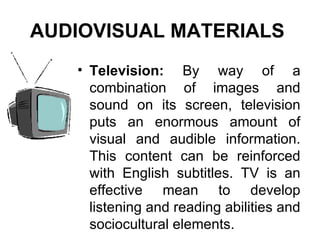
Television:  By way of a combination of images and sound on its screen, television puts an enormous amount of visual and audible information. This content can be reinforced with English subtitles. TV is an effective mean to develop listening and reading abilities and sociocultural elements. AUDIOVISUAL MATERIALS
Video :   The use of videos in the classroom has many advantages: It’s informative, motivational, recreational and expressive.  There are a great number of  videos  available  that have been made specifically for the ELT classroom . Some videos contain songs and rhymes e.g. Play it again!, and others present cultural aspects of English speaking countries e.g. This is Britain.   There are also a great number of  authentic suitable videos  such as cartoons, TV programs, documentary, self made videos, etc. AUDIOVISUAL MATERIALS
Cassette/ CD :  Nowadays all the books include CD which in turn include oral texts, video clips, stories, songs and other activities. They are very useful to consolidate and extend vocabulary and to improve oral skills and comprehension. Use of cassettes and CD has the following advantages: They present a great variety of native accents. They focus on oral language. They make the realization of many communicative activities possible. They are easy to use and don’t cost much. They can be elaborated by students. AUDIOVISUAL MATERIALS
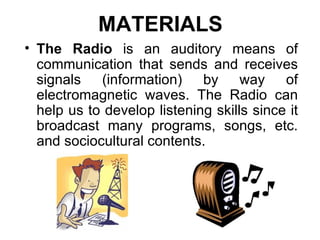
MATERIALS The Radio  is an auditory means of communication that sends and receives signals (information) by way of electromagnetic waves. The Radio can help us to develop listening skills since it broadcast many programs, songs, etc. and sociocultural contents.
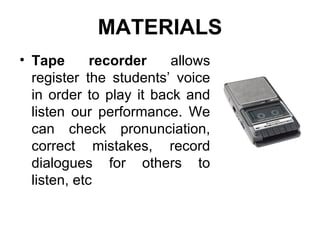
Tape recorder  allows register the students’ voice in order to play it back and listen our performance. We can check pronunciation, correct mistakes, record dialogues for others to listen, etc MATERIALS
MATERIALS Newspaper:   The reading and writing of newspapers offer a multitude of didactic possibilities. In digital or print format, newspaper can be used for many activities and projects with a lot of contents and at any level. The use of newspaper has the following advantages: It’s more than a mere classroom activity.  It integrates communication, teaching and motivates apprenticeship. It allows students to obtain information in English. It provides information about English speaking countries. It encourages the development of cooperative work. It encourages research. It provides a wide range of possibilities in order to develop language skills.
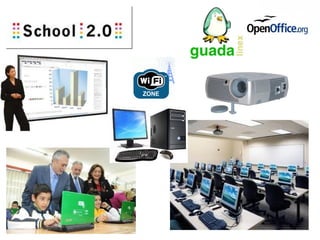
COMPUTERS Computers complement and reinforce the learning process.   Nowadays, all the resources and materials above mentioned are available in computers and Internet as  multimedia  resources.  As ICT Schools 2.0 we have at our disposal computer room, and in the third cycle the students have their own laptops and the classrooms are equipped with projectors, computers, digital board and wifi access to Internet.
 
Computers use   Computers offer a wide variety of tools for classroom use .  We have offline and online activities which offer a great amount of materials and didactic possibilities for English classrooms.   We should adapt our methodology and materials to the characteristics of our students and check before the lessons that they are suitable for them and our proposals. With the combination of technological, pedagogical and human resources, we can better respond to the interests and needs of each student making a much more autonomous and personal learning process.
Educational  Software  The operative system available for our schools in Andalucía ( Guadalinex ) includes  Openoffice  software such as  Writer  and  Impress  which help us for elaborating templates, worksheets, texts, presentations, etc. Most textbooks come with  CD –ROM  that contain: the multimedia version of dictionaries, exercises, pronunciation practice, texts, dialogues, games, videos, songs, stories, etc. Internet  offers online tools such as, web pages, blogs, forums, communities to share exercises, searchers (Google), videos (Youtube), chats, emails, social nets, databases, radio shows, games, …, the possibilities are limitless.
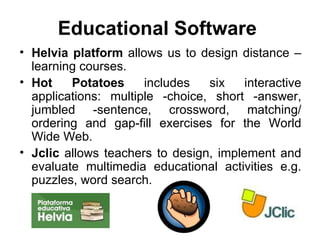
Helvia platform  allows us to design distance –learning courses. Hot  Potatoes   includes six interactive applications: multiple -choice, short -answer, jumbled -sentence, crossword, matching/ ordering and gap-fill exercises for the World Wide Web. Jclic   allows teachers to design, implement and evaluate multimedia educational activities e.g. puzzles, word search. Educational  Software
Advantages Internet is a great resource for developing the four language skills   since   it provides access to a great amount of multimedia information.  ICT give teachers a powerful motivational tool. Because de images, the information found is more attractive  Computers contribute to a more active and personalized apprenticeship for students. It makes possible for everyone to choose the time and place for training, and allows them to complete the activities at their own pace. Students can choose their own learning itinerary. It Increases the level of control students have over their own learning.
It increases teacher –student and peers communication through email, chat, forums, social nets, etc.  It allows establish contact with English speaking people and schools. Internet facilitates the continuous formation and collaboration between students. There is no limit to information, communication, imagination and exchange of ideas. Audiovisual material will help students’ comprehension of the world and the changes happening in it. Advantages
Disadvantages   We may sometimes have trouble accessing web resources. Being prepared to use new technologies requires additional effort of the part of the teacher and the students. Having good machines that work comfortably and quickly supposes additional infrastructure and maintenance costs. There are contents, practices, activities, etc. that can not be done by internet. Not all information is suitable for our students. Occasionally, we may overuse the website and frustrate or even alienate students who don’t have access to Internet. Links sometimes break and computers sometimes freeze.
Web safety   It is really important to protect our pupils from distasteful pages. Our computers should be equipped with program designed to filter out inappropriate content. Our children should be supervised by the teacher while they work with computers. It’s recommended to have a document signed by children and parents detailing how the Internet can or con not be used.
The uses of Internet   For developing projects or reports searching specific information related to a topic. Creating a school website or blog with the main content of the different didactic units. A class design web page doesn’t need Internet connection; it can be done directly and accessible from the hard drive. To establish contact with pen pals from English speaking schools. Reading and following instructions and answering questions. Accessing a site to produce a quiz for other pupils. Doing language activities. Creating new materials, Jclic, hot potatoes.
Computer management   rules Make children know what will happen if they disobey the rules. Establish basic rules for using computers. Always, as teachers, visit a site before using it with our pupils. Check the computers before using them (connection, CD, software, web pages, links, etc.). Ensure children understand the purpose of the activity with the computers. Use computers for a limited time. Always to present children a clear task to focus their attention.
Students with specific needs of educational support The use of technological resources offers students with special educational needs compensatory instruments that allow them to complete the same activities as the rest of the students. We should consider their needs and, above all, what he or she is capable of doing, then determining what kind of technology adaptations requires. For example:  voice –recognition software  for  motor deficiencies , a  special screen  where images can be substituted by sounds, or  Braille keyboard or printer  for  visual deficiencies .  Listening deficiencies  don’t need special adaptation although in some cases a sonic  message  can be substituted for a  visual  one.
Technology:   Pupils’ learning contributions Psychological:  It stimulate children’s motivation since they find it fun. Linguistic:  It combines sound and vision, provides a full context for language, includes non verbal communication, develops all skills, introduces new words and phrases or helps to revise them. Cognitive:  It develops children’s power of observation, curiosity, information and research skills as well as independent learning. Social:  Pupils working together on a computer project will develop collaborative skills. Cultural:  It provides background information about English speaking countries.
CONCLUSION As English teachers, we should be at the forefront of the changes. The motivation that ICT awaken in students and the advantages they offer can become a very powerful educational tool. Students will think they are playing with the computer, drawing graphics, changing colours, etc. while we know the true learning potential of these games and activities. It isn’t technology “per se” that matters; it is the didactic use we give it, combined with practice with the materials.

Ppp24

  • 1.
    TOPIC 24. TECHNOLOGICALAND PEDAGOGICAL ASPECT OF THE USE OF AUDIOVISUAL MATERIALS (NEWSPAPER, TELEVISION, TAPE RECORDER, VIDEO…). COMPUTERS AS AN AUXILIARY RESOURCE IN FOREIGN LANGUAGE LEARNING AND IMPROVEMENT.
  • 2.
    INTRODUCTION With theadvance of Information and Communication Technology (ICT), it is clear that a new society is emerging worldwide. This society is primarily characterized by its ability to access information and use it to create new knowledge. We live in the image –based world, therefore, our students are more motivated and captivated by images than by books. Nowadays, Educational technologies are indispensable resources for English learning/ teaching (ELT). They offer a wide range of possibilities for practicing the four language skills, but we must take into account the way we use the technology since not all information available is suitable for our students.
  • 3.
    AUDIOVISUAL MATERIALS With the advent of new technologies, the expression audiovisual refers to the use of machines as means of diffusion and communication (Computers, TV). The use of audiovisual materials is crucial to develop the Information and Digital Competence. Adell (2007) states that the ease with which our students handle technology is a result of having been born into this new society as “digital natives” while adults have had to acquire these important skills retroactively as “digital immigrants”. The widespread incorporation of ICT into schools has given teachers a powerful tool for developing our lessons .
  • 4.
    Television: Byway of a combination of images and sound on its screen, television puts an enormous amount of visual and audible information. This content can be reinforced with English subtitles. TV is an effective mean to develop listening and reading abilities and sociocultural elements. AUDIOVISUAL MATERIALS
  • 5.
    Video : The use of videos in the classroom has many advantages: It’s informative, motivational, recreational and expressive. There are a great number of videos available that have been made specifically for the ELT classroom . Some videos contain songs and rhymes e.g. Play it again!, and others present cultural aspects of English speaking countries e.g. This is Britain. There are also a great number of authentic suitable videos such as cartoons, TV programs, documentary, self made videos, etc. AUDIOVISUAL MATERIALS
  • 6.
    Cassette/ CD : Nowadays all the books include CD which in turn include oral texts, video clips, stories, songs and other activities. They are very useful to consolidate and extend vocabulary and to improve oral skills and comprehension. Use of cassettes and CD has the following advantages: They present a great variety of native accents. They focus on oral language. They make the realization of many communicative activities possible. They are easy to use and don’t cost much. They can be elaborated by students. AUDIOVISUAL MATERIALS
  • 7.
    MATERIALS The Radio is an auditory means of communication that sends and receives signals (information) by way of electromagnetic waves. The Radio can help us to develop listening skills since it broadcast many programs, songs, etc. and sociocultural contents.
  • 8.
    Tape recorder allows register the students’ voice in order to play it back and listen our performance. We can check pronunciation, correct mistakes, record dialogues for others to listen, etc MATERIALS
  • 9.
    MATERIALS Newspaper: The reading and writing of newspapers offer a multitude of didactic possibilities. In digital or print format, newspaper can be used for many activities and projects with a lot of contents and at any level. The use of newspaper has the following advantages: It’s more than a mere classroom activity. It integrates communication, teaching and motivates apprenticeship. It allows students to obtain information in English. It provides information about English speaking countries. It encourages the development of cooperative work. It encourages research. It provides a wide range of possibilities in order to develop language skills.
  • 10.
    COMPUTERS Computers complementand reinforce the learning process. Nowadays, all the resources and materials above mentioned are available in computers and Internet as multimedia resources. As ICT Schools 2.0 we have at our disposal computer room, and in the third cycle the students have their own laptops and the classrooms are equipped with projectors, computers, digital board and wifi access to Internet.
  • 11.
  • 12.
    Computers use Computers offer a wide variety of tools for classroom use . We have offline and online activities which offer a great amount of materials and didactic possibilities for English classrooms. We should adapt our methodology and materials to the characteristics of our students and check before the lessons that they are suitable for them and our proposals. With the combination of technological, pedagogical and human resources, we can better respond to the interests and needs of each student making a much more autonomous and personal learning process.
  • 13.
    Educational Software The operative system available for our schools in Andalucía ( Guadalinex ) includes Openoffice software such as Writer and Impress which help us for elaborating templates, worksheets, texts, presentations, etc. Most textbooks come with CD –ROM that contain: the multimedia version of dictionaries, exercises, pronunciation practice, texts, dialogues, games, videos, songs, stories, etc. Internet offers online tools such as, web pages, blogs, forums, communities to share exercises, searchers (Google), videos (Youtube), chats, emails, social nets, databases, radio shows, games, …, the possibilities are limitless.
  • 14.
    Helvia platform allows us to design distance –learning courses. Hot Potatoes includes six interactive applications: multiple -choice, short -answer, jumbled -sentence, crossword, matching/ ordering and gap-fill exercises for the World Wide Web. Jclic allows teachers to design, implement and evaluate multimedia educational activities e.g. puzzles, word search. Educational Software
  • 15.
    Advantages Internet isa great resource for developing the four language skills since it provides access to a great amount of multimedia information. ICT give teachers a powerful motivational tool. Because de images, the information found is more attractive Computers contribute to a more active and personalized apprenticeship for students. It makes possible for everyone to choose the time and place for training, and allows them to complete the activities at their own pace. Students can choose their own learning itinerary. It Increases the level of control students have over their own learning.
  • 16.
    It increases teacher–student and peers communication through email, chat, forums, social nets, etc. It allows establish contact with English speaking people and schools. Internet facilitates the continuous formation and collaboration between students. There is no limit to information, communication, imagination and exchange of ideas. Audiovisual material will help students’ comprehension of the world and the changes happening in it. Advantages
  • 17.
    Disadvantages We may sometimes have trouble accessing web resources. Being prepared to use new technologies requires additional effort of the part of the teacher and the students. Having good machines that work comfortably and quickly supposes additional infrastructure and maintenance costs. There are contents, practices, activities, etc. that can not be done by internet. Not all information is suitable for our students. Occasionally, we may overuse the website and frustrate or even alienate students who don’t have access to Internet. Links sometimes break and computers sometimes freeze.
  • 18.
    Web safety It is really important to protect our pupils from distasteful pages. Our computers should be equipped with program designed to filter out inappropriate content. Our children should be supervised by the teacher while they work with computers. It’s recommended to have a document signed by children and parents detailing how the Internet can or con not be used.
  • 19.
    The uses ofInternet For developing projects or reports searching specific information related to a topic. Creating a school website or blog with the main content of the different didactic units. A class design web page doesn’t need Internet connection; it can be done directly and accessible from the hard drive. To establish contact with pen pals from English speaking schools. Reading and following instructions and answering questions. Accessing a site to produce a quiz for other pupils. Doing language activities. Creating new materials, Jclic, hot potatoes.
  • 20.
    Computer management rules Make children know what will happen if they disobey the rules. Establish basic rules for using computers. Always, as teachers, visit a site before using it with our pupils. Check the computers before using them (connection, CD, software, web pages, links, etc.). Ensure children understand the purpose of the activity with the computers. Use computers for a limited time. Always to present children a clear task to focus their attention.
  • 21.
    Students with specificneeds of educational support The use of technological resources offers students with special educational needs compensatory instruments that allow them to complete the same activities as the rest of the students. We should consider their needs and, above all, what he or she is capable of doing, then determining what kind of technology adaptations requires. For example: voice –recognition software for motor deficiencies , a special screen where images can be substituted by sounds, or Braille keyboard or printer for visual deficiencies . Listening deficiencies don’t need special adaptation although in some cases a sonic message can be substituted for a visual one.
  • 22.
    Technology: Pupils’ learning contributions Psychological: It stimulate children’s motivation since they find it fun. Linguistic: It combines sound and vision, provides a full context for language, includes non verbal communication, develops all skills, introduces new words and phrases or helps to revise them. Cognitive: It develops children’s power of observation, curiosity, information and research skills as well as independent learning. Social: Pupils working together on a computer project will develop collaborative skills. Cultural: It provides background information about English speaking countries.
  • 23.
    CONCLUSION As Englishteachers, we should be at the forefront of the changes. The motivation that ICT awaken in students and the advantages they offer can become a very powerful educational tool. Students will think they are playing with the computer, drawing graphics, changing colours, etc. while we know the true learning potential of these games and activities. It isn’t technology “per se” that matters; it is the didactic use we give it, combined with practice with the materials.