Chapter 9:
Principle of Computer Operation
9-2
Instruction Execution Engines
• What computers can do
– Faithfully perform or execute instructions to process information
– The computer must have instructions to follow
• What computers can't do
– Have no imagination or creativity
– Are not vindictive or cruel
– Are not purposeful
– Have no free will
9-3
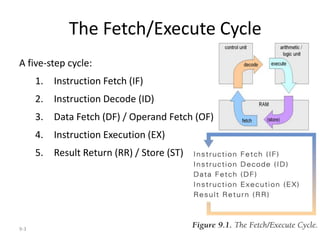
The Fetch/Execute Cycle
A five-step cycle:
1. Instruction Fetch (IF)
2. Instruction Decode (ID)
3. Data Fetch (DF) / Operand Fetch (OF)
4. Instruction Execution (EX)
5. Result Return (RR) / Store (ST)
9-4
Anatomy of a Computer
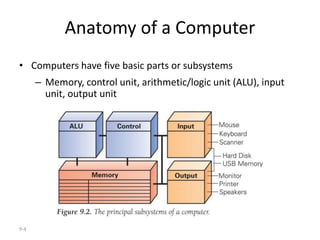
• Computers have five basic parts or subsystems
– Memory, control unit, arithmetic/logic unit (ALU), input
unit, output unit
9-5
Memory
• Memory stores the program running and the data on which
the program operates
• Properties of memory:
– Discrete locations. Each location consists of 1 byte.
– Addresses. Every memory location (byte) has an address (whole
numbers starting with zero).
– Values. Memory locations record or store values.
– Finite capacity. Limited size—programmers must remember that the
data may not "fit" in the memory location.
9-6
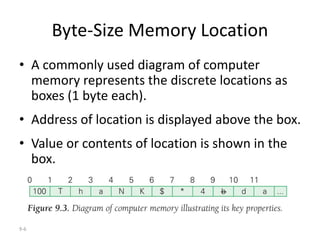
Byte-Size Memory Location
• A commonly used diagram of computer
memory represents the discrete locations as
boxes (1 byte each).
• Address of location is displayed above the box.
• Value or contents of location is shown in the
box.
9-7
Memory (cont'd)
• 1-byte memory locations can store one ASCII
character, or a number less than 256 (0 - 255)
• Programmers use a sequence of memory
locations together, ignoring the fact that they
all have different addresses
– Blocks of four bytes are used as a unit so
frequently that they are called memory "words"
9-8
Random Access Memory (RAM)
• "Random access" means the computer can
refer to (access) the memory locations in any
order
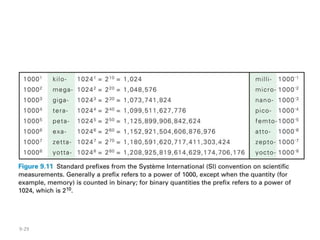
• Often measured in
megabytes (MB) – millions of bytes or
gigabytes (GB) – billions of bytes
• Large memory is preferable because there is
more space for programs and data (which
usually equates to less I/O)
6-9
Microprocessor
• Central Processing Unit (CPU)
• Two Basic Components
– Control unit
– Arithmetic-logic unit (ALU)
Page 161
9-10
Control Unit
• Hardware implementation of the Fetch/Execute Cycle
• Its circuitry fetches an instruction from memory, decodes the
instruction, and fetches the operands used in it
– A typical instruction might have the form
ADD 4000, 2000, 2080 op dest, src1, src2
– This instruction asks that the numbers stored in locations 2000 and
2080 be added together, and the result stored in location 4000
[4000] = [2000] + [2080]
– Data/Operand Fetch step must get these two values and after they are
added, Result Return/Store step will store the answer in location 4000
9-11
Arithmetic/Logic Unit (ALU)
• Performs the math
• Generally does the work during the Instruction Execute step of the Cycle
• A circuit in the ALU can add two number
• There are also circuits for multiplying, comparing, etc.
• Instructions that just transfer data usually don't use the ALU
• Data/Operand Fetch step of the Cycle gets the values that the ALU needs
to work on (operands)
• When the ALU completes the operation, Return Result/Store step moves
the answer from the ALU to the destination memory address specified in
the instruction
9-12
Input Unit and Output Unit (I/O)
• The wires and circuits through which information
moves into and out of a computer
• The peripherals: Connect to the computer
input/output ports. They are not considered part of
the computer, but specialized gadgets that encode or
decode information between the computer and the
physical world.
9-13
The Peripherals
• Keyboard encodes keystrokes we type into binary
form for the computer
• Monitor decodes information from the computer's
memory and displays it on a lighted, colored screen
• Disks drives are used for both input and output—
storage devices where the computer puts away
information when it is not needed, and can retrieve
from when it is needed again
9-14
A Device Driver for Every Peripheral
• "Dumb" devices provide basic physical translation to
or from binary signals.
• Additional information from the computer is needed
to make it operate intelligently.
• e.g., computer receives information that user typed
shift and w at the same time. It converts to a capital
W. The software that converts is called the device
driver.
9-15
The Program Counter: The Pc's PC
• Determine which step to execute next
• Address of the next instruction is stored in the control part of
the computer. It is called the program counter (PC).
• Because instructions (in binaries) use 4 bytes of memory, the
next instruction must be at PC + 4, 4 bytes further along in the
sequence (in general).
• Computer adds four to the PC, so when the F/E Cycle gets
back to Instruction Fetch step, the PC is "pointing at" the next
instruction.
9-16
Instruction Interpretation
• Process of executing a program
– Computer is interpreting our commands, but in its
own language
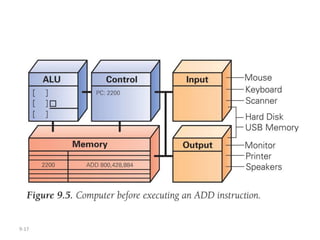
• Before the F/E Cycle begins, some of the
memory locations and the PC are visible in the
control unit
9-17
9-18
Instruction Interpretation (cont'd)
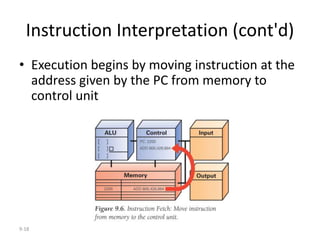
• Execution begins by moving instruction at the
address given by the PC from memory to
control unit
9-19
Instruction Interpretation (cont'd)
• Bits of instruction are placed into the decoder
circuit of the CU
• Once instruction is fetched, the PC can be
readied for fetching the next instruction
9-20
Instruction Interpretation (cont'd)
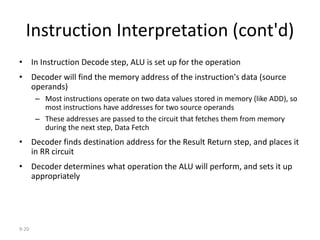
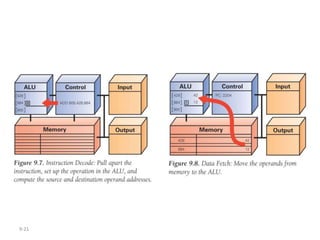
• In Instruction Decode step, ALU is set up for the operation
• Decoder will find the memory address of the instruction's data (source
operands)
– Most instructions operate on two data values stored in memory (like ADD), so
most instructions have addresses for two source operands
– These addresses are passed to the circuit that fetches them from memory
during the next step, Data Fetch
• Decoder finds destination address for the Result Return step, and places it
in RR circuit
• Decoder determines what operation the ALU will perform, and sets it up
appropriately
9-21
9-22
Instruction Interpretation (cont'd)
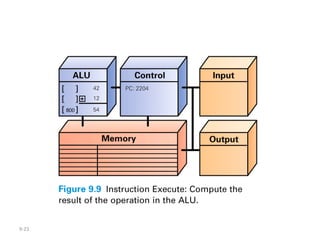
• Instruction Execution: The actual computation
is performed. For ADD instruction, the
addition circuit adds the two source operands
together to produce their sum
9-23
9-24
Instruction Interpretation (cont'd)
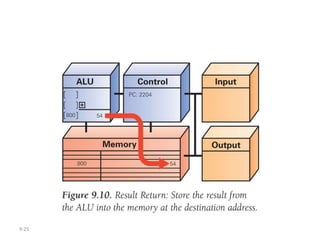
• Result Return: result of execution is returned
to the memory location specified by the
destination address.
• Once the result is returned, the cycle begins
again.
9-25
9-26
Many, Many Simple Operations
• Computers can only perform about 100 different
instructions
– About 20 different kinds of operations
• Everything computers do must be reduced to some
combination of these primitive, hardwired
instructions
9-27
Examples of Other Instructions
• Besides ADD, MULT (multiply) and DIV (divide), other
instructions include:
– Shift the bits of a word to the left or right, filling the emptied places
with zeros and throwing away bits that fall off the end
– Compute logical AND (test if pairs of bits are both true), and logical OR
(test if at least one of two bits is true)
– Test if a bit is zero or non-zero, and jump to new set of instructions
based on outcome
– Move information around in memory
– Sense signals from input/output devices
9-28
Cycling the F/E Cycle
• Computers get their impressive capabilities by
executing many of these simple instructions
per second
• The Computer Clock (CPU speed): Determines
rate of F/E Cycle
– Measured in gigahertz (GHz), or billions of cycles
per second
9-29
9-30
How Important is Clock Speed?
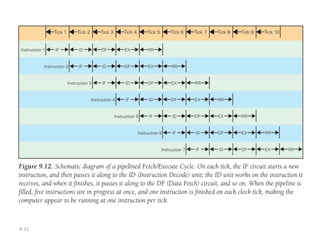
• Modern computers try to start an instruction on each clock
tick
• Pass off finishing instruction to other circuitry (pipelining)
– Five instructions can be in process at the same time
• Does a 1 GHz clock really execute a billion instructions per
second?
– Not a precise measurement. Computer may not be able to start an
instruction on each tick, but may sometimes be able to start more
than one instruction at a time
9-31
9-32
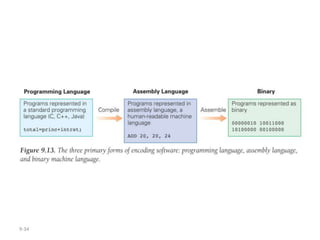
Software
• A computer's view of software
– Sees binary object file, a long sequence of 4-byte words
(0's and 1's)
• Assembly language
– Alternative form of machine language using letters and
normal numbers so people can understand it
– Computer scans assemble code, as it encounters words it
looks them up in a table to convert to binary, converts
numbers to binary, then assembles the binary pieces into
an instruction
9-33
Software (cont'd)
• High-level programming languages
– Most modern software is written in high-level notation,
which is then compiled (translated) into assembly
language, which is then assembled into binary
– Have special statement forms to help programmers give
complicated instructions
• Example: Three-part if statement
– Yes/no question to test
– Instructions to operate if test is true
– Instructions to operate if test is false
9-34
9-35
Operating Systems
• Basic operations that are necessary for the effective
use of computer, but are not built into the hardware
• Three most widely used Operating Systems:
– Microsoft Windows
– Apple's Mac OS X
– Unix / Linux
• OS performs booting, memory management, device
management, Internet connection, file management
9-36
Programming
• Programmers build on previously developed
software to make their jobs easier
• Example: GUI Software
– Frame around window, slider bars, buttons,
pointers, etc. are packaged for programmers and
given with OS.

Principle of Computer Operation.ppt

  • 1.
    Chapter 9: Principle ofComputer Operation
  • 2.
    9-2 Instruction Execution Engines •What computers can do – Faithfully perform or execute instructions to process information – The computer must have instructions to follow • What computers can't do – Have no imagination or creativity – Are not vindictive or cruel – Are not purposeful – Have no free will
  • 3.
    9-3 The Fetch/Execute Cycle Afive-step cycle: 1. Instruction Fetch (IF) 2. Instruction Decode (ID) 3. Data Fetch (DF) / Operand Fetch (OF) 4. Instruction Execution (EX) 5. Result Return (RR) / Store (ST)
  • 4.
    9-4 Anatomy of aComputer • Computers have five basic parts or subsystems – Memory, control unit, arithmetic/logic unit (ALU), input unit, output unit
  • 5.
    9-5 Memory • Memory storesthe program running and the data on which the program operates • Properties of memory: – Discrete locations. Each location consists of 1 byte. – Addresses. Every memory location (byte) has an address (whole numbers starting with zero). – Values. Memory locations record or store values. – Finite capacity. Limited size—programmers must remember that the data may not "fit" in the memory location.
  • 6.
    9-6 Byte-Size Memory Location •A commonly used diagram of computer memory represents the discrete locations as boxes (1 byte each). • Address of location is displayed above the box. • Value or contents of location is shown in the box.
  • 7.
    9-7 Memory (cont'd) • 1-bytememory locations can store one ASCII character, or a number less than 256 (0 - 255) • Programmers use a sequence of memory locations together, ignoring the fact that they all have different addresses – Blocks of four bytes are used as a unit so frequently that they are called memory "words"
  • 8.
    9-8 Random Access Memory(RAM) • "Random access" means the computer can refer to (access) the memory locations in any order • Often measured in megabytes (MB) – millions of bytes or gigabytes (GB) – billions of bytes • Large memory is preferable because there is more space for programs and data (which usually equates to less I/O)
  • 9.
    6-9 Microprocessor • Central ProcessingUnit (CPU) • Two Basic Components – Control unit – Arithmetic-logic unit (ALU) Page 161
  • 10.
    9-10 Control Unit • Hardwareimplementation of the Fetch/Execute Cycle • Its circuitry fetches an instruction from memory, decodes the instruction, and fetches the operands used in it – A typical instruction might have the form ADD 4000, 2000, 2080 op dest, src1, src2 – This instruction asks that the numbers stored in locations 2000 and 2080 be added together, and the result stored in location 4000 [4000] = [2000] + [2080] – Data/Operand Fetch step must get these two values and after they are added, Result Return/Store step will store the answer in location 4000
  • 11.
    9-11 Arithmetic/Logic Unit (ALU) •Performs the math • Generally does the work during the Instruction Execute step of the Cycle • A circuit in the ALU can add two number • There are also circuits for multiplying, comparing, etc. • Instructions that just transfer data usually don't use the ALU • Data/Operand Fetch step of the Cycle gets the values that the ALU needs to work on (operands) • When the ALU completes the operation, Return Result/Store step moves the answer from the ALU to the destination memory address specified in the instruction
  • 12.
    9-12 Input Unit andOutput Unit (I/O) • The wires and circuits through which information moves into and out of a computer • The peripherals: Connect to the computer input/output ports. They are not considered part of the computer, but specialized gadgets that encode or decode information between the computer and the physical world.
  • 13.
    9-13 The Peripherals • Keyboardencodes keystrokes we type into binary form for the computer • Monitor decodes information from the computer's memory and displays it on a lighted, colored screen • Disks drives are used for both input and output— storage devices where the computer puts away information when it is not needed, and can retrieve from when it is needed again
  • 14.
    9-14 A Device Driverfor Every Peripheral • "Dumb" devices provide basic physical translation to or from binary signals. • Additional information from the computer is needed to make it operate intelligently. • e.g., computer receives information that user typed shift and w at the same time. It converts to a capital W. The software that converts is called the device driver.
  • 15.
    9-15 The Program Counter:The Pc's PC • Determine which step to execute next • Address of the next instruction is stored in the control part of the computer. It is called the program counter (PC). • Because instructions (in binaries) use 4 bytes of memory, the next instruction must be at PC + 4, 4 bytes further along in the sequence (in general). • Computer adds four to the PC, so when the F/E Cycle gets back to Instruction Fetch step, the PC is "pointing at" the next instruction.
  • 16.
    9-16 Instruction Interpretation • Processof executing a program – Computer is interpreting our commands, but in its own language • Before the F/E Cycle begins, some of the memory locations and the PC are visible in the control unit
  • 17.
  • 18.
    9-18 Instruction Interpretation (cont'd) •Execution begins by moving instruction at the address given by the PC from memory to control unit
  • 19.
    9-19 Instruction Interpretation (cont'd) •Bits of instruction are placed into the decoder circuit of the CU • Once instruction is fetched, the PC can be readied for fetching the next instruction
  • 20.
    9-20 Instruction Interpretation (cont'd) •In Instruction Decode step, ALU is set up for the operation • Decoder will find the memory address of the instruction's data (source operands) – Most instructions operate on two data values stored in memory (like ADD), so most instructions have addresses for two source operands – These addresses are passed to the circuit that fetches them from memory during the next step, Data Fetch • Decoder finds destination address for the Result Return step, and places it in RR circuit • Decoder determines what operation the ALU will perform, and sets it up appropriately
  • 21.
  • 22.
    9-22 Instruction Interpretation (cont'd) •Instruction Execution: The actual computation is performed. For ADD instruction, the addition circuit adds the two source operands together to produce their sum
  • 23.
  • 24.
    9-24 Instruction Interpretation (cont'd) •Result Return: result of execution is returned to the memory location specified by the destination address. • Once the result is returned, the cycle begins again.
  • 25.
  • 26.
    9-26 Many, Many SimpleOperations • Computers can only perform about 100 different instructions – About 20 different kinds of operations • Everything computers do must be reduced to some combination of these primitive, hardwired instructions
  • 27.
    9-27 Examples of OtherInstructions • Besides ADD, MULT (multiply) and DIV (divide), other instructions include: – Shift the bits of a word to the left or right, filling the emptied places with zeros and throwing away bits that fall off the end – Compute logical AND (test if pairs of bits are both true), and logical OR (test if at least one of two bits is true) – Test if a bit is zero or non-zero, and jump to new set of instructions based on outcome – Move information around in memory – Sense signals from input/output devices
  • 28.
    9-28 Cycling the F/ECycle • Computers get their impressive capabilities by executing many of these simple instructions per second • The Computer Clock (CPU speed): Determines rate of F/E Cycle – Measured in gigahertz (GHz), or billions of cycles per second
  • 29.
  • 30.
    9-30 How Important isClock Speed? • Modern computers try to start an instruction on each clock tick • Pass off finishing instruction to other circuitry (pipelining) – Five instructions can be in process at the same time • Does a 1 GHz clock really execute a billion instructions per second? – Not a precise measurement. Computer may not be able to start an instruction on each tick, but may sometimes be able to start more than one instruction at a time
  • 31.
  • 32.
    9-32 Software • A computer'sview of software – Sees binary object file, a long sequence of 4-byte words (0's and 1's) • Assembly language – Alternative form of machine language using letters and normal numbers so people can understand it – Computer scans assemble code, as it encounters words it looks them up in a table to convert to binary, converts numbers to binary, then assembles the binary pieces into an instruction
  • 33.
    9-33 Software (cont'd) • High-levelprogramming languages – Most modern software is written in high-level notation, which is then compiled (translated) into assembly language, which is then assembled into binary – Have special statement forms to help programmers give complicated instructions • Example: Three-part if statement – Yes/no question to test – Instructions to operate if test is true – Instructions to operate if test is false
  • 34.
  • 35.
    9-35 Operating Systems • Basicoperations that are necessary for the effective use of computer, but are not built into the hardware • Three most widely used Operating Systems: – Microsoft Windows – Apple's Mac OS X – Unix / Linux • OS performs booting, memory management, device management, Internet connection, file management
  • 36.
    9-36 Programming • Programmers buildon previously developed software to make their jobs easier • Example: GUI Software – Frame around window, slider bars, buttons, pointers, etc. are packaged for programmers and given with OS.