Paper name : Computer application in business
Staff : P. Nivetha MCA, M.TECH
Class :II-BCA-A
Semester :IV
Unit : Unit-I
Topic : COMPUTER AND MS-WORD
COMPUTER
AND
MS-WORD
Computer definition:
 A computer is a programmable engine designed to perform arithmetic logical operations mechanically
and sequentially on the input given by the operator and gives the preferred output after processing.
 Computer are divided into two categories namely hardware and software.
 Hardware is the machine itself and its connected devices such as monitor, keyboard, mouse etc.
 Software are the set of programs that make use of hardware for execution various function.
Software and Hardware:
 Software is overall term used to define a collection of computer programs, procedures, and
documentation that make some job on a computer system.
 Practical computer systems can divided software into three main classes:
System Software
Application software
Programming software
 Hardware is best termed as a device such as a hard drive that is physically connected to the computer or
something that can be physically touched.
Famous computer scientists:
Some famous computer experts who have used their realisation, expertise and inventive spirits to
impact our world forever.
 Barbara Liskov
 Elon Musk
 Larry page
 carl Sassenrath
 Gudio van Rassum
 Mark Zukerburg
 Brendan Eich
 Tim Berners-Lee
 Bill Gates
 Hedy Lamarr
HARDWARE SOFTWARE
Kinds Input, storage, processing ,
control and output devices.
System software, programming
software and application
software.
Illustrations CD-ROM, monitor , printer,
video card ,scanner, label
makers.
QuickBooks, Adobe Acrobat,
Google chrome, Ms-word.
Interdependency Hardware starts effective once
software is loaded.
To bring its set of commands,
software is connected on
hardware.
Failure Hardware disaster is random.
Hardware does have growing
failure at the previous stage.
Software disaster is methodical.
Software does not have an rising
failure rate.
Nature Hardware is physical in nature. software is logical in nature.
Difference between Hardware and software:
Major areas of application computer systems are:
Education:
 Getting the right kind of report is a main challenge as is attainment information to make sense.
 Students occupy an average of 5-6hours a week on the internet.
 Investigation shows that computers can significantly enhance presentation in learning.
 Tutee exposed to the internet, they think the web has helped them developed the quality of
their scholastic research an of their paper work.
 One revolution in education is the advent of distance studying.
 This suggestions a collection of internet and video based online courses.
 Computer play vital role in education.
Health and medicine:
 Computer technology is drastically altering the implements of medicine.
 All medical report can be now digitized.
 Software is now able to computer the hazard of sickness.
 Psychological health investigators are using computers to screen anxious adolescents in essential
of psychotherapy.
 Some of the technology used to diagnose human diseases like MRI scan, CT scan, X-ray etc,.
Science:
 Scientists have long been clients of it. A innovative adventure among scientists is the
concept of “collaborator”, an internet based collaborative laboratory.
 In which researchers all over the zone can work together without difficulty even at a
distance.
 An illustration is space physics where space physicists are permissible to gang together to
measure the globe ionosphere frim instruments on four parts of the world.
Business:
 Business clearly see the attention as a way to improve output and competitiveness.
 Some areas of profession that are undertaking quick modifications are sales and
marketing, retailing, banking, stock trading etc.
 Sales representatives not only essential to be educated and more knowledgeable about
their customers businesses, but also must be comfortable with computer knowledge.
Ms-word:
 Microsoft word is broadly used commercial word processor created by Microsoft .
Microsoft word is a part of the Microsoft office suite of efficiency software, but can also
be obtained as a stand-alone invention.
The Evolution of Microsoft Word:
 1989:Microsoft Word as a DOS application
 Word 2.0 came as part of Microsoft Office
 1994:Word 6.0 came as a portion of Microsoft Office 4.0
 1995:Word 7.0 came as portion if Office 95
 1996:Word 95 came and taken us the ‘beloved’ Office Assistant aka the ‘clippy-guy’
 1999:Word 2000 came as a portion of Office 2000. Office Genuine Advantage is born.
 2001:Word 2002 came as portion of Office XP
 2003:”Microsoft Office Word” came as portion of Office 2003
 Microsoft Office Word 2007 came as portion of Office 2007
Thesaurus in Microsoft word:
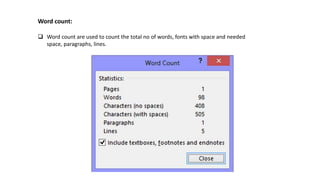
Word count:
 Word count are used to count the total no of words, fonts with space and needed
space, paragraphs, lines.
Find and Replace:
 Find and Replace is helps to replace the words in selected area and also find the searching
words.
Inserting objects in word:
 Inserting Hyperlink
 Inserting page number
 Inserting Header and Footer
Inserting Hyperlinks:
 Select hyperlink from the center of the ribbon and fresh window will open enter the address
And transcript to display and click ok.
Inserting Header and Footer:
 Inserting Header and Footer to the page using the Ms-word.
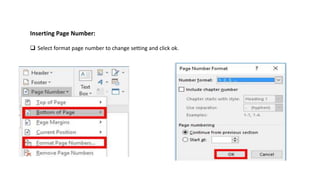
Inserting Page Number:
 Select format page number to change setting and click ok.
Inserting pictures:
 Inserting picturing use the menu insert and select the picture and click ok.
Advancement in MS-WORD :
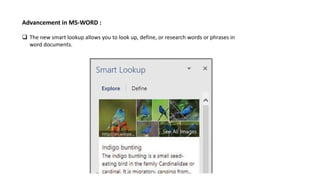
 The new smart lookup allows you to look up, define, or research words or phrases in
word documents.
Math input control:
 The new Ink Equation tool allow you to make difficult mathematical equation using your
finger, touch stylus, or mouse to draw freehand, and the resulting equation is converted into
computer text.
Simpler sharing:
 Word 2016 provides a original share button which supports you to quickly share your
documents protected on share point, OneDrive, or OneDrive for business as a connection or
email attachment.
New Draw Tab:
 Word 2016 new draw tab provides an collection of drawing and linking tools
to support you mark up or demonstrate a document.
Creating business letters using Wizards:

Computer and ms word

  • 1.
    Paper name :Computer application in business Staff : P. Nivetha MCA, M.TECH Class :II-BCA-A Semester :IV Unit : Unit-I Topic : COMPUTER AND MS-WORD
  • 2.
  • 3.
    Computer definition:  Acomputer is a programmable engine designed to perform arithmetic logical operations mechanically and sequentially on the input given by the operator and gives the preferred output after processing.  Computer are divided into two categories namely hardware and software.  Hardware is the machine itself and its connected devices such as monitor, keyboard, mouse etc.  Software are the set of programs that make use of hardware for execution various function. Software and Hardware:  Software is overall term used to define a collection of computer programs, procedures, and documentation that make some job on a computer system.  Practical computer systems can divided software into three main classes: System Software Application software Programming software  Hardware is best termed as a device such as a hard drive that is physically connected to the computer or something that can be physically touched.
  • 4.
    Famous computer scientists: Somefamous computer experts who have used their realisation, expertise and inventive spirits to impact our world forever.  Barbara Liskov  Elon Musk  Larry page  carl Sassenrath  Gudio van Rassum  Mark Zukerburg  Brendan Eich  Tim Berners-Lee  Bill Gates  Hedy Lamarr
  • 5.
    HARDWARE SOFTWARE Kinds Input,storage, processing , control and output devices. System software, programming software and application software. Illustrations CD-ROM, monitor , printer, video card ,scanner, label makers. QuickBooks, Adobe Acrobat, Google chrome, Ms-word. Interdependency Hardware starts effective once software is loaded. To bring its set of commands, software is connected on hardware. Failure Hardware disaster is random. Hardware does have growing failure at the previous stage. Software disaster is methodical. Software does not have an rising failure rate. Nature Hardware is physical in nature. software is logical in nature. Difference between Hardware and software:
  • 6.
    Major areas ofapplication computer systems are: Education:  Getting the right kind of report is a main challenge as is attainment information to make sense.  Students occupy an average of 5-6hours a week on the internet.  Investigation shows that computers can significantly enhance presentation in learning.  Tutee exposed to the internet, they think the web has helped them developed the quality of their scholastic research an of their paper work.  One revolution in education is the advent of distance studying.  This suggestions a collection of internet and video based online courses.  Computer play vital role in education. Health and medicine:  Computer technology is drastically altering the implements of medicine.  All medical report can be now digitized.  Software is now able to computer the hazard of sickness.  Psychological health investigators are using computers to screen anxious adolescents in essential of psychotherapy.  Some of the technology used to diagnose human diseases like MRI scan, CT scan, X-ray etc,.
  • 7.
    Science:  Scientists havelong been clients of it. A innovative adventure among scientists is the concept of “collaborator”, an internet based collaborative laboratory.  In which researchers all over the zone can work together without difficulty even at a distance.  An illustration is space physics where space physicists are permissible to gang together to measure the globe ionosphere frim instruments on four parts of the world. Business:  Business clearly see the attention as a way to improve output and competitiveness.  Some areas of profession that are undertaking quick modifications are sales and marketing, retailing, banking, stock trading etc.  Sales representatives not only essential to be educated and more knowledgeable about their customers businesses, but also must be comfortable with computer knowledge.
  • 8.
    Ms-word:  Microsoft wordis broadly used commercial word processor created by Microsoft . Microsoft word is a part of the Microsoft office suite of efficiency software, but can also be obtained as a stand-alone invention. The Evolution of Microsoft Word:  1989:Microsoft Word as a DOS application  Word 2.0 came as part of Microsoft Office  1994:Word 6.0 came as a portion of Microsoft Office 4.0  1995:Word 7.0 came as portion if Office 95  1996:Word 95 came and taken us the ‘beloved’ Office Assistant aka the ‘clippy-guy’  1999:Word 2000 came as a portion of Office 2000. Office Genuine Advantage is born.  2001:Word 2002 came as portion of Office XP  2003:”Microsoft Office Word” came as portion of Office 2003  Microsoft Office Word 2007 came as portion of Office 2007
  • 9.
  • 10.
    Word count:  Wordcount are used to count the total no of words, fonts with space and needed space, paragraphs, lines.
  • 11.
    Find and Replace: Find and Replace is helps to replace the words in selected area and also find the searching words.
  • 12.
    Inserting objects inword:  Inserting Hyperlink  Inserting page number  Inserting Header and Footer
  • 13.
    Inserting Hyperlinks:  Selecthyperlink from the center of the ribbon and fresh window will open enter the address And transcript to display and click ok.
  • 14.
    Inserting Header andFooter:  Inserting Header and Footer to the page using the Ms-word.
  • 15.
    Inserting Page Number: Select format page number to change setting and click ok.
  • 16.
    Inserting pictures:  Insertingpicturing use the menu insert and select the picture and click ok.
  • 17.
    Advancement in MS-WORD:  The new smart lookup allows you to look up, define, or research words or phrases in word documents.
  • 18.
    Math input control: The new Ink Equation tool allow you to make difficult mathematical equation using your finger, touch stylus, or mouse to draw freehand, and the resulting equation is converted into computer text.
  • 19.
    Simpler sharing:  Word2016 provides a original share button which supports you to quickly share your documents protected on share point, OneDrive, or OneDrive for business as a connection or email attachment.
  • 20.
    New Draw Tab: Word 2016 new draw tab provides an collection of drawing and linking tools to support you mark up or demonstrate a document.
  • 21.