2nd Semester Merge Class
Intro to Computer Science
By: Mubashir Ali
I will tell you in this presentation.
How to Create your Resume on MS Word?
What is MS Word?
What do they work for?
What are their benefits?
ABOUT PRESENTATION
Lorem ipsum is simply dummy text
of the printing and typesetting
industry.
Run
Lorem ipsum is simply dummy text
of the printing and typesetting
industry.
Installation
Lorem ipsum is simply dummy text
of the printing and typesetting
industry.
Ready to Use
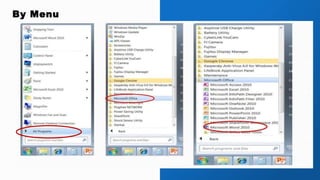
There are two ways to Open MS Word.
How to Open MS Word
1: By Menu
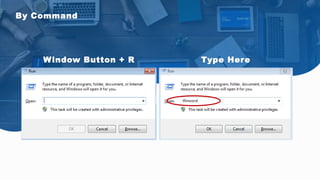
2: By Command
→Start Bar
→ All Programs
→ Microsoft office
→ Microsoft word 2010
By Menu
→ Window Button + R = Run
→ Type “Winword”
→ Enter
By Command
By Menu
By Command
Window Button + R Type Here
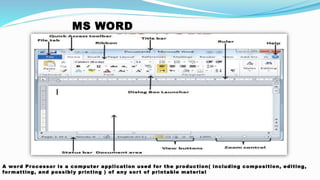
MS WORD
A word Processor is a computer application used for the production( including composition, editing,
for matting, and possibly printing ) of any sor t of printable material
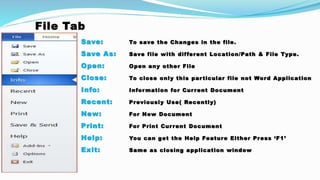
File Tab
Save: To save the Changes in the file.
Save As: Save file with different Location/Path & File Type.
Open: Open any other File
Close: To close only this particular file not Word Application
Info: Information for Current Document
Recent: Previously Use( Recently)
New: For New Document
Print: For Print Current Document
Help: You can get the Help Feature Either Press ‘F1’
Exit: Same as closing application window
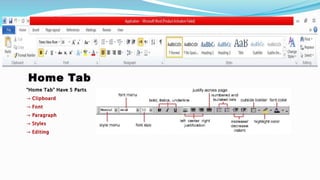
Home Tab
“Home Tab” Have 5 Parts
→ Clipboard
→ Font
→ Paragraph
→ Styles
→ Editing
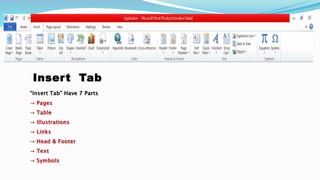
Insert Tab
“Insert Tab” Have 7 Parts
→ Pages
→ Table
→ Illustrations
→ Links
→ Head & Footer
→ Text
→ Symbols
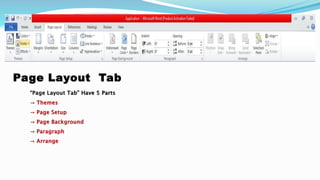
Page Layout Tab
“Page Layout Tab” Have 5 Parts
→ Themes
→ Page Setup
→ Page Background
→ Paragraph
→ Arrange
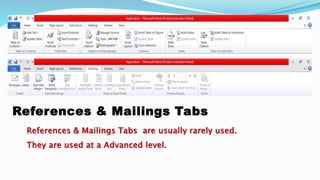
References & Mailings Tabs
References & Mailings Tabs are usually rarely used.
They are used at a Advanced level.
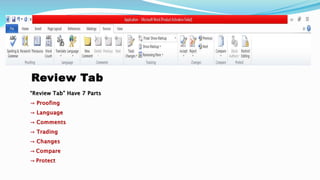
Review Tab
“Review Tab” Have 7 Parts
→ Proofing
→ Language
→ Comments
→ Trading
→ Changes
→ Compare
→ Protect
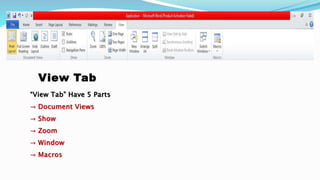
View Tab
“View Tab” Have 5 Parts
→ Document Views
→ Show
→ Zoom
→ Window
→ Macros
THANK YOU


MS WORD

  • 1.
    2nd Semester MergeClass Intro to Computer Science By: Mubashir Ali
  • 2.
    I will tellyou in this presentation. How to Create your Resume on MS Word? What is MS Word? What do they work for? What are their benefits? ABOUT PRESENTATION
  • 3.
    Lorem ipsum issimply dummy text of the printing and typesetting industry. Run Lorem ipsum is simply dummy text of the printing and typesetting industry. Installation Lorem ipsum is simply dummy text of the printing and typesetting industry. Ready to Use There are two ways to Open MS Word. How to Open MS Word 1: By Menu 2: By Command
  • 4.
    →Start Bar → AllPrograms → Microsoft office → Microsoft word 2010 By Menu → Window Button + R = Run → Type “Winword” → Enter By Command
  • 5.
  • 6.
  • 7.
    MS WORD A wordProcessor is a computer application used for the production( including composition, editing, for matting, and possibly printing ) of any sor t of printable material
  • 8.
    File Tab Save: Tosave the Changes in the file. Save As: Save file with different Location/Path & File Type. Open: Open any other File Close: To close only this particular file not Word Application Info: Information for Current Document Recent: Previously Use( Recently) New: For New Document Print: For Print Current Document Help: You can get the Help Feature Either Press ‘F1’ Exit: Same as closing application window
  • 9.
    Home Tab “Home Tab”Have 5 Parts → Clipboard → Font → Paragraph → Styles → Editing
  • 10.
    Insert Tab “Insert Tab”Have 7 Parts → Pages → Table → Illustrations → Links → Head & Footer → Text → Symbols
  • 11.
    Page Layout Tab “PageLayout Tab” Have 5 Parts → Themes → Page Setup → Page Background → Paragraph → Arrange
  • 12.
    References & MailingsTabs References & Mailings Tabs are usually rarely used. They are used at a Advanced level.
  • 13.
    Review Tab “Review Tab”Have 7 Parts → Proofing → Language → Comments → Trading → Changes → Compare → Protect
  • 14.
    View Tab “View Tab”Have 5 Parts → Document Views → Show → Zoom → Window → Macros
  • 15.

Editor's Notes

  • #2 Links: https://www.pexels.com/photo/five-bulb-lights-1036936/ https://www.free-power-point-templates.com/
  • #3 Links: https://www.pexels.com/photo/apple-devices-books-business-coffee-572056/
  • #4 Links: https://www.pexels.com/photo/apple-computer-computers-desk-326504/
  • #5 Links: https://www.pexels.com/photo/photo-of-people-looking-on-tablet-3182835/
  • #6 Links: https://www.pexels.com/photo/group-of-people-watching-on-laptop-1595385/ https://www.pexels.com/photo/man-wearing-white-long-sleeved-shirt-holding-black-pen-3182781/ https://www.pexels.com/photo/group-of-people-in-conference-room-1181304/
  • #7 Links: https://www.pexels.com/photo/top-view-photo-of-people-near-wooden-table-3183150/
  • #8 Links: https://www.pexels.com/photo/woman-draw-a-light-bulb-in-white-board-3758105/ https://www.pexels.com/photo/working-in-a-group-6224/ https://www.pexels.com/photo/person-s-holds-brown-gift-box-842876/
  • #9 Links: https://www.pexels.com/photo/people-inside-brown-concrete-building-at-daytime-794212/ https://www.pexels.com/photo/growth-leaves-notebook-pen-380810/ https://www.pexels.com/photo/10-piece-black-makeup-brush-set-on-white-panel-2721977/ https://www.pexels.com/photo/rectangular-green-swiss-cheese-leafed-plant-photo-mounted-on-wall-1534924/ https://www.pexels.com/photo/black-and-gray-ghostly-book-beside-three-dried-maple-leaves-1470162/ https://www.pexels.com/photo/brown-fern-leaves-2512282/ https://www.pexels.com/photo/green-leafed-plant-with-white-flowers-2395244/