WELCOME
TO
PRESENTATION
MICROSOFT WORD
‱ Presented to :MAM MAIDA JUNAID
‱ Presented by :Group 7
‱ Members : Rehan Asghar (22011514-114)
‱ Hamail Imtiaz (22011514-090)
‱ Sidrah Nazir (22011514-064)
‱ Sehrish Naaz (22011514-092)
‱ Subject: Introduction to computer application IT 101
‱ Section A: Semester 1st
‱ Department of Zoology
Table of Contents
‱ What is MS word
‱ VERSIONS OF MS WORD
‱ Uses of MS Word
‱ Features of MS Word
‱ Objective of MS Word
‱ Benefits OF MS WORD
What is MS WORD
‱ Microsoft word is a word processing programme you can use to write letters
resumes reports and more .
‱ It was launched in 1983 by Microsoft cooperation.
‱ MS word is a graphical word processing software also called documentation software
‱ That time it was also called as “Multi Tool Word”
‱ The first graphical writing program was Bravo Microsoft bought bravo program and
change it name to MS WORD
‱ it include Copying moving replacing deleting text.
‱ A family include MS WORD ;MS EXCEL’ MS POWER POINT ; MS Teams
VERSIONS OF MS WORD
‱ First version of MS word was released in 1988
‱ It was introduced by the founder of Microsoft cooperation BILL GATES
‱ Time by time new version came
‱ MS WORD 2000
‱ MS WORD 2003
‱ MS WORD 2007
‱ MS WORD 2010
‱ MS WORD 2013
‱ MS WORD 2016
‱ MS WORD 2019
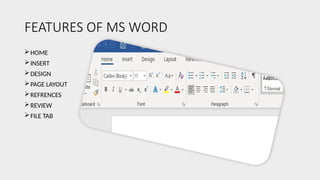
FEATURES OF MS WORD
HOME
INSERT
DESIGN
PAGE LAYOUT
REFRENCES
REVIEW
FILE TAB
HOME TAB
‱ HOME TAB has five groups of related commands
Clip board
Font
Paragraph
Styles
Editing
 Helps to change documents setting such as font size font style
alignment copy paste adding bullets
 Much of our time is spent in this menu
Home tab :
‱ Clipboard:contain cut and copy paste option
‱ Font: contain font size font colour bold italic upper and lower case option
‱ Paragraph : adding bullets line spacing add remove column alignment
‱ Styles : contain different text styles such as for writing references quotes book
title
‱ Editing :contain find and replace text by advanced search option can replace text
with something else and selecting particular text or subject .
INSERT TAB
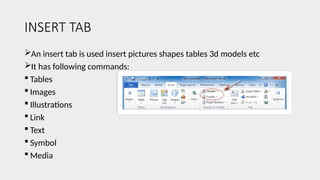
An insert tab is used insert pictures shapes tables 3d models etc
It has following commands:
 Tables
 Images
 Illustrations
 Link
 Text
 Symbol
 Media
INSERT TAB
 TABLES:arrangement of data and information in rows and column used in communication
data analysis and researches
 Images :add images or art and picture is a important way to illustrarte the information.
 Illustrations: a decorations interpretatation or visual explaination of text concept or
process often used in digital published media such as posters flyers magazines
 Links :HTML object that allow you to jump on another location when you clip or tap it
often used for references.
 Text :we can insert the text box header footer and current data time and files embedded
on other documents
 Symbol :we can add mathematical equation cam add of variety of symbol such as
currency mathematical or copyright symbol
 Media :any video or audio file can be added .
Design Tab:
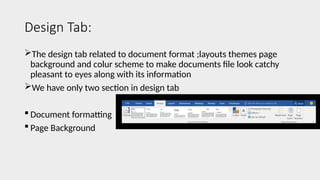
The design tab related to document format ;layouts themes page
background and colur scheme to make documents file look catchy
pleasant to eyes along with its information
We have only two section in design tab
 Document formatting
 Page Background
Design tab
‱ Document formatting :help use to choose color schemes for
document format styles other than colors of particular themes you
can select your on color for your document themes
‱ Page background : we cam add watermark on your document,such as
confidential sample,we can color page background or add borders
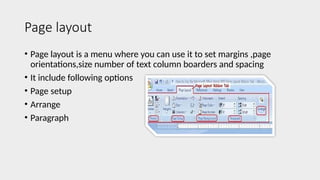
Page layout
‱ Page layout is a menu where you can use it to set margins ,page
orientations,size number of text column boarders and spacing
‱ It include following options
‱ Page setup
‱ Arrange
‱ Paragraph
Page layout
‱ Page setup : parameter defined to help the user to determine how a
printed page appears.parametrs are the size or margins quality of
printed page orientation
‱ Arrange : all command places all open documents in a separate
window on the screen
‱ Paragraph :any text that end with hard return and you insert hard
return anytime you press the enter key
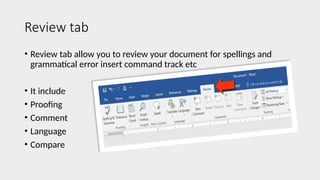
Review tab
‱ Review tab allow you to review your document for spellings and
grammatical error insert command track etc
‱ It include
‱ Proofing
‱ Comment
‱ Language
‱ Compare
Review tab
Proofing :
‱ Display spelling and grammer dialogue box
‱ Display of research task pane
‱ Display language dialogue box
Comments
 This can insert a new comment or delete the comment goes to pervious comment in
active document
Language
 Translate the document mini transistor and choose a translating language
Compare
Allow you to compare the document in two version of the same document
References tab
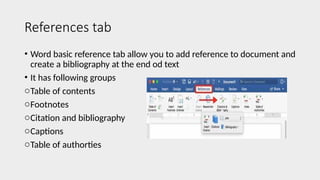
‱ Word basic reference tab allow you to add reference to document and
create a bibliography at the end od text
‱ It has following groups
oTable of contents
oFootnotes
oCitation and bibliography
oCaptions
oTable of authorties
References tab
‱ Table of content : add to give overview of your file you can add text
heading
‱ Footnotes :you can add footnotes at the bottom of the document or at
the end of the document to give more information
‱ Citation and bibliography :used to give credit and source of
information such as book or article
‱ Captions: you can write any caption for pictureor any object
‱ Table of authorities : used to insert a table of authorties and mark a
citation to add in table that contain list and page number of all sources
File tab
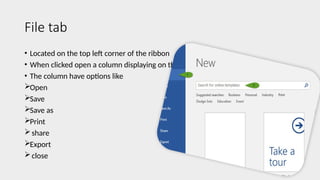
‱ Located on the top left corner of the ribbon
‱ When clicked open a column displaying on the left
‱ The column have options like
Open
Save
Save as
Print
share
Export
close
File tab
‱ Save :use the option to save the current files
‱ Save as : you can use the option to create another copy of file or
replace it edit name
‱ Print : you can take the print of current file
‱ Share : use the option to share the files to many users
‱ Export : you can export the file pdf or xps documents and also change
it into jpg etc
‱ Close : use the option to close the file
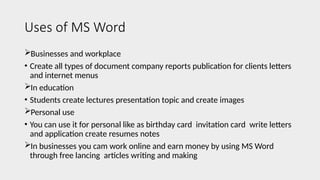
Uses of MS Word
Businesses and workplace
‱ Create all types of document company reports publication for clients letters
and internet menus
In education
‱ Students create lectures presentation topic and create images
Personal use
‱ You can use it for personal like as birthday card invitation card write letters
and application create resumes notes
In businesses you cam work online and earn money by using MS Word
through free lancing articles writing and making
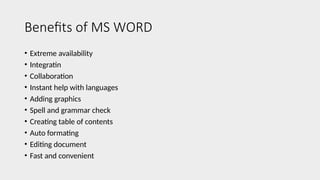
Benefits of MS WORD
‱ Extreme availability
‱ Integratin
‱ Collaboration
‱ Instant help with languages
‱ Adding graphics
‱ Spell and grammar check
‱ Creating table of contents
‱ Auto formating
‱ Editing document
‱ Fast and convenient
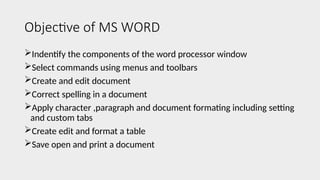
Objective of MS WORD
Indentify the components of the word processor window
Select commands using menus and toolbars
Create and edit document
Correct spelling in a document
Apply character ,paragraph and document formating including setting
and custom tabs
Create edit and format a table
Save open and print a document
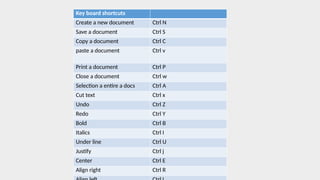
Key board shortcuts
Create a new document Ctrl N
Save a document Ctrl S
Copy a document Ctrl C
paste a document Ctrl v
Print a document Ctrl P
Close a document Ctrl w
Selection a entire a docs Ctrl A
Cut text Ctrl x
Undo Ctrl Z
Redo Ctrl Y
Bold Ctrl B
Italics Ctrl I
Under line Ctrl U
Justify Ctrl j
Center Ctrl E
Align right Ctrl R

Presentation1 IT-1.pptx its neccesssary

  • 2.
  • 3.
    MICROSOFT WORD ‱ Presentedto :MAM MAIDA JUNAID ‱ Presented by :Group 7 ‱ Members : Rehan Asghar (22011514-114) ‱ Hamail Imtiaz (22011514-090) ‱ Sidrah Nazir (22011514-064) ‱ Sehrish Naaz (22011514-092) ‱ Subject: Introduction to computer application IT 101 ‱ Section A: Semester 1st ‱ Department of Zoology
  • 4.
    Table of Contents ‱What is MS word ‱ VERSIONS OF MS WORD ‱ Uses of MS Word ‱ Features of MS Word ‱ Objective of MS Word ‱ Benefits OF MS WORD
  • 6.
    What is MSWORD ‱ Microsoft word is a word processing programme you can use to write letters resumes reports and more . ‱ It was launched in 1983 by Microsoft cooperation. ‱ MS word is a graphical word processing software also called documentation software ‱ That time it was also called as “Multi Tool Word” ‱ The first graphical writing program was Bravo Microsoft bought bravo program and change it name to MS WORD ‱ it include Copying moving replacing deleting text. ‱ A family include MS WORD ;MS EXCEL’ MS POWER POINT ; MS Teams
  • 7.
    VERSIONS OF MSWORD ‱ First version of MS word was released in 1988 ‱ It was introduced by the founder of Microsoft cooperation BILL GATES ‱ Time by time new version came ‱ MS WORD 2000 ‱ MS WORD 2003 ‱ MS WORD 2007 ‱ MS WORD 2010 ‱ MS WORD 2013 ‱ MS WORD 2016 ‱ MS WORD 2019
  • 8.
    FEATURES OF MSWORD HOME INSERT DESIGN PAGE LAYOUT REFRENCES REVIEW FILE TAB
  • 9.
    HOME TAB ‱ HOMETAB has five groups of related commands Clip board Font Paragraph Styles Editing  Helps to change documents setting such as font size font style alignment copy paste adding bullets  Much of our time is spent in this menu
  • 10.
    Home tab : ‱Clipboard:contain cut and copy paste option ‱ Font: contain font size font colour bold italic upper and lower case option ‱ Paragraph : adding bullets line spacing add remove column alignment ‱ Styles : contain different text styles such as for writing references quotes book title ‱ Editing :contain find and replace text by advanced search option can replace text with something else and selecting particular text or subject .
  • 11.
    INSERT TAB An inserttab is used insert pictures shapes tables 3d models etc It has following commands:  Tables  Images  Illustrations  Link  Text  Symbol  Media
  • 12.
    INSERT TAB  TABLES:arrangementof data and information in rows and column used in communication data analysis and researches  Images :add images or art and picture is a important way to illustrarte the information.  Illustrations: a decorations interpretatation or visual explaination of text concept or process often used in digital published media such as posters flyers magazines  Links :HTML object that allow you to jump on another location when you clip or tap it often used for references.  Text :we can insert the text box header footer and current data time and files embedded on other documents  Symbol :we can add mathematical equation cam add of variety of symbol such as currency mathematical or copyright symbol  Media :any video or audio file can be added .
  • 13.
    Design Tab: The designtab related to document format ;layouts themes page background and colur scheme to make documents file look catchy pleasant to eyes along with its information We have only two section in design tab  Document formatting  Page Background
  • 14.
    Design tab ‱ Documentformatting :help use to choose color schemes for document format styles other than colors of particular themes you can select your on color for your document themes ‱ Page background : we cam add watermark on your document,such as confidential sample,we can color page background or add borders
  • 15.
    Page layout ‱ Pagelayout is a menu where you can use it to set margins ,page orientations,size number of text column boarders and spacing ‱ It include following options ‱ Page setup ‱ Arrange ‱ Paragraph
  • 16.
    Page layout ‱ Pagesetup : parameter defined to help the user to determine how a printed page appears.parametrs are the size or margins quality of printed page orientation ‱ Arrange : all command places all open documents in a separate window on the screen ‱ Paragraph :any text that end with hard return and you insert hard return anytime you press the enter key
  • 17.
    Review tab ‱ Reviewtab allow you to review your document for spellings and grammatical error insert command track etc ‱ It include ‱ Proofing ‱ Comment ‱ Language ‱ Compare
  • 18.
    Review tab Proofing : ‱Display spelling and grammer dialogue box ‱ Display of research task pane ‱ Display language dialogue box Comments  This can insert a new comment or delete the comment goes to pervious comment in active document Language  Translate the document mini transistor and choose a translating language Compare Allow you to compare the document in two version of the same document
  • 19.
    References tab ‱ Wordbasic reference tab allow you to add reference to document and create a bibliography at the end od text ‱ It has following groups oTable of contents oFootnotes oCitation and bibliography oCaptions oTable of authorties
  • 20.
    References tab ‱ Tableof content : add to give overview of your file you can add text heading ‱ Footnotes :you can add footnotes at the bottom of the document or at the end of the document to give more information ‱ Citation and bibliography :used to give credit and source of information such as book or article ‱ Captions: you can write any caption for pictureor any object ‱ Table of authorities : used to insert a table of authorties and mark a citation to add in table that contain list and page number of all sources
  • 21.
    File tab ‱ Locatedon the top left corner of the ribbon ‱ When clicked open a column displaying on the left ‱ The column have options like Open Save Save as Print share Export close
  • 22.
    File tab ‱ Save:use the option to save the current files ‱ Save as : you can use the option to create another copy of file or replace it edit name ‱ Print : you can take the print of current file ‱ Share : use the option to share the files to many users ‱ Export : you can export the file pdf or xps documents and also change it into jpg etc ‱ Close : use the option to close the file
  • 23.
    Uses of MSWord Businesses and workplace ‱ Create all types of document company reports publication for clients letters and internet menus In education ‱ Students create lectures presentation topic and create images Personal use ‱ You can use it for personal like as birthday card invitation card write letters and application create resumes notes In businesses you cam work online and earn money by using MS Word through free lancing articles writing and making
  • 24.
    Benefits of MSWORD ‱ Extreme availability ‱ Integratin ‱ Collaboration ‱ Instant help with languages ‱ Adding graphics ‱ Spell and grammar check ‱ Creating table of contents ‱ Auto formating ‱ Editing document ‱ Fast and convenient
  • 25.
    Objective of MSWORD Indentify the components of the word processor window Select commands using menus and toolbars Create and edit document Correct spelling in a document Apply character ,paragraph and document formating including setting and custom tabs Create edit and format a table Save open and print a document
  • 26.
    Key board shortcuts Createa new document Ctrl N Save a document Ctrl S Copy a document Ctrl C paste a document Ctrl v Print a document Ctrl P Close a document Ctrl w Selection a entire a docs Ctrl A Cut text Ctrl x Undo Ctrl Z Redo Ctrl Y Bold Ctrl B Italics Ctrl I Under line Ctrl U Justify Ctrl j Center Ctrl E Align right Ctrl R