www.usm.my
Computer Algebra System in Education
Maple
Azat Azhibekov
azatazhibekov@gmail.com
Department of Computer Education and Instructional Technologies,Fatih
University,34500 Buyukcekmece,Istanbul,Turkey
May 23, 2015
FU BOTE
Introduction
General Purpose CAS
Maple in Use
Symbolic Computation in
Maple
Maple in
Education
Mathematics with Maple
Basic Function
Mathematics with Maple
Visualisation
Plots
Extra(Research)
Reference
Computer Algebra System
2 types
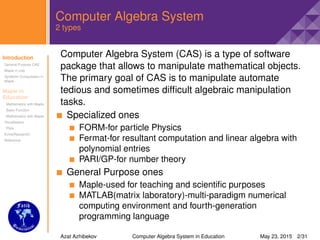
Computer Algebra System (CAS) is a type of software
package that allows to manipulate mathematical objects.
The primary goal of CAS is to manipulate automate
tedious and sometimes difficult algebraic manipulation
tasks.
Specialized ones
FORM-for particle Physics
Fermat-for resultant computation and linear algebra with
polynomial entries
PARI/GP-for number theory
General Purpose ones
Maple-used for teaching and scientific purposes
MATLAB(matrix laboratory)-multi-paradigm numerical
computing environment and fourth-generation
programming language
Azat Azhibekov Computer Algebra System in Education May 23, 2015 2/31
Introduction
General Purpose CAS
Maple in Use
Symbolic Computation in
Maple
Maple in
Education
Mathematics with Maple
Basic Function
Mathematics with Maple
Visualisation
Plots
Extra(Research)
Reference
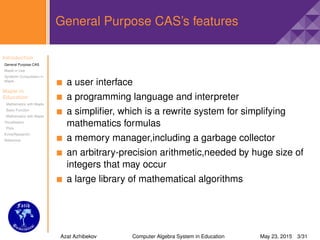
General Purpose CAS’s features
a user interface
a programming language and interpreter
a simplifier, which is a rewrite system for simplifying
mathematics formulas
a memory manager,including a garbage collector
an arbitrary-precision arithmetic,needed by huge size of
integers that may occur
a large library of mathematical algorithms
Azat Azhibekov Computer Algebra System in Education May 23, 2015 3/31
Introduction
General Purpose CAS
Maple in Use
Symbolic Computation in
Maple
Maple in
Education
Mathematics with Maple
Basic Function
Mathematics with Maple
Visualisation
Plots
Extra(Research)
Reference
Maple-a general purpose algebra system
Maple is one of the leading general-purpose commercial
CAS and widely used in engineering,science,and
mathematics. Maplesoft customers include:
Ford
BMW
Bosch
Boeing
NASA
Canadian Space Agency
Canon
Motorola
Microsoft Research
Bloomberg
DreamWorks
Azat Azhibekov Computer Algebra System in Education May 23, 2015 4/31
Introduction
General Purpose CAS
Maple in Use
Symbolic Computation in
Maple
Maple in
Education
Mathematics with Maple
Basic Function
Mathematics with Maple
Visualisation
Plots
Extra(Research)
Reference
Maple-a general purpose algebra system
Covering sectors:
automotive
aerospace
electronics
defence
energy
financial services
consumer products
entertainment
Education– Over 90% of advanced research institutions
and universities worldwide,including
MIT,Stanford,Oxford, the NASA Jet Propulsion
Laboratory and the U.S. Department of energy,have
adopted Maplesoft solutions to enhance education and
research activities.
Azat Azhibekov Computer Algebra System in Education May 23, 2015 5/31
Introduction
General Purpose CAS
Maple in Use
Symbolic Computation in
Maple
Maple in
Education
Mathematics with Maple
Basic Function
Mathematics with Maple
Visualisation
Plots
Extra(Research)
Reference
Maple
Maple is a very powerful interactive computer algebra
system for doing maths and used for numerical and
symbolic computation
Definition (Symbolic Computation)
In mathematics and computer science,computer
algebra,also called symbolic computation or algebraic
computation is a scientific area that refers to the study and
development of algorithms and software for manipulating
mathematical expressions and other mathematical objects
Symbolic Computation in Maple(11)
∞
−∞
e−x2
dx =
√
π
Azat Azhibekov Computer Algebra System in Education May 23, 2015 6/31
Introduction
General Purpose CAS
Maple in Use
Symbolic Computation in
Maple
Maple in
Education
Mathematics with Maple
Basic Function
Mathematics with Maple
Visualisation
Plots
Extra(Research)
Reference
Maple in Math Education
In every class there are places,where we can use
Technology to help advance understanding,and Maple
must be used to do that effectively.
Maple is a tool for doing mathematics
Maple allows you do math in your own way
Maple makes you love itself as well as mathematics
Researchers recommend that teachers use CAS
features to focus on concepts,personalize curricular to fit
student needs,and emphasize meaningful math tasks.
Azat Azhibekov Computer Algebra System in Education May 23, 2015 7/31
Introduction
General Purpose CAS
Maple in Use
Symbolic Computation in
Maple
Maple in
Education
Mathematics with Maple
Basic Function
Mathematics with Maple
Visualisation
Plots
Extra(Research)
Reference
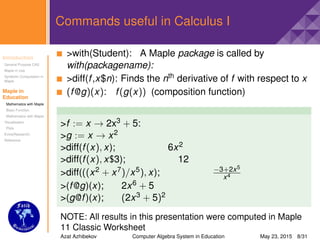
Commands useful in Calculus I
>with(Student): A Maple package is called by
with(packagename):
>diff(f,x$n): Finds the nth derivative of f with respect to x
(f@g)(x): f(g(x)) (composition function)
>f := x → 2x3 + 5:
>g := x → x2
>diff(f(x), x); 6x2
>diff(f(x), x$3); 12
>diff(((x2 + x7)/x5), x); −3+2x5
x4
>(f@g)(x); 2x6 + 5
>(g@f)(x); (2x3 + 5)2
NOTE: All results in this presentation were computed in Maple
11 Classic Worksheet
Azat Azhibekov Computer Algebra System in Education May 23, 2015 8/31
Introduction
General Purpose CAS
Maple in Use
Symbolic Computation in
Maple
Maple in
Education
Mathematics with Maple
Basic Function
Mathematics with Maple
Visualisation
Plots
Extra(Research)
Reference
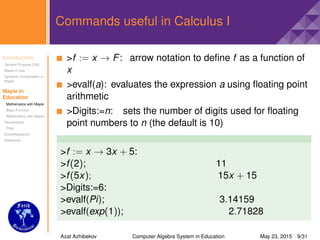
Commands useful in Calculus I
>f := x → F: arrow notation to define f as a function of
x
>evalf(a): evaluates the expression a using floating point
arithmetic
>Digits:=n: sets the number of digits used for floating
point numbers to n (the default is 10)
>f := x → 3x + 5:
>f(2); 11
>f(5x); 15x + 15
>Digits:=6:
>evalf(Pi); 3.14159
>evalf(exp(1)); 2.71828
Azat Azhibekov Computer Algebra System in Education May 23, 2015 9/31
Introduction
General Purpose CAS
Maple in Use
Symbolic Computation in
Maple
Maple in
Education
Mathematics with Maple
Basic Function
Mathematics with Maple
Visualisation
Plots
Extra(Research)
Reference
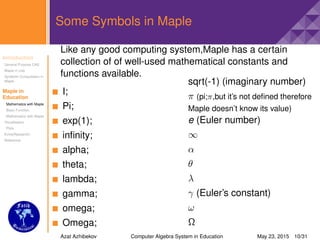
Some Symbols in Maple
Like any good computing system,Maple has a certain
collection of of well-used mathematical constants and
functions available.
I;
Pi;
exp(1);
infinity;
alpha;
theta;
lambda;
gamma;
omega;
Omega;
sqrt(-1) (imaginary number)
π (pi;π,but it’s not defined therefore
Maple doesn’t know its value)
e (Euler number)
∞
α
θ
λ
γ (Euler’s constant)
ω
Ω
Azat Azhibekov Computer Algebra System in Education May 23, 2015 10/31
Introduction
General Purpose CAS
Maple in Use
Symbolic Computation in
Maple
Maple in
Education
Mathematics with Maple
Basic Function
Mathematics with Maple
Visualisation
Plots
Extra(Research)
Reference
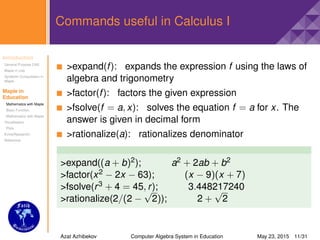
Commands useful in Calculus I
>expand(f): expands the expression f using the laws of
algebra and trigonometry
>factor(f): factors the given expression
>fsolve(f = a, x): solves the equation f = a for x. The
answer is given in decimal form
>rationalize(a): rationalizes denominator
>expand((a + b)2); a2 + 2ab + b2
>factor(x2 − 2x − 63); (x − 9)(x + 7)
>fsolve(r3 + 4 = 45, r); 3.448217240
>rationalize(2/(2 −
√
2)); 2 +
√
2
Azat Azhibekov Computer Algebra System in Education May 23, 2015 11/31
Introduction
General Purpose CAS
Maple in Use
Symbolic Computation in
Maple
Maple in
Education
Mathematics with Maple
Basic Function
Mathematics with Maple
Visualisation
Plots
Extra(Research)
Reference
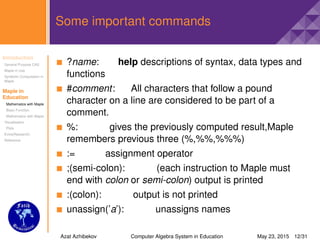
Some important commands
?name: help descriptions of syntax, data types and
functions
#comment: All characters that follow a pound
character on a line are considered to be part of a
comment.
%: gives the previously computed result,Maple
remembers previous three (%,%%,%%%)
:= assignment operator
;(semi-colon): (each instruction to Maple must
end with colon or semi-colon) output is printed
:(colon): output is not printed
unassign(’a’): unassigns names
Azat Azhibekov Computer Algebra System in Education May 23, 2015 12/31
Introduction
General Purpose CAS
Maple in Use
Symbolic Computation in
Maple
Maple in
Education
Mathematics with Maple
Basic Function
Mathematics with Maple
Visualisation
Plots
Extra(Research)
Reference
Commands useful in Calculus I
>Slope(p1,p2): computes the slope of the line
through the points p1 and p2
>limit(f, x = a): finds the limit of f as x approaches a
>solve(f = a, x): solves f(x) for x
>root(x, n): nth root of x
>limit(sin(x)/x,x = 0); 1
>limit(exp(b),infinity); ∞
>limit(−1/x, x = 0,right); −∞
>solve(sin(x) + y = 2, x); − arcsin(y − 2)
>solve(x2 − 9 = 0, x); ±3
>root(32, 5); 2
>Slope([0, 0], [1, 2]); 2
Azat Azhibekov Computer Algebra System in Education May 23, 2015 13/31
Introduction
General Purpose CAS
Maple in Use
Symbolic Computation in
Maple
Maple in
Education
Mathematics with Maple
Basic Function
Mathematics with Maple
Visualisation
Plots
Extra(Research)
Reference
Commands useful in Calculus I
>int(a, x): computes the indefinite integral of
expression a with respect to x
>int(a, x = b..c): computes the definite integral of a
with respect to x
>maximize(a, opt1, opt2..optn): computes global
maximum value of a
>minimize(a, opt1, opt2..optn): computes global
minimum value of a
>int(2 + x, x); 2x + x2
2
>int(4x2 − 2/x5 + 7, x); 4x3
3 + 1
2x4 + 7x
>int(exp(x)/2, x); 1
2 ex
>maximize(x3 − 3x2 − 9x + 5, x = 0..4,location);
5, {[{x = 0}, 5]}
>minimize(x2 + 1, x = −1..2); 1
Azat Azhibekov Computer Algebra System in Education May 23, 2015 14/31
Introduction
General Purpose CAS
Maple in Use
Symbolic Computation in
Maple
Maple in
Education
Mathematics with Maple
Basic Function
Mathematics with Maple
Visualisation
Plots
Extra(Research)
Reference
Some important commands II
restart: clears all previously assigned variables,makes
Maple act like as if just started
: executes the current expression
: executes the worksheet
[list] (ordered): z := [c, a, b]: >z [1]; c
{set} (unordered,no duplicates): >{a, b, a, c}; {a,b,c}
>=: ≥ (greater than or equal)
<>: = (not equal)
<=: ≤ (less than or equal)
@: composition operator(composition function)
"text": assigns nothing but only text
Azat Azhibekov Computer Algebra System in Education May 23, 2015 15/31
Introduction
General Purpose CAS
Maple in Use
Symbolic Computation in
Maple
Maple in
Education
Mathematics with Maple
Basic Function
Mathematics with Maple
Visualisation
Plots
Extra(Research)
Reference
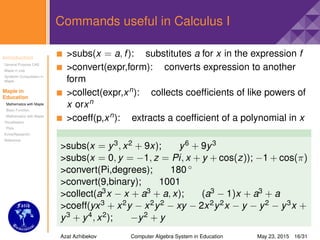
Commands useful in Calculus I
>subs(x = a, f): substitutes a for x in the expression f
>convert(expr,form): converts expression to another
form
>collect(expr,xn): collects coefficients of like powers of
x orxn
>coeff(p,xn): extracts a coefficient of a polynomial in x
>subs(x = y3, x2 + 9x); y6 + 9y3
>subs(x = 0, y = −1, z = Pi, x + y + cos(z)); −1 + cos(π)
>convert(Pi,degrees); 180 ◦
>convert(9,binary); 1001
>collect(a3x − x + a3 + a, x); (a3 − 1)x + a3 + a
>coeff(yx3 + x2y − x2y2 − xy − 2x2y2x − y − y2 − y3x +
y3 + y4, x2); −y2 + y
Azat Azhibekov Computer Algebra System in Education May 23, 2015 16/31
Introduction
General Purpose CAS
Maple in Use
Symbolic Computation in
Maple
Maple in
Education
Mathematics with Maple
Basic Function
Mathematics with Maple
Visualisation
Plots
Extra(Research)
Reference
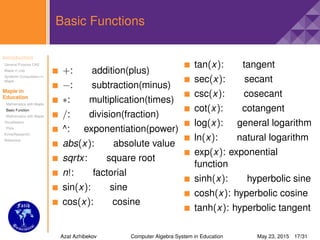
Basic Functions
+: addition(plus)
−: subtraction(minus)
∗: multiplication(times)
/: division(fraction)
^: exponentiation(power)
abs(x): absolute value
sqrtx: square root
n!: factorial
sin(x): sine
cos(x): cosine
tan(x): tangent
sec(x): secant
csc(x): cosecant
cot(x): cotangent
log(x): general logarithm
ln(x): natural logarithm
exp(x): exponential
function
sinh(x): hyperbolic sine
cosh(x): hyperbolic cosine
tanh(x): hyperbolic tangent
Azat Azhibekov Computer Algebra System in Education May 23, 2015 17/31
Introduction
General Purpose CAS
Maple in Use
Symbolic Computation in
Maple
Maple in
Education
Mathematics with Maple
Basic Function
Mathematics with Maple
Visualisation
Plots
Extra(Research)
Reference
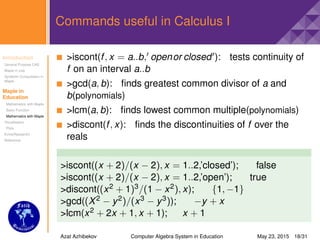
Commands useful in Calculus I
>iscont(f, x = a..b, openor closed ): tests continuity of
f on an interval a..b
>gcd(a, b): finds greatest common divisor of a and
b(polynomials)
>lcm(a, b): finds lowest common multiple(polynomials)
>discont(f, x): finds the discontinuities of f over the
reals
>iscont((x + 2)/(x − 2), x = 1..2,’closed’); false
>iscont((x + 2)/(x − 2), x = 1..2,’open’); true
>discont((x2 + 1)3/(1 − x2), x); {1, −1}
>gcd((X2 − y2)/(x3 − y3)); −y + x
>lcm(x2 + 2x + 1, x + 1); x + 1
Azat Azhibekov Computer Algebra System in Education May 23, 2015 18/31
Introduction
General Purpose CAS
Maple in Use
Symbolic Computation in
Maple
Maple in
Education
Mathematics with Maple
Basic Function
Mathematics with Maple
Visualisation
Plots
Extra(Research)
Reference
Commands useful in Calculus I
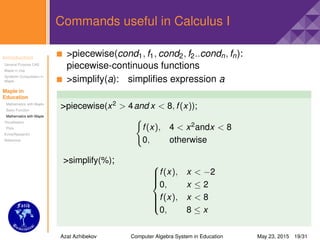
>piecewise(cond1, f1, cond2, f2..condn, fn):
piecewise-continuous functions
>simplify(a): simplifies expression a
>piecewise(x2
> 4and x < 8, f(x));
f(x), 4 < x2
andx < 8
0, otherwise
>simplify(%); 


f(x), x < −2
0, x ≤ 2
f(x), x < 8
0, 8 ≤ x
Azat Azhibekov Computer Algebra System in Education May 23, 2015 19/31
Introduction
General Purpose CAS
Maple in Use
Symbolic Computation in
Maple
Maple in
Education
Mathematics with Maple
Basic Function
Mathematics with Maple
Visualisation
Plots
Extra(Research)
Reference
Plotting 2D Graphs
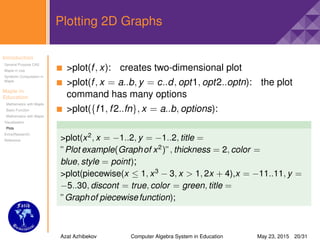
>plot(f, x): creates two-dimensional plot
>plot(f, x = a..b, y = c..d, opt1, opt2..optn): the plot
command has many options
>plot({f1, f2..fn}, x = a..b, options):
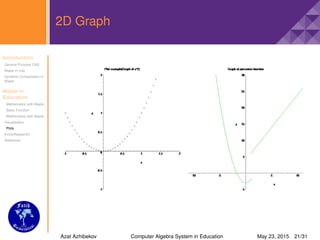
>plot(x2
, x = −1..2, y = −1..2, title =
”Plot example(Graphof x2
)”, thickness = 2, color =
blue, style = point);
>plot(piecewise(x ≤ 1, x3
− 3, x > 1, 2x + 4),x = −11..11, y =
−5..30, discont = true, color = green, title =
”Graphof piecewisefunction);
Azat Azhibekov Computer Algebra System in Education May 23, 2015 20/31
Introduction
General Purpose CAS
Maple in Use
Symbolic Computation in
Maple
Maple in
Education
Mathematics with Maple
Basic Function
Mathematics with Maple
Visualisation
Plots
Extra(Research)
Reference
2D Graph
Azat Azhibekov Computer Algebra System in Education May 23, 2015 21/31
Introduction
General Purpose CAS
Maple in Use
Symbolic Computation in
Maple
Maple in
Education
Mathematics with Maple
Basic Function
Mathematics with Maple
Visualisation
Plots
Extra(Research)
Reference
Some plot options
You can change the view of graphs by applying plot options
axes="boxed,frame,none or normal"
color="Orange,Silver,Gold,Green,Coral,BlueViolet,Lime,
Yellow,DeepSkyBlue,etc."
discont=true,false
filled=true,false
labels=[x,y]
labeldirections=[horizontal,vertical]
linestyle=solid,dot,dash,dashdot,longdash,spacedash,
spacedot
numpoints=n (default is 50 points)
style=line,point,patchnogrid,patch
thickness=n
Azat Azhibekov Computer Algebra System in Education May 23, 2015 22/31
Introduction
General Purpose CAS
Maple in Use
Symbolic Computation in
Maple
Maple in
Education
Mathematics with Maple
Basic Function
Mathematics with Maple
Visualisation
Plots
Extra(Research)
Reference
2D Graph
>plot([sqrt(x), 3log(x)], x = 0..400, numpoints =
1000, thickness = 3);
Azat Azhibekov Computer Algebra System in Education May 23, 2015 23/31
Introduction
General Purpose CAS
Maple in Use
Symbolic Computation in
Maple
Maple in
Education
Mathematics with Maple
Basic Function
Mathematics with Maple
Visualisation
Plots
Extra(Research)
Reference
Plotting 3D Graphs
For some special plots you need special commands that
are in plots package
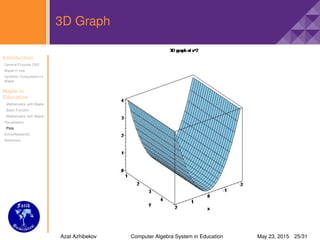
>plot3d(f, x = a..b, y = c..d): creates
three-dimensional plot
>plot3d([f, g, h], s = a..b, t = c..d):
>plot3d([f, g, h], a..b, c..b):
>plot3d([exprf, exprg, exprh], s = a..b, t = c..d):
>plot3d(x2, x = −2..2, y = 1..5, axes = boxed, scaling =
constrained, color = ”SkyBlue”, style = patch, title =
”3Dgraphof x2);
Azat Azhibekov Computer Algebra System in Education May 23, 2015 24/31
Introduction
General Purpose CAS
Maple in Use
Symbolic Computation in
Maple
Maple in
Education
Mathematics with Maple
Basic Function
Mathematics with Maple
Visualisation
Plots
Extra(Research)
Reference
3D Graph
Azat Azhibekov Computer Algebra System in Education May 23, 2015 25/31
Introduction
General Purpose CAS
Maple in Use
Symbolic Computation in
Maple
Maple in
Education
Mathematics with Maple
Basic Function
Mathematics with Maple
Visualisation
Plots
Extra(Research)
Reference
3D Graph
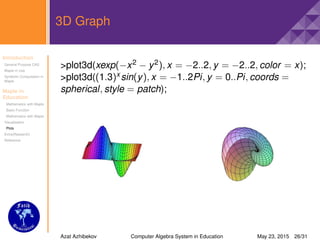
>plot3d(xexp(−x2 − y2), x = −2..2, y = −2..2, color = x);
>plot3d((1.3)x sin(y), x = −1..2Pi, y = 0..Pi, coords =
spherical, style = patch);
Azat Azhibekov Computer Algebra System in Education May 23, 2015 26/31
Introduction
General Purpose CAS
Maple in Use
Symbolic Computation in
Maple
Maple in
Education
Mathematics with Maple
Basic Function
Mathematics with Maple
Visualisation
Plots
Extra(Research)
Reference
Some 3D Plot Options
axes=boxed
caption="c"
coords=polar,spherical,cylindrical,conical,bispherical
font=[family, style, size]
family=TIMES,HELVETICA,COURIER,SYMBOL
TIMES→ style=ROMAN,BOLD,ITALIC,BOLDITALIC
HELVETICA and COURIER→
style=BOLD,OBLIQUE,BOLDOBLIQUE
SYMBOL→ style=no style
lightmodel=none,light1,light2,light3,light4
scaling=constrained,unconstrained
style=surface,patch,contour,patchcontour,line,point
symbol=asterisk,box,circle,diagonalcross,diamondpoint,
solidsphere,sphere
symbolsize=n(default=10)
Azat Azhibekov Computer Algebra System in Education May 23, 2015 27/31
Introduction
General Purpose CAS
Maple in Use
Symbolic Computation in
Maple
Maple in
Education
Mathematics with Maple
Basic Function
Mathematics with Maple
Visualisation
Plots
Extra(Research)
Reference
Potting points
>plot([[x1, y2], [x2, y2], [x3, y3]..., [xn, yn]]): Plots points
>L:=[[0, 0], [1, 1], [2, 3], [3, 2], [4, −2]]:
>plot(L);
Azat Azhibekov Computer Algebra System in Education May 23, 2015 28/31
Introduction
General Purpose CAS
Maple in Use
Symbolic Computation in
Maple
Maple in
Education
Mathematics with Maple
Basic Function
Mathematics with Maple
Visualisation
Plots
Extra(Research)
Reference
Ford Motor Company uses Maple
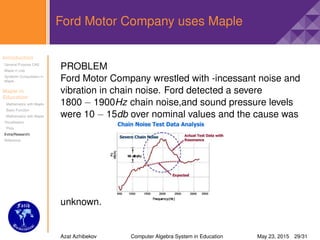
PROBLEM
Ford Motor Company wrestled with -incessant noise and
vibration in chain noise. Ford detected a severe
1800 − 1900Hz chain noise,and sound pressure levels
were 10 − 15db over nominal values and the cause was
unknown.
Azat Azhibekov Computer Algebra System in Education May 23, 2015 29/31
Introduction
General Purpose CAS
Maple in Use
Symbolic Computation in
Maple
Maple in
Education
Mathematics with Maple
Basic Function
Mathematics with Maple
Visualisation
Plots
Extra(Research)
Reference
References
Reference Materials(click here)
Azat Azhibekov Computer Algebra System in Education May 23, 2015 30/31
Thank You

Computer algebra-system-maple

  • 1.
    www.usm.my Computer Algebra Systemin Education Maple Azat Azhibekov azatazhibekov@gmail.com Department of Computer Education and Instructional Technologies,Fatih University,34500 Buyukcekmece,Istanbul,Turkey May 23, 2015 FU BOTE
  • 2.
    Introduction General Purpose CAS Maplein Use Symbolic Computation in Maple Maple in Education Mathematics with Maple Basic Function Mathematics with Maple Visualisation Plots Extra(Research) Reference Computer Algebra System 2 types Computer Algebra System (CAS) is a type of software package that allows to manipulate mathematical objects. The primary goal of CAS is to manipulate automate tedious and sometimes difficult algebraic manipulation tasks. Specialized ones FORM-for particle Physics Fermat-for resultant computation and linear algebra with polynomial entries PARI/GP-for number theory General Purpose ones Maple-used for teaching and scientific purposes MATLAB(matrix laboratory)-multi-paradigm numerical computing environment and fourth-generation programming language Azat Azhibekov Computer Algebra System in Education May 23, 2015 2/31
  • 3.
    Introduction General Purpose CAS Maplein Use Symbolic Computation in Maple Maple in Education Mathematics with Maple Basic Function Mathematics with Maple Visualisation Plots Extra(Research) Reference General Purpose CAS’s features a user interface a programming language and interpreter a simplifier, which is a rewrite system for simplifying mathematics formulas a memory manager,including a garbage collector an arbitrary-precision arithmetic,needed by huge size of integers that may occur a large library of mathematical algorithms Azat Azhibekov Computer Algebra System in Education May 23, 2015 3/31
  • 4.
    Introduction General Purpose CAS Maplein Use Symbolic Computation in Maple Maple in Education Mathematics with Maple Basic Function Mathematics with Maple Visualisation Plots Extra(Research) Reference Maple-a general purpose algebra system Maple is one of the leading general-purpose commercial CAS and widely used in engineering,science,and mathematics. Maplesoft customers include: Ford BMW Bosch Boeing NASA Canadian Space Agency Canon Motorola Microsoft Research Bloomberg DreamWorks Azat Azhibekov Computer Algebra System in Education May 23, 2015 4/31
  • 5.
    Introduction General Purpose CAS Maplein Use Symbolic Computation in Maple Maple in Education Mathematics with Maple Basic Function Mathematics with Maple Visualisation Plots Extra(Research) Reference Maple-a general purpose algebra system Covering sectors: automotive aerospace electronics defence energy financial services consumer products entertainment Education– Over 90% of advanced research institutions and universities worldwide,including MIT,Stanford,Oxford, the NASA Jet Propulsion Laboratory and the U.S. Department of energy,have adopted Maplesoft solutions to enhance education and research activities. Azat Azhibekov Computer Algebra System in Education May 23, 2015 5/31
  • 6.
    Introduction General Purpose CAS Maplein Use Symbolic Computation in Maple Maple in Education Mathematics with Maple Basic Function Mathematics with Maple Visualisation Plots Extra(Research) Reference Maple Maple is a very powerful interactive computer algebra system for doing maths and used for numerical and symbolic computation Definition (Symbolic Computation) In mathematics and computer science,computer algebra,also called symbolic computation or algebraic computation is a scientific area that refers to the study and development of algorithms and software for manipulating mathematical expressions and other mathematical objects Symbolic Computation in Maple(11) ∞ −∞ e−x2 dx = √ π Azat Azhibekov Computer Algebra System in Education May 23, 2015 6/31
  • 7.
    Introduction General Purpose CAS Maplein Use Symbolic Computation in Maple Maple in Education Mathematics with Maple Basic Function Mathematics with Maple Visualisation Plots Extra(Research) Reference Maple in Math Education In every class there are places,where we can use Technology to help advance understanding,and Maple must be used to do that effectively. Maple is a tool for doing mathematics Maple allows you do math in your own way Maple makes you love itself as well as mathematics Researchers recommend that teachers use CAS features to focus on concepts,personalize curricular to fit student needs,and emphasize meaningful math tasks. Azat Azhibekov Computer Algebra System in Education May 23, 2015 7/31
  • 8.
    Introduction General Purpose CAS Maplein Use Symbolic Computation in Maple Maple in Education Mathematics with Maple Basic Function Mathematics with Maple Visualisation Plots Extra(Research) Reference Commands useful in Calculus I >with(Student): A Maple package is called by with(packagename): >diff(f,x$n): Finds the nth derivative of f with respect to x (f@g)(x): f(g(x)) (composition function) >f := x → 2x3 + 5: >g := x → x2 >diff(f(x), x); 6x2 >diff(f(x), x$3); 12 >diff(((x2 + x7)/x5), x); −3+2x5 x4 >(f@g)(x); 2x6 + 5 >(g@f)(x); (2x3 + 5)2 NOTE: All results in this presentation were computed in Maple 11 Classic Worksheet Azat Azhibekov Computer Algebra System in Education May 23, 2015 8/31
  • 9.
    Introduction General Purpose CAS Maplein Use Symbolic Computation in Maple Maple in Education Mathematics with Maple Basic Function Mathematics with Maple Visualisation Plots Extra(Research) Reference Commands useful in Calculus I >f := x → F: arrow notation to define f as a function of x >evalf(a): evaluates the expression a using floating point arithmetic >Digits:=n: sets the number of digits used for floating point numbers to n (the default is 10) >f := x → 3x + 5: >f(2); 11 >f(5x); 15x + 15 >Digits:=6: >evalf(Pi); 3.14159 >evalf(exp(1)); 2.71828 Azat Azhibekov Computer Algebra System in Education May 23, 2015 9/31
  • 10.
    Introduction General Purpose CAS Maplein Use Symbolic Computation in Maple Maple in Education Mathematics with Maple Basic Function Mathematics with Maple Visualisation Plots Extra(Research) Reference Some Symbols in Maple Like any good computing system,Maple has a certain collection of of well-used mathematical constants and functions available. I; Pi; exp(1); infinity; alpha; theta; lambda; gamma; omega; Omega; sqrt(-1) (imaginary number) π (pi;π,but it’s not defined therefore Maple doesn’t know its value) e (Euler number) ∞ α θ λ γ (Euler’s constant) ω Ω Azat Azhibekov Computer Algebra System in Education May 23, 2015 10/31
  • 11.
    Introduction General Purpose CAS Maplein Use Symbolic Computation in Maple Maple in Education Mathematics with Maple Basic Function Mathematics with Maple Visualisation Plots Extra(Research) Reference Commands useful in Calculus I >expand(f): expands the expression f using the laws of algebra and trigonometry >factor(f): factors the given expression >fsolve(f = a, x): solves the equation f = a for x. The answer is given in decimal form >rationalize(a): rationalizes denominator >expand((a + b)2); a2 + 2ab + b2 >factor(x2 − 2x − 63); (x − 9)(x + 7) >fsolve(r3 + 4 = 45, r); 3.448217240 >rationalize(2/(2 − √ 2)); 2 + √ 2 Azat Azhibekov Computer Algebra System in Education May 23, 2015 11/31
  • 12.
    Introduction General Purpose CAS Maplein Use Symbolic Computation in Maple Maple in Education Mathematics with Maple Basic Function Mathematics with Maple Visualisation Plots Extra(Research) Reference Some important commands ?name: help descriptions of syntax, data types and functions #comment: All characters that follow a pound character on a line are considered to be part of a comment. %: gives the previously computed result,Maple remembers previous three (%,%%,%%%) := assignment operator ;(semi-colon): (each instruction to Maple must end with colon or semi-colon) output is printed :(colon): output is not printed unassign(’a’): unassigns names Azat Azhibekov Computer Algebra System in Education May 23, 2015 12/31
  • 13.
    Introduction General Purpose CAS Maplein Use Symbolic Computation in Maple Maple in Education Mathematics with Maple Basic Function Mathematics with Maple Visualisation Plots Extra(Research) Reference Commands useful in Calculus I >Slope(p1,p2): computes the slope of the line through the points p1 and p2 >limit(f, x = a): finds the limit of f as x approaches a >solve(f = a, x): solves f(x) for x >root(x, n): nth root of x >limit(sin(x)/x,x = 0); 1 >limit(exp(b),infinity); ∞ >limit(−1/x, x = 0,right); −∞ >solve(sin(x) + y = 2, x); − arcsin(y − 2) >solve(x2 − 9 = 0, x); ±3 >root(32, 5); 2 >Slope([0, 0], [1, 2]); 2 Azat Azhibekov Computer Algebra System in Education May 23, 2015 13/31
  • 14.
    Introduction General Purpose CAS Maplein Use Symbolic Computation in Maple Maple in Education Mathematics with Maple Basic Function Mathematics with Maple Visualisation Plots Extra(Research) Reference Commands useful in Calculus I >int(a, x): computes the indefinite integral of expression a with respect to x >int(a, x = b..c): computes the definite integral of a with respect to x >maximize(a, opt1, opt2..optn): computes global maximum value of a >minimize(a, opt1, opt2..optn): computes global minimum value of a >int(2 + x, x); 2x + x2 2 >int(4x2 − 2/x5 + 7, x); 4x3 3 + 1 2x4 + 7x >int(exp(x)/2, x); 1 2 ex >maximize(x3 − 3x2 − 9x + 5, x = 0..4,location); 5, {[{x = 0}, 5]} >minimize(x2 + 1, x = −1..2); 1 Azat Azhibekov Computer Algebra System in Education May 23, 2015 14/31
  • 15.
    Introduction General Purpose CAS Maplein Use Symbolic Computation in Maple Maple in Education Mathematics with Maple Basic Function Mathematics with Maple Visualisation Plots Extra(Research) Reference Some important commands II restart: clears all previously assigned variables,makes Maple act like as if just started : executes the current expression : executes the worksheet [list] (ordered): z := [c, a, b]: >z [1]; c {set} (unordered,no duplicates): >{a, b, a, c}; {a,b,c} >=: ≥ (greater than or equal) <>: = (not equal) <=: ≤ (less than or equal) @: composition operator(composition function) "text": assigns nothing but only text Azat Azhibekov Computer Algebra System in Education May 23, 2015 15/31
  • 16.
    Introduction General Purpose CAS Maplein Use Symbolic Computation in Maple Maple in Education Mathematics with Maple Basic Function Mathematics with Maple Visualisation Plots Extra(Research) Reference Commands useful in Calculus I >subs(x = a, f): substitutes a for x in the expression f >convert(expr,form): converts expression to another form >collect(expr,xn): collects coefficients of like powers of x orxn >coeff(p,xn): extracts a coefficient of a polynomial in x >subs(x = y3, x2 + 9x); y6 + 9y3 >subs(x = 0, y = −1, z = Pi, x + y + cos(z)); −1 + cos(π) >convert(Pi,degrees); 180 ◦ >convert(9,binary); 1001 >collect(a3x − x + a3 + a, x); (a3 − 1)x + a3 + a >coeff(yx3 + x2y − x2y2 − xy − 2x2y2x − y − y2 − y3x + y3 + y4, x2); −y2 + y Azat Azhibekov Computer Algebra System in Education May 23, 2015 16/31
  • 17.
    Introduction General Purpose CAS Maplein Use Symbolic Computation in Maple Maple in Education Mathematics with Maple Basic Function Mathematics with Maple Visualisation Plots Extra(Research) Reference Basic Functions +: addition(plus) −: subtraction(minus) ∗: multiplication(times) /: division(fraction) ^: exponentiation(power) abs(x): absolute value sqrtx: square root n!: factorial sin(x): sine cos(x): cosine tan(x): tangent sec(x): secant csc(x): cosecant cot(x): cotangent log(x): general logarithm ln(x): natural logarithm exp(x): exponential function sinh(x): hyperbolic sine cosh(x): hyperbolic cosine tanh(x): hyperbolic tangent Azat Azhibekov Computer Algebra System in Education May 23, 2015 17/31
  • 18.
    Introduction General Purpose CAS Maplein Use Symbolic Computation in Maple Maple in Education Mathematics with Maple Basic Function Mathematics with Maple Visualisation Plots Extra(Research) Reference Commands useful in Calculus I >iscont(f, x = a..b, openor closed ): tests continuity of f on an interval a..b >gcd(a, b): finds greatest common divisor of a and b(polynomials) >lcm(a, b): finds lowest common multiple(polynomials) >discont(f, x): finds the discontinuities of f over the reals >iscont((x + 2)/(x − 2), x = 1..2,’closed’); false >iscont((x + 2)/(x − 2), x = 1..2,’open’); true >discont((x2 + 1)3/(1 − x2), x); {1, −1} >gcd((X2 − y2)/(x3 − y3)); −y + x >lcm(x2 + 2x + 1, x + 1); x + 1 Azat Azhibekov Computer Algebra System in Education May 23, 2015 18/31
  • 19.
    Introduction General Purpose CAS Maplein Use Symbolic Computation in Maple Maple in Education Mathematics with Maple Basic Function Mathematics with Maple Visualisation Plots Extra(Research) Reference Commands useful in Calculus I >piecewise(cond1, f1, cond2, f2..condn, fn): piecewise-continuous functions >simplify(a): simplifies expression a >piecewise(x2 > 4and x < 8, f(x)); f(x), 4 < x2 andx < 8 0, otherwise >simplify(%);    f(x), x < −2 0, x ≤ 2 f(x), x < 8 0, 8 ≤ x Azat Azhibekov Computer Algebra System in Education May 23, 2015 19/31
  • 20.
    Introduction General Purpose CAS Maplein Use Symbolic Computation in Maple Maple in Education Mathematics with Maple Basic Function Mathematics with Maple Visualisation Plots Extra(Research) Reference Plotting 2D Graphs >plot(f, x): creates two-dimensional plot >plot(f, x = a..b, y = c..d, opt1, opt2..optn): the plot command has many options >plot({f1, f2..fn}, x = a..b, options): >plot(x2 , x = −1..2, y = −1..2, title = ”Plot example(Graphof x2 )”, thickness = 2, color = blue, style = point); >plot(piecewise(x ≤ 1, x3 − 3, x > 1, 2x + 4),x = −11..11, y = −5..30, discont = true, color = green, title = ”Graphof piecewisefunction); Azat Azhibekov Computer Algebra System in Education May 23, 2015 20/31
  • 21.
    Introduction General Purpose CAS Maplein Use Symbolic Computation in Maple Maple in Education Mathematics with Maple Basic Function Mathematics with Maple Visualisation Plots Extra(Research) Reference 2D Graph Azat Azhibekov Computer Algebra System in Education May 23, 2015 21/31
  • 22.
    Introduction General Purpose CAS Maplein Use Symbolic Computation in Maple Maple in Education Mathematics with Maple Basic Function Mathematics with Maple Visualisation Plots Extra(Research) Reference Some plot options You can change the view of graphs by applying plot options axes="boxed,frame,none or normal" color="Orange,Silver,Gold,Green,Coral,BlueViolet,Lime, Yellow,DeepSkyBlue,etc." discont=true,false filled=true,false labels=[x,y] labeldirections=[horizontal,vertical] linestyle=solid,dot,dash,dashdot,longdash,spacedash, spacedot numpoints=n (default is 50 points) style=line,point,patchnogrid,patch thickness=n Azat Azhibekov Computer Algebra System in Education May 23, 2015 22/31
  • 23.
    Introduction General Purpose CAS Maplein Use Symbolic Computation in Maple Maple in Education Mathematics with Maple Basic Function Mathematics with Maple Visualisation Plots Extra(Research) Reference 2D Graph >plot([sqrt(x), 3log(x)], x = 0..400, numpoints = 1000, thickness = 3); Azat Azhibekov Computer Algebra System in Education May 23, 2015 23/31
  • 24.
    Introduction General Purpose CAS Maplein Use Symbolic Computation in Maple Maple in Education Mathematics with Maple Basic Function Mathematics with Maple Visualisation Plots Extra(Research) Reference Plotting 3D Graphs For some special plots you need special commands that are in plots package >plot3d(f, x = a..b, y = c..d): creates three-dimensional plot >plot3d([f, g, h], s = a..b, t = c..d): >plot3d([f, g, h], a..b, c..b): >plot3d([exprf, exprg, exprh], s = a..b, t = c..d): >plot3d(x2, x = −2..2, y = 1..5, axes = boxed, scaling = constrained, color = ”SkyBlue”, style = patch, title = ”3Dgraphof x2); Azat Azhibekov Computer Algebra System in Education May 23, 2015 24/31
  • 25.
    Introduction General Purpose CAS Maplein Use Symbolic Computation in Maple Maple in Education Mathematics with Maple Basic Function Mathematics with Maple Visualisation Plots Extra(Research) Reference 3D Graph Azat Azhibekov Computer Algebra System in Education May 23, 2015 25/31
  • 26.
    Introduction General Purpose CAS Maplein Use Symbolic Computation in Maple Maple in Education Mathematics with Maple Basic Function Mathematics with Maple Visualisation Plots Extra(Research) Reference 3D Graph >plot3d(xexp(−x2 − y2), x = −2..2, y = −2..2, color = x); >plot3d((1.3)x sin(y), x = −1..2Pi, y = 0..Pi, coords = spherical, style = patch); Azat Azhibekov Computer Algebra System in Education May 23, 2015 26/31
  • 27.
    Introduction General Purpose CAS Maplein Use Symbolic Computation in Maple Maple in Education Mathematics with Maple Basic Function Mathematics with Maple Visualisation Plots Extra(Research) Reference Some 3D Plot Options axes=boxed caption="c" coords=polar,spherical,cylindrical,conical,bispherical font=[family, style, size] family=TIMES,HELVETICA,COURIER,SYMBOL TIMES→ style=ROMAN,BOLD,ITALIC,BOLDITALIC HELVETICA and COURIER→ style=BOLD,OBLIQUE,BOLDOBLIQUE SYMBOL→ style=no style lightmodel=none,light1,light2,light3,light4 scaling=constrained,unconstrained style=surface,patch,contour,patchcontour,line,point symbol=asterisk,box,circle,diagonalcross,diamondpoint, solidsphere,sphere symbolsize=n(default=10) Azat Azhibekov Computer Algebra System in Education May 23, 2015 27/31
  • 28.
    Introduction General Purpose CAS Maplein Use Symbolic Computation in Maple Maple in Education Mathematics with Maple Basic Function Mathematics with Maple Visualisation Plots Extra(Research) Reference Potting points >plot([[x1, y2], [x2, y2], [x3, y3]..., [xn, yn]]): Plots points >L:=[[0, 0], [1, 1], [2, 3], [3, 2], [4, −2]]: >plot(L); Azat Azhibekov Computer Algebra System in Education May 23, 2015 28/31
  • 29.
    Introduction General Purpose CAS Maplein Use Symbolic Computation in Maple Maple in Education Mathematics with Maple Basic Function Mathematics with Maple Visualisation Plots Extra(Research) Reference Ford Motor Company uses Maple PROBLEM Ford Motor Company wrestled with -incessant noise and vibration in chain noise. Ford detected a severe 1800 − 1900Hz chain noise,and sound pressure levels were 10 − 15db over nominal values and the cause was unknown. Azat Azhibekov Computer Algebra System in Education May 23, 2015 29/31
  • 30.
    Introduction General Purpose CAS Maplein Use Symbolic Computation in Maple Maple in Education Mathematics with Maple Basic Function Mathematics with Maple Visualisation Plots Extra(Research) Reference References Reference Materials(click here) Azat Azhibekov Computer Algebra System in Education May 23, 2015 30/31
  • 31.