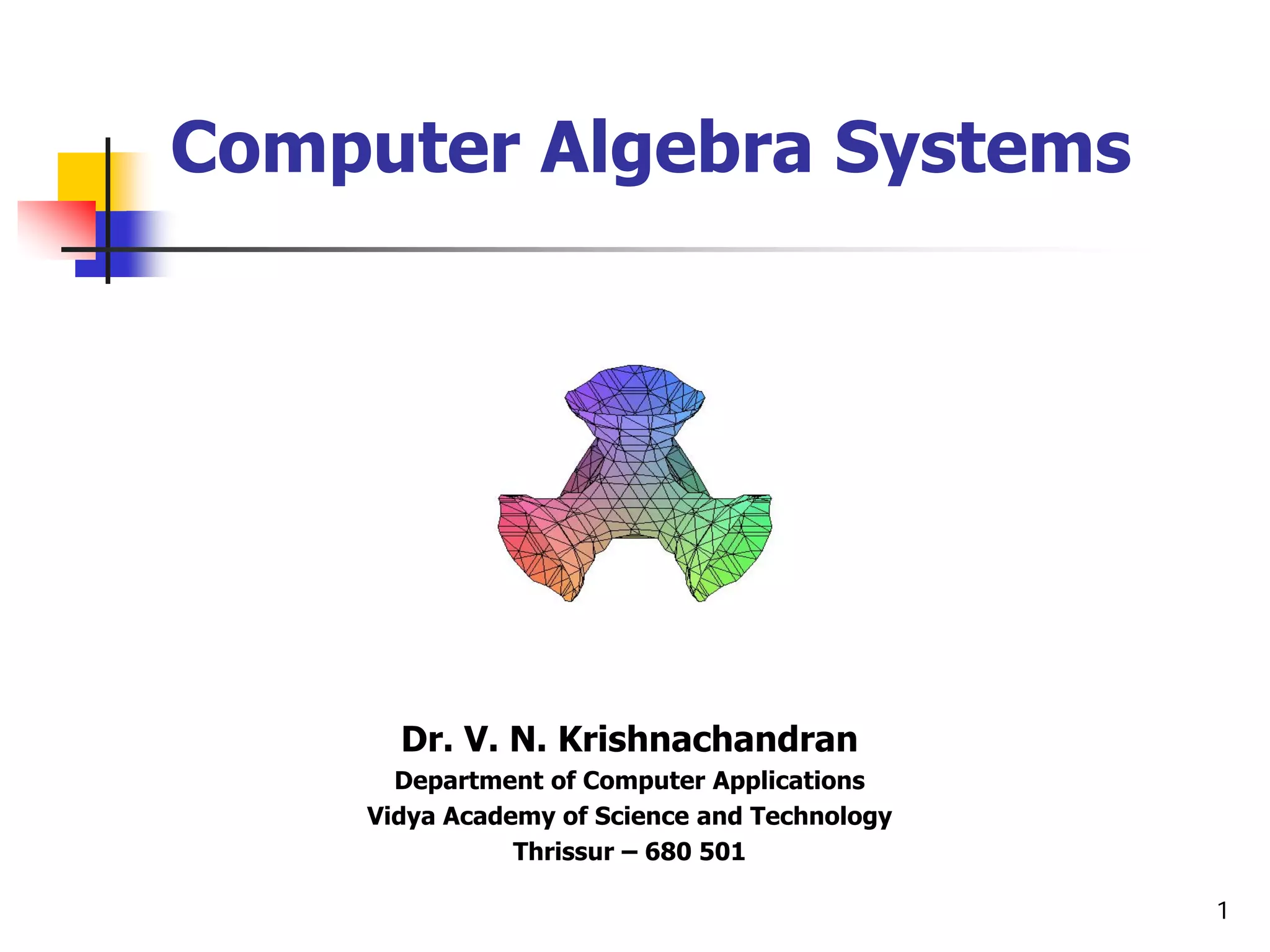
Computer Algebra Systems


      Dr. V. N. Krishnachandran
      Department of Computer Applications
    Vidya Academy of Science and Technology
               Thrissur – 680 501

                                              1
Introduction to Computer Algebra Systems


     Outline

     Introduction
                    Numerical computations
                    Symbolic computations
                    Some popular CAS’s : Maple, Matlab, …

     Maple in action
                    Maple syntax
                    Algebra with Maple
                    Calculus with Maple
                    Differential equations with Maple
                    Maple packages
                                   LinearAlgebra package
                                   inttrans package
                    Graphics with Maple

V. N. Krishnachandran, Vidya Academy of Science and Technology, Thrissur - 680501                                              2
Introduction to Computer Algebra Systems


                          Introduction


V. N. Krishnachandran, Vidya Academy of Science and Technology, Thrissur - 680501                                              3
Introduction to Computer Algebra Systems


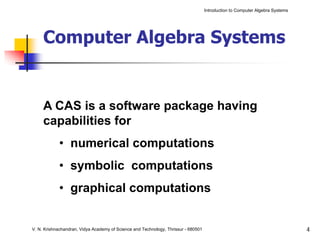
     Computer Algebra Systems


     A CAS is a software package having
     capabilities for
            • numerical computations
            • symbolic computations
            • graphical computations


V. N. Krishnachandran, Vidya Academy of Science and Technology, Thrissur - 680501                                              4
Introduction to Computer Algebra Systems


Introduction


Numerical computations


V. N. Krishnachandran, Vidya Academy of Science and Technology, Thrissur - 680501                                              5
Introduction to Computer Algebra Systems


     Numerical computation

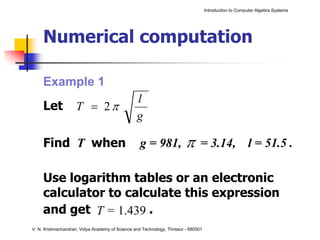
     Example 1
                                                 l
     Let             T = 2π
                                                 g

     Find T when                                   g = 981,              π      = 3.14, l = 51.5 .

     Use logarithm tables or an electronic
     calculator to calculate this expression
     and get T = 1.439 .
V. N. Krishnachandran, Vidya Academy of Science and Technology, Thrissur - 680501
Introduction to Computer Algebra Systems


     Numerical computation

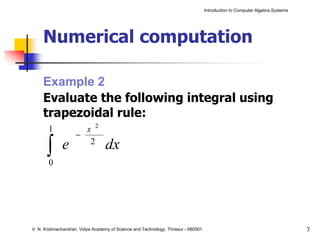
     Example 2
     Evaluate the following integral using
     trapezoidal rule:
       1              x 2
                    −
       ∫
       0
              e        2
                                  dx


V. N. Krishnachandran, Vidya Academy of Science and Technology, Thrissur - 680501                                              7
Introduction to Computer Algebra Systems


 Introduction


 Symbolic computations


V. N. Krishnachandran, Vidya Academy of Science and Technology, Thrissur - 680501                                              8
Introduction to Computer Algebra Systems


     Symbolic computation

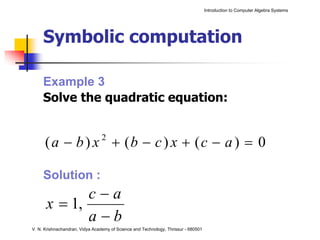
     Example 3
     Solve the quadratic equation:


      ( a − b ) x + (b − c ) x + (c − a ) = 0
                                 2


     Solution :
             c−a
      x = 1,
             a−b
V. N. Krishnachandran, Vidya Academy of Science and Technology, Thrissur - 680501
Introduction to Computer Algebra Systems


     Symbolic computation

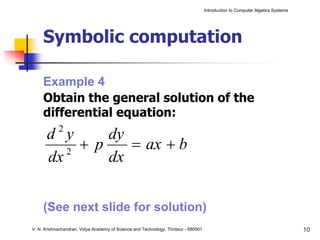
     Example 4
     Obtain the general solution of the
     differential equation:
            2
       d y      dy
          2
            + p    = ax + b
       dx       dx


     (See next slide for solution)
V. N. Krishnachandran, Vidya Academy of Science and Technology, Thrissur - 680501                                              10
Introduction to Computer Algebra Systems


     Symbolic computation

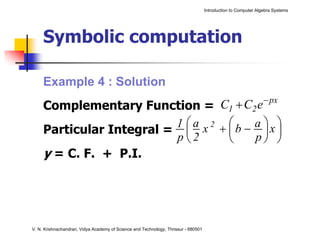
     Example 4 : Solution
     Complementary Function =       C1 + C2 e − px
                          1 ⎛ a x 2 + ⎛b − a ⎞x ⎞
     Particular Integral = ⎜          ⎜       ⎟ ⎟
                          p⎝2         ⎝    p⎠ ⎠
     y = C. F. + P.I.


V. N. Krishnachandran, Vidya Academy of Science and Technology, Thrissur - 680501
Introduction to Computer Algebra Systems


 Introduction


 Graphical computations


V. N. Krishnachandran, Vidya Academy of Science and Technology, Thrissur - 680501                                              12
Introduction to Computer Algebra Systems


     Graphical computation

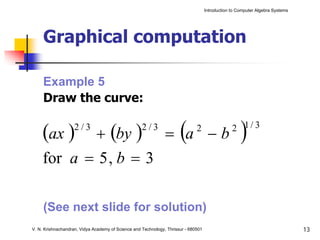
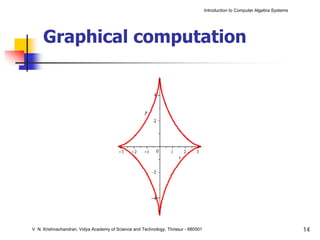
     Example 5
     Draw the curve:

     (ax )  + (by ) = a − b
                    2/3                             2/3
                                                                      (       2
                                                                                                     )
                                                                                                 2 1/ 3


     for a = 5 , b = 3

     (See next slide for solution)
V. N. Krishnachandran, Vidya Academy of Science and Technology, Thrissur - 680501                                              13
Introduction to Computer Algebra Systems


     Graphical computation


V. N. Krishnachandran, Vidya Academy of Science and Technology, Thrissur - 680501                                              14
Introduction to Computer Algebra Systems


     Graphical computation

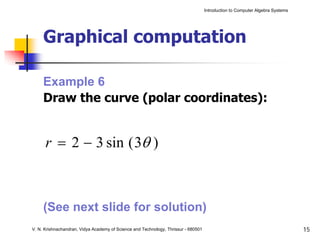
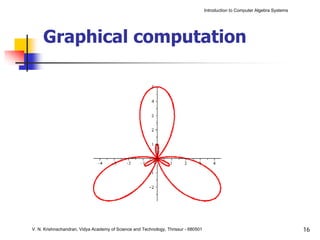
     Example 6
     Draw the curve (polar coordinates):


      r = 2 − 3 sin ( 3θ )


     (See next slide for solution)
V. N. Krishnachandran, Vidya Academy of Science and Technology, Thrissur - 680501                                              15
Introduction to Computer Algebra Systems


     Graphical computation


V. N. Krishnachandran, Vidya Academy of Science and Technology, Thrissur - 680501                                              16
Introduction to Computer Algebra Systems


     Graphical computation

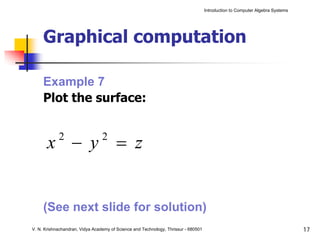
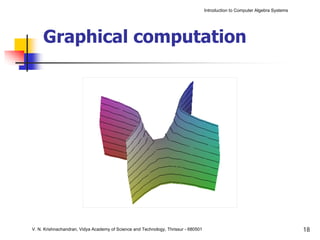
     Example 7
     Plot the surface:


       x − y = z
            2                    2


     (See next slide for solution)
V. N. Krishnachandran, Vidya Academy of Science and Technology, Thrissur - 680501                                              17
Introduction to Computer Algebra Systems


     Graphical computation


V. N. Krishnachandran, Vidya Academy of Science and Technology, Thrissur - 680501                                              18
Introduction to Computer Algebra Systems


         Introduction


         Some popular CAS’s


V. N. Krishnachandran, Vidya Academy of Science and Technology, Thrissur - 680501                                              19
Introduction to Computer Algebra Systems


     Some popular CAS’s


V. N. Krishnachandran, Vidya Academy of Science and Technology, Thrissur - 680501                                              20
Introduction to Computer Algebra Systems


     Some popular CAS’s


V. N. Krishnachandran, Vidya Academy of Science and Technology, Thrissur - 680501                                              21
Introduction to Computer Algebra Systems


     Some popular CAS’s


V. N. Krishnachandran, Vidya Academy of Science and Technology, Thrissur - 680501                                              22
Introduction to Computer Algebra Systems


     Some popular CAS’s

     Symbolic Math Toolbox in


V. N. Krishnachandran, Vidya Academy of Science and Technology, Thrissur - 680501                                              23
Introduction to Computer Algebra Systems


                    Maple in action


V. N. Krishnachandran, Vidya Academy of Science and Technology, Thrissur - 680501                                              24
Introduction to Computer Algebra Systems


                Maple in action


                Maple syntax


V. N. Krishnachandran, Vidya Academy of Science and Technology, Thrissur - 680501                                              25
Introduction to Computer Algebra Systems


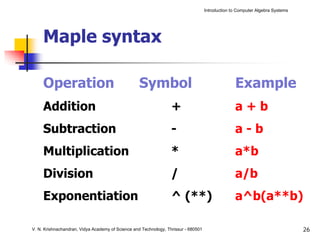
     Maple syntax

     Operation                                     Symbol                                         Example
     Addition                                                     +                               a+b
     Subtraction                                                  -                               a-b
     Multiplication                                               *                               a*b
     Division                                                     /                               a/b
     Exponentiation                                               ^ (**)                          a^b(a**b)

V. N. Krishnachandran, Vidya Academy of Science and Technology, Thrissur - 680501                                              26
Introduction to Computer Algebra Systems


     Maple syntax

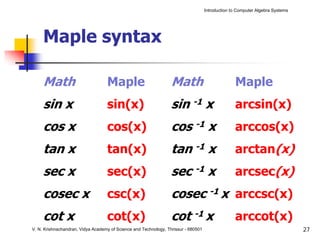
     Math                          Maple                          Math                            Maple
     sin x                         sin(x)                         sin -1 x                        arcsin(x)
     cos x                         cos(x)                         cos -1 x                        arccos(x)
     tan x                         tan(x)                         tan -1 x                        arctan(x)
     sec x                         sec(x)                         sec -1 x                        arcsec(x)
     cosec x                       csc(x)                         cosec -1 x arccsc(x)
     cot x                         cot(x)                         cot -1 x                        arccot(x)
V. N. Krishnachandran, Vidya Academy of Science and Technology, Thrissur - 680501                                              27
Introduction to Computer Algebra Systems


     Maple syntax

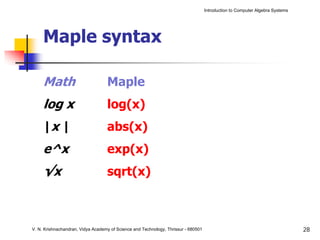
     Math                          Maple
     log x                         log(x)
     |x |                          abs(x)
     e^x                           exp(x)
     √x                            sqrt(x)


V. N. Krishnachandran, Vidya Academy of Science and Technology, Thrissur - 680501                                              28
Introduction to Computer Algebra Systems


     Maple syntax

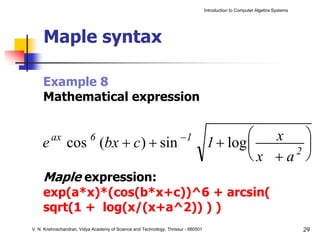
     Example 8
     Mathematical expression


                                                                      −1                     ⎛  x ⎞
     e   ax
                cos (bx + c ) + sin
                           6
                                                                                     1 + log ⎜    2⎟
                                                                                             ⎝x +a ⎠
     Maple expression:
     exp(a*x)*(cos(b*x+c))^6 + arcsin(
     sqrt(1 + log(x/(x+a^2)) ) )
V. N. Krishnachandran, Vidya Academy of Science and Technology, Thrissur - 680501                                              29
Introduction to Computer Algebra Systems


         Maple in action


         Algebra with Maple


V. N. Krishnachandran, Vidya Academy of Science and Technology, Thrissur - 680501                                              30
Introduction to Computer Algebra Systems


     Algebra

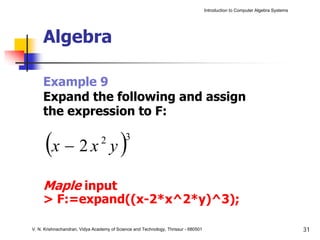
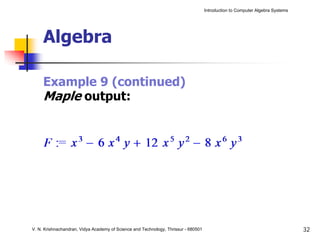
     Example 9
     Expand the following and assign
     the expression to F:

      (x − 2 x y )              2           3


     Maple input
     > F:=expand((x-2*x^2*y)^3);

V. N. Krishnachandran, Vidya Academy of Science and Technology, Thrissur - 680501                                              31
Introduction to Computer Algebra Systems


     Algebra

     Example 9 (continued)
     Maple output:


V. N. Krishnachandran, Vidya Academy of Science and Technology, Thrissur - 680501                                              32
Introduction to Computer Algebra Systems


     Algebra

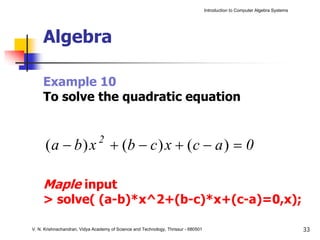
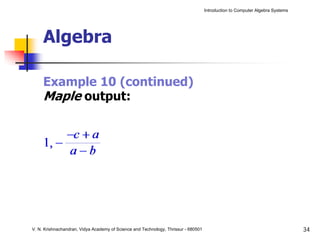
     Example 10
     To solve the quadratic equation


      ( a − b ) x + (b − c ) x + ( c − a ) = 0
                               2


     Maple input
     > solve( (a-b)*x^2+(b-c)*x+(c-a)=0,x);

V. N. Krishnachandran, Vidya Academy of Science and Technology, Thrissur - 680501                                              33
Introduction to Computer Algebra Systems


     Algebra

     Example 10 (continued)
     Maple output:


V. N. Krishnachandran, Vidya Academy of Science and Technology, Thrissur - 680501                                              34
Introduction to Computer Algebra Systems


     Algebra

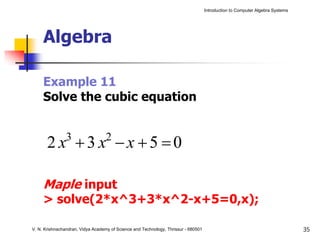
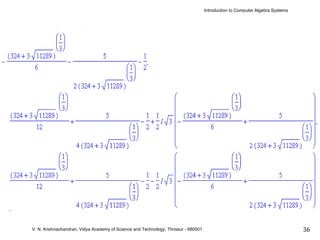
     Example 11
     Solve the cubic equation


       2 x +3 x −x +5 =0
                3                  2


     Maple input
     > solve(2*x^3+3*x^2-x+5=0,x);

V. N. Krishnachandran, Vidya Academy of Science and Technology, Thrissur - 680501                                              35
Introduction to Computer Algebra Systems


     Algebra


V. N. Krishnachandran, Vidya Academy of Science and Technology, Thrissur - 680501                                              36
Introduction to Computer Algebra Systems


     Algebra

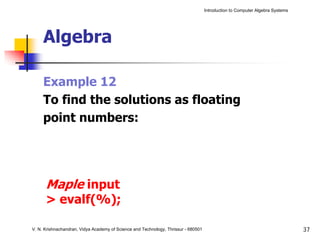
     Example 12
     To find the solutions as floating
     point numbers:


      Maple input
      > evalf(%);

V. N. Krishnachandran, Vidya Academy of Science and Technology, Thrissur - 680501                                              37
Introduction to Computer Algebra Systems


     Algebra

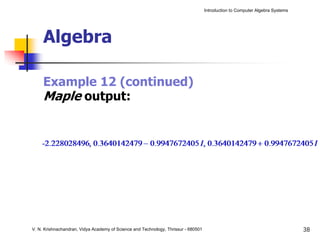
     Example 12 (continued)
     Maple output:


V. N. Krishnachandran, Vidya Academy of Science and Technology, Thrissur - 680501                                              38
Introduction to Computer Algebra Systems


         Maple in action


         Calculus with Maple


V. N. Krishnachandran, Vidya Academy of Science and Technology, Thrissur - 680501                                              39
Introduction to Computer Algebra Systems


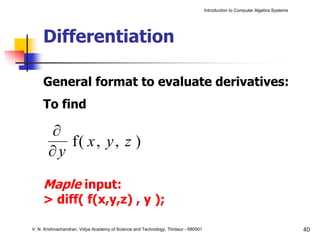
     Differentiation

     General format to evaluate derivatives:
     To find

       ∂
          f( x , y , z )
       ∂y

     Maple input:
     > diff( f(x,y,z) , y );

V. N. Krishnachandran, Vidya Academy of Science and Technology, Thrissur - 680501                                              40
Introduction to Computer Algebra Systems


     Differentiation

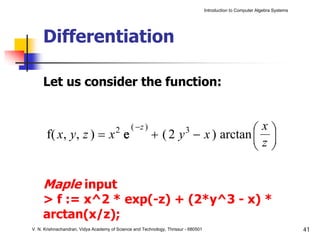
     Let us consider the function:


      f( x, y, z ) = x e               2       ( −z )                        ⎛x⎞
                                                        + ( 2 y − x ) arctan ⎜ ⎟
                                                                         3
                                                                             ⎜z⎟
                                                                             ⎝ ⎠

     Maple input
     > f := x^2 * exp(-z) + (2*y^3 - x) *
     arctan(x/z);
V. N. Krishnachandran, Vidya Academy of Science and Technology, Thrissur - 680501                                              41
Introduction to Computer Algebra Systems


     Differentiation

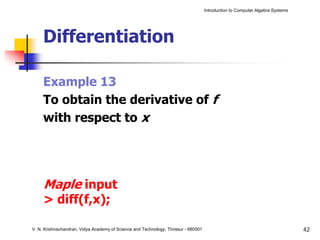
     Example 13
     To obtain the derivative of f
     with respect to x


     Maple input
     > diff(f,x);

V. N. Krishnachandran, Vidya Academy of Science and Technology, Thrissur - 680501                                              42
Introduction to Computer Algebra Systems


     Differentiation

     Example 13 (continued)
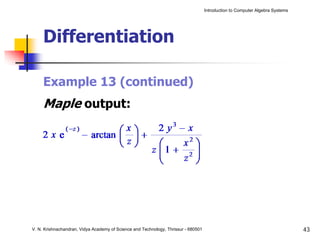
     Maple output:


V. N. Krishnachandran, Vidya Academy of Science and Technology, Thrissur - 680501                                              43
Introduction to Computer Algebra Systems


     Differentiation

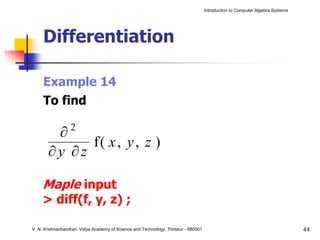
     Example 14
     To find

        ∂2
             f( x , y , z )
       ∂y ∂z

     Maple input
     > diff(f, y, z) ;

V. N. Krishnachandran, Vidya Academy of Science and Technology, Thrissur - 680501                                              44
Introduction to Computer Algebra Systems


     Differentiation

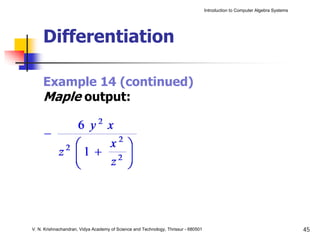
     Example 14 (continued)
     Maple output:


V. N. Krishnachandran, Vidya Academy of Science and Technology, Thrissur - 680501                                              45
Introduction to Computer Algebra Systems


     Differentiation

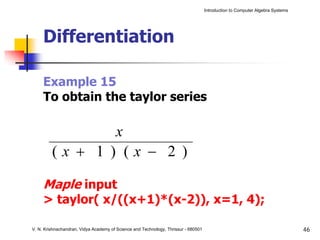
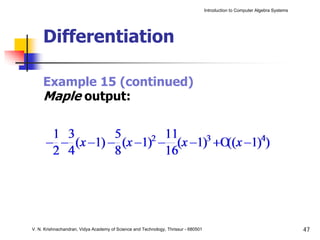
     Example 15
     To obtain the taylor series

                                       x
         (x + 1 ) (x − 2 )

     Maple input
     > taylor( x/((x+1)*(x-2)), x=1, 4);

V. N. Krishnachandran, Vidya Academy of Science and Technology, Thrissur - 680501                                              46
Introduction to Computer Algebra Systems


     Differentiation

     Example 15 (continued)
     Maple output:


V. N. Krishnachandran, Vidya Academy of Science and Technology, Thrissur - 680501                                              47
Introduction to Computer Algebra Systems


     Integration

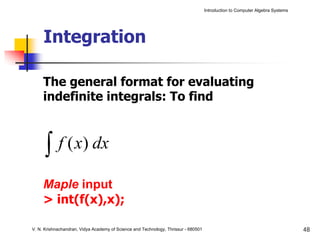
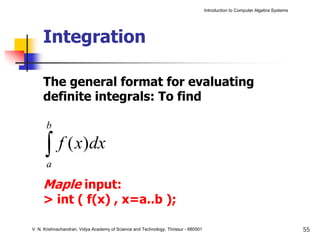
     The general format for evaluating
     indefinite integrals: To find


      ∫     f ( x) dx

     Maple input
     > int(f(x),x);

V. N. Krishnachandran, Vidya Academy of Science and Technology, Thrissur - 680501                                              48
Introduction to Computer Algebra Systems


     Integration

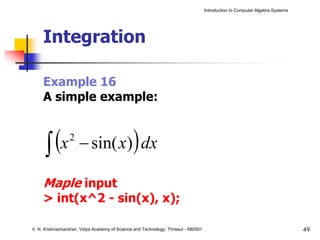
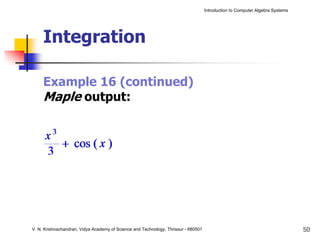
     Example 16
     A simple example:


      ∫ (x            − sin( x) dx              )
                 2


     Maple input
     > int(x^2 - sin(x), x);

V. N. Krishnachandran, Vidya Academy of Science and Technology, Thrissur - 680501                                              49
Introduction to Computer Algebra Systems


     Integration

     Example 16 (continued)
     Maple output:


V. N. Krishnachandran, Vidya Academy of Science and Technology, Thrissur - 680501                                              50
Introduction to Computer Algebra Systems


     Integration

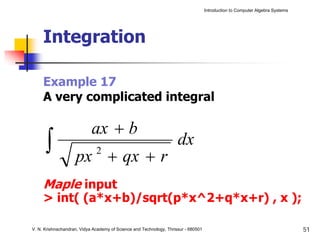
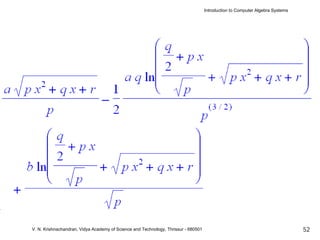
     Example 17
     A very complicated integral

                            ax + b
      ∫             px + qx + r
                              2
                                                                     dx

     Maple input
     > int( (a*x+b)/sqrt(p*x^2+q*x+r) , x );

V. N. Krishnachandran, Vidya Academy of Science and Technology, Thrissur - 680501                                              51
Introduction to Computer Algebra Systems


V. N. Krishnachandran, Vidya Academy of Science and Technology, Thrissur - 680501                                              52
Introduction to Computer Algebra Systems


     Integration

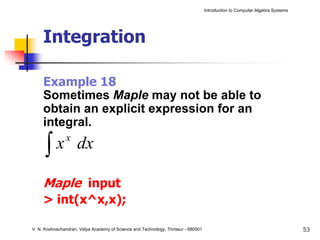
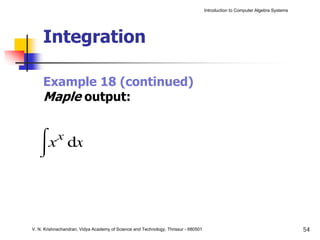
     Example 18
     Sometimes Maple may not be able to
     obtain an explicit expression for an
     integral.

      ∫
                x
        x dx

     Maple input
     > int(x^x,x);

V. N. Krishnachandran, Vidya Academy of Science and Technology, Thrissur - 680501                                              53
Introduction to Computer Algebra Systems


     Integration

     Example 18 (continued)
     Maple output:


V. N. Krishnachandran, Vidya Academy of Science and Technology, Thrissur - 680501                                              54
Introduction to Computer Algebra Systems


     Integration

     The general format for evaluating
     definite integrals: To find

      b

      ∫ f ( x)dx
      a

     Maple input:
     > int ( f(x) , x=a..b );

V. N. Krishnachandran, Vidya Academy of Science and Technology, Thrissur - 680501                                              55
Introduction to Computer Algebra Systems


     Integration

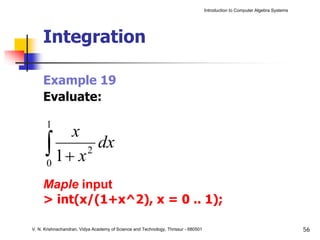
     Example 19
     Evaluate:

      1
          x
      ∫ 1+ x2
      0
              dx

     Maple input
     > int(x/(1+x^2), x = 0 .. 1);

V. N. Krishnachandran, Vidya Academy of Science and Technology, Thrissur - 680501                                              56
Introduction to Computer Algebra Systems


     Integration

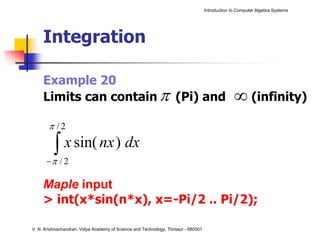
     Example 20
     Limits can contain π (Pi) and                                                                ∞ (infinity)
       π /2

         ∫ x sin( nx ) dx
         π
      − /2

     Maple input
     > int(x*sin(n*x), x=-Pi/2 .. Pi/2);

V. N. Krishnachandran, Vidya Academy of Science and Technology, Thrissur - 680501
Introduction to Computer Algebra Systems


     Integration

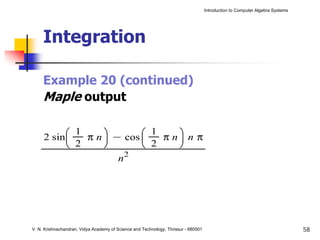
     Example 20 (continued)
     Maple output


V. N. Krishnachandran, Vidya Academy of Science and Technology, Thrissur - 680501                                              58
Introduction to Computer Algebra Systems


       Maple in action


       Differential equations
       with Maple

V. N. Krishnachandran, Vidya Academy of Science and Technology, Thrissur - 680501                                              59
Introduction to Computer Algebra Systems


     Differential equations

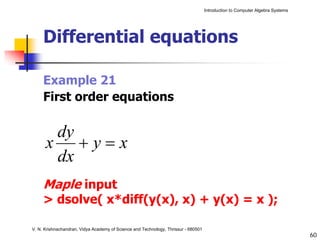
     Example 21
     First order equations

       dy
      x +y=x
       dx
     Maple input
     > dsolve( x*diff(y(x), x) + y(x) = x );

V. N. Krishnachandran, Vidya Academy of Science and Technology, Thrissur - 680501
                                                                                                                               60
Introduction to Computer Algebra Systems


     Differential equations

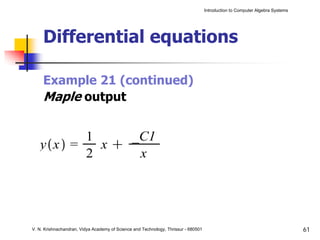
     Example 21 (continued)
     Maple output


V. N. Krishnachandran, Vidya Academy of Science and Technology, Thrissur - 680501                                              61
Introduction to Computer Algebra Systems


     Differential equations

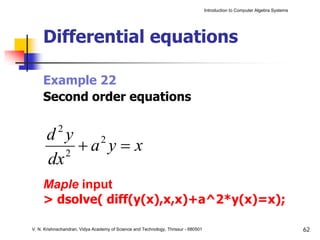
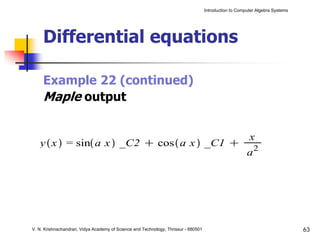
     Example 22
     Second order equations

            2
       d y
          2
            +a y = x
              2

       dx
     Maple input
     > dsolve( diff(y(x),x,x)+a^2*y(x)=x);

V. N. Krishnachandran, Vidya Academy of Science and Technology, Thrissur - 680501                                              62
Introduction to Computer Algebra Systems


     Differential equations

     Example 22 (continued)
     Maple output


V. N. Krishnachandran, Vidya Academy of Science and Technology, Thrissur - 680501                                              63
Introduction to Computer Algebra Systems


                   Maple in action


                   Maple packages


V. N. Krishnachandran, Vidya Academy of Science and Technology, Thrissur - 680501                                              64
Introduction to Computer Algebra Systems


     Packages

     Some packages
     combinat                                      combinatorial functions
     inttrans                                      integral transforms
     LinearAlgebra Linear algebra
     networks                                      graph networks
     numtheory                                     number theory
     plots                                         displaying graphs
V. N. Krishnachandran, Vidya Academy of Science and Technology, Thrissur - 680501                                              65
Introduction to Computer Algebra Systems


Maple in action


LinearAlgebra package


V. N. Krishnachandran, Vidya Academy of Science and Technology, Thrissur - 680501                                              66
Introduction to Computer Algebra Systems


     LinearAlgebra package

     This is a collection of functions
     for symbolic computations
     involving vectors and matrices.


V. N. Krishnachandran, Vidya Academy of Science and Technology, Thrissur - 680501                                              67
Introduction to Computer Algebra Systems


     LinearAlgebra package

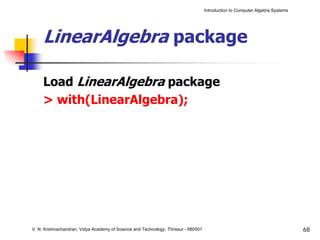
     Load LinearAlgebra package
     > with(LinearAlgebra);


V. N. Krishnachandran, Vidya Academy of Science and Technology, Thrissur - 680501                                              68
Introduction to Computer Algebra Systems


     LinearAlgebra package

     To define the matrix


       ⎡ 1                    −3                4⎤
       ⎢
       ⎢ 2                                       ⎥
       ⎢                      3                 4⎥
                                                 ⎥
       ⎢
       ⎢−4                                       ⎥
       ⎣                      0                 5⎥
                                                 ⎦
     Maple input
     >A:=Matrix([[1, -3, 4],[2, 3, 4],[-4, 0, 5]]);

V. N. Krishnachandran, Vidya Academy of Science and Technology, Thrissur - 680501                                              69
Introduction to Computer Algebra Systems


     LinearAlgebra package

     Example 23
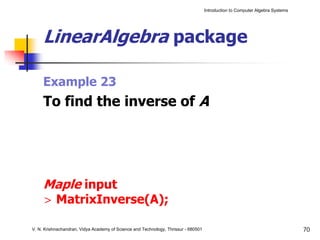
     To find the inverse of A


     Maple input
     > MatrixInverse(A);

V. N. Krishnachandran, Vidya Academy of Science and Technology, Thrissur - 680501                                              70
Introduction to Computer Algebra Systems


     LinearAlgebra package

     Example 24
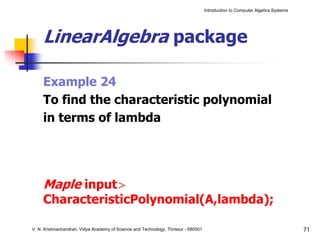
     To find the characteristic polynomial
     in terms of lambda


     Maple input>
     CharacteristicPolynomial(A,lambda);

V. N. Krishnachandran, Vidya Academy of Science and Technology, Thrissur - 680501                                              71
Introduction to Computer Algebra Systems


     LinearAlgebra package

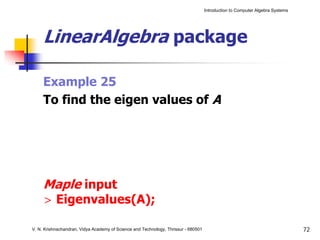
     Example 25
     To find the eigen values of A


     Maple input
     > Eigenvalues(A);

V. N. Krishnachandran, Vidya Academy of Science and Technology, Thrissur - 680501                                              72
Introduction to Computer Algebra Systems


                  Maple in action


                  inttrans package


V. N. Krishnachandran, Vidya Academy of Science and Technology, Thrissur - 680501                                              73
Introduction to Computer Algebra Systems


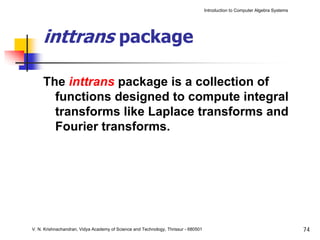
     inttrans package

     The inttrans package is a collection of
       functions designed to compute integral
       transforms like Laplace transforms and
       Fourier transforms.


V. N. Krishnachandran, Vidya Academy of Science and Technology, Thrissur - 680501                                              74
Introduction to Computer Algebra Systems


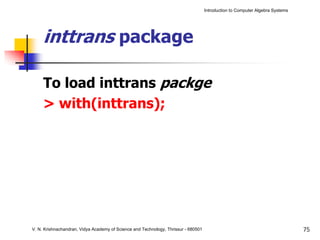
     inttrans package

     To load inttrans packge
     > with(inttrans);


V. N. Krishnachandran, Vidya Academy of Science and Technology, Thrissur - 680501                                              75
Introduction to Computer Algebra Systems


     inttrans package

     Example 26
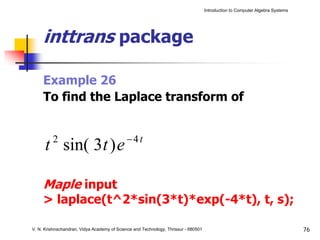
     To find the Laplace transform of


         2                                   −4 t
      t sin( 3 t ) e

     Maple input
     > laplace(t^2*sin(3*t)*exp(-4*t), t, s);

V. N. Krishnachandran, Vidya Academy of Science and Technology, Thrissur - 680501                                              76
Introduction to Computer Algebra Systems


     inttrans package

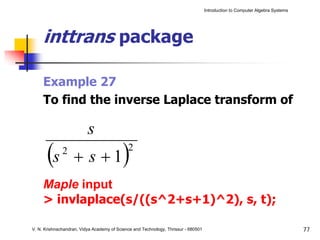
     Example 27
     To find the inverse Laplace transform of

                          s
       (s     2
                   + s +1                  ) 2


     Maple input
     > invlaplace(s/((s^2+s+1)^2), s, t);

V. N. Krishnachandran, Vidya Academy of Science and Technology, Thrissur - 680501                                              77
Introduction to Computer Algebra Systems


     Maple in action


     Graphics with Maple


V. N. Krishnachandran, Vidya Academy of Science and Technology, Thrissur - 680501                                              78
Introduction to Computer Algebra Systems


     Graphics

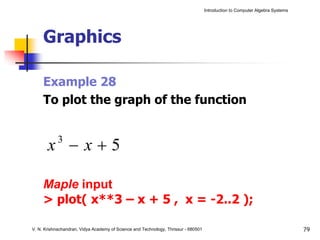
     Example 28
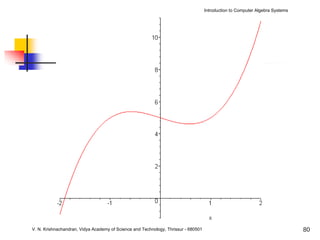
     To plot the graph of the function


       x −x+5
            3


     Maple input
     > plot( x**3 – x + 5 , x = -2..2 );

V. N. Krishnachandran, Vidya Academy of Science and Technology, Thrissur - 680501                                              79
Introduction to Computer Algebra Systems


V. N. Krishnachandran, Vidya Academy of Science and Technology, Thrissur - 680501                                              80
Introduction to Computer Algebra Systems


     Graphics

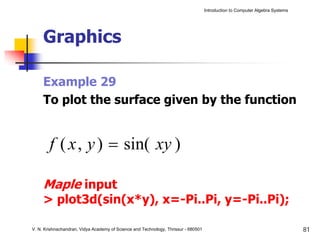
     Example 29
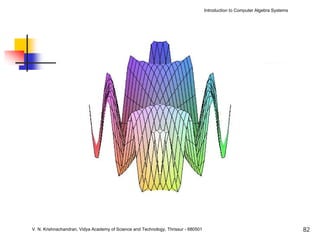
     To plot the surface given by the function


        f ( x , y ) = sin( xy )

     Maple input
     > plot3d(sin(x*y), x=-Pi..Pi, y=-Pi..Pi);

V. N. Krishnachandran, Vidya Academy of Science and Technology, Thrissur - 680501                                              81
Introduction to Computer Algebra Systems


V. N. Krishnachandran, Vidya Academy of Science and Technology, Thrissur - 680501                                              82
Introduction to Computer Algebra Systems


     Graphics:plots package

     To use the plots package
     > with(plots);


V. N. Krishnachandran, Vidya Academy of Science and Technology, Thrissur - 680501                                              83
Introduction to Computer Algebra Systems


     Graphics:plots package

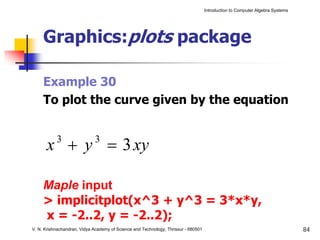
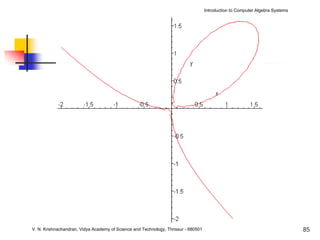
     Example 30
     To plot the curve given by the equation


      x + y = 3 xy
           3                 3


     Maple input
     > implicitplot(x^3 + y^3 = 3*x*y,
     x = -2..2, y = -2..2);
V. N. Krishnachandran, Vidya Academy of Science and Technology, Thrissur - 680501                                              84
Introduction to Computer Algebra Systems


V. N. Krishnachandran, Vidya Academy of Science and Technology, Thrissur - 680501                                              85
Introduction to Computer Algebra Systems


     Graphics:plots package

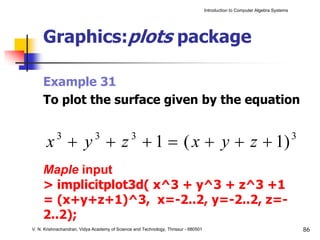
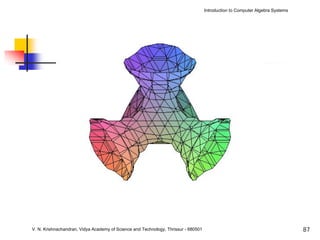
     Example 31
     To plot the surface given by the equation


      x + y + z + 1 = ( x + y + z + 1)
           3                 3                 3                                                                               3


     Maple input
     > implicitplot3d( x^3 + y^3 + z^3 +1
     = (x+y+z+1)^3, x=-2..2, y=-2..2, z=-
     2..2);
V. N. Krishnachandran, Vidya Academy of Science and Technology, Thrissur - 680501                                                  86
Introduction to Computer Algebra Systems


V. N. Krishnachandran, Vidya Academy of Science and Technology, Thrissur - 680501                                              87
Introduction to Computer Algebra Systems


                            THANK YOU …


V. N. Krishnachandran, Vidya Academy of Science and Technology, Thrissur - 680501                                              88

Introduction to Computer Algebra Systems

  • 1.
    Computer Algebra Systems Dr. V. N. Krishnachandran Department of Computer Applications Vidya Academy of Science and Technology Thrissur – 680 501 1
  • 2.
    Introduction to ComputerAlgebra Systems Outline Introduction Numerical computations Symbolic computations Some popular CAS’s : Maple, Matlab, … Maple in action Maple syntax Algebra with Maple Calculus with Maple Differential equations with Maple Maple packages LinearAlgebra package inttrans package Graphics with Maple V. N. Krishnachandran, Vidya Academy of Science and Technology, Thrissur - 680501 2
  • 3.
    Introduction to ComputerAlgebra Systems Introduction V. N. Krishnachandran, Vidya Academy of Science and Technology, Thrissur - 680501 3
  • 4.
    Introduction to ComputerAlgebra Systems Computer Algebra Systems A CAS is a software package having capabilities for • numerical computations • symbolic computations • graphical computations V. N. Krishnachandran, Vidya Academy of Science and Technology, Thrissur - 680501 4
  • 5.
    Introduction to ComputerAlgebra Systems Introduction Numerical computations V. N. Krishnachandran, Vidya Academy of Science and Technology, Thrissur - 680501 5
  • 6.
    Introduction to ComputerAlgebra Systems Numerical computation Example 1 l Let T = 2π g Find T when g = 981, π = 3.14, l = 51.5 . Use logarithm tables or an electronic calculator to calculate this expression and get T = 1.439 . V. N. Krishnachandran, Vidya Academy of Science and Technology, Thrissur - 680501
  • 7.
    Introduction to ComputerAlgebra Systems Numerical computation Example 2 Evaluate the following integral using trapezoidal rule: 1 x 2 − ∫ 0 e 2 dx V. N. Krishnachandran, Vidya Academy of Science and Technology, Thrissur - 680501 7
  • 8.
    Introduction to ComputerAlgebra Systems Introduction Symbolic computations V. N. Krishnachandran, Vidya Academy of Science and Technology, Thrissur - 680501 8
  • 9.
    Introduction to ComputerAlgebra Systems Symbolic computation Example 3 Solve the quadratic equation: ( a − b ) x + (b − c ) x + (c − a ) = 0 2 Solution : c−a x = 1, a−b V. N. Krishnachandran, Vidya Academy of Science and Technology, Thrissur - 680501
  • 10.
    Introduction to ComputerAlgebra Systems Symbolic computation Example 4 Obtain the general solution of the differential equation: 2 d y dy 2 + p = ax + b dx dx (See next slide for solution) V. N. Krishnachandran, Vidya Academy of Science and Technology, Thrissur - 680501 10
  • 11.
    Introduction to ComputerAlgebra Systems Symbolic computation Example 4 : Solution Complementary Function = C1 + C2 e − px 1 ⎛ a x 2 + ⎛b − a ⎞x ⎞ Particular Integral = ⎜ ⎜ ⎟ ⎟ p⎝2 ⎝ p⎠ ⎠ y = C. F. + P.I. V. N. Krishnachandran, Vidya Academy of Science and Technology, Thrissur - 680501
  • 12.
    Introduction to ComputerAlgebra Systems Introduction Graphical computations V. N. Krishnachandran, Vidya Academy of Science and Technology, Thrissur - 680501 12
  • 13.
    Introduction to ComputerAlgebra Systems Graphical computation Example 5 Draw the curve: (ax ) + (by ) = a − b 2/3 2/3 ( 2 ) 2 1/ 3 for a = 5 , b = 3 (See next slide for solution) V. N. Krishnachandran, Vidya Academy of Science and Technology, Thrissur - 680501 13
  • 14.
    Introduction to ComputerAlgebra Systems Graphical computation V. N. Krishnachandran, Vidya Academy of Science and Technology, Thrissur - 680501 14
  • 15.
    Introduction to ComputerAlgebra Systems Graphical computation Example 6 Draw the curve (polar coordinates): r = 2 − 3 sin ( 3θ ) (See next slide for solution) V. N. Krishnachandran, Vidya Academy of Science and Technology, Thrissur - 680501 15
  • 16.
    Introduction to ComputerAlgebra Systems Graphical computation V. N. Krishnachandran, Vidya Academy of Science and Technology, Thrissur - 680501 16
  • 17.
    Introduction to ComputerAlgebra Systems Graphical computation Example 7 Plot the surface: x − y = z 2 2 (See next slide for solution) V. N. Krishnachandran, Vidya Academy of Science and Technology, Thrissur - 680501 17
  • 18.
    Introduction to ComputerAlgebra Systems Graphical computation V. N. Krishnachandran, Vidya Academy of Science and Technology, Thrissur - 680501 18
  • 19.
    Introduction to ComputerAlgebra Systems Introduction Some popular CAS’s V. N. Krishnachandran, Vidya Academy of Science and Technology, Thrissur - 680501 19
  • 20.
    Introduction to ComputerAlgebra Systems Some popular CAS’s V. N. Krishnachandran, Vidya Academy of Science and Technology, Thrissur - 680501 20
  • 21.
    Introduction to ComputerAlgebra Systems Some popular CAS’s V. N. Krishnachandran, Vidya Academy of Science and Technology, Thrissur - 680501 21
  • 22.
    Introduction to ComputerAlgebra Systems Some popular CAS’s V. N. Krishnachandran, Vidya Academy of Science and Technology, Thrissur - 680501 22
  • 23.
    Introduction to ComputerAlgebra Systems Some popular CAS’s Symbolic Math Toolbox in V. N. Krishnachandran, Vidya Academy of Science and Technology, Thrissur - 680501 23
  • 24.
    Introduction to ComputerAlgebra Systems Maple in action V. N. Krishnachandran, Vidya Academy of Science and Technology, Thrissur - 680501 24
  • 25.
    Introduction to ComputerAlgebra Systems Maple in action Maple syntax V. N. Krishnachandran, Vidya Academy of Science and Technology, Thrissur - 680501 25
  • 26.
    Introduction to ComputerAlgebra Systems Maple syntax Operation Symbol Example Addition + a+b Subtraction - a-b Multiplication * a*b Division / a/b Exponentiation ^ (**) a^b(a**b) V. N. Krishnachandran, Vidya Academy of Science and Technology, Thrissur - 680501 26
  • 27.
    Introduction to ComputerAlgebra Systems Maple syntax Math Maple Math Maple sin x sin(x) sin -1 x arcsin(x) cos x cos(x) cos -1 x arccos(x) tan x tan(x) tan -1 x arctan(x) sec x sec(x) sec -1 x arcsec(x) cosec x csc(x) cosec -1 x arccsc(x) cot x cot(x) cot -1 x arccot(x) V. N. Krishnachandran, Vidya Academy of Science and Technology, Thrissur - 680501 27
  • 28.
    Introduction to ComputerAlgebra Systems Maple syntax Math Maple log x log(x) |x | abs(x) e^x exp(x) √x sqrt(x) V. N. Krishnachandran, Vidya Academy of Science and Technology, Thrissur - 680501 28
  • 29.
    Introduction to ComputerAlgebra Systems Maple syntax Example 8 Mathematical expression −1 ⎛ x ⎞ e ax cos (bx + c ) + sin 6 1 + log ⎜ 2⎟ ⎝x +a ⎠ Maple expression: exp(a*x)*(cos(b*x+c))^6 + arcsin( sqrt(1 + log(x/(x+a^2)) ) ) V. N. Krishnachandran, Vidya Academy of Science and Technology, Thrissur - 680501 29
  • 30.
    Introduction to ComputerAlgebra Systems Maple in action Algebra with Maple V. N. Krishnachandran, Vidya Academy of Science and Technology, Thrissur - 680501 30
  • 31.
    Introduction to ComputerAlgebra Systems Algebra Example 9 Expand the following and assign the expression to F: (x − 2 x y ) 2 3 Maple input > F:=expand((x-2*x^2*y)^3); V. N. Krishnachandran, Vidya Academy of Science and Technology, Thrissur - 680501 31
  • 32.
    Introduction to ComputerAlgebra Systems Algebra Example 9 (continued) Maple output: V. N. Krishnachandran, Vidya Academy of Science and Technology, Thrissur - 680501 32
  • 33.
    Introduction to ComputerAlgebra Systems Algebra Example 10 To solve the quadratic equation ( a − b ) x + (b − c ) x + ( c − a ) = 0 2 Maple input > solve( (a-b)*x^2+(b-c)*x+(c-a)=0,x); V. N. Krishnachandran, Vidya Academy of Science and Technology, Thrissur - 680501 33
  • 34.
    Introduction to ComputerAlgebra Systems Algebra Example 10 (continued) Maple output: V. N. Krishnachandran, Vidya Academy of Science and Technology, Thrissur - 680501 34
  • 35.
    Introduction to ComputerAlgebra Systems Algebra Example 11 Solve the cubic equation 2 x +3 x −x +5 =0 3 2 Maple input > solve(2*x^3+3*x^2-x+5=0,x); V. N. Krishnachandran, Vidya Academy of Science and Technology, Thrissur - 680501 35
  • 36.
    Introduction to ComputerAlgebra Systems Algebra V. N. Krishnachandran, Vidya Academy of Science and Technology, Thrissur - 680501 36
  • 37.
    Introduction to ComputerAlgebra Systems Algebra Example 12 To find the solutions as floating point numbers: Maple input > evalf(%); V. N. Krishnachandran, Vidya Academy of Science and Technology, Thrissur - 680501 37
  • 38.
    Introduction to ComputerAlgebra Systems Algebra Example 12 (continued) Maple output: V. N. Krishnachandran, Vidya Academy of Science and Technology, Thrissur - 680501 38
  • 39.
    Introduction to ComputerAlgebra Systems Maple in action Calculus with Maple V. N. Krishnachandran, Vidya Academy of Science and Technology, Thrissur - 680501 39
  • 40.
    Introduction to ComputerAlgebra Systems Differentiation General format to evaluate derivatives: To find ∂ f( x , y , z ) ∂y Maple input: > diff( f(x,y,z) , y ); V. N. Krishnachandran, Vidya Academy of Science and Technology, Thrissur - 680501 40
  • 41.
    Introduction to ComputerAlgebra Systems Differentiation Let us consider the function: f( x, y, z ) = x e 2 ( −z ) ⎛x⎞ + ( 2 y − x ) arctan ⎜ ⎟ 3 ⎜z⎟ ⎝ ⎠ Maple input > f := x^2 * exp(-z) + (2*y^3 - x) * arctan(x/z); V. N. Krishnachandran, Vidya Academy of Science and Technology, Thrissur - 680501 41
  • 42.
    Introduction to ComputerAlgebra Systems Differentiation Example 13 To obtain the derivative of f with respect to x Maple input > diff(f,x); V. N. Krishnachandran, Vidya Academy of Science and Technology, Thrissur - 680501 42
  • 43.
    Introduction to ComputerAlgebra Systems Differentiation Example 13 (continued) Maple output: V. N. Krishnachandran, Vidya Academy of Science and Technology, Thrissur - 680501 43
  • 44.
    Introduction to ComputerAlgebra Systems Differentiation Example 14 To find ∂2 f( x , y , z ) ∂y ∂z Maple input > diff(f, y, z) ; V. N. Krishnachandran, Vidya Academy of Science and Technology, Thrissur - 680501 44
  • 45.
    Introduction to ComputerAlgebra Systems Differentiation Example 14 (continued) Maple output: V. N. Krishnachandran, Vidya Academy of Science and Technology, Thrissur - 680501 45
  • 46.
    Introduction to ComputerAlgebra Systems Differentiation Example 15 To obtain the taylor series x (x + 1 ) (x − 2 ) Maple input > taylor( x/((x+1)*(x-2)), x=1, 4); V. N. Krishnachandran, Vidya Academy of Science and Technology, Thrissur - 680501 46
  • 47.
    Introduction to ComputerAlgebra Systems Differentiation Example 15 (continued) Maple output: V. N. Krishnachandran, Vidya Academy of Science and Technology, Thrissur - 680501 47
  • 48.
    Introduction to ComputerAlgebra Systems Integration The general format for evaluating indefinite integrals: To find ∫ f ( x) dx Maple input > int(f(x),x); V. N. Krishnachandran, Vidya Academy of Science and Technology, Thrissur - 680501 48
  • 49.
    Introduction to ComputerAlgebra Systems Integration Example 16 A simple example: ∫ (x − sin( x) dx ) 2 Maple input > int(x^2 - sin(x), x); V. N. Krishnachandran, Vidya Academy of Science and Technology, Thrissur - 680501 49
  • 50.
    Introduction to ComputerAlgebra Systems Integration Example 16 (continued) Maple output: V. N. Krishnachandran, Vidya Academy of Science and Technology, Thrissur - 680501 50
  • 51.
    Introduction to ComputerAlgebra Systems Integration Example 17 A very complicated integral ax + b ∫ px + qx + r 2 dx Maple input > int( (a*x+b)/sqrt(p*x^2+q*x+r) , x ); V. N. Krishnachandran, Vidya Academy of Science and Technology, Thrissur - 680501 51
  • 52.
    Introduction to ComputerAlgebra Systems V. N. Krishnachandran, Vidya Academy of Science and Technology, Thrissur - 680501 52
  • 53.
    Introduction to ComputerAlgebra Systems Integration Example 18 Sometimes Maple may not be able to obtain an explicit expression for an integral. ∫ x x dx Maple input > int(x^x,x); V. N. Krishnachandran, Vidya Academy of Science and Technology, Thrissur - 680501 53
  • 54.
    Introduction to ComputerAlgebra Systems Integration Example 18 (continued) Maple output: V. N. Krishnachandran, Vidya Academy of Science and Technology, Thrissur - 680501 54
  • 55.
    Introduction to ComputerAlgebra Systems Integration The general format for evaluating definite integrals: To find b ∫ f ( x)dx a Maple input: > int ( f(x) , x=a..b ); V. N. Krishnachandran, Vidya Academy of Science and Technology, Thrissur - 680501 55
  • 56.
    Introduction to ComputerAlgebra Systems Integration Example 19 Evaluate: 1 x ∫ 1+ x2 0 dx Maple input > int(x/(1+x^2), x = 0 .. 1); V. N. Krishnachandran, Vidya Academy of Science and Technology, Thrissur - 680501 56
  • 57.
    Introduction to ComputerAlgebra Systems Integration Example 20 Limits can contain π (Pi) and ∞ (infinity) π /2 ∫ x sin( nx ) dx π − /2 Maple input > int(x*sin(n*x), x=-Pi/2 .. Pi/2); V. N. Krishnachandran, Vidya Academy of Science and Technology, Thrissur - 680501
  • 58.
    Introduction to ComputerAlgebra Systems Integration Example 20 (continued) Maple output V. N. Krishnachandran, Vidya Academy of Science and Technology, Thrissur - 680501 58
  • 59.
    Introduction to ComputerAlgebra Systems Maple in action Differential equations with Maple V. N. Krishnachandran, Vidya Academy of Science and Technology, Thrissur - 680501 59
  • 60.
    Introduction to ComputerAlgebra Systems Differential equations Example 21 First order equations dy x +y=x dx Maple input > dsolve( x*diff(y(x), x) + y(x) = x ); V. N. Krishnachandran, Vidya Academy of Science and Technology, Thrissur - 680501 60
  • 61.
    Introduction to ComputerAlgebra Systems Differential equations Example 21 (continued) Maple output V. N. Krishnachandran, Vidya Academy of Science and Technology, Thrissur - 680501 61
  • 62.
    Introduction to ComputerAlgebra Systems Differential equations Example 22 Second order equations 2 d y 2 +a y = x 2 dx Maple input > dsolve( diff(y(x),x,x)+a^2*y(x)=x); V. N. Krishnachandran, Vidya Academy of Science and Technology, Thrissur - 680501 62
  • 63.
    Introduction to ComputerAlgebra Systems Differential equations Example 22 (continued) Maple output V. N. Krishnachandran, Vidya Academy of Science and Technology, Thrissur - 680501 63
  • 64.
    Introduction to ComputerAlgebra Systems Maple in action Maple packages V. N. Krishnachandran, Vidya Academy of Science and Technology, Thrissur - 680501 64
  • 65.
    Introduction to ComputerAlgebra Systems Packages Some packages combinat combinatorial functions inttrans integral transforms LinearAlgebra Linear algebra networks graph networks numtheory number theory plots displaying graphs V. N. Krishnachandran, Vidya Academy of Science and Technology, Thrissur - 680501 65
  • 66.
    Introduction to ComputerAlgebra Systems Maple in action LinearAlgebra package V. N. Krishnachandran, Vidya Academy of Science and Technology, Thrissur - 680501 66
  • 67.
    Introduction to ComputerAlgebra Systems LinearAlgebra package This is a collection of functions for symbolic computations involving vectors and matrices. V. N. Krishnachandran, Vidya Academy of Science and Technology, Thrissur - 680501 67
  • 68.
    Introduction to ComputerAlgebra Systems LinearAlgebra package Load LinearAlgebra package > with(LinearAlgebra); V. N. Krishnachandran, Vidya Academy of Science and Technology, Thrissur - 680501 68
  • 69.
    Introduction to ComputerAlgebra Systems LinearAlgebra package To define the matrix ⎡ 1 −3 4⎤ ⎢ ⎢ 2 ⎥ ⎢ 3 4⎥ ⎥ ⎢ ⎢−4 ⎥ ⎣ 0 5⎥ ⎦ Maple input >A:=Matrix([[1, -3, 4],[2, 3, 4],[-4, 0, 5]]); V. N. Krishnachandran, Vidya Academy of Science and Technology, Thrissur - 680501 69
  • 70.
    Introduction to ComputerAlgebra Systems LinearAlgebra package Example 23 To find the inverse of A Maple input > MatrixInverse(A); V. N. Krishnachandran, Vidya Academy of Science and Technology, Thrissur - 680501 70
  • 71.
    Introduction to ComputerAlgebra Systems LinearAlgebra package Example 24 To find the characteristic polynomial in terms of lambda Maple input> CharacteristicPolynomial(A,lambda); V. N. Krishnachandran, Vidya Academy of Science and Technology, Thrissur - 680501 71
  • 72.
    Introduction to ComputerAlgebra Systems LinearAlgebra package Example 25 To find the eigen values of A Maple input > Eigenvalues(A); V. N. Krishnachandran, Vidya Academy of Science and Technology, Thrissur - 680501 72
  • 73.
    Introduction to ComputerAlgebra Systems Maple in action inttrans package V. N. Krishnachandran, Vidya Academy of Science and Technology, Thrissur - 680501 73
  • 74.
    Introduction to ComputerAlgebra Systems inttrans package The inttrans package is a collection of functions designed to compute integral transforms like Laplace transforms and Fourier transforms. V. N. Krishnachandran, Vidya Academy of Science and Technology, Thrissur - 680501 74
  • 75.
    Introduction to ComputerAlgebra Systems inttrans package To load inttrans packge > with(inttrans); V. N. Krishnachandran, Vidya Academy of Science and Technology, Thrissur - 680501 75
  • 76.
    Introduction to ComputerAlgebra Systems inttrans package Example 26 To find the Laplace transform of 2 −4 t t sin( 3 t ) e Maple input > laplace(t^2*sin(3*t)*exp(-4*t), t, s); V. N. Krishnachandran, Vidya Academy of Science and Technology, Thrissur - 680501 76
  • 77.
    Introduction to ComputerAlgebra Systems inttrans package Example 27 To find the inverse Laplace transform of s (s 2 + s +1 ) 2 Maple input > invlaplace(s/((s^2+s+1)^2), s, t); V. N. Krishnachandran, Vidya Academy of Science and Technology, Thrissur - 680501 77
  • 78.
    Introduction to ComputerAlgebra Systems Maple in action Graphics with Maple V. N. Krishnachandran, Vidya Academy of Science and Technology, Thrissur - 680501 78
  • 79.
    Introduction to ComputerAlgebra Systems Graphics Example 28 To plot the graph of the function x −x+5 3 Maple input > plot( x**3 – x + 5 , x = -2..2 ); V. N. Krishnachandran, Vidya Academy of Science and Technology, Thrissur - 680501 79
  • 80.
    Introduction to ComputerAlgebra Systems V. N. Krishnachandran, Vidya Academy of Science and Technology, Thrissur - 680501 80
  • 81.
    Introduction to ComputerAlgebra Systems Graphics Example 29 To plot the surface given by the function f ( x , y ) = sin( xy ) Maple input > plot3d(sin(x*y), x=-Pi..Pi, y=-Pi..Pi); V. N. Krishnachandran, Vidya Academy of Science and Technology, Thrissur - 680501 81
  • 82.
    Introduction to ComputerAlgebra Systems V. N. Krishnachandran, Vidya Academy of Science and Technology, Thrissur - 680501 82
  • 83.
    Introduction to ComputerAlgebra Systems Graphics:plots package To use the plots package > with(plots); V. N. Krishnachandran, Vidya Academy of Science and Technology, Thrissur - 680501 83
  • 84.
    Introduction to ComputerAlgebra Systems Graphics:plots package Example 30 To plot the curve given by the equation x + y = 3 xy 3 3 Maple input > implicitplot(x^3 + y^3 = 3*x*y, x = -2..2, y = -2..2); V. N. Krishnachandran, Vidya Academy of Science and Technology, Thrissur - 680501 84
  • 85.
    Introduction to ComputerAlgebra Systems V. N. Krishnachandran, Vidya Academy of Science and Technology, Thrissur - 680501 85
  • 86.
    Introduction to ComputerAlgebra Systems Graphics:plots package Example 31 To plot the surface given by the equation x + y + z + 1 = ( x + y + z + 1) 3 3 3 3 Maple input > implicitplot3d( x^3 + y^3 + z^3 +1 = (x+y+z+1)^3, x=-2..2, y=-2..2, z=- 2..2); V. N. Krishnachandran, Vidya Academy of Science and Technology, Thrissur - 680501 86
  • 87.
    Introduction to ComputerAlgebra Systems V. N. Krishnachandran, Vidya Academy of Science and Technology, Thrissur - 680501 87
  • 88.
    Introduction to ComputerAlgebra Systems THANK YOU … V. N. Krishnachandran, Vidya Academy of Science and Technology, Thrissur - 680501 88