A Comprehensive Look at Dates and
Timestamps in Apache Spark 3.0
Maxim Gekk
Software Engineer at Databricks
https://github.com/MaxGekk
Agenda
▪ DATE type in Apache Spark
▪ Calendars
▪ Constructing DATE columns
▪ TIMESTAMP type in Apache Spark
▪ Session time zone
▪ Resolving time zones
▪ Date and Timestamp ranges
▪ Internal view on dates and timestamps
▪ Timestamps and dates parallelization
▪ Collecting dates and timestamps
https://databricks.com/blog/2020/07/22/a-comprehensive-look-
at-dates-and-timestamps-in-apache-spark-3-0.html
Date and calendar
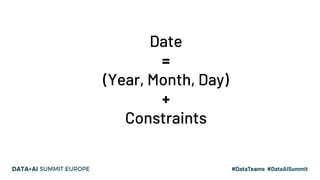
Date
=
(Year, Month, Day)
+
Constraints
Date and calendar
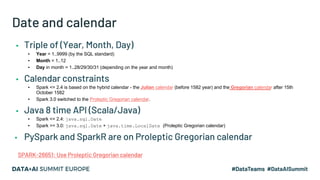
▪ Triple of (Year, Month, Day)
▪ Year = 1..9999 (by the SQL standard)
▪ Month = 1..12
▪ Day in month = 1..28/29/30/31 (depending on the year and month)
▪ Calendar constraints
▪ Spark <= 2.4 is based on the hybrid calendar - the Julian calendar (before 1582 year) and the Gregorian calendar after 15th
October 1582
▪ Spark 3.0 switched to the Proleptic Gregorian calendar.
▪ Java 8 time API (Scala/Java)
▪ Spark <= 2.4: java.sql.Date
▪ Spark >= 3.0: java.sql.Date + java.time.LocalDate (Proleptic Gregorian calendar)
▪ PySpark and SparkR are on Proleptic Gregorian calendar
SPARK-26651: Use Proleptic Gregorian calendar
Julian calendar
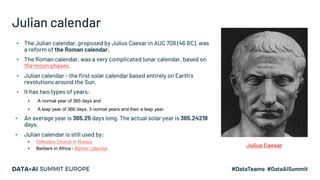
▪ The Julian calendar, proposed by Julius Caesar in AUC 708 (46 BC), was
a reform of the Roman calendar.
▪ The Roman calendar, was a very complicated lunar calendar, based on
the moon phases.
▪ Julian calendar - the first solar calendar based entirely on Earth's
revolutions around the Sun.
▪ It has two types of years:
▪ A normal year of 365 days and
▪ A leap year of 366 days. 3 normal years and then a leap year.
▪ An average year is 365.25 days long. The actual solar year is 365.24219
days.
▪ Julian calendar is still used by:
▪ Orthodox Church in Russia
▪ Berbers in Africa - Berber calendar
Julius Caesar
Gregorian calendar
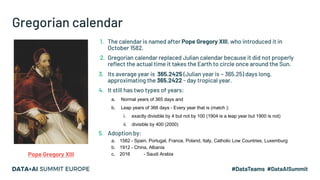
1. The calendar is named after Pope Gregory XIII, who introduced it in
October 1582.
2. Gregorian calendar replaced Julian calendar because it did not properly
reflect the actual time it takes the Earth to circle once around the Sun.
3. Its average year is 365.2425 (Julian year is ~ 365.25) days long,
approximating the 365.2422 - day tropical year.
4. It still has two types of years:
a. Normal years of 365 days and
b. Leap years of 366 days - Every year that is (match ):
i. exactly divisible by 4 but not by 100 (1904 is a leap year but 1900 is not)
ii. divisible by 400 (2000)
5. Adoption by:
a. 1582 - Spain, Portugal, France, Poland, Italy, Catholic Low Countries, Luxemburg
b. 1912 - China, Albania
c. 2016 - Saudi ArabiaPope Gregory XIII
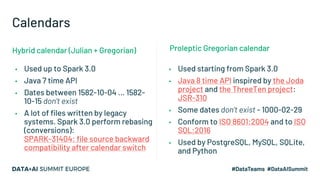
Calendars
▪ Used up to Spark 3.0
▪ Java 7 time API
▪ Dates between 1582-10-04 ... 1582-
10-15 don’t exist
▪ A lot of files written by legacy
systems. Spark 3.0 perform rebasing
(conversions):
SPARK-31404: file source backward
compatibility after calendar switch
▪ Used starting from Spark 3.0
▪ Java 8 time API inspired by the Joda
project and the ThreeTen project:
JSR-310
▪ Some dates don’t exist - 1000-02-29
▪ Conform to ISO 8601:2004 and to ISO
SQL:2016
▪ Used by PostgreSQL, MySQL, SQLite,
and Python
Proleptic Gregorian calendarHybrid calendar (Julian + Gregorian)
Constructing a DATE column
▪ MAKE_DATE - new function in Spark 3.0, SPARK-28432
>>> spark.createDataFrame([(2020, 6, 26), (1000, 2, 29), (-44, 1, 1)], ['Y', 'M', 'D']).createTempView('YMD')
>>> df = sql('select MAKE_DATE(Y, M, D) as date from YMD')
▪ Parallelization of java.time.LocalDate, SPARK-27008
scala> Seq(java.time.LocalDate.of(2020, 2, 29), java.time.LocalDate.now).toDF("date")
▪ Casting from strings or typed literal, SPARK-26618
SELECT DATE '2019-01-14'
SELECT CAST('2019-01-14' AS DATE)
▪ Parsing by to_date() (in JSON and CSV datasource)
Spark 3.0 uses new parser but if it fails you can switch to old one by set
spark.sql.legacy.timeParserPolicy to LEGACY, SPARK-30668
▪ CURRENT_DATE - catch the current date at start of a query, SPARK-33015
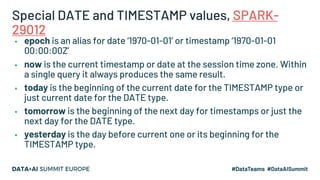
Special DATE and TIMESTAMP values, SPARK-
29012
▪ epoch is an alias for date ‘1970-01-01’ or timestamp ‘1970-01-01
00:00:00Z’
▪ now is the current timestamp or date at the session time zone. Within
a single query it always produces the same result.
▪ today is the beginning of the current date for the TIMESTAMP type or
just current date for the DATE type.
▪ tomorrow is the beginning of the next day for timestamps or just the
next day for the DATE type.
▪ yesterday is the day before current one or its beginning for the
TIMESTAMP type.
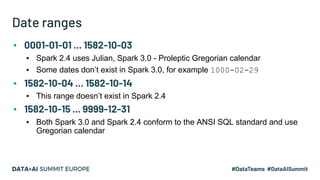
Date ranges
▪ 0001-01-01 ... 1582-10-03
▪ Spark 2.4 uses Julian, Spark 3.0 - Proleptic Gregorian calendar
▪ Some dates don’t exist in Spark 3.0, for example 1000-02-29
▪ 1582-10-04 ... 1582-10-14
▪ This range doesn’t exist in Spark 2.4
▪ 1582-10-15 ... 9999-12-31
▪ Both Spark 3.0 and Spark 2.4 conform to the ANSI SQL standard and use
Gregorian calendar
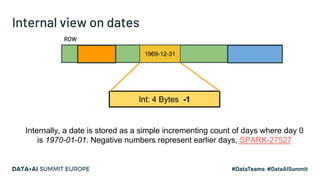
Internal view on dates
ROW
1969-12-31
Int: 4 Bytes -1
Internally, a date is stored as a simple incrementing count of days where day 0
is 1970-01-01. Negative numbers represent earlier days, SPARK-27527
Timestamp and time zone
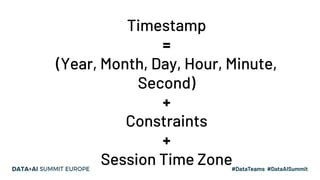
Timestamp
=
(Year, Month, Day, Hour, Minute,
Second)
+
Constraints
+
Session Time Zone
Timestamp and time zone
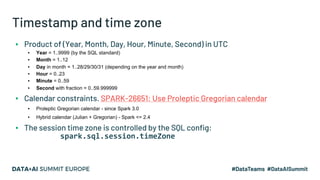
▪ Product of (Year, Month, Day, Hour, Minute, Second) in UTC
▪ Year = 1..9999 (by the SQL standard)
▪ Month = 1..12
▪ Day in month = 1..28/29/30/31 (depending on the year and month)
▪ Hour = 0..23
▪ Minute = 0..59
▪ Second with fraction = 0..59.999999
▪ Calendar constraints. SPARK-26651: Use Proleptic Gregorian calendar
▪ Proleptic Gregorian calendar - since Spark 3.0
▪ Hybrid calendar (Julian + Gregorian) - Spark <= 2.4
▪ The session time zone is controlled by the SQL config:
spark.sql.session.timeZone
Timestamp instant
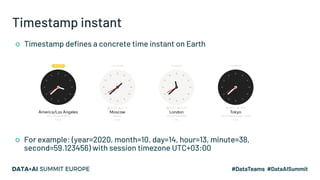
○ Timestamp defines a concrete time instant on Earth
○ For example: (year=2020, month=10, day=14, hour=13, minute=38,
second=59.123456) with session timezone UTC+03:00
Session time zone
1. The session time zone is used in conversion to local timestamps,
and to take local fields like YEAR, MONTH, HOUR and so on.
2. Controlled by the SQL config spark.sql.session.timeZone
which should have the formats:
a. Zone offset '(+|-)HH:mm', for example '-08:00' or '+01:00'
b. Region IDs in the form 'area/city', such as 'America/Los_Angeles'
c. An alias for zone offset '+00:00' - 'UTC' or 'Z'
d. Other formats are not recommended because they can be ambiguous
3. Spark delegates the mapping of region IDs to offsets to the Java standard
library, which loads data from the Internet Assigned Numbers Authority Time
Zone Database (IANA TZDB)
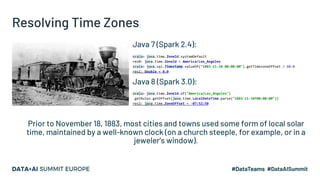
Resolving Time Zones
Java 7 (Spark 2.4):
scala> java.time.ZoneId.systemDefault
res0: java.time.ZoneId = America/Los_Angeles
scala> java.sql.Timestamp.valueOf("1883-11-10 00:00:00").getTimezoneOffset / 60.0
res1: Double = 8.0
Java 8 (Spark 3.0):
scala> java.time.ZoneId.of("America/Los_Angeles")
.getRules.getOffset(java.time.LocalDateTime.parse("1883-11-10T00:00:00"))
res2: java.time.ZoneOffset = -07:52:58
Prior to November 18, 1883, most cities and towns used some form of local solar
time, maintained by a well-known clock (on a church steeple, for example, or in a
jeweler's window).
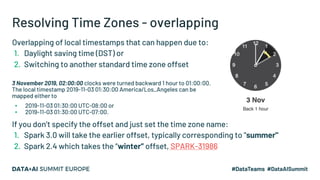
Resolving Time Zones - overlapping
Overlapping of local timestamps that can happen due to:
1. Daylight saving time (DST) or
2. Switching to another standard time zone offset
3 November 2019, 02:00:00 clocks were turned backward 1 hour to 01:00:00.
The local timestamp 2019-11-03 01:30:00 America/Los_Angeles can be
mapped either to
▪ 2019-11-03 01:30:00 UTC-08:00 or
▪ 2019-11-03 01:30:00 UTC-07:00.
If you don’t specify the offset and just set the time zone name:
1. Spark 3.0 will take the earlier offset, typically corresponding to "summer"
2. Spark 2.4 which takes the “winter” offset, SPARK-31986
Spark Timestamp vs SQL Timestamp
➔Spark SQL defines the timestamp type as TIMESTAMP WITH SESSION TIME ZONE:
(YEAR, MONTH, DAY, HOUR, MINUTE, SECOND, SESSION TZ)
where the YEAR through SECOND field identify a time instant in the UTC time zone
➔It is different from SQL’s TIMESTAMP WITHOUT TIME ZONE:
◆ SQL type can map to multiple physical time instants.
◆ We can emulate the type if we set the session time zone to UTC+0.
➔It is different from SQL’s TIMESTAMP WITH TIME ZONE:
◆ Column values of SQL type can have different time zone offsets.
◆ SQL TIME ZONE is an offset. Spark’s TIME ZONE can be an region ID.
◆ Spark doesn’t support this type
➔ Other DBMS have similar type, for instance Oracle Database TIMESTAMP WITH LOCAL TIME ZONE.
Constructing a TIMESTAMP column
▪ MAKE_TIMESTAMP - new function in Spark 3.0, SPARK-28459
>>> df = spark.createDataFrame([(2020, 6, 28, 10, 31, 30.123456), (1582, 10, 10, 0, 1, 2.0001), (2019, 2, 29, 9, 29, 1.0)],
... ['YEAR', 'MONTH', 'DAY', 'HOUR', 'MINUTE', 'SECOND'])
ts = df.selectExpr("make_timestamp(YEAR, MONTH, DAY, HOUR, MINUTE, SECOND) as MAKE_TIMESTAMP")
▪ Parallelization of java.time.Instant, SPARK-26902
scala> Seq(java.time.Instant.ofEpochSecond(-12219261484L), java.time.Instant.EPOCH).toDF("ts").show
▪ Casting from strings or typed literal, SPARK-26618
SELECT TIMESTAMP '2019-01-14 20:54:00.000'
SELECT CAST('2019-01-14 20:54:00.000' AS TIMESTAMP)
▪ Parsing by to_timestamp() (in JSON and CSV datasource)
Spark 3.0 uses new parser but if it fails you can switch to old one by set
spark.sql.legacy.timeParserPolicy to LEGACY, SPARK-30668
▪ CURRENT_TEMESTAMP - the timestamp at start of a query, SPARK-27035
TIMESTAMP parallelization (Python)
➔ PySpark:
>>> import datetime
>>> df = spark.createDataFrame([(datetime.datetime(2020, 7, 1, 0, 0, 0),
... datetime.date(2020, 7, 1))], ['timestamp', 'date'])
>>> df.show()
+-------------------+----------+
| timestamp| date|
+-------------------+----------+
|2020-07-01 00:00:00|2020-07-01|
+-------------------+----------+
➔ PySpark converts Python’s datetime objects to internal Spark SQL
representations at the driver side using the system time zone
➔ The system time zone can be different from Spark’s session time
zone settings spark.sql.session.timeZone
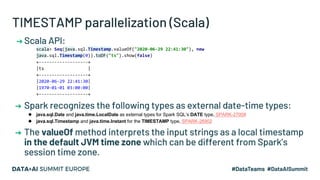
TIMESTAMP parallelization (Scala)
➔ Scala API:
scala> Seq(java.sql.Timestamp.valueOf("2020-06-29 22:41:30"), new
java.sql.Timestamp(0)).toDF("ts").show(false)
+-------------------+
|ts |
+-------------------+
|2020-06-29 22:41:30|
|1970-01-01 03:00:00|
+-------------------+
➔ Spark recognizes the following types as external date-time types:
◆ java.sql.Date and java.time.LocalDate as external types for Spark SQL’s DATE type, SPARK-27008
◆ java.sql.Timestamp and java.time.Instant for the TIMESTAMP type, SPARK-26902
➔ The valueOf method interprets the input strings as a local timestamp
in the default JVM time zone which can be different from Spark’s
session time zone.
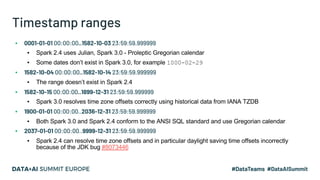
Timestamp ranges
▪ 0001-01-01 00:00:00..1582-10-03 23:59:59.999999
▪ Spark 2.4 uses Julian, Spark 3.0 - Proleptic Gregorian calendar
▪ Some dates don’t exist in Spark 3.0, for example 1000-02-29
▪ 1582-10-04 00:00:00..1582-10-14 23:59:59.999999
▪ The range doesn’t exist in Spark 2.4
▪ 1582-10-15 00:00:00..1899-12-31 23:59:59.999999
▪ Spark 3.0 resolves time zone offsets correctly using historical data from IANA TZDB
▪ 1900-01-01 00:00:00..2036-12-31 23:59:59.999999
▪ Both Spark 3.0 and Spark 2.4 conform to the ANSI SQL standard and use Gregorian calendar
▪ 2037-01-01 00:00:00..9999-12-31 23:59:59.999999
▪ Spark 2.4 can resolve time zone offsets and in particular daylight saving time offsets incorrectly
because of the JDK bug #8073446
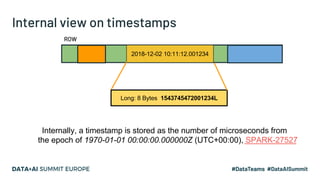
Internal view on timestamps
ROW
2018-12-02 10:11:12.001234
Long: 8 Bytes 1543745472001234L
Internally, a timestamp is stored as the number of microseconds from
the epoch of 1970-01-01 00:00:00.000000Z (UTC+00:00), SPARK-27527
Collecting dates and timestamps
➔ Spark transfers internal values of dates and timestamps columns as
time instants in the UTC time zone from executors to the driver:
>>> df.collect()
[Row(timestamp=datetime.datetime(2020, 7, 1, 0, 0), date=datetime.date(2020, 7, 1))]
➔ And performs conversions to Python datetime objects in the system
time zone at the driver, NOT using Spark SQL session time zone
➔ In Java and Scala APIs, Spark performs the following conversions by
default:
◆ Spark SQL’s DATE values are converted to instances of java.sql.Date.
◆ Timestamps are converted to instances of java.sql.Timestamp.
➔ When spark.sql.datetime.java8API.enabled is true:
◆ java.time.LocalDate for Spark SQL’s DATE type, SPARK-27008
◆ java.time.Instant for Spark SQL’s TIMESTAMP type, SPARK-26902
Feedback
Your feedback is important to us.
Don’t forget to rate
and review the sessions.

Comprehensive View on Date-time APIs of Apache Spark 3.0

  • 1.
    A Comprehensive Lookat Dates and Timestamps in Apache Spark 3.0 Maxim Gekk Software Engineer at Databricks https://github.com/MaxGekk
  • 2.
    Agenda ▪ DATE typein Apache Spark ▪ Calendars ▪ Constructing DATE columns ▪ TIMESTAMP type in Apache Spark ▪ Session time zone ▪ Resolving time zones ▪ Date and Timestamp ranges ▪ Internal view on dates and timestamps ▪ Timestamps and dates parallelization ▪ Collecting dates and timestamps https://databricks.com/blog/2020/07/22/a-comprehensive-look- at-dates-and-timestamps-in-apache-spark-3-0.html
  • 3.
  • 4.
  • 5.
    Date and calendar ▪Triple of (Year, Month, Day) ▪ Year = 1..9999 (by the SQL standard) ▪ Month = 1..12 ▪ Day in month = 1..28/29/30/31 (depending on the year and month) ▪ Calendar constraints ▪ Spark <= 2.4 is based on the hybrid calendar - the Julian calendar (before 1582 year) and the Gregorian calendar after 15th October 1582 ▪ Spark 3.0 switched to the Proleptic Gregorian calendar. ▪ Java 8 time API (Scala/Java) ▪ Spark <= 2.4: java.sql.Date ▪ Spark >= 3.0: java.sql.Date + java.time.LocalDate (Proleptic Gregorian calendar) ▪ PySpark and SparkR are on Proleptic Gregorian calendar SPARK-26651: Use Proleptic Gregorian calendar
  • 6.
    Julian calendar ▪ TheJulian calendar, proposed by Julius Caesar in AUC 708 (46 BC), was a reform of the Roman calendar. ▪ The Roman calendar, was a very complicated lunar calendar, based on the moon phases. ▪ Julian calendar - the first solar calendar based entirely on Earth's revolutions around the Sun. ▪ It has two types of years: ▪ A normal year of 365 days and ▪ A leap year of 366 days. 3 normal years and then a leap year. ▪ An average year is 365.25 days long. The actual solar year is 365.24219 days. ▪ Julian calendar is still used by: ▪ Orthodox Church in Russia ▪ Berbers in Africa - Berber calendar Julius Caesar
  • 7.
    Gregorian calendar 1. Thecalendar is named after Pope Gregory XIII, who introduced it in October 1582. 2. Gregorian calendar replaced Julian calendar because it did not properly reflect the actual time it takes the Earth to circle once around the Sun. 3. Its average year is 365.2425 (Julian year is ~ 365.25) days long, approximating the 365.2422 - day tropical year. 4. It still has two types of years: a. Normal years of 365 days and b. Leap years of 366 days - Every year that is (match ): i. exactly divisible by 4 but not by 100 (1904 is a leap year but 1900 is not) ii. divisible by 400 (2000) 5. Adoption by: a. 1582 - Spain, Portugal, France, Poland, Italy, Catholic Low Countries, Luxemburg b. 1912 - China, Albania c. 2016 - Saudi ArabiaPope Gregory XIII
  • 8.
    Calendars ▪ Used upto Spark 3.0 ▪ Java 7 time API ▪ Dates between 1582-10-04 ... 1582- 10-15 don’t exist ▪ A lot of files written by legacy systems. Spark 3.0 perform rebasing (conversions): SPARK-31404: file source backward compatibility after calendar switch ▪ Used starting from Spark 3.0 ▪ Java 8 time API inspired by the Joda project and the ThreeTen project: JSR-310 ▪ Some dates don’t exist - 1000-02-29 ▪ Conform to ISO 8601:2004 and to ISO SQL:2016 ▪ Used by PostgreSQL, MySQL, SQLite, and Python Proleptic Gregorian calendarHybrid calendar (Julian + Gregorian)
  • 9.
    Constructing a DATEcolumn ▪ MAKE_DATE - new function in Spark 3.0, SPARK-28432 >>> spark.createDataFrame([(2020, 6, 26), (1000, 2, 29), (-44, 1, 1)], ['Y', 'M', 'D']).createTempView('YMD') >>> df = sql('select MAKE_DATE(Y, M, D) as date from YMD') ▪ Parallelization of java.time.LocalDate, SPARK-27008 scala> Seq(java.time.LocalDate.of(2020, 2, 29), java.time.LocalDate.now).toDF("date") ▪ Casting from strings or typed literal, SPARK-26618 SELECT DATE '2019-01-14' SELECT CAST('2019-01-14' AS DATE) ▪ Parsing by to_date() (in JSON and CSV datasource) Spark 3.0 uses new parser but if it fails you can switch to old one by set spark.sql.legacy.timeParserPolicy to LEGACY, SPARK-30668 ▪ CURRENT_DATE - catch the current date at start of a query, SPARK-33015
  • 10.
    Special DATE andTIMESTAMP values, SPARK- 29012 ▪ epoch is an alias for date ‘1970-01-01’ or timestamp ‘1970-01-01 00:00:00Z’ ▪ now is the current timestamp or date at the session time zone. Within a single query it always produces the same result. ▪ today is the beginning of the current date for the TIMESTAMP type or just current date for the DATE type. ▪ tomorrow is the beginning of the next day for timestamps or just the next day for the DATE type. ▪ yesterday is the day before current one or its beginning for the TIMESTAMP type.
  • 11.
    Date ranges ▪ 0001-01-01... 1582-10-03 ▪ Spark 2.4 uses Julian, Spark 3.0 - Proleptic Gregorian calendar ▪ Some dates don’t exist in Spark 3.0, for example 1000-02-29 ▪ 1582-10-04 ... 1582-10-14 ▪ This range doesn’t exist in Spark 2.4 ▪ 1582-10-15 ... 9999-12-31 ▪ Both Spark 3.0 and Spark 2.4 conform to the ANSI SQL standard and use Gregorian calendar
  • 12.
    Internal view ondates ROW 1969-12-31 Int: 4 Bytes -1 Internally, a date is stored as a simple incrementing count of days where day 0 is 1970-01-01. Negative numbers represent earlier days, SPARK-27527
  • 13.
  • 14.
    Timestamp = (Year, Month, Day,Hour, Minute, Second) + Constraints + Session Time Zone
  • 15.
    Timestamp and timezone ▪ Product of (Year, Month, Day, Hour, Minute, Second) in UTC ▪ Year = 1..9999 (by the SQL standard) ▪ Month = 1..12 ▪ Day in month = 1..28/29/30/31 (depending on the year and month) ▪ Hour = 0..23 ▪ Minute = 0..59 ▪ Second with fraction = 0..59.999999 ▪ Calendar constraints. SPARK-26651: Use Proleptic Gregorian calendar ▪ Proleptic Gregorian calendar - since Spark 3.0 ▪ Hybrid calendar (Julian + Gregorian) - Spark <= 2.4 ▪ The session time zone is controlled by the SQL config: spark.sql.session.timeZone
  • 16.
    Timestamp instant ○ Timestampdefines a concrete time instant on Earth ○ For example: (year=2020, month=10, day=14, hour=13, minute=38, second=59.123456) with session timezone UTC+03:00
  • 17.
    Session time zone 1.The session time zone is used in conversion to local timestamps, and to take local fields like YEAR, MONTH, HOUR and so on. 2. Controlled by the SQL config spark.sql.session.timeZone which should have the formats: a. Zone offset '(+|-)HH:mm', for example '-08:00' or '+01:00' b. Region IDs in the form 'area/city', such as 'America/Los_Angeles' c. An alias for zone offset '+00:00' - 'UTC' or 'Z' d. Other formats are not recommended because they can be ambiguous 3. Spark delegates the mapping of region IDs to offsets to the Java standard library, which loads data from the Internet Assigned Numbers Authority Time Zone Database (IANA TZDB)
  • 18.
    Resolving Time Zones Java7 (Spark 2.4): scala> java.time.ZoneId.systemDefault res0: java.time.ZoneId = America/Los_Angeles scala> java.sql.Timestamp.valueOf("1883-11-10 00:00:00").getTimezoneOffset / 60.0 res1: Double = 8.0 Java 8 (Spark 3.0): scala> java.time.ZoneId.of("America/Los_Angeles") .getRules.getOffset(java.time.LocalDateTime.parse("1883-11-10T00:00:00")) res2: java.time.ZoneOffset = -07:52:58 Prior to November 18, 1883, most cities and towns used some form of local solar time, maintained by a well-known clock (on a church steeple, for example, or in a jeweler's window).
  • 19.
    Resolving Time Zones- overlapping Overlapping of local timestamps that can happen due to: 1. Daylight saving time (DST) or 2. Switching to another standard time zone offset 3 November 2019, 02:00:00 clocks were turned backward 1 hour to 01:00:00. The local timestamp 2019-11-03 01:30:00 America/Los_Angeles can be mapped either to ▪ 2019-11-03 01:30:00 UTC-08:00 or ▪ 2019-11-03 01:30:00 UTC-07:00. If you don’t specify the offset and just set the time zone name: 1. Spark 3.0 will take the earlier offset, typically corresponding to "summer" 2. Spark 2.4 which takes the “winter” offset, SPARK-31986
  • 20.
    Spark Timestamp vsSQL Timestamp ➔Spark SQL defines the timestamp type as TIMESTAMP WITH SESSION TIME ZONE: (YEAR, MONTH, DAY, HOUR, MINUTE, SECOND, SESSION TZ) where the YEAR through SECOND field identify a time instant in the UTC time zone ➔It is different from SQL’s TIMESTAMP WITHOUT TIME ZONE: ◆ SQL type can map to multiple physical time instants. ◆ We can emulate the type if we set the session time zone to UTC+0. ➔It is different from SQL’s TIMESTAMP WITH TIME ZONE: ◆ Column values of SQL type can have different time zone offsets. ◆ SQL TIME ZONE is an offset. Spark’s TIME ZONE can be an region ID. ◆ Spark doesn’t support this type ➔ Other DBMS have similar type, for instance Oracle Database TIMESTAMP WITH LOCAL TIME ZONE.
  • 21.
    Constructing a TIMESTAMPcolumn ▪ MAKE_TIMESTAMP - new function in Spark 3.0, SPARK-28459 >>> df = spark.createDataFrame([(2020, 6, 28, 10, 31, 30.123456), (1582, 10, 10, 0, 1, 2.0001), (2019, 2, 29, 9, 29, 1.0)], ... ['YEAR', 'MONTH', 'DAY', 'HOUR', 'MINUTE', 'SECOND']) ts = df.selectExpr("make_timestamp(YEAR, MONTH, DAY, HOUR, MINUTE, SECOND) as MAKE_TIMESTAMP") ▪ Parallelization of java.time.Instant, SPARK-26902 scala> Seq(java.time.Instant.ofEpochSecond(-12219261484L), java.time.Instant.EPOCH).toDF("ts").show ▪ Casting from strings or typed literal, SPARK-26618 SELECT TIMESTAMP '2019-01-14 20:54:00.000' SELECT CAST('2019-01-14 20:54:00.000' AS TIMESTAMP) ▪ Parsing by to_timestamp() (in JSON and CSV datasource) Spark 3.0 uses new parser but if it fails you can switch to old one by set spark.sql.legacy.timeParserPolicy to LEGACY, SPARK-30668 ▪ CURRENT_TEMESTAMP - the timestamp at start of a query, SPARK-27035
  • 22.
    TIMESTAMP parallelization (Python) ➔PySpark: >>> import datetime >>> df = spark.createDataFrame([(datetime.datetime(2020, 7, 1, 0, 0, 0), ... datetime.date(2020, 7, 1))], ['timestamp', 'date']) >>> df.show() +-------------------+----------+ | timestamp| date| +-------------------+----------+ |2020-07-01 00:00:00|2020-07-01| +-------------------+----------+ ➔ PySpark converts Python’s datetime objects to internal Spark SQL representations at the driver side using the system time zone ➔ The system time zone can be different from Spark’s session time zone settings spark.sql.session.timeZone
  • 23.
    TIMESTAMP parallelization (Scala) ➔Scala API: scala> Seq(java.sql.Timestamp.valueOf("2020-06-29 22:41:30"), new java.sql.Timestamp(0)).toDF("ts").show(false) +-------------------+ |ts | +-------------------+ |2020-06-29 22:41:30| |1970-01-01 03:00:00| +-------------------+ ➔ Spark recognizes the following types as external date-time types: ◆ java.sql.Date and java.time.LocalDate as external types for Spark SQL’s DATE type, SPARK-27008 ◆ java.sql.Timestamp and java.time.Instant for the TIMESTAMP type, SPARK-26902 ➔ The valueOf method interprets the input strings as a local timestamp in the default JVM time zone which can be different from Spark’s session time zone.
  • 24.
    Timestamp ranges ▪ 0001-01-0100:00:00..1582-10-03 23:59:59.999999 ▪ Spark 2.4 uses Julian, Spark 3.0 - Proleptic Gregorian calendar ▪ Some dates don’t exist in Spark 3.0, for example 1000-02-29 ▪ 1582-10-04 00:00:00..1582-10-14 23:59:59.999999 ▪ The range doesn’t exist in Spark 2.4 ▪ 1582-10-15 00:00:00..1899-12-31 23:59:59.999999 ▪ Spark 3.0 resolves time zone offsets correctly using historical data from IANA TZDB ▪ 1900-01-01 00:00:00..2036-12-31 23:59:59.999999 ▪ Both Spark 3.0 and Spark 2.4 conform to the ANSI SQL standard and use Gregorian calendar ▪ 2037-01-01 00:00:00..9999-12-31 23:59:59.999999 ▪ Spark 2.4 can resolve time zone offsets and in particular daylight saving time offsets incorrectly because of the JDK bug #8073446
  • 25.
    Internal view ontimestamps ROW 2018-12-02 10:11:12.001234 Long: 8 Bytes 1543745472001234L Internally, a timestamp is stored as the number of microseconds from the epoch of 1970-01-01 00:00:00.000000Z (UTC+00:00), SPARK-27527
  • 26.
    Collecting dates andtimestamps ➔ Spark transfers internal values of dates and timestamps columns as time instants in the UTC time zone from executors to the driver: >>> df.collect() [Row(timestamp=datetime.datetime(2020, 7, 1, 0, 0), date=datetime.date(2020, 7, 1))] ➔ And performs conversions to Python datetime objects in the system time zone at the driver, NOT using Spark SQL session time zone ➔ In Java and Scala APIs, Spark performs the following conversions by default: ◆ Spark SQL’s DATE values are converted to instances of java.sql.Date. ◆ Timestamps are converted to instances of java.sql.Timestamp. ➔ When spark.sql.datetime.java8API.enabled is true: ◆ java.time.LocalDate for Spark SQL’s DATE type, SPARK-27008 ◆ java.time.Instant for Spark SQL’s TIMESTAMP type, SPARK-26902
  • 27.
    Feedback Your feedback isimportant to us. Don’t forget to rate and review the sessions.