Team Emertxe
Android System Development
Day-4
Android System Service
● Introduction to service
● Inter Process Communication (IPC)
● Adding Custom Service
● Writing Custom HAL
● Compiling SDK
● Testing Custom Service
Table of Content
Introduction to service
“A Service is an application component that can
perform long-running operations in the background and
does not provide a user interface”
“A Service is an application component that can
perform long-running operations in the background and
does not provide a user interface”
● Another app component can start a service and it will continue
to run in the background even if the user switches to another
application
● Additionally, a component can bind to a service to interact
with it and even perform inter-process communication (IPC)
● Example - play music, download a file, tracking distance
traveled through sensor, all from the background
Introduction to Service
(what?)
Introduction to Service
(what?)
● Service is not process
● Faceless task that runs in the background
● No visual user interface
● Can run indefinitely unless stopped
● Each service extends the Service base class
Introduction to Service
(Types)
● Scheduled
● Started
● Bound
Introduction to Service
(Types - Scheduled)
● A service is scheduled through JobScheduler
● JobScheduler API was introduced in Android 5.0
(API level 21)
● API is used for scheduling various types of jobs
against the framework that will be executed in
app’s own process
● Example :
– Cricket score update
Introduction to Service
(Types - Started)
● A service is started when an application component
(such as an activity) calls startService()
● After it's started, a service can run in background
indefinitely, even if the component that started it is
destroyed
● Usually, a started service performs a single operation
and does not return a result to the caller
● Example : download or upload a file over the network
● When operation is complete, service should stop itself
Introduction to Service
(Types - Bound)
“A bound service is the server in a client-server
interface. It allows components (such as activities) to
bind to the service, send requests, receive responses,
and perform interprocess communication (IPC)”
“A bound service is the server in a client-server
interface. It allows components (such as activities) to
bind to the service, send requests, receive responses,
and perform interprocess communication (IPC)”
● A bound service typically lives only while it serves another app
component and does not run in the background indefinitely
● Example : GPS service
Introduction to Service
(Types - Bound)
● A service is bound when an app component
binds to it by calling bindService()
● A bound service runs only as long as another
app component is bound to it
● Multiple components can bind to the service at
once, but when all of them unbind, the service
is destroyed
Introduction to Service
(Basics)
● A service can be started (to run indefinitely),
bound or both
● Any app component can use the service (even
from a separate application) in the same way
that any component can use an activity—by
starting it with an Intent
● If required, declare the service as private in
manifest file and block access from other app
Introduction to Service
(Basics)
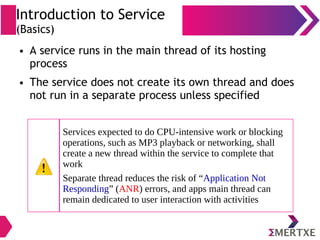
● A service runs in the main thread of its hosting
process
● The service does not create its own thread and does
not run in a separate process unless specified
Services expected to do CPU-intensive work or blocking
operations, such as MP3 playback or networking, shall
create a new thread within the service to complete that
work
Separate thread reduces the risk of “Application Not
Responding” (ANR) errors, and apps main thread can
remain dedicated to user interaction with activities
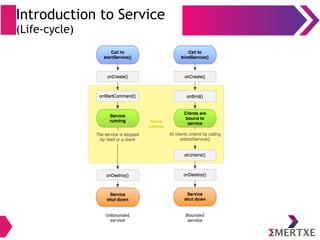
Introduction to Service
(Life-cycle)
Inter-Process Communication
IPC
(Different ways)
● AIDL
● Binder
● Message
IPC
(AIDL)
“Android Interface Definition Language (AIDL) enables
to define programming interface that both client and
service agree upon in order to communicate with each
other using inter-process communication (IPC)”
“Android Interface Definition Language (AIDL) enables
to define programming interface that both client and
service agree upon in order to communicate with each
other using inter-process communication (IPC)”
IPC
(AIDL)
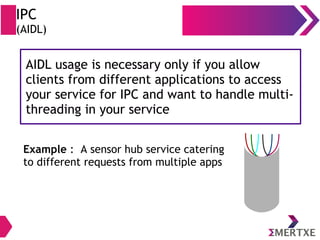
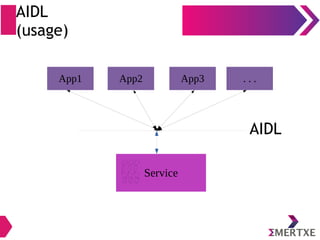
AIDL usage is necessary only if you allow
clients from different applications to access
your service for IPC and want to handle multi-
threading in your service
AIDL usage is necessary only if you allow
clients from different applications to access
your service for IPC and want to handle multi-
threading in your service
Example : A sensor hub service catering
to different requests from multiple apps
IPC
(AIDL - why?)
● In Android, one process cannot normally access
the memory of another process
● So processes need to decompose their objects into
primitives that operating system can understand
● These primitives are marshalled by OS across
process boundary
● The marshalling code is tedious to write, so
Android handles it with AIDL
AIDL
(usage)
App1 App2 App3 . . .
Service
AIDL
IPC
(Binder)
● Create your interface by extending Binder if -
– There is no need to perform concurrent IPC across
different apps
– Your service is private to your own application and
runs in the same process as the client (your service
is merely a background worker for your own app)
IPC
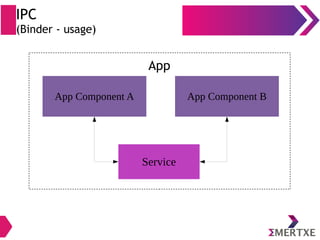
(Binder - usage)
App Component A
Service
App Component B
App
IPC
(Binder - class)
● Binder is base class for a remotable object
● Binder class implements IBinder interface
● IBinder provides standard local
implementation of such an object
IPC
(IBinder - class)
● Base interface for a remotable object
● This interface describes abstract protocol for
interacting with a remotable object
IPC
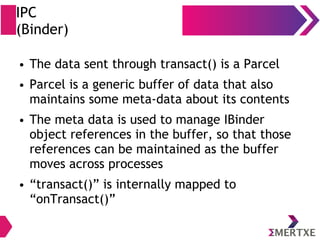
(Binder)
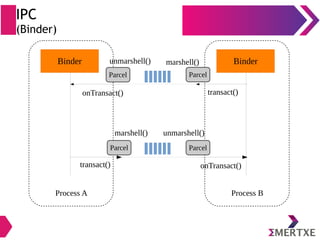
● The data sent through transact() is a Parcel
● Parcel is a generic buffer of data that also
maintains some meta-data about its contents
● The meta data is used to manage IBinder
object references in the buffer, so that those
references can be maintained as the buffer
moves across processes
● “transact()” is internally mapped to
“onTransact()”
IPC
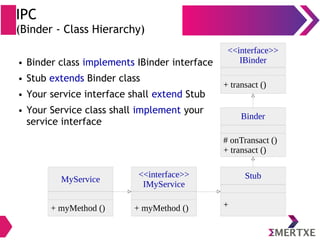
(Binder - Class Hierarchy)
Binder
# onTransact ()
+ transact ()
<<interface>>
IBinder
+ transact ()
Stub
+
<<interface>>
IMyService
+ myMethod ()
● Binder class implements IBinder interface
● Stub extends Binder class
● Your service interface shall extend Stub
● Your Service class shall implement your
service interface
MyService
+ myMethod ()
IPC
(Binder)
Binder Binder
Parcel
onTransact() transact()
Parcel
transact() onTransact()
Process A Process B
Parcel
Parcel
unmarshell() marshell()
marshell() unmarshell()
IPC
(Messenger)
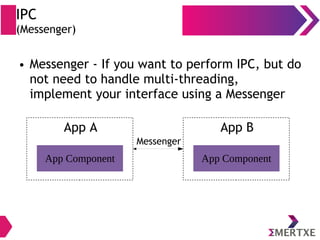
● Messenger - If you want to perform IPC, but do
not need to handle multi-threading,
implement your interface using a Messenger
App Component
App A
App Component
App B
Messenger
IPC
(Architecture)
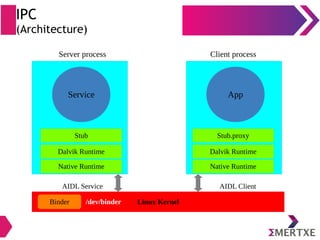
Service
Stub
App
AIDL Service AIDL Client
Linux KernelBinder
Server process Client process
Dalvik Runtime
Native Runtime
Stub.proxy
Dalvik Runtime
Native Runtime
/dev/binder
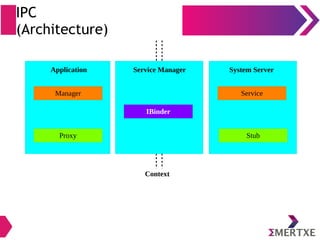
Context
IPC
(Architecture)
Proxy
Application System Server
Stub
Manager Service
Service Manager
IBinder
IPC
(Synchronous)
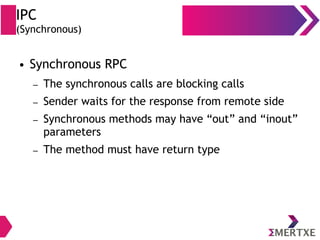
● Synchronous RPC
– The synchronous calls are blocking calls
– Sender waits for the response from remote side
– Synchronous methods may have “out” and “inout”
parameters
– The method must have return type
IPC
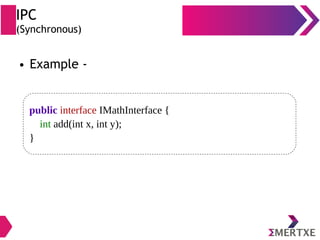
(Synchronous)
● Example -
public interface IMathInterface {
int add(int x, int y);
}
IPC
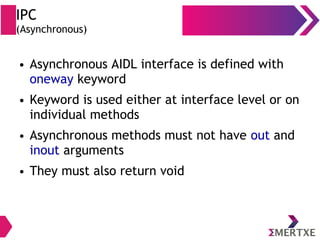
(Asynchronous)
● Asynchronous AIDL interface is defined with
oneway keyword
● Keyword is used either at interface level or on
individual methods
● Asynchronous methods must not have out and
inout arguments
● They must also return void
IPC
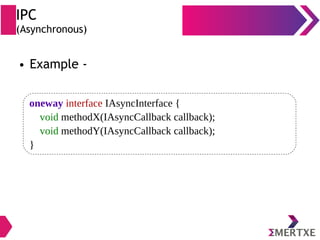
(Asynchronous)
● Example -
oneway interface IAsyncInterface {
void methodX(IAsyncCallback callback);
void methodY(IAsyncCallback callback);
}
IPC
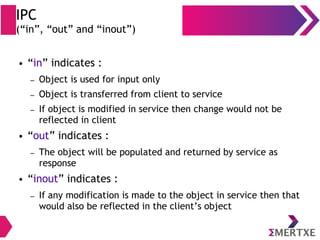
(“in”, “out” and “inout”)
● “in” indicates :
– Object is used for input only
– Object is transferred from client to service
– If object is modified in service then change would not be
reflected in client
● “out” indicates :
– The object will be populated and returned by service as
response
● “inout” indicates :
– If any modification is made to the object in service then that
would also be reflected in the client’s object
Adding Custom service
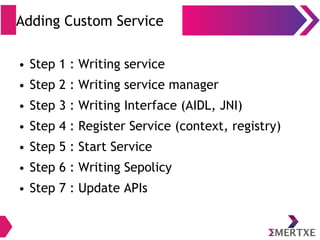
Adding Custom Service
● Step 1 : Writing service
● Step 2 : Writing service manager
● Step 3 : Writing Interface (AIDL, JNI)
● Step 4 : Register Service (context, registry)
● Step 5 : Start Service
● Step 6 : Writing Sepolicy
● Step 7 : Update APIs
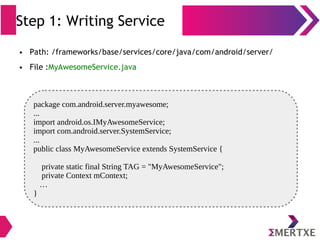
Step 1: Writing Service
● Path: /frameworks/base/services/core/java/com/android/server/
● File :MyAwesomeService.java
package com.android.server.myawesome;
...
import android.os.IMyAwesomeService;
import com.android.server.SystemService;
...
public class MyAwesomeService extends SystemService {
private static final String TAG = "MyAwesomeService";
private Context mContext;
…
}
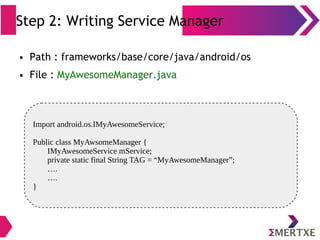
Step 2: Writing Service Manager
● Path : frameworks/base/core/java/android/os
● File : MyAwesomeManager.java
Import android.os.IMyAwesomeService;
Public class MyAwsomeManager {
IMyAwesomeService mService;
private static final String TAG = “MyAwesomeManager”;
….
….
}
Step 3: Write Interface
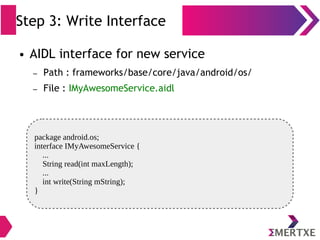
package android.os;
interface IMyAwesomeService {
...
String read(int maxLength);
...
int write(String mString);
}
● AIDL interface for new service
– Path : frameworks/base/core/java/android/os/
– File : IMyAwesomeService.aidl
Step 3: Write Interface
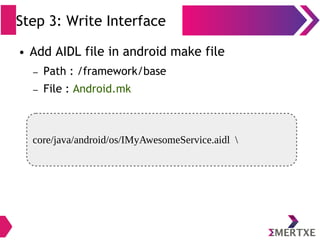
core/java/android/os/IMyAwesomeService.aidl 
● Add AIDL file in android make file
– Path : /framework/base
– File : Android.mk
Step 3: Write Interface
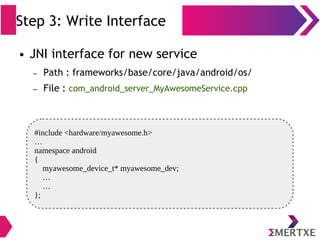
#include <hardware/myawesome.h>
…
namespace android
{
myawesome_device_t* myawesome_dev;
…
…
};
● JNI interface for new service
– Path : frameworks/base/core/java/android/os/
– File : com_android_server_MyAwesomeService.cpp
Step 3: Write Interface
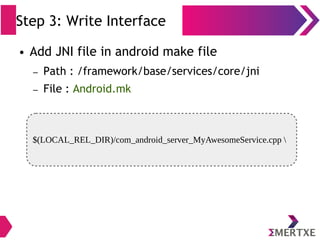
$(LOCAL_REL_DIR)/com_android_server_MyAwesomeService.cpp 
● Add JNI file in android make file
– Path : /framework/base/services/core/jni
– File : Android.mk
Step 3: Write Interface
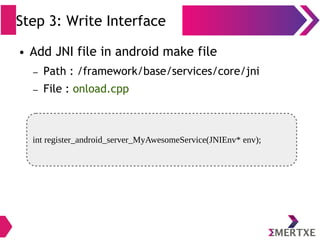
int register_android_server_MyAwesomeService(JNIEnv* env);
● Add JNI file in android make file
– Path : /framework/base/services/core/jni
– File : onload.cpp
Step 3: Write Interface
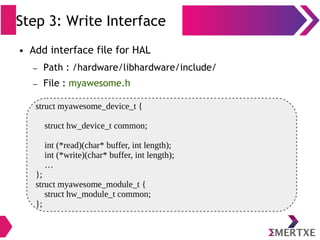
struct myawesome_device_t {
struct hw_device_t common;
int (*read)(char* buffer, int length);
int (*write)(char* buffer, int length);
…
};
struct myawesome_module_t {
struct hw_module_t common;
};
● Add interface file for HAL
– Path : /hardware/libhardware/include/
– File : myawesome.h
Step 4: Register Service
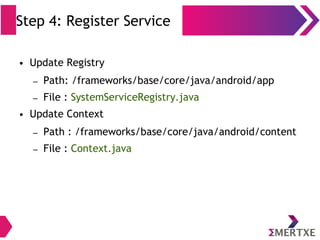
● Update Registry
– Path: /frameworks/base/core/java/android/app
– File : SystemServiceRegistry.java
● Update Context
– Path : /frameworks/base/core/java/android/content
– File : Context.java
Step 5: Start Service
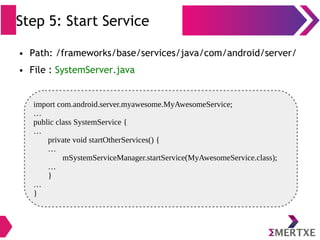
● Path: /frameworks/base/services/java/com/android/server/
● File : SystemServer.java
import com.android.server.myawesome.MyAwesomeService;
…
public class SystemService {
…
private void startOtherServices() {
…
mSystemServiceManager.startService(MyAwesomeService.class);
…
}
…
}
SELinux Policy
● Access control mechanisms
– DAC (Discretionary Access Control)
● Access is provided based on user permission
– MAC (Mandatory Access Control)
● Each program runs within a sandbox that limits its
permissions
SELinux Policy
(MAC vs DAC)
● Generally, MACs are much more effective than
DACs
● MAC are often applied to agents other than
users, such as programs, whereas DACs are
generally applied only to users
● MACs may be applied to objects not protected
by DACs such as network sockets and processes
Step 6: Writing Sepolicy
● Path :
– /device/<vendor>/<product>/sepolicy
– Example : /device/brcm/rpi3/sepolicy
● File(s)
– device.te
– service.te
– service_contexts
– <custom-service>.te (Example : myawesome.te)
*policy configuration files end in .te
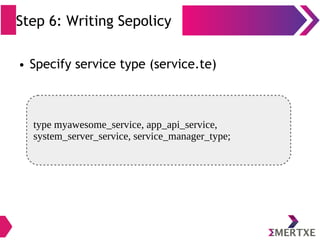
Step 6: Writing Sepolicy
● Specify service type (service.te)
type myawesome_service, app_api_service,
system_server_service, service_manager_type;
Step 6: Writing Sepolicy
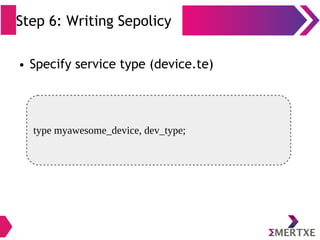
● Specify service type (device.te)
type myawesome_device, dev_type;
Step 6: Writing Sepolicy
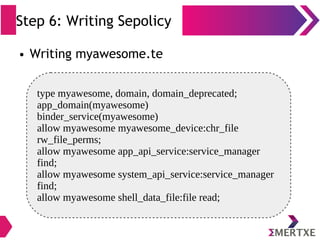
● Writing myawesome.te
type myawesome, domain, domain_deprecated;
app_domain(myawesome)
binder_service(myawesome)
allow myawesome myawesome_device:chr_file
rw_file_perms;
allow myawesome app_api_service:service_manager
find;
allow myawesome system_api_service:service_manager
find;
allow myawesome shell_data_file:file read;
Step 6: Writing Sepolicy
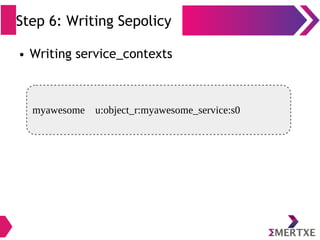
● Writing service_contexts
myawesome u:object_r:myawesome_service:s0
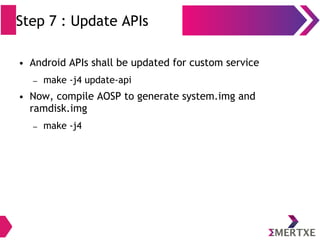
Step 7 : Update APIs
● Android APIs shall be updated for custom service
– make -j4 update-api
● Now, compile AOSP to generate system.img and
ramdisk.img
– make -j4
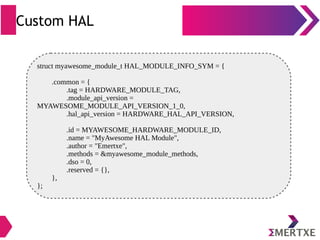
Custom HAL
struct myawesome_module_t HAL_MODULE_INFO_SYM = {
.common = {
.tag = HARDWARE_MODULE_TAG,
.module_api_version =
MYAWESOME_MODULE_API_VERSION_1_0,
.hal_api_version = HARDWARE_HAL_API_VERSION,
.id = MYAWESOME_HARDWARE_MODULE_ID,
.name = "MyAwesome HAL Module",
.author = "Emertxe",
.methods = &myawesome_module_methods,
.dso = 0,
.reserved = {},
},
};
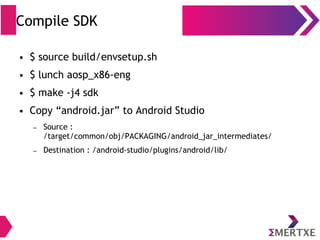
Compile SDK
● $ source build/envsetup.sh
● $ lunch aosp_x86-eng
● $ make -j4 sdk
● Copy “android.jar” to Android Studio
– Source :
/target/common/obj/PACKAGING/android_jar_intermediates/
– Destination : /android-studio/plugins/android/lib/
Testing custom service
● Write an app in android studio and test
Stay connected
About us: Emertxe is India’s one of the top IT finishing schools & self learning
kits provider. Our primary focus is on Embedded with diversification focus on
Java, Oracle and Android areas
Emertxe Information Technologies Pvt Ltd
No. 83, 1st Floor, Farah Towers,
M.G Road, Bangalore
Karnataka - 560001
T: +91 809 555 7 333
T: +91 80 4128 9576
E: training@emertxe.com
https://www.facebook.com/Emertxe https://twitter.com/EmertxeTweet https://www.slideshare.net/EmertxeSlides
Thank You

Embedded Android : System Development - Part IV (Android System Services)

  • 1.
    Team Emertxe Android SystemDevelopment Day-4
  • 2.
  • 3.
    ● Introduction toservice ● Inter Process Communication (IPC) ● Adding Custom Service ● Writing Custom HAL ● Compiling SDK ● Testing Custom Service Table of Content
  • 4.
  • 5.
    “A Service isan application component that can perform long-running operations in the background and does not provide a user interface” “A Service is an application component that can perform long-running operations in the background and does not provide a user interface” ● Another app component can start a service and it will continue to run in the background even if the user switches to another application ● Additionally, a component can bind to a service to interact with it and even perform inter-process communication (IPC) ● Example - play music, download a file, tracking distance traveled through sensor, all from the background Introduction to Service (what?)
  • 6.
    Introduction to Service (what?) ●Service is not process ● Faceless task that runs in the background ● No visual user interface ● Can run indefinitely unless stopped ● Each service extends the Service base class
  • 7.
    Introduction to Service (Types) ●Scheduled ● Started ● Bound
  • 8.
    Introduction to Service (Types- Scheduled) ● A service is scheduled through JobScheduler ● JobScheduler API was introduced in Android 5.0 (API level 21) ● API is used for scheduling various types of jobs against the framework that will be executed in app’s own process ● Example : – Cricket score update
  • 9.
    Introduction to Service (Types- Started) ● A service is started when an application component (such as an activity) calls startService() ● After it's started, a service can run in background indefinitely, even if the component that started it is destroyed ● Usually, a started service performs a single operation and does not return a result to the caller ● Example : download or upload a file over the network ● When operation is complete, service should stop itself
  • 10.
    Introduction to Service (Types- Bound) “A bound service is the server in a client-server interface. It allows components (such as activities) to bind to the service, send requests, receive responses, and perform interprocess communication (IPC)” “A bound service is the server in a client-server interface. It allows components (such as activities) to bind to the service, send requests, receive responses, and perform interprocess communication (IPC)” ● A bound service typically lives only while it serves another app component and does not run in the background indefinitely ● Example : GPS service
  • 11.
    Introduction to Service (Types- Bound) ● A service is bound when an app component binds to it by calling bindService() ● A bound service runs only as long as another app component is bound to it ● Multiple components can bind to the service at once, but when all of them unbind, the service is destroyed
  • 12.
    Introduction to Service (Basics) ●A service can be started (to run indefinitely), bound or both ● Any app component can use the service (even from a separate application) in the same way that any component can use an activity—by starting it with an Intent ● If required, declare the service as private in manifest file and block access from other app
  • 13.
    Introduction to Service (Basics) ●A service runs in the main thread of its hosting process ● The service does not create its own thread and does not run in a separate process unless specified Services expected to do CPU-intensive work or blocking operations, such as MP3 playback or networking, shall create a new thread within the service to complete that work Separate thread reduces the risk of “Application Not Responding” (ANR) errors, and apps main thread can remain dedicated to user interaction with activities
  • 14.
  • 15.
  • 16.
  • 17.
    IPC (AIDL) “Android Interface DefinitionLanguage (AIDL) enables to define programming interface that both client and service agree upon in order to communicate with each other using inter-process communication (IPC)” “Android Interface Definition Language (AIDL) enables to define programming interface that both client and service agree upon in order to communicate with each other using inter-process communication (IPC)”
  • 18.
    IPC (AIDL) AIDL usage isnecessary only if you allow clients from different applications to access your service for IPC and want to handle multi- threading in your service AIDL usage is necessary only if you allow clients from different applications to access your service for IPC and want to handle multi- threading in your service Example : A sensor hub service catering to different requests from multiple apps
  • 19.
    IPC (AIDL - why?) ●In Android, one process cannot normally access the memory of another process ● So processes need to decompose their objects into primitives that operating system can understand ● These primitives are marshalled by OS across process boundary ● The marshalling code is tedious to write, so Android handles it with AIDL
  • 20.
    AIDL (usage) App1 App2 App3. . . Service AIDL
  • 21.
    IPC (Binder) ● Create yourinterface by extending Binder if - – There is no need to perform concurrent IPC across different apps – Your service is private to your own application and runs in the same process as the client (your service is merely a background worker for your own app)
  • 22.
    IPC (Binder - usage) AppComponent A Service App Component B App
  • 23.
    IPC (Binder - class) ●Binder is base class for a remotable object ● Binder class implements IBinder interface ● IBinder provides standard local implementation of such an object
  • 24.
    IPC (IBinder - class) ●Base interface for a remotable object ● This interface describes abstract protocol for interacting with a remotable object
  • 25.
    IPC (Binder) ● The datasent through transact() is a Parcel ● Parcel is a generic buffer of data that also maintains some meta-data about its contents ● The meta data is used to manage IBinder object references in the buffer, so that those references can be maintained as the buffer moves across processes ● “transact()” is internally mapped to “onTransact()”
  • 26.
    IPC (Binder - ClassHierarchy) Binder # onTransact () + transact () <<interface>> IBinder + transact () Stub + <<interface>> IMyService + myMethod () ● Binder class implements IBinder interface ● Stub extends Binder class ● Your service interface shall extend Stub ● Your Service class shall implement your service interface MyService + myMethod ()
  • 27.
    IPC (Binder) Binder Binder Parcel onTransact() transact() Parcel transact()onTransact() Process A Process B Parcel Parcel unmarshell() marshell() marshell() unmarshell()
  • 28.
    IPC (Messenger) ● Messenger -If you want to perform IPC, but do not need to handle multi-threading, implement your interface using a Messenger App Component App A App Component App B Messenger
  • 29.
    IPC (Architecture) Service Stub App AIDL Service AIDLClient Linux KernelBinder Server process Client process Dalvik Runtime Native Runtime Stub.proxy Dalvik Runtime Native Runtime /dev/binder
  • 30.
  • 31.
    IPC (Synchronous) ● Synchronous RPC –The synchronous calls are blocking calls – Sender waits for the response from remote side – Synchronous methods may have “out” and “inout” parameters – The method must have return type
  • 32.
    IPC (Synchronous) ● Example - publicinterface IMathInterface { int add(int x, int y); }
  • 33.
    IPC (Asynchronous) ● Asynchronous AIDLinterface is defined with oneway keyword ● Keyword is used either at interface level or on individual methods ● Asynchronous methods must not have out and inout arguments ● They must also return void
  • 34.
    IPC (Asynchronous) ● Example - onewayinterface IAsyncInterface { void methodX(IAsyncCallback callback); void methodY(IAsyncCallback callback); }
  • 35.
    IPC (“in”, “out” and“inout”) ● “in” indicates : – Object is used for input only – Object is transferred from client to service – If object is modified in service then change would not be reflected in client ● “out” indicates : – The object will be populated and returned by service as response ● “inout” indicates : – If any modification is made to the object in service then that would also be reflected in the client’s object
  • 36.
  • 37.
    Adding Custom Service ●Step 1 : Writing service ● Step 2 : Writing service manager ● Step 3 : Writing Interface (AIDL, JNI) ● Step 4 : Register Service (context, registry) ● Step 5 : Start Service ● Step 6 : Writing Sepolicy ● Step 7 : Update APIs
  • 38.
    Step 1: WritingService ● Path: /frameworks/base/services/core/java/com/android/server/ ● File :MyAwesomeService.java package com.android.server.myawesome; ... import android.os.IMyAwesomeService; import com.android.server.SystemService; ... public class MyAwesomeService extends SystemService { private static final String TAG = "MyAwesomeService"; private Context mContext; … }
  • 39.
    Step 2: WritingService Manager ● Path : frameworks/base/core/java/android/os ● File : MyAwesomeManager.java Import android.os.IMyAwesomeService; Public class MyAwsomeManager { IMyAwesomeService mService; private static final String TAG = “MyAwesomeManager”; …. …. }
  • 40.
    Step 3: WriteInterface package android.os; interface IMyAwesomeService { ... String read(int maxLength); ... int write(String mString); } ● AIDL interface for new service – Path : frameworks/base/core/java/android/os/ – File : IMyAwesomeService.aidl
  • 41.
    Step 3: WriteInterface core/java/android/os/IMyAwesomeService.aidl ● Add AIDL file in android make file – Path : /framework/base – File : Android.mk
  • 42.
    Step 3: WriteInterface #include <hardware/myawesome.h> … namespace android { myawesome_device_t* myawesome_dev; … … }; ● JNI interface for new service – Path : frameworks/base/core/java/android/os/ – File : com_android_server_MyAwesomeService.cpp
  • 43.
    Step 3: WriteInterface $(LOCAL_REL_DIR)/com_android_server_MyAwesomeService.cpp ● Add JNI file in android make file – Path : /framework/base/services/core/jni – File : Android.mk
  • 44.
    Step 3: WriteInterface int register_android_server_MyAwesomeService(JNIEnv* env); ● Add JNI file in android make file – Path : /framework/base/services/core/jni – File : onload.cpp
  • 45.
    Step 3: WriteInterface struct myawesome_device_t { struct hw_device_t common; int (*read)(char* buffer, int length); int (*write)(char* buffer, int length); … }; struct myawesome_module_t { struct hw_module_t common; }; ● Add interface file for HAL – Path : /hardware/libhardware/include/ – File : myawesome.h
  • 46.
    Step 4: RegisterService ● Update Registry – Path: /frameworks/base/core/java/android/app – File : SystemServiceRegistry.java ● Update Context – Path : /frameworks/base/core/java/android/content – File : Context.java
  • 47.
    Step 5: StartService ● Path: /frameworks/base/services/java/com/android/server/ ● File : SystemServer.java import com.android.server.myawesome.MyAwesomeService; … public class SystemService { … private void startOtherServices() { … mSystemServiceManager.startService(MyAwesomeService.class); … } … }
  • 48.
    SELinux Policy ● Accesscontrol mechanisms – DAC (Discretionary Access Control) ● Access is provided based on user permission – MAC (Mandatory Access Control) ● Each program runs within a sandbox that limits its permissions
  • 49.
    SELinux Policy (MAC vsDAC) ● Generally, MACs are much more effective than DACs ● MAC are often applied to agents other than users, such as programs, whereas DACs are generally applied only to users ● MACs may be applied to objects not protected by DACs such as network sockets and processes
  • 50.
    Step 6: WritingSepolicy ● Path : – /device/<vendor>/<product>/sepolicy – Example : /device/brcm/rpi3/sepolicy ● File(s) – device.te – service.te – service_contexts – <custom-service>.te (Example : myawesome.te) *policy configuration files end in .te
  • 51.
    Step 6: WritingSepolicy ● Specify service type (service.te) type myawesome_service, app_api_service, system_server_service, service_manager_type;
  • 52.
    Step 6: WritingSepolicy ● Specify service type (device.te) type myawesome_device, dev_type;
  • 53.
    Step 6: WritingSepolicy ● Writing myawesome.te type myawesome, domain, domain_deprecated; app_domain(myawesome) binder_service(myawesome) allow myawesome myawesome_device:chr_file rw_file_perms; allow myawesome app_api_service:service_manager find; allow myawesome system_api_service:service_manager find; allow myawesome shell_data_file:file read;
  • 54.
    Step 6: WritingSepolicy ● Writing service_contexts myawesome u:object_r:myawesome_service:s0
  • 55.
    Step 7 :Update APIs ● Android APIs shall be updated for custom service – make -j4 update-api ● Now, compile AOSP to generate system.img and ramdisk.img – make -j4
  • 56.
    Custom HAL struct myawesome_module_tHAL_MODULE_INFO_SYM = { .common = { .tag = HARDWARE_MODULE_TAG, .module_api_version = MYAWESOME_MODULE_API_VERSION_1_0, .hal_api_version = HARDWARE_HAL_API_VERSION, .id = MYAWESOME_HARDWARE_MODULE_ID, .name = "MyAwesome HAL Module", .author = "Emertxe", .methods = &myawesome_module_methods, .dso = 0, .reserved = {}, }, };
  • 57.
    Compile SDK ● $source build/envsetup.sh ● $ lunch aosp_x86-eng ● $ make -j4 sdk ● Copy “android.jar” to Android Studio – Source : /target/common/obj/PACKAGING/android_jar_intermediates/ – Destination : /android-studio/plugins/android/lib/
  • 58.
    Testing custom service ●Write an app in android studio and test
  • 59.
    Stay connected About us:Emertxe is India’s one of the top IT finishing schools & self learning kits provider. Our primary focus is on Embedded with diversification focus on Java, Oracle and Android areas Emertxe Information Technologies Pvt Ltd No. 83, 1st Floor, Farah Towers, M.G Road, Bangalore Karnataka - 560001 T: +91 809 555 7 333 T: +91 80 4128 9576 E: training@emertxe.com https://www.facebook.com/Emertxe https://twitter.com/EmertxeTweet https://www.slideshare.net/EmertxeSlides
  • 60.