By –
Manas Shukla – A2305212150
Component Diagram
in UML
Plan of Talk 2
Introduction
about
Components
Elements of the
component
Case Study
Components and
Components
Diagrams in UML
Component view:
black-box view and
white-box view
UML Component Diagrams 3
A component is an autonomous unit
within a system
The components can be used to describe
a software system of arbitary size and
complexity
Important for Component Based
Development
Components and subsytems can be
easily reused and replaced
UML Component diagrams enable to
model the high level software
components and the interfaces to those
components
Often referred to as “Wiring Diagrams”
They describe software components and their dependencies to each others.
4
B
Activity Diagram
State Diagram
Use Case Diagram
Interaction Diagram
Behavior
S
Collaboration Diagram
Activity Diagram
Sequence Diagram
Structure
I
Class Diagram
Component Diagram
Deployment Diagram
Interaction
S
Use case Diagram
Class Diagram
Static
D
State Diagram
Activity Diagram
Sequence Diagram
Collaboration Diagram
Dynamic
Component Diagram
Deployment Diagram
Implementation
Classification of UML Diagrams
Component in UML 2.0 5
Has one or more provided or required interfaces
Its internals are hidden and inaccessible
.
A component is encapsulated
Its dependencies are designed such that it can be treated as independently as
possible
Modular Unit with well-defined interfaces that is replaceable within its environment.
Autonomous unit within a system
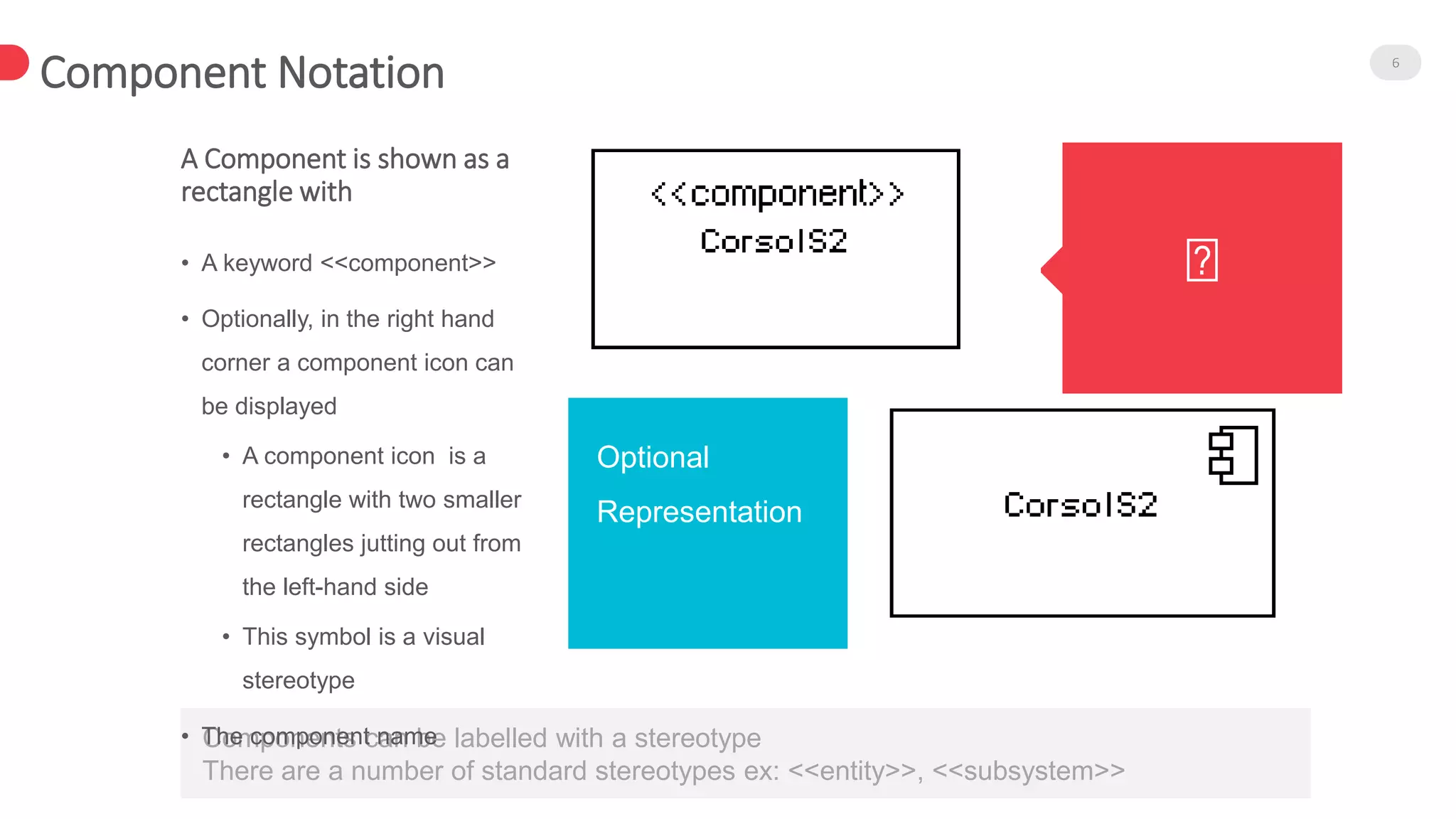
Components can be labelled with a stereotype
There are a number of standard stereotypes ex: <<entity>>, <<subsystem>>
Component Notation 6
A Component is shown as a
rectangle with
• A keyword <<component>>
• Optionally, in the right hand
corner a component icon can
be displayed
• A component icon is a
rectangle with two smaller
rectangles jutting out from
the left-hand side
• This symbol is a visual
stereotype
• The component name
Optional
Representation
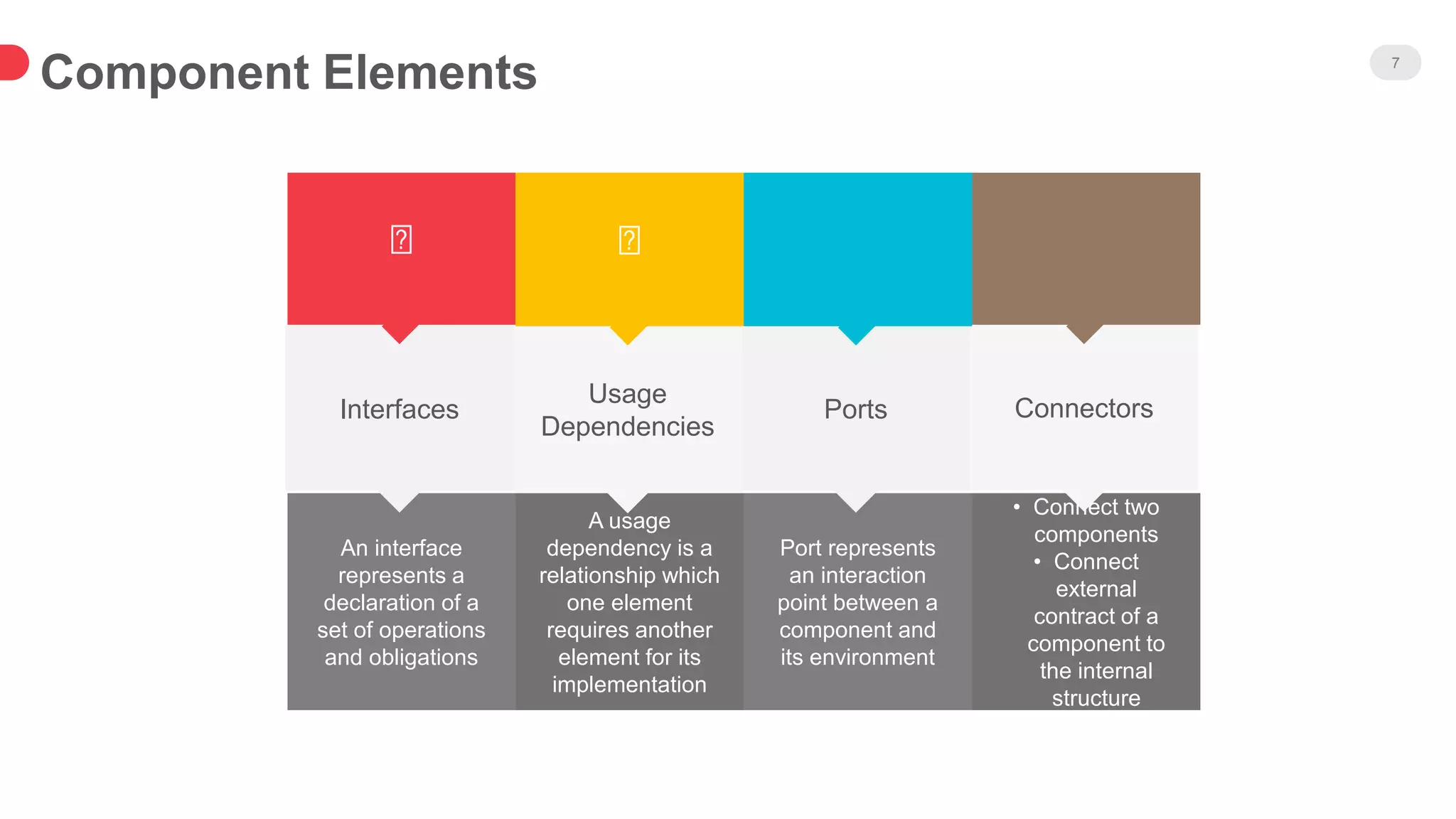
Component Elements 7
An interface
represents a
declaration of a
set of operations
and obligations
Interfaces
A usage
dependency is a
relationship which
one element
requires another
element for its
implementation
Port represents
an interaction
point between a
component and
its environment
• Connect two
components
• Connect
external
contract of a
component to
the internal
structure
Usage
Dependencies
Ports Connectors
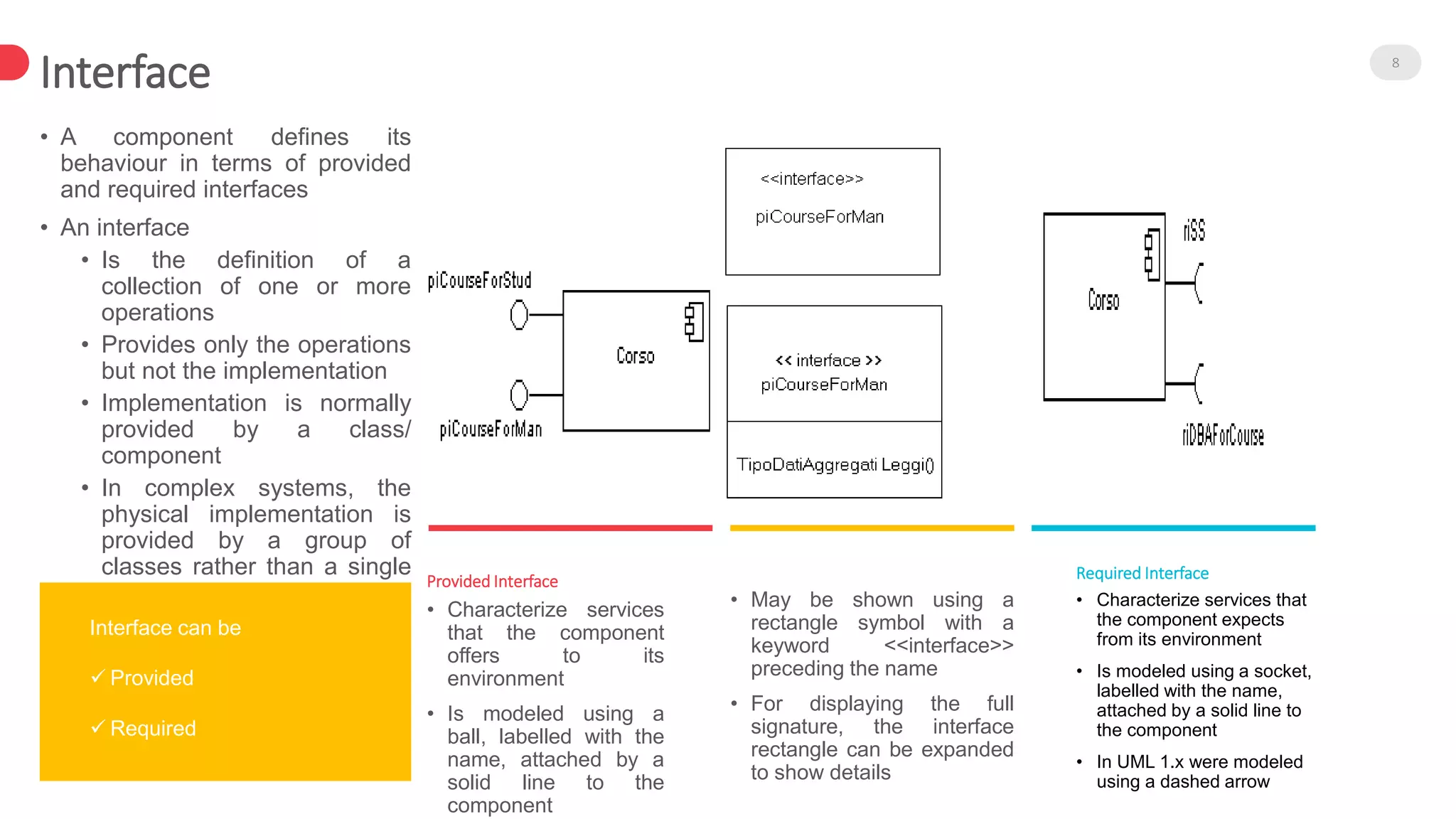
Interface 8
• A component defines its
behaviour in terms of provided
and required interfaces
• An interface
• Is the definition of a
collection of one or more
operations
• Provides only the operations
but not the implementation
• Implementation is normally
provided by a class/
component
• In complex systems, the
physical implementation is
provided by a group of
classes rather than a single
class • May be shown using a
rectangle symbol with a
keyword <<interface>>
preceding the name
• For displaying the full
signature, the interface
rectangle can be expanded
to show details
• Characterize services
that the component
offers to its
environment
• Is modeled using a
ball, labelled with the
name, attached by a
solid line to the
component
Provided Interface
• Characterize services that
the component expects
from its environment
• Is modeled using a socket,
labelled with the name,
attached by a solid line to
the component
• In UML 1.x were modeled
using a dashed arrow
Required Interface
Interface can be
 Provided
 Required
9
The ball-and-socket notation hint at that interface in question
serves to mediate interactions between the two components
Where two components/classes provide and
require the same interface, these two notations
may be combined
If an interface is shown using the rectangle symbol,
we can use an alternative notation, using
dependency arrows
In a system context where there are multiple
components that require or provide a particular
interface, a notation abstraction can be used that
combines by joining the interfaces
Dependency 10
Components can be
connected by usage
dependencies
Usage Dependency
• A usage dependency is relationship
which one element requires another
element for its full implementation
• Is a dependency in which the client
requires the presence of the supplier
• Is shown as dashed arrow with a
<<use>> keyword
• The arrowhead point from the dependent
component to the one of which it is
dependent
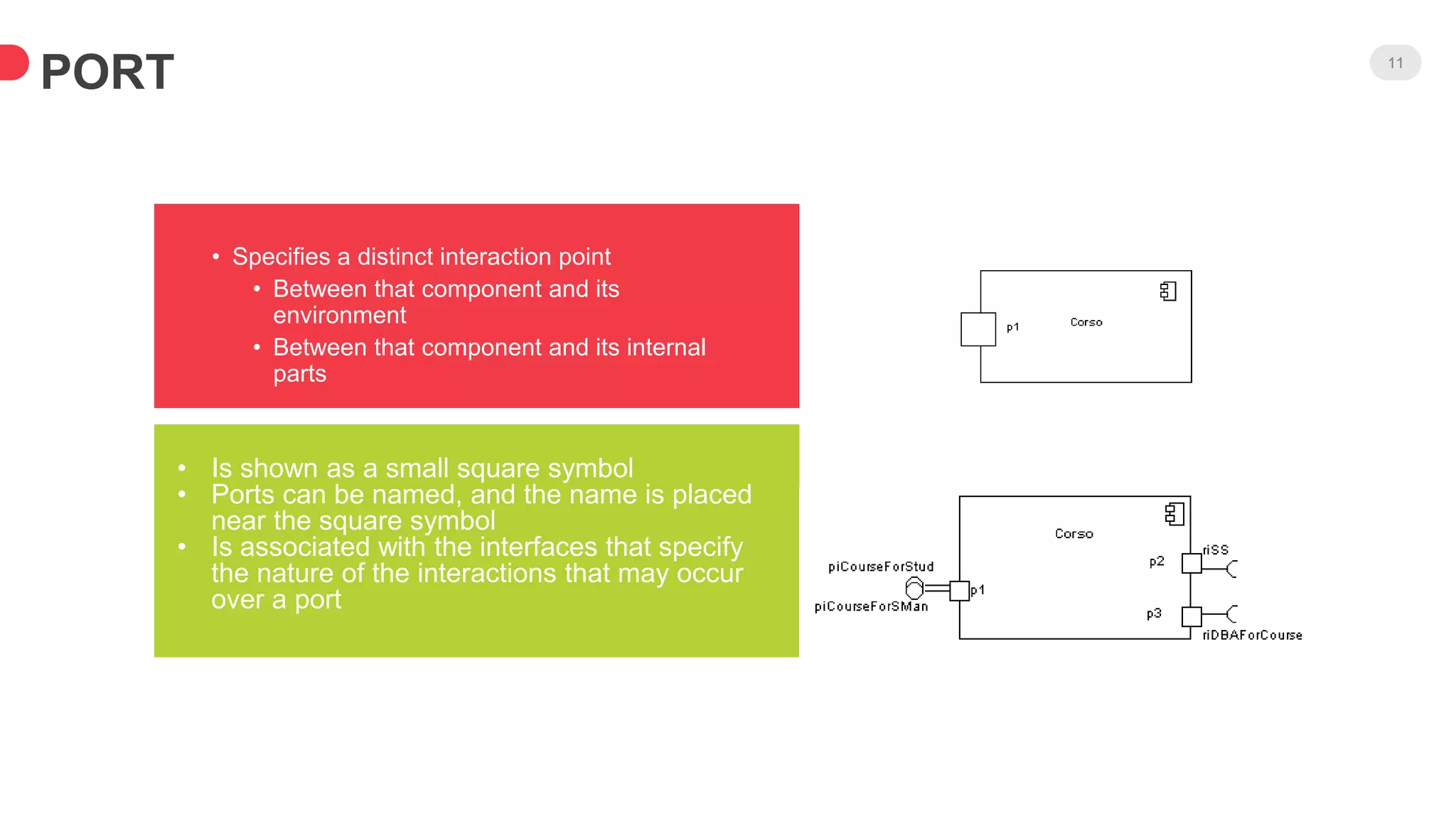
PORT 11
• Specifies a distinct interaction point
• Between that component and its
environment
• Between that component and its internal
parts
• Is shown as a small square symbol
• Ports can be named, and the name is placed
near the square symbol
• Is associated with the interfaces that specify
the nature of the interactions that may occur
over a port
PORT 12
Ports can support unidirectional
communication or bi-directional
communication
 All interactions of a component with its
environment are achieved through a port
 The internals are fully isolated from the
environment
 This allows such a component to be used in
any context that satisfies the constraints
specified by its ports
 Ports are not defined in UML 1.x
Assembly Connector 13
• A connector between 2 components defines that one
component provides the services that another component
requires
• He must only be defined from a required interface to a
provided interface
• An assembly connector is notated by a “ball-and-socket”
connection
• Are that signals travel along an instance of a connector
originating in a required port and delivered to a provided port
• The interfaces provided and required must be compatible
• The interface compatibility between provided and required
ports that are connected enables an existing component in a
system to be replaced
• Multiple connections directed from a single required interface
to provided interfaces indicates that the instance that will
handle the signal will be determined at execution time
Semantics of an assembly connector
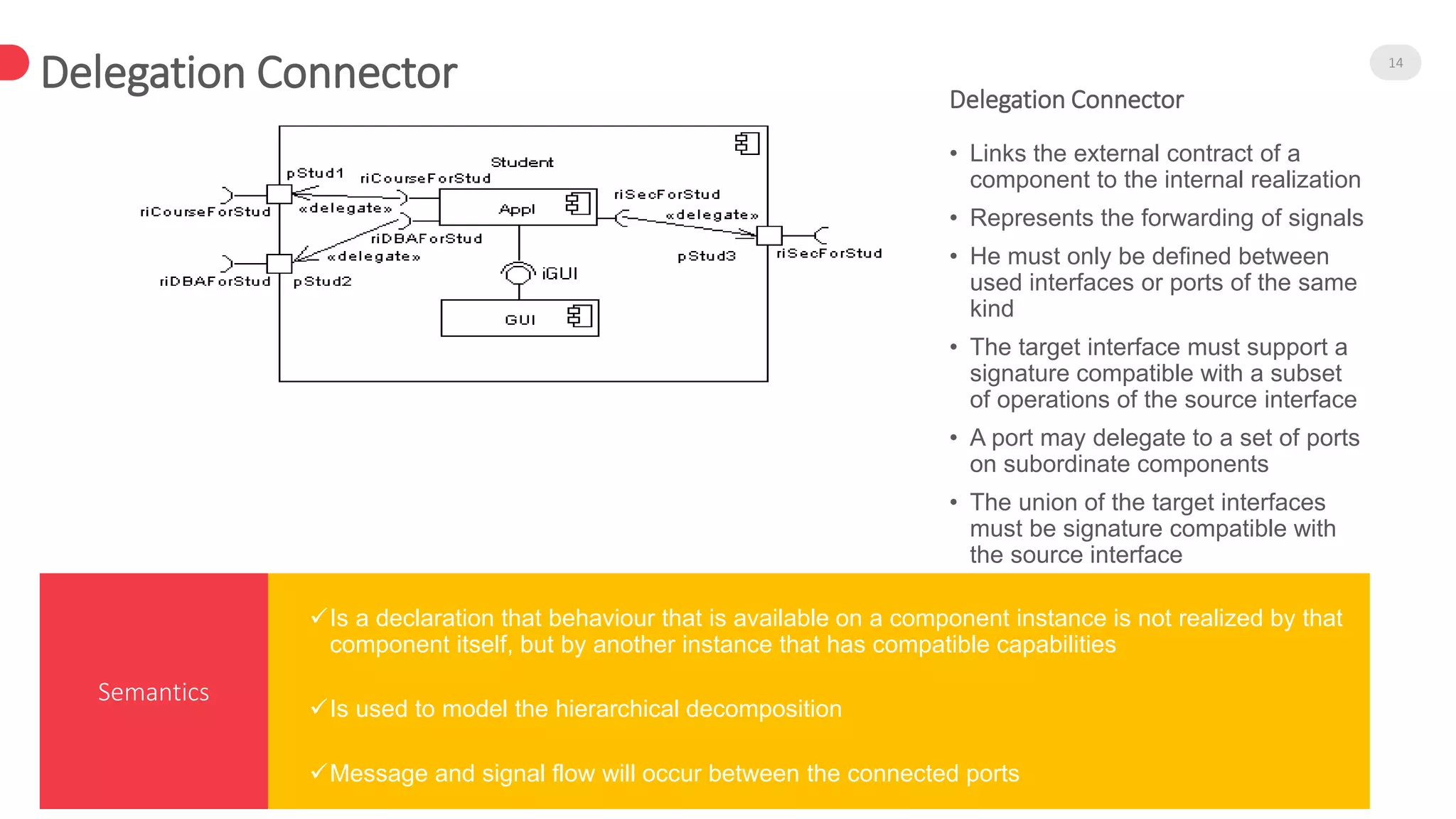
Delegation Connector 14
Semantics
• Links the external contract of a
component to the internal realization
• Represents the forwarding of signals
• He must only be defined between
used interfaces or ports of the same
kind
• The target interface must support a
signature compatible with a subset
of operations of the source interface
• A port may delegate to a set of ports
on subordinate components
• The union of the target interfaces
must be signature compatible with
the source interface
Delegation Connector
Is a declaration that behaviour that is available on a component instance is not realized by that
component itself, but by another instance that has compatible capabilities
Is used to model the hierarchical decomposition
Message and signal flow will occur between the connected ports
Views of a Component 15
An internal, or white box view of a component is
where the realizing classes/components are
nested within the component shape
Realization is a relationship between two set of
model elements
 One represents a specification
 The other represent an implementation of the
latter
The internal class that realize the behavior of a
component may be displayed in an additional
compartment
Compartments can also be used to display
parts, connectors or implementation artifacts
An artifact is the specification of a phisycal piece
of information
Internal View
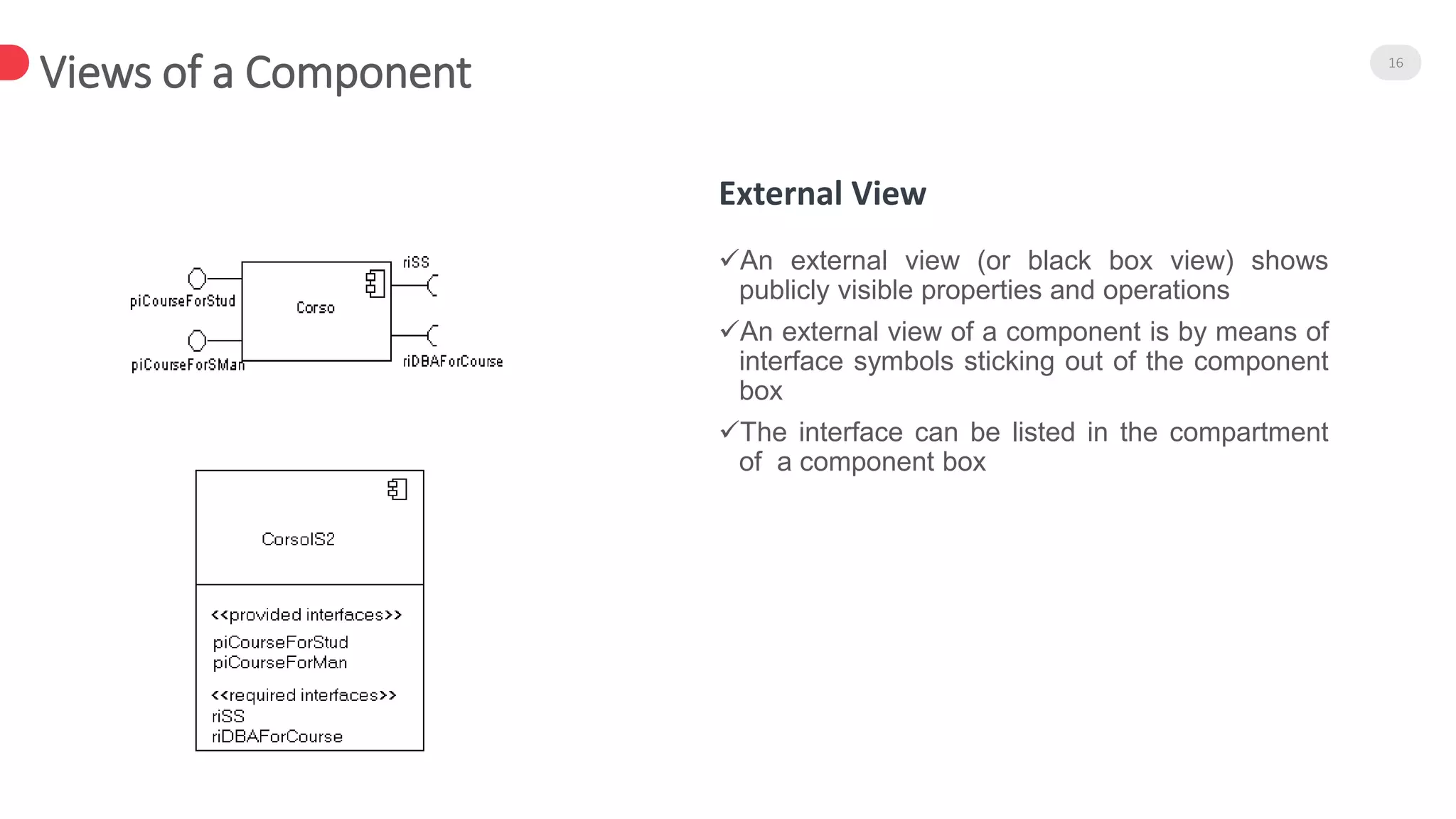
Views of a Component 16
An external view (or black box view) shows
publicly visible properties and operations
An external view of a component is by means of
interface symbols sticking out of the component
box
The interface can be listed in the compartment
of a component box
External View
CASE STUDY 17

Component Diagram

  • 1.
    By – Manas Shukla– A2305212150 Component Diagram in UML
  • 2.
    Plan of Talk2 Introduction about Components Elements of the component Case Study Components and Components Diagrams in UML Component view: black-box view and white-box view
  • 3.
    UML Component Diagrams3 A component is an autonomous unit within a system The components can be used to describe a software system of arbitary size and complexity Important for Component Based Development Components and subsytems can be easily reused and replaced UML Component diagrams enable to model the high level software components and the interfaces to those components Often referred to as “Wiring Diagrams” They describe software components and their dependencies to each others.
  • 4.
    4 B Activity Diagram State Diagram UseCase Diagram Interaction Diagram Behavior S Collaboration Diagram Activity Diagram Sequence Diagram Structure I Class Diagram Component Diagram Deployment Diagram Interaction S Use case Diagram Class Diagram Static D State Diagram Activity Diagram Sequence Diagram Collaboration Diagram Dynamic Component Diagram Deployment Diagram Implementation Classification of UML Diagrams
  • 5.
    Component in UML2.0 5 Has one or more provided or required interfaces Its internals are hidden and inaccessible . A component is encapsulated Its dependencies are designed such that it can be treated as independently as possible Modular Unit with well-defined interfaces that is replaceable within its environment. Autonomous unit within a system
  • 6.
    Components can belabelled with a stereotype There are a number of standard stereotypes ex: <<entity>>, <<subsystem>> Component Notation 6 A Component is shown as a rectangle with • A keyword <<component>> • Optionally, in the right hand corner a component icon can be displayed • A component icon is a rectangle with two smaller rectangles jutting out from the left-hand side • This symbol is a visual stereotype • The component name Optional Representation
  • 7.
    Component Elements 7 Aninterface represents a declaration of a set of operations and obligations Interfaces A usage dependency is a relationship which one element requires another element for its implementation Port represents an interaction point between a component and its environment • Connect two components • Connect external contract of a component to the internal structure Usage Dependencies Ports Connectors
  • 8.
    Interface 8 • Acomponent defines its behaviour in terms of provided and required interfaces • An interface • Is the definition of a collection of one or more operations • Provides only the operations but not the implementation • Implementation is normally provided by a class/ component • In complex systems, the physical implementation is provided by a group of classes rather than a single class • May be shown using a rectangle symbol with a keyword <<interface>> preceding the name • For displaying the full signature, the interface rectangle can be expanded to show details • Characterize services that the component offers to its environment • Is modeled using a ball, labelled with the name, attached by a solid line to the component Provided Interface • Characterize services that the component expects from its environment • Is modeled using a socket, labelled with the name, attached by a solid line to the component • In UML 1.x were modeled using a dashed arrow Required Interface Interface can be  Provided  Required
  • 9.
    9 The ball-and-socket notationhint at that interface in question serves to mediate interactions between the two components Where two components/classes provide and require the same interface, these two notations may be combined If an interface is shown using the rectangle symbol, we can use an alternative notation, using dependency arrows In a system context where there are multiple components that require or provide a particular interface, a notation abstraction can be used that combines by joining the interfaces
  • 10.
    Dependency 10 Components canbe connected by usage dependencies Usage Dependency • A usage dependency is relationship which one element requires another element for its full implementation • Is a dependency in which the client requires the presence of the supplier • Is shown as dashed arrow with a <<use>> keyword • The arrowhead point from the dependent component to the one of which it is dependent
  • 11.
    PORT 11 • Specifiesa distinct interaction point • Between that component and its environment • Between that component and its internal parts • Is shown as a small square symbol • Ports can be named, and the name is placed near the square symbol • Is associated with the interfaces that specify the nature of the interactions that may occur over a port
  • 12.
    PORT 12 Ports cansupport unidirectional communication or bi-directional communication  All interactions of a component with its environment are achieved through a port  The internals are fully isolated from the environment  This allows such a component to be used in any context that satisfies the constraints specified by its ports  Ports are not defined in UML 1.x
  • 13.
    Assembly Connector 13 •A connector between 2 components defines that one component provides the services that another component requires • He must only be defined from a required interface to a provided interface • An assembly connector is notated by a “ball-and-socket” connection • Are that signals travel along an instance of a connector originating in a required port and delivered to a provided port • The interfaces provided and required must be compatible • The interface compatibility between provided and required ports that are connected enables an existing component in a system to be replaced • Multiple connections directed from a single required interface to provided interfaces indicates that the instance that will handle the signal will be determined at execution time Semantics of an assembly connector
  • 14.
    Delegation Connector 14 Semantics •Links the external contract of a component to the internal realization • Represents the forwarding of signals • He must only be defined between used interfaces or ports of the same kind • The target interface must support a signature compatible with a subset of operations of the source interface • A port may delegate to a set of ports on subordinate components • The union of the target interfaces must be signature compatible with the source interface Delegation Connector Is a declaration that behaviour that is available on a component instance is not realized by that component itself, but by another instance that has compatible capabilities Is used to model the hierarchical decomposition Message and signal flow will occur between the connected ports
  • 15.
    Views of aComponent 15 An internal, or white box view of a component is where the realizing classes/components are nested within the component shape Realization is a relationship between two set of model elements  One represents a specification  The other represent an implementation of the latter The internal class that realize the behavior of a component may be displayed in an additional compartment Compartments can also be used to display parts, connectors or implementation artifacts An artifact is the specification of a phisycal piece of information Internal View
  • 16.
    Views of aComponent 16 An external view (or black box view) shows publicly visible properties and operations An external view of a component is by means of interface symbols sticking out of the component box The interface can be listed in the compartment of a component box External View
  • 17.

Editor's Notes

  • #9 Provided Interface A provided interface is the one that is either realized directly by the component itself, or realized by one of the classifiers realizing component, or is provided by a public port of the component. Required Interface A required interface is either designated by usage dependency from the component itself, or designated by usage dependency from one of the classifiers realizing component, or is required by a public port of the component.
  • #14 Connector in components extends connector from internal structures. It specifies a link that enables communication between two or more instances. Connector was extended in the components to include contracts and specific notation. Connector linking components could be either: delegation connector, or assembly connector. Kind of connector attribute is derived: a connector with one or more ends connected to a port that is not on a part and that is not a behavior port is a delegation; otherwise it is an assembly. Connector's contract is set of behaviors that specify the valid interaction patterns across the connector.
  • #18 Development of an application collecting students’ opinions about courses A student can Read Insert Update Make data permanent about the courses in its schedule A professor can only see statistic elaboration of the data The student application must be installed in pc client (sw1, sw2) The manager application must be installed in pc client (in the manager’s office) There is one or more servers with DataBase and components for courses management