Duration : 3 Hrs
1
Ramakant Soni
Assistant Professor
Dept. of Computer Science
B K Birla Institute of Engineering & Technology, Pilani, India
Ramakant Soni @ BKBIET Pilani
Activity Diagram
Activity diagram is basically a flow chart to
represent the flow from one activity to another
activity.
The activity can be described as an operation
Ramakant Soni @ BKBIET Pilani 2
The activity can be described as an operation
of the system.
This flow can be sequential, branched or
concurrent.
Purpose
Activity diagrams are not only used for visualizing
dynamic nature of a system but they are also used to
construct the executable system by using forward and
reverse engineering techniques.
It does not show any message flow from one activity to
Ramakant Soni @ BKBIET Pilani 3
It does not show any message flow from one activity to
another.
So the purposes can be described as to:
• Draw the activity flow of a system.
• Describe the sequence from one activity to another.
Ramakant Soni @ BKBIET Pilani 4
• Describe the parallel, branched and concurrent flow
of the system.
How to draw Activity Diagram
Before drawing an activity diagram we must have a
clear understanding about the elements used in activity
diagram.
First we should identify the following elements :
1. Activities
2. Association
Ramakant Soni @ BKBIET Pilani 5
2. Association
3. Conditions
4. Constraints
Once the above mentioned parameters are identified we need to
make a mental layout of the entire flow. This mental layout is then
transformed into an activity diagram.
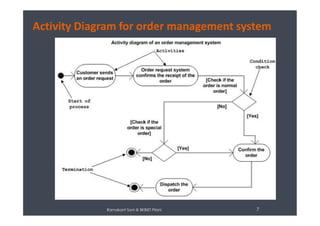
Example of an order management system
The diagram is drawn with the four main activities :
• Send order by the customer
• Receipt of the order
• Confirm order
• Dispatch order
After receiving the order request condition checks are
Ramakant Soni @ BKBIET Pilani 6
After receiving the order request condition checks are
performed to check if it is normal or special order.
After the type of order is identified dispatch activity is
performed and that is marked as the termination of the
process.
Activity Diagram for order management system
Ramakant Soni @ BKBIET Pilani 7
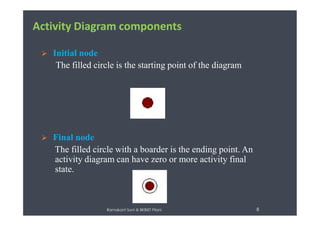
 Initial node
The filled circle is the starting point of the diagram
Activity Diagram components
 Final node
The filled circle with a boarder is the ending point. An
activity diagram can have zero or more activity final
state.
8Ramakant Soni @ BKBIET Pilani
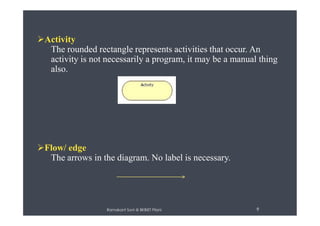
Activity
The rounded rectangle represents activities that occur. An
activity is not necessarily a program, it may be a manual thing
also.
Ramakant Soni @ BKBIET Pilani 9
Flow/ edge
The arrows in the diagram. No label is necessary.
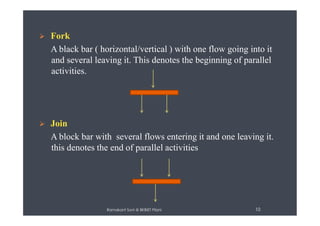
 Fork
A black bar ( horizontal/vertical ) with one flow going into it
and several leaving it. This denotes the beginning of parallel
activities.
 Join
A block bar with several flows entering it and one leaving it.
this denotes the end of parallel activities
10Ramakant Soni @ BKBIET Pilani
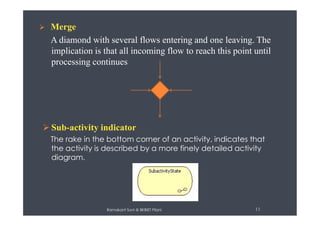
 Merge
A diamond with several flows entering and one leaving. The
implication is that all incoming flow to reach this point until
processing continues
 Sub-activity indicator
The rake in the bottom corner of an activity, indicates that
the activity is described by a more finely detailed activity
diagram.
11Ramakant Soni @ BKBIET Pilani
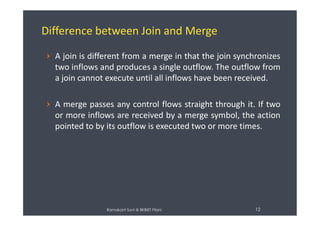
Difference between Join and Merge
› A join is different from a merge in that the join synchronizes
two inflows and produces a single outflow. The outflow from
a join cannot execute until all inflows have been received.
› A merge passes any control flows straight through it. If two
or more inflows are received by a merge symbol, the actionor more inflows are received by a merge symbol, the action
pointed to by its outflow is executed two or more times.
12Ramakant Soni @ BKBIET Pilani
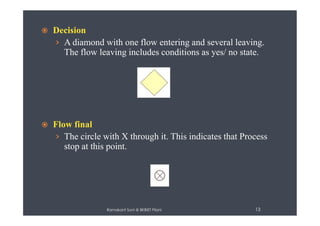
 Decision
› A diamond with one flow entering and several leaving.
The flow leaving includes conditions as yes/ no state.
 Flow final
› The circle with X through it. This indicates that Process
stop at this point.
13Ramakant Soni @ BKBIET Pilani
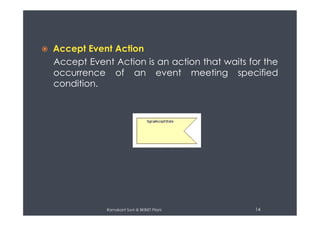
 Accept Event Action
Accept Event Action is an action that waits for the
occurrence of an event meeting specified
condition.
14Ramakant Soni @ BKBIET Pilani
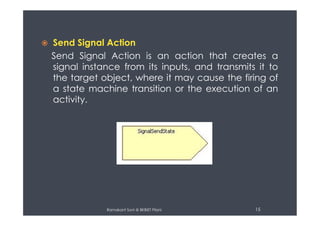
 Send Signal Action
Send Signal Action is an action that creates a
signal instance from its inputs, and transmits it to
the target object, where it may cause the firing of
a state machine transition or the execution of an
activity.
15Ramakant Soni @ BKBIET Pilani
 Swim lane
A partition in activity diagram by means of dashed line,
called swim lane. This swim lane may be horizontal or
vertical.
Vertical Swimlane Horizontal Swimlane
16Ramakant Soni @ BKBIET Pilani
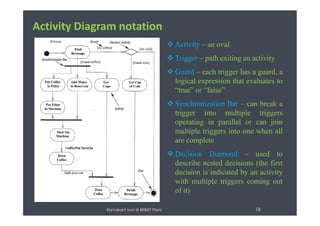
Activity Diagram notation
text  Start at the top black circle
 If condition 1 is TRUE, go
right; if condition 2 is TRUE,
go down
 At first bar (a synchronization
bar), break apart to follow two
Ramakant Soni @ BKBIET Pilani 17
bar), break apart to follow two
parallel paths
 At second bar, come together
to proceed only when both
parallel activities are done
Activity Diagram notation
text
 Activity – an oval
 Trigger – path exiting an activity
 Guard – each trigger has a guard, a
logical expression that evaluates to
“true” or “false”
 Synchronization Bar – can break a
trigger into multiple triggers
Ramakant Soni @ BKBIET Pilani 18
trigger into multiple triggers
operating in parallel or can join
multiple triggers into one when all
are complete
 Decision Diamond – used to
describe nested decisions (the first
decision is indicated by an activity
with multiple triggers coming out
of it)
text
Use Case: Receiving an Order Use Case: Receiving a Supply
Ramakant Soni @ BKBIET Pilani 19
Ramakant Soni @ BKBIET Pilani 20
Use Case: Receiving an Order and Receiving a Supply
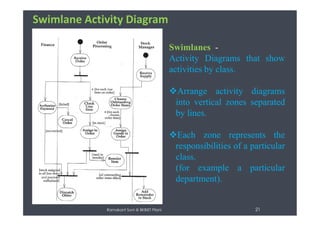
Swimlane Activity Diagram
Swimlanes -
Activity Diagrams that show
activities by class.
Arrange activity diagrams
into vertical zones separated
by lines.
Ramakant Soni @ BKBIET Pilani 21
by lines.
Each zone represents the
responsibilities of a particular
class.
(for example a particular
department).
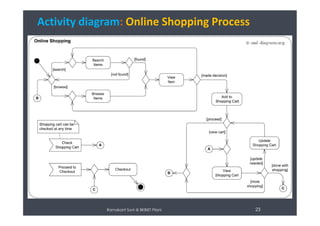
Exercise 1: Online Shopping Process
Scenario:
“Online customer can browse or search items,
view specific item, add it to shopping cart, view
and update shopping cart, checkout. User can
Ramakant Soni @ BKBIET Pilani 22
and update shopping cart, checkout. User can
view shopping cart at any time. Checkout is
assumed to include user registration and login.”
Activity diagram: Online Shopping Process
Ramakant Soni @ BKBIET Pilani 23
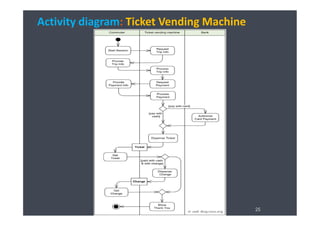
Exercise 2: Ticket Vending Machine
Scenario:
“Activity is started by Commuter actor who needs to buy a
ticket. Ticket vending machine will request trip information from
Commuter. This information will include number and type of
tickets, e.g. whether it is a monthly pass, one way or round
ticket, route number, destination or zone number, etc.
Ramakant Soni @ BKBIET Pilani 24
ticket, route number, destination or zone number, etc.
Based on the provided trip info ticket vending machine will
calculate payment due and request payment options. Those
options include payment by cash, or by credit or debit card. If
payment by card was selected by Commuter, another actor,
Bank will participate in the activity by authorizing the payment.
“
Activity diagram: Ticket Vending Machine
Ramakant Soni @ BKBIET Pilani 25
Exercise 3: Resolving issues in Software
Scenario:
“Prepare an activity diagram which shows how to
resolve an issue in a software design. After ticket is
created by some authority and the issue is reproduced,
Ramakant Soni @ BKBIET Pilani 26
created by some authority and the issue is reproduced,
issue is identified, resolution is determined, issue is fixed
and verified, and ticket is closed, if issue was resolved.”
Activity diagram: Resolving issues in Software
Ramakant Soni @ BKBIET Pilani 27
Exercise 4: Single Sign- on for Google Apps
Scenario:
To interact with partner companies Google uses single sign-on based on OASIS SAML 2.0
protocol. Google acts as service provider with services such as Gmail or Start Pages. Partner
companies act as identity providers and control user names, passwords, and other information
used to identify, authenticate and authorize users for web applications that Google hosts. Each
partner provides Google with the URL of its SSO service as well as the public key that Google will
use to verify SAML responses.
When a user attempts to use some hosted Google application, such as Gmail, Google generates
a SAML authentication request and sends redirect request back to the user's browser. Redirect
Ramakant Soni @ BKBIET Pilani 28
a SAML authentication request and sends redirect request back to the user's browser. Redirect
points to the specific identity provider. SAML authentication request contains the encoded URL
of the Google application that the user is trying to reach.
The partner identity provider authenticates the user by either asking for valid login credentials
or by checking for its own valid authentication cookies. The partner generates a SAML response
and digitally signs it. The response is forwarded to Google's Assertion Consumer Service (ACS).
Google's ACS verifies the SAML response using the partner's public key. If the response is valid
and user identity was confirmed by identity provider, ACS redirects the user to the destination
URL. Otherwise user will see error message.
Activity diagram: Single Sign- on for Google Apps
Ramakant Soni @ BKBIET Pilani 29
References:
[1] http://www.uml-diagrams.org/
[2] http://en.wikipedia.org/wiki/Activity_diagram
[3] http://www.visual-paradigm.com/VPGallery/diagrams/Activity.html
[4] http://www.ibm.com/developerworks/rational/library/3101. html
Ramakant Soni @ BKBIET Pilani 30
ThanksThanks
4/26/2015 30
[5] http://www.uml-diagrams.org/activity-diagrams-examples.html

Activity diagram-UML diagram

  • 1.
    Duration : 3Hrs 1 Ramakant Soni Assistant Professor Dept. of Computer Science B K Birla Institute of Engineering & Technology, Pilani, India Ramakant Soni @ BKBIET Pilani
  • 2.
    Activity Diagram Activity diagramis basically a flow chart to represent the flow from one activity to another activity. The activity can be described as an operation Ramakant Soni @ BKBIET Pilani 2 The activity can be described as an operation of the system. This flow can be sequential, branched or concurrent.
  • 3.
    Purpose Activity diagrams arenot only used for visualizing dynamic nature of a system but they are also used to construct the executable system by using forward and reverse engineering techniques. It does not show any message flow from one activity to Ramakant Soni @ BKBIET Pilani 3 It does not show any message flow from one activity to another.
  • 4.
    So the purposescan be described as to: • Draw the activity flow of a system. • Describe the sequence from one activity to another. Ramakant Soni @ BKBIET Pilani 4 • Describe the parallel, branched and concurrent flow of the system.
  • 5.
    How to drawActivity Diagram Before drawing an activity diagram we must have a clear understanding about the elements used in activity diagram. First we should identify the following elements : 1. Activities 2. Association Ramakant Soni @ BKBIET Pilani 5 2. Association 3. Conditions 4. Constraints Once the above mentioned parameters are identified we need to make a mental layout of the entire flow. This mental layout is then transformed into an activity diagram.
  • 6.
    Example of anorder management system The diagram is drawn with the four main activities : • Send order by the customer • Receipt of the order • Confirm order • Dispatch order After receiving the order request condition checks are Ramakant Soni @ BKBIET Pilani 6 After receiving the order request condition checks are performed to check if it is normal or special order. After the type of order is identified dispatch activity is performed and that is marked as the termination of the process.
  • 7.
    Activity Diagram fororder management system Ramakant Soni @ BKBIET Pilani 7
  • 8.
     Initial node Thefilled circle is the starting point of the diagram Activity Diagram components  Final node The filled circle with a boarder is the ending point. An activity diagram can have zero or more activity final state. 8Ramakant Soni @ BKBIET Pilani
  • 9.
    Activity The rounded rectanglerepresents activities that occur. An activity is not necessarily a program, it may be a manual thing also. Ramakant Soni @ BKBIET Pilani 9 Flow/ edge The arrows in the diagram. No label is necessary.
  • 10.
     Fork A blackbar ( horizontal/vertical ) with one flow going into it and several leaving it. This denotes the beginning of parallel activities.  Join A block bar with several flows entering it and one leaving it. this denotes the end of parallel activities 10Ramakant Soni @ BKBIET Pilani
  • 11.
     Merge A diamondwith several flows entering and one leaving. The implication is that all incoming flow to reach this point until processing continues  Sub-activity indicator The rake in the bottom corner of an activity, indicates that the activity is described by a more finely detailed activity diagram. 11Ramakant Soni @ BKBIET Pilani
  • 12.
    Difference between Joinand Merge › A join is different from a merge in that the join synchronizes two inflows and produces a single outflow. The outflow from a join cannot execute until all inflows have been received. › A merge passes any control flows straight through it. If two or more inflows are received by a merge symbol, the actionor more inflows are received by a merge symbol, the action pointed to by its outflow is executed two or more times. 12Ramakant Soni @ BKBIET Pilani
  • 13.
     Decision › Adiamond with one flow entering and several leaving. The flow leaving includes conditions as yes/ no state.  Flow final › The circle with X through it. This indicates that Process stop at this point. 13Ramakant Soni @ BKBIET Pilani
  • 14.
     Accept EventAction Accept Event Action is an action that waits for the occurrence of an event meeting specified condition. 14Ramakant Soni @ BKBIET Pilani
  • 15.
     Send SignalAction Send Signal Action is an action that creates a signal instance from its inputs, and transmits it to the target object, where it may cause the firing of a state machine transition or the execution of an activity. 15Ramakant Soni @ BKBIET Pilani
  • 16.
     Swim lane Apartition in activity diagram by means of dashed line, called swim lane. This swim lane may be horizontal or vertical. Vertical Swimlane Horizontal Swimlane 16Ramakant Soni @ BKBIET Pilani
  • 17.
    Activity Diagram notation text Start at the top black circle  If condition 1 is TRUE, go right; if condition 2 is TRUE, go down  At first bar (a synchronization bar), break apart to follow two Ramakant Soni @ BKBIET Pilani 17 bar), break apart to follow two parallel paths  At second bar, come together to proceed only when both parallel activities are done
  • 18.
    Activity Diagram notation text Activity – an oval  Trigger – path exiting an activity  Guard – each trigger has a guard, a logical expression that evaluates to “true” or “false”  Synchronization Bar – can break a trigger into multiple triggers Ramakant Soni @ BKBIET Pilani 18 trigger into multiple triggers operating in parallel or can join multiple triggers into one when all are complete  Decision Diamond – used to describe nested decisions (the first decision is indicated by an activity with multiple triggers coming out of it)
  • 19.
    text Use Case: Receivingan Order Use Case: Receiving a Supply Ramakant Soni @ BKBIET Pilani 19
  • 20.
    Ramakant Soni @BKBIET Pilani 20 Use Case: Receiving an Order and Receiving a Supply
  • 21.
    Swimlane Activity Diagram Swimlanes- Activity Diagrams that show activities by class. Arrange activity diagrams into vertical zones separated by lines. Ramakant Soni @ BKBIET Pilani 21 by lines. Each zone represents the responsibilities of a particular class. (for example a particular department).
  • 22.
    Exercise 1: OnlineShopping Process Scenario: “Online customer can browse or search items, view specific item, add it to shopping cart, view and update shopping cart, checkout. User can Ramakant Soni @ BKBIET Pilani 22 and update shopping cart, checkout. User can view shopping cart at any time. Checkout is assumed to include user registration and login.”
  • 23.
    Activity diagram: OnlineShopping Process Ramakant Soni @ BKBIET Pilani 23
  • 24.
    Exercise 2: TicketVending Machine Scenario: “Activity is started by Commuter actor who needs to buy a ticket. Ticket vending machine will request trip information from Commuter. This information will include number and type of tickets, e.g. whether it is a monthly pass, one way or round ticket, route number, destination or zone number, etc. Ramakant Soni @ BKBIET Pilani 24 ticket, route number, destination or zone number, etc. Based on the provided trip info ticket vending machine will calculate payment due and request payment options. Those options include payment by cash, or by credit or debit card. If payment by card was selected by Commuter, another actor, Bank will participate in the activity by authorizing the payment. “
  • 25.
    Activity diagram: TicketVending Machine Ramakant Soni @ BKBIET Pilani 25
  • 26.
    Exercise 3: Resolvingissues in Software Scenario: “Prepare an activity diagram which shows how to resolve an issue in a software design. After ticket is created by some authority and the issue is reproduced, Ramakant Soni @ BKBIET Pilani 26 created by some authority and the issue is reproduced, issue is identified, resolution is determined, issue is fixed and verified, and ticket is closed, if issue was resolved.”
  • 27.
    Activity diagram: Resolvingissues in Software Ramakant Soni @ BKBIET Pilani 27
  • 28.
    Exercise 4: SingleSign- on for Google Apps Scenario: To interact with partner companies Google uses single sign-on based on OASIS SAML 2.0 protocol. Google acts as service provider with services such as Gmail or Start Pages. Partner companies act as identity providers and control user names, passwords, and other information used to identify, authenticate and authorize users for web applications that Google hosts. Each partner provides Google with the URL of its SSO service as well as the public key that Google will use to verify SAML responses. When a user attempts to use some hosted Google application, such as Gmail, Google generates a SAML authentication request and sends redirect request back to the user's browser. Redirect Ramakant Soni @ BKBIET Pilani 28 a SAML authentication request and sends redirect request back to the user's browser. Redirect points to the specific identity provider. SAML authentication request contains the encoded URL of the Google application that the user is trying to reach. The partner identity provider authenticates the user by either asking for valid login credentials or by checking for its own valid authentication cookies. The partner generates a SAML response and digitally signs it. The response is forwarded to Google's Assertion Consumer Service (ACS). Google's ACS verifies the SAML response using the partner's public key. If the response is valid and user identity was confirmed by identity provider, ACS redirects the user to the destination URL. Otherwise user will see error message.
  • 29.
    Activity diagram: SingleSign- on for Google Apps Ramakant Soni @ BKBIET Pilani 29
  • 30.
    References: [1] http://www.uml-diagrams.org/ [2] http://en.wikipedia.org/wiki/Activity_diagram [3]http://www.visual-paradigm.com/VPGallery/diagrams/Activity.html [4] http://www.ibm.com/developerworks/rational/library/3101. html Ramakant Soni @ BKBIET Pilani 30 ThanksThanks 4/26/2015 30 [5] http://www.uml-diagrams.org/activity-diagrams-examples.html