



BUILDING MORE ADVANCED MIXED
REALITY APPS FOR HOLOLENS
HOLOADVANCED
“HoloLens Evangelist”
I am responsible for architecture related business for our project services
department at ETTU. I’m involved as architect at different companies like Jumbo
Maritime, PGGM, Gemeente Amersfoort and others
Alexander Meijers
ABOUT ME
 Solutions Architect for ETTU
 Founder of the Mixed Reality User Group
 MixUG: http://www.mixug.nl
 Email: a.meijers@ettu.nl or alexander@appzinside.com
 Twitter: @ameijers
 Blog: http://www.appzinside.com
4INTRO ETTU
TODAY’S TALK
AGENDA
 Realities Explained
 HoloLens
 Mixed Reality Toolkit
 Spatial perception
 Coordinate system & anchoring
 Advanced gestures
 Performance & stabilization
Slider
Content Ads
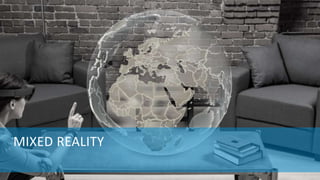
MIXED REALITY
HOLOBASICS 6
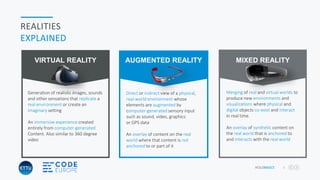
REALITIES
EXPLAINED
Merging of real and virtual worlds to
produce new environments and
visualizations where physical and
digital objects co-exist and interact
in real time.
An overlay of synthetic content on
the real world that is anchored to
and interacts with the real world
MIXED REALITY
Direct or indirect view of a physical,
real-world environment whose
elements are augmented by
computer-generated sensory input
such as sound, video, graphics
or GPS data
An overlay of content on the real
world where that content is not
anchored to or part of it
AUGMENTED REALITY
Generation of realistic images, sounds
and other sensations that replicate a
real environment or create an
imaginary setting
An immersive experience created
entirely from computer-generated
Content. Also similar to 360 degree
video
VIRTUAL REALITY
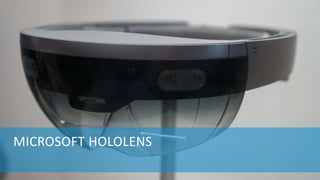
MICROSOFT HOLOLENS
HOLOBASICS 8
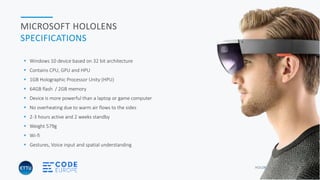
MICROSOFT HOLOLENS
SPECIFICATIONS
 Windows 10 device based on 32 bit architecture
 Contains CPU, GPU and HPU
 1GB Holographic Processor Unity (HPU)
 64GB flash / 2GB memory
 Device is more powerful than a laptop or game computer
 No overheating due to warm air flows to the sides
 2-3 hours active and 2 weeks standby
 Weight 579g
 Wi-fi
 Gestures, Voice input and spatial understanding
HOLOBASICS 9
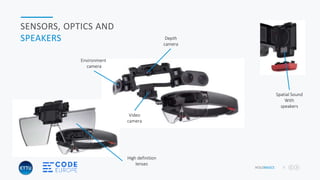
SENSORS, OPTICS AND
SPEAKERS
Environment
camera
Depth
camera
Video
camera
Spatial Sound
With
speakers
High definition
lenses
HOLOBASICS 10
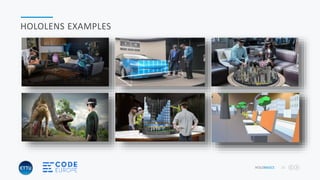
HOLOLENS EXAMPLES
HOLOBASICS 12
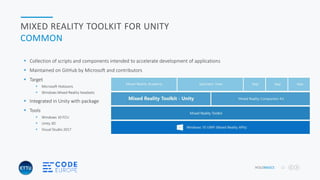
MIXED REALITY TOOLKIT FOR UNITY
COMMON
 Collection of scripts and components intended to accelerate development of applications
 Maintained on GitHub by Microsoft and contributors
 Target
 Microsoft HoloLens
 Windows Mixed Reality headsets
 Integrated in Unity with package
 Tools
 Windows 10 FCU
 Unity 3D
 Visual Studio 2017
HOLOBASICS 13
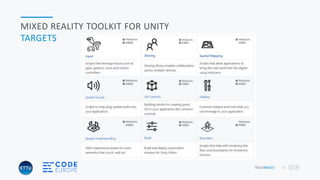
MIXED REALITY TOOLKIT FOR UNITY
TARGETS
“WALK THROUGH OF HOLOLENS APPLICATION
USING TOOLKIT”
“HoloAdvanced by Alexander Meijers”
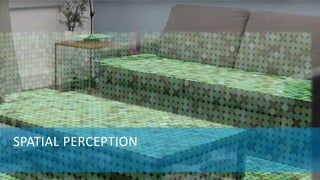
SPATIAL PERCEPTION
HOLOBASICS 16
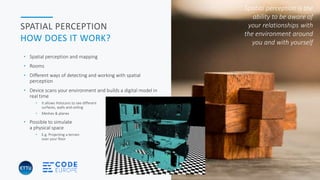
SPATIAL PERCEPTION
HOW DOES IT WORK?
• Spatial perception and mapping
• Rooms
• Different ways of detecting and working with spatial
perception
• Device scans your environment and builds a digital model in
real time
• It allows HoloLens to see different
surfaces, walls and ceiling
• Meshes & planes
• Possible to simulate
a physical space
• E.g. Projecting a terrain
over your floor
Spatial perception is the
ability to be aware of
your relationships with
the environment around
you and with yourself
“DEMONSTRATION OF DEFAULT
SPATIAL MAPPING”
“HoloAdvanced by Alexander Meijers”
HOLOBASICS 18
SPATIAL PERCEPTION
SPATIAL UNDERSTANDING
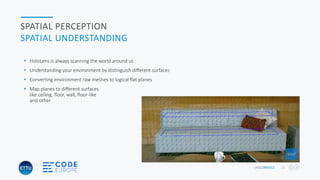
 HoloLens is always scanning the world around us
 Understanding your environment by distinguish different surfaces
 Converting environment raw meshes to logical flat planes
 Map planes to different surfaces
like ceiling, floor, wall, floor-like
and other
HOLOBASICS 19
SPATIAL PERCEPTION
DIFFERENT METHODS
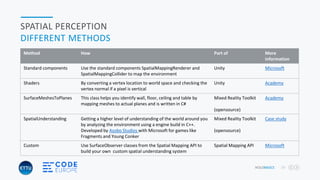
Method How Part of More
information
Standard components Use the standard components SpatialMappingRenderer and
SpatialMappingCollider to map the environment
Unity Microsoft
Shaders By converting a vertex location to world space and checking the
vertex normal if a pixel is vertical
Unity Academy
SurfaceMeshesToPlanes This class helps you identify wall, floor, ceiling and table by
mapping meshes to actual planes and is written in C#
Mixed Reality Toolkit
(opensource)
Academy
SpatialUnderstanding Getting a higher level of understanding of the world around you
by analyzing the environment using a engine build in C++.
Developed by Asobo Studios with Microsoft for games like
Fragments and Young Conker
Mixed Reality Toolkit
(opensource)
Case study
Custom Use SurfaceObserver classes from the Spatial Mapping API to
build your own custom spatial understanding system
Spatial Mapping API Microsoft
“DEMONSTRATION OF SPATIAL
UNDERSTANDING OF THE ENVIRONMENT”
“HoloAdvanced by Alexander Meijers”
HOLOBASICS 21
SPATIAL PERCEPTION
ROOM SCANNING
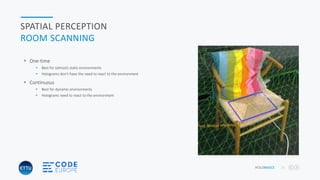
 One-time
 Best for (almost) static environments
 Holograms don’t have the need to react to the environment
 Continuous
 Best for dynamic environments
 Holograms need to react to the environment
COORDINATE SYSTEM & ANCHORING
HOLOBASICS 23
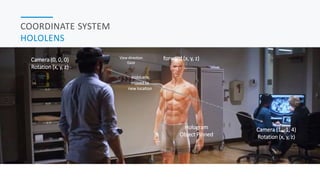
COORDINATE SYSTEM
HOLOLENS
forward (x, y, z)Camera (0, 0, 0)
Rotation (x, y, z)
Camera (1, -1, 4)
Rotation (x, y, z)
Hologram
Object Pinned
HoloLens
moved to
new location
View direction
Gaze
HOLOBASICS 24
ANCHORING
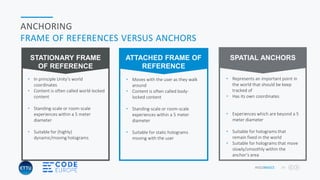
FRAME OF REFERENCES VERSUS ANCHORS
• Moves with the user as they walk
around
• Content is often called body-
locked content
• Standing-scale or room-scale
experiences within a 5 meter
diameter
• Suitable for static holograms
moving with the user
ATTACHED FRAME OF
REFERENCE
• In principle Unity’s world
coordinates
• Content is often called world-locked
content
• Standing-scale or room-scale
experiences within a 5 meter
diameter
• Suitable for (highly)
dynamic/moving holograms
STATIONARY FRAME
OF REFERENCE
• Represents an important point in
the world that should be keep
tracked of
• Has its own coordinates
• Experiences which are beyond a 5
meter diameter
• Suitable for holograms that
remain fixed in the world
• Suitable for holograms that move
slowly/smoothly within the
anchor’s area
SPATIAL ANCHORS
HOLOBASICS 25
ANCHORING
SPATIAL ANCHORS
 Represents an important point in the world that is tracked by the system in time
 Has its own coordinate system
 Adjust when needed relative to other anchors or frame of reference
 Achieves the most accurate position for a hologram
 Very cheap to create
 myHologramObject.AddComponent<WorldAnchor>();
HOLOBASICS 26
ANCHORING
WHEN TO USE SPATIAL ANCHORS
In most cases create a spatial anchor for each hologram placed in the scene by an end user
Keep the following in mind
 You can use a single spatial anchor for multiple holograms
 Render holograms always within 3 meters of their attached anchor
 Avoid creating a grid of spatial anchors to allow holograms move between different anchored areas
 Clean-up spatial anchors which you not use anymore
HOLOBASICS 27
MICROSOFT HOLOLENS
SHARING ACROSS SESSIONS
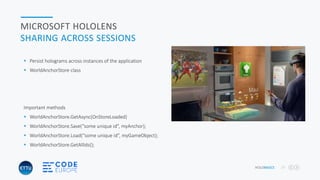
 Persist holograms across instances of the application
 WorldAnchorStore class
Important methods
 WorldAnchorStore.GetAsync(OnStoreLoaded)
 WorldAnchorStore.Save(“some unique id”, myAnchor);
 WorldAnchorStore.Load(“some unique id”, myGameObject);
 WorldAnchorStore.GetAllIds();
HOLOBASICS 28
MICROSOFT HOLOLENS
ANCHOR SHARING BETWEEN DEVICES
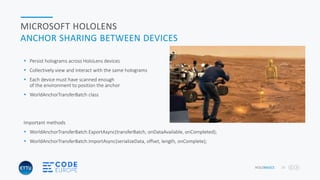
 Persist holograms across HoloLens devices
 Collectively view and interact with the same holograms
 Each device must have scanned enough
of the environment to position the anchor
 WorldAnchorTransferBatch class
Important methods
 WorldAnchorTransferBatch.ExportAsync(transferBatch, onDataAvailable, onCompleted);
 WorldAnchorTransferBatch.ImportAsync(serializeData, offset, length, onComplete);
“DEMONSTRATION OF MAINTAINING
ANCHORS ACROSS SESSIONS”
“HoloAdvanced by Alexander Meijers”
ADVANCED GESTURES
HOLOBASICS 31
ADVANCED GESTURES
GESTURE RECOGNIZER
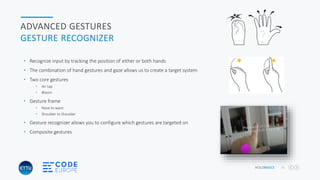
• Recognize input by tracking the position of either or both hands
• The combination of hand gestures and gaze allows us to create a target system
• Two core gestures
• Air tap
• Bloom
• Gesture frame
• Nose to waist
• Shoulder to Shoulder
• Gesture recognizer allows you to configure which gestures are targeted on
• Composite gestures
HOLOBASICS 32
ADVANCED GESTURES
COMPOSITES
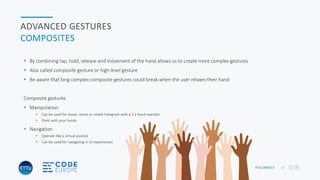
 By combining tap, hold, release and movement of the hand allows us to create more complex gestures
 Also called composite gesture or high level gesture
 Be aware that long complex composite gestures could break when the user relaxes their hand
Composite gestures
 Manipulation
 Can be used for move, resize or rotate hologram with a 1:1 hand reaction
 Paint with your hands
 Navigation
 Operate like a virtual joystick
 Can be used for navigating in UI experiences
“DEMONSTRATION OF A
COMPOSITE GESTURE”
“HoloAdvanced by Alexander Meijers”
HOLOBASICS 34
ADVANCED GESTURES
INTERACTION
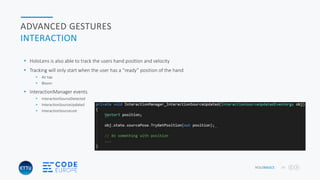
 HoloLens is also able to track the users hand position and velocity
 Tracking will only start when the user has a “ready” position of the hand
 Air tap
 Bloom
 InteractionManager events
 InteractionSourceDetected
 InteractionSourceUpdated
 InteractionSourceLost
35INTRO ETTU
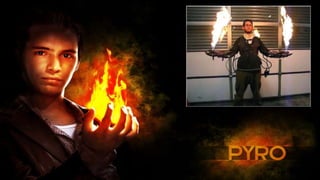
“DEMONSTRATION OF (SAFE) FIRE
USING HOLOLENS”
“HoloAdvanced by Alexander Meijers”
OPTIMALIZATION & STABILITY
HOLOBASICS 38
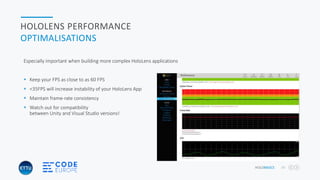
HOLOLENS PERFORMANCE
OPTIMALISATIONS
Especially important when building more complex HoloLens applications
 Keep your FPS as close to as 60 FPS
 <35FPS will increase instability of your HoloLens App
 Maintain frame-rate consistency
 Watch out for compatibility
between Unity and Visual Studio versions!
HOLOBASICS 39
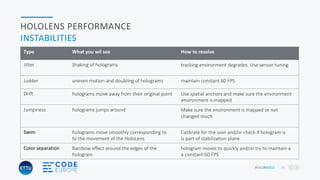
HOLOLENS PERFORMANCE
INSTABILITIES
Type What you wil see How to resolve
Jitter Shaking of holograms tracking environment degrades. Use sensor tuning
Judder uneven motion and doubling of holograms maintain constant 60 FPS
Drift holograms move away from their original point Use spatial anchors and make sure the environment
environment is mapped
Jumpiness holograms jumps around Make sure the environment is mapped or not
changed much
Swim holograms move smoothly corresponding to
to the movement of the HoloLens
Calibrate for the user and/or check if hologram is
is part of stabilization plane
Color separation Rainbow effect around the edges of the
hologram
hologram moves to quickly and/or try to maintain a
a constant 60 FPS
HOLOBASICS 40
HOLOLENS PERFORMANCE
THINGS YOU CAN DO
 Spatial mapping only when needed and if possible low number of triangles
 Don’t use Mixed Reality Capture via Windows Device Portal
 Prevent rendering of holograms outside the frustum
 Remove spatial anchors you do need. The system will keep
prioritize sensor data around these anchors
 Remove directional light if not needed
HOLOBASICS 41
HOLOLENS PERFORMANCE
THINGS YOU CAN DO
 Adjust stereo rendering (but be aware!)
 Enable Low Latent Frame Presentation (but be aware!)
 Use low poly of hologram objects
 Use HoloLens specific shaders
 Use of “static” on GameObjects which do not move
 Keep code as clean as possible. Remove unused assets
HOLOBASICS 42
WRAP-UP
TAKAWAYS
 Mixed Reality Toolkit delivers a number of prefabs and components which allows you to build quicker
 There are different methods for spatial mapping and understanding. Use what's best for you
 Spatial Anchors allow you to share across sessions and even devices
 Build more complex composite gestures by using standard gestures, hand movement and location
 Keep optimizing your application to maintain stability. Keep FPS at 60
THANKS FOR WATCHING!
HoloAdvanced code on gitHub - https://github.com/ameijers/HoloAdvanced
Kampenringweg 45b, Gouda
0182-686 000
a.meijers@ettu.nl / alexander@appzinside.com
Contact me:
facebook.com/alexandermeijers.5
@ameijers
Follow me on:

Code europe holoadvanced - building more advanced mixed reality apps for hololens

  • 1.
    BUILDING MORE ADVANCEDMIXED REALITY APPS FOR HOLOLENS HOLOADVANCED
  • 2.
    “HoloLens Evangelist” I amresponsible for architecture related business for our project services department at ETTU. I’m involved as architect at different companies like Jumbo Maritime, PGGM, Gemeente Amersfoort and others Alexander Meijers ABOUT ME  Solutions Architect for ETTU  Founder of the Mixed Reality User Group  MixUG: http://www.mixug.nl  Email: a.meijers@ettu.nl or alexander@appzinside.com  Twitter: @ameijers  Blog: http://www.appzinside.com
  • 3.
    4INTRO ETTU TODAY’S TALK AGENDA Realities Explained  HoloLens  Mixed Reality Toolkit  Spatial perception  Coordinate system & anchoring  Advanced gestures  Performance & stabilization Slider Content Ads
  • 4.
  • 5.
    HOLOBASICS 6 REALITIES EXPLAINED Merging ofreal and virtual worlds to produce new environments and visualizations where physical and digital objects co-exist and interact in real time. An overlay of synthetic content on the real world that is anchored to and interacts with the real world MIXED REALITY Direct or indirect view of a physical, real-world environment whose elements are augmented by computer-generated sensory input such as sound, video, graphics or GPS data An overlay of content on the real world where that content is not anchored to or part of it AUGMENTED REALITY Generation of realistic images, sounds and other sensations that replicate a real environment or create an imaginary setting An immersive experience created entirely from computer-generated Content. Also similar to 360 degree video VIRTUAL REALITY
  • 6.
  • 7.
    HOLOBASICS 8 MICROSOFT HOLOLENS SPECIFICATIONS Windows 10 device based on 32 bit architecture  Contains CPU, GPU and HPU  1GB Holographic Processor Unity (HPU)  64GB flash / 2GB memory  Device is more powerful than a laptop or game computer  No overheating due to warm air flows to the sides  2-3 hours active and 2 weeks standby  Weight 579g  Wi-fi  Gestures, Voice input and spatial understanding
  • 8.
    HOLOBASICS 9 SENSORS, OPTICSAND SPEAKERS Environment camera Depth camera Video camera Spatial Sound With speakers High definition lenses
  • 9.
  • 11.
    HOLOBASICS 12 MIXED REALITYTOOLKIT FOR UNITY COMMON  Collection of scripts and components intended to accelerate development of applications  Maintained on GitHub by Microsoft and contributors  Target  Microsoft HoloLens  Windows Mixed Reality headsets  Integrated in Unity with package  Tools  Windows 10 FCU  Unity 3D  Visual Studio 2017
  • 12.
    HOLOBASICS 13 MIXED REALITYTOOLKIT FOR UNITY TARGETS
  • 13.
    “WALK THROUGH OFHOLOLENS APPLICATION USING TOOLKIT” “HoloAdvanced by Alexander Meijers”
  • 14.
  • 15.
    HOLOBASICS 16 SPATIAL PERCEPTION HOWDOES IT WORK? • Spatial perception and mapping • Rooms • Different ways of detecting and working with spatial perception • Device scans your environment and builds a digital model in real time • It allows HoloLens to see different surfaces, walls and ceiling • Meshes & planes • Possible to simulate a physical space • E.g. Projecting a terrain over your floor Spatial perception is the ability to be aware of your relationships with the environment around you and with yourself
  • 16.
    “DEMONSTRATION OF DEFAULT SPATIALMAPPING” “HoloAdvanced by Alexander Meijers”
  • 17.
    HOLOBASICS 18 SPATIAL PERCEPTION SPATIALUNDERSTANDING  HoloLens is always scanning the world around us  Understanding your environment by distinguish different surfaces  Converting environment raw meshes to logical flat planes  Map planes to different surfaces like ceiling, floor, wall, floor-like and other
  • 18.
    HOLOBASICS 19 SPATIAL PERCEPTION DIFFERENTMETHODS Method How Part of More information Standard components Use the standard components SpatialMappingRenderer and SpatialMappingCollider to map the environment Unity Microsoft Shaders By converting a vertex location to world space and checking the vertex normal if a pixel is vertical Unity Academy SurfaceMeshesToPlanes This class helps you identify wall, floor, ceiling and table by mapping meshes to actual planes and is written in C# Mixed Reality Toolkit (opensource) Academy SpatialUnderstanding Getting a higher level of understanding of the world around you by analyzing the environment using a engine build in C++. Developed by Asobo Studios with Microsoft for games like Fragments and Young Conker Mixed Reality Toolkit (opensource) Case study Custom Use SurfaceObserver classes from the Spatial Mapping API to build your own custom spatial understanding system Spatial Mapping API Microsoft
  • 19.
    “DEMONSTRATION OF SPATIAL UNDERSTANDINGOF THE ENVIRONMENT” “HoloAdvanced by Alexander Meijers”
  • 20.
    HOLOBASICS 21 SPATIAL PERCEPTION ROOMSCANNING  One-time  Best for (almost) static environments  Holograms don’t have the need to react to the environment  Continuous  Best for dynamic environments  Holograms need to react to the environment
  • 21.
  • 22.
    HOLOBASICS 23 COORDINATE SYSTEM HOLOLENS forward(x, y, z)Camera (0, 0, 0) Rotation (x, y, z) Camera (1, -1, 4) Rotation (x, y, z) Hologram Object Pinned HoloLens moved to new location View direction Gaze
  • 23.
    HOLOBASICS 24 ANCHORING FRAME OFREFERENCES VERSUS ANCHORS • Moves with the user as they walk around • Content is often called body- locked content • Standing-scale or room-scale experiences within a 5 meter diameter • Suitable for static holograms moving with the user ATTACHED FRAME OF REFERENCE • In principle Unity’s world coordinates • Content is often called world-locked content • Standing-scale or room-scale experiences within a 5 meter diameter • Suitable for (highly) dynamic/moving holograms STATIONARY FRAME OF REFERENCE • Represents an important point in the world that should be keep tracked of • Has its own coordinates • Experiences which are beyond a 5 meter diameter • Suitable for holograms that remain fixed in the world • Suitable for holograms that move slowly/smoothly within the anchor’s area SPATIAL ANCHORS
  • 24.
    HOLOBASICS 25 ANCHORING SPATIAL ANCHORS Represents an important point in the world that is tracked by the system in time  Has its own coordinate system  Adjust when needed relative to other anchors or frame of reference  Achieves the most accurate position for a hologram  Very cheap to create  myHologramObject.AddComponent<WorldAnchor>();
  • 25.
    HOLOBASICS 26 ANCHORING WHEN TOUSE SPATIAL ANCHORS In most cases create a spatial anchor for each hologram placed in the scene by an end user Keep the following in mind  You can use a single spatial anchor for multiple holograms  Render holograms always within 3 meters of their attached anchor  Avoid creating a grid of spatial anchors to allow holograms move between different anchored areas  Clean-up spatial anchors which you not use anymore
  • 26.
    HOLOBASICS 27 MICROSOFT HOLOLENS SHARINGACROSS SESSIONS  Persist holograms across instances of the application  WorldAnchorStore class Important methods  WorldAnchorStore.GetAsync(OnStoreLoaded)  WorldAnchorStore.Save(“some unique id”, myAnchor);  WorldAnchorStore.Load(“some unique id”, myGameObject);  WorldAnchorStore.GetAllIds();
  • 27.
    HOLOBASICS 28 MICROSOFT HOLOLENS ANCHORSHARING BETWEEN DEVICES  Persist holograms across HoloLens devices  Collectively view and interact with the same holograms  Each device must have scanned enough of the environment to position the anchor  WorldAnchorTransferBatch class Important methods  WorldAnchorTransferBatch.ExportAsync(transferBatch, onDataAvailable, onCompleted);  WorldAnchorTransferBatch.ImportAsync(serializeData, offset, length, onComplete);
  • 28.
    “DEMONSTRATION OF MAINTAINING ANCHORSACROSS SESSIONS” “HoloAdvanced by Alexander Meijers”
  • 29.
  • 30.
    HOLOBASICS 31 ADVANCED GESTURES GESTURERECOGNIZER • Recognize input by tracking the position of either or both hands • The combination of hand gestures and gaze allows us to create a target system • Two core gestures • Air tap • Bloom • Gesture frame • Nose to waist • Shoulder to Shoulder • Gesture recognizer allows you to configure which gestures are targeted on • Composite gestures
  • 31.
    HOLOBASICS 32 ADVANCED GESTURES COMPOSITES By combining tap, hold, release and movement of the hand allows us to create more complex gestures  Also called composite gesture or high level gesture  Be aware that long complex composite gestures could break when the user relaxes their hand Composite gestures  Manipulation  Can be used for move, resize or rotate hologram with a 1:1 hand reaction  Paint with your hands  Navigation  Operate like a virtual joystick  Can be used for navigating in UI experiences
  • 32.
    “DEMONSTRATION OF A COMPOSITEGESTURE” “HoloAdvanced by Alexander Meijers”
  • 33.
    HOLOBASICS 34 ADVANCED GESTURES INTERACTION HoloLens is also able to track the users hand position and velocity  Tracking will only start when the user has a “ready” position of the hand  Air tap  Bloom  InteractionManager events  InteractionSourceDetected  InteractionSourceUpdated  InteractionSourceLost
  • 34.
  • 35.
    “DEMONSTRATION OF (SAFE)FIRE USING HOLOLENS” “HoloAdvanced by Alexander Meijers”
  • 36.
  • 37.
    HOLOBASICS 38 HOLOLENS PERFORMANCE OPTIMALISATIONS Especiallyimportant when building more complex HoloLens applications  Keep your FPS as close to as 60 FPS  <35FPS will increase instability of your HoloLens App  Maintain frame-rate consistency  Watch out for compatibility between Unity and Visual Studio versions!
  • 38.
    HOLOBASICS 39 HOLOLENS PERFORMANCE INSTABILITIES TypeWhat you wil see How to resolve Jitter Shaking of holograms tracking environment degrades. Use sensor tuning Judder uneven motion and doubling of holograms maintain constant 60 FPS Drift holograms move away from their original point Use spatial anchors and make sure the environment environment is mapped Jumpiness holograms jumps around Make sure the environment is mapped or not changed much Swim holograms move smoothly corresponding to to the movement of the HoloLens Calibrate for the user and/or check if hologram is is part of stabilization plane Color separation Rainbow effect around the edges of the hologram hologram moves to quickly and/or try to maintain a a constant 60 FPS
  • 39.
    HOLOBASICS 40 HOLOLENS PERFORMANCE THINGSYOU CAN DO  Spatial mapping only when needed and if possible low number of triangles  Don’t use Mixed Reality Capture via Windows Device Portal  Prevent rendering of holograms outside the frustum  Remove spatial anchors you do need. The system will keep prioritize sensor data around these anchors  Remove directional light if not needed
  • 40.
    HOLOBASICS 41 HOLOLENS PERFORMANCE THINGSYOU CAN DO  Adjust stereo rendering (but be aware!)  Enable Low Latent Frame Presentation (but be aware!)  Use low poly of hologram objects  Use HoloLens specific shaders  Use of “static” on GameObjects which do not move  Keep code as clean as possible. Remove unused assets
  • 41.
    HOLOBASICS 42 WRAP-UP TAKAWAYS  MixedReality Toolkit delivers a number of prefabs and components which allows you to build quicker  There are different methods for spatial mapping and understanding. Use what's best for you  Spatial Anchors allow you to share across sessions and even devices  Build more complex composite gestures by using standard gestures, hand movement and location  Keep optimizing your application to maintain stability. Keep FPS at 60
  • 42.
    THANKS FOR WATCHING! HoloAdvancedcode on gitHub - https://github.com/ameijers/HoloAdvanced Kampenringweg 45b, Gouda 0182-686 000 a.meijers@ettu.nl / alexander@appzinside.com Contact me: facebook.com/alexandermeijers.5 @ameijers Follow me on:

Editor's Notes

  • #13 FCU = Falls Creator Update
  • #17 https://developer.microsoft.com/en-us/windows/mixed-reality/install_the_tools
  • #19 https://developer.microsoft.com/en-us/windows/mixed-reality/case_study_-_expanding_the_spatial_mapping_capabilities_of_hololens#ray_casting
  • #20 https://developer.microsoft.com/en-us/windows/mixed-reality/case_study_-_expanding_the_spatial_mapping_capabilities_of_hololens#ray_casting
  • #24 https://developer.microsoft.com/en-us/windows/mixed-reality/coordinate_systems
  • #25 https://developer.microsoft.com/en-us/windows/mixed-reality/coordinate_systems https://developer.microsoft.com/en-us/windows/mixed-reality/spatial_anchors
  • #26 https://developer.microsoft.com/en-us/windows/mixed-reality/spatial_anchors
  • #27 https://developer.microsoft.com/en-us/windows/mixed-reality/spatial_anchors
  • #28 https://developer.microsoft.com/en-us/windows/mixed-reality/shared_experiences_in_mixed_reality
  • #29 https://developer.microsoft.com/en-us/windows/mixed-reality/shared_experiences_in_unity
  • #32 https://developer.microsoft.com/en-us/windows/mixed-reality/install_the_tools
  • #33 https://developer.microsoft.com/en-us/windows/mixed-reality/gestures
  • #35 https://developer.microsoft.com/en-us/windows/mixed-reality/gestures
  • #39 https://developer.microsoft.com/en-us/windows/mixed-reality/hologram_stability
  • #40 https://developer.microsoft.com/en-us/windows/mixed-reality/hologram_stability
  • #41 https://docs.unity3d.com/550/Documentation/ScriptReference/VR.WSA.HolographicSettings.ActivateLatentFramePresentation.html
  • #42 https://docs.unity3d.com/550/Documentation/ScriptReference/VR.WSA.HolographicSettings.ActivateLatentFramePresentation.html
  • #43 https://developer.microsoft.com/en-us/windows/mixed-reality/install_the_tools