MICROSOFT HOLOLENS
Ppt by
K.Sirisha
14A81A0578
Introduction
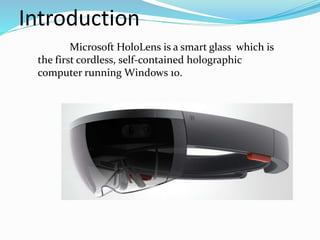
Microsoft HoloLens is a smart glass which is
the first cordless, self-contained holographic
computer running Windows 10.
Why We Need Hologram?
 We’ve made incredible advances in the
technology but still constrained with the ways
computers recognize our commands through
mouse clicks or by touching a screen.
• Using holograms, you can pin your digital
content, such as apps, information, and even
multi-dimensional videos, in the physical space
around you, so you can interact with it in the
same ways that you interact with other physical
objects.
How it works
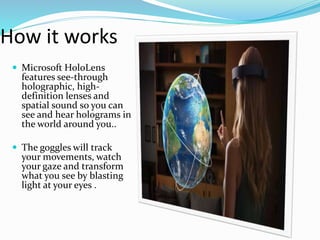
 Microsoft HoloLens
features see-through
holographic, high-
definition lenses and
spatial sound so you can
see and hear holograms in
the world around you..
 The goggles will track
your movements, watch
your gaze and transform
what you see by blasting
light at your eyes .
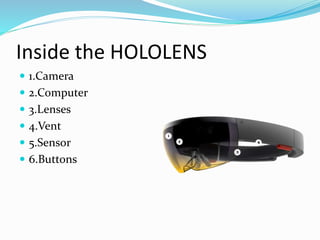
Inside the HOLOLENS
 1.Camera
 2.Computer
 3.Lenses
 4.Vent
 5.Sensor
 6.Buttons
Inside the Headset
1. Camera:
The project HoloLens depth camera has a field of
vision that spans 120 by 120 degrees.
2.Computer:
As many as 18 sensors flood the brain of the
device with terabytes of data every second.
3.Lenses:
To trick your brain into perceiving holographic
images, light particles bounce around millions of
times in the so called light engine.
4. Vent:
The device is more powerful than a laptop but
wont overheat.
5.Buttons:
Allow you to adjust the volume and to control the
contrast of the hologram
Features
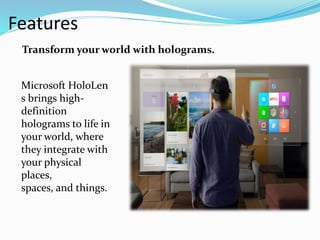
Microsoft HoloLen
s brings high-
definition
holograms to life in
your world, where
they integrate with
your physical
places,
spaces, and things.
Transform your world with holograms.
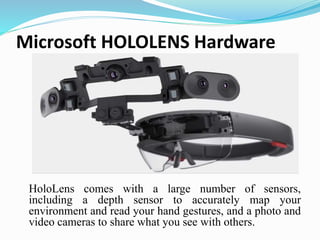
Microsoft HOLOLENS Hardware
HoloLens comes with a large number of sensors,
including a depth sensor to accurately map your
environment and read your hand gestures, and a photo and
video cameras to share what you see with others.
Objective of Microsoft HoloLens
 Main Objective of the HoloLens is to project,
manipulate, and annotate virtual objects (holograms)
within your physical environment.
 Microsoft expects HoloLens to be made available "in
the Windows 10 timeframe“.
How is it different from Google glass?
 Hololens completely different from Google glass.
Google glass was design to perform the function of
smart phone Like a phone it support apps take photos
and video so basically its a expensive version of
handheld device.
 Google glass support virtual reality where user
disconnect with real world but in Hololens user see
the real world in front of them they can walk around
and talk to others without worrying about bumping
into walls.
Advantages
 No phones, no wires.
 Transparent lens and advanced sensors allow
you to see your world and move confidently in
it.
 Lightweight and adjustable to fit any adult
head size. Work and play comfortably.
Disadvantages
 Can be easily damaged or broken user will have a
tough time taking care of it.
 It may lead to accident while driving.
 Privacy of people may break due to new glasses.
Conclusion
 Holographic computing experiences with
Microsoft HoloLens are different from existing
experiences, such as augmented reality (AR)
and virtual reality (VR).
 HoloLens looks incredibly exciting, but what
we've seen so far is a glimpse into the future.
“when you change the way you see the
world, you can change the world you see.”
MICROSOFT HOLOLENS
MICROSOFT HOLOLENS

MICROSOFT HOLOLENS

  • 1.
  • 2.
    Introduction Microsoft HoloLens isa smart glass which is the first cordless, self-contained holographic computer running Windows 10.
  • 3.
    Why We NeedHologram?  We’ve made incredible advances in the technology but still constrained with the ways computers recognize our commands through mouse clicks or by touching a screen. • Using holograms, you can pin your digital content, such as apps, information, and even multi-dimensional videos, in the physical space around you, so you can interact with it in the same ways that you interact with other physical objects.
  • 4.
    How it works Microsoft HoloLens features see-through holographic, high- definition lenses and spatial sound so you can see and hear holograms in the world around you..  The goggles will track your movements, watch your gaze and transform what you see by blasting light at your eyes .
  • 5.
    Inside the HOLOLENS 1.Camera  2.Computer  3.Lenses  4.Vent  5.Sensor  6.Buttons
  • 6.
    Inside the Headset 1.Camera: The project HoloLens depth camera has a field of vision that spans 120 by 120 degrees. 2.Computer: As many as 18 sensors flood the brain of the device with terabytes of data every second. 3.Lenses: To trick your brain into perceiving holographic images, light particles bounce around millions of times in the so called light engine. 4. Vent: The device is more powerful than a laptop but wont overheat. 5.Buttons: Allow you to adjust the volume and to control the contrast of the hologram
  • 7.
    Features Microsoft HoloLen s bringshigh- definition holograms to life in your world, where they integrate with your physical places, spaces, and things. Transform your world with holograms.
  • 8.
    Microsoft HOLOLENS Hardware HoloLenscomes with a large number of sensors, including a depth sensor to accurately map your environment and read your hand gestures, and a photo and video cameras to share what you see with others.
  • 9.
    Objective of MicrosoftHoloLens  Main Objective of the HoloLens is to project, manipulate, and annotate virtual objects (holograms) within your physical environment.  Microsoft expects HoloLens to be made available "in the Windows 10 timeframe“.
  • 10.
    How is itdifferent from Google glass?  Hololens completely different from Google glass. Google glass was design to perform the function of smart phone Like a phone it support apps take photos and video so basically its a expensive version of handheld device.  Google glass support virtual reality where user disconnect with real world but in Hololens user see the real world in front of them they can walk around and talk to others without worrying about bumping into walls.
  • 11.
    Advantages  No phones,no wires.  Transparent lens and advanced sensors allow you to see your world and move confidently in it.  Lightweight and adjustable to fit any adult head size. Work and play comfortably.
  • 12.
    Disadvantages  Can beeasily damaged or broken user will have a tough time taking care of it.  It may lead to accident while driving.  Privacy of people may break due to new glasses.
  • 13.
    Conclusion  Holographic computingexperiences with Microsoft HoloLens are different from existing experiences, such as augmented reality (AR) and virtual reality (VR).  HoloLens looks incredibly exciting, but what we've seen so far is a glimpse into the future. “when you change the way you see the world, you can change the world you see.”