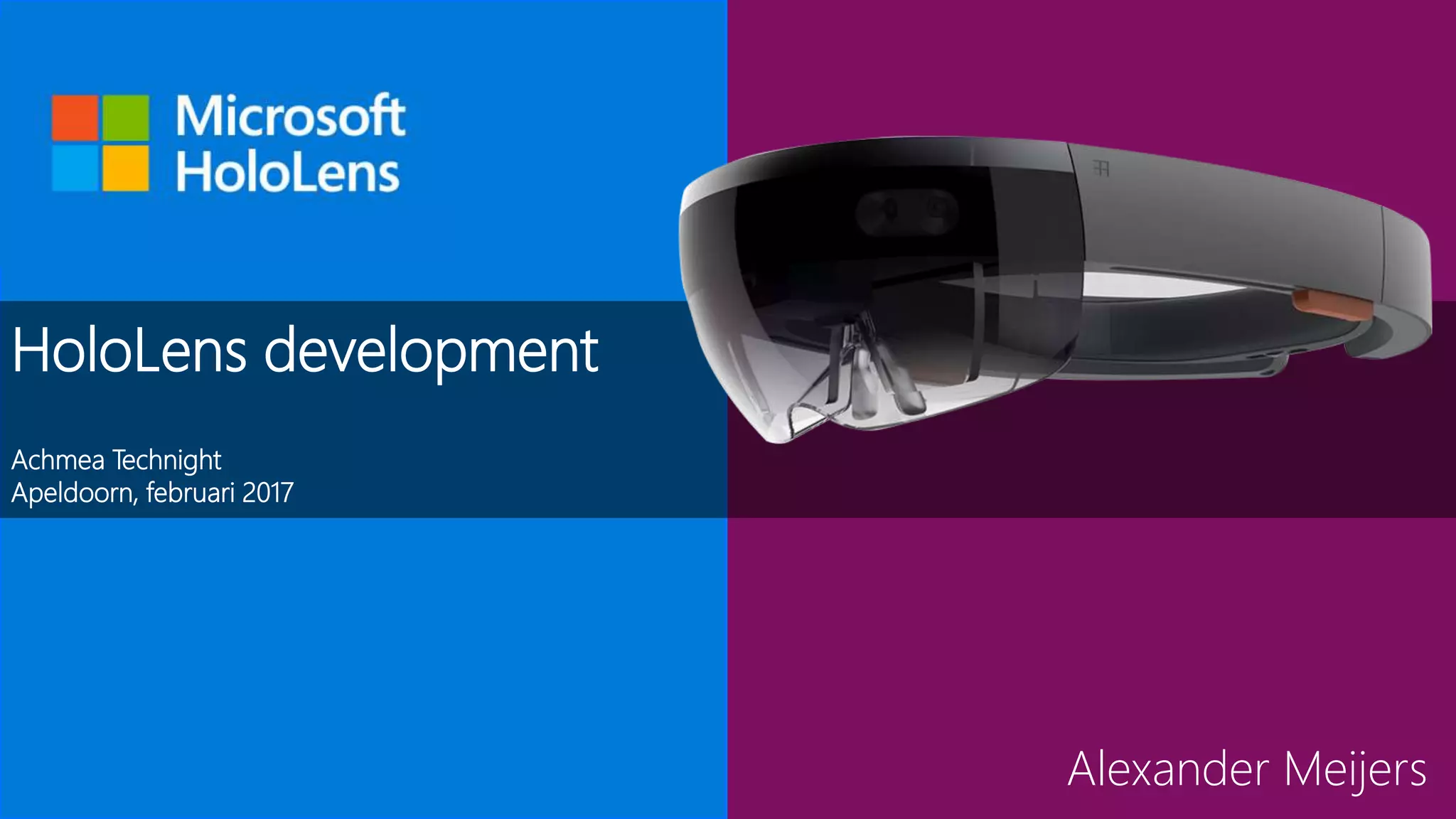









HoloLens development
Achmea Technight
Apeldoorn, februari 2017
Alexander Meijers
Even kennismaken...
• Alexander Meijers
• Architect @ ETTU
Apps | Hololens | Azure
SharePoint | Office 365 | Dev |
Functional | Architecture Love the
Community Speaker | Blogger | 3
kids Fitness | Airsoft
Warhammer 40K
@ameijers
alexander@appzinside.com
Agenda
SESSIE 1
• History, emplacement and fields
of application
• Microsoft HoloLens inside out
• HoloLens development
• Unity Explained
• Camera location, position and
forward
SESSIE 2
• Holographic Objects and the gaze
• Gestures and pinning objects
• Spatial perception
• Meshes to planes
History, emplacement and fields of application
History of HoloLens
• Codenamed Project HoloLens
• Chief inventor Alex Kipman
• Official title is technical fellow
• He dreamed up Kinect in at the end of 2007
and set a vision which incorporated HoloLens
• It is the start of a transforming world
• In the new reality, sensors will be anywhere
• A visual computing platform controlled by speech and gesture
Satya Nadella - “The emergence of
the next computing interface”
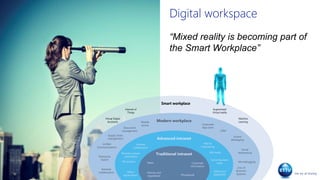
Digital workspace
“Mixed reality is becoming part of
the Smart Workplace”
Modern workplace
Advanced intranet
Traditional intranet
Mail &
Calendaring
Mobile
access
Document
management
Unified
Communications
Enterprise
Search
Selfservice
applicaties
Business proces
automation
Office
applications
Microblogging
Instant
Messaging
Social
Networking
CRM
Supply chain
management
Extranet
collaboration
News
Social Business
tools
RSS feeds
Intranet
collaboration
HR systems
Corporate
information
Phonebook
Policies and
regulations
Line of
Business
Systems
Corporate
App store
Smart workplace
Augmented/
Virtual reality
Internet of
Things
Machine
Learning
Virtual Digital
Assistants
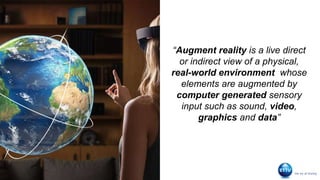
“Augment reality is a live direct
or indirect view of a physical,
real-world environment whose
elements are augmented by
computer generated sensory
input such as sound, video,
graphics and data”
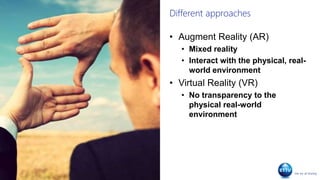
Different approaches
• Augment Reality (AR)
• Mixed reality
• Interact with the physical, real-
world environment
• Virtual Reality (VR)
• No transparency to the
physical real-world
environment
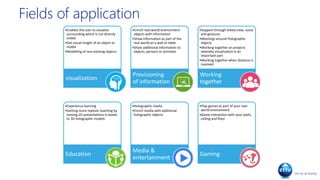
Fields of application
•Enables the user to visualize
surrounding which is not directly
visible
•Get visual insight of an object or
model
•Modelling of non-existing objects
visualization
•Enrich real-world environment
objects with information
•Show information as part of the
real-world on a wall or table
•Show additional information to
objects, persons or activities
Provisioning
of information
•Support through linked view, voice
and gestures
•Meetings around Holographic
objects
•Working together on projects
whereby visualization is an
important part
•Working together when distance is
involved
Working
together
•Experience learning
•Getting more realistic teaching by
moving 2D presentations in books
to 3D holographic models
Education
•Holographic media
•Enrich media with additional
holographic objects
Media &
entertainment
•Play games as part of your real-
world environment
•Game interaction with your walls,
ceiling and floor
Gaming
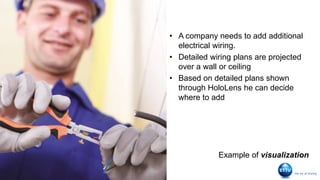
Detecting
electrical wiring
• A company needs to add additional
electrical wiring.
• Detailed wiring plans are projected
over a wall or ceiling
• Based on detailed plans shown
through HoloLens he can decide
where to add
Example of visualization
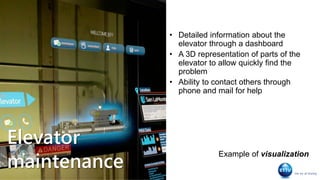
Elevator
maintenance
• Detailed information about the
elevator through a dashboard
• A 3D representation of parts of the
elevator to allow quickly find the
problem
• Ability to contact others through
phone and mail for help
Example of visualization
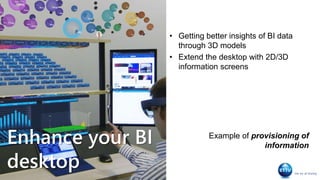
Enhance your BI
desktop
• Getting better insights of BI data
through 3D models
• Extend the desktop with 2D/3D
information screens
Example of provisioning of
information
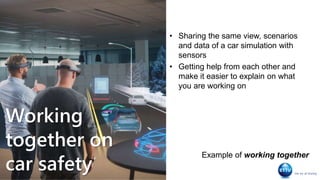
Working
together on
car safety
• Sharing the same view, scenarios
and data of a car simulation with
sensors
• Getting help from each other and
make it easier to explain on what
you are working on
Example of working together
Learning
about the
human body
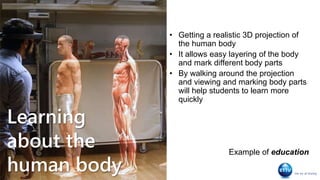
• Getting a realistic 3D projection of
the human body
• It allows easy layering of the body
and mark different body parts
• By walking around the projection
and viewing and marking body parts
will help students to learn more
quickly
Example of education
…
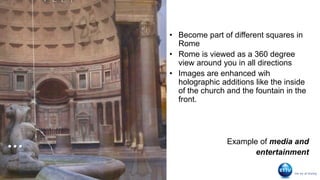
• Become part of different squares in
Rome
• Rome is viewed as a 360 degree
view around you in all directions
• Images are enhanced wih
holographic additions like the inside
of the church and the fountain in the
front.
Example of media and
entertainment
Mixed reality
during
gameplay
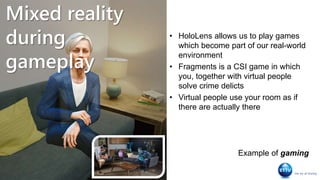
• HoloLens allows us to play games
which become part of our real-world
environment
• Fragments is a CSI game in which
you, together with virtual people
solve crime delicts
• Virtual people use your room as if
there are actually there
Example of gaming
Microsoft HoloLens inside out
Microsoft Hololens
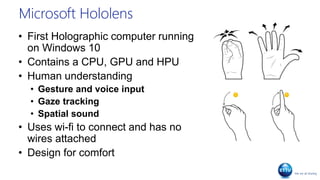
• First Holographic computer running
on Windows 10
• Contains a CPU, GPU and HPU
• Human understanding
• Gesture and voice input
• Gaze tracking
• Spatial sound
• Uses wi-fi to connect and has no
wires attached
• Design for comfort
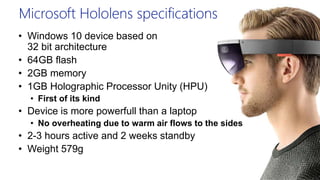
Microsoft Hololens specifications
• Windows 10 device based on
32 bit architecture
• 64GB flash
• 2GB memory
• 1GB Holographic Processor Unity (HPU)
• First of its kind
• Device is more powerfull than a laptop
• No overheating due to warm air flows to the sides
• 2-3 hours active and 2 weeks standby
• Weight 579g
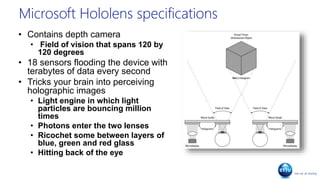
Microsoft Hololens specifications
• Contains depth camera
• Field of vision that spans 120 by
120 degrees
• 18 sensors flooding the device with
terabytes of data every second
• Tricks your brain into perceiving
holographic images
• Light engine in which light
particles are bouncing million
times
• Photons enter the two lenses
• Ricochet some between layers of
blue, green and red glass
• Hitting back of the eye
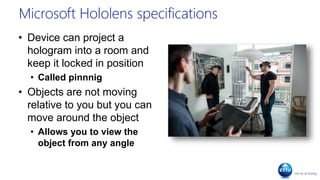
Microsoft Hololens specifications
• Device can project a
hologram into a room and
keep it locked in position
• Called pinnnig
• Objects are not moving
relative to you but you can
move around the object
• Allows you to view the
object from any angle
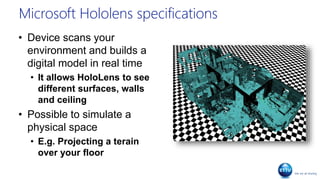
Microsoft Hololens specifications
• Device scans your
environment and builds a
digital model in real time
• It allows HoloLens to see
different surfaces, walls
and ceiling
• Possible to simulate a
physical space
• E.g. Projecting a terain
over your floor
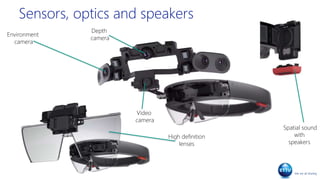
Sensors, optics and speakers
Environment
camera
High definition
lenses
Spatial sound
with
speakers
Depth
camera
Video
camera
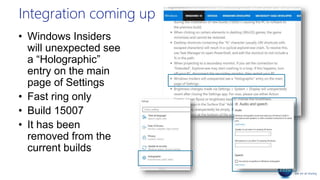
Integration coming up
• Windows Insiders
will unexpected see
a “Holographic”
entry on the main
page of Settings
• Fast ring only
• Build 15007
• It has been
removed from the
current builds
HoloLens development
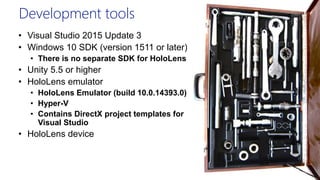
Development tools
• Visual Studio 2015 Update 3
• Windows 10 SDK (version 1511 or later)
• There is no separate SDK for HoloLens
• Unity 5.5 or higher
• HoloLens emulator
• HoloLens Emulator (build 10.0.14393.0)
• Hyper-V
• Contains DirectX project templates for
Visual Studio
• HoloLens device
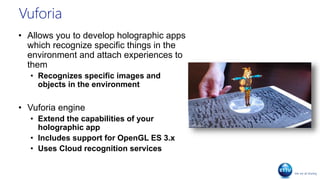
Vuforia
• Allows you to develop holographic apps
which recognize specific things in the
environment and attach experiences to
them
• Recognizes specific images and
objects in the environment
• Vuforia engine
• Extend the capabilities of your
holographic app
• Includes support for OpenGL ES 3.x
• Uses Cloud recognition services
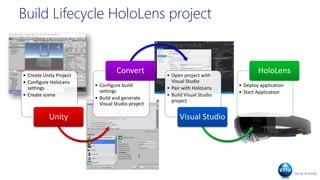
Build Lifecycle HoloLens project
• Create Unity Project
• Configure HoloLens
settings
• Create scene
Unity
• Configure build
settings
• Build and generate
Visual Studio project
Convert • Open project with
Visual Studio
• Pair with HoloLens
• Build Visual Studio
project
Visual Studio
• Deploy application
• Start Application
HoloLens
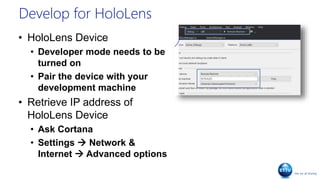
Develop for HoloLens
• HoloLens Device
• Developer mode needs to be
turned on
• Pair the device with your
development machine
• Retrieve IP address of
HoloLens Device
• Ask Cortana
• Settings  Network &
Internet  Advanced options
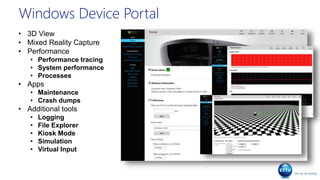
Windows Device Portal
• 3D View
• Mixed Reality Capture
• Performance
• Performance tracing
• System performance
• Processes
• Apps
• Maintenance
• Crash dumps
• Additional tools
• Logging
• File Explorer
• Kiosk Mode
• Simulation
• Virtual Input
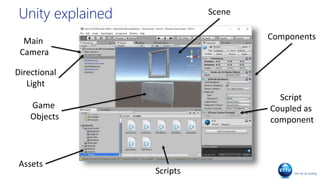
Unity Explained
Unity explained Scene
Main
Camera
Directional
Light
Scripts
Components
Script
Coupled as
component
Game
Objects
Assets
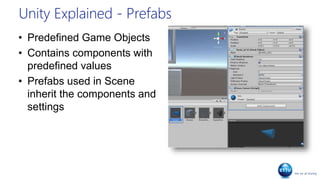
Unity Explained - Prefabs
• Predefined Game Objects
• Contains components with
predefined values
• Prefabs used in Scene
inherit the components and
settings
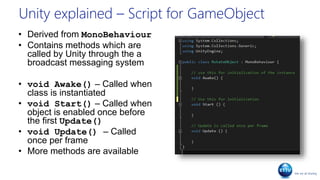
Unity explained – Script for GameObject
• Derived from MonoBehaviour
• Contains methods which are
called by Unity through the a
broadcast messaging system
• void Awake() – Called when
class is instantiated
• void Start() – Called when
object is enabled once before
the first Update()
• void Update() – Called
once per frame
• More methods are available
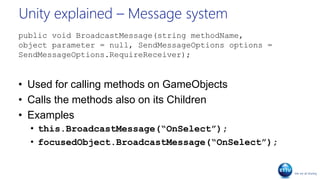
Unity explained – Message system
public void BroadcastMessage(string methodName,
object parameter = null, SendMessageOptions options =
SendMessageOptions.RequireReceiver);
• Used for calling methods on GameObjects
• Calls the methods also on its Children
• Examples
• this.BroadcastMessage(“OnSelect”);
• focusedObject.BroadcastMessage(“OnSelect”);
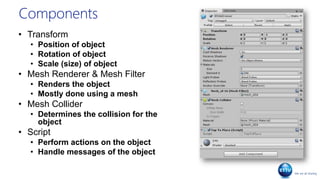
Components
• Transform
• Position of object
• Rotation of object
• Scale (size) of object
• Mesh Renderer & Mesh Filter
• Renders the object
• Mostly done using a mesh
• Mesh Collider
• Determines the collision for the
object
• Script
• Perform actions on the object
• Handle messages of the object
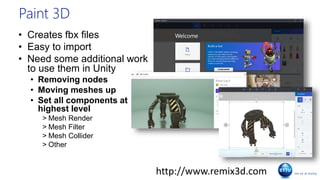
Paint 3D
• Creates fbx files
• Easy to import
• Need some additional work
to use them in Unity
• Removing nodes
• Moving meshes up
• Set all components at
highest level
> Mesh Render
> Mesh Filter
> Mesh Collider
> Other
http://www.remix3d.com
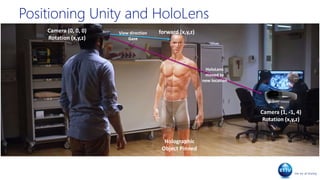
Positioning Unity and HoloLens
forward (x,y,z)Camera (0, 0, 0)
Rotation (x,y,z)
Camera (1, -1, 4)
Rotation (x,y,z)
Holographic
Object Pinned
HoloLens
moved to
new location
View direction
Gaze
Positioning Unity and HoloLens
Democamera location,
position and forward
Wat zijn onze conclusies?
• Nog geen volwassen product
• Integratie met SharePoint Online loopt voorop
• Alleen toepassen voor eenvoudige data verwerking
Agenda
SESSIE 1
• History, emplacement and fields
of application
• Microsoft HoloLens inside out
• HoloLens development
• Unity Explained
• Camera location, position and
forward
SESSIE 2
• Holographic Objects and the gaze
• Gestures and pinning objects
• Spatial perception
• Meshes to planes
DemoHolographic objects
and the gaze
Demogestures and
pinning objects
Demospatial perception
Demomeshes to planes
Developer resources
GitHub development resources
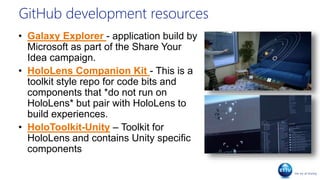
• Galaxy Explorer - application build by
Microsoft as part of the Share Your
Idea campaign.
• HoloLens Companion Kit - This is a
toolkit style repo for code bits and
components that *do not run on
HoloLens* but pair with HoloLens to
build experiences.
• HoloToolkit-Unity – Toolkit for
HoloLens and contains Unity specific
components
Other resources
• Windows Dev Center – Documentation about
learning the fundamentals of holographic
development
• Academy – hands on with code, tutorials and
lessons
• Windows Holographic Developer Forum –
Forum about HoloLens App Development
• Unity tutorials – Learning about the engine,
services and production
• Windows blog – Lots of business articles
found about HoloLens
• Vuforia – Examples, articles and support on
the use of HoloLens with Vuforia
 Bedankt voor jullie aandacht!
Alexander Meijers, ETTU
<the end/>

Achmea technight - HoloLens development

  • 1.
    HoloLens development Achmea Technight Apeldoorn,februari 2017 Alexander Meijers
  • 2.
    Even kennismaken... • AlexanderMeijers • Architect @ ETTU Apps | Hololens | Azure SharePoint | Office 365 | Dev | Functional | Architecture Love the Community Speaker | Blogger | 3 kids Fitness | Airsoft Warhammer 40K @ameijers alexander@appzinside.com
  • 3.
    Agenda SESSIE 1 • History,emplacement and fields of application • Microsoft HoloLens inside out • HoloLens development • Unity Explained • Camera location, position and forward SESSIE 2 • Holographic Objects and the gaze • Gestures and pinning objects • Spatial perception • Meshes to planes
  • 4.
    History, emplacement andfields of application
  • 5.
    History of HoloLens •Codenamed Project HoloLens • Chief inventor Alex Kipman • Official title is technical fellow • He dreamed up Kinect in at the end of 2007 and set a vision which incorporated HoloLens • It is the start of a transforming world • In the new reality, sensors will be anywhere • A visual computing platform controlled by speech and gesture Satya Nadella - “The emergence of the next computing interface”
  • 6.
    Digital workspace “Mixed realityis becoming part of the Smart Workplace” Modern workplace Advanced intranet Traditional intranet Mail & Calendaring Mobile access Document management Unified Communications Enterprise Search Selfservice applicaties Business proces automation Office applications Microblogging Instant Messaging Social Networking CRM Supply chain management Extranet collaboration News Social Business tools RSS feeds Intranet collaboration HR systems Corporate information Phonebook Policies and regulations Line of Business Systems Corporate App store Smart workplace Augmented/ Virtual reality Internet of Things Machine Learning Virtual Digital Assistants
  • 7.
    “Augment reality isa live direct or indirect view of a physical, real-world environment whose elements are augmented by computer generated sensory input such as sound, video, graphics and data”
  • 8.
    Different approaches • AugmentReality (AR) • Mixed reality • Interact with the physical, real- world environment • Virtual Reality (VR) • No transparency to the physical real-world environment
  • 9.
    Fields of application •Enablesthe user to visualize surrounding which is not directly visible •Get visual insight of an object or model •Modelling of non-existing objects visualization •Enrich real-world environment objects with information •Show information as part of the real-world on a wall or table •Show additional information to objects, persons or activities Provisioning of information •Support through linked view, voice and gestures •Meetings around Holographic objects •Working together on projects whereby visualization is an important part •Working together when distance is involved Working together •Experience learning •Getting more realistic teaching by moving 2D presentations in books to 3D holographic models Education •Holographic media •Enrich media with additional holographic objects Media & entertainment •Play games as part of your real- world environment •Game interaction with your walls, ceiling and floor Gaming
  • 10.
    Detecting electrical wiring • Acompany needs to add additional electrical wiring. • Detailed wiring plans are projected over a wall or ceiling • Based on detailed plans shown through HoloLens he can decide where to add Example of visualization
  • 11.
    Elevator maintenance • Detailed informationabout the elevator through a dashboard • A 3D representation of parts of the elevator to allow quickly find the problem • Ability to contact others through phone and mail for help Example of visualization
  • 12.
    Enhance your BI desktop •Getting better insights of BI data through 3D models • Extend the desktop with 2D/3D information screens Example of provisioning of information
  • 13.
    Working together on car safety •Sharing the same view, scenarios and data of a car simulation with sensors • Getting help from each other and make it easier to explain on what you are working on Example of working together
  • 14.
    Learning about the human body •Getting a realistic 3D projection of the human body • It allows easy layering of the body and mark different body parts • By walking around the projection and viewing and marking body parts will help students to learn more quickly Example of education
  • 15.
    … • Become partof different squares in Rome • Rome is viewed as a 360 degree view around you in all directions • Images are enhanced wih holographic additions like the inside of the church and the fountain in the front. Example of media and entertainment
  • 16.
    Mixed reality during gameplay • HoloLensallows us to play games which become part of our real-world environment • Fragments is a CSI game in which you, together with virtual people solve crime delicts • Virtual people use your room as if there are actually there Example of gaming
  • 17.
  • 18.
    Microsoft Hololens • FirstHolographic computer running on Windows 10 • Contains a CPU, GPU and HPU • Human understanding • Gesture and voice input • Gaze tracking • Spatial sound • Uses wi-fi to connect and has no wires attached • Design for comfort
  • 19.
    Microsoft Hololens specifications •Windows 10 device based on 32 bit architecture • 64GB flash • 2GB memory • 1GB Holographic Processor Unity (HPU) • First of its kind • Device is more powerfull than a laptop • No overheating due to warm air flows to the sides • 2-3 hours active and 2 weeks standby • Weight 579g
  • 20.
    Microsoft Hololens specifications •Contains depth camera • Field of vision that spans 120 by 120 degrees • 18 sensors flooding the device with terabytes of data every second • Tricks your brain into perceiving holographic images • Light engine in which light particles are bouncing million times • Photons enter the two lenses • Ricochet some between layers of blue, green and red glass • Hitting back of the eye
  • 21.
    Microsoft Hololens specifications •Device can project a hologram into a room and keep it locked in position • Called pinnnig • Objects are not moving relative to you but you can move around the object • Allows you to view the object from any angle
  • 22.
    Microsoft Hololens specifications •Device scans your environment and builds a digital model in real time • It allows HoloLens to see different surfaces, walls and ceiling • Possible to simulate a physical space • E.g. Projecting a terain over your floor
  • 23.
    Sensors, optics andspeakers Environment camera High definition lenses Spatial sound with speakers Depth camera Video camera
  • 24.
    Integration coming up •Windows Insiders will unexpected see a “Holographic” entry on the main page of Settings • Fast ring only • Build 15007 • It has been removed from the current builds
  • 25.
  • 26.
    Development tools • VisualStudio 2015 Update 3 • Windows 10 SDK (version 1511 or later) • There is no separate SDK for HoloLens • Unity 5.5 or higher • HoloLens emulator • HoloLens Emulator (build 10.0.14393.0) • Hyper-V • Contains DirectX project templates for Visual Studio • HoloLens device
  • 27.
    Vuforia • Allows youto develop holographic apps which recognize specific things in the environment and attach experiences to them • Recognizes specific images and objects in the environment • Vuforia engine • Extend the capabilities of your holographic app • Includes support for OpenGL ES 3.x • Uses Cloud recognition services
  • 28.
    Build Lifecycle HoloLensproject • Create Unity Project • Configure HoloLens settings • Create scene Unity • Configure build settings • Build and generate Visual Studio project Convert • Open project with Visual Studio • Pair with HoloLens • Build Visual Studio project Visual Studio • Deploy application • Start Application HoloLens
  • 29.
    Develop for HoloLens •HoloLens Device • Developer mode needs to be turned on • Pair the device with your development machine • Retrieve IP address of HoloLens Device • Ask Cortana • Settings  Network & Internet  Advanced options
  • 30.
    Windows Device Portal •3D View • Mixed Reality Capture • Performance • Performance tracing • System performance • Processes • Apps • Maintenance • Crash dumps • Additional tools • Logging • File Explorer • Kiosk Mode • Simulation • Virtual Input
  • 31.
  • 32.
  • 33.
    Unity Explained -Prefabs • Predefined Game Objects • Contains components with predefined values • Prefabs used in Scene inherit the components and settings
  • 34.
    Unity explained –Script for GameObject • Derived from MonoBehaviour • Contains methods which are called by Unity through the a broadcast messaging system • void Awake() – Called when class is instantiated • void Start() – Called when object is enabled once before the first Update() • void Update() – Called once per frame • More methods are available
  • 35.
    Unity explained –Message system public void BroadcastMessage(string methodName, object parameter = null, SendMessageOptions options = SendMessageOptions.RequireReceiver); • Used for calling methods on GameObjects • Calls the methods also on its Children • Examples • this.BroadcastMessage(“OnSelect”); • focusedObject.BroadcastMessage(“OnSelect”);
  • 36.
    Components • Transform • Positionof object • Rotation of object • Scale (size) of object • Mesh Renderer & Mesh Filter • Renders the object • Mostly done using a mesh • Mesh Collider • Determines the collision for the object • Script • Perform actions on the object • Handle messages of the object
  • 37.
    Paint 3D • Createsfbx files • Easy to import • Need some additional work to use them in Unity • Removing nodes • Moving meshes up • Set all components at highest level > Mesh Render > Mesh Filter > Mesh Collider > Other http://www.remix3d.com
  • 38.
  • 39.
    forward (x,y,z)Camera (0,0, 0) Rotation (x,y,z) Camera (1, -1, 4) Rotation (x,y,z) Holographic Object Pinned HoloLens moved to new location View direction Gaze Positioning Unity and HoloLens
  • 40.
  • 41.
    Wat zijn onzeconclusies? • Nog geen volwassen product • Integratie met SharePoint Online loopt voorop • Alleen toepassen voor eenvoudige data verwerking
  • 42.
    Agenda SESSIE 1 • History,emplacement and fields of application • Microsoft HoloLens inside out • HoloLens development • Unity Explained • Camera location, position and forward SESSIE 2 • Holographic Objects and the gaze • Gestures and pinning objects • Spatial perception • Meshes to planes
  • 43.
  • 44.
  • 45.
  • 46.
  • 47.
  • 48.
    GitHub development resources •Galaxy Explorer - application build by Microsoft as part of the Share Your Idea campaign. • HoloLens Companion Kit - This is a toolkit style repo for code bits and components that *do not run on HoloLens* but pair with HoloLens to build experiences. • HoloToolkit-Unity – Toolkit for HoloLens and contains Unity specific components
  • 49.
    Other resources • WindowsDev Center – Documentation about learning the fundamentals of holographic development • Academy – hands on with code, tutorials and lessons • Windows Holographic Developer Forum – Forum about HoloLens App Development • Unity tutorials – Learning about the engine, services and production • Windows blog – Lots of business articles found about HoloLens • Vuforia – Examples, articles and support on the use of HoloLens with Vuforia
  • 51.
     Bedankt voorjullie aandacht! Alexander Meijers, ETTU <the end/>

Editor's Notes

  • #6 https://www.wired.com/2015/01/microsoft-nadella/
  • #10 Visualization - Think of pluming and electrical wiring in the walls. Building maps of a device (e.g. control panels, elevator, etc.) Provisioning of information – These kind of applications are providing additional information to objects, persons or activities around you Working together – The use of HoloLens to work together on projects and help out another Education – Getting experience by getting the feel how big or small something is and teaching with holographic presentations of 2D examples Media & entertainment – enrich existing media with holographic objects to allow it to have more depth by going from 2D to 3D Gaming – Play games combined in our world
  • #21 Ricochet – afketsen More information about HoloLens en Holographic view - http://doc-ok.org/?p=1329
  • #22 Ricochet - afketsen
  • #23 Ricochet - afketsen
  • #24 Advanced sensors – 4 environment cameras / 1 depth camera / 1 video camera / Ambient sensor / 4 microphones / mixed reality capture Advanced optics – High definition lenses used as an advanced optical projection system. Built-in speakers – spatial sound – hear anything from anywhere in the room
  • #27 Unity for HoloLens has been depreceated https://developer.microsoft.com/en-us/windows/holographic/install_the_tools
  • #28 https://developer.vuforia.com/downloads/sdk OpenGL for Embedded Systems (OpenGL ES or GLES) is a subset[2] of the OpenGL computer graphics rendering application programming interface (API) for rendering 2D and 3D computer graphics such as those used by video games, typically hardware-accelerated using a graphics processing unit (GPU).
  • #31 https://developer.microsoft.com/en-us/windows/holographic/using_the_windows_device_portal
  • #49 HoloLens & Galaxy Explorer, Build 2016 - https://www.youtube.com/watch?v=IKfc0geA-rM