Contents
Introduction
Augmentedand VirtualReality
Hardware And Software Components
How its WORK
Applications
Advantages
Disadvantages
Conclusion
What is HoloLens?
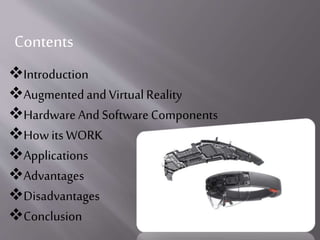
HoloLens is holographic computer running on
Windows 10 OS. Or you may say,
HoloLens is a device to touch and feel your
imaginations.
Hologram:
Microsoft HoloLens is a smart glass which is the first cordless, self-
contained holographic computer running Windows 10.The HoloLens is
similar to Google Glass in that it uses AR technology
 It is completelyunattached– no wires, phones,
or any connection.Microsoft HoloLensallows
user to pinhologramsin his physical
environmentand providesa new way to see his
world.
 Microsoft Hololenssupportaugmented reality.
☼ It has never been possible to
make a holographic image in real
world until now.
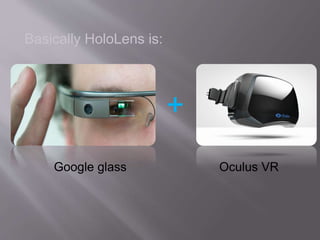
Basically HoloLens is:
+
Google glass Oculus VR
 VirtualReality:-It tricks your eyes intothinkingthat
you are somewhere else.
 Augmented Reality:-It is an extra dimension over VR
since it can show the real world around wearer with
graphic overlayed.
 AR can also totallyimmerse user just like VRby simply
showing pixels everywhere withno transparency to the
real world.
 In virtual world, users are best advised to stay seated to
avoid collisions withphysical whichthey cannotsee in
the real world.
Virtual Reality
1.Headset and Display
2.Sensors
3.Processors
4.Microphones
5.Power and Connectivity:
Hardware Components
How Its Work
1.Lenses andDisplay:-
Microsoft hololens has two display. they are transparent
so that wherever can see the real world behind virtual
object.
2.Sensor:-
sensor track where the wherever is looking and adjust the
display.
Motion sensor detect wherever movement.
3. computer:-
Hololens is not just a visor connected to a computer, it is a
computer on its own.
Hololens contain CPU, battery,GPU and first of its kind
HPU (holographic processing unit).
4.camera:-
The project hololens depth camera has a field of vision that
spans 120 by 120 degree, so it can sense what your hands
are doing even when they are nearly outstretched.
5.Vent:-
The device is more powerful than a laptop but won’t
overheat- warm air flows to the sides, where it vents up and
out.
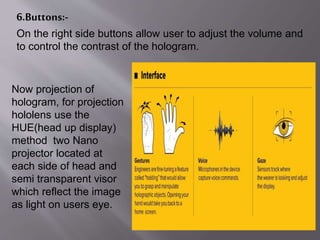
6.Buttons:-
On the right side buttons allow user to adjust the volume and
to control the contrast of the hologram.
Now projection of
hologram, for projection
hololens use the
HUE(head up display)
method two Nano
projector located at
each side of head and
semi transparent visor
which reflect the image
as light on users eye.
Application
1.Remote Instruction
This use was demonstrated in the Microsoft Hololens
introductory video. Imagine getting step-by-step instructions on
things like home repair from an expert.
2. 3D Computer-Aided Design
Imagine building a 3D model of pretty much anything you can
imagine in the physical space around you.
3. Gaming
Gaming is another potential use that was shown off in the
introductory video from Microsoft (whose recent history of
innovation and improvements is impressive,) and the
possibilities of using the Hollers for gaming are fascinating.
5. Decorating
Unlike Google Glasses, HoloLens is first being geared for use
mostly inside the home or office and not necessarily on the
go.
Advantages
1. Easy to wear and use.
2. Sensitive and responsive to the presence of people.
3. Hololens can be used in army battlefield, where detailed
instruction can be given to the untrained person in the
midst of combat.
4. A spectacle based computer to reside directly.
5. on your eyes rather than your pocket. No cords, no
phones, no wires, no theatre
6. Transparent lens and advanced sensors allow you to see
your world and move confidently in it.
7. Lightweight and adjustable to fit any adult head size.
Work and play comfortably.
8. Built-in spatial sound lets you hear holograms wherever
they are in the room with pinpoint precision.
9. Next-generation technology enabled by Windows 10.
Possibilities with HoloLens:
Create:
Explore:
1.Can be easily damaged or broken. User will
have a tough time taking care of it.
2. It may lead to accident while driving.
3. Privacy of people may break due to new
glasses.
DRAWBACKS
Visual diagrams would actually show up in space
around the user indicating exactly what you need to do
next.
This application could even extend to the battlefield,
where detailed medical instructions could be given to
untrained personnel in the midst of combat.
Pin holograms to physical objects so user can size and
scale them in each angle and with gesture do all new
creation.
FUTUR SCOPE
Holographic computing experiences with Microsoft HoloLens are
different from existing experiences, such as augmented reality
(AR) and virtual reality (VR).
HoloLens looks incredibly exciting, but what we've seen so far is a
glimpse into the future.
The team is working with creators and developers all over the
world on exciting new holographic experiences.
The era of holographic computing is here.When you change the
way you see the world, you can change the world you see.
CONCLUSION
1. http://www.xinreality.com/wiki/Microsoft_HoloLens#Ha
rdware
2. https://www.microsoft.com/microsoft-hololens/en-us
3. http://marketrealist.com/2015/02/microsofts-hololens-
faces-stifmarketcompetition/
4. http://www.slideshare.net/vikeez/microsoft-hololens-
46691964
5. http://www.quora.com/Microsoft-Announces-
HoloLens-Headset-January-2015
REFERNCE
Get ready to step into the future
A future beyond imagination !
Externally:
Thank you

Hololens

  • 2.
    Contents Introduction Augmentedand VirtualReality Hardware AndSoftware Components How its WORK Applications Advantages Disadvantages Conclusion
  • 3.
    What is HoloLens? HoloLensis holographic computer running on Windows 10 OS. Or you may say, HoloLens is a device to touch and feel your imaginations.
  • 4.
  • 5.
    Microsoft HoloLens isa smart glass which is the first cordless, self- contained holographic computer running Windows 10.The HoloLens is similar to Google Glass in that it uses AR technology
  • 6.
     It iscompletelyunattached– no wires, phones, or any connection.Microsoft HoloLensallows user to pinhologramsin his physical environmentand providesa new way to see his world.  Microsoft Hololenssupportaugmented reality.
  • 7.
    ☼ It hasnever been possible to make a holographic image in real world until now.
  • 8.
  • 9.
     VirtualReality:-It tricksyour eyes intothinkingthat you are somewhere else.  Augmented Reality:-It is an extra dimension over VR since it can show the real world around wearer with graphic overlayed.  AR can also totallyimmerse user just like VRby simply showing pixels everywhere withno transparency to the real world.  In virtual world, users are best advised to stay seated to avoid collisions withphysical whichthey cannotsee in the real world. Virtual Reality
  • 10.
  • 11.
    How Its Work 1.LensesandDisplay:- Microsoft hololens has two display. they are transparent so that wherever can see the real world behind virtual object. 2.Sensor:- sensor track where the wherever is looking and adjust the display. Motion sensor detect wherever movement.
  • 12.
    3. computer:- Hololens isnot just a visor connected to a computer, it is a computer on its own. Hololens contain CPU, battery,GPU and first of its kind HPU (holographic processing unit). 4.camera:- The project hololens depth camera has a field of vision that spans 120 by 120 degree, so it can sense what your hands are doing even when they are nearly outstretched. 5.Vent:- The device is more powerful than a laptop but won’t overheat- warm air flows to the sides, where it vents up and out.
  • 13.
    6.Buttons:- On the rightside buttons allow user to adjust the volume and to control the contrast of the hologram. Now projection of hologram, for projection hololens use the HUE(head up display) method two Nano projector located at each side of head and semi transparent visor which reflect the image as light on users eye.
  • 14.
    Application 1.Remote Instruction This usewas demonstrated in the Microsoft Hololens introductory video. Imagine getting step-by-step instructions on things like home repair from an expert. 2. 3D Computer-Aided Design Imagine building a 3D model of pretty much anything you can imagine in the physical space around you. 3. Gaming Gaming is another potential use that was shown off in the introductory video from Microsoft (whose recent history of innovation and improvements is impressive,) and the possibilities of using the Hollers for gaming are fascinating.
  • 15.
    5. Decorating Unlike GoogleGlasses, HoloLens is first being geared for use mostly inside the home or office and not necessarily on the go.
  • 16.
    Advantages 1. Easy towear and use. 2. Sensitive and responsive to the presence of people. 3. Hololens can be used in army battlefield, where detailed instruction can be given to the untrained person in the midst of combat. 4. A spectacle based computer to reside directly. 5. on your eyes rather than your pocket. No cords, no phones, no wires, no theatre 6. Transparent lens and advanced sensors allow you to see your world and move confidently in it. 7. Lightweight and adjustable to fit any adult head size. Work and play comfortably. 8. Built-in spatial sound lets you hear holograms wherever they are in the room with pinpoint precision. 9. Next-generation technology enabled by Windows 10.
  • 17.
  • 18.
  • 19.
    1.Can be easilydamaged or broken. User will have a tough time taking care of it. 2. It may lead to accident while driving. 3. Privacy of people may break due to new glasses. DRAWBACKS
  • 20.
    Visual diagrams wouldactually show up in space around the user indicating exactly what you need to do next. This application could even extend to the battlefield, where detailed medical instructions could be given to untrained personnel in the midst of combat. Pin holograms to physical objects so user can size and scale them in each angle and with gesture do all new creation. FUTUR SCOPE
  • 21.
    Holographic computing experienceswith Microsoft HoloLens are different from existing experiences, such as augmented reality (AR) and virtual reality (VR). HoloLens looks incredibly exciting, but what we've seen so far is a glimpse into the future. The team is working with creators and developers all over the world on exciting new holographic experiences. The era of holographic computing is here.When you change the way you see the world, you can change the world you see. CONCLUSION
  • 22.
    1. http://www.xinreality.com/wiki/Microsoft_HoloLens#Ha rdware 2. https://www.microsoft.com/microsoft-hololens/en-us 3.http://marketrealist.com/2015/02/microsofts-hololens- faces-stifmarketcompetition/ 4. http://www.slideshare.net/vikeez/microsoft-hololens- 46691964 5. http://www.quora.com/Microsoft-Announces- HoloLens-Headset-January-2015 REFERNCE
  • 23.
    Get ready tostep into the future A future beyond imagination ! Externally:
  • 24.