CMYK vs. RGB, JPEG vs TIFF, PDF vs. IDD
By Bradley Wilson, Ph.D.

bradleywilson08@gmail.com

@bradleywilson09
Color modes
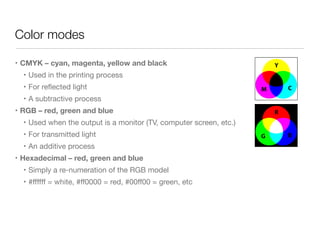
• CMYK – cyan, magenta, yellow and black
• Used in the printing process

• For reflected light

• A subtractive process

• RGB – red, green and blue
• Used when the output is a monitor (TV, computer screen, etc.)

• For transmitted light

• An additive process

• Hexadecimal – red, green and blue
• Simply a re-numeration of the RGB model

• #ffffff = white, #ff0000 = red, #00ff00 = green, etc
From designer Mike Williams
Most designers think if they are designing FOR print they should use
CMYK, or FOR screen use RGB. 

Instead, they should be thinking if they are looking at color ON
screen use RGB, and if they are checking color ON a print use
CMYK. While working on a screen keep the colors RGB and before
sending the files to proof and print convert to CMYK. 

You just cannot trust CMYK colors on a screen. Period.
From designer Andrew Kelsall
• RGB files are about 25 percent smaller
than CMYK.

• Many filters and functions are only
available to use in an RGB color mode in
Adobe Photoshop and similar programs.

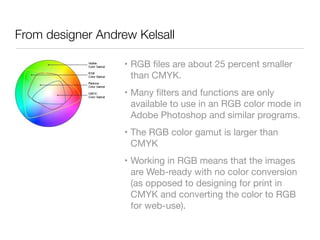
• The RGB color gamut is larger than
CMYK

• Working in RGB means that the images
are Web-ready with no color conversion
(as opposed to designing for print in
CMYK and converting the color to RGB
for web-use).
Photo file formats
• EPS

• GIF

• JPEG

• PNG

• PSD

• TIFF

• Raw
Photo file formats
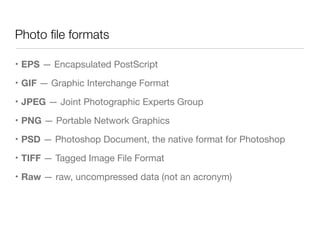
• EPS — Encapsulated PostScript

• GIF — Graphic Interchange Format

• JPEG — Joint Photographic Experts Group

• PNG — Portable Network Graphics

• PSD — Photoshop Document, the native format for Photoshop

• TIFF — Tagged Image File Format

• Raw — raw, uncompressed data (not an acronym)
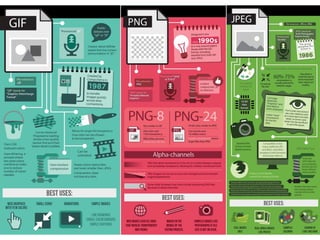
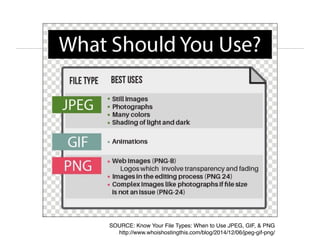
SOURCE: Know Your File Types: When to Use JPEG, GIF, & PNG
http://www.whoishostingthis.com/blog/2014/12/06/jpeg-gif-png/
Other file formats
• IDD — Adobe InDesign native format

• PDF — (Adobe) Portable Document Format
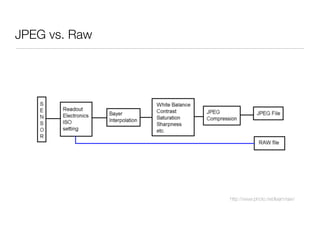
JPEG vs. Raw
http://www.photo.net/learn/raw/
JPEG vs. Raw
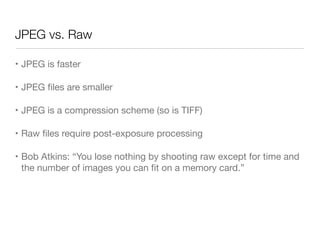
• JPEG is faster

• JPEG files are smaller

• JPEG is a compression scheme (so is TIFF)

• Raw files require post-exposure processing

• Bob Atkins: “You lose nothing by shooting raw except for time and
the number of images you can fit on a memory card.”
Printing terms and formulas
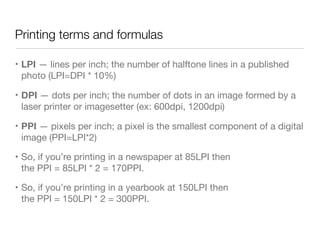
• LPI — lines per inch; the number of halftone lines in a published
photo (LPI=DPI * 10%)

• DPI — dots per inch; the number of dots in an image formed by a
laser printer or imagesetter (ex: 600dpi, 1200dpi)

• PPI — pixels per inch; a pixel is the smallest component of a digital
image (PPI=LPI*2)

• So, if you’re printing in a newspaper at 85LPI then 

the PPI = 85LPI * 2 = 170PPI.

• So, if you’re printing in a yearbook at 150LPI then 

the PPI = 150LPI * 2 = 300PPI.
So…
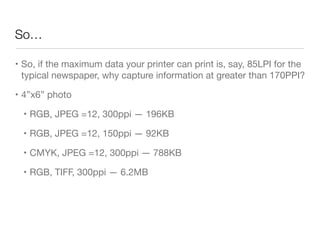
• So, if the maximum data your printer can print is, say, 85LPI for the
typical newspaper, why capture information at greater than 170PPI?

• 4”x6” photo

• RGB, JPEG =12, 300ppi — 196KB

• RGB, JPEG =12, 150ppi — 92KB

• CMYK, JPEG =12, 300ppi — 788KB

• RGB, TIFF, 300ppi — 6.2MB
Scenario: Do you get it?
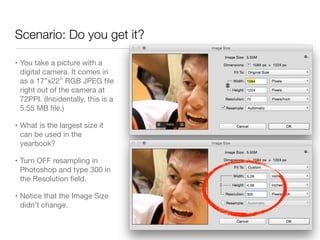
• You take a picture with a
digital camera. It comes in
as a 17”x22” RGB JPEG file
right out of the camera at
72PPI. (Incidentally, this is a
5.55 MB file.)

• What is the largest size it
can be used in the
yearbook?

• Turn OFF resampling in
Photoshop and type 300 in
the Resolution field.

• Notice that the Image Size
didn’t change.
Extension
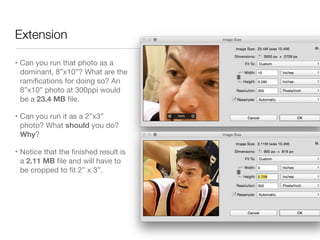
• Can you run that photo as a
dominant, 8”x10”? What are the
ramifications for doing so? An
8”x10” photo at 300ppi would
be a 23.4 MB file.

• Can you run it as a 2”x3”
photo? What should you do?
Why?

• Notice that the finished result is
a 2.11 MB file and will have to
be cropped to fit 2” x 3”.
How do you compare?
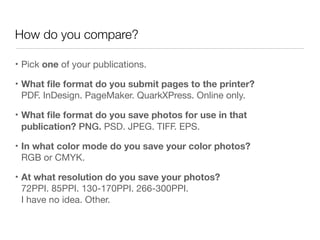
• Pick one of your publications.

• What file format do you submit pages to the printer?
PDF. InDesign. PageMaker. QuarkXPress. Online only.

• What file format do you save photos for use in that
publication? PNG. PSD. JPEG. TIFF. EPS.

• In what color mode do you save your color photos?
RGB or CMYK.

• At what resolution do you save your photos? 

72PPI. 85PPI. 130-170PPI. 266-300PPI. 

I have no idea. Other.
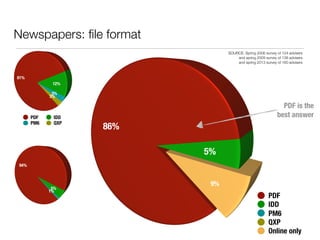
Newspapers: file format
PDF IDD
PM6 QXP
PDF
IDD
PM6
QXP
Online only
PDF is the
best answer
SOURCE: Spring 2006 survey of 124 advisers
and spring 2009 survey of 138 advisers
and spring 2013 survey of 160 advisers
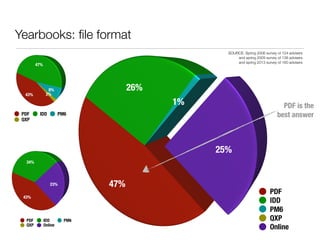
Yearbooks: file format
PDF IDD PM6
QXP
PDF
IDD
PM6
QXP
Online
PDF is the
best answer
PDF IDD PM6
QXP Online
SOURCE: Spring 2006 survey of 124 advisers
and spring 2009 survey of 138 advisers
and spring 2013 survey of 160 advisers
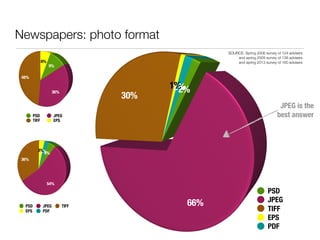
Newspapers: photo format
PSD JPEG
TIFF EPS
PSD
JPEG
TIFF
EPS
PDF
PSD JPEG TIFF
EPS PDF
JPEG is the
best answer
SOURCE: Spring 2006 survey of 124 advisers
and spring 2009 survey of 138 advisers
and spring 2013 survey of 160 advisers
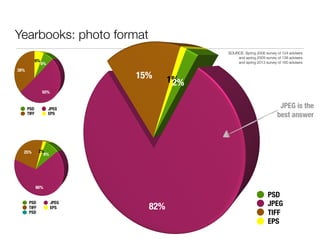
Yearbooks: photo format
PSD JPEG
TIFF EPS
PSD
JPEG
TIFF
EPS
PSD JPEG
TIFF EPS
PSD
JPEG is the
best answer
SOURCE: Spring 2006 survey of 124 advisers
and spring 2009 survey of 138 advisers
and spring 2013 survey of 160 advisers
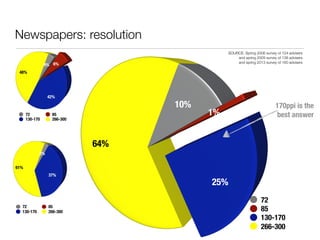
Newspapers: resolution
72 85
130-170 266-300
72
85
130-170
266-300
72 85
130-170 266-300
170ppi is the
best answer
SOURCE: Spring 2006 survey of 124 advisers
and spring 2009 survey of 138 advisers
and spring 2013 survey of 160 advisers
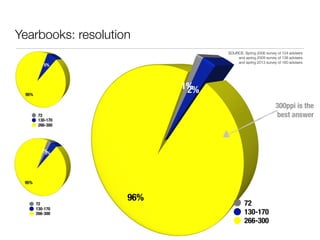
Yearbooks: resolution
72
130-170
266-300
72
130-170
266-300
72
130-170
266-300
300ppi is the
best answer
SOURCE: Spring 2006 survey of 124 advisers
and spring 2009 survey of 138 advisers
and spring 2013 survey of 160 advisers
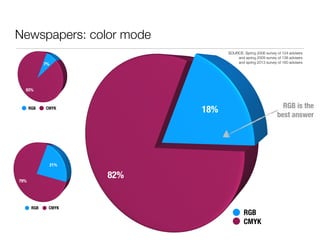
Newspapers: color mode
RGB CMYK
RGB
CMYK
RGB CMYK
RGB is the
best answer
SOURCE: Spring 2006 survey of 124 advisers
and spring 2009 survey of 138 advisers
and spring 2013 survey of 160 advisers
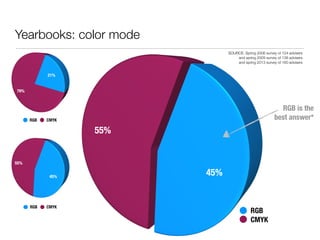
Yearbooks: color mode
RGB CMYK
RGB
CMYK
RGB CMYK
RGB is the
best answer*
SOURCE: Spring 2006 survey of 124 advisers
and spring 2009 survey of 138 advisers
and spring 2013 survey of 160 advisers
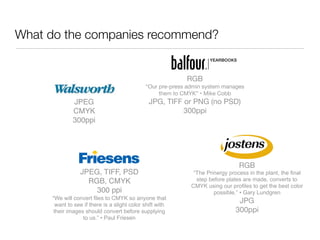
What do the companies recommend?
JPEG
CMYK
300ppi
JPEG, TIFF, PSD
RGB, CMYK
300 ppi
“We will convert files to CMYK so anyone that
want to see if there is a slight color shift with
their images should convert before supplying
to us.” • Paul Friesen
RGB

“Our pre-press admin system manages
them to CMYK” • Mike Cobb

JPG, TIFF or PNG (no PSD)

300ppi
RGB

“The Prinergy process in the plant, the final
step before plates are made, converts to
CMYK using our profiles to get the best color
possible.” • Gary Lundgren
JPG

300ppi
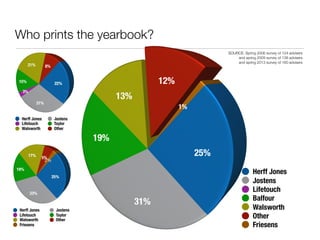
Who prints the yearbook?
Herff Jones Jostens
Lifetouch Taylor
Walsworth Other
Herff Jones
Jostens
Lifetouch
Balfour
Walsworth
Other
Friesens
SOURCE: Spring 2006 survey of 124 advisers
and spring 2009 survey of 138 advisers
and spring 2013 survey of 160 advisers
Herff Jones Jostens
Lifetouch Taylor
Walsworth Other
Friesens
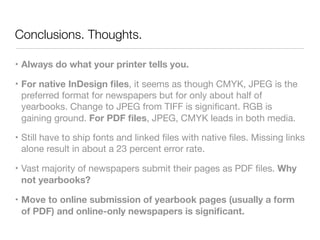
Conclusions. Thoughts.
• Always do what your printer tells you.
• For native InDesign files, it seems as though CMYK, JPEG is the
preferred format for newspapers but for only about half of
yearbooks. Change to JPEG from TIFF is significant. RGB is
gaining ground. For PDF files, JPEG, CMYK leads in both media.

• Still have to ship fonts and linked files with native files. Missing links
alone result in about a 23 percent error rate.

• Vast majority of newspapers submit their pages as PDF files. Why
not yearbooks?

• Move to online submission of yearbook pages (usually a form
of PDF) and online-only newspapers is significant.
Contact me
By Bradley Wilson, PhD
bradleywilson08@gmail.com
bradleywilsononline.net • @bradleywilson09
©2015

CMYK etc

  • 1.
    CMYK vs. RGB,JPEG vs TIFF, PDF vs. IDD By Bradley Wilson, Ph.D. bradleywilson08@gmail.com @bradleywilson09
  • 2.
    Color modes • CMYK– cyan, magenta, yellow and black • Used in the printing process • For reflected light • A subtractive process • RGB – red, green and blue • Used when the output is a monitor (TV, computer screen, etc.) • For transmitted light • An additive process • Hexadecimal – red, green and blue • Simply a re-numeration of the RGB model • #ffffff = white, #ff0000 = red, #00ff00 = green, etc
  • 3.
    From designer MikeWilliams Most designers think if they are designing FOR print they should use CMYK, or FOR screen use RGB. Instead, they should be thinking if they are looking at color ON screen use RGB, and if they are checking color ON a print use CMYK. While working on a screen keep the colors RGB and before sending the files to proof and print convert to CMYK. You just cannot trust CMYK colors on a screen. Period.
  • 4.
    From designer AndrewKelsall • RGB files are about 25 percent smaller than CMYK. • Many filters and functions are only available to use in an RGB color mode in Adobe Photoshop and similar programs. • The RGB color gamut is larger than CMYK • Working in RGB means that the images are Web-ready with no color conversion (as opposed to designing for print in CMYK and converting the color to RGB for web-use).
  • 5.
    Photo file formats •EPS • GIF • JPEG • PNG • PSD • TIFF • Raw
  • 6.
    Photo file formats •EPS — Encapsulated PostScript • GIF — Graphic Interchange Format • JPEG — Joint Photographic Experts Group • PNG — Portable Network Graphics • PSD — Photoshop Document, the native format for Photoshop • TIFF — Tagged Image File Format • Raw — raw, uncompressed data (not an acronym)
  • 8.
    SOURCE: Know YourFile Types: When to Use JPEG, GIF, & PNG http://www.whoishostingthis.com/blog/2014/12/06/jpeg-gif-png/
  • 9.
    Other file formats •IDD — Adobe InDesign native format • PDF — (Adobe) Portable Document Format
  • 10.
  • 11.
    JPEG vs. Raw •JPEG is faster • JPEG files are smaller • JPEG is a compression scheme (so is TIFF) • Raw files require post-exposure processing • Bob Atkins: “You lose nothing by shooting raw except for time and the number of images you can fit on a memory card.”
  • 12.
    Printing terms andformulas • LPI — lines per inch; the number of halftone lines in a published photo (LPI=DPI * 10%) • DPI — dots per inch; the number of dots in an image formed by a laser printer or imagesetter (ex: 600dpi, 1200dpi) • PPI — pixels per inch; a pixel is the smallest component of a digital image (PPI=LPI*2) • So, if you’re printing in a newspaper at 85LPI then 
 the PPI = 85LPI * 2 = 170PPI. • So, if you’re printing in a yearbook at 150LPI then 
 the PPI = 150LPI * 2 = 300PPI.
  • 13.
    So… • So, ifthe maximum data your printer can print is, say, 85LPI for the typical newspaper, why capture information at greater than 170PPI? • 4”x6” photo • RGB, JPEG =12, 300ppi — 196KB • RGB, JPEG =12, 150ppi — 92KB • CMYK, JPEG =12, 300ppi — 788KB • RGB, TIFF, 300ppi — 6.2MB
  • 14.
    Scenario: Do youget it? • You take a picture with a digital camera. It comes in as a 17”x22” RGB JPEG file right out of the camera at 72PPI. (Incidentally, this is a 5.55 MB file.) • What is the largest size it can be used in the yearbook? • Turn OFF resampling in Photoshop and type 300 in the Resolution field. • Notice that the Image Size didn’t change.
  • 15.
    Extension • Can yourun that photo as a dominant, 8”x10”? What are the ramifications for doing so? An 8”x10” photo at 300ppi would be a 23.4 MB file. • Can you run it as a 2”x3” photo? What should you do? Why? • Notice that the finished result is a 2.11 MB file and will have to be cropped to fit 2” x 3”.
  • 16.
    How do youcompare? • Pick one of your publications. • What file format do you submit pages to the printer? PDF. InDesign. PageMaker. QuarkXPress. Online only. • What file format do you save photos for use in that publication? PNG. PSD. JPEG. TIFF. EPS. • In what color mode do you save your color photos? RGB or CMYK. • At what resolution do you save your photos? 
 72PPI. 85PPI. 130-170PPI. 266-300PPI. 
 I have no idea. Other.
  • 17.
    Newspapers: file format PDFIDD PM6 QXP PDF IDD PM6 QXP Online only PDF is the best answer SOURCE: Spring 2006 survey of 124 advisers and spring 2009 survey of 138 advisers and spring 2013 survey of 160 advisers
  • 18.
    Yearbooks: file format PDFIDD PM6 QXP PDF IDD PM6 QXP Online PDF is the best answer PDF IDD PM6 QXP Online SOURCE: Spring 2006 survey of 124 advisers and spring 2009 survey of 138 advisers and spring 2013 survey of 160 advisers
  • 19.
    Newspapers: photo format PSDJPEG TIFF EPS PSD JPEG TIFF EPS PDF PSD JPEG TIFF EPS PDF JPEG is the best answer SOURCE: Spring 2006 survey of 124 advisers and spring 2009 survey of 138 advisers and spring 2013 survey of 160 advisers
  • 20.
    Yearbooks: photo format PSDJPEG TIFF EPS PSD JPEG TIFF EPS PSD JPEG TIFF EPS PSD JPEG is the best answer SOURCE: Spring 2006 survey of 124 advisers and spring 2009 survey of 138 advisers and spring 2013 survey of 160 advisers
  • 21.
    Newspapers: resolution 72 85 130-170266-300 72 85 130-170 266-300 72 85 130-170 266-300 170ppi is the best answer SOURCE: Spring 2006 survey of 124 advisers and spring 2009 survey of 138 advisers and spring 2013 survey of 160 advisers
  • 22.
    Yearbooks: resolution 72 130-170 266-300 72 130-170 266-300 72 130-170 266-300 300ppi isthe best answer SOURCE: Spring 2006 survey of 124 advisers and spring 2009 survey of 138 advisers and spring 2013 survey of 160 advisers
  • 23.
    Newspapers: color mode RGBCMYK RGB CMYK RGB CMYK RGB is the best answer SOURCE: Spring 2006 survey of 124 advisers and spring 2009 survey of 138 advisers and spring 2013 survey of 160 advisers
  • 24.
    Yearbooks: color mode RGBCMYK RGB CMYK RGB CMYK RGB is the best answer* SOURCE: Spring 2006 survey of 124 advisers and spring 2009 survey of 138 advisers and spring 2013 survey of 160 advisers
  • 25.
    What do thecompanies recommend? JPEG CMYK 300ppi JPEG, TIFF, PSD RGB, CMYK 300 ppi “We will convert files to CMYK so anyone that want to see if there is a slight color shift with their images should convert before supplying to us.” • Paul Friesen RGB “Our pre-press admin system manages them to CMYK” • Mike Cobb JPG, TIFF or PNG (no PSD) 300ppi RGB “The Prinergy process in the plant, the final step before plates are made, converts to CMYK using our profiles to get the best color possible.” • Gary Lundgren JPG 300ppi
  • 26.
    Who prints theyearbook? Herff Jones Jostens Lifetouch Taylor Walsworth Other Herff Jones Jostens Lifetouch Balfour Walsworth Other Friesens SOURCE: Spring 2006 survey of 124 advisers and spring 2009 survey of 138 advisers and spring 2013 survey of 160 advisers Herff Jones Jostens Lifetouch Taylor Walsworth Other Friesens
  • 27.
    Conclusions. Thoughts. • Alwaysdo what your printer tells you. • For native InDesign files, it seems as though CMYK, JPEG is the preferred format for newspapers but for only about half of yearbooks. Change to JPEG from TIFF is significant. RGB is gaining ground. For PDF files, JPEG, CMYK leads in both media. • Still have to ship fonts and linked files with native files. Missing links alone result in about a 23 percent error rate. • Vast majority of newspapers submit their pages as PDF files. Why not yearbooks? • Move to online submission of yearbook pages (usually a form of PDF) and online-only newspapers is significant.
  • 28.
    Contact me By BradleyWilson, PhD bradleywilson08@gmail.com bradleywilsononline.net • @bradleywilson09 ©2015