 Compare the Advantages and Limitations of the Various
Image File Format.
In This Chapter, you’ll learn on:
 The various file formats.
 • JPEG
 • GIF
 • BMP
 • TIFF
 • EPS
 • PSD
 • PDF
 • SWF
 The characteristics of these formats.
 The advantages and limitations of these formats.
 The Various File Types, the Characteristics,
Advantages and Limitations
 Pixel-based images can be saved in a number of file
formats. Some of them have more or less becomes
industry standards. They are primarily differentiated
by which color modes they can handle as well as
the level of features they are capable of. The most
common image file formats are Photoshop, EPS, TIFF,
PICT, GIF and JPEG. Some are only used on
Macintosh and others only on Windows. The two
formats generally used in graphic production are TIFF
and EPS.

 Photoshop [PSD]
 This pixel-based image format is primarily used during
the actual editing of the image.
 It cannot be used for output and tend to have huge
file size, which is inconvenient during file transfer. It
can also take up a lot of storage space.
 One of the advantages of Photoshop is that it can
save images in layers, which allows for more
creativity in image retouching.
 Many other programs can read Photoshop-
formatted files
 EPS
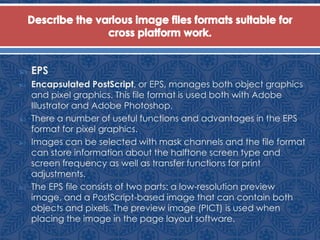
 Encapsulated PostScript, or EPS, manages both object graphics
and pixel graphics. This file format is used both with Adobe
Illustrator and Adobe Photoshop.
 There a number of useful functions and advantages in the EPS
format for pixel graphics.
 Images can be selected with mask channels and the file format
can store information about the halftone screen type and
screen frequency as well as transfer functions for print
adjustments.
 The EPS file consists of two parts: a low-resolution preview
image, and a PostScript-based image that can contain both
objects and pixels. The preview image (PICT) is used when
placing the image in the page layout software.
 EPS
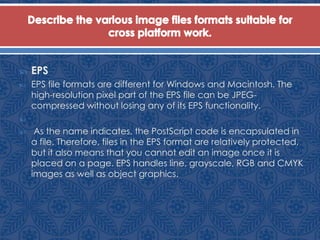
 EPS file formats are different for Windows and Macintosh. The
high-resolution pixel part of the EPS file can be JPEG-
compressed without losing any of its EPS functionality.

 As the name indicates, the PostScript code is encapsulated in
a file. Therefore, files in the EPS format are relatively protected,
but it also means that you cannot edit an image once it is
placed on a page. EPS handles line, grayscale, RGB and CMYK
images as well as object graphics.
 EPS
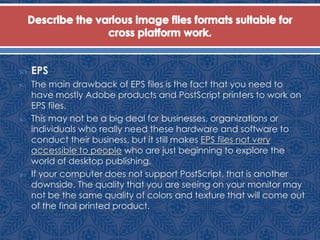
 The main drawback of EPS files is the fact that you need to
have mostly Adobe products and PostScript printers to work on
EPS files.
 This may not be a big deal for businesses, organizations or
individuals who really need these hardware and software to
conduct their business, but it still makes EPS files not very
accessible to people who are just beginning to explore the
world of desktop publishing.
 If your computer does not support PostScript, that is another
downside. The quality that you are seeing on your monitor may
not be the same quality of colors and texture that will come out
of the final printed product.
 EPS
 The main drawback of EPS files is the fact that you need to
have mostly Adobe products and PostScript printers to work on
EPS files.
 This may not be a big deal for businesses, organizations or
individuals who really need these hardware and software to
conduct their business, but it still makes EPS files not very
accessible to people who are just beginning to explore the
world of desktop publishing.
 If your computer does not support PostScript, that is another
downside. The quality that you are seeing on your monitor may
not be the same quality of colors and texture that will come out
of the final printed product.
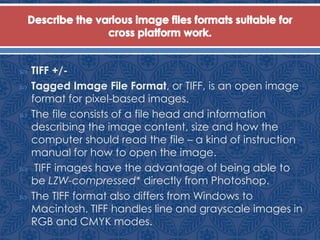
 TIFF +/-
 Tagged Image File Format, or TIFF, is an open image
format for pixel-based images.
 The file consists of a file head and information
describing the image content, size and how the
computer should read the file – a kind of instruction
manual for how to open the image.
 TIFF images have the advantage of being able to
be LZW-compressed* directly from Photoshop.
 The TIFF format also differs from Windows to
Macintosh. TIFF handles line and grayscale images in
RGB and CMYK modes.
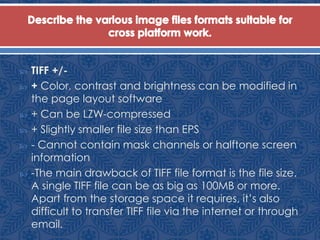
 TIFF +/-
 + Color, contrast and brightness can be modified in
the page layout software
 + Can be LZW-compressed
 + Slightly smaller file size than EPS
 - Cannot contain mask channels or halftone screen
information
 -The main drawback of TIFF file format is the file size.
A single TIFF file can be as big as 100MB or more.
Apart from the storage space it requires, it’s also
difficult to transfer TIFF file via the internet or through
email.
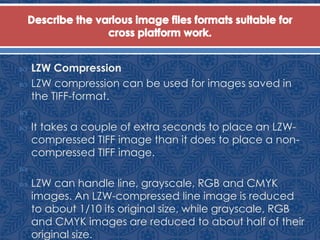
 LZW Compression
 LZW compression can be used for images saved in
the TIFF-format.

 It takes a couple of extra seconds to place an LZW-
compressed TIFF image than it does to place a non-
compressed TIFF image.

 LZW can handle line, grayscale, RGB and CMYK
images. An LZW-compressed line image is reduced
to about 1/10 its original size, while grayscale, RGB
and CMYK images are reduced to about half of their
original size.
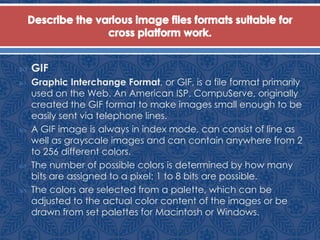
 GIF
 Graphic Interchange Format, or GIF, is a file format primarily
used on the Web. An American ISP, CompuServe, originally
created the GIF format to make images small enough to be
easily sent via telephone lines.
 A GIF image is always in index mode, can consist of line as
well as grayscale images and can contain anywhere from 2
to 256 different colors.
 The number of possible colors is determined by how many
bits are assigned to a pixel: 1 to 8 bits are possible.
 The colors are selected from a palette, which can be
adjusted to the actual color content of the images or be
drawn from set palettes for Macintosh or Windows.
 GIF
 There is also a set palette for the web that represents a combination
of Macintosh and Windows palettes.
 GIF files have the advantage of supporting simple animations in one
single file. Basically, the file consists of several images being displayed
one after another, creating the illusion of movement and animation.
 Another advantage of GIF files is that is support transparency. Most
image file types don’t support transparency.
 While GIF files have some advantages, the main drawback is the file
size. files are generally a lot larger than JPG or PNG files, which may
cause problems for people who wish to upload files onto the Internet.
 Another disadvantage of GIF is the fact that it only save images in 256
(8-bit) colours as compared to PNG files which display 24-bit colours.
 JPEG
 The Joint Photographic Experts Group, or JPEG,
format is a compression method for images that
also works as its own image format.
 JPEG works for grayscale, RGB and CMYK modes.
 The advantage to the JPEG format is that it is the
same on all company platforms.
 The main disadvantage of the JPEG format is that it
uses lossy compression. When images are
converted to JPEG, some of the details and
information will be lost. Continually loading and
saving JPEG images could lead to greater lose in
quality.
 PDF
 Portable Document Format, or PDF, manages both object
graphics and pixel graphics.
 Adobe Photoshop and Adobe Illustrator can save and edit
images in high-resolution PDF.
 PDF will most likely become more commonly used because it
combines the best characteristics of the EPS format and
Photoshop, is better standardized and can be read across all
platforms.
 The main advantage of PDF files is that they provide a
convenient way to deliver print documents.
 One the downside, PDF files can be slower to download than
HTML. Another disadvantage is that the user must have the
Adobe Reader plug-in installed in order to read the PDF
document.
 FH
 Macromedia Freehand, or FH, is a powerful
application that you can use for your creative
projects, whether they are for print or the web.
 FH is a file extension which adds automatically to
the file name when you’re saving a particular file
that you’d created in the application.
 The application is designed originally as a tool for
creating line art for print, Freehand had grown to
be a tremendous tool for all your graphic projects
and ideas.
 FH
 For example, you can use Freehand to draw a logo
for your company, create business cards and
letterheads and other marketing materials,
storyboard your web site, and even create
Macromedia Flash presentations.
 Although Macromedia Flash is a powerful web
animation tool, Freehand has better drawing tools.
The two applications work together, giving
designers a commanding set of tools for creating
everything necessary for print or motion graphics.
 AI
 Adobe Illustrator, or AI, is a well-known and widely used
drawing application.
 AI is a file extension which adds automatically to the file name
when you’re saving a particular file that you’d created in the
application.
 It gives you creative freedom that lets you realize your ideas
quickly and powerfully. Instantly, convert bitmaps to vector
artworks and paint intuitively. It has a tight integration with
other software allows you to produce extraordinary graphics
for print, video, the Web and mobile devices.
 Adobe Illustrator and Macromedia Freehand are both
illustration applications. Both takes pixel graphics and converts
them to object graphics.
 BMP
 Microsoft Windows Bitmap, or BMP, is one of several graphic
file formats supported by Microsoft Windows operating
environment.
 BMP is the native bitmap format of Windows and is used to
store virtually any type of bitmap data.
 Most graphic and imaging applications running under
Microsoft Windows support the creation and display of BMP
format files.
 The advantage of BMP is that it provides a realistic display of
the picture. Since it is made out of pixels, it is able to create
the illusion of one colour blending into another.
 The disadvantage is that BMP images tend to lose clarity when
the image is resize. It is impossible to enlarge an image without
causing pixelation.
 SWF
 Shockwave Flash Object, or SWF, is a file extension which adds
automatically to the file name when you’re saving a
particular file that you’d created in the application,
Macromedia Flash.
 When you author in Flash you work in a Flash document, a file
that, when saved, has the file extension .fla.
 When you are ready to deploy your Flash content, you publish
it, creating a file with the extension .swf. Flash Player,
described in the next section, runs the SWF file.
 Macromedia Flash is an authoring tool that allows you to
create anything from a simple animation to a complex
interactive web application, such as an online store.
 SWF
 You can make your Flash applications media rich by adding
pictures, sound, and video.
 Flash includes many features that make it powerful but easy to
use, such as drag-and-drop user interface components, built-
in behaviors that add ActionScript to your document, and
special effects that you can add to objects.
 The advantage of SWF is that it is vector based. Even when
they are zoomed in to fit different screen sizes, the graphics
can be scaled without losing sharpness. Secondly SWF files
have relative small file size. Generally, they are fast loading.
Thirdly, SWF allows interactions.
 The disadvantage is that it requires flash plugin (not available
on all platforms)

Chap59

  • 1.
     Compare theAdvantages and Limitations of the Various Image File Format.
  • 2.
    In This Chapter,you’ll learn on:  The various file formats.  • JPEG  • GIF  • BMP  • TIFF  • EPS  • PSD  • PDF  • SWF  The characteristics of these formats.  The advantages and limitations of these formats.
  • 3.
     The VariousFile Types, the Characteristics, Advantages and Limitations  Pixel-based images can be saved in a number of file formats. Some of them have more or less becomes industry standards. They are primarily differentiated by which color modes they can handle as well as the level of features they are capable of. The most common image file formats are Photoshop, EPS, TIFF, PICT, GIF and JPEG. Some are only used on Macintosh and others only on Windows. The two formats generally used in graphic production are TIFF and EPS. 
  • 4.
     Photoshop [PSD] This pixel-based image format is primarily used during the actual editing of the image.  It cannot be used for output and tend to have huge file size, which is inconvenient during file transfer. It can also take up a lot of storage space.  One of the advantages of Photoshop is that it can save images in layers, which allows for more creativity in image retouching.  Many other programs can read Photoshop- formatted files
  • 5.
     EPS  EncapsulatedPostScript, or EPS, manages both object graphics and pixel graphics. This file format is used both with Adobe Illustrator and Adobe Photoshop.  There a number of useful functions and advantages in the EPS format for pixel graphics.  Images can be selected with mask channels and the file format can store information about the halftone screen type and screen frequency as well as transfer functions for print adjustments.  The EPS file consists of two parts: a low-resolution preview image, and a PostScript-based image that can contain both objects and pixels. The preview image (PICT) is used when placing the image in the page layout software.
  • 6.
     EPS  EPSfile formats are different for Windows and Macintosh. The high-resolution pixel part of the EPS file can be JPEG- compressed without losing any of its EPS functionality.   As the name indicates, the PostScript code is encapsulated in a file. Therefore, files in the EPS format are relatively protected, but it also means that you cannot edit an image once it is placed on a page. EPS handles line, grayscale, RGB and CMYK images as well as object graphics.
  • 7.
     EPS  Themain drawback of EPS files is the fact that you need to have mostly Adobe products and PostScript printers to work on EPS files.  This may not be a big deal for businesses, organizations or individuals who really need these hardware and software to conduct their business, but it still makes EPS files not very accessible to people who are just beginning to explore the world of desktop publishing.  If your computer does not support PostScript, that is another downside. The quality that you are seeing on your monitor may not be the same quality of colors and texture that will come out of the final printed product.
  • 8.
     EPS  Themain drawback of EPS files is the fact that you need to have mostly Adobe products and PostScript printers to work on EPS files.  This may not be a big deal for businesses, organizations or individuals who really need these hardware and software to conduct their business, but it still makes EPS files not very accessible to people who are just beginning to explore the world of desktop publishing.  If your computer does not support PostScript, that is another downside. The quality that you are seeing on your monitor may not be the same quality of colors and texture that will come out of the final printed product.
  • 9.
     TIFF +/- Tagged Image File Format, or TIFF, is an open image format for pixel-based images.  The file consists of a file head and information describing the image content, size and how the computer should read the file – a kind of instruction manual for how to open the image.  TIFF images have the advantage of being able to be LZW-compressed* directly from Photoshop.  The TIFF format also differs from Windows to Macintosh. TIFF handles line and grayscale images in RGB and CMYK modes.
  • 10.
     TIFF +/- + Color, contrast and brightness can be modified in the page layout software  + Can be LZW-compressed  + Slightly smaller file size than EPS  - Cannot contain mask channels or halftone screen information  -The main drawback of TIFF file format is the file size. A single TIFF file can be as big as 100MB or more. Apart from the storage space it requires, it’s also difficult to transfer TIFF file via the internet or through email.
  • 11.
     LZW Compression LZW compression can be used for images saved in the TIFF-format.   It takes a couple of extra seconds to place an LZW- compressed TIFF image than it does to place a non- compressed TIFF image.   LZW can handle line, grayscale, RGB and CMYK images. An LZW-compressed line image is reduced to about 1/10 its original size, while grayscale, RGB and CMYK images are reduced to about half of their original size.
  • 12.
     GIF  GraphicInterchange Format, or GIF, is a file format primarily used on the Web. An American ISP, CompuServe, originally created the GIF format to make images small enough to be easily sent via telephone lines.  A GIF image is always in index mode, can consist of line as well as grayscale images and can contain anywhere from 2 to 256 different colors.  The number of possible colors is determined by how many bits are assigned to a pixel: 1 to 8 bits are possible.  The colors are selected from a palette, which can be adjusted to the actual color content of the images or be drawn from set palettes for Macintosh or Windows.
  • 13.
     GIF  Thereis also a set palette for the web that represents a combination of Macintosh and Windows palettes.  GIF files have the advantage of supporting simple animations in one single file. Basically, the file consists of several images being displayed one after another, creating the illusion of movement and animation.  Another advantage of GIF files is that is support transparency. Most image file types don’t support transparency.  While GIF files have some advantages, the main drawback is the file size. files are generally a lot larger than JPG or PNG files, which may cause problems for people who wish to upload files onto the Internet.  Another disadvantage of GIF is the fact that it only save images in 256 (8-bit) colours as compared to PNG files which display 24-bit colours.
  • 14.
     JPEG  TheJoint Photographic Experts Group, or JPEG, format is a compression method for images that also works as its own image format.  JPEG works for grayscale, RGB and CMYK modes.  The advantage to the JPEG format is that it is the same on all company platforms.  The main disadvantage of the JPEG format is that it uses lossy compression. When images are converted to JPEG, some of the details and information will be lost. Continually loading and saving JPEG images could lead to greater lose in quality.
  • 15.
     PDF  PortableDocument Format, or PDF, manages both object graphics and pixel graphics.  Adobe Photoshop and Adobe Illustrator can save and edit images in high-resolution PDF.  PDF will most likely become more commonly used because it combines the best characteristics of the EPS format and Photoshop, is better standardized and can be read across all platforms.  The main advantage of PDF files is that they provide a convenient way to deliver print documents.  One the downside, PDF files can be slower to download than HTML. Another disadvantage is that the user must have the Adobe Reader plug-in installed in order to read the PDF document.
  • 16.
     FH  MacromediaFreehand, or FH, is a powerful application that you can use for your creative projects, whether they are for print or the web.  FH is a file extension which adds automatically to the file name when you’re saving a particular file that you’d created in the application.  The application is designed originally as a tool for creating line art for print, Freehand had grown to be a tremendous tool for all your graphic projects and ideas.
  • 17.
     FH  Forexample, you can use Freehand to draw a logo for your company, create business cards and letterheads and other marketing materials, storyboard your web site, and even create Macromedia Flash presentations.  Although Macromedia Flash is a powerful web animation tool, Freehand has better drawing tools. The two applications work together, giving designers a commanding set of tools for creating everything necessary for print or motion graphics.
  • 18.
     AI  AdobeIllustrator, or AI, is a well-known and widely used drawing application.  AI is a file extension which adds automatically to the file name when you’re saving a particular file that you’d created in the application.  It gives you creative freedom that lets you realize your ideas quickly and powerfully. Instantly, convert bitmaps to vector artworks and paint intuitively. It has a tight integration with other software allows you to produce extraordinary graphics for print, video, the Web and mobile devices.  Adobe Illustrator and Macromedia Freehand are both illustration applications. Both takes pixel graphics and converts them to object graphics.
  • 19.
     BMP  MicrosoftWindows Bitmap, or BMP, is one of several graphic file formats supported by Microsoft Windows operating environment.  BMP is the native bitmap format of Windows and is used to store virtually any type of bitmap data.  Most graphic and imaging applications running under Microsoft Windows support the creation and display of BMP format files.  The advantage of BMP is that it provides a realistic display of the picture. Since it is made out of pixels, it is able to create the illusion of one colour blending into another.  The disadvantage is that BMP images tend to lose clarity when the image is resize. It is impossible to enlarge an image without causing pixelation.
  • 20.
     SWF  ShockwaveFlash Object, or SWF, is a file extension which adds automatically to the file name when you’re saving a particular file that you’d created in the application, Macromedia Flash.  When you author in Flash you work in a Flash document, a file that, when saved, has the file extension .fla.  When you are ready to deploy your Flash content, you publish it, creating a file with the extension .swf. Flash Player, described in the next section, runs the SWF file.  Macromedia Flash is an authoring tool that allows you to create anything from a simple animation to a complex interactive web application, such as an online store.
  • 21.
     SWF  Youcan make your Flash applications media rich by adding pictures, sound, and video.  Flash includes many features that make it powerful but easy to use, such as drag-and-drop user interface components, built- in behaviors that add ActionScript to your document, and special effects that you can add to objects.  The advantage of SWF is that it is vector based. Even when they are zoomed in to fit different screen sizes, the graphics can be scaled without losing sharpness. Secondly SWF files have relative small file size. Generally, they are fast loading. Thirdly, SWF allows interactions.  The disadvantage is that it requires flash plugin (not available on all platforms)