Master Qualification Basic Training
2020
G7 Master Qualification Basic Training
1. Idealliance and the Value of G7
2. G7 Principles- Gray Balance & Tonality
3. G7 Target Conditions - Global Standards and Specifications
4. G7 Color Managed Workflows
5. G7 Process Control and Quality Assurance
6. Using G7 with Color Management – Expectations and Value
7. G7 Compliance & G7 Master Submission
Idealliance and the Value of G7:
Lesson 1
Idealliance International Affiliate Offices
Idealliance Today
G7® Empowering a Global Supply Chain
Brands Using G7® Requirements
Include…
G7® Adoption Snapshot
G7 Master Qualified Facilities
Include…
Education and Innovation
Creators of ISO Standards
in the World
ISO Experts & Unique
Status of Liaison A to ISO
Largest Certifying
Body in the World as
Measured by ISO
Most Recognized
Industry Training in
the World
12 Global Offices
Globally
Transformative
Partners
G7 Master Qualification for Print Facilities
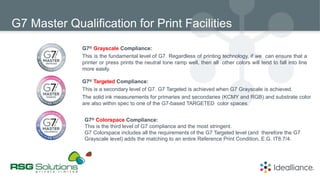
G7® Grayscale Compliance:
This is the fundamental level of G7. Regardless of printing technology, if we can ensure that a
printer or press prints the neutral tone ramp well, then all other colors will tend to fall into line
more easily.
G7® Targeted Compliance:
This is a secondary level of G7. G7 Targeted is achieved when G7 Grayscale is achieved.
The solid ink measurements for primaries and secondaries (KCMY and RGB) and substrate color
are also within spec to one of the G7-based TARGETED color spaces.
G7® Colorspace Compliance:
This is the third level of G7 compliance and the most stringent.
G7 Colorspace includes all the requirements of the G7 Targeted level (and therefore the G7
Grayscale level) adds the matching to an entire Reference Print Condition, E.G. IT8.7/4.
Idealliance G7 Programs
G7 Expert Certification
Individuals trained, tested, and authorized
by Idealliance to train G7 Masters
• Skilled, tested and proven leaders in print
production
• Users of global standards to match proof-to-
print
• Committed to reducing costs, speed to market
• Improve their client’s brand image
G7 Expert Certification
A G7 Expert has demonstrated expertise in the field of color management, process and quality control for proofing
and printing utilizing the G7 methodology & specification. A G7 Expert is able to analyze color and print related
issues and take corrective action to bring systems and processes in control to a set method, standard or
specification with repeatable, predictable results. A G7 Expert has attended and successfully completed an
Idealliance G7 Expert Training with a minimum level of 90% proficiency. Certification is valid for two years.
Individuals certified as a G7 Expert must hold individual, or be employed by an organization holding, Idealliance
membership. Recertification is required every two years. The G7 Expert must recertify by successfully completing
the Recertification Review & Exam within 90 days of certification expiration.
G7® Value and Benefits
• G7® is Idealliance’s industry-leading set of
specifications for achieving gray balance
• G7 achieves visual similarity across all print
processes.
G Represents Gray
7 Represents CMYK+RGB
G7® Shared Neutral Appearance
Offset
Digital Ink Jet
Before
After
G7® Technical Definition
• Defines a universal neutral appearance for printed
grays.
• Calibrates based on Tonality and Gray Balance
Offset Inkjet Flexo
G7® Leading Global Specification
Revised into ISO 12647-2
Pantone® Color Bridge is G7® calibrated
Used since 2006 by thousands and thousands
of printers globally
Specified by hundreds of major international
brands
• Customers expect consistent color
• Brand color requirements
• Across multiple presses and locations
• Reprinting same job or graphics
• One target regardless of device
• Proof to Press
• Customers expect consistent color
• Paper agnostic
• Predictable color accuracy
• Measurable, objective quality
G7® Value Print Service Providers
Consistency
G7® Value Print Service Providers
• Reduces make-ready time
• Reduces labor and waste
• All devices print to same target
• Sustaining expectations is easier
• G7 is an ANSI/CGATS specification for
targeting gray balance
• Agile – Load balancing work
• Shift production lines confidently
Efficiency
G7® Value Brands
• Color consistency reinforces trust
• Color variation erodes brand loyalty
subconsciously
• Color is an essential part of brand loyalty
• Color is a crucial factor in quality perception
• Color enhances consumers’ experience
with a product
• Color is an emotional attribute of a brand
Consistency
G7® Value Brands
• Reduced design cycles
• Reduced cost of design proofing
• Eliminate the need for on-site press checks
• Faster design-to-print cycle
• No fuss job reprints
Efficiency
G7® Value Supply Chain
• Simple data exchange to communicate
quality needs
• Concise expectations for acceptable color
• Aligns supply chain partners to the same
sheet of music
Communication
G7 Principles – Lesson 2
• Based on human visual perception
• Defines a universal “near neutral"
for the printed appearance of gray
• Single Color (black) vs. Multi Color (CMY)
• Controls
• TONALITY and
• GRAY BALANCE
What is G7?
• Defines a simple method for
calibrating CMYK printing devices.
• Simple, fast, one-step process to
calibrate any print system
• (Single Color (Black) to CMYK)
• Applicable across all CMYK print
technologies, inks and substrates
What is G7?
G7® Shared Neutral Appearance
Offset
Digital Ink Jet
Before
After
• G7 is a gray management system
• Managing gray balance & tonality using simple CMYK calibration
curves
• G7 is not a ”color management" system
• Complete color management requires G7 + additional color
management. Does not replace ICC Profiles, Process Control
• Tone reproduction improve when grays are correct
What is G7 NOT?
• Gray balance + tonality are controlled with
simple 1-D curves.
• G7 produces a shared neutral appearance on
all printing systems.
The G7 Method: Core Concept
• Achieving G7 Grayscale compliance with
CMYK (1-D) curves alone, and no extra color
management
• Individual (C+M+Y+K) curves can be imported
from external software (LUTs, DLPs, etc.) or
calculated by the printing system (Print Engine,
RIP, etc.)
The G7 Method: Core Concept Application
How is G7 Different?
Basics
• Based on Tonal Value Increase (TVI) of separate CMYK
ink scales
Dot Gain (TVI) calibration
Traditional Dot Gain (TVI) calibration achieves...
• With Standard Dot Gain Curves (TVI)
RIP Curves TVI Curves
+ =
• A color swatch can have the same TVI but different
tonality
50% black ink, 20% TVI
TVI does not compensate for tonality
• Dot Gain is a ratio of ink film reflectance (density)
• Not a direct indicator of "appearance“
• Any two points can vary in appearance
TVI does not compensate for tonality
• Any two swatches can have the same TVI, but vary in
appearance.
Example:
Dot Gain alone (TVI) does not control gray balance
CTVI = 18% MTVI = 18% YTVI = 18%
• Gray balance is also impacted by various other print
variation
Dot Gain alone (TVI) does not control gray balance
Green/blue “cool” caused by print variation : Trapping,
Sequence, Ink Hue, Opacity?
TVI = Inconsistent Grays = Inconsistent Color
Digital Ink Jet Offset
Before
After
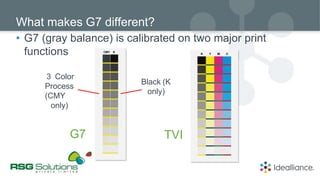
• G7 (gray balance) is calibrated on two major print
functions
What makes G7 different?
3 Color
Process
(CMY
only)
Black (K
only)
G7 TVI
• Tonality and Gray Balance
G7 Aligns according to 2 Basic Visual Concepts
T
onality Gray balance (Near
Neutral)
G7 Calibration Creates…
+ = Gray balance (Near
Neutral)
• Repeatable tonality and gray balance
Tonality
LUT / RIP Curves
G7 controls grays without ICC profiles
Offset
Digital Ink Jet
Before
After
Neutral Print Density Curve
Tonality (NPDC)
• Neutral Print Density Curve
G7 NPDC: What is NDPC?
Neutral
Density
Gray Halftone dot % (CMY v K)
Origin of G7 Neutral Print Density (Tonality)
• G7 was developed as the ND vs. dot % of nine GRACoL
research print trials
Neutral Print
Density Curves
Adaptive Dynamic Range
Dynamic
Range
G7 Neutral Print Density Curves (NPDC) adapt
automatically to any device’s dynamic range
Gray Balance
• Defined CMY "triplets“
CMY Gray Balance percentages
25 19 19
50 40 40
75 66 66
a*G7 = a*paper
b*G7 = b*paper
x (1 – C/100)
x (1 – C/100)
G7 gray balance formula
Example: (paper = 2a* -6b*)
0.75 x 2 a* =
0.75 x -6 b* =
(1 – 25/100) = 0.75
1.5 a*
-4.5 b*
25c
LAB
Example: (paper = 2a* -6b*)
(1 – 50/100) = 0.50
1.0 a*
-3.0 b*
50c
0.5 x 2 a* =
0.5 x -6 b* =
LAB
Example: (paper = 2a* -6b*)
(1 – 75/100) = 0.25
0.25 x 2 a* =
0.25 x -6 b* =
0.5 a*
-1.5 b*
75c
LAB
Substate Relative Gray Balance with G7
Appearance of gray matches the substrate it is printed on
Cool Substrate Neutral White Point Warm Substrate
Example: Poly Film Example: Uncoated
Board
Substrate Absolute Gray Balance with G7 (abs; a*, b* = 0)
Grays are inconsistent with substrate/paper white
Cool Substrate Neutral White Point Warm Substrate
Example: Poly Film Example: Uncoated
Board
Target Conditions: Global Standards &
Specifications - Lesson 3
GRACoL® / SWOP®
CGATS.21 / ISO PAS 15339
Reference Print
Conditions
ISO/PAS 15339 CGATS.21*
• 7 Characterized Reference Print
Conditions (CRPCs) for multiple print
technology/applications
• Include Shared Relative Appearance
thanks to G7 and similar ink hue
angles
Seven CRPC’s – TARGET CONDITIONS
1
2 3 4
5
6
7
CRPC 1 cold-set news
CRPC 2 heat-set news
CRPC 3 quality uncoated
CRPC 4 pub super-calendared
CRPC 5 pub coated (SWOP 2013)
CRPC 6 commercial coated (GRACoL 2013)
CRPC 7 generic large-gamut
Color Managed Workflows – Lesson 4
• Stabilize the system.
• Produce a sample print. (No color management)
• Measure your calibration target. Ex. P2P
• Calculate RIP curves. By software or with formula (graph paper)
• Produce a second print with new RIP curves. (No color management)
• Check Results of Second Press Run.
• Create ICC (if needed).
G7 Calibration Steps
• Idealliance Certified G7 Systems
• A system that achieves G7 Grayscale by the G7 Method with 1-D curves alone
• Excludes systems that simulate G7, e.g. by color management, GCR, channel mixing, etc.
• Current list available at www.idealliance.org/g7systems
Automatic G7® Curve Calculation
Automatic G7® Curve Calculation: Systems
• FUJIFILM ColorPath™ Sync®
• Heidelberg Prinect® Color Toolbox
• CHROMiX/HutchColor Curve2™ /
Curve3™ / Curve4™
• Alwan Dynamic Printer
Calibration™
• ColorGATE Productionserver
• Color CareTM v 2.2.1
• Caldera Print Standard Verifier G7
• Kodak ColorFlow Software
• EFI Fiery Color Profiler Suite v.4.9 /
v.5.0
• PRISMAsync Color Print Server for
Canon imagePRESS
• ORIS Lynx
• Bodini Systems pressSIGN 8
• AGFA PressTune 8
• Koenig & Bauer QualityPass 8
• PRISMAsync Color Print Server V6
/ V7
• ONYX Media Manager with G7
v18.5
• AGFAAsanti 4.2
• Mellow Colour PrintSpec 4Canon
Visit www.Idealliance.org for details
• Measured on P2P Columns 4 & 5
• Unit: Weighted Delta L* (w∆L*)
Neutral Print Density (NPDC) Accuracy
Target:
Avg: < 1.5
Max: < 3.0
• Column 5 (CMY only) on P2P
• Weighted Delta Ch (w∆Ch)
Gray Balance Accuracy with G7
Target:
Avg: < 1.5
Max: < 3.0
Weighting Function
1
0.75
0.5
0.25
0
0 25 50 75 100
• Reduces errors above 50% (shadows/less critical tones)
w∆ L*
∆ L*
(1max(0,(%50)500.75))
w∆ Ch ∆ Ch(1max(0,(%50)500.75))
Weighting
Evaluation Targets
• Idealliance ISO 12647-7 Strip on every proof
Proof Evaluation
• 3 Row Proof Verification Control Wedge (ISO 12647-7)
• Example: i1Pro or iSis
Proof Evaluation
• D50
• Defined by ISO 3664:2009
• The only ‘standard’ way to view color
• D50 is not the same as 5000K:
Proof Evaluation : Viewing Conditions
Process Control and Quality
Assurance – Lesson 5
Process Control
Aims
T
o Check NPDC Curves
Practical Evaluation of Press Sheet
HC Highlight Contrast – 25k or 25c, 19m, 19y
HR Highlight Range – 50k or 50c, 40m, 40y
SC Shadow Contrast – 75k or 75c, 66m, 66y
G7 Neutral Print Density Curves (NPDC)
Finding control patches in the P2P target
SC
75c 66m 66y
75k
HR
50c 40m 40y
50k
HC
25c 19m 19y
25k
Quick check of NPDC in mid-tones
50% gray ND relative to paper
Add paper ND to get target ND
HR_cmy = 0.54
HR_k = 0.50
Highlight Range (HR)
Evaluate NPDC in highlights
25% gray ND relative to paper
Add paper ND to get target ND
HC_cmy = 0.25
HC_k = 0.22
Highlight Contrast (HC)
25
Evaluate NPDC in shadows
75% gray ND relative to paper
Add paper ND to get target ND
SC_cmy = 0.90
SC_k = 0.90
(varies with DR)
Shadow Contrast (SC)
75
• HR and SC aims vary with tonal range (DR)
• But HC (25%) aims are constant
• (Same for all density ranges)
Target ND aims vary according to Tonal Range (density)
Using G7 with Color Management -
Lesson 6
• G7 doesn’t add extra work (in theory)
• All devices must be calibrated anyway
• For some work, G7 is enough without profiles
• G7 extends the life of a profile
• If the device drifts, G7 brings the gray scale back to how the profile
was made - less need to re-profile
Why profile & G7?
• G7 can improve the quality of ICC color management
• Does the heavy lifting of tonality and gray balance
• Lets the profile concentrate on subtle color accuracy
• G7 controls highlight detail better than ICC
• Due to limited precision of IT8.7/4 and other profiling targets
Why profile & G7?
• G7 reduces the need for re-profiling
• ICC profiling is slower, more expensive than calibration
• ICC profiling can be DANGEROUS
Why profile & G7?
• Color is subjective
• ALL printing systems vary to some extent
• A proof is a “simulation” of a perfect press
• Every press run is slightly different
• Evaluating “quality” is not an exact science
• Quality is proportional to price
Reality check
 An offset pressrun is a combination of science, skill and
luck
 Over 100 variables, only about 10 of which can be
controlled at press time
 Ink Jet printing is roughly 100x more stable than offset!
• That's why most proofing systems use ink jet
Printing is not an exact science
• ISO-standard papers are hard to find!!!
• Papers are bluer than ten years ago
• Paper color affects image color
• Don't expect a good proof simulation if you print on
non-standard paper
Non-standard papers
The effect of paper
• G7 does NOT guarantee perfect color
• Nothing does!
• G7 manages gray balance and tonality
• G7 does not compensate for…
• Inconsistent materials
• Unstable processes
• Color gamut limitations
• Bad printing
G7 Limitations
• Like any calibration method, G7 does not eliminate
printing variation
• For best results, measure more than one sheet to
minimize variations on the device
• Offset G7 calibration (and profiling) requires more than
one test.
•
Ideally, repeat the exercise 2 or 3 times and take the average
G7 Cautions (continued)
• CMYK+OGV
• Adds Orange, Green and Violet to
CMYK inks
• Commonly used in packaging
(mostly offset and flexo)
• XCMYK
• Extended gamut method for 4-
color (CMYK) inks
• Methodology, data set and
profiles released by Idealliance in
2016
Extended Gamut Print Strategies
• Offset or Flexo:
• Print CMYK inks to high densities on good paper
• Use FM screening to enhance pastels
• Calibrate to G7
• Digital
• Match the XCMYK profile (free at Idealliance.org)
XCMYK method
Compliance & G7 Master Submission -
Lesson 7
G7 Compliance Levels
G7 Master Compliance Levels
• G7 Grayscale
• G7 Targeted (Absolute or Relative)
• G7 Colorspace (Absolute or Relative)
G7 Grayscale Compliance
• G7 grayscale calibration
• Average w∆Ch:
• Maximum wCh:
• Average w∆L*:
• Maximum w∆L*:
< 1.5
< 3.0
< 1.5
< 3.0
• Minimum Level of Compliance
• Non-standard inks
*G7 Master Pass/Fail Requirements, Version 36, Aug 2019
G7 Targeted Compliance
• G7 Grayscale plus...
• Inks match a defined CRPC
• ∆E00 ≤: CMY 3.5, K 5, RGB 4.2
• CRPC can be standard or custom
• (Send custom data with application)
• Example: G7-calibrated offset
• Standard Level of Compliance
G7 Colorspace Compliance
• Elite Level of Compliance
• G7 Targeted plus IT8.7/5 tolerances...
• Proofing:
≤ 1.5 ∆E00
≤ 1.5 ∆E00
≤ 3 ∆E00
≤ 5 ∆E00
• Substrate
• All patches average
• 95th percentile
• Maximum
• Press:
• Substrate
• All patches average
• 95th percentile
≤ 3 ∆E00
≤ 3.5 ∆E00
≤ 5 ∆E00
G7 Colorspace Compliance
• CRPC can be public (e.g. GRACoL) or custom*
*Custom submissions must include IT8.7/5 data
• Expected performance:
• Good neutral match
• Good solid color match
• Good pictorial color match
G7 Targeted & Colorspace - Relative
• Same as G7 Targeted or G7 Colorspace but utilized with
non-standard white point substrate
• Different color or lightness
• Ink solids are compared to the defined CRPC, modified
by "SCCA" (Substrate-Corrected Colorimetric Aims)
• NOTE: Highlights, Color, & Grays , colors and grays
shift towards substrate color and brightness
• ∆E < 1.5 = Excellent Proof
• ∆E < 2.0 = Average Proof
• ∆E < 3.0 = Average Press (offset)
• Average of all patches within a
characterization target
• IT8.7/5 (TC1617) / IT8.7/4
Typical Delta E tolerances : Proof & Press
• On-site training requirements
• Supported by online tutorials and other material
• Affidavit signed by Expert and Master employee
• Samples must be produced by employee, not Expert
G7 Master procedures summary
Requirements Affidavit Samples
• Each device aims for a named compliance level:
• Grayscale, Targeted, or Colorspace
•
• Print samples must contain latest QR code
• www.idealliance.org - changes quarterly
G7 Master print samples
G7 sample prints must be made by the
Master employee, not the Expert
 Recommended:
• G7 Verifier
 Also accepted:
• P2P51 or P2P25
Sample targets - G7 Grayscale & Targeted
•
•
•
Sample targets - G7 Colorspace
• Recommended:
• TC1617, IT8.7/5
• Also accepted:
• G7 Verifier or P2P51 or P2P25 + IT8.7/4
+
or or
G7 Master affidavit
All the best for your Master certification
Learn more about G7® at
www.idealliance.org/G7
ISHANT KALKAL *G7 Expert - (Pre-sales Manager) RSG Solutions Pvt. Ltd. New Delhi
E-Mail Address – ishant.Kalkal@rsgsolutions.co.in / Mobile - +919310196639

G7 Master Qualification Basic Training V2020_ALL.pptx

  • 1.
  • 2.
    G7 Master QualificationBasic Training 1. Idealliance and the Value of G7 2. G7 Principles- Gray Balance & Tonality 3. G7 Target Conditions - Global Standards and Specifications 4. G7 Color Managed Workflows 5. G7 Process Control and Quality Assurance 6. Using G7 with Color Management – Expectations and Value 7. G7 Compliance & G7 Master Submission
  • 3.
    Idealliance and theValue of G7: Lesson 1
  • 4.
  • 5.
  • 6.
    G7® Empowering aGlobal Supply Chain
  • 7.
    Brands Using G7®Requirements Include… G7® Adoption Snapshot G7 Master Qualified Facilities Include…
  • 8.
    Education and Innovation Creatorsof ISO Standards in the World ISO Experts & Unique Status of Liaison A to ISO Largest Certifying Body in the World as Measured by ISO Most Recognized Industry Training in the World 12 Global Offices Globally Transformative Partners
  • 9.
    G7 Master Qualificationfor Print Facilities G7® Grayscale Compliance: This is the fundamental level of G7. Regardless of printing technology, if we can ensure that a printer or press prints the neutral tone ramp well, then all other colors will tend to fall into line more easily. G7® Targeted Compliance: This is a secondary level of G7. G7 Targeted is achieved when G7 Grayscale is achieved. The solid ink measurements for primaries and secondaries (KCMY and RGB) and substrate color are also within spec to one of the G7-based TARGETED color spaces. G7® Colorspace Compliance: This is the third level of G7 compliance and the most stringent. G7 Colorspace includes all the requirements of the G7 Targeted level (and therefore the G7 Grayscale level) adds the matching to an entire Reference Print Condition, E.G. IT8.7/4.
  • 10.
    Idealliance G7 Programs G7Expert Certification Individuals trained, tested, and authorized by Idealliance to train G7 Masters • Skilled, tested and proven leaders in print production • Users of global standards to match proof-to- print • Committed to reducing costs, speed to market • Improve their client’s brand image
  • 11.
    G7 Expert Certification AG7 Expert has demonstrated expertise in the field of color management, process and quality control for proofing and printing utilizing the G7 methodology & specification. A G7 Expert is able to analyze color and print related issues and take corrective action to bring systems and processes in control to a set method, standard or specification with repeatable, predictable results. A G7 Expert has attended and successfully completed an Idealliance G7 Expert Training with a minimum level of 90% proficiency. Certification is valid for two years. Individuals certified as a G7 Expert must hold individual, or be employed by an organization holding, Idealliance membership. Recertification is required every two years. The G7 Expert must recertify by successfully completing the Recertification Review & Exam within 90 days of certification expiration.
  • 12.
    G7® Value andBenefits • G7® is Idealliance’s industry-leading set of specifications for achieving gray balance • G7 achieves visual similarity across all print processes. G Represents Gray 7 Represents CMYK+RGB
  • 13.
    G7® Shared NeutralAppearance Offset Digital Ink Jet Before After
  • 14.
    G7® Technical Definition •Defines a universal neutral appearance for printed grays. • Calibrates based on Tonality and Gray Balance Offset Inkjet Flexo
  • 15.
    G7® Leading GlobalSpecification Revised into ISO 12647-2 Pantone® Color Bridge is G7® calibrated Used since 2006 by thousands and thousands of printers globally Specified by hundreds of major international brands
  • 16.
    • Customers expectconsistent color • Brand color requirements • Across multiple presses and locations • Reprinting same job or graphics • One target regardless of device • Proof to Press • Customers expect consistent color • Paper agnostic • Predictable color accuracy • Measurable, objective quality G7® Value Print Service Providers Consistency
  • 17.
    G7® Value PrintService Providers • Reduces make-ready time • Reduces labor and waste • All devices print to same target • Sustaining expectations is easier • G7 is an ANSI/CGATS specification for targeting gray balance • Agile – Load balancing work • Shift production lines confidently Efficiency
  • 18.
    G7® Value Brands •Color consistency reinforces trust • Color variation erodes brand loyalty subconsciously • Color is an essential part of brand loyalty • Color is a crucial factor in quality perception • Color enhances consumers’ experience with a product • Color is an emotional attribute of a brand Consistency
  • 19.
    G7® Value Brands •Reduced design cycles • Reduced cost of design proofing • Eliminate the need for on-site press checks • Faster design-to-print cycle • No fuss job reprints Efficiency
  • 20.
    G7® Value SupplyChain • Simple data exchange to communicate quality needs • Concise expectations for acceptable color • Aligns supply chain partners to the same sheet of music Communication
  • 21.
  • 22.
    • Based onhuman visual perception • Defines a universal “near neutral" for the printed appearance of gray • Single Color (black) vs. Multi Color (CMY) • Controls • TONALITY and • GRAY BALANCE What is G7?
  • 23.
    • Defines asimple method for calibrating CMYK printing devices. • Simple, fast, one-step process to calibrate any print system • (Single Color (Black) to CMYK) • Applicable across all CMYK print technologies, inks and substrates What is G7?
  • 24.
    G7® Shared NeutralAppearance Offset Digital Ink Jet Before After
  • 25.
    • G7 isa gray management system • Managing gray balance & tonality using simple CMYK calibration curves • G7 is not a ”color management" system • Complete color management requires G7 + additional color management. Does not replace ICC Profiles, Process Control • Tone reproduction improve when grays are correct What is G7 NOT?
  • 26.
    • Gray balance+ tonality are controlled with simple 1-D curves. • G7 produces a shared neutral appearance on all printing systems. The G7 Method: Core Concept
  • 27.
    • Achieving G7Grayscale compliance with CMYK (1-D) curves alone, and no extra color management • Individual (C+M+Y+K) curves can be imported from external software (LUTs, DLPs, etc.) or calculated by the printing system (Print Engine, RIP, etc.) The G7 Method: Core Concept Application
  • 28.
    How is G7Different? Basics
  • 29.
    • Based onTonal Value Increase (TVI) of separate CMYK ink scales Dot Gain (TVI) calibration
  • 30.
    Traditional Dot Gain(TVI) calibration achieves... • With Standard Dot Gain Curves (TVI) RIP Curves TVI Curves + =
  • 31.
    • A colorswatch can have the same TVI but different tonality 50% black ink, 20% TVI TVI does not compensate for tonality
  • 32.
    • Dot Gainis a ratio of ink film reflectance (density) • Not a direct indicator of "appearance“ • Any two points can vary in appearance TVI does not compensate for tonality
  • 33.
    • Any twoswatches can have the same TVI, but vary in appearance. Example: Dot Gain alone (TVI) does not control gray balance CTVI = 18% MTVI = 18% YTVI = 18%
  • 34.
    • Gray balanceis also impacted by various other print variation Dot Gain alone (TVI) does not control gray balance Green/blue “cool” caused by print variation : Trapping, Sequence, Ink Hue, Opacity?
  • 35.
    TVI = InconsistentGrays = Inconsistent Color Digital Ink Jet Offset Before After
  • 36.
    • G7 (graybalance) is calibrated on two major print functions What makes G7 different? 3 Color Process (CMY only) Black (K only) G7 TVI
  • 37.
    • Tonality andGray Balance G7 Aligns according to 2 Basic Visual Concepts T onality Gray balance (Near Neutral)
  • 38.
    G7 Calibration Creates… += Gray balance (Near Neutral) • Repeatable tonality and gray balance Tonality LUT / RIP Curves
  • 39.
    G7 controls grayswithout ICC profiles Offset Digital Ink Jet Before After
  • 40.
    Neutral Print DensityCurve Tonality (NPDC)
  • 41.
    • Neutral PrintDensity Curve G7 NPDC: What is NDPC? Neutral Density Gray Halftone dot % (CMY v K)
  • 42.
    Origin of G7Neutral Print Density (Tonality) • G7 was developed as the ND vs. dot % of nine GRACoL research print trials Neutral Print Density Curves
  • 43.
    Adaptive Dynamic Range Dynamic Range G7Neutral Print Density Curves (NPDC) adapt automatically to any device’s dynamic range
  • 44.
  • 45.
    • Defined CMY"triplets“ CMY Gray Balance percentages 25 19 19 50 40 40 75 66 66
  • 46.
    a*G7 = a*paper b*G7= b*paper x (1 – C/100) x (1 – C/100) G7 gray balance formula
  • 47.
    Example: (paper =2a* -6b*) 0.75 x 2 a* = 0.75 x -6 b* = (1 – 25/100) = 0.75 1.5 a* -4.5 b* 25c LAB
  • 48.
    Example: (paper =2a* -6b*) (1 – 50/100) = 0.50 1.0 a* -3.0 b* 50c 0.5 x 2 a* = 0.5 x -6 b* = LAB
  • 49.
    Example: (paper =2a* -6b*) (1 – 75/100) = 0.25 0.25 x 2 a* = 0.25 x -6 b* = 0.5 a* -1.5 b* 75c LAB
  • 50.
    Substate Relative GrayBalance with G7 Appearance of gray matches the substrate it is printed on Cool Substrate Neutral White Point Warm Substrate Example: Poly Film Example: Uncoated Board
  • 51.
    Substrate Absolute GrayBalance with G7 (abs; a*, b* = 0) Grays are inconsistent with substrate/paper white Cool Substrate Neutral White Point Warm Substrate Example: Poly Film Example: Uncoated Board
  • 52.
    Target Conditions: GlobalStandards & Specifications - Lesson 3
  • 53.
    GRACoL® / SWOP® CGATS.21/ ISO PAS 15339 Reference Print Conditions
  • 54.
    ISO/PAS 15339 CGATS.21* •7 Characterized Reference Print Conditions (CRPCs) for multiple print technology/applications • Include Shared Relative Appearance thanks to G7 and similar ink hue angles
  • 55.
    Seven CRPC’s –TARGET CONDITIONS 1 2 3 4 5 6 7 CRPC 1 cold-set news CRPC 2 heat-set news CRPC 3 quality uncoated CRPC 4 pub super-calendared CRPC 5 pub coated (SWOP 2013) CRPC 6 commercial coated (GRACoL 2013) CRPC 7 generic large-gamut
  • 56.
  • 57.
    • Stabilize thesystem. • Produce a sample print. (No color management) • Measure your calibration target. Ex. P2P • Calculate RIP curves. By software or with formula (graph paper) • Produce a second print with new RIP curves. (No color management) • Check Results of Second Press Run. • Create ICC (if needed). G7 Calibration Steps
  • 58.
    • Idealliance CertifiedG7 Systems • A system that achieves G7 Grayscale by the G7 Method with 1-D curves alone • Excludes systems that simulate G7, e.g. by color management, GCR, channel mixing, etc. • Current list available at www.idealliance.org/g7systems Automatic G7® Curve Calculation
  • 59.
    Automatic G7® CurveCalculation: Systems • FUJIFILM ColorPath™ Sync® • Heidelberg Prinect® Color Toolbox • CHROMiX/HutchColor Curve2™ / Curve3™ / Curve4™ • Alwan Dynamic Printer Calibration™ • ColorGATE Productionserver • Color CareTM v 2.2.1 • Caldera Print Standard Verifier G7 • Kodak ColorFlow Software • EFI Fiery Color Profiler Suite v.4.9 / v.5.0 • PRISMAsync Color Print Server for Canon imagePRESS • ORIS Lynx • Bodini Systems pressSIGN 8 • AGFA PressTune 8 • Koenig & Bauer QualityPass 8 • PRISMAsync Color Print Server V6 / V7 • ONYX Media Manager with G7 v18.5 • AGFAAsanti 4.2 • Mellow Colour PrintSpec 4Canon Visit www.Idealliance.org for details
  • 60.
    • Measured onP2P Columns 4 & 5 • Unit: Weighted Delta L* (w∆L*) Neutral Print Density (NPDC) Accuracy Target: Avg: < 1.5 Max: < 3.0
  • 61.
    • Column 5(CMY only) on P2P • Weighted Delta Ch (w∆Ch) Gray Balance Accuracy with G7 Target: Avg: < 1.5 Max: < 3.0
  • 62.
    Weighting Function 1 0.75 0.5 0.25 0 0 2550 75 100 • Reduces errors above 50% (shadows/less critical tones) w∆ L* ∆ L* (1max(0,(%50)500.75)) w∆ Ch ∆ Ch(1max(0,(%50)500.75)) Weighting
  • 63.
  • 64.
    • Idealliance ISO12647-7 Strip on every proof Proof Evaluation
  • 65.
    • 3 RowProof Verification Control Wedge (ISO 12647-7) • Example: i1Pro or iSis Proof Evaluation
  • 66.
    • D50 • Definedby ISO 3664:2009 • The only ‘standard’ way to view color • D50 is not the same as 5000K: Proof Evaluation : Viewing Conditions
  • 67.
    Process Control andQuality Assurance – Lesson 5
  • 68.
  • 69.
  • 70.
    HC Highlight Contrast– 25k or 25c, 19m, 19y HR Highlight Range – 50k or 50c, 40m, 40y SC Shadow Contrast – 75k or 75c, 66m, 66y G7 Neutral Print Density Curves (NPDC)
  • 71.
    Finding control patchesin the P2P target SC 75c 66m 66y 75k HR 50c 40m 40y 50k HC 25c 19m 19y 25k
  • 72.
    Quick check ofNPDC in mid-tones 50% gray ND relative to paper Add paper ND to get target ND HR_cmy = 0.54 HR_k = 0.50 Highlight Range (HR)
  • 73.
    Evaluate NPDC inhighlights 25% gray ND relative to paper Add paper ND to get target ND HC_cmy = 0.25 HC_k = 0.22 Highlight Contrast (HC) 25
  • 74.
    Evaluate NPDC inshadows 75% gray ND relative to paper Add paper ND to get target ND SC_cmy = 0.90 SC_k = 0.90 (varies with DR) Shadow Contrast (SC) 75
  • 75.
    • HR andSC aims vary with tonal range (DR) • But HC (25%) aims are constant • (Same for all density ranges) Target ND aims vary according to Tonal Range (density)
  • 76.
    Using G7 withColor Management - Lesson 6
  • 77.
    • G7 doesn’tadd extra work (in theory) • All devices must be calibrated anyway • For some work, G7 is enough without profiles • G7 extends the life of a profile • If the device drifts, G7 brings the gray scale back to how the profile was made - less need to re-profile Why profile & G7?
  • 78.
    • G7 canimprove the quality of ICC color management • Does the heavy lifting of tonality and gray balance • Lets the profile concentrate on subtle color accuracy • G7 controls highlight detail better than ICC • Due to limited precision of IT8.7/4 and other profiling targets Why profile & G7?
  • 79.
    • G7 reducesthe need for re-profiling • ICC profiling is slower, more expensive than calibration • ICC profiling can be DANGEROUS Why profile & G7?
  • 80.
    • Color issubjective • ALL printing systems vary to some extent • A proof is a “simulation” of a perfect press • Every press run is slightly different • Evaluating “quality” is not an exact science • Quality is proportional to price Reality check
  • 81.
     An offsetpressrun is a combination of science, skill and luck  Over 100 variables, only about 10 of which can be controlled at press time  Ink Jet printing is roughly 100x more stable than offset! • That's why most proofing systems use ink jet Printing is not an exact science
  • 82.
    • ISO-standard papersare hard to find!!! • Papers are bluer than ten years ago • Paper color affects image color • Don't expect a good proof simulation if you print on non-standard paper Non-standard papers
  • 83.
  • 84.
    • G7 doesNOT guarantee perfect color • Nothing does! • G7 manages gray balance and tonality • G7 does not compensate for… • Inconsistent materials • Unstable processes • Color gamut limitations • Bad printing G7 Limitations
  • 85.
    • Like anycalibration method, G7 does not eliminate printing variation • For best results, measure more than one sheet to minimize variations on the device • Offset G7 calibration (and profiling) requires more than one test. • Ideally, repeat the exercise 2 or 3 times and take the average G7 Cautions (continued)
  • 86.
    • CMYK+OGV • AddsOrange, Green and Violet to CMYK inks • Commonly used in packaging (mostly offset and flexo) • XCMYK • Extended gamut method for 4- color (CMYK) inks • Methodology, data set and profiles released by Idealliance in 2016 Extended Gamut Print Strategies
  • 87.
    • Offset orFlexo: • Print CMYK inks to high densities on good paper • Use FM screening to enhance pastels • Calibrate to G7 • Digital • Match the XCMYK profile (free at Idealliance.org) XCMYK method
  • 88.
    Compliance & G7Master Submission - Lesson 7
  • 89.
  • 90.
    G7 Master ComplianceLevels • G7 Grayscale • G7 Targeted (Absolute or Relative) • G7 Colorspace (Absolute or Relative)
  • 91.
    G7 Grayscale Compliance •G7 grayscale calibration • Average w∆Ch: • Maximum wCh: • Average w∆L*: • Maximum w∆L*: < 1.5 < 3.0 < 1.5 < 3.0 • Minimum Level of Compliance • Non-standard inks *G7 Master Pass/Fail Requirements, Version 36, Aug 2019
  • 92.
    G7 Targeted Compliance •G7 Grayscale plus... • Inks match a defined CRPC • ∆E00 ≤: CMY 3.5, K 5, RGB 4.2 • CRPC can be standard or custom • (Send custom data with application) • Example: G7-calibrated offset • Standard Level of Compliance
  • 93.
    G7 Colorspace Compliance •Elite Level of Compliance • G7 Targeted plus IT8.7/5 tolerances... • Proofing: ≤ 1.5 ∆E00 ≤ 1.5 ∆E00 ≤ 3 ∆E00 ≤ 5 ∆E00 • Substrate • All patches average • 95th percentile • Maximum • Press: • Substrate • All patches average • 95th percentile ≤ 3 ∆E00 ≤ 3.5 ∆E00 ≤ 5 ∆E00
  • 94.
    G7 Colorspace Compliance •CRPC can be public (e.g. GRACoL) or custom* *Custom submissions must include IT8.7/5 data • Expected performance: • Good neutral match • Good solid color match • Good pictorial color match
  • 95.
    G7 Targeted &Colorspace - Relative • Same as G7 Targeted or G7 Colorspace but utilized with non-standard white point substrate • Different color or lightness • Ink solids are compared to the defined CRPC, modified by "SCCA" (Substrate-Corrected Colorimetric Aims) • NOTE: Highlights, Color, & Grays , colors and grays shift towards substrate color and brightness
  • 96.
    • ∆E <1.5 = Excellent Proof • ∆E < 2.0 = Average Proof • ∆E < 3.0 = Average Press (offset) • Average of all patches within a characterization target • IT8.7/5 (TC1617) / IT8.7/4 Typical Delta E tolerances : Proof & Press
  • 97.
    • On-site trainingrequirements • Supported by online tutorials and other material • Affidavit signed by Expert and Master employee • Samples must be produced by employee, not Expert G7 Master procedures summary Requirements Affidavit Samples
  • 98.
    • Each deviceaims for a named compliance level: • Grayscale, Targeted, or Colorspace • • Print samples must contain latest QR code • www.idealliance.org - changes quarterly G7 Master print samples G7 sample prints must be made by the Master employee, not the Expert
  • 99.
     Recommended: • G7Verifier  Also accepted: • P2P51 or P2P25 Sample targets - G7 Grayscale & Targeted
  • 100.
    • • • Sample targets -G7 Colorspace • Recommended: • TC1617, IT8.7/5 • Also accepted: • G7 Verifier or P2P51 or P2P25 + IT8.7/4 + or or
  • 101.
  • 102.
    All the bestfor your Master certification Learn more about G7® at www.idealliance.org/G7 ISHANT KALKAL *G7 Expert - (Pre-sales Manager) RSG Solutions Pvt. Ltd. New Delhi E-Mail Address – ishant.Kalkal@rsgsolutions.co.in / Mobile - +919310196639