INTRODUCTION TO
CLOUD COMPUTING
Cloud Computing
Cloud computing can be classified as a new paradigm for
 the dynamic provisioning of computing services
 supported by state-of-the-art data centers
 employing virtualization technologies for consolidation and
effective utilization of resources.
 allowing renting infrastructure, runtime environments, and
services on a pay- per-use basis
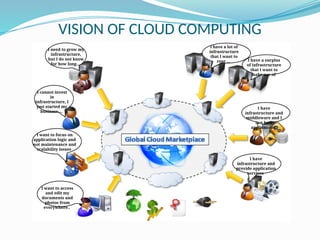
VISION OF CLOUD COMPUTING
I need to grow my
infrastructure,
but I do not know
for how long…
I cannot invest
in
infrastructure, I
just started my
business….
I have a lot of
infrastructure
that I want to
rent … I have a surplus
of infrastructure
that I want to
make use of
I have
infrastructure and
provide application
services
I have
infrastructure and
middleware and I
can host
applications
I want to access
and edit my
documents and
photos from
everywhere..
I want to focus on
application logic and
not maintenance and
scalability issues
General view of cloud computing
“I don’t care where my servers are,
who manages them,
where my documents are stored,
or where my applications are hosted.
I just want them always available,
access them from any device through Internet.
And I am willing to pay for this service
for as a long as I need it.”
Vision of cloud computing
 Cloud computing allows anyone with a credit card to
provision virtual hardware, runtime environments, and
services.
 These are used for as long as needed, with no up-front
commitments required.
 The entire stack of a computing system is transformed into
a collection of utilities, which can be provisioned and
composed together to deploy systems in hours rather than
days and with virtually no maintenance costs.
 The long-term vision of cloud computing is that IT services
are traded as utilities in an open market, without
technological and legal barriers.
Making IT services into utilities is made possible by the effective
composition of several technologies, which have reached the
appropriate maturity level.
 Distributed Systems - primary purpose of distributed systems is
to share resources and utilize them better
 Web 2.0 technologies play a central role in making cloud
computing an attractive opportunity for building computing
systems. They have transformed the Internet into a rich
application and service delivery platform , mature enough
to serve complex needs.
 Service orientation Service-oriented computing(SOC)
supports the development of rapid, low-cost,
flexible ,interoperable, and evolvable applications and
systems
 Virtualization confers on cloud computing the necessary
degree of customization, control, and flexibility for building
production and enterprise systems.
Definition of cloud – Buyya et al
A cloud is a type of parallel and distributed system
consisting of a collection of interconnected and virtualized
computers that are dynamically provisioned and presented as
one or more unified computing resources based on service-
level agreements established through negotiation between the
service provider and consumers.
 Expresses The utility-oriented nature of cloud computing
 though many cloud computing services are freely available for
single users, enterprise- class services are delivered according a
specific pricing scheme.
 In this case users subscribe to the service and establish with the
service provider a service-level agreement (SLA) defining the
quality-of-service parameters under which the service is
delivered
Practical examples of Cloud computing systems
 Large enterprises can offload some of their activities to cloud-
based systems
 New york Times using Amazon EC2 and S3 Cloud resources
 Small enterprises and start-ups can afford to translate their ideas
into business results more quickly, without excessive up-front
costs
 Animoto using Amazon Web Services
 System developers can concentrate on the business logic rather
than dealing with the complexity of infrastructure management
and scalability
 Big Fluffy Toys Bike rental using Google AppEngine
 End users can have their documents accessible from everywhere
and any device.
 Apple iCloud
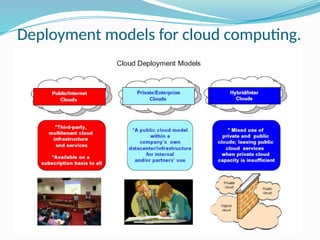
Deployment models for cloud computing.
Public Cloud
 Public clouds are the most common deployment models in which necessary IT
infrastructure (eg. virtualized datacenters) is established by a third-party service
provider that makes it available to any consumer on a subscription basis.
 they allow users to quickly leverage compute, storage, and application services.
 users data and applications are deployed on cloud datacenters on the vendor’s
premises.
Private Cloud
 Large organizations that own massive computing infrastructures can still benefit
from cloud computing by replicating the cloud IT service delivery model in-house.
 The use of cloud-based in-house solutions is also driven by the need to keep
confidential information within an organization’s premises.
 Institutions such as governments and banks that have high security, privacy, and
regulatory concerns prefer to build and use their own private or enterprise clouds.
Hybrid Cloud
 When private cloud resources are unable to meet users’ quality-of-service
requirements, hybrid computing systems, partially composed of public cloud
resources and privately owned infra- structures, are created to serve the
organization’s needs
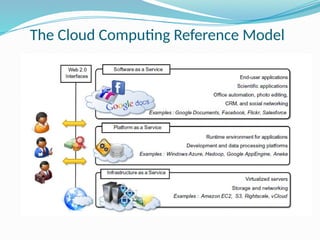
The Cloud Computing Reference Model
Infrastructure-as-a-Service
 Infrastructure-as-a-Service solutions deliver infrastructure on demand in
the form of virtual hardware, storage, and networking.
 Virtual hardware is utilized to provide compute on demand in the form of
virtual machine instances.
 created at users’ request on the provider’s infrastructure
 users are given tools and interfaces to configure the software stack
installed in the virtual machine.
 The pricing model is usually defined in terms of dollars per hour where
the hourly cost is influenced by the characteristics of the virtual hardware.
 Virtual storage is delivered in the form of raw disk space or object store.
 Raw Disk space complements a virtual hardware offering that requires persistent
storage.
 Object store is a more high-level abstraction for storing entities rather than files.
 IaaS solutions are sought by users who want to leverage cloud computing
from building dynamically scalable computing systems requiring a specific
software stack. IaaS services are therefore used to develop scalable
Websites or for back- ground processing.
Platform-as-a-Service
 They deliver scalable and elastic runtime environments on demand and
host the execution of applications.
 Services are backed by a core middleware platform that is responsible for
creating the abstract environment where applications are deployed and
executed.
 responsibility of the service provider to
 provide scalability
 manage fault tolerance,
 users are requested to focus on the logic of the application developed by
leveraging the provider’s APIs and libraries.
 This approach increases the level of abstraction at which cloud computing
is leveraged but also constrains the user in a more controlled environment.
 PaaS solutions provide scalable programming platforms for developing
applications and are more appropriate when new systems have to be
developed
Software-as-a-Service
 provide applications and services on demand.
 office automation,
 document management,
 photo editing, and
 customer relationship management (CRM)
 Softwares are replicated on the provider’s infrastructure and made more
scalable and accessible through a browser on demand.
 These applications are shared across multiple users whose interaction is
isolated from the other users.
 The SaaS layer is also the area of social networking Websites, which
leverage cloud-based infrastructures to sustain the load generated by their
popularity.
 SaaS solutions target mostly end users who want to benefit from the elastic
scalability of the cloud without doing any software development,
installation, configuration, and maintenance.
 This solution is appropriate when there are existing SaaS services that fit
users needs (such as email, document management, CRM, etc.) and a
minimum level of customization is needed.
Characteristics of Cloud Computing
 No up-front commitments
 On-demand access
 Nice pricing
 Simplified application acceleration and scalability
 Efficient resource allocation
 Energy efficiency
 Seamless creation and use of third-party services
Benefits of Cloud Computing
 Increased economical return due to the reduced
maintenance costs and operational costs related to IT
software and infrastructure.
 This is mainly because Capital costs (IT assets ) namely software and
infrastructure, are turned into utility costs, which are paid for as long as
they are used, not paid for upfront.
 cloud computing also provides an opportunity for small organizations
and start-ups
 maintenance costs are significantly reduced
 Increased agility in defining and structuring software systems
 Organizations can more dynamically and flexibly compose their
software systems, without being constrained by capital costs for IT
assets.
 reduced need for capacity planning
 Scalability can be leveraged across the entire computing stack
 Data and the capability of operating on it always available,
from anywhere, at any time, and through multiple devices
 Information and services stored in the cloud are exposed to users by
Web-based interfaces that make them accessible from portable devices
as well as desktops at home.
 end users can perform the same tasks that previously were carried out
through considerable software investments.
 Multitenancy allows for better utilization of the shared infrastructure
that is kept operational and fully active.
 provides opportunity for considerable optimization in terms of resource
allocation and energy efficiency, which eventually can lead to a less
impacting approach on the environment.
 Service orientation and on-demand access create new
opportunities for composing systems and applications with a
flexibility not possible before cloud computing
 it is easier to turn ideas into products with limited costs and by
concentrating technical efforts on what matters
Challenges ahead
 Practical aspects, which are related to configuration, networking,
and sizing of cloud computing systems.
 challenges concerning the dynamic provisioning of cloud
computing services and resources
 Technical challenges for the management of large computing
infrastructures and the use of virtualization technologies on top of
them.
 issues and challenges concerning the integration of real and virtual
infrastructure need to be taken into account from different
perspectives, such as security and legislation.
 Security in terms of confidentiality, secrecy, and protection of data
in a cloud environment is another important challenge.
 Legal issues may also arise. These are specifically tied to the
ubiquitous nature of cloud computing, which spreads computing
infrastructure across diverse geographical locations.
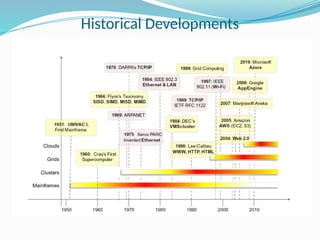
Historical Developments
 Clouds are essentially large distributed computing facilities that make
available their services to third parties on demand.
 characterization of a distributed system proposed by Tanenbaum et al
“ A distributed system is a collection of independent computers that
appears to its users as a single coherent system. “
 important elements characterizing a distributed system
 the fact that it is composed of multiple independent components
 these components are perceived as a single entity by users.
 The primary purpose of distributed systems is to share resources and
utilize them better.
 Distributed systems often exhibit other properties such as heterogeneity,
openness, scalability, transparency, concurrency, continuous availability,
and independent failures.
 Three major milestones have led to cloud computing:
 mainframe computing,
 cluster computing, and
 grid computing.
Distributed systems
Main Frames
 Mainframes were powerful, highly reliable computers specialized for
large data movement and massive input/output (I/O) operations.
 They were mostly used by large organizations for bulk data processing
tasks such as online transactions, enterprise resource planning, and
other operations involving the processing of significant amounts of data
 they offered large computational power by using multiple processors,
which were presented as a single entity to users
 features of mainframes
 highly reliable computers that were “always on”
 capable of tolerating failures transparently
 No system shutdown was required to replace failed components, and
the system could work without interruption
 Batch processing was the main application of mainframes
 evolved versions of such systems are still in use for transaction
processing (such as online banking, airline ticket booking, supermarket
and telcos, and government services).
Clusters
 started as a low-cost alternative to the use of mainframes and
supercomputers
 machines could then be connected by a high-bandwidth network and
controlled by specific software tools that manage them as a single
system
 clusters become the standard technology for parallel and high-
performance computing
 Built by commodity machines, they were cheaper than mainframes
and made high-performance computing available to a large number of
groups, including universities and small research labs.
 features of clusters
 computational power of commodity machines could be leveraged
to solve problems that were previously manageable only on
expensive supercomputers.
 clusters could be easily extended if more computational power was
required.
Grid Computing
 Users can “consume” resources in the same way as they use other
utilities such as power, gas, and water
 Grids initially developed as aggregations of geographically dispersed
clusters by means of Internet connections
 a computing grid was a dynamic aggregation of heterogeneous
computing nodes, and its scale was nationwide or even worldwide
 elements led to the development of grids,
 clusters became quite common resources
 they were often underutilized
 new problems were requiring computational power that went
beyond the capability of single clusters
 the improvements in networking and the diffusion of the Internet
made possible long-distance, high-bandwidth connectivity
 Virtualization is essentially a technology that allows creation of different
computing environments
 they simulate the interface that is expected by a guest
 hardware virtualization
 allows simulating the hardware interface expected by an operating
system
 allows the coexistence of different software stacks on top of the same
hardware
 These stacks are contained inside virtual machine instances, which
operate in complete isolation from each other.
 High-performance servers can host several virtual machine instances,
thus creating the opportunity to have a customized software stack on
demand .
 Example : Amazon EC2, RightScale, Vmware, vCloud
 Emulation of IT infrastructure
 hardware virtualization , storage virtualization & network virtualization
Virtualization
 Virtualization technologies are also used to replicate runtime
environments for programs.
 process virtual machines
 Instead of being executed by the operating system, are run by a
specific program called a virtual machine.
 This technique allows isolating the execution of applications and
pro- viding a finer control on the resource they access
 Process virtual machines offer a higher level of abstraction with
respect to hardware virtualization, since the guest is only
constituted by an application rather than a complete software
stack
 Eg : Google AppEngine and Windows Azure.
 Web encompasses a set of technologies and services that facilitate
interactive information sharing, collaboration, user-centered design, and
application composition
 Web 2.0brings interactivity and flexibility into Webpages, providing
enhanced user experience by gaining Web-based access to all the functions
that are normally found in desktop applications.
 These capabilities are obtained by integrating a collection of standards and
technologies such as
XML, Asynchronous Java Script and XML(AJAX), Web Services
 Web 2.0
 allow us to build applications leveraging the contribution of users, who
now become providers of content.
 the capillary diffusion of the Internet opens new opportunities and
markets for the Web, the services of which can now be accessed from a
variety of devices
 Web 2.0 applications are extremely dynamic: they improve
continuously, and new updates and features are integrated at a
constant rate by following the usage trend of the community
Web 2.0
 Loose coupling is another fundamental property. New applications can be
“synthesized” simply by composing existing services and integrating them,
thus providing added value.
 Examples
 GoogleDocuments, GoogleMaps, Flickr, Facebook, Twitter, YouTube,
de.li.cious, Blogger, and Wikipedia
 level of interaction in Websites such as Facebook or Flickr would not
have been possible without the support of AJAX, Really Simple
Syndication (RSS), and other tools that make the user experience
incredibly interactive.
 Service orientation is the core reference model for cloud computing
systems.
 This approach adopts the concept of services as the main building blocks of
application and system development.
 Service-oriented computing(SOC) supports the development of rapid, low-
cost,flexible ,interoperable, and evolvable applications and systems
 A service is an abstraction representing a self-describing and platform-
agnostic component that can perform any function—anything from a
simple function to a complex business process.
 A service is supposed to be loosely coupled, reusable, programming
language independent, and location transparent.
 Services are composed and aggregated into a service-oriented
architecture(SOA) which is a logical way of organizing software systems to
provide end users or other entities distributed over the network with
services through published and discoverable interfaces.
Service orientation
 Service-oriented computing introduces and diffuses two important concepts
 quality of service (QoS)
 Quality of service (QoS) identifies a set of functional and nonfunctional
attributes that can be used to evaluate the behavior of a service from
different perspectives.
 These could be performance metrics such as response time, or security
attributes, transactional integrity, reliability, scalability, and availability
 Software-as-a-Service
 The concept of Software-as-a-Service introduces a new delivery model
for applications.
 The term has been inherited from the world of application service
providers (ASPs), which deliver software services-based solutions across
the wide area network from a central datacenter and make them
available on a subscription or rental basis.
 This software delivery model is possible because economies of scale are
reached by means of multitenancy
 One of the most popular expressions of service orientation is represented by
Web Services
 Web services are software components that expose functionalities accessible
using a method invocation pattern that goes over the HyperText Transfer
Protocol (HTTP).
Cloud Computing- Module 1 Introduction.pptx

Cloud Computing- Module 1 Introduction.pptx

  • 1.
  • 2.
    Cloud Computing Cloud computingcan be classified as a new paradigm for  the dynamic provisioning of computing services  supported by state-of-the-art data centers  employing virtualization technologies for consolidation and effective utilization of resources.  allowing renting infrastructure, runtime environments, and services on a pay- per-use basis
  • 3.
    VISION OF CLOUDCOMPUTING I need to grow my infrastructure, but I do not know for how long… I cannot invest in infrastructure, I just started my business…. I have a lot of infrastructure that I want to rent … I have a surplus of infrastructure that I want to make use of I have infrastructure and provide application services I have infrastructure and middleware and I can host applications I want to access and edit my documents and photos from everywhere.. I want to focus on application logic and not maintenance and scalability issues
  • 4.
    General view ofcloud computing “I don’t care where my servers are, who manages them, where my documents are stored, or where my applications are hosted. I just want them always available, access them from any device through Internet. And I am willing to pay for this service for as a long as I need it.”
  • 5.
    Vision of cloudcomputing  Cloud computing allows anyone with a credit card to provision virtual hardware, runtime environments, and services.  These are used for as long as needed, with no up-front commitments required.  The entire stack of a computing system is transformed into a collection of utilities, which can be provisioned and composed together to deploy systems in hours rather than days and with virtually no maintenance costs.  The long-term vision of cloud computing is that IT services are traded as utilities in an open market, without technological and legal barriers.
  • 6.
    Making IT servicesinto utilities is made possible by the effective composition of several technologies, which have reached the appropriate maturity level.  Distributed Systems - primary purpose of distributed systems is to share resources and utilize them better  Web 2.0 technologies play a central role in making cloud computing an attractive opportunity for building computing systems. They have transformed the Internet into a rich application and service delivery platform , mature enough to serve complex needs.  Service orientation Service-oriented computing(SOC) supports the development of rapid, low-cost, flexible ,interoperable, and evolvable applications and systems  Virtualization confers on cloud computing the necessary degree of customization, control, and flexibility for building production and enterprise systems.
  • 7.
    Definition of cloud– Buyya et al A cloud is a type of parallel and distributed system consisting of a collection of interconnected and virtualized computers that are dynamically provisioned and presented as one or more unified computing resources based on service- level agreements established through negotiation between the service provider and consumers.  Expresses The utility-oriented nature of cloud computing  though many cloud computing services are freely available for single users, enterprise- class services are delivered according a specific pricing scheme.  In this case users subscribe to the service and establish with the service provider a service-level agreement (SLA) defining the quality-of-service parameters under which the service is delivered
  • 8.
    Practical examples ofCloud computing systems  Large enterprises can offload some of their activities to cloud- based systems  New york Times using Amazon EC2 and S3 Cloud resources  Small enterprises and start-ups can afford to translate their ideas into business results more quickly, without excessive up-front costs  Animoto using Amazon Web Services  System developers can concentrate on the business logic rather than dealing with the complexity of infrastructure management and scalability  Big Fluffy Toys Bike rental using Google AppEngine  End users can have their documents accessible from everywhere and any device.  Apple iCloud
  • 9.
    Deployment models forcloud computing.
  • 10.
    Public Cloud  Publicclouds are the most common deployment models in which necessary IT infrastructure (eg. virtualized datacenters) is established by a third-party service provider that makes it available to any consumer on a subscription basis.  they allow users to quickly leverage compute, storage, and application services.  users data and applications are deployed on cloud datacenters on the vendor’s premises. Private Cloud  Large organizations that own massive computing infrastructures can still benefit from cloud computing by replicating the cloud IT service delivery model in-house.  The use of cloud-based in-house solutions is also driven by the need to keep confidential information within an organization’s premises.  Institutions such as governments and banks that have high security, privacy, and regulatory concerns prefer to build and use their own private or enterprise clouds. Hybrid Cloud  When private cloud resources are unable to meet users’ quality-of-service requirements, hybrid computing systems, partially composed of public cloud resources and privately owned infra- structures, are created to serve the organization’s needs
  • 11.
    The Cloud ComputingReference Model
  • 12.
    Infrastructure-as-a-Service  Infrastructure-as-a-Service solutionsdeliver infrastructure on demand in the form of virtual hardware, storage, and networking.  Virtual hardware is utilized to provide compute on demand in the form of virtual machine instances.  created at users’ request on the provider’s infrastructure  users are given tools and interfaces to configure the software stack installed in the virtual machine.  The pricing model is usually defined in terms of dollars per hour where the hourly cost is influenced by the characteristics of the virtual hardware.  Virtual storage is delivered in the form of raw disk space or object store.  Raw Disk space complements a virtual hardware offering that requires persistent storage.  Object store is a more high-level abstraction for storing entities rather than files.  IaaS solutions are sought by users who want to leverage cloud computing from building dynamically scalable computing systems requiring a specific software stack. IaaS services are therefore used to develop scalable Websites or for back- ground processing.
  • 13.
    Platform-as-a-Service  They deliverscalable and elastic runtime environments on demand and host the execution of applications.  Services are backed by a core middleware platform that is responsible for creating the abstract environment where applications are deployed and executed.  responsibility of the service provider to  provide scalability  manage fault tolerance,  users are requested to focus on the logic of the application developed by leveraging the provider’s APIs and libraries.  This approach increases the level of abstraction at which cloud computing is leveraged but also constrains the user in a more controlled environment.  PaaS solutions provide scalable programming platforms for developing applications and are more appropriate when new systems have to be developed
  • 14.
    Software-as-a-Service  provide applicationsand services on demand.  office automation,  document management,  photo editing, and  customer relationship management (CRM)  Softwares are replicated on the provider’s infrastructure and made more scalable and accessible through a browser on demand.  These applications are shared across multiple users whose interaction is isolated from the other users.  The SaaS layer is also the area of social networking Websites, which leverage cloud-based infrastructures to sustain the load generated by their popularity.  SaaS solutions target mostly end users who want to benefit from the elastic scalability of the cloud without doing any software development, installation, configuration, and maintenance.  This solution is appropriate when there are existing SaaS services that fit users needs (such as email, document management, CRM, etc.) and a minimum level of customization is needed.
  • 15.
    Characteristics of CloudComputing  No up-front commitments  On-demand access  Nice pricing  Simplified application acceleration and scalability  Efficient resource allocation  Energy efficiency  Seamless creation and use of third-party services
  • 16.
    Benefits of CloudComputing  Increased economical return due to the reduced maintenance costs and operational costs related to IT software and infrastructure.  This is mainly because Capital costs (IT assets ) namely software and infrastructure, are turned into utility costs, which are paid for as long as they are used, not paid for upfront.  cloud computing also provides an opportunity for small organizations and start-ups  maintenance costs are significantly reduced  Increased agility in defining and structuring software systems  Organizations can more dynamically and flexibly compose their software systems, without being constrained by capital costs for IT assets.  reduced need for capacity planning  Scalability can be leveraged across the entire computing stack
  • 17.
     Data andthe capability of operating on it always available, from anywhere, at any time, and through multiple devices  Information and services stored in the cloud are exposed to users by Web-based interfaces that make them accessible from portable devices as well as desktops at home.  end users can perform the same tasks that previously were carried out through considerable software investments.  Multitenancy allows for better utilization of the shared infrastructure that is kept operational and fully active.  provides opportunity for considerable optimization in terms of resource allocation and energy efficiency, which eventually can lead to a less impacting approach on the environment.  Service orientation and on-demand access create new opportunities for composing systems and applications with a flexibility not possible before cloud computing  it is easier to turn ideas into products with limited costs and by concentrating technical efforts on what matters
  • 18.
    Challenges ahead  Practicalaspects, which are related to configuration, networking, and sizing of cloud computing systems.  challenges concerning the dynamic provisioning of cloud computing services and resources  Technical challenges for the management of large computing infrastructures and the use of virtualization technologies on top of them.  issues and challenges concerning the integration of real and virtual infrastructure need to be taken into account from different perspectives, such as security and legislation.  Security in terms of confidentiality, secrecy, and protection of data in a cloud environment is another important challenge.  Legal issues may also arise. These are specifically tied to the ubiquitous nature of cloud computing, which spreads computing infrastructure across diverse geographical locations.
  • 19.
  • 20.
     Clouds areessentially large distributed computing facilities that make available their services to third parties on demand.  characterization of a distributed system proposed by Tanenbaum et al “ A distributed system is a collection of independent computers that appears to its users as a single coherent system. “  important elements characterizing a distributed system  the fact that it is composed of multiple independent components  these components are perceived as a single entity by users.  The primary purpose of distributed systems is to share resources and utilize them better.  Distributed systems often exhibit other properties such as heterogeneity, openness, scalability, transparency, concurrency, continuous availability, and independent failures.  Three major milestones have led to cloud computing:  mainframe computing,  cluster computing, and  grid computing. Distributed systems
  • 21.
    Main Frames  Mainframeswere powerful, highly reliable computers specialized for large data movement and massive input/output (I/O) operations.  They were mostly used by large organizations for bulk data processing tasks such as online transactions, enterprise resource planning, and other operations involving the processing of significant amounts of data  they offered large computational power by using multiple processors, which were presented as a single entity to users  features of mainframes  highly reliable computers that were “always on”  capable of tolerating failures transparently  No system shutdown was required to replace failed components, and the system could work without interruption  Batch processing was the main application of mainframes  evolved versions of such systems are still in use for transaction processing (such as online banking, airline ticket booking, supermarket and telcos, and government services).
  • 22.
    Clusters  started asa low-cost alternative to the use of mainframes and supercomputers  machines could then be connected by a high-bandwidth network and controlled by specific software tools that manage them as a single system  clusters become the standard technology for parallel and high- performance computing  Built by commodity machines, they were cheaper than mainframes and made high-performance computing available to a large number of groups, including universities and small research labs.  features of clusters  computational power of commodity machines could be leveraged to solve problems that were previously manageable only on expensive supercomputers.  clusters could be easily extended if more computational power was required.
  • 23.
    Grid Computing  Userscan “consume” resources in the same way as they use other utilities such as power, gas, and water  Grids initially developed as aggregations of geographically dispersed clusters by means of Internet connections  a computing grid was a dynamic aggregation of heterogeneous computing nodes, and its scale was nationwide or even worldwide  elements led to the development of grids,  clusters became quite common resources  they were often underutilized  new problems were requiring computational power that went beyond the capability of single clusters  the improvements in networking and the diffusion of the Internet made possible long-distance, high-bandwidth connectivity
  • 24.
     Virtualization isessentially a technology that allows creation of different computing environments  they simulate the interface that is expected by a guest  hardware virtualization  allows simulating the hardware interface expected by an operating system  allows the coexistence of different software stacks on top of the same hardware  These stacks are contained inside virtual machine instances, which operate in complete isolation from each other.  High-performance servers can host several virtual machine instances, thus creating the opportunity to have a customized software stack on demand .  Example : Amazon EC2, RightScale, Vmware, vCloud  Emulation of IT infrastructure  hardware virtualization , storage virtualization & network virtualization Virtualization
  • 25.
     Virtualization technologiesare also used to replicate runtime environments for programs.  process virtual machines  Instead of being executed by the operating system, are run by a specific program called a virtual machine.  This technique allows isolating the execution of applications and pro- viding a finer control on the resource they access  Process virtual machines offer a higher level of abstraction with respect to hardware virtualization, since the guest is only constituted by an application rather than a complete software stack  Eg : Google AppEngine and Windows Azure.
  • 26.
     Web encompassesa set of technologies and services that facilitate interactive information sharing, collaboration, user-centered design, and application composition  Web 2.0brings interactivity and flexibility into Webpages, providing enhanced user experience by gaining Web-based access to all the functions that are normally found in desktop applications.  These capabilities are obtained by integrating a collection of standards and technologies such as XML, Asynchronous Java Script and XML(AJAX), Web Services  Web 2.0  allow us to build applications leveraging the contribution of users, who now become providers of content.  the capillary diffusion of the Internet opens new opportunities and markets for the Web, the services of which can now be accessed from a variety of devices  Web 2.0 applications are extremely dynamic: they improve continuously, and new updates and features are integrated at a constant rate by following the usage trend of the community Web 2.0
  • 27.
     Loose couplingis another fundamental property. New applications can be “synthesized” simply by composing existing services and integrating them, thus providing added value.  Examples  GoogleDocuments, GoogleMaps, Flickr, Facebook, Twitter, YouTube, de.li.cious, Blogger, and Wikipedia  level of interaction in Websites such as Facebook or Flickr would not have been possible without the support of AJAX, Really Simple Syndication (RSS), and other tools that make the user experience incredibly interactive.
  • 28.
     Service orientationis the core reference model for cloud computing systems.  This approach adopts the concept of services as the main building blocks of application and system development.  Service-oriented computing(SOC) supports the development of rapid, low- cost,flexible ,interoperable, and evolvable applications and systems  A service is an abstraction representing a self-describing and platform- agnostic component that can perform any function—anything from a simple function to a complex business process.  A service is supposed to be loosely coupled, reusable, programming language independent, and location transparent.  Services are composed and aggregated into a service-oriented architecture(SOA) which is a logical way of organizing software systems to provide end users or other entities distributed over the network with services through published and discoverable interfaces. Service orientation
  • 29.
     Service-oriented computingintroduces and diffuses two important concepts  quality of service (QoS)  Quality of service (QoS) identifies a set of functional and nonfunctional attributes that can be used to evaluate the behavior of a service from different perspectives.  These could be performance metrics such as response time, or security attributes, transactional integrity, reliability, scalability, and availability  Software-as-a-Service  The concept of Software-as-a-Service introduces a new delivery model for applications.  The term has been inherited from the world of application service providers (ASPs), which deliver software services-based solutions across the wide area network from a central datacenter and make them available on a subscription or rental basis.  This software delivery model is possible because economies of scale are reached by means of multitenancy  One of the most popular expressions of service orientation is represented by Web Services  Web services are software components that expose functionalities accessible using a method invocation pattern that goes over the HyperText Transfer Protocol (HTTP).