Introduction to Cloud Computing
WHAT IS CLOUD COMPUTING ?
What do they say ?
Cloud Definitions
• Definition from NIST(National Institute of Standards and Technology)
 Cloud computing is a model for enabling convenient, on-demand
network access to a shared pool of configurable computing
resources (e.g., networks, servers, storage, applications, and
services) that can be rapidly provisioned and released with minimal
management effort or service provider interaction.
 This cloud model promotes availability and is composed of five
essential characteristics, three service models, and four deployment
models.
Cloud Definitions
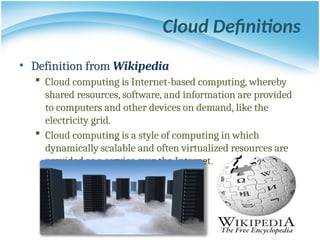
• Definition from Wikipedia
 Cloud computing is Internet-based computing, whereby
shared resources, software, and information are provided
to computers and other devices on demand, like the
electricity grid.
 Cloud computing is a style of computing in which
dynamically scalable and often virtualized resources are
provided as a service over the Internet.
Cloud Definitions
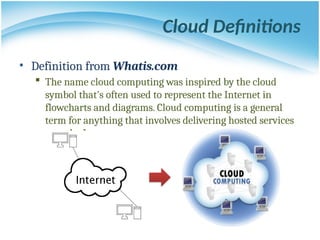
• Definition from Whatis.com
 The name cloud computing was inspired by the cloud
symbol that's often used to represent the Internet in
flowcharts and diagrams. Cloud computing is a general
term for anything that involves delivering hosted services
over the Internet.
Eye-Opening Facts About Cloud Computing
• 90% of companies are on the cloud
• Cloud data centers will process 94% of workloads in 2021
• Amazon Web Services is the leading cloud vendor with a 32% share
• Cost optimization is the primary reason for 47% of enterprises’ cloud
migration
• Amazon, Microsoft, and Google combined accounted for 57% of the
global cloud computing market in 2018
• Cloud Types – What’s the Difference?
 Public cloud – this refers to the model with which the services are delivered
across the Internet
 Private cloud – it’s designed for internal use by a single organization
 Hybrid cloud – this is when a company uses both a public and a private cloud
Source:
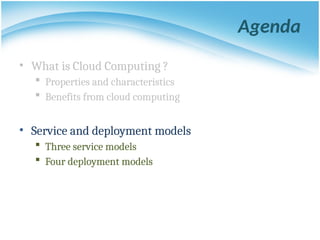
Agenda
• What is Cloud Computing ?
 Properties and characteristics
 Benefits from cloud computing
• Service and deployment models
 Three service models
 Four deployment models
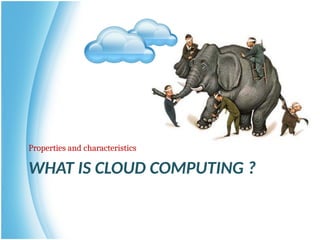
WHAT IS CLOUD COMPUTING ?
Properties and characteristics
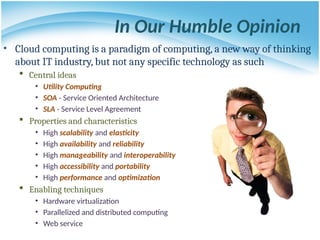
In Our Humble Opinion
• Cloud computing is a paradigm of computing, a new way of thinking
about IT industry, but not any specific technology as such
 Central ideas
• Utility Computing
• SOA - Service Oriented Architecture
• SLA - Service Level Agreement
 Properties and characteristics
• High scalability and elasticity
• High availability and reliability
• High manageability and interoperability
• High accessibility and portability
• High performance and optimization
 Enabling techniques
• Hardware virtualization
• Parallelized and distributed computing
• Web service
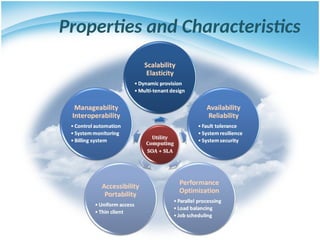
Properties and Characteristics
Central Ideas
Utility
Computing
SOA + SLA
DON’T TELL ME DETAILS!!
I DON’T CARE!!
Central Ideas
• Perspective from user :
 Users do not care about how the works are done
• Instead, they only concern about what they can get
 Users do not care about what the provider actually did
• Instead, they only concern about their quality of service
 Users do not want to own the physical infrastructure
• Instead, they only want to pay as many as they used
• What does the user really care
about?
 They only care about their “Service”
and the cost
Utility
Computing
SOA + SLA
Utility Computing
• One service provisioning model
 Service provider makes computing
resources and infrastructure management
available to the customer as needed, and
charges them for specific usage rather than
a flat rate.
 Like other types of on-demand computing ,
the utility model seeks to maximize the
efficient use of resources and/or minimize
associated costs.
Utility
Computing
SOA + SLA
What Is Web Service?
• Definition :
 Web service is self-describing and stateless modules that perform
discrete units of work and are available over the network
 Web service providers offer APIs that enable developers to exploit
functionality over the Internet, rather than delivering full-blown
applications
• Web Services Description Language (WSDL) :
 WSDL is an XML-based interface description language that is used for
describing the functionality offered by a web service, which includes
both data type and messages
Utility
Computing
SOA + SLA
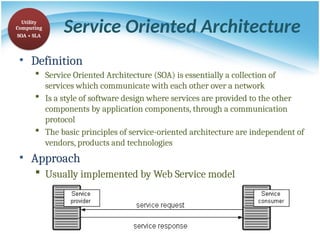
Service Oriented Architecture
• Definition
 Service Oriented Architecture (SOA) is essentially a collection of
services which communicate with each other over a network
 Is a style of software design where services are provided to the other
components by application components, through a communication
protocol
 The basic principles of service-oriented architecture are independent of
vendors, products and technologies
• Approach
 Usually implemented by Web Service model
Utility
Computing
SOA + SLA
Service Level Agreement
• Definition
 A service-level agreement (SLA) is a contract between a network
service provider and a customer that specifies, usually in
measurable terms (QoS), what services the network service provider
will furnish
• Common content in contract
 Performance guarantee metrics
• Up-time and down-time ratio
• System throughput
• Response time
 Problem management detail
 Penalties for non-performance
 Documented security capabilities
Utility
Computing
SOA + SLA
Scalability & Elasticity
Give me the world
without limitation!!
Scalability & Elasticity
• What is scalability ?
 The ability to increase workload size within existing infrastructure (hardware,
software, etc.) without impacting performance. These resources required to support this
are usually pre-planned capacity with a certain amount of headroom built in to handle
peak demand.
• What is elasticity ?
 The ability to grow or shrink infrastructure resources dynamically as needed to adapt
to workload changes in an autonomic manner, maximizing the use of resources. This
can result in savings in infrastructure costs overall.
 Cloud elasticity is a popular feature associated with scale-out solutions (horizontal
scaling), which allows for resources to be dynamically added or removed when needed.
• But how to achieve these properties ?
 Dynamic provisioning
 Multi-tenant design
Static Provisioning
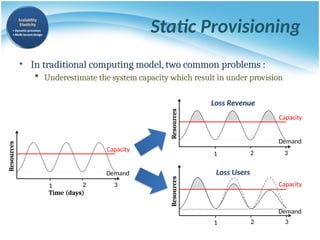
• In traditional computing model, two common problems :
 Underestimate the system capacity which result in under provision
Resources
Demand
Capacity
1 2 3
Resources
Demand
Capacity
1 2 3
Resources
Demand
Capacity
Time (days)
1 2 3
Loss Users
Loss Revenue
Static Provisioning
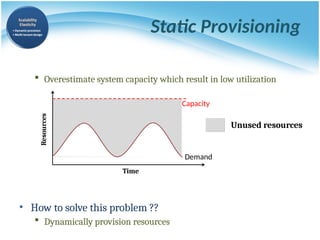
 Overestimate system capacity which result in low utilization
• How to solve this problem ??
 Dynamically provision resources
Unused resources
Demand
Capacity
Time
Resources
Elasticity - Dynamic Provisioning
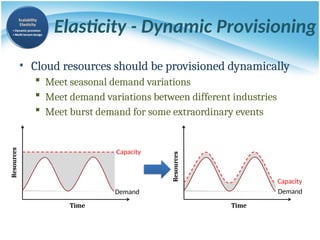
• Cloud resources should be provisioned dynamically
 Meet seasonal demand variations
 Meet demand variations between different industries
 Meet burst demand for some extraordinary events
Demand
Capacity
Time
Resources
Demand
Capacity
Time
Resources
Multi-tenant Design
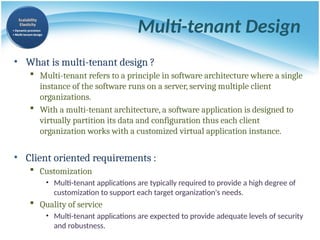
• What is multi-tenant design ?
 Multi-tenant refers to a principle in software architecture where a single
instance of the software runs on a server, serving multiple client
organizations.
 With a multi-tenant architecture, a software application is designed to
virtually partition its data and configuration thus each client
organization works with a customized virtual application instance.
• Client oriented requirements :
 Customization
• Multi-tenant applications are typically required to provide a high degree of
customization to support each target organization's needs.
 Quality of service
• Multi-tenant applications are expected to provide adequate levels of security
and robustness.
Availability & Reliability
Data Never Lost
Machine Never Fail
Availability & Reliability
• What is availability ?
 The degree to which a system, subsystem, or equipment is in a
specified operable and committable state at the start of a mission,
when the mission is called for at an unknown time.
 Cloud system usually require high availability
• Ex. “Five Nines” system would statistically provide 99.999% availability
• What is reliability ?
 The ability of a system or component to perform its required
functions under stated conditions for a specified period of time.
• But how to achieve these properties ?
 Fault tolerant system
 Require system resilience
 Reliable system security
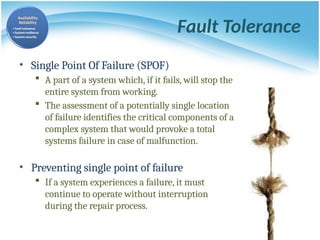
Fault Tolerance
• Single Point Of Failure (SPOF)
 A part of a system which, if it fails, will stop the
entire system from working.
 The assessment of a potentially single location
of failure identifies the critical components of a
complex system that would provoke a total
systems failure in case of malfunction.
• Preventing single point of failure
 If a system experiences a failure, it must
continue to operate without interruption
during the repair process.
System Resilience
• What is resilience ?
 Resilience is the ability to provide and maintain an acceptable level
of service in the face of faults and challenges to normal operation.
 Resiliency pertains to the system's ability to return to its original
state after encountering trouble. In other words, if a risk event
knocks a system offline, a highly resilient system will return back to
work and function as planned as soon as possible.
• Some risk events
 If power is lost at a plant for two days, can our system recover ?
 If a key service is lost because a database corruption, can the
business recover ?
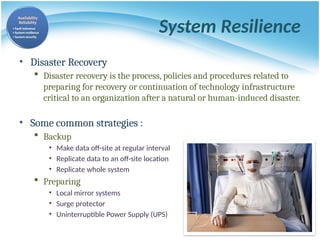
System Resilience
• Disaster Recovery
 Disaster recovery is the process, policies and procedures related to
preparing for recovery or continuation of technology infrastructure
critical to an organization after a natural or human-induced disaster.
• Some common strategies :
 Backup
• Make data off-site at regular interval
• Replicate data to an off-site location
• Replicate whole system
 Preparing
• Local mirror systems
• Surge protector
• Uninterruptible Power Supply (UPS)
System Security
• Security issue in Cloud Computing :
 Cloud security is an evolving sub-domain of computer security,
network security, and, more broadly, information security.
 It refers to a broad set of policies, technologies, and controls deployed
to protect data, applications, and the associated infrastructure of cloud
computing.
System Security
• Important security and privacy issues :
 Data Protection
• To be considered protected, data from one customer must be
properly segregated from that of another.
 Application Security
• Cloud providers should ensure that applications available as a
service via the cloud are secure.
 Privacy
• Providers ensure that all critical data are masked and that only
authorized users have access to data in its entirety.
Billing System
• Billing System in Cloud
 Users pay as many as they used.
 Cloud provider must first determine the list of service usage price.
 Cloud provider have to record the resource or service usage of each user,
and then charge users by these records.
• How can cloud provider know users’ usage ?
 Get those information by means of monitoring system.
 Automatically calculate the total
amount of money which user
should pay. And automatically
request money from use’s banking
account.
Performance & Optimization
High Performance
Improvement
Performance & Optimization
• Performance guarantees ??
 Application performance should be guaranteed.
 Cloud providers make use of powerful infrastructure or
other underlining resources to build up a highly performed
and highly optimized environment, and then deliver the
complete services to cloud users.
• But how to achieve this property ?
 Parallel computing
 Load balancing
 Job scheduling
Parallel Processing
• Parallel Processing
 Parallel processing is a form of computation in which many
calculations are carried out simultaneously, operating on the principle
that large problems can often be divided into smaller ones, which are
then solved concurrently.
• Parallelism in different levels :
 Bit level parallelism
 Instruction level parallelism
 Data level parallelism
 Task level parallelism
Parallel Processing
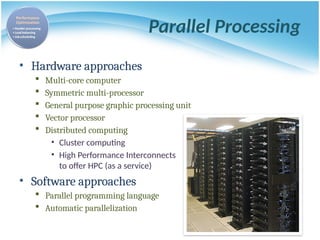
• Hardware approaches
 Multi-core computer
 Symmetric multi-processor
 General purpose graphic processing unit
 Vector processor
 Distributed computing
• Cluster computing
• High Performance Interconnects
to offer HPC (as a service)
• Software approaches
 Parallel programming language
 Automatic parallelization
Load Balancing
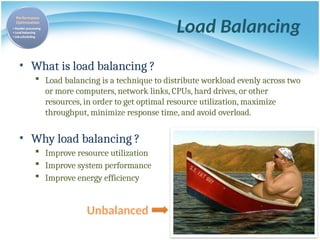
• What is load balancing ?
 Load balancing is a technique to distribute workload evenly across two
or more computers, network links, CPUs, hard drives, or other
resources, in order to get optimal resource utilization, maximize
throughput, minimize response time, and avoid overload.
• Why load balancing ?
 Improve resource utilization
 Improve system performance
 Improve energy efficiency
Unbalanced
Accessibility & Portability
Anyone !
Anytime !
Anywhere !
Accessibility & Portability
• What is accessibility ?
 Accessibility is a general term used to describe the degree to which
a product, device, service, or environment is accessible by as many
people as possible.
• What is service portability ?
 Service portability is the ability to access services using any
device, anywhere, continuously with mobility support and
dynamic adaptation to resource variations.
• But how to achieve these properties ?
 Uniform access
 Thin client
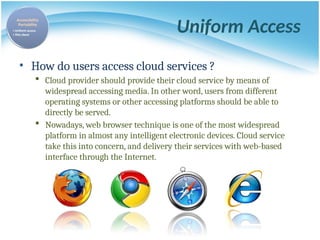
Uniform Access
• How do users access cloud services ?
 Cloud provider should provide their cloud service by means of
widespread accessing media. In other word, users from different
operating systems or other accessing platforms should be able to
directly be served.
 Nowadays, web browser technique is one of the most widespread
platform in almost any intelligent electronic devices. Cloud service
take this into concern, and delivery their services with web-based
interface through the Internet.
Thin Client
• What is thin client ?
 Thin client is a computer or a computer program which depends
heavily on some other computer to fulfill its traditional computational
roles. This stands in contrast to the traditional fat client, a computer
designed to take on these roles by itself.
• Characteristics :
 Cheap client hardware
• While the cloud providers handle several client sessions at once, the
clients can be made out of much cheaper hardware.
 Diversity of end devices
• End user can access cloud service via plenty of various electronic devices,
which include mobile phones and smart TV.
 Client simplicity
• Client local system do not need complete operational functionalities.
WHAT IS CLOUD COMPUTING ?
What can we gain from cloud ?
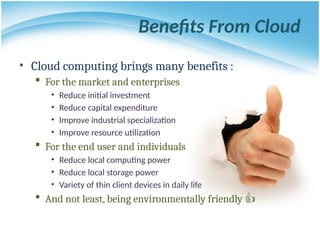
Benefits From Cloud
• Cloud computing brings many benefits :
 For the market and enterprises
• Reduce initial investment
• Reduce capital expenditure
• Improve industrial specialization
• Improve resource utilization
 For the end user and individuals
• Reduce local computing power
• Reduce local storage power
• Variety of thin client devices in daily life
 And not least, being environmentally friendly 👍
For Market and Enterpeises
Reduce Capital Expenditure
• Traditional capital expenditure of enterprises :
 Each enterprise should establish its own IT department
 IT department should handle the listing jobs
• Manage and administrate hardware and software
• Apply regular data backup and check point process
• Purchase new infrastructure and eliminate outdated one
• Always standby for any unexpected IT problems
• Some drawbacks :
 Enterprise pays for IT investment which is not its business focus
 Enterprise should take the risk of hardware/software malfunction
 Replacing and updating infrastructure is time consuming and risky
Reduce Capital Expenditure
• Capital expenditure with Cloud Computing service :
 Enterprise can almost dismiss its IT department
 The jobs of IT department can be achieved by cloud provider
• Dynamically update and upgrade hardware or software
• Dynamically provision and deploy infrastructure for enterprise
• Automatically backup data and check consistency
• Self-recover from disaster or system malfunction
• Some benefits :
 Enterprise can shift effort to its business focus
 Enterprise can reconfigure its IT services in short time
 Enterprise pays to cloud provider as many as the service used
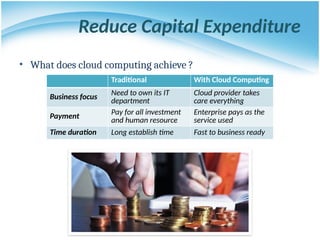
Reduce Capital Expenditure
• What does cloud computing achieve ?
Traditional With Cloud Computing
Business focus Need to own its IT
department
Cloud provider takes
care everything
Payment
Pay for all investment
and human resource
Enterprise pays as the
service used
Time duration Long establish time Fast to business ready
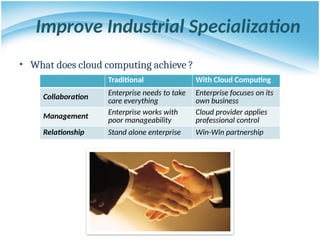
Improve Industrial Specialization
• What does cloud computing achieve ?
Traditional With Cloud Computing
Collaboration Enterprise needs to take
care everything
Enterprise focuses on its
own business
Management
Enterprise works with
poor manageability
Cloud provider applies
professional control
Relationship Stand alone enterprise Win-Win partnership
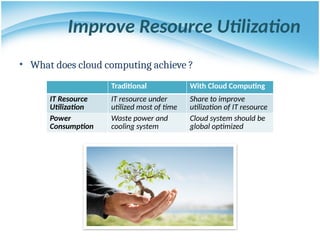
Improve Resource Utilization
• What does cloud computing achieve ?
Traditional With Cloud Computing
IT Resource
Utilization
IT resource under
utilized most of time
Share to improve
utilization of IT resource
Power
Consumption
Waste power and
cooling system
Cloud system should be
global optimized
For End User and Individual
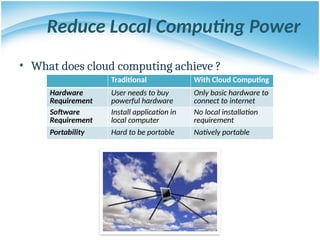
Reduce Local Computing Power
• What does cloud computing achieve ?
Traditional With Cloud Computing
Hardware
Requirement
User needs to buy
powerful hardware
Only basic hardware to
connect to internet
Software
Requirement
Install application in
local computer
No local installation
requirement
Portability Hard to be portable Natively portable
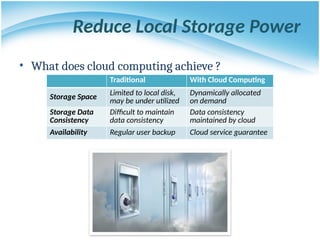
Reduce Local Storage Power
• What does cloud computing achieve ?
Traditional With Cloud Computing
Storage Space Limited to local disk,
may be under utilized
Dynamically allocated
on demand
Storage Data
Consistency
Difficult to maintain
data consistency
Data consistency
maintained by cloud
Availability Regular user backup Cloud service guarantee
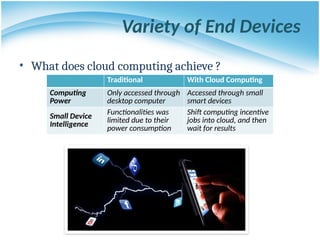
Variety of End Devices
• What does cloud computing achieve ?
Traditional With Cloud Computing
Computing
Power
Only accessed through
desktop computer
Accessed through small
smart devices
Small Device
Intelligence
Functionalities was
limited due to their
power consumption
Shift computing incentive
jobs into cloud, and then
wait for results
Agenda
• What is Cloud Computing ?
 Properties and characteristics
 Benefits from cloud computing
• Service and deployment models
 Three service models
 Four deployment models
SERVICE MODELS
Choose the service you need.
A Simple Analogy
Say, you just moved to a city
and you are looking for a
place to live.
What is your choice ?
Build a new house ?
Buy an empty house ?
Live in a hotel ?
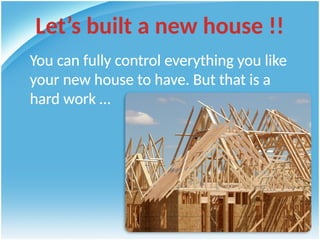
Let’s built a new house !!
You can fully control everything you like
your new house to have. But that is a
hard work …
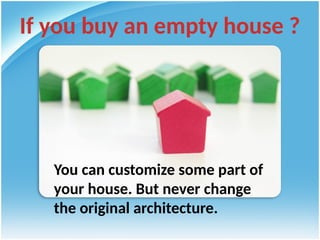
If you buy an empty house ?
You can customize some part of
your house. But never change
the original architecture.
How about live in a hotel ?
Live in a hotel will be a good idea if the only thing you
care of is to enjoy your life!! There is nothing you can do
with the house except living in it.
Let’s translate this to
Cloud Computing !!
Service Models Overview
• What if you want to have an IT “department” ?
 Similar to build a new house in previous analogy
• You can rent some virtualized infrastructure and build up your own IT
system among those resources, which may be fully controlled.
• Technical speaking, use the Infrastructure as a Service (IaaS) solution.
 Similar to buy an empty house in previous analogy
• You can directly develop your IT system through one cloud platform,
and do not care about any lower level resource management.
• Technical speaking, use the Platform as a Service (PaaS) solution.
 Similar to live in a hotel in previous analogy
• You can directly use some existing IT system solutions, which are
provided by some cloud application service provider, without knowing
any detail technique about how these service was achieved.
• Technical speaking, use the Software as a Service (SaaS) solution.
Service Model Overview
SERVICE MODELS
Infrastructure as a Service
Platform as a Service
Software as a Service
Infrastructure as a Service
• Infrastructure as a Service - IaaS
 The capability provided to the consumer is to provision processing,
storage, networks, and other fundamental computing resources where
the consumer is able to deploy and run arbitrary software, which can
include operating systems and applications.
 The consumer does not manage or control the underlying cloud
infrastructure but has control over operating systems, storage,
deployed applications, and possibly limited control of select
networking components.
• Examples :
 Amazon EC2
 Eucalyputs
 OpenNebula
 … etc
Infrastructure as a Service
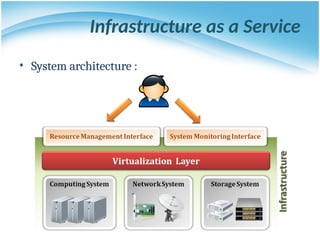
• System architecture :
Infrastructure as a Service
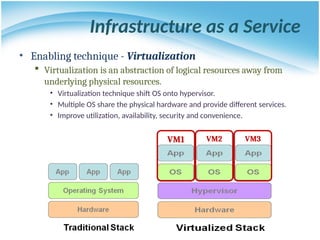
• Enabling technique - Virtualization
 Virtualization is an abstraction of logical resources away from
underlying physical resources.
• Virtualization technique shift OS onto hypervisor.
• Multiple OS share the physical hardware and provide different services.
• Improve utilization, availability, security and convenience.
VM1 VM2 VM3
Motivation for virtualization
• Cloud resource virtualization is important for:
 Performance isolation
• as we can dynamically assign and account for resources
across different applications
 System security:
• as it allows isolation of services running on the same
hardware
 Performance and reliability:
• as it allows applications to migrate from one platform to
another
 The development and management of services
offered by a provider
Virtualization
• Virtualization simulates the interface to a physical object
by:
 Multiplexing: creates multiple virtual objects from one instance
of a physical object. Many virtual objects to one physical.
Example - a processor is multiplexed among a number of
processes or threads.
 Aggregation: creates one virtual object from multiple physical
objects. One virtual object to many physical objects. Example - a
number of physical disks are aggregated into a RAID disk.
 Emulation: constructs a virtual object of a certain type from a
different type of a physical object. Example - a physical disk
emulates a Random Access Memory (RAM).
 Multiplexing and emulation. Examples - virtual memory with
paging multiplexes real memory and disk; a virtual address
emulates a real address.
Layering and Virtualization
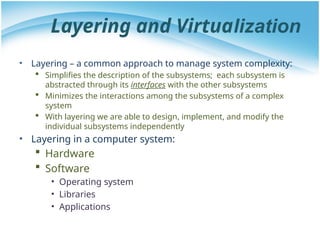
• Layering – a common approach to manage system complexity:
 Simplifies the description of the subsystems; each subsystem is
abstracted through its interfaces with the other subsystems
 Minimizes the interactions among the subsystems of a complex
system
 With layering we are able to design, implement, and modify the
individual subsystems independently
• Layering in a computer system:
 Hardware
 Software
• Operating system
• Libraries
• Applications
Layering and Interfaces
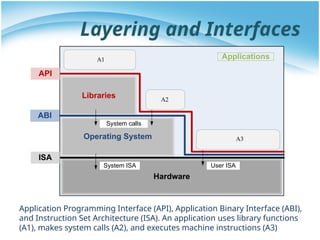
Application Programming Interface (API), Application Binary Interface (ABI),
and Instruction Set Architecture (ISA). An application uses library functions
(A1), makes system calls (A2), and executes machine instructions (A3)
Hardware
Operating System
ISA
Libraries
ABI
API
System calls
Applications
System ISA User ISA
A1
A2
A3
Interfaces
• Instruction Set Architecture (ISA) – at the boundary
between hardware and software.
• Application Binary Interface (ABI) – allows the ensemble
consisting of the application and the library modules to
access the hardware; the ABI does not include privileged
system instructions, instead it invokes system calls.
• Application Program Interface (API) - defines the set of
instructions the hardware was designed to execute and
gives the application access to the ISA; it includes high-level
language (HLL) library calls which often invoke system calls
Code portability
• Binaries created by a compiler for a specific ISA and a
specific operating systems are not portable
• It is possible, though, to compile a HLL program for a
virtual machine (VM) environment where portable code
is produced and distributed and then converted by
binary translators to the ISA of the host system
• A dynamic binary translation converts blocks of guest
instructions from the portable code to the host
instruction and leads to a significant performance
improvement, as such blocks are cached and reused
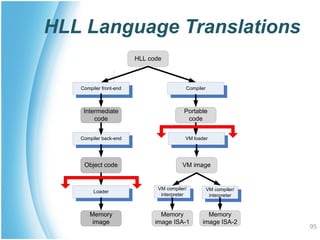
HLL Language Translations
95
Compiler front-end
Intermediate
code
HLL code
Compiler
Portable
code
Compiler back-end
Object code
Loader
Memory
image
VM loader
VM compiler/
interpreter
VM image
VM compiler/
interpreter
Memory
image ISA-1
Memory
image ISA-2
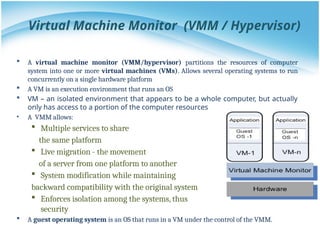
Virtual Machine Monitor (VMM / Hypervisor)
 A virtual machine monitor (VMM/hypervisor) partitions the resources of computer
system into one or more virtual machines (VMs). Allows several operating systems to run
concurrently on a single hardware platform
 A VM is an execution environment that runs an OS
 VM – an isolated environment that appears to be a whole computer, but actually
only has access to a portion of the computer resources
• A VMM allows:
 Multiple services to share
the same platform
 Live migration - the movement
of a server from one platform to another
 System modification while maintaining
backward compatibility with the original system
 Enforces isolation among the systems, thus
security
 A guest operating system is an OS that runs in a VM under the control of the VMM.
IaaS - Summary
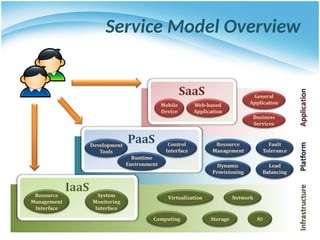
• IaaS is the deployment platform that abstract the infrastructure.
• IaaS enabling technique
 Virtualization
• Server Virtualization
• Storage Virtualization
• Network Virtualization
• IaaS provided services
 Resource Management Interface
 System Monitoring Interface
SERVICE MODELS
Infrastructure as a Service
Platform as a Service
Software as a Service
Platform as a Service
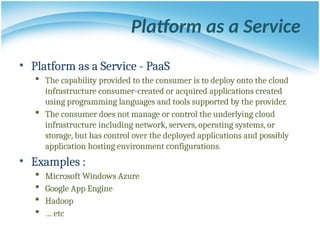
• Platform as a Service - PaaS
 The capability provided to the consumer is to deploy onto the cloud
infrastructure consumer-created or acquired applications created
using programming languages and tools supported by the provider.
 The consumer does not manage or control the underlying cloud
infrastructure including network, servers, operating systems, or
storage, but has control over the deployed applications and possibly
application hosting environment configurations.
• Examples :
 Microsoft Windows Azure
 Google App Engine
 Hadoop
 … etc
Platform as a Service
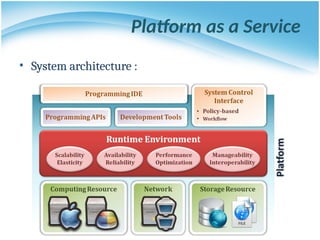
• System architecture :
Platform as a Service
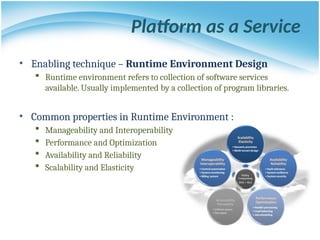
• Enabling technique – Runtime Environment Design
 Runtime environment refers to collection of software services
available. Usually implemented by a collection of program libraries.
• Common properties in Runtime Environment :
 Manageability and Interoperability
 Performance and Optimization
 Availability and Reliability
 Scalability and Elasticity
Platform as a Service
• Provided service – Programming IDE
 Users make use of programming IDE to develop their service among
PaaS.
• This IDE should integrate the full functionalities which supported from the
underling runtime environment.
• This IDE should also provide some development tools, such as profiler,
debugger and testing environment.
 The programming APIs supported by the runtime environment may
vary among different cloud providers, but there are still some common
operating functions.
• Computation, storage and communication resource operation
Platform as a Service
• Provided service – System Control Interface
 Police-Based Control
• Typically described as a principle or rule to guide decisions and
achieve rational outcome(s)
• Make the decision according to some requirements
 Workflow Control
• Describe the flow of installation and configuration of resources
• Workflow processing daemon delivers speedy and efficient
construction and management of cloud resources
PaaS - Summary
• PaaS is the development platform that abstract the infrastructure, OS,
and middleware to drive developer productivity.
• PaaS enabling technique
 Runtime Environment
• PaaS provide services
 Programming IDE
• Programming APIs
• Development tools
 System Control Interface
• Policy based approach
• Workflow based approach
SERVICE MODELS
Infrastructure as a Service
Platform as a Service
Software as a Service
• Software as a Service - SaaS
 The capability provided to the consumer is to use the provider’s
applications running on a cloud infrastructure. The applications are
accessible from various client devices through a thin client interface
such as a web browser (e.g., web-based email).
 The consumer does not manage or control the underlying cloud
infrastructure including network, servers, operating systems, storage,
or even individual application capabilities, with the possible exception
of limited user-specific application configuration settings.
• Examples :
 Google Apps (e.g., Gmail, Google Docs, Google sites, …etc)
 SalesForce.com
 EyeOS
 … etc
Software as a Service
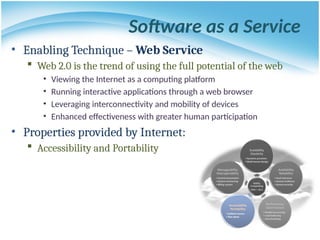
• Enabling Technique – Web Service
 Web 2.0 is the trend of using the full potential of the web
• Viewing the Internet as a computing platform
• Running interactive applications through a web browser
• Leveraging interconnectivity and mobility of devices
• Enhanced effectiveness with greater human participation
• Properties provided by Internet:
 Accessibility and Portability
Software as a Service
• Provide service – Web Portal
 Apart from the standard search engine feature, web portals offer
other services such as e-mail, news, stock prices, information,
databases and entertainment.
 Portals provide a way for enterprises to provide a consistent look
and feel with access control and procedures for multiple
applications and databases, which otherwise would have been
different entities altogether.
 Some examples :
• iGoogle
• MSNBC
• Netvibes
• Yahoo!
SaaS - Summary
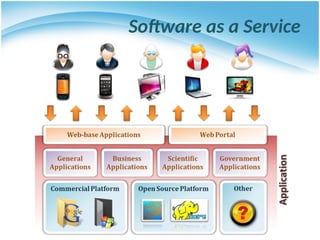
• SaaS is the finished applications that you rent and customize.
• SaaS enabling technique
 Web Service
• SaaS provide services
 Web-based Applications
• General applications
• Business applications
• Scientific applications
• Government applications
 Web Portal
DEPLOYMENT MODELS
How to deploy a cloud system ?
Deployment Model
• There are four primary cloud deployment models :
 Public Cloud
 Private Cloud
 Community Cloud
 Hybrid Cloud
• Each can exhibit the previously discussed
characteristics; their differences lie primarily in the
scope and access of published cloud services, as they
are made available to service consumers.
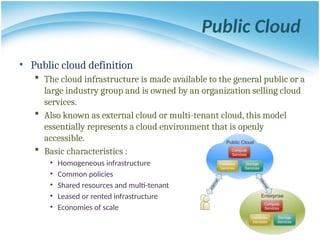
Public Cloud
• Public cloud definition
 The cloud infrastructure is made available to the general public or a
large industry group and is owned by an organization selling cloud
services.
 Also known as external cloud or multi-tenant cloud, this model
essentially represents a cloud environment that is openly
accessible.
 Basic characteristics :
• Homogeneous infrastructure
• Common policies
• Shared resources and multi-tenant
• Leased or rented infrastructure
• Economies of scale
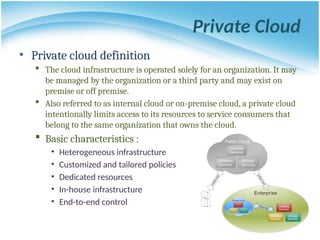
Private Cloud
• Private cloud definition
 The cloud infrastructure is operated solely for an organization. It may
be managed by the organization or a third party and may exist on
premise or off premise.
 Also referred to as internal cloud or on-premise cloud, a private cloud
intentionally limits access to its resources to service consumers that
belong to the same organization that owns the cloud.
 Basic characteristics :
• Heterogeneous infrastructure
• Customized and tailored policies
• Dedicated resources
• In-house infrastructure
• End-to-end control
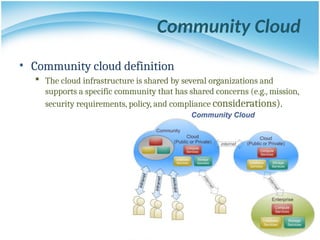
Community Cloud
• Community cloud definition
 The cloud infrastructure is shared by several organizations and
supports a specific community that has shared concerns (e.g., mission,
security requirements, policy, and compliance considerations).
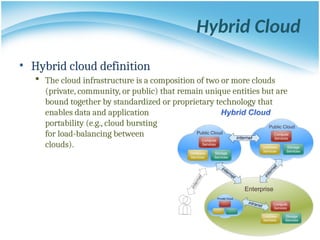
Hybrid Cloud
• Hybrid cloud definition
 The cloud infrastructure is a composition of two or more clouds
(private, community, or public) that remain unique entities but are
bound together by standardized or proprietary technology that
enables data and application
portability (e.g., cloud bursting
for load-balancing between
clouds).
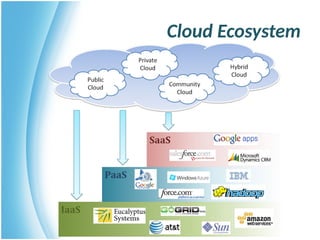
Cloud Ecosystem
Summary
• What is cloud computing in your mind
 Clear or Cloudy?
• Cloud computing is a new paradigm shift of computing
• Cloud computing can provide high quality of properties
and characteristics based on essentially central ideas
• Service models and deployment models provide services
that can be used to
 Rent fundamental computing resources
 Deploy and develop customer-created applications on clouds
 Access provider’s applications over network (wired or wireless)
References
• NIST (National Institute of Standards and Technology).
http://csrc.nist.gov/groups/SNS/cloud-computing/
• M. Armbrust et. al., “Above the Clouds: A Berkeley View of Cloud Computing,”
Technical Report No. UCB/EECS-2009-28, University of California at Berkeley,
2009.
• R. Buyya et. al., “Cloud computing and emerging IT platforms: Vision, hype,
and reality for delivering computing as the 5th utility,” Future Generation
Computer Systems, 2009.
• Cloud Computing Use Cases. http://groups.google.com/group/cloud-
computing-use-cases
• Cloud Computing Explained.
http://www.andyharjanto.com/2009/11/wanted-cloud-computing-
explained-in.html
• From Wikipedia, the free encyclopedia
• All resources of the materials and pictures were partially retrieved from the
Internet.
cloud-computing presentation using various methods

  • 1.
  • 2.
    WHAT IS CLOUDCOMPUTING ? What do they say ?
  • 3.
    Cloud Definitions • Definitionfrom NIST(National Institute of Standards and Technology)  Cloud computing is a model for enabling convenient, on-demand network access to a shared pool of configurable computing resources (e.g., networks, servers, storage, applications, and services) that can be rapidly provisioned and released with minimal management effort or service provider interaction.  This cloud model promotes availability and is composed of five essential characteristics, three service models, and four deployment models.
  • 4.
    Cloud Definitions • Definitionfrom Wikipedia  Cloud computing is Internet-based computing, whereby shared resources, software, and information are provided to computers and other devices on demand, like the electricity grid.  Cloud computing is a style of computing in which dynamically scalable and often virtualized resources are provided as a service over the Internet.
  • 5.
    Cloud Definitions • Definitionfrom Whatis.com  The name cloud computing was inspired by the cloud symbol that's often used to represent the Internet in flowcharts and diagrams. Cloud computing is a general term for anything that involves delivering hosted services over the Internet.
  • 6.
    Eye-Opening Facts AboutCloud Computing • 90% of companies are on the cloud • Cloud data centers will process 94% of workloads in 2021 • Amazon Web Services is the leading cloud vendor with a 32% share • Cost optimization is the primary reason for 47% of enterprises’ cloud migration • Amazon, Microsoft, and Google combined accounted for 57% of the global cloud computing market in 2018 • Cloud Types – What’s the Difference?  Public cloud – this refers to the model with which the services are delivered across the Internet  Private cloud – it’s designed for internal use by a single organization  Hybrid cloud – this is when a company uses both a public and a private cloud Source:
  • 7.
    Agenda • What isCloud Computing ?  Properties and characteristics  Benefits from cloud computing • Service and deployment models  Three service models  Four deployment models
  • 8.
    WHAT IS CLOUDCOMPUTING ? Properties and characteristics
  • 9.
    In Our HumbleOpinion • Cloud computing is a paradigm of computing, a new way of thinking about IT industry, but not any specific technology as such  Central ideas • Utility Computing • SOA - Service Oriented Architecture • SLA - Service Level Agreement  Properties and characteristics • High scalability and elasticity • High availability and reliability • High manageability and interoperability • High accessibility and portability • High performance and optimization  Enabling techniques • Hardware virtualization • Parallelized and distributed computing • Web service
  • 10.
  • 11.
    Central Ideas Utility Computing SOA +SLA DON’T TELL ME DETAILS!! I DON’T CARE!!
  • 12.
    Central Ideas • Perspectivefrom user :  Users do not care about how the works are done • Instead, they only concern about what they can get  Users do not care about what the provider actually did • Instead, they only concern about their quality of service  Users do not want to own the physical infrastructure • Instead, they only want to pay as many as they used • What does the user really care about?  They only care about their “Service” and the cost Utility Computing SOA + SLA
  • 13.
    Utility Computing • Oneservice provisioning model  Service provider makes computing resources and infrastructure management available to the customer as needed, and charges them for specific usage rather than a flat rate.  Like other types of on-demand computing , the utility model seeks to maximize the efficient use of resources and/or minimize associated costs. Utility Computing SOA + SLA
  • 14.
    What Is WebService? • Definition :  Web service is self-describing and stateless modules that perform discrete units of work and are available over the network  Web service providers offer APIs that enable developers to exploit functionality over the Internet, rather than delivering full-blown applications • Web Services Description Language (WSDL) :  WSDL is an XML-based interface description language that is used for describing the functionality offered by a web service, which includes both data type and messages Utility Computing SOA + SLA
  • 15.
    Service Oriented Architecture •Definition  Service Oriented Architecture (SOA) is essentially a collection of services which communicate with each other over a network  Is a style of software design where services are provided to the other components by application components, through a communication protocol  The basic principles of service-oriented architecture are independent of vendors, products and technologies • Approach  Usually implemented by Web Service model Utility Computing SOA + SLA
  • 16.
    Service Level Agreement •Definition  A service-level agreement (SLA) is a contract between a network service provider and a customer that specifies, usually in measurable terms (QoS), what services the network service provider will furnish • Common content in contract  Performance guarantee metrics • Up-time and down-time ratio • System throughput • Response time  Problem management detail  Penalties for non-performance  Documented security capabilities Utility Computing SOA + SLA
  • 17.
    Scalability & Elasticity Giveme the world without limitation!!
  • 18.
    Scalability & Elasticity •What is scalability ?  The ability to increase workload size within existing infrastructure (hardware, software, etc.) without impacting performance. These resources required to support this are usually pre-planned capacity with a certain amount of headroom built in to handle peak demand. • What is elasticity ?  The ability to grow or shrink infrastructure resources dynamically as needed to adapt to workload changes in an autonomic manner, maximizing the use of resources. This can result in savings in infrastructure costs overall.  Cloud elasticity is a popular feature associated with scale-out solutions (horizontal scaling), which allows for resources to be dynamically added or removed when needed. • But how to achieve these properties ?  Dynamic provisioning  Multi-tenant design
  • 19.
    Static Provisioning • Intraditional computing model, two common problems :  Underestimate the system capacity which result in under provision Resources Demand Capacity 1 2 3 Resources Demand Capacity 1 2 3 Resources Demand Capacity Time (days) 1 2 3 Loss Users Loss Revenue
  • 20.
    Static Provisioning  Overestimatesystem capacity which result in low utilization • How to solve this problem ??  Dynamically provision resources Unused resources Demand Capacity Time Resources
  • 21.
    Elasticity - DynamicProvisioning • Cloud resources should be provisioned dynamically  Meet seasonal demand variations  Meet demand variations between different industries  Meet burst demand for some extraordinary events Demand Capacity Time Resources Demand Capacity Time Resources
  • 22.
    Multi-tenant Design • Whatis multi-tenant design ?  Multi-tenant refers to a principle in software architecture where a single instance of the software runs on a server, serving multiple client organizations.  With a multi-tenant architecture, a software application is designed to virtually partition its data and configuration thus each client organization works with a customized virtual application instance. • Client oriented requirements :  Customization • Multi-tenant applications are typically required to provide a high degree of customization to support each target organization's needs.  Quality of service • Multi-tenant applications are expected to provide adequate levels of security and robustness.
  • 23.
    Availability & Reliability DataNever Lost Machine Never Fail
  • 24.
    Availability & Reliability •What is availability ?  The degree to which a system, subsystem, or equipment is in a specified operable and committable state at the start of a mission, when the mission is called for at an unknown time.  Cloud system usually require high availability • Ex. “Five Nines” system would statistically provide 99.999% availability • What is reliability ?  The ability of a system or component to perform its required functions under stated conditions for a specified period of time. • But how to achieve these properties ?  Fault tolerant system  Require system resilience  Reliable system security
  • 25.
    Fault Tolerance • SinglePoint Of Failure (SPOF)  A part of a system which, if it fails, will stop the entire system from working.  The assessment of a potentially single location of failure identifies the critical components of a complex system that would provoke a total systems failure in case of malfunction. • Preventing single point of failure  If a system experiences a failure, it must continue to operate without interruption during the repair process.
  • 26.
    System Resilience • Whatis resilience ?  Resilience is the ability to provide and maintain an acceptable level of service in the face of faults and challenges to normal operation.  Resiliency pertains to the system's ability to return to its original state after encountering trouble. In other words, if a risk event knocks a system offline, a highly resilient system will return back to work and function as planned as soon as possible. • Some risk events  If power is lost at a plant for two days, can our system recover ?  If a key service is lost because a database corruption, can the business recover ?
  • 27.
    System Resilience • DisasterRecovery  Disaster recovery is the process, policies and procedures related to preparing for recovery or continuation of technology infrastructure critical to an organization after a natural or human-induced disaster. • Some common strategies :  Backup • Make data off-site at regular interval • Replicate data to an off-site location • Replicate whole system  Preparing • Local mirror systems • Surge protector • Uninterruptible Power Supply (UPS)
  • 28.
    System Security • Securityissue in Cloud Computing :  Cloud security is an evolving sub-domain of computer security, network security, and, more broadly, information security.  It refers to a broad set of policies, technologies, and controls deployed to protect data, applications, and the associated infrastructure of cloud computing.
  • 29.
    System Security • Importantsecurity and privacy issues :  Data Protection • To be considered protected, data from one customer must be properly segregated from that of another.  Application Security • Cloud providers should ensure that applications available as a service via the cloud are secure.  Privacy • Providers ensure that all critical data are masked and that only authorized users have access to data in its entirety.
  • 30.
    Billing System • BillingSystem in Cloud  Users pay as many as they used.  Cloud provider must first determine the list of service usage price.  Cloud provider have to record the resource or service usage of each user, and then charge users by these records. • How can cloud provider know users’ usage ?  Get those information by means of monitoring system.  Automatically calculate the total amount of money which user should pay. And automatically request money from use’s banking account.
  • 31.
    Performance & Optimization HighPerformance Improvement
  • 32.
    Performance & Optimization •Performance guarantees ??  Application performance should be guaranteed.  Cloud providers make use of powerful infrastructure or other underlining resources to build up a highly performed and highly optimized environment, and then deliver the complete services to cloud users. • But how to achieve this property ?  Parallel computing  Load balancing  Job scheduling
  • 33.
    Parallel Processing • ParallelProcessing  Parallel processing is a form of computation in which many calculations are carried out simultaneously, operating on the principle that large problems can often be divided into smaller ones, which are then solved concurrently. • Parallelism in different levels :  Bit level parallelism  Instruction level parallelism  Data level parallelism  Task level parallelism
  • 34.
    Parallel Processing • Hardwareapproaches  Multi-core computer  Symmetric multi-processor  General purpose graphic processing unit  Vector processor  Distributed computing • Cluster computing • High Performance Interconnects to offer HPC (as a service) • Software approaches  Parallel programming language  Automatic parallelization
  • 35.
    Load Balancing • Whatis load balancing ?  Load balancing is a technique to distribute workload evenly across two or more computers, network links, CPUs, hard drives, or other resources, in order to get optimal resource utilization, maximize throughput, minimize response time, and avoid overload. • Why load balancing ?  Improve resource utilization  Improve system performance  Improve energy efficiency Unbalanced
  • 36.
    Accessibility & Portability Anyone! Anytime ! Anywhere !
  • 37.
    Accessibility & Portability •What is accessibility ?  Accessibility is a general term used to describe the degree to which a product, device, service, or environment is accessible by as many people as possible. • What is service portability ?  Service portability is the ability to access services using any device, anywhere, continuously with mobility support and dynamic adaptation to resource variations. • But how to achieve these properties ?  Uniform access  Thin client
  • 38.
    Uniform Access • Howdo users access cloud services ?  Cloud provider should provide their cloud service by means of widespread accessing media. In other word, users from different operating systems or other accessing platforms should be able to directly be served.  Nowadays, web browser technique is one of the most widespread platform in almost any intelligent electronic devices. Cloud service take this into concern, and delivery their services with web-based interface through the Internet.
  • 39.
    Thin Client • Whatis thin client ?  Thin client is a computer or a computer program which depends heavily on some other computer to fulfill its traditional computational roles. This stands in contrast to the traditional fat client, a computer designed to take on these roles by itself. • Characteristics :  Cheap client hardware • While the cloud providers handle several client sessions at once, the clients can be made out of much cheaper hardware.  Diversity of end devices • End user can access cloud service via plenty of various electronic devices, which include mobile phones and smart TV.  Client simplicity • Client local system do not need complete operational functionalities.
  • 40.
    WHAT IS CLOUDCOMPUTING ? What can we gain from cloud ?
  • 41.
    Benefits From Cloud •Cloud computing brings many benefits :  For the market and enterprises • Reduce initial investment • Reduce capital expenditure • Improve industrial specialization • Improve resource utilization  For the end user and individuals • Reduce local computing power • Reduce local storage power • Variety of thin client devices in daily life  And not least, being environmentally friendly 👍
  • 42.
    For Market andEnterpeises
  • 43.
    Reduce Capital Expenditure •Traditional capital expenditure of enterprises :  Each enterprise should establish its own IT department  IT department should handle the listing jobs • Manage and administrate hardware and software • Apply regular data backup and check point process • Purchase new infrastructure and eliminate outdated one • Always standby for any unexpected IT problems • Some drawbacks :  Enterprise pays for IT investment which is not its business focus  Enterprise should take the risk of hardware/software malfunction  Replacing and updating infrastructure is time consuming and risky
  • 44.
    Reduce Capital Expenditure •Capital expenditure with Cloud Computing service :  Enterprise can almost dismiss its IT department  The jobs of IT department can be achieved by cloud provider • Dynamically update and upgrade hardware or software • Dynamically provision and deploy infrastructure for enterprise • Automatically backup data and check consistency • Self-recover from disaster or system malfunction • Some benefits :  Enterprise can shift effort to its business focus  Enterprise can reconfigure its IT services in short time  Enterprise pays to cloud provider as many as the service used
  • 45.
    Reduce Capital Expenditure •What does cloud computing achieve ? Traditional With Cloud Computing Business focus Need to own its IT department Cloud provider takes care everything Payment Pay for all investment and human resource Enterprise pays as the service used Time duration Long establish time Fast to business ready
  • 46.
    Improve Industrial Specialization •What does cloud computing achieve ? Traditional With Cloud Computing Collaboration Enterprise needs to take care everything Enterprise focuses on its own business Management Enterprise works with poor manageability Cloud provider applies professional control Relationship Stand alone enterprise Win-Win partnership
  • 47.
    Improve Resource Utilization •What does cloud computing achieve ? Traditional With Cloud Computing IT Resource Utilization IT resource under utilized most of time Share to improve utilization of IT resource Power Consumption Waste power and cooling system Cloud system should be global optimized
  • 48.
    For End Userand Individual
  • 49.
    Reduce Local ComputingPower • What does cloud computing achieve ? Traditional With Cloud Computing Hardware Requirement User needs to buy powerful hardware Only basic hardware to connect to internet Software Requirement Install application in local computer No local installation requirement Portability Hard to be portable Natively portable
  • 50.
    Reduce Local StoragePower • What does cloud computing achieve ? Traditional With Cloud Computing Storage Space Limited to local disk, may be under utilized Dynamically allocated on demand Storage Data Consistency Difficult to maintain data consistency Data consistency maintained by cloud Availability Regular user backup Cloud service guarantee
  • 51.
    Variety of EndDevices • What does cloud computing achieve ? Traditional With Cloud Computing Computing Power Only accessed through desktop computer Accessed through small smart devices Small Device Intelligence Functionalities was limited due to their power consumption Shift computing incentive jobs into cloud, and then wait for results
  • 52.
    Agenda • What isCloud Computing ?  Properties and characteristics  Benefits from cloud computing • Service and deployment models  Three service models  Four deployment models
  • 53.
    SERVICE MODELS Choose theservice you need.
  • 54.
    A Simple Analogy Say,you just moved to a city and you are looking for a place to live.
  • 55.
    What is yourchoice ? Build a new house ? Buy an empty house ? Live in a hotel ?
  • 56.
    Let’s built anew house !! You can fully control everything you like your new house to have. But that is a hard work …
  • 57.
    If you buyan empty house ? You can customize some part of your house. But never change the original architecture.
  • 58.
    How about livein a hotel ? Live in a hotel will be a good idea if the only thing you care of is to enjoy your life!! There is nothing you can do with the house except living in it.
  • 59.
    Let’s translate thisto Cloud Computing !!
  • 60.
    Service Models Overview •What if you want to have an IT “department” ?  Similar to build a new house in previous analogy • You can rent some virtualized infrastructure and build up your own IT system among those resources, which may be fully controlled. • Technical speaking, use the Infrastructure as a Service (IaaS) solution.  Similar to buy an empty house in previous analogy • You can directly develop your IT system through one cloud platform, and do not care about any lower level resource management. • Technical speaking, use the Platform as a Service (PaaS) solution.  Similar to live in a hotel in previous analogy • You can directly use some existing IT system solutions, which are provided by some cloud application service provider, without knowing any detail technique about how these service was achieved. • Technical speaking, use the Software as a Service (SaaS) solution.
  • 61.
  • 62.
    SERVICE MODELS Infrastructure asa Service Platform as a Service Software as a Service
  • 63.
    Infrastructure as aService • Infrastructure as a Service - IaaS  The capability provided to the consumer is to provision processing, storage, networks, and other fundamental computing resources where the consumer is able to deploy and run arbitrary software, which can include operating systems and applications.  The consumer does not manage or control the underlying cloud infrastructure but has control over operating systems, storage, deployed applications, and possibly limited control of select networking components. • Examples :  Amazon EC2  Eucalyputs  OpenNebula  … etc
  • 64.
    Infrastructure as aService • System architecture :
  • 65.
    Infrastructure as aService • Enabling technique - Virtualization  Virtualization is an abstraction of logical resources away from underlying physical resources. • Virtualization technique shift OS onto hypervisor. • Multiple OS share the physical hardware and provide different services. • Improve utilization, availability, security and convenience. VM1 VM2 VM3
  • 66.
    Motivation for virtualization •Cloud resource virtualization is important for:  Performance isolation • as we can dynamically assign and account for resources across different applications  System security: • as it allows isolation of services running on the same hardware  Performance and reliability: • as it allows applications to migrate from one platform to another  The development and management of services offered by a provider
  • 67.
    Virtualization • Virtualization simulatesthe interface to a physical object by:  Multiplexing: creates multiple virtual objects from one instance of a physical object. Many virtual objects to one physical. Example - a processor is multiplexed among a number of processes or threads.  Aggregation: creates one virtual object from multiple physical objects. One virtual object to many physical objects. Example - a number of physical disks are aggregated into a RAID disk.  Emulation: constructs a virtual object of a certain type from a different type of a physical object. Example - a physical disk emulates a Random Access Memory (RAM).  Multiplexing and emulation. Examples - virtual memory with paging multiplexes real memory and disk; a virtual address emulates a real address.
  • 68.
    Layering and Virtualization •Layering – a common approach to manage system complexity:  Simplifies the description of the subsystems; each subsystem is abstracted through its interfaces with the other subsystems  Minimizes the interactions among the subsystems of a complex system  With layering we are able to design, implement, and modify the individual subsystems independently • Layering in a computer system:  Hardware  Software • Operating system • Libraries • Applications
  • 69.
    Layering and Interfaces ApplicationProgramming Interface (API), Application Binary Interface (ABI), and Instruction Set Architecture (ISA). An application uses library functions (A1), makes system calls (A2), and executes machine instructions (A3) Hardware Operating System ISA Libraries ABI API System calls Applications System ISA User ISA A1 A2 A3
  • 70.
    Interfaces • Instruction SetArchitecture (ISA) – at the boundary between hardware and software. • Application Binary Interface (ABI) – allows the ensemble consisting of the application and the library modules to access the hardware; the ABI does not include privileged system instructions, instead it invokes system calls. • Application Program Interface (API) - defines the set of instructions the hardware was designed to execute and gives the application access to the ISA; it includes high-level language (HLL) library calls which often invoke system calls
  • 71.
    Code portability • Binariescreated by a compiler for a specific ISA and a specific operating systems are not portable • It is possible, though, to compile a HLL program for a virtual machine (VM) environment where portable code is produced and distributed and then converted by binary translators to the ISA of the host system • A dynamic binary translation converts blocks of guest instructions from the portable code to the host instruction and leads to a significant performance improvement, as such blocks are cached and reused
  • 72.
    HLL Language Translations 95 Compilerfront-end Intermediate code HLL code Compiler Portable code Compiler back-end Object code Loader Memory image VM loader VM compiler/ interpreter VM image VM compiler/ interpreter Memory image ISA-1 Memory image ISA-2
  • 73.
    Virtual Machine Monitor(VMM / Hypervisor)  A virtual machine monitor (VMM/hypervisor) partitions the resources of computer system into one or more virtual machines (VMs). Allows several operating systems to run concurrently on a single hardware platform  A VM is an execution environment that runs an OS  VM – an isolated environment that appears to be a whole computer, but actually only has access to a portion of the computer resources • A VMM allows:  Multiple services to share the same platform  Live migration - the movement of a server from one platform to another  System modification while maintaining backward compatibility with the original system  Enforces isolation among the systems, thus security  A guest operating system is an OS that runs in a VM under the control of the VMM.
  • 74.
    IaaS - Summary •IaaS is the deployment platform that abstract the infrastructure. • IaaS enabling technique  Virtualization • Server Virtualization • Storage Virtualization • Network Virtualization • IaaS provided services  Resource Management Interface  System Monitoring Interface
  • 75.
    SERVICE MODELS Infrastructure asa Service Platform as a Service Software as a Service
  • 76.
    Platform as aService • Platform as a Service - PaaS  The capability provided to the consumer is to deploy onto the cloud infrastructure consumer-created or acquired applications created using programming languages and tools supported by the provider.  The consumer does not manage or control the underlying cloud infrastructure including network, servers, operating systems, or storage, but has control over the deployed applications and possibly application hosting environment configurations. • Examples :  Microsoft Windows Azure  Google App Engine  Hadoop  … etc
  • 77.
    Platform as aService • System architecture :
  • 78.
    Platform as aService • Enabling technique – Runtime Environment Design  Runtime environment refers to collection of software services available. Usually implemented by a collection of program libraries. • Common properties in Runtime Environment :  Manageability and Interoperability  Performance and Optimization  Availability and Reliability  Scalability and Elasticity
  • 79.
    Platform as aService • Provided service – Programming IDE  Users make use of programming IDE to develop their service among PaaS. • This IDE should integrate the full functionalities which supported from the underling runtime environment. • This IDE should also provide some development tools, such as profiler, debugger and testing environment.  The programming APIs supported by the runtime environment may vary among different cloud providers, but there are still some common operating functions. • Computation, storage and communication resource operation
  • 80.
    Platform as aService • Provided service – System Control Interface  Police-Based Control • Typically described as a principle or rule to guide decisions and achieve rational outcome(s) • Make the decision according to some requirements  Workflow Control • Describe the flow of installation and configuration of resources • Workflow processing daemon delivers speedy and efficient construction and management of cloud resources
  • 81.
    PaaS - Summary •PaaS is the development platform that abstract the infrastructure, OS, and middleware to drive developer productivity. • PaaS enabling technique  Runtime Environment • PaaS provide services  Programming IDE • Programming APIs • Development tools  System Control Interface • Policy based approach • Workflow based approach
  • 82.
    SERVICE MODELS Infrastructure asa Service Platform as a Service Software as a Service
  • 83.
    Software as aService • Software as a Service - SaaS  The capability provided to the consumer is to use the provider’s applications running on a cloud infrastructure. The applications are accessible from various client devices through a thin client interface such as a web browser (e.g., web-based email).  The consumer does not manage or control the underlying cloud infrastructure including network, servers, operating systems, storage, or even individual application capabilities, with the possible exception of limited user-specific application configuration settings. • Examples :  Google Apps (e.g., Gmail, Google Docs, Google sites, …etc)  SalesForce.com  EyeOS  … etc
  • 84.
  • 85.
    Software as aService • Enabling Technique – Web Service  Web 2.0 is the trend of using the full potential of the web • Viewing the Internet as a computing platform • Running interactive applications through a web browser • Leveraging interconnectivity and mobility of devices • Enhanced effectiveness with greater human participation • Properties provided by Internet:  Accessibility and Portability
  • 86.
    Software as aService • Provide service – Web Portal  Apart from the standard search engine feature, web portals offer other services such as e-mail, news, stock prices, information, databases and entertainment.  Portals provide a way for enterprises to provide a consistent look and feel with access control and procedures for multiple applications and databases, which otherwise would have been different entities altogether.  Some examples : • iGoogle • MSNBC • Netvibes • Yahoo!
  • 87.
    SaaS - Summary •SaaS is the finished applications that you rent and customize. • SaaS enabling technique  Web Service • SaaS provide services  Web-based Applications • General applications • Business applications • Scientific applications • Government applications  Web Portal
  • 88.
    DEPLOYMENT MODELS How todeploy a cloud system ?
  • 89.
    Deployment Model • Thereare four primary cloud deployment models :  Public Cloud  Private Cloud  Community Cloud  Hybrid Cloud • Each can exhibit the previously discussed characteristics; their differences lie primarily in the scope and access of published cloud services, as they are made available to service consumers.
  • 90.
    Public Cloud • Publiccloud definition  The cloud infrastructure is made available to the general public or a large industry group and is owned by an organization selling cloud services.  Also known as external cloud or multi-tenant cloud, this model essentially represents a cloud environment that is openly accessible.  Basic characteristics : • Homogeneous infrastructure • Common policies • Shared resources and multi-tenant • Leased or rented infrastructure • Economies of scale
  • 91.
    Private Cloud • Privatecloud definition  The cloud infrastructure is operated solely for an organization. It may be managed by the organization or a third party and may exist on premise or off premise.  Also referred to as internal cloud or on-premise cloud, a private cloud intentionally limits access to its resources to service consumers that belong to the same organization that owns the cloud.  Basic characteristics : • Heterogeneous infrastructure • Customized and tailored policies • Dedicated resources • In-house infrastructure • End-to-end control
  • 92.
    Community Cloud • Communitycloud definition  The cloud infrastructure is shared by several organizations and supports a specific community that has shared concerns (e.g., mission, security requirements, policy, and compliance considerations).
  • 93.
    Hybrid Cloud • Hybridcloud definition  The cloud infrastructure is a composition of two or more clouds (private, community, or public) that remain unique entities but are bound together by standardized or proprietary technology that enables data and application portability (e.g., cloud bursting for load-balancing between clouds).
  • 94.
  • 95.
    Summary • What iscloud computing in your mind  Clear or Cloudy? • Cloud computing is a new paradigm shift of computing • Cloud computing can provide high quality of properties and characteristics based on essentially central ideas • Service models and deployment models provide services that can be used to  Rent fundamental computing resources  Deploy and develop customer-created applications on clouds  Access provider’s applications over network (wired or wireless)
  • 96.
    References • NIST (NationalInstitute of Standards and Technology). http://csrc.nist.gov/groups/SNS/cloud-computing/ • M. Armbrust et. al., “Above the Clouds: A Berkeley View of Cloud Computing,” Technical Report No. UCB/EECS-2009-28, University of California at Berkeley, 2009. • R. Buyya et. al., “Cloud computing and emerging IT platforms: Vision, hype, and reality for delivering computing as the 5th utility,” Future Generation Computer Systems, 2009. • Cloud Computing Use Cases. http://groups.google.com/group/cloud- computing-use-cases • Cloud Computing Explained. http://www.andyharjanto.com/2009/11/wanted-cloud-computing- explained-in.html • From Wikipedia, the free encyclopedia • All resources of the materials and pictures were partially retrieved from the Internet.
Editor's Notes