Introduction to Cloud Computing -  Jayaprakash Aridoss
Agenda Introduction to Cloud Computing Background of Cloud Computing Cloud Services Types of Cloud Computing Cloud Storage Infrastructure Storing a file to a cloud storage Benefits of clouds  Challenges of Clouds Future of Cloud – Talk of IDC Open Discussion
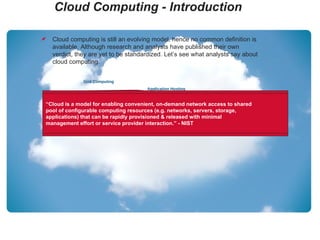
Cloud Computing - Introduction Grid Computing Application Hosting Utility Computing Storage as a Service Platform as a Service Infrastructure as a Service Software as a Service Virtualization  Cloud computing is still an evolving model, hence no common definition is available. Although research and analysts have published their own verdict, they are yet to be standardized. Let’s see what analysts say about cloud computing. “ The cloud is IT as a Service. Delivered by IT resources that are independent of location.” - 451 Group “ Cloud computing is a style of computing where massively scalable IT-related capabilities are provided ‘as a service’ across the internet to multiple external customers.” - Gartner “ A pool of abstracted, highly scalable, and managed infrastructure capable of hosting end-customer applications and billed by consumption.” - Forrester Research “ Cloud is a model for enabling convenient, on-demand network access to shared pool of configurable computing resources (e.g. networks, servers, storage, applications) that can be rapidly provisioned & released with minimal management effort or service provider interaction.” - NIST
Background of Cloud Computing   Grid Computing 􀁹  Parallel computing 􀁹  Clustered computing 􀁹  Load balancing Utility Computing 􀁹  Virtualization improves resource utilization and reduces Capital and Operational Expenditures 􀁹  Pay – per use Cloud Computing 􀁹  Grid + Utility + more…such security, backup.. 􀁹  New buzz of IT
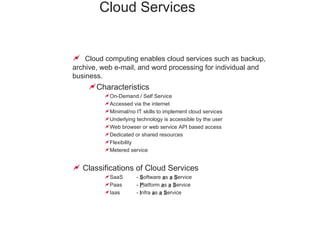
Cloud Services   Cloud computing enables cloud services such as backup, archive, web e-mail, and word processing for individual and business. Characteristics On-Demand / Self Service Accessed via the internet Minimal/no IT skills to implement cloud services Underlying technology is accessible by the user Web browser or web service API based access Dedicated or shared resources Flexibility  Metered service Classifications of Cloud Services SaaS  -  S oftware  a s  a   S ervice Paas  -  P latform  a s  a   S ervice Iaas  -  I nfra  a s  a   S ervice
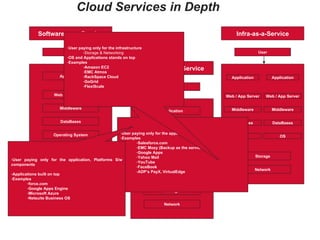
Cloud Services in Depth Application Web / App Server Middleware DataBases Operating System Storage Network User Software-as-a-Service Hired Resources Application Web / App Server Middleware DataBases Operating System Storage Network User Platform-as-a-Service Hired Resources Application Web / App Server Middleware DataBases OS Storage Network User Infra-as-a-Service Web / App Server Middleware DataBases OS Application User paying only for the application Examples Salesforce.com  EMC Mozy (Backup as the service) Google Apps Yahoo Mail YouTube FaceBook ADP’s PayX, VirtualEdge User paying only for the application, Platforms S/w components Applications built on top Examples force.com  Google Apps Engine Microsoft Azure Netsuite Business OS User paying only for the infrastructure Storage & Networking OS and Applications stands on top Examples Amazon EC2 EMC Atmos RackSpace Cloud GoGrid FlexiScale
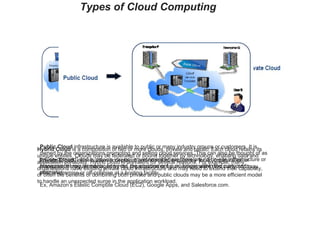
Types of Cloud Computing Private Cloud ,  infrastructure is deployed and operated exclusively for an organization or enterprise. It may be managed by the organization or by an independent third party and may exist on-premise or off-premise at a hosting facility. Public Cloud  infrastructure is available to public or many industry groups or customers. It is owned by the organizations promoting and selling cloud services. This can also be thought of as an “on-demand” and a “pay-as-you-go” environment where there are no on-site infrastructure or management requirements; however, the environment is no longer within the customer’s perimeter. Ex, Amazon’s Elastic Compute Cloud (EC2), Google Apps, and Salesforce.com. Hybrid Cloud  is a composition of two or more clouds, private and public. Each cloud retains its unique entities. Clouds may be federated or bound together by technology, enabling data and application portability. Hybrid cloud is prevalent for several reasons. For example, many organizations have existing private cloud infrastructure and may need to extend their capability, or often the benefits of combining both private and public clouds may be a more efficient model to handle an unexpected surge in the application workload.
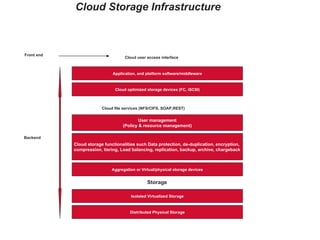
Cloud Storage Infrastructure Distributed Physical Storage Isolated Virtualized Storage Storage Aggregation or Virtual/physical storage devices Cloud storage functionalities such Data protection, de-duplication, encryption,  compression, tiering, Load balancing, replication, backup, archive, chargeback User management (Policy & resource management) Cloud file services (NFS/CIFS, SOAP,REST) Cloud optimized storage devices (FC, iSCSI) Application, and platform software/middleware Cloud user access interface Backend Front end
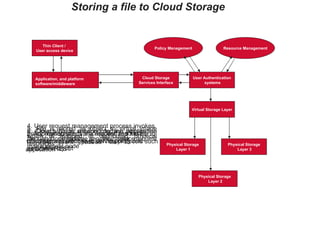
Storing a file to Cloud Storage Thin Client /  User access device Application, and platform  software/middleware Policy Management Resource Management Cloud Storage Services Interface User Authentication systems Virtual Storage Layer Physical Storage Layer 1 Physical Storage Layer 2 Physical Storage Layer 3 1. Thin client passes file to application 2. Application sends the request and the file to cloud storage using web service protocols such as SOAP/REST 3. Cloud storage service interface passes the file and metadata to the user request management node 4. User request management process invokes policy management process and resource management process to define policy and determine layout 5. File is stored as object to virtual image which is mapped to distributed physical resources 6. Object ID is returned to the application through cloud storage service interface
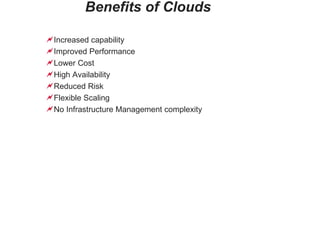
Benefits of Clouds Increased capability Improved Performance Lower Cost High Availability Reduced Risk Flexible Scaling No Infrastructure Management complexity
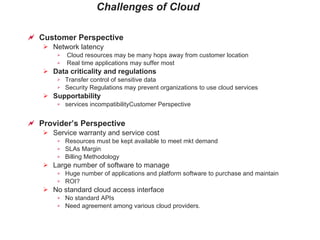
Challenges of Cloud Customer Perspective Network latency Cloud resources may be many hops away from customer location Real time applications may suffer most Data criticality and regulations Transfer control of sensitive data Security Regulations may prevent organizations to use cloud services Supportability services incompatibilityCustomer Perspective Provider’s Perspective Service warranty and service cost Resources must be kept available to meet mkt demand SLAs Margin Billing Methodology Large number of software to manage Huge number of applications and platform software to purchase and maintain ROI? No standard cloud access interface No standard APIs Need agreement among various cloud providers.
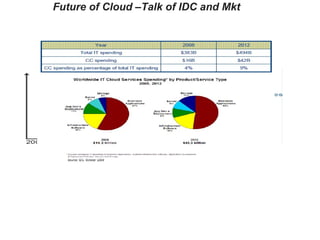
Future of Cloud –Talk of IDC and Mkt

Intro To Cloud Computing

  • 1.
    Introduction to CloudComputing - Jayaprakash Aridoss
  • 2.
    Agenda Introduction toCloud Computing Background of Cloud Computing Cloud Services Types of Cloud Computing Cloud Storage Infrastructure Storing a file to a cloud storage Benefits of clouds Challenges of Clouds Future of Cloud – Talk of IDC Open Discussion
  • 3.
    Cloud Computing -Introduction Grid Computing Application Hosting Utility Computing Storage as a Service Platform as a Service Infrastructure as a Service Software as a Service Virtualization Cloud computing is still an evolving model, hence no common definition is available. Although research and analysts have published their own verdict, they are yet to be standardized. Let’s see what analysts say about cloud computing. “ The cloud is IT as a Service. Delivered by IT resources that are independent of location.” - 451 Group “ Cloud computing is a style of computing where massively scalable IT-related capabilities are provided ‘as a service’ across the internet to multiple external customers.” - Gartner “ A pool of abstracted, highly scalable, and managed infrastructure capable of hosting end-customer applications and billed by consumption.” - Forrester Research “ Cloud is a model for enabling convenient, on-demand network access to shared pool of configurable computing resources (e.g. networks, servers, storage, applications) that can be rapidly provisioned & released with minimal management effort or service provider interaction.” - NIST
  • 4.
    Background of CloudComputing Grid Computing 􀁹 Parallel computing 􀁹 Clustered computing 􀁹 Load balancing Utility Computing 􀁹 Virtualization improves resource utilization and reduces Capital and Operational Expenditures 􀁹 Pay – per use Cloud Computing 􀁹 Grid + Utility + more…such security, backup.. 􀁹 New buzz of IT
  • 5.
    Cloud Services Cloud computing enables cloud services such as backup, archive, web e-mail, and word processing for individual and business. Characteristics On-Demand / Self Service Accessed via the internet Minimal/no IT skills to implement cloud services Underlying technology is accessible by the user Web browser or web service API based access Dedicated or shared resources Flexibility Metered service Classifications of Cloud Services SaaS - S oftware a s a S ervice Paas - P latform a s a S ervice Iaas - I nfra a s a S ervice
  • 6.
    Cloud Services inDepth Application Web / App Server Middleware DataBases Operating System Storage Network User Software-as-a-Service Hired Resources Application Web / App Server Middleware DataBases Operating System Storage Network User Platform-as-a-Service Hired Resources Application Web / App Server Middleware DataBases OS Storage Network User Infra-as-a-Service Web / App Server Middleware DataBases OS Application User paying only for the application Examples Salesforce.com EMC Mozy (Backup as the service) Google Apps Yahoo Mail YouTube FaceBook ADP’s PayX, VirtualEdge User paying only for the application, Platforms S/w components Applications built on top Examples force.com Google Apps Engine Microsoft Azure Netsuite Business OS User paying only for the infrastructure Storage & Networking OS and Applications stands on top Examples Amazon EC2 EMC Atmos RackSpace Cloud GoGrid FlexiScale
  • 7.
    Types of CloudComputing Private Cloud , infrastructure is deployed and operated exclusively for an organization or enterprise. It may be managed by the organization or by an independent third party and may exist on-premise or off-premise at a hosting facility. Public Cloud infrastructure is available to public or many industry groups or customers. It is owned by the organizations promoting and selling cloud services. This can also be thought of as an “on-demand” and a “pay-as-you-go” environment where there are no on-site infrastructure or management requirements; however, the environment is no longer within the customer’s perimeter. Ex, Amazon’s Elastic Compute Cloud (EC2), Google Apps, and Salesforce.com. Hybrid Cloud is a composition of two or more clouds, private and public. Each cloud retains its unique entities. Clouds may be federated or bound together by technology, enabling data and application portability. Hybrid cloud is prevalent for several reasons. For example, many organizations have existing private cloud infrastructure and may need to extend their capability, or often the benefits of combining both private and public clouds may be a more efficient model to handle an unexpected surge in the application workload.
  • 8.
    Cloud Storage InfrastructureDistributed Physical Storage Isolated Virtualized Storage Storage Aggregation or Virtual/physical storage devices Cloud storage functionalities such Data protection, de-duplication, encryption, compression, tiering, Load balancing, replication, backup, archive, chargeback User management (Policy & resource management) Cloud file services (NFS/CIFS, SOAP,REST) Cloud optimized storage devices (FC, iSCSI) Application, and platform software/middleware Cloud user access interface Backend Front end
  • 9.
    Storing a fileto Cloud Storage Thin Client / User access device Application, and platform software/middleware Policy Management Resource Management Cloud Storage Services Interface User Authentication systems Virtual Storage Layer Physical Storage Layer 1 Physical Storage Layer 2 Physical Storage Layer 3 1. Thin client passes file to application 2. Application sends the request and the file to cloud storage using web service protocols such as SOAP/REST 3. Cloud storage service interface passes the file and metadata to the user request management node 4. User request management process invokes policy management process and resource management process to define policy and determine layout 5. File is stored as object to virtual image which is mapped to distributed physical resources 6. Object ID is returned to the application through cloud storage service interface
  • 10.
    Benefits of CloudsIncreased capability Improved Performance Lower Cost High Availability Reduced Risk Flexible Scaling No Infrastructure Management complexity
  • 11.
    Challenges of CloudCustomer Perspective Network latency Cloud resources may be many hops away from customer location Real time applications may suffer most Data criticality and regulations Transfer control of sensitive data Security Regulations may prevent organizations to use cloud services Supportability services incompatibilityCustomer Perspective Provider’s Perspective Service warranty and service cost Resources must be kept available to meet mkt demand SLAs Margin Billing Methodology Large number of software to manage Huge number of applications and platform software to purchase and maintain ROI? No standard cloud access interface No standard APIs Need agreement among various cloud providers.
  • 12.
    Future of Cloud–Talk of IDC and Mkt

Editor's Notes

  • #4 National Institute of Standards and Technology (NIST), Information Technology Laboratory
  • #5 Grid Computing: In grid computing environment, the workload is distributed or transferred to nodes with needed computing resources. Usually a chain of nodes, such as servers, are networked to form the grid. These nodes are typically clustered and are kept ready to handle the distributed workload. Grid computing enables parallel computing, although its utility is best for large workloads. Utility Computing: The main benefit of utility computing is capital and operational cost savings. Most datacenters have underutilized servers, storage networks, and storage, due to over provisioning to handle peak workload, sudden spike, and projected growth. Utility computing introduces ‘pay only for what you use’ models, allowing organizations to hire computing resources when required. Cloud Computing: The backbone of cloud computing is utility computing, however, it offers a wider picture. It can be applied internal to an organization to build its own cloud infrastructure, in addition to utility services. Cloud provides the opportunity of unlimited scalability, significant cost savings, internet based access, workload balancing, dynamic and fine granular provisioning, and self service requesting. It is an emerging technology, but already considered as another generation of computing, after mainframe, personal computer, client-server computing, and the web.
  • #6 Cloud computing enables cloud services such as backup, archive, web e-mail, and word processing for individual and business.
  • #8 Private Cloud, infrastructure is deployed and operated exclusively for an organization or enterprise. It may be managed by the organization or by an independent third party and may exist on-premise or off-premise at a hosting facility. Public Cloud infrastructure is available to public or many industry groups or customers. It is owned by the organizations promoting and selling cloud services. This can also be thought of as an “on-demand” and a “pay-as-you-go” environment where there are no on-site infrastructure or management requirements; however, the environment is no longer within the customer’s perimeter. Hybrid Cloud is a composition of two or more clouds, private and public. Each cloud retains its unique entities. Clouds may be federated or bound together by technology, enabling data and application portability. Hybrid cloud is prevalent for several reasons. For example, many organizations have existing private cloud infrastructure and may need to extend their capability, or often the benefits of combining both private and public clouds may be a more efficient model to handle an unexpected surge in the application workload. Sorce - NIST
  • #9 Simple Object Access Protocol – SOAP Representational State Transfer – REST Common Internet File System - CIFS
  • #10 1. Thin client passes file to application 2. Application sends the request and the file to cloud storage using web service protocols such as SOAP/REST 3. Cloud storage service interface passes the file and metadata to the user request management node 4. User request management process invokes policy management process and resource management process to define policy and determine layout 5. File is stored as object to virtual image which is mapped to distributed physical resources 6. Object ID is returned to the application through cloud storage service interface