Chapter V: Connecting LANs, BackboneNetworks,
and Virtual LANs
Introduction
 LANs do not normally operate in isolation. They are
connected to one another or to the Internet. To
connect LANs, or segments of LANs, we use
connecting devices.
 Connecting devices can operate in different layers
of the Internet model.
 After discussing some connecting devices, we show
how they are used to create backbone networks.
Finally, we discuss virtual local area networks
(VLANs).
1
Lecturer Kim No @RUPP
5.1 CONNECTING DEVICES
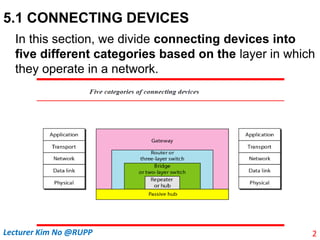
In this section, we divide connecting devices into
five different categories based on the layer in which
they operate in a network.
2
Lecturer Kim No @RUPP
5.1 CONNECTING DEVICES
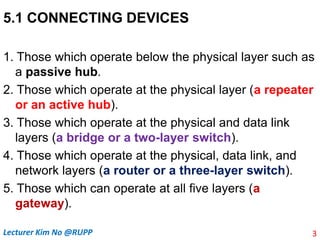
1. Those which operate below the physical layer such as
a passive hub.
2. Those which operate at the physical layer (a repeater
or an active hub).
3. Those which operate at the physical and data link
layers (a bridge or a two-layer switch).
4. Those which operate at the physical, data link, and
network layers (a router or a three-layer switch).
5. Those which can operate at all five layers (a
gateway).
3
Lecturer Kim No @RUPP
5.1 CONNECTING DEVICES
 Passive Hubs
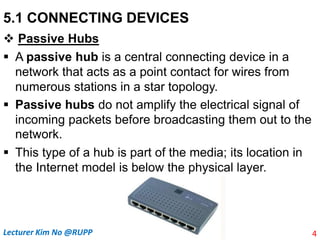
 A passive hub is a central connecting device in a
network that acts as a point contact for wires from
numerous stations in a star topology.
 Passive hubs do not amplify the electrical signal of
incoming packets before broadcasting them out to the
network.
 This type of a hub is part of the media; its location in
the Internet model is below the physical layer.
4
Lecturer Kim No @RUPP
5.1 CONNECTING DEVICES
 Repeaters
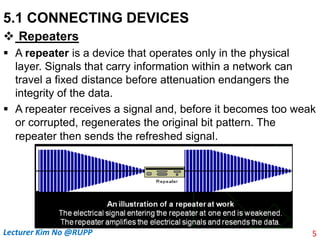
 A repeater is a device that operates only in the physical
layer. Signals that carry information within a network can
travel a fixed distance before attenuation endangers the
integrity of the data.
 A repeater receives a signal and, before it becomes too weak
or corrupted, regenerates the original bit pattern. The
repeater then sends the refreshed signal.
5
Lecturer Kim No @RUPP
5.1 CONNECTING DEVICES
 Repeaters
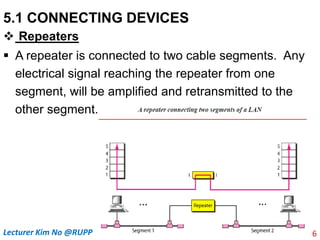
 A repeater is connected to two cable segments. Any
electrical signal reaching the repeater from one
segment, will be amplified and retransmitted to the
other segment.
6
Lecturer Kim No @RUPP
5.1 CONNECTING DEVICES
 Repeaters
 A repeater does not actually connect two LANs; it
connects two segments of the same LAN. The
segments connected are still part of one single LAN. A
repeater is not a device that can connect two LANs of
different protocols.
7
Lecturer Kim No @RUPP
5.1 CONNECTING DEVICES
 Repeaters
 A repeater can overcome the 10Base5 Ethernet length
restriction. In this standard, the length of the cable is
limited to 500 m. To extend this length, we divide the cable
into segments and install repeaters between segments.
Note that the whole network is still considered one LAN,
but the portions of the network separated by repeaters are
called segments. The repeater acts as a two-port node,
but operates only in the physical layer. When it receives
a frame from any of the ports, it regenerates and forwards
it tothe other port.
8
Lecturer Kim No @RUPP
5.1 CONNECTING DEVICES
 Active Hubs
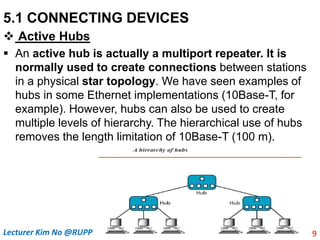
 An active hub is actually a multiport repeater. It is
normally used to create connections between stations
in a physical star topology. We have seen examples of
hubs in some Ethernet implementations (10Base-T, for
example). However, hubs can also be used to create
multiple levels of hierarchy. The hierarchical use of hubs
removes the length limitation of 10Base-T (100 m).
9
Lecturer Kim No @RUPP
5.1 CONNECTING DEVICES
 Bridges
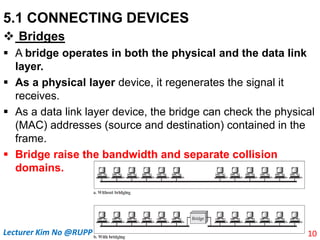
 A bridge operates in both the physical and the data link
layer.
 As a physical layer device, it regenerates the signal it
receives.
 As a data link layer device, the bridge can check the physical
(MAC) addresses (source and destination) contained in the
frame.
 Bridge raise the bandwidth and separate collision
domains.
10
Lecturer Kim No @RUPP
5.1 CONNECTING DEVICES
 Bridges
Filtering:
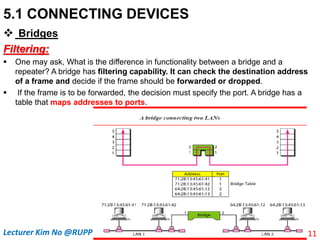
 One may ask, What is the difference in functionality between a bridge and a
repeater? A bridge has filtering capability. It can check the destination address
of a frame and decide if the frame should be forwarded or dropped.
 If the frame is to be forwarded, the decision must specify the port. A bridge has a
table that maps addresses to ports.
11
Lecturer Kim No @RUPP
5.1 CONNECTING DEVICES
 Bridges
Filtering:
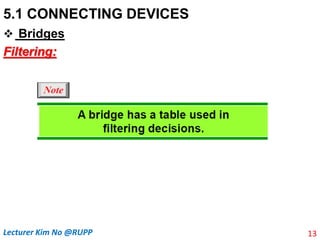
 Let us give an example. In Figure above, two LAN
segments are connected by a bridge. If a frame destined
for station 712B13456142 arrives at port 1, the bridge
consults its table to find the departing port. According to
its table, frames for 712B13456142 leave through port 1;
therefore, there is no need for forwarding, and the frame
is dropped.
 On the other hand, if a frame for 712B13456141 arrives at
port 2, the departing port is port 1 and the frame is
forwarded.
 In the first case, LAN 2 remains free of traffic; in the
second case, both LANs have traffic. 12
Lecturer Kim No @RUPP
5.1 CONNECTING DEVICES
 Bridges
Filtering:
13
Lecturer Kim No @RUPP
5.1 CONNECTING DEVICES
 Bridges
Dynamic Learning MAC addresses:
14
Lecturer Kim No @RUPP
5.1 CONNECTING DEVICES
 Bridges
Dynamic Learning MAC addresses:
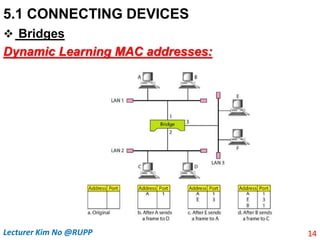
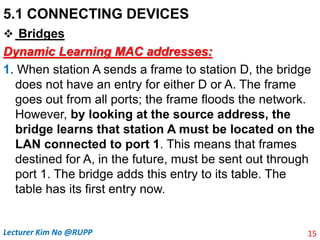
1. When station A sends a frame to station D, the bridge
does not have an entry for either D or A. The frame
goes out from all ports; the frame floods the network.
However, by looking at the source address, the
bridge learns that station A must be located on the
LAN connected to port 1. This means that frames
destined for A, in the future, must be sent out through
port 1. The bridge adds this entry to its table. The
table has its first entry now.
15
Lecturer Kim No @RUPP
5.1 CONNECTING DEVICES
 Bridges
Dynamic Learning MAC addresses:
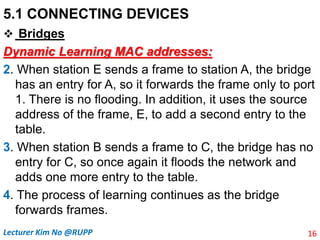
2. When station E sends a frame to station A, the bridge
has an entry for A, so it forwards the frame only to port
1. There is no flooding. In addition, it uses the source
address of the frame, E, to add a second entry to the
table.
3. When station B sends a frame to C, the bridge has no
entry for C, so once again it floods the network and
adds one more entry to the table.
4. The process of learning continues as the bridge
forwards frames.
16
Lecturer Kim No @RUPP
5.1 CONNECTING DEVICES
 Two-Layer Switches
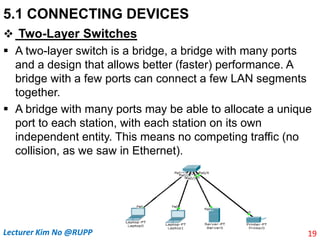
 A two-layer switch is a bridge, a bridge with many ports
and a design that allows better (faster) performance. A
bridge with a few ports can connect a few LAN segments
together.
 A bridge with many ports may be able to allocate a unique
port to each station, with each station on its own
independent entity. This means no competing traffic (no
collision, as we saw in Ethernet).
19
Lecturer Kim No @RUPP
5.1 CONNECTING DEVICES
 Two-Layer Switches
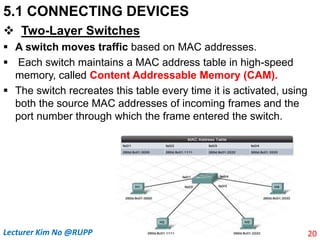
 A switch moves traffic based on MAC addresses.
 Each switch maintains a MAC address table in high-speed
memory, called Content Addressable Memory (CAM).
 The switch recreates this table every time it is activated, using
both the source MAC addresses of incoming frames and the
port number through which the frame entered the switch.
20
Lecturer Kim No @RUPP
5.1 CONNECTING DEVICES
 Two-Layer Switches
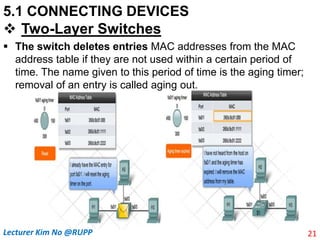
 The switch deletes entries MAC addresses from the MAC
address table if they are not used within a certain period of
time. The name given to this period of time is the aging timer;
removal of an entry is called aging out.
21
Lecturer Kim No @RUPP
5.1 CONNECTING DEVICES
 Two-Layer Switches
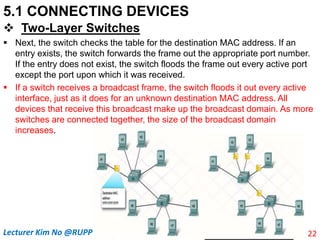
 Next, the switch checks the table for the destination MAC address. If an
entry exists, the switch forwards the frame out the appropriate port number.
If the entry does not exist, the switch floods the frame out every active port
except the port upon which it was received.
 If a switch receives a broadcast frame, the switch floods it out every active
interface, just as it does for an unknown destination MAC address. All
devices that receive this broadcast make up the broadcast domain. As more
switches are connected together, the size of the broadcast domain
increases.
22
Lecturer Kim No @RUPP
5.1 CONNECTING DEVICES
 Two-Layer Switches
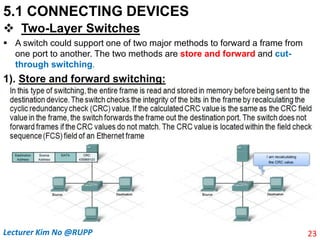
 A switch could support one of two major methods to forward a frame from
one port to another. The two methods are store and forward and cut-
through switching.
1). Store and forward switching:
23
Lecturer Kim No @RUPP
5.1 CONNECTING DEVICES
 Two-Layer Switches
2). Cut-through Switching:
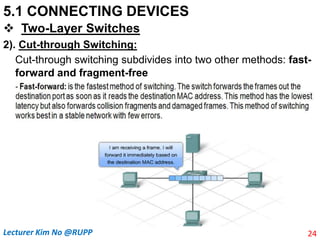
Cut-through switching subdivides into two other methods: fast-
forward and fragment-free
24
Lecturer Kim No @RUPP
5.1 CONNECTING DEVICES
 Two-Layer Switches
2). Cut-through Switching:
25
Lecturer Kim No @RUPP
5.1 CONNECTING DEVICES
 Two-Layer Switches
2). Cut-through Switching:
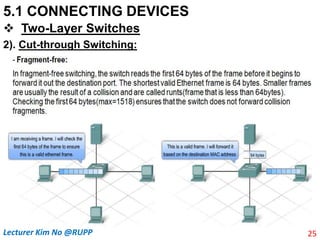
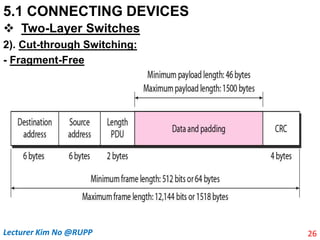
- Fragment-Free
26
Lecturer Kim No @RUPP
5.1 CONNECTING DEVICES
 Two-Layer Switches .
2). Cut-through Switching:
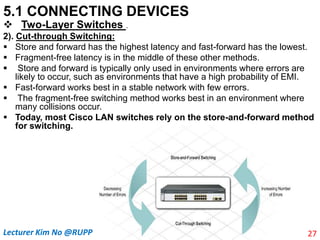
 Store and forward has the highest latency and fast-forward has the lowest.
 Fragment-free latency is in the middle of these other methods.
 Store and forward is typically only used in environments where errors are
likely to occur, such as environments that have a high probability of EMI.
 Fast-forward works best in a stable network with few errors.
 The fragment-free switching method works best in an environment where
many collisions occur.
 Today, most Cisco LAN switches rely on the store-and-forward method
for switching.
27
Lecturer Kim No @RUPP
5.1 CONNECTING DEVICES
 Two-Layer Switches
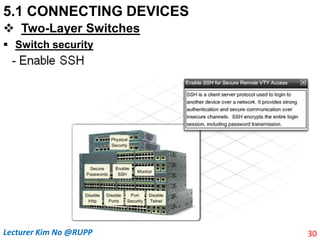
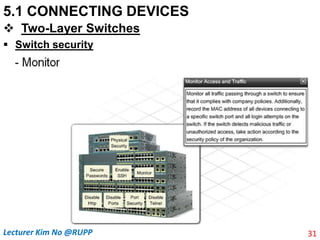
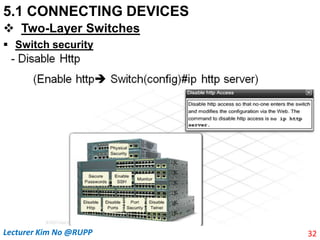
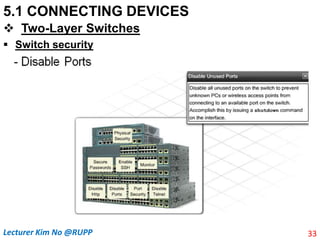
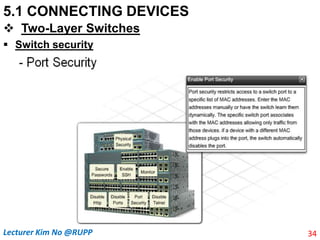
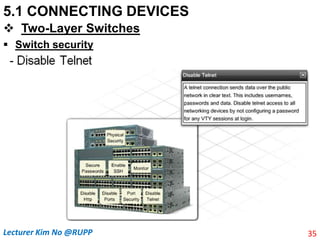
 Switch security
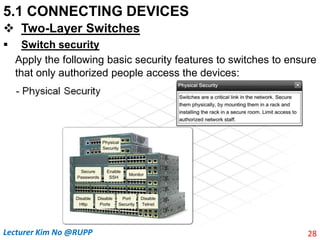
Apply the following basic security features to switches to ensure
that only authorized people access the devices:
28
Lecturer Kim No @RUPP
5.1 CONNECTING DEVICES
 Two-Layer Switches
 Switch security
29
Lecturer Kim No @RUPP
5.1 CONNECTING DEVICES
 Two-Layer Switches
 Switch security
30
Lecturer Kim No @RUPP
5.1 CONNECTING DEVICES
 Two-Layer Switches
 Switch security
31
Lecturer Kim No @RUPP
5.1 CONNECTING DEVICES
 Two-Layer Switches
 Switch security
32
Lecturer Kim No @RUPP
5.1 CONNECTING DEVICES
 Two-Layer Switches
 Switch security
33
Lecturer Kim No @RUPP
5.1 CONNECTING DEVICES
 Two-Layer Switches
 Switch security
34
Lecturer Kim No @RUPP
5.1 CONNECTING DEVICES
 Two-Layer Switches
 Switch security
35
Lecturer Kim No @RUPP
5.1 CONNECTING DEVICES
 Two-Layer Switches
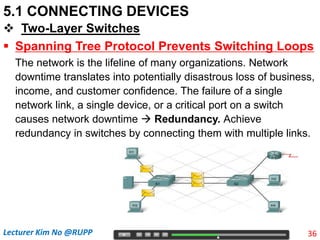
 Spanning Tree Protocol Prevents Switching Loops
The network is the lifeline of many organizations. Network
downtime translates into potentially disastrous loss of business,
income, and customer confidence. The failure of a single
network link, a single device, or a critical port on a switch
causes network downtime  Redundancy. Achieve
redundancy in switches by connecting them with multiple links.
36
Lecturer Kim No @RUPP
5.1 CONNECTING DEVICES
 Two-Layer Switches
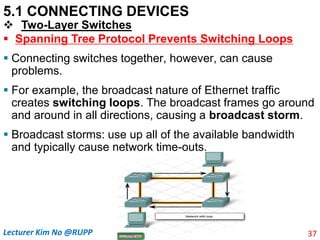
 Spanning Tree Protocol Prevents Switching Loops
 Connecting switches together, however, can cause
problems.
 For example, the broadcast nature of Ethernet traffic
creates switching loops. The broadcast frames go around
and around in all directions, causing a broadcast storm.
 Broadcast storms: use up all of the available bandwidth
and typically cause network time-outs.
37
Lecturer Kim No @RUPP
5.1 CONNECTING DEVICES
 Two-Layer Switches
 Spanning Tree Protocol Prevents Switching Loops
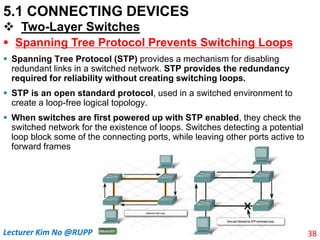
 Spanning Tree Protocol (STP) provides a mechanism for disabling
redundant links in a switched network. STP provides the redundancy
required for reliability without creating switching loops.
 STP is an open standard protocol, used in a switched environment to
create a loop-free logical topology.
 When switches are first powered up with STP enabled, they check the
switched network for the existence of loops. Switches detecting a potential
loop block some of the connecting ports, while leaving other ports active to
forward frames
38
Lecturer Kim No @RUPP
5.1 CONNECTING DEVICES
 Two-Layer Switches
 Spanning Tree Protocol Prevents Switching Loops
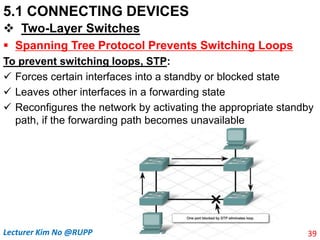
To prevent switching loops, STP:
 Forces certain interfaces into a standby or blocked state
 Leaves other interfaces in a forwarding state
 Reconfigures the network by activating the appropriate standby
path, if the forwarding path becomes unavailable
39
Lecturer Kim No @RUPP
5.1 CONNECTING DEVICES
 Two-Layer Switches
 Spanning Tree Protocol Prevents Switching Loops
 In STP terminology, the term bridge is frequently used to refer to a
switch. For example, the Root Bridge is the primary switch. The root
bridge send special messages to one another, called bridge protocol
data units (BPDUs), to update the spanning tree every 2 seconds.
The spanning tree is updated when there is a change in the system
such as a failure of a switch or an addition or deletion of switches.
 There is only one root bridge on each network, and it is elected based on
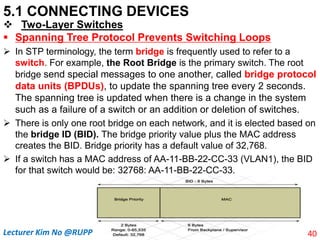
the bridge ID (BID). The bridge priority value plus the MAC address
creates the BID. Bridge priority has a default value of 32,768.
 If a switch has a MAC address of AA-11-BB-22-CC-33 (VLAN1), the BID
for that switch would be: 32768: AA-11-BB-22-CC-33.
40
Lecturer Kim No @RUPP
5.1 CONNECTING DEVICES
 Two-Layer Switches
 Spanning Tree Protocol Prevents Switching Loops
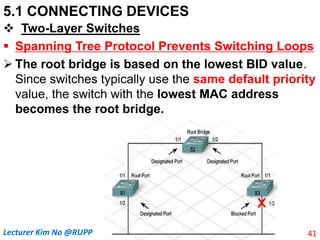
 The root bridge is based on the lowest BID value.
Since switches typically use the same default priority
value, the switch with the lowest MAC address
becomes the root bridge.
41
Lecturer Kim No @RUPP
5.1 CONNECTING DEVICES
 Two-Layer Switches
 Spanning Tree Protocol Prevents Switching Loops
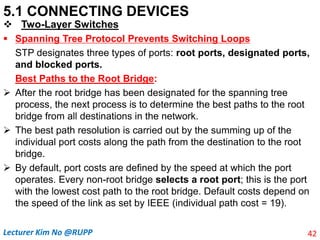
STP designates three types of ports: root ports, designated ports,
and blocked ports.
Best Paths to the Root Bridge:
 After the root bridge has been designated for the spanning tree
process, the next process is to determine the best paths to the root
bridge from all destinations in the network.
 The best path resolution is carried out by the summing up of the
individual port costs along the path from the destination to the root
bridge.
 By default, port costs are defined by the speed at which the port
operates. Every non-root bridge selects a root port; this is the port
with the lowest cost path to the root bridge. Default costs depend on
the speed of the link as set by IEEE (individual path cost = 19).
42
Lecturer Kim No @RUPP
5.1 CONNECTING DEVICES
 Two-Layer Switches
 Spanning Tree Protocol Prevents Switching Loops
Best Paths to the Root Bridge:
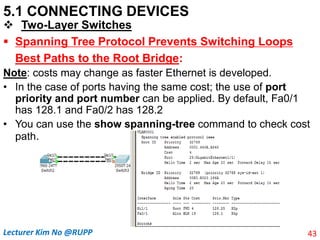
Note: costs may change as faster Ethernet is developed.
• In the case of ports having the same cost; the use of port
priority and port number can be applied. By default, Fa0/1
has 128.1 and Fa0/2 has 128.2
• You can use the show spanning-tree command to check cost
path.
43
Lecturer Kim No @RUPP
5.1 CONNECTING DEVICES
 Two-Layer Switches
 Spanning Tree Protocol Prevents Switching Loops
Best Paths to the Root Bridge:
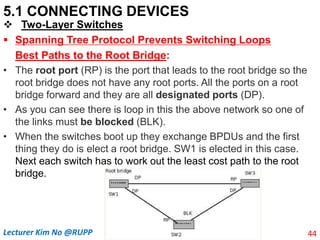
• The root port (RP) is the port that leads to the root bridge so the
root bridge does not have any root ports. All the ports on a root
bridge forward and they are all designated ports (DP).
• As you can see there is loop in this the above network so one of
the links must be blocked (BLK).
• When the switches boot up they exchange BPDUs and the first
thing they do is elect a root bridge. SW1 is elected in this case.
Next each switch has to work out the least cost path to the root
bridge.
44
Lecturer Kim No @RUPP
5.1 CONNECTING DEVICES
 Two-Layer Switches
 Spanning Tree Protocol Prevents Switching Loops
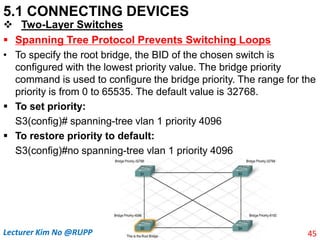
• To specify the root bridge, the BID of the chosen switch is
configured with the lowest priority value. The bridge priority
command is used to configure the bridge priority. The range for the
priority is from 0 to 65535. The default value is 32768.
 To set priority:
S3(config)# spanning-tree vlan 1 priority 4096
 To restore priority to default:
S3(config)#no spanning-tree vlan 1 priority 4096
45
Lecturer Kim No @RUPP
5.1 CONNECTING DEVICES
 Two-Layer Switches
 Spanning Tree Protocol Prevents Switching Loops
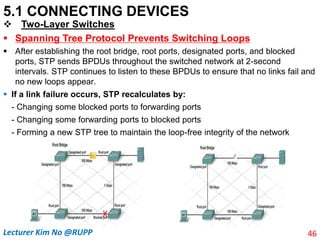
 After establishing the root bridge, root ports, designated ports, and blocked
ports, STP sends BPDUs throughout the switched network at 2-second
intervals. STP continues to listen to these BPDUs to ensure that no links fail and
no new loops appear.
 If a link failure occurs, STP recalculates by:
- Changing some blocked ports to forwarding ports
- Changing some forwarding ports to blocked ports
- Forming a new STP tree to maintain the loop-free integrity of the network
46
Lecturer Kim No @RUPP
5.1 CONNECTING DEVICES
 Two-Layer Switches
 Spanning Tree Protocol Prevents Switching Loops
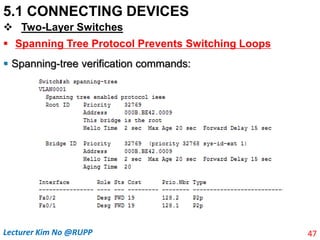
 Spanning-tree verification commands:
47
Lecturer Kim No @RUPP
5.1 CONNECTING DEVICES
 Routers
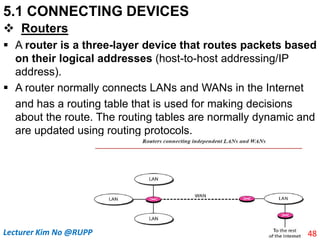
 A router is a three-layer device that routes packets based
on their logical addresses (host-to-host addressing/IP
address).
 A router normally connects LANs and WANs in the Internet
and has a routing table that is used for making decisions
about the route. The routing tables are normally dynamic and
are updated using routing protocols.
48
Lecturer Kim No @RUPP
5.1 CONNECTING DEVICES
 Routers
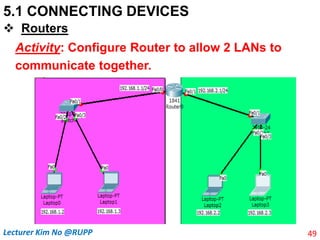
Activity: Configure Router to allow 2 LANs to
communicate together.
49
Lecturer Kim No @RUPP
5.1 CONNECTING DEVICES
 Routers
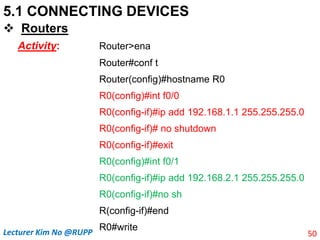
Activity: Router>ena
Router#conf t
Router(config)#hostname R0
R0(config)#int f0/0
R0(config-if)#ip add 192.168.1.1 255.255.255.0
R0(config-if)# no shutdown
R0(config-if)#exit
R0(config)#int f0/1
R0(config-if)#ip add 192.168.2.1 255.255.255.0
R0(config-if)#no sh
R(config-if)#end
R0#write
50
Lecturer Kim No @RUPP
5.1 CONNECTING DEVICES
 Routers
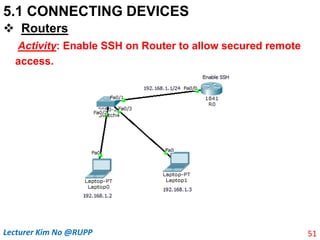
Activity: Enable SSH on Router to allow secured remote
access.
51
Lecturer Kim No @RUPP
5.1 CONNECTING DEVICES
 Routers
Activity:
Router>ena
Router#conf t
Router(config)#hostname R0
R0(config)#line console 0
R0(config-line)#password 12345
R0(config-line)#login
R0(config-line)#exit
R0(config)#ena secret 12345
R0(config)#int f0/0
R0(config-if)#ip add 192.168.1.1
255.255.255.0
R0(config-if)#no sh
R0(config-if)exit
R0(config)! Note Enable SSH
R0(config)#ip domain-name demo.com
R0(config)#crypto key generate rsa
The name for the keys will be:
R0.demo.comChoose the size of the key
modulus in the range of 360 to 2048 for
your General Purpose Keys. Choosing a
key modulus greater than 512 may take a
few minutes.
How many bits in the modulus [512]: 2048
R0(config)#username chumno pass 12345
R0(config)#line vty 04
R0(config-line)#login local
R0(config-line)#transport input ssh
R0(config-line)#end
R0#write
52
Lecturer Kim No @RUPP
5.1 CONNECTING DEVICES
 Routers
Activity:
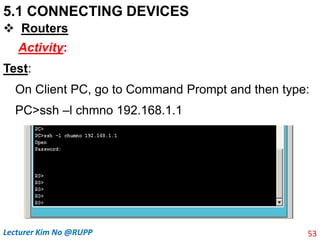
Test:
On Client PC, go to Command Prompt and then type:
PC>ssh –l chmno 192.168.1.1
53
Lecturer Kim No @RUPP
54
Lecturer Kim No @RUPP

Chapter V-Connecting LANs, Backbone Networks, and Virtual LANs.pptx

  • 1.
    Chapter V: ConnectingLANs, BackboneNetworks, and Virtual LANs Introduction  LANs do not normally operate in isolation. They are connected to one another or to the Internet. To connect LANs, or segments of LANs, we use connecting devices.  Connecting devices can operate in different layers of the Internet model.  After discussing some connecting devices, we show how they are used to create backbone networks. Finally, we discuss virtual local area networks (VLANs). 1 Lecturer Kim No @RUPP
  • 2.
    5.1 CONNECTING DEVICES Inthis section, we divide connecting devices into five different categories based on the layer in which they operate in a network. 2 Lecturer Kim No @RUPP
  • 3.
    5.1 CONNECTING DEVICES 1.Those which operate below the physical layer such as a passive hub. 2. Those which operate at the physical layer (a repeater or an active hub). 3. Those which operate at the physical and data link layers (a bridge or a two-layer switch). 4. Those which operate at the physical, data link, and network layers (a router or a three-layer switch). 5. Those which can operate at all five layers (a gateway). 3 Lecturer Kim No @RUPP
  • 4.
    5.1 CONNECTING DEVICES Passive Hubs  A passive hub is a central connecting device in a network that acts as a point contact for wires from numerous stations in a star topology.  Passive hubs do not amplify the electrical signal of incoming packets before broadcasting them out to the network.  This type of a hub is part of the media; its location in the Internet model is below the physical layer. 4 Lecturer Kim No @RUPP
  • 5.
    5.1 CONNECTING DEVICES Repeaters  A repeater is a device that operates only in the physical layer. Signals that carry information within a network can travel a fixed distance before attenuation endangers the integrity of the data.  A repeater receives a signal and, before it becomes too weak or corrupted, regenerates the original bit pattern. The repeater then sends the refreshed signal. 5 Lecturer Kim No @RUPP
  • 6.
    5.1 CONNECTING DEVICES Repeaters  A repeater is connected to two cable segments. Any electrical signal reaching the repeater from one segment, will be amplified and retransmitted to the other segment. 6 Lecturer Kim No @RUPP
  • 7.
    5.1 CONNECTING DEVICES Repeaters  A repeater does not actually connect two LANs; it connects two segments of the same LAN. The segments connected are still part of one single LAN. A repeater is not a device that can connect two LANs of different protocols. 7 Lecturer Kim No @RUPP
  • 8.
    5.1 CONNECTING DEVICES Repeaters  A repeater can overcome the 10Base5 Ethernet length restriction. In this standard, the length of the cable is limited to 500 m. To extend this length, we divide the cable into segments and install repeaters between segments. Note that the whole network is still considered one LAN, but the portions of the network separated by repeaters are called segments. The repeater acts as a two-port node, but operates only in the physical layer. When it receives a frame from any of the ports, it regenerates and forwards it tothe other port. 8 Lecturer Kim No @RUPP
  • 9.
    5.1 CONNECTING DEVICES Active Hubs  An active hub is actually a multiport repeater. It is normally used to create connections between stations in a physical star topology. We have seen examples of hubs in some Ethernet implementations (10Base-T, for example). However, hubs can also be used to create multiple levels of hierarchy. The hierarchical use of hubs removes the length limitation of 10Base-T (100 m). 9 Lecturer Kim No @RUPP
  • 10.
    5.1 CONNECTING DEVICES Bridges  A bridge operates in both the physical and the data link layer.  As a physical layer device, it regenerates the signal it receives.  As a data link layer device, the bridge can check the physical (MAC) addresses (source and destination) contained in the frame.  Bridge raise the bandwidth and separate collision domains. 10 Lecturer Kim No @RUPP
  • 11.
    5.1 CONNECTING DEVICES Bridges Filtering:  One may ask, What is the difference in functionality between a bridge and a repeater? A bridge has filtering capability. It can check the destination address of a frame and decide if the frame should be forwarded or dropped.  If the frame is to be forwarded, the decision must specify the port. A bridge has a table that maps addresses to ports. 11 Lecturer Kim No @RUPP
  • 12.
    5.1 CONNECTING DEVICES Bridges Filtering:  Let us give an example. In Figure above, two LAN segments are connected by a bridge. If a frame destined for station 712B13456142 arrives at port 1, the bridge consults its table to find the departing port. According to its table, frames for 712B13456142 leave through port 1; therefore, there is no need for forwarding, and the frame is dropped.  On the other hand, if a frame for 712B13456141 arrives at port 2, the departing port is port 1 and the frame is forwarded.  In the first case, LAN 2 remains free of traffic; in the second case, both LANs have traffic. 12 Lecturer Kim No @RUPP
  • 13.
    5.1 CONNECTING DEVICES Bridges Filtering: 13 Lecturer Kim No @RUPP
  • 14.
    5.1 CONNECTING DEVICES Bridges Dynamic Learning MAC addresses: 14 Lecturer Kim No @RUPP
  • 15.
    5.1 CONNECTING DEVICES Bridges Dynamic Learning MAC addresses: 1. When station A sends a frame to station D, the bridge does not have an entry for either D or A. The frame goes out from all ports; the frame floods the network. However, by looking at the source address, the bridge learns that station A must be located on the LAN connected to port 1. This means that frames destined for A, in the future, must be sent out through port 1. The bridge adds this entry to its table. The table has its first entry now. 15 Lecturer Kim No @RUPP
  • 16.
    5.1 CONNECTING DEVICES Bridges Dynamic Learning MAC addresses: 2. When station E sends a frame to station A, the bridge has an entry for A, so it forwards the frame only to port 1. There is no flooding. In addition, it uses the source address of the frame, E, to add a second entry to the table. 3. When station B sends a frame to C, the bridge has no entry for C, so once again it floods the network and adds one more entry to the table. 4. The process of learning continues as the bridge forwards frames. 16 Lecturer Kim No @RUPP
  • 17.
    5.1 CONNECTING DEVICES Two-Layer Switches  A two-layer switch is a bridge, a bridge with many ports and a design that allows better (faster) performance. A bridge with a few ports can connect a few LAN segments together.  A bridge with many ports may be able to allocate a unique port to each station, with each station on its own independent entity. This means no competing traffic (no collision, as we saw in Ethernet). 19 Lecturer Kim No @RUPP
  • 18.
    5.1 CONNECTING DEVICES Two-Layer Switches  A switch moves traffic based on MAC addresses.  Each switch maintains a MAC address table in high-speed memory, called Content Addressable Memory (CAM).  The switch recreates this table every time it is activated, using both the source MAC addresses of incoming frames and the port number through which the frame entered the switch. 20 Lecturer Kim No @RUPP
  • 19.
    5.1 CONNECTING DEVICES Two-Layer Switches  The switch deletes entries MAC addresses from the MAC address table if they are not used within a certain period of time. The name given to this period of time is the aging timer; removal of an entry is called aging out. 21 Lecturer Kim No @RUPP
  • 20.
    5.1 CONNECTING DEVICES Two-Layer Switches  Next, the switch checks the table for the destination MAC address. If an entry exists, the switch forwards the frame out the appropriate port number. If the entry does not exist, the switch floods the frame out every active port except the port upon which it was received.  If a switch receives a broadcast frame, the switch floods it out every active interface, just as it does for an unknown destination MAC address. All devices that receive this broadcast make up the broadcast domain. As more switches are connected together, the size of the broadcast domain increases. 22 Lecturer Kim No @RUPP
  • 21.
    5.1 CONNECTING DEVICES Two-Layer Switches  A switch could support one of two major methods to forward a frame from one port to another. The two methods are store and forward and cut- through switching. 1). Store and forward switching: 23 Lecturer Kim No @RUPP
  • 22.
    5.1 CONNECTING DEVICES Two-Layer Switches 2). Cut-through Switching: Cut-through switching subdivides into two other methods: fast- forward and fragment-free 24 Lecturer Kim No @RUPP
  • 23.
    5.1 CONNECTING DEVICES Two-Layer Switches 2). Cut-through Switching: 25 Lecturer Kim No @RUPP
  • 24.
    5.1 CONNECTING DEVICES Two-Layer Switches 2). Cut-through Switching: - Fragment-Free 26 Lecturer Kim No @RUPP
  • 25.
    5.1 CONNECTING DEVICES Two-Layer Switches . 2). Cut-through Switching:  Store and forward has the highest latency and fast-forward has the lowest.  Fragment-free latency is in the middle of these other methods.  Store and forward is typically only used in environments where errors are likely to occur, such as environments that have a high probability of EMI.  Fast-forward works best in a stable network with few errors.  The fragment-free switching method works best in an environment where many collisions occur.  Today, most Cisco LAN switches rely on the store-and-forward method for switching. 27 Lecturer Kim No @RUPP
  • 26.
    5.1 CONNECTING DEVICES Two-Layer Switches  Switch security Apply the following basic security features to switches to ensure that only authorized people access the devices: 28 Lecturer Kim No @RUPP
  • 27.
    5.1 CONNECTING DEVICES Two-Layer Switches  Switch security 29 Lecturer Kim No @RUPP
  • 28.
    5.1 CONNECTING DEVICES Two-Layer Switches  Switch security 30 Lecturer Kim No @RUPP
  • 29.
    5.1 CONNECTING DEVICES Two-Layer Switches  Switch security 31 Lecturer Kim No @RUPP
  • 30.
    5.1 CONNECTING DEVICES Two-Layer Switches  Switch security 32 Lecturer Kim No @RUPP
  • 31.
    5.1 CONNECTING DEVICES Two-Layer Switches  Switch security 33 Lecturer Kim No @RUPP
  • 32.
    5.1 CONNECTING DEVICES Two-Layer Switches  Switch security 34 Lecturer Kim No @RUPP
  • 33.
    5.1 CONNECTING DEVICES Two-Layer Switches  Switch security 35 Lecturer Kim No @RUPP
  • 34.
    5.1 CONNECTING DEVICES Two-Layer Switches  Spanning Tree Protocol Prevents Switching Loops The network is the lifeline of many organizations. Network downtime translates into potentially disastrous loss of business, income, and customer confidence. The failure of a single network link, a single device, or a critical port on a switch causes network downtime  Redundancy. Achieve redundancy in switches by connecting them with multiple links. 36 Lecturer Kim No @RUPP
  • 35.
    5.1 CONNECTING DEVICES Two-Layer Switches  Spanning Tree Protocol Prevents Switching Loops  Connecting switches together, however, can cause problems.  For example, the broadcast nature of Ethernet traffic creates switching loops. The broadcast frames go around and around in all directions, causing a broadcast storm.  Broadcast storms: use up all of the available bandwidth and typically cause network time-outs. 37 Lecturer Kim No @RUPP
  • 36.
    5.1 CONNECTING DEVICES Two-Layer Switches  Spanning Tree Protocol Prevents Switching Loops  Spanning Tree Protocol (STP) provides a mechanism for disabling redundant links in a switched network. STP provides the redundancy required for reliability without creating switching loops.  STP is an open standard protocol, used in a switched environment to create a loop-free logical topology.  When switches are first powered up with STP enabled, they check the switched network for the existence of loops. Switches detecting a potential loop block some of the connecting ports, while leaving other ports active to forward frames 38 Lecturer Kim No @RUPP
  • 37.
    5.1 CONNECTING DEVICES Two-Layer Switches  Spanning Tree Protocol Prevents Switching Loops To prevent switching loops, STP:  Forces certain interfaces into a standby or blocked state  Leaves other interfaces in a forwarding state  Reconfigures the network by activating the appropriate standby path, if the forwarding path becomes unavailable 39 Lecturer Kim No @RUPP
  • 38.
    5.1 CONNECTING DEVICES Two-Layer Switches  Spanning Tree Protocol Prevents Switching Loops  In STP terminology, the term bridge is frequently used to refer to a switch. For example, the Root Bridge is the primary switch. The root bridge send special messages to one another, called bridge protocol data units (BPDUs), to update the spanning tree every 2 seconds. The spanning tree is updated when there is a change in the system such as a failure of a switch or an addition or deletion of switches.  There is only one root bridge on each network, and it is elected based on the bridge ID (BID). The bridge priority value plus the MAC address creates the BID. Bridge priority has a default value of 32,768.  If a switch has a MAC address of AA-11-BB-22-CC-33 (VLAN1), the BID for that switch would be: 32768: AA-11-BB-22-CC-33. 40 Lecturer Kim No @RUPP
  • 39.
    5.1 CONNECTING DEVICES Two-Layer Switches  Spanning Tree Protocol Prevents Switching Loops  The root bridge is based on the lowest BID value. Since switches typically use the same default priority value, the switch with the lowest MAC address becomes the root bridge. 41 Lecturer Kim No @RUPP
  • 40.
    5.1 CONNECTING DEVICES Two-Layer Switches  Spanning Tree Protocol Prevents Switching Loops STP designates three types of ports: root ports, designated ports, and blocked ports. Best Paths to the Root Bridge:  After the root bridge has been designated for the spanning tree process, the next process is to determine the best paths to the root bridge from all destinations in the network.  The best path resolution is carried out by the summing up of the individual port costs along the path from the destination to the root bridge.  By default, port costs are defined by the speed at which the port operates. Every non-root bridge selects a root port; this is the port with the lowest cost path to the root bridge. Default costs depend on the speed of the link as set by IEEE (individual path cost = 19). 42 Lecturer Kim No @RUPP
  • 41.
    5.1 CONNECTING DEVICES Two-Layer Switches  Spanning Tree Protocol Prevents Switching Loops Best Paths to the Root Bridge: Note: costs may change as faster Ethernet is developed. • In the case of ports having the same cost; the use of port priority and port number can be applied. By default, Fa0/1 has 128.1 and Fa0/2 has 128.2 • You can use the show spanning-tree command to check cost path. 43 Lecturer Kim No @RUPP
  • 42.
    5.1 CONNECTING DEVICES Two-Layer Switches  Spanning Tree Protocol Prevents Switching Loops Best Paths to the Root Bridge: • The root port (RP) is the port that leads to the root bridge so the root bridge does not have any root ports. All the ports on a root bridge forward and they are all designated ports (DP). • As you can see there is loop in this the above network so one of the links must be blocked (BLK). • When the switches boot up they exchange BPDUs and the first thing they do is elect a root bridge. SW1 is elected in this case. Next each switch has to work out the least cost path to the root bridge. 44 Lecturer Kim No @RUPP
  • 43.
    5.1 CONNECTING DEVICES Two-Layer Switches  Spanning Tree Protocol Prevents Switching Loops • To specify the root bridge, the BID of the chosen switch is configured with the lowest priority value. The bridge priority command is used to configure the bridge priority. The range for the priority is from 0 to 65535. The default value is 32768.  To set priority: S3(config)# spanning-tree vlan 1 priority 4096  To restore priority to default: S3(config)#no spanning-tree vlan 1 priority 4096 45 Lecturer Kim No @RUPP
  • 44.
    5.1 CONNECTING DEVICES Two-Layer Switches  Spanning Tree Protocol Prevents Switching Loops  After establishing the root bridge, root ports, designated ports, and blocked ports, STP sends BPDUs throughout the switched network at 2-second intervals. STP continues to listen to these BPDUs to ensure that no links fail and no new loops appear.  If a link failure occurs, STP recalculates by: - Changing some blocked ports to forwarding ports - Changing some forwarding ports to blocked ports - Forming a new STP tree to maintain the loop-free integrity of the network 46 Lecturer Kim No @RUPP
  • 45.
    5.1 CONNECTING DEVICES Two-Layer Switches  Spanning Tree Protocol Prevents Switching Loops  Spanning-tree verification commands: 47 Lecturer Kim No @RUPP
  • 46.
    5.1 CONNECTING DEVICES Routers  A router is a three-layer device that routes packets based on their logical addresses (host-to-host addressing/IP address).  A router normally connects LANs and WANs in the Internet and has a routing table that is used for making decisions about the route. The routing tables are normally dynamic and are updated using routing protocols. 48 Lecturer Kim No @RUPP
  • 47.
    5.1 CONNECTING DEVICES Routers Activity: Configure Router to allow 2 LANs to communicate together. 49 Lecturer Kim No @RUPP
  • 48.
    5.1 CONNECTING DEVICES Routers Activity: Router>ena Router#conf t Router(config)#hostname R0 R0(config)#int f0/0 R0(config-if)#ip add 192.168.1.1 255.255.255.0 R0(config-if)# no shutdown R0(config-if)#exit R0(config)#int f0/1 R0(config-if)#ip add 192.168.2.1 255.255.255.0 R0(config-if)#no sh R(config-if)#end R0#write 50 Lecturer Kim No @RUPP
  • 49.
    5.1 CONNECTING DEVICES Routers Activity: Enable SSH on Router to allow secured remote access. 51 Lecturer Kim No @RUPP
  • 50.
    5.1 CONNECTING DEVICES Routers Activity: Router>ena Router#conf t Router(config)#hostname R0 R0(config)#line console 0 R0(config-line)#password 12345 R0(config-line)#login R0(config-line)#exit R0(config)#ena secret 12345 R0(config)#int f0/0 R0(config-if)#ip add 192.168.1.1 255.255.255.0 R0(config-if)#no sh R0(config-if)exit R0(config)! Note Enable SSH R0(config)#ip domain-name demo.com R0(config)#crypto key generate rsa The name for the keys will be: R0.demo.comChoose the size of the key modulus in the range of 360 to 2048 for your General Purpose Keys. Choosing a key modulus greater than 512 may take a few minutes. How many bits in the modulus [512]: 2048 R0(config)#username chumno pass 12345 R0(config)#line vty 04 R0(config-line)#login local R0(config-line)#transport input ssh R0(config-line)#end R0#write 52 Lecturer Kim No @RUPP
  • 51.
    5.1 CONNECTING DEVICES Routers Activity: Test: On Client PC, go to Command Prompt and then type: PC>ssh –l chmno 192.168.1.1 53 Lecturer Kim No @RUPP
  • 52.

Editor's Notes

  • #2 In this chapter, we discuss only those that operate in the physical and data link layers
  • #5 It does not provide any regeneration or processing of signals.
  • #10 Active hubs, on the other hand, do perform this amplification, as does a different type of dedicated network device called a repeater.
  • #19 Station A sends a frame to station D. The tables of both bridges are empty. Both forward the frame and update their tables based on the source address A. To solve the looping problem, the IEEE specification requires that bridges use the spanning tree algorithm to create a loopless topology.
  • #37 Redundant links in a switched network reduce congestion and support high availability and load balancing.
  • #41 The bridges send special messages to one another, called bridge protocol data units (BPDUs), to update the spanning tree. The spanning tree is updated when there is a change in the system such as a failure of a bridge or an addition or deletion of bridges.
  • #52 R0(config)#crypto key generate rsa The name for the keys will be: R0.demo.com Choose the size of the key modulus in the range of 360 to 2048 for your General Purpose Keys. Choosing a key modulus greater than 512 may take a few minutes. How many bits in the modulus [512]:
  • #53 RSA: Rivest; Shamir; Adleman: is the most popular public key algorithm and is named for creators.
  • #54 RSA: Rivest; Shamir; Adleman: is the most popular public key algorithm and is named for creators.