DATA STRUCTURE
Chapter 7: Queue
Prepared & Presented by
Mr. Mahmoud R. Alfarra
2011-2012
College of Science & Technology
Dep. Of Computer Science & IT
BCs of Information Technology
http://mfarra.cst.ps
Out Line
 What is Queue data structure?
 EnQueue operation
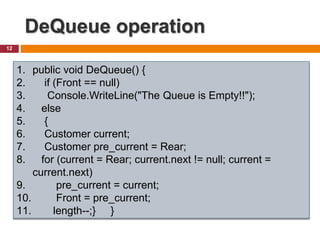
 DeQueue operation
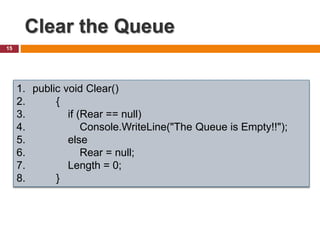
 Clear the Queue
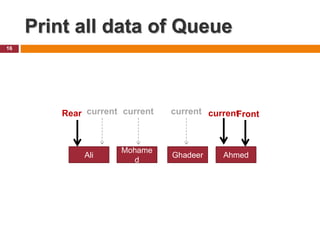
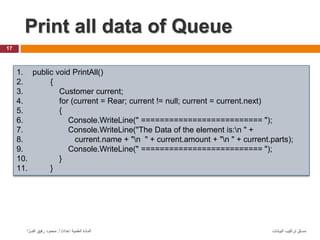
 Print all data of Queue
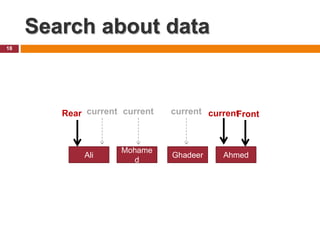
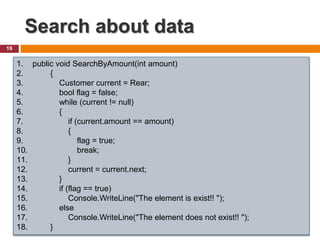
 Search about data
 Queue Class
 Types of Queue
2
What is Queue data
structure?
 Queues are used to prioritize operating system
processes and to simulate events in the real
world, such as teller lines at banks and the
operation of elevators in buildings.
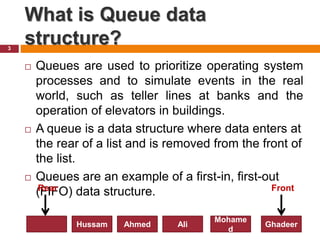
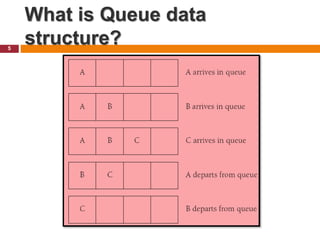
 A queue is a data structure where data enters at
the rear of a list and is removed from the front of
the list.
 Queues are an example of a first-in, first-out
(FIFO) data structure.
3
Mohame
d
Ghadeer
Ali
Ahmed
Hussam
Rear Front
Queue Operations
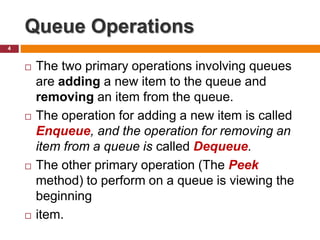
 The two primary operations involving queues
are adding a new item to the queue and
removing an item from the queue.
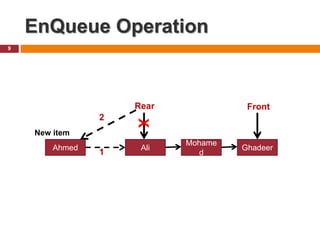
 The operation for adding a new item is called
Enqueue, and the operation for removing an
item from a queue is called Dequeue.
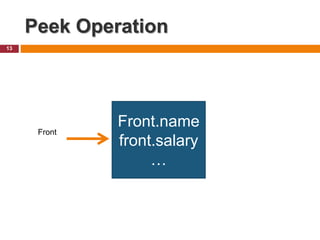
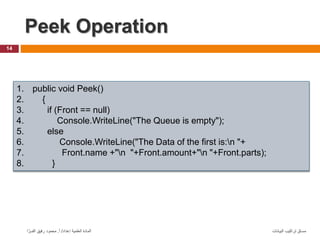
 The other primary operation (The Peek
method) to perform on a queue is viewing the
beginning
 item.
4
What is Queue data
structure?
5
Element of Queue
6
‫البيانات‬ ‫تراكيب‬ ‫مساق‬
‫إعداد‬ ‫العلمية‬ ‫المادة‬
/
‫أ‬
.
‫ا‬ َّ‫الفــر‬ ‫رفيق‬ ‫محمود‬
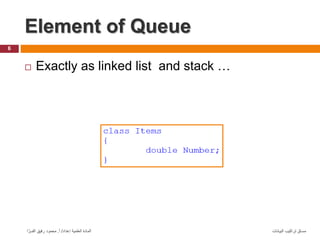
 Exactly as linked list and stack …
1- Element of Queue
(customer)
7
‫البيانات‬ ‫تراكيب‬ ‫مساق‬
‫إعداد‬ ‫العلمية‬ ‫المادة‬
/
‫أ‬
.
‫ا‬ َّ‫الفــر‬ ‫رفيق‬ ‫محمود‬
1. class Customer {
2. public int parts;
3. public int amount;
4. public String name;
5. public Customer next;
6. public Customer() {
7. parts = 0;
8. amount = 0;
9. name = "no name"; }
10. public Customer(int parts, int amount, String name) {
11. this.parts = parts;
12. this.amount = amount;
13. this.name = name; } }
2- Class Queue of customer
8
‫البيانات‬ ‫تراكيب‬ ‫مساق‬
‫إعداد‬ ‫العلمية‬ ‫المادة‬
/
‫أ‬
.
‫ا‬ َّ‫الفــر‬ ‫رفيق‬ ‫محمود‬
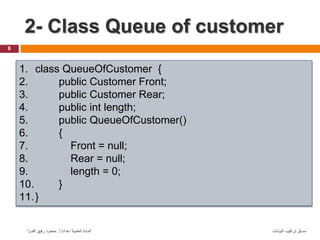
1. class QueueOfCustomer {
2. public Customer Front;
3. public Customer Rear;
4. public int length;
5. public QueueOfCustomer()
6. {
7. Front = null;
8. Rear = null;
9. length = 0;
10. }
11.}
EnQueue Operation
9
Mohame
d
Ghadeer
Ali
Rear Front
Ahmed
New item
1
2
X
EnQueue Operation
10
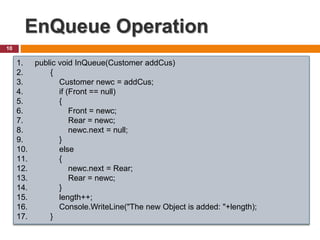
1. public void InQueue(Customer addCus)
2. {
3. Customer newc = addCus;
4. if (Front == null)
5. {
6. Front = newc;
7. Rear = newc;
8. newc.next = null;
9. }
10. else
11. {
12. newc.next = Rear;
13. Rear = newc;
14. }
15. length++;
16. Console.WriteLine("The new Object is added: "+length);
17. }
DeQueue operation
11
Mohame
d
Ghadeer
Ali
Rear Front
Ahmad
current
DeQueue operation
12
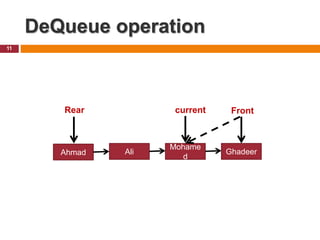
1. public void DeQueue() {
2. if (Front == null)
3. Console.WriteLine("The Queue is Empty!!");
4. else
5. {
6. Customer current;
7. Customer pre_current = Rear;
8. for (current = Rear; current.next != null; current =
current.next)
9. pre_current = current;
10. Front = pre_current;
11. length--;} }
Peek Operation
13
Front.name
front.salary
…
Front
Peek Operation
14
‫البيانات‬ ‫تراكيب‬ ‫مساق‬
‫إعداد‬ ‫العلمية‬ ‫المادة‬
/
‫أ‬
.
‫ا‬ َّ‫الفــر‬ ‫رفيق‬ ‫محمود‬
1. public void Peek()
2. {
3. if (Front == null)
4. Console.WriteLine("The Queue is empty");
5. else
6. Console.WriteLine("The Data of the first is:n "+
7. Front.name +"n "+Front.amount+"n "+Front.parts);
8. }
Clear the Queue
15
1. public void Clear()
2. {
3. if (Rear == null)
4. Console.WriteLine("The Queue is Empty!!");
5. else
6. Rear = null;
7. Length = 0;
8. }
Print all data of Queue
16
Mohame
d
Ghadeer
Ali
Rear Front
Ahmed
current current current current
Print all data of Queue
17
‫البيانات‬ ‫تراكيب‬ ‫مساق‬
‫إعداد‬ ‫العلمية‬ ‫المادة‬
/
‫أ‬
.
‫ا‬ َّ‫الفــر‬ ‫رفيق‬ ‫محمود‬
1. public void PrintAll()
2. {
3. Customer current;
4. for (current = Rear; current != null; current = current.next)
5. {
6. Console.WriteLine(" ========================== ");
7. Console.WriteLine("The Data of the element is:n " +
8. current.name + "n " + current.amount + "n " + current.parts);
9. Console.WriteLine(" ========================== ");
10. }
11. }
Search about data
18
Mohame
d
Ghadeer
Ali
Rear Front
Ahmed
current current current current
Search about data
19
‫البيانات‬ ‫تراكيب‬ ‫مساق‬
‫إعداد‬ ‫العلمية‬ ‫المادة‬
/
‫أ‬
.
‫ا‬ َّ‫الفــر‬ ‫رفيق‬ ‫محمود‬
1. public void SearchByAmount(int amount)
2. {
3. Customer current = Rear;
4. bool flag = false;
5. while (current != null)
6. {
7. if (current.amount == amount)
8. {
9. flag = true;
10. break;
11. }
12. current = current.next;
13. }
14. if (flag == true)
15. Console.WriteLine("The element is exist!! ");
16. else
17. Console.WriteLine("The element does not exist!! ");
18. }
Queue Class
 Class of Queue available in collection space of
.Net.
20
Practice : develop a full
application using class of Queue
Types of Queue
 Linear queue
 Circular queue
 Double ended queue
Thank You …
22
Remember that: question is the key of knowledge
Ahl Eljanna 

َ
‫ه‬َ‫ن‬َ
‫و‬ ٍ
‫َّات‬‫ن‬َ
‫ج‬ ِ
‫ِف‬ َ
‫ني‬ِ
‫َّق‬‫ت‬ُ
‫ْم‬‫ل‬‫ا‬ َّ
‫ن‬ِ‫إ‬
ٍ
‫ر‬
)::(
ِ
‫ع‬ ٍ
‫ق‬ْ
‫د‬ِ
‫ص‬ ِ
‫د‬َ
‫ع‬ْ
‫ق‬َ
‫م‬ ِ
‫ِف‬
َ
‫د‬ْ‫ن‬
ٍ
‫ر‬ِ
‫د‬َ‫ت‬ْ
‫ق‬ُ
‫م‬ ٍ
‫يك‬ِ‫ل‬َ
‫م‬
)::(
23

Chapter 7: Queue data structure

  • 1.
    DATA STRUCTURE Chapter 7:Queue Prepared & Presented by Mr. Mahmoud R. Alfarra 2011-2012 College of Science & Technology Dep. Of Computer Science & IT BCs of Information Technology http://mfarra.cst.ps
  • 2.
    Out Line  Whatis Queue data structure?  EnQueue operation  DeQueue operation  Clear the Queue  Print all data of Queue  Search about data  Queue Class  Types of Queue 2
  • 3.
    What is Queuedata structure?  Queues are used to prioritize operating system processes and to simulate events in the real world, such as teller lines at banks and the operation of elevators in buildings.  A queue is a data structure where data enters at the rear of a list and is removed from the front of the list.  Queues are an example of a first-in, first-out (FIFO) data structure. 3 Mohame d Ghadeer Ali Ahmed Hussam Rear Front
  • 4.
    Queue Operations  Thetwo primary operations involving queues are adding a new item to the queue and removing an item from the queue.  The operation for adding a new item is called Enqueue, and the operation for removing an item from a queue is called Dequeue.  The other primary operation (The Peek method) to perform on a queue is viewing the beginning  item. 4
  • 5.
    What is Queuedata structure? 5
  • 6.
    Element of Queue 6 ‫البيانات‬‫تراكيب‬ ‫مساق‬ ‫إعداد‬ ‫العلمية‬ ‫المادة‬ / ‫أ‬ . ‫ا‬ َّ‫الفــر‬ ‫رفيق‬ ‫محمود‬  Exactly as linked list and stack …
  • 7.
    1- Element ofQueue (customer) 7 ‫البيانات‬ ‫تراكيب‬ ‫مساق‬ ‫إعداد‬ ‫العلمية‬ ‫المادة‬ / ‫أ‬ . ‫ا‬ َّ‫الفــر‬ ‫رفيق‬ ‫محمود‬ 1. class Customer { 2. public int parts; 3. public int amount; 4. public String name; 5. public Customer next; 6. public Customer() { 7. parts = 0; 8. amount = 0; 9. name = "no name"; } 10. public Customer(int parts, int amount, String name) { 11. this.parts = parts; 12. this.amount = amount; 13. this.name = name; } }
  • 8.
    2- Class Queueof customer 8 ‫البيانات‬ ‫تراكيب‬ ‫مساق‬ ‫إعداد‬ ‫العلمية‬ ‫المادة‬ / ‫أ‬ . ‫ا‬ َّ‫الفــر‬ ‫رفيق‬ ‫محمود‬ 1. class QueueOfCustomer { 2. public Customer Front; 3. public Customer Rear; 4. public int length; 5. public QueueOfCustomer() 6. { 7. Front = null; 8. Rear = null; 9. length = 0; 10. } 11.}
  • 9.
  • 10.
    EnQueue Operation 10 1. publicvoid InQueue(Customer addCus) 2. { 3. Customer newc = addCus; 4. if (Front == null) 5. { 6. Front = newc; 7. Rear = newc; 8. newc.next = null; 9. } 10. else 11. { 12. newc.next = Rear; 13. Rear = newc; 14. } 15. length++; 16. Console.WriteLine("The new Object is added: "+length); 17. }
  • 11.
  • 12.
    DeQueue operation 12 1. publicvoid DeQueue() { 2. if (Front == null) 3. Console.WriteLine("The Queue is Empty!!"); 4. else 5. { 6. Customer current; 7. Customer pre_current = Rear; 8. for (current = Rear; current.next != null; current = current.next) 9. pre_current = current; 10. Front = pre_current; 11. length--;} }
  • 13.
  • 14.
    Peek Operation 14 ‫البيانات‬ ‫تراكيب‬‫مساق‬ ‫إعداد‬ ‫العلمية‬ ‫المادة‬ / ‫أ‬ . ‫ا‬ َّ‫الفــر‬ ‫رفيق‬ ‫محمود‬ 1. public void Peek() 2. { 3. if (Front == null) 4. Console.WriteLine("The Queue is empty"); 5. else 6. Console.WriteLine("The Data of the first is:n "+ 7. Front.name +"n "+Front.amount+"n "+Front.parts); 8. }
  • 15.
    Clear the Queue 15 1.public void Clear() 2. { 3. if (Rear == null) 4. Console.WriteLine("The Queue is Empty!!"); 5. else 6. Rear = null; 7. Length = 0; 8. }
  • 16.
    Print all dataof Queue 16 Mohame d Ghadeer Ali Rear Front Ahmed current current current current
  • 17.
    Print all dataof Queue 17 ‫البيانات‬ ‫تراكيب‬ ‫مساق‬ ‫إعداد‬ ‫العلمية‬ ‫المادة‬ / ‫أ‬ . ‫ا‬ َّ‫الفــر‬ ‫رفيق‬ ‫محمود‬ 1. public void PrintAll() 2. { 3. Customer current; 4. for (current = Rear; current != null; current = current.next) 5. { 6. Console.WriteLine(" ========================== "); 7. Console.WriteLine("The Data of the element is:n " + 8. current.name + "n " + current.amount + "n " + current.parts); 9. Console.WriteLine(" ========================== "); 10. } 11. }
  • 18.
    Search about data 18 Mohame d Ghadeer Ali RearFront Ahmed current current current current
  • 19.
    Search about data 19 ‫البيانات‬‫تراكيب‬ ‫مساق‬ ‫إعداد‬ ‫العلمية‬ ‫المادة‬ / ‫أ‬ . ‫ا‬ َّ‫الفــر‬ ‫رفيق‬ ‫محمود‬ 1. public void SearchByAmount(int amount) 2. { 3. Customer current = Rear; 4. bool flag = false; 5. while (current != null) 6. { 7. if (current.amount == amount) 8. { 9. flag = true; 10. break; 11. } 12. current = current.next; 13. } 14. if (flag == true) 15. Console.WriteLine("The element is exist!! "); 16. else 17. Console.WriteLine("The element does not exist!! "); 18. }
  • 20.
    Queue Class  Classof Queue available in collection space of .Net. 20 Practice : develop a full application using class of Queue
  • 21.
    Types of Queue Linear queue  Circular queue  Double ended queue
  • 22.
    Thank You … 22 Rememberthat: question is the key of knowledge
  • 23.
    Ahl Eljanna   َ ‫ه‬َ‫ن‬َ ‫و‬ٍ ‫َّات‬‫ن‬َ ‫ج‬ ِ ‫ِف‬ َ ‫ني‬ِ ‫َّق‬‫ت‬ُ ‫ْم‬‫ل‬‫ا‬ َّ ‫ن‬ِ‫إ‬ ٍ ‫ر‬ )::( ِ ‫ع‬ ٍ ‫ق‬ْ ‫د‬ِ ‫ص‬ ِ ‫د‬َ ‫ع‬ْ ‫ق‬َ ‫م‬ ِ ‫ِف‬ َ ‫د‬ْ‫ن‬ ٍ ‫ر‬ِ ‫د‬َ‫ت‬ْ ‫ق‬ُ ‫م‬ ٍ ‫يك‬ِ‫ل‬َ ‫م‬ )::( 23