DIT 411 PC HARDWARE 1 CHAPTER 2: POWER SUPPLY AND COMPUTER CASE
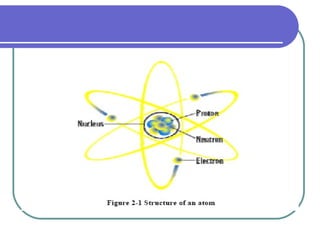
BASICS OF ELECTRICITY Electricity  is a basic part of nature and it is one of our most widely used forms of energy. Electricity is about  charge . Charge is a property of  electrons  and  protons  which are part of an  atom . Electrons have negative charge and are mobile because they have 1/1830 of the mass of the positive proton.  Neutrons  have the same mass as a  proton , but no any charge.
 
Electron Electron  in motion is called  electric current  which we use every day in our homes .  In other words,  Electricity  is simply a flow of negative charged particles, called  electrons  through conductors like copper wire.  In most metals, the nuclei of atoms (protons & neutrons) are bonded together. The pressure the electrons in the wire is called  voltage  and is measured in units called  volts (V) .  The amount of electrons moving past a certain point on a wire is called the  current,  which is measured in units called  amperes (Amps or A).
Type of electric current Alternating current (AC) electrons flow in one direction around a continuous path Direct current (DC) electrons alternates direction back and forth
Power Supply Designed to convert  110 volt  or  230 volt AC  power from the mains to usable  low-voltage DC power  (12 volt, 5 volt and 3.3volt) for the internal components of the computer.  It provides the necessary  electrical power  to make the computer work. A power supply is rated by the number of  watts  it generates. Because motherboards, power supplies and computer cases are often sold together and must be  compatible  with each other.  Personal Computer (PC)  power supply consists of  single box  with lots of wires coming out of it to  connect various internal  components and  motherboard  of a computer.  Understanding power supply units of a PC is very important because any problem in power supply can crash your computer and can corrupt your valuable information (data).
Power Supply In a personal computer (PC), the power supply is the metal box usually found in a corner of the case. The power supply is visible from the back of many systems because it contains the power-cord receptacle and the cooling fan
 
The interior of a power supply.
WARNING:   Do not open the power supply, it contains capacitors which can hold Electricity (WHICH CAN KILL) even if the computer is power off for a week, if not longer
Power Supply Form Factors Form Factor : industry term for the size, shape, type and external connector. There are approximately eight industry standard Form factors for power supplies. They are: Personal Computer / Extended Technology (PC/XT) Advanced Technology (AT) Desktop type AT Tower Type Baby AT LPX Advanced Technology Extended (ATX)/NLX SFX WTX
Power Supply Form Factors – PC/XT first used in IBM desktop in 1983. Called as  extended technology. placed into the rear of the case – right hand side controlled by an up/down toggle switch
Power Supply Form Factors – AT (Desk Type) “ AT” –  advanced technology introduced by IBM in 1984 increased in size. The original AT power supply provided  192 Watts ,
Power Supply Form Factors –AT (Tower) Introduce  tower style cases Introduced the first remote power switch. The control wires for the switch were passed through the same hole in the front of the power supply case that was used for the motherboard and drive connector bundle.
Older AT Style Power Supply
Power Supply Form Factors – BABY - AT smaller version of the original AT form. It has the same height and length, but is about 2" less in width. It has the same  motherboard connectors  and  drive connectors  as the AT introduced around the time PCs began to grow. The  Baby AT power supply  was made in both a  tower  and  desktop  configuration, the most popular design over a decade.
 
Power Supply Form Factors – LPX The  LP  in  LPX  stands for  low profile .  They are also often called  slimline  power supplies because  LPX cases  are often called  slimline cases . size reduction. The height in particular of the power supply is significantly reduced, facilitating the design of  much smaller, consumer-oriented  PCs. The  connectors of the LPX  form factor power supply are the  same as that of any AT  families. use remote power switches. made in large quantity  and millions of these power supplies are still in use.
 
Power Supply Form Factors – ATX/NLX Introduction by  Intel in 1995 . The  Advanced Technology Extended (ATX)  form factor was the  most significant change in system design Now standard in the marketplace. The  NLX  motherboard and case form factor designed to replace LPX. The ATX power supply appears virtually identical to an LPX power supply in terms of its dimensions and component placement.
The ATX power supply design consist: True Standard Soft Power Additional Signals Changed Motherboard Connectors Modified Fan Direction and Placement
Power Supply Form Factors – ATX/NLX Rear view
Power Supply Form Factors – SFX In  1997 Intel  introduced the new  microATX  form factor, based upon the original ATX form factor. In  1999, Intel  produced the  FlexATX  addition to the microATX specification, detailing plans for an even smaller motherboard and case standard. Later, Intel created the  SFX power  supply form factor, which they may optionally use. “ S” stand for small The specified output rating of the  SFX power supply is 90 W.  This is sufficient to run rather  small systems  with  low-powered CPUs  and few peripherals
View of the top and side of an SFX power supply, showing the top-mounted cooling fan.
Power Supply Form Factors – WTX WTX was introduced by Intel in 1998 , and revised in 1999.  designed specifically for workstations. W in WTX stands for Workstation. WTX defines a standard for motherboards, cases, and power supplies. It is designed in a modular way from the ground up to allow it to meet the  needs of large, multiple-CPU systems now and in the future .
The motherboard is mounted on a special mounting plate which gives motherboard makers the flexibility to design boards suit the needs of larger system supplies large power
AT POWER SUPPLY CONNECTORS Industry  standard PC/XT, AT, Baby AT, and LPX motherboards  all use the same type of main power supply connectors. These supplies feature  two main power connectors (P8 and P9) , each with 6 pins that attach the power supply to the motherboard.
 
ATX POWER SUPPLY CONNECTOR Modern motherboard uses a 20 or 24 pin P1 power connector . Some motherboards may require  special 4-, 6- or 8-pin connectors to supply extra power . The ATX, NLX and SFX power supplies have 20-pin connectors that attach to the motherboard.
Power Supply Connections to Peripheral Hardware  - MOLEX the most commonly used provides both 12 volt and 5 volt hard disk drives, CD Rom drives
Power Supply Connectors to Peripheral Hardware - Mini Connectors supply power to floppy drive standard connector for 3.5 inch floppy disk four pins out and usually four wires
Power Supply Connectors  - SATA Connectors Serial Advanced Technology Attachment (SATA)  designed for transfer data to and from hard disks and optical drives. SATA hard drives need a special  15 pin SATA power connector .
Power Supply Connectors  - Splitters using splitters to create more connections
Power Supply Connectors  - Mini Adapter most systems come with a single mini connector for an additional mini connector use mini adapter
Computer Cases Usually made of metals  Holds all the primary electronics Three general rules to consider: the bigger the box, the more component it can hold the more compact the box, the less expansion potential it has smaller cases that come with a power supply usually have lower wattage
DESKTOP Desktop computer cases  are for the models of PC that  sit on the desk horizontally .  As far as computer cases go, desktops have the least amount of choice available on the market. Although the majority of new PC's come with towers or mini towers, some are still built using desktops case.
 
MINI TOWER
Full Tower
Following factors need to be considered while choosing a computer case: Size Cooling Installation features Power supply Convenience Items Style

Chapter 2 Power Supply

  • 1.
    DIT 411 PCHARDWARE 1 CHAPTER 2: POWER SUPPLY AND COMPUTER CASE
  • 2.
    BASICS OF ELECTRICITYElectricity is a basic part of nature and it is one of our most widely used forms of energy. Electricity is about charge . Charge is a property of electrons and protons which are part of an atom . Electrons have negative charge and are mobile because they have 1/1830 of the mass of the positive proton. Neutrons have the same mass as a proton , but no any charge.
  • 3.
  • 4.
    Electron Electron in motion is called electric current which we use every day in our homes . In other words, Electricity is simply a flow of negative charged particles, called electrons through conductors like copper wire. In most metals, the nuclei of atoms (protons & neutrons) are bonded together. The pressure the electrons in the wire is called voltage and is measured in units called volts (V) . The amount of electrons moving past a certain point on a wire is called the current, which is measured in units called amperes (Amps or A).
  • 5.
    Type of electriccurrent Alternating current (AC) electrons flow in one direction around a continuous path Direct current (DC) electrons alternates direction back and forth
  • 6.
    Power Supply Designedto convert 110 volt or 230 volt AC power from the mains to usable low-voltage DC power (12 volt, 5 volt and 3.3volt) for the internal components of the computer. It provides the necessary electrical power to make the computer work. A power supply is rated by the number of watts it generates. Because motherboards, power supplies and computer cases are often sold together and must be compatible with each other. Personal Computer (PC) power supply consists of single box with lots of wires coming out of it to connect various internal components and motherboard of a computer. Understanding power supply units of a PC is very important because any problem in power supply can crash your computer and can corrupt your valuable information (data).
  • 7.
    Power Supply Ina personal computer (PC), the power supply is the metal box usually found in a corner of the case. The power supply is visible from the back of many systems because it contains the power-cord receptacle and the cooling fan
  • 8.
  • 9.
    The interior ofa power supply.
  • 10.
    WARNING: Do not open the power supply, it contains capacitors which can hold Electricity (WHICH CAN KILL) even if the computer is power off for a week, if not longer
  • 11.
    Power Supply FormFactors Form Factor : industry term for the size, shape, type and external connector. There are approximately eight industry standard Form factors for power supplies. They are: Personal Computer / Extended Technology (PC/XT) Advanced Technology (AT) Desktop type AT Tower Type Baby AT LPX Advanced Technology Extended (ATX)/NLX SFX WTX
  • 12.
    Power Supply FormFactors – PC/XT first used in IBM desktop in 1983. Called as extended technology. placed into the rear of the case – right hand side controlled by an up/down toggle switch
  • 13.
    Power Supply FormFactors – AT (Desk Type) “ AT” – advanced technology introduced by IBM in 1984 increased in size. The original AT power supply provided 192 Watts ,
  • 14.
    Power Supply FormFactors –AT (Tower) Introduce tower style cases Introduced the first remote power switch. The control wires for the switch were passed through the same hole in the front of the power supply case that was used for the motherboard and drive connector bundle.
  • 15.
    Older AT StylePower Supply
  • 16.
    Power Supply FormFactors – BABY - AT smaller version of the original AT form. It has the same height and length, but is about 2" less in width. It has the same motherboard connectors and drive connectors as the AT introduced around the time PCs began to grow. The Baby AT power supply was made in both a tower and desktop configuration, the most popular design over a decade.
  • 17.
  • 18.
    Power Supply FormFactors – LPX The LP in LPX stands for low profile . They are also often called slimline power supplies because LPX cases are often called slimline cases . size reduction. The height in particular of the power supply is significantly reduced, facilitating the design of much smaller, consumer-oriented PCs. The connectors of the LPX form factor power supply are the same as that of any AT families. use remote power switches. made in large quantity and millions of these power supplies are still in use.
  • 19.
  • 20.
    Power Supply FormFactors – ATX/NLX Introduction by Intel in 1995 . The Advanced Technology Extended (ATX) form factor was the most significant change in system design Now standard in the marketplace. The NLX motherboard and case form factor designed to replace LPX. The ATX power supply appears virtually identical to an LPX power supply in terms of its dimensions and component placement.
  • 21.
    The ATX powersupply design consist: True Standard Soft Power Additional Signals Changed Motherboard Connectors Modified Fan Direction and Placement
  • 22.
    Power Supply FormFactors – ATX/NLX Rear view
  • 23.
    Power Supply FormFactors – SFX In 1997 Intel introduced the new microATX form factor, based upon the original ATX form factor. In 1999, Intel produced the FlexATX addition to the microATX specification, detailing plans for an even smaller motherboard and case standard. Later, Intel created the SFX power supply form factor, which they may optionally use. “ S” stand for small The specified output rating of the SFX power supply is 90 W. This is sufficient to run rather small systems with low-powered CPUs and few peripherals
  • 24.
    View of thetop and side of an SFX power supply, showing the top-mounted cooling fan.
  • 25.
    Power Supply FormFactors – WTX WTX was introduced by Intel in 1998 , and revised in 1999. designed specifically for workstations. W in WTX stands for Workstation. WTX defines a standard for motherboards, cases, and power supplies. It is designed in a modular way from the ground up to allow it to meet the needs of large, multiple-CPU systems now and in the future .
  • 26.
    The motherboard ismounted on a special mounting plate which gives motherboard makers the flexibility to design boards suit the needs of larger system supplies large power
  • 27.
    AT POWER SUPPLYCONNECTORS Industry standard PC/XT, AT, Baby AT, and LPX motherboards all use the same type of main power supply connectors. These supplies feature two main power connectors (P8 and P9) , each with 6 pins that attach the power supply to the motherboard.
  • 28.
  • 29.
    ATX POWER SUPPLYCONNECTOR Modern motherboard uses a 20 or 24 pin P1 power connector . Some motherboards may require special 4-, 6- or 8-pin connectors to supply extra power . The ATX, NLX and SFX power supplies have 20-pin connectors that attach to the motherboard.
  • 30.
    Power Supply Connectionsto Peripheral Hardware - MOLEX the most commonly used provides both 12 volt and 5 volt hard disk drives, CD Rom drives
  • 31.
    Power Supply Connectorsto Peripheral Hardware - Mini Connectors supply power to floppy drive standard connector for 3.5 inch floppy disk four pins out and usually four wires
  • 32.
    Power Supply Connectors - SATA Connectors Serial Advanced Technology Attachment (SATA) designed for transfer data to and from hard disks and optical drives. SATA hard drives need a special 15 pin SATA power connector .
  • 33.
    Power Supply Connectors - Splitters using splitters to create more connections
  • 34.
    Power Supply Connectors - Mini Adapter most systems come with a single mini connector for an additional mini connector use mini adapter
  • 35.
    Computer Cases Usuallymade of metals Holds all the primary electronics Three general rules to consider: the bigger the box, the more component it can hold the more compact the box, the less expansion potential it has smaller cases that come with a power supply usually have lower wattage
  • 36.
    DESKTOP Desktop computercases are for the models of PC that sit on the desk horizontally . As far as computer cases go, desktops have the least amount of choice available on the market. Although the majority of new PC's come with towers or mini towers, some are still built using desktops case.
  • 37.
  • 38.
  • 39.
  • 40.
    Following factors needto be considered while choosing a computer case: Size Cooling Installation features Power supply Convenience Items Style