PC Powe r Supply
Power Supply 
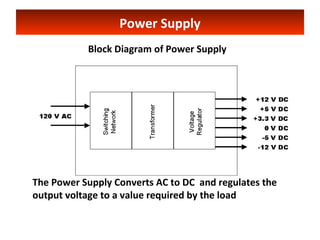
Block Diagram of Power Supply 
The Power Supply Converts AC to DC and regulates the 
output voltage to a value required by the load
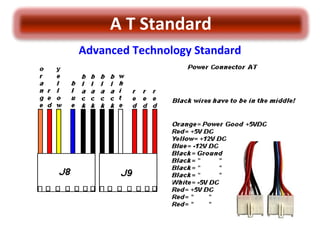
A T Standard 
Advanced Technology Standard
A T Standard 
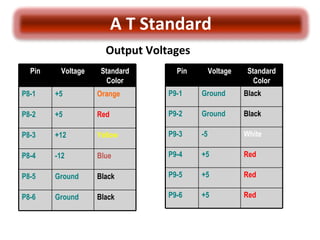
Output Voltages 
Standard 
Color 
Pin Voltage 
P8-1 +5 Orange 
P8-2 +5 Red 
P8-3 +12 Yellow 
P8-4 -12 Blue 
P8-5 Ground Black 
P8-6 Ground Black 
Standard 
Color 
Pin Voltage 
P9-1 Ground Black 
P9-2 Ground Black 
P9-3 -5 White 
P9-4 +5 Red 
P9-5 +5 Red 
P9-6 +5 Red
ATX Power Supply
Power Supply 
• A power supply (sometimes known as a power supply unit or PSU) is a 
device or system that supplies electrical or other types of energy to an 
output load or group of loads. The term is most commonly applied to 
electrical energy supplies. 
At the motherboard 
At the Cable 
• The most common computer power supply is built to conform with the 
ATX form factor. This enables different power supplies to be 
interchangeable with different components inside the computer.
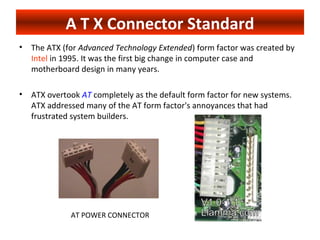
A T X Connector Standard 
• The ATX (for Advanced Technology Extended) form factor was created by 
Intel in 1995. It was the first big change in computer case and 
motherboard design in many years. 
• ATX overtook AT completely as the default form factor for new systems. 
ATX addressed many of the AT form factor's annoyances that had 
frustrated system builders. 
AT POWER CONNECTOR
A T X Power Connector 
- ATX Power 
Supply connector 
- Typical wattages range 
from 200 W to 500 W 
- There are also other, 
smaller connectors, most of 
which have four wires: 
two black, 
one red, 
one yellow. 
“each black wire is a Ground, the red wire is +5 V, and 
the yellow wire is +12 V.”
A T X 
ATX Motherboard Connectors 
Pin Voltage Standard Color 
1 + 3.3 Orange 
2 + 3.3 Orange 
3 Ground Black 
4 + 5 Red 
5 Ground Black 
6 + 5 Red 
7 Ground Black 
8 + 5 Gray 
9 + 5 Purple 
10 + 12 Yellow 
Pin Voltage Standard Color 
11 + 3.3 Orange 
12 - 12 Blue 
13 Ground Black 
14 PS_On Green 
15 Ground Black 
16 Ground Black 
17 Ground Black 
18 - 5 White 
19 + 5 Red 
20 + 5 Red 
At the motherboard At the cable
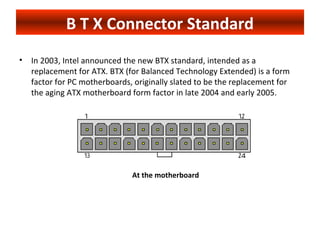
B T X Connector Standard 
• In 2003, Intel announced the new BTX standard, intended as a 
replacement for ATX. BTX (for Balanced Technology Extended) is a form 
factor for PC motherboards, originally slated to be the replacement for 
the aging ATX motherboard form factor in late 2004 and early 2005. 
At the motherboard
B T X Connector Pin Designation 
Pin Signal Description 
1 +3.3 VDC 
2 +3.3 VDC 
3 COM Ground 
4 +5 VDC 
5 COM Ground 
6 +5 VDC 
7 COM Ground 
8 PWR_OK Power good - indicate that VDC voltages 
are in range. 
9 +5 VSB Standby voltage 
10 +12 VDC
B T X Connector Pin Designation 
Pin Signal Description 
11 +12 VDC 
12 +3.3 VDC 
13 +3.3 VDC 
14 -12 VDC 
15 COM Ground 
16 PS_ON# Active low. TTL compatible (0.1-0.8V low; 2.0 high?). When low - 
DC outputs are enabled. When high - power supply should not deliver DC 
current. 
17 COM Ground 
18 COM Ground 
19 COM Ground 
20 N/C 
21 +5 VDC 
22 +5 VDC 
23 +5 VDC 
24 COM Ground
B T X/ATX/AT HDD and FDD Power Connector Pin 
Designation 
Pin Voltage Color 
1 + 12 Yellow 
2 Ground Black 
3 Ground Black 
4 + 5 Red
Question 
• Can I fit an ATX mainboard in an AT case? 
- Not really. An AT case and AT power supply can neither power up nor 
house a new ATX mainboard. ATX and AT are two different form-factors. 
The AT case was designed before ATX. Most of the computer cases built 
before late 1996 were AT form-factor. For over 10 years, from about 1985 
to 1997, the AT form-factors, founded by the original IBM PC-AT, provided 
the standard for 90% of the PC industry. Today, the majority of new 
systems ATX form-factor. The ATX is also known as the Extended AT form-factor.
Choosing a Power Supply 
Why Weight Matters? 
The more appropriate question is why size matters. 
The weight of a power supply is directly related to the quantity, quality, and 
size of the material (thus cost) used to build the power supply.
Choosing a Power Supply 
• Conclusions 
This brief study clearly confirms an empirical knowledge: the 
quality of a power supply can be estimated by its weight. 
- The very simple and easy way for ordinary PC users to 
estimate and compare the quality of a power supply.
Identifying Defective Power 
Supply(Dead set) 
• For AT Power Supply 
Turn on the main power switch(mechanical) and measure the 
presence of the output voltage (±12V and ± 5V) using a voltmeter. 
If a voltmeter is not available, just observe the functionality of the 
cooling fan. 
• For ATX and BTX Power Supply 
Simply short the Ps_On terminal and observe the cooling fan. 
If the fan works, the power supply is good. You can measure the 
output voltage of each terminal and compare the reading to the 
specified values. 
• Replacement of a known good Power Supply is the last approach 
for confirmation.

Power supply

  • 1.
    PC Powe rSupply
  • 2.
    Power Supply BlockDiagram of Power Supply The Power Supply Converts AC to DC and regulates the output voltage to a value required by the load
  • 3.
    A T Standard Advanced Technology Standard
  • 4.
    A T Standard Output Voltages Standard Color Pin Voltage P8-1 +5 Orange P8-2 +5 Red P8-3 +12 Yellow P8-4 -12 Blue P8-5 Ground Black P8-6 Ground Black Standard Color Pin Voltage P9-1 Ground Black P9-2 Ground Black P9-3 -5 White P9-4 +5 Red P9-5 +5 Red P9-6 +5 Red
  • 5.
  • 6.
    Power Supply •A power supply (sometimes known as a power supply unit or PSU) is a device or system that supplies electrical or other types of energy to an output load or group of loads. The term is most commonly applied to electrical energy supplies. At the motherboard At the Cable • The most common computer power supply is built to conform with the ATX form factor. This enables different power supplies to be interchangeable with different components inside the computer.
  • 7.
    A T XConnector Standard • The ATX (for Advanced Technology Extended) form factor was created by Intel in 1995. It was the first big change in computer case and motherboard design in many years. • ATX overtook AT completely as the default form factor for new systems. ATX addressed many of the AT form factor's annoyances that had frustrated system builders. AT POWER CONNECTOR
  • 8.
    A T XPower Connector - ATX Power Supply connector - Typical wattages range from 200 W to 500 W - There are also other, smaller connectors, most of which have four wires: two black, one red, one yellow. “each black wire is a Ground, the red wire is +5 V, and the yellow wire is +12 V.”
  • 9.
    A T X ATX Motherboard Connectors Pin Voltage Standard Color 1 + 3.3 Orange 2 + 3.3 Orange 3 Ground Black 4 + 5 Red 5 Ground Black 6 + 5 Red 7 Ground Black 8 + 5 Gray 9 + 5 Purple 10 + 12 Yellow Pin Voltage Standard Color 11 + 3.3 Orange 12 - 12 Blue 13 Ground Black 14 PS_On Green 15 Ground Black 16 Ground Black 17 Ground Black 18 - 5 White 19 + 5 Red 20 + 5 Red At the motherboard At the cable
  • 10.
    B T XConnector Standard • In 2003, Intel announced the new BTX standard, intended as a replacement for ATX. BTX (for Balanced Technology Extended) is a form factor for PC motherboards, originally slated to be the replacement for the aging ATX motherboard form factor in late 2004 and early 2005. At the motherboard
  • 11.
    B T XConnector Pin Designation Pin Signal Description 1 +3.3 VDC 2 +3.3 VDC 3 COM Ground 4 +5 VDC 5 COM Ground 6 +5 VDC 7 COM Ground 8 PWR_OK Power good - indicate that VDC voltages are in range. 9 +5 VSB Standby voltage 10 +12 VDC
  • 12.
    B T XConnector Pin Designation Pin Signal Description 11 +12 VDC 12 +3.3 VDC 13 +3.3 VDC 14 -12 VDC 15 COM Ground 16 PS_ON# Active low. TTL compatible (0.1-0.8V low; 2.0 high?). When low - DC outputs are enabled. When high - power supply should not deliver DC current. 17 COM Ground 18 COM Ground 19 COM Ground 20 N/C 21 +5 VDC 22 +5 VDC 23 +5 VDC 24 COM Ground
  • 13.
    B T X/ATX/ATHDD and FDD Power Connector Pin Designation Pin Voltage Color 1 + 12 Yellow 2 Ground Black 3 Ground Black 4 + 5 Red
  • 14.
    Question • CanI fit an ATX mainboard in an AT case? - Not really. An AT case and AT power supply can neither power up nor house a new ATX mainboard. ATX and AT are two different form-factors. The AT case was designed before ATX. Most of the computer cases built before late 1996 were AT form-factor. For over 10 years, from about 1985 to 1997, the AT form-factors, founded by the original IBM PC-AT, provided the standard for 90% of the PC industry. Today, the majority of new systems ATX form-factor. The ATX is also known as the Extended AT form-factor.
  • 15.
    Choosing a PowerSupply Why Weight Matters? The more appropriate question is why size matters. The weight of a power supply is directly related to the quantity, quality, and size of the material (thus cost) used to build the power supply.
  • 16.
    Choosing a PowerSupply • Conclusions This brief study clearly confirms an empirical knowledge: the quality of a power supply can be estimated by its weight. - The very simple and easy way for ordinary PC users to estimate and compare the quality of a power supply.
  • 17.
    Identifying Defective Power Supply(Dead set) • For AT Power Supply Turn on the main power switch(mechanical) and measure the presence of the output voltage (±12V and ± 5V) using a voltmeter. If a voltmeter is not available, just observe the functionality of the cooling fan. • For ATX and BTX Power Supply Simply short the Ps_On terminal and observe the cooling fan. If the fan works, the power supply is good. You can measure the output voltage of each terminal and compare the reading to the specified values. • Replacement of a known good Power Supply is the last approach for confirmation.