Networking
Chap:02
Topologies
1.2
1.3 Data Flow (Modes of Communication)1.3 Data Flow (Modes of Communication)
•Simplex:Simplex: in simplex mode communication isin simplex mode communication is
unidirectional. Only one device on a linkunidirectional. Only one device on a link
can send the data. The other device willcan send the data. The other device will
only receive the data. E.g Keyboard &only receive the data. E.g Keyboard &
MonitorMonitor
•Half Duplex:Half Duplex: in this mode both sender and receiverin this mode both sender and receiver
can send and receive, but not at the samecan send and receive, but not at the same
time. At a time one is sender the other acttime. At a time one is sender the other act
as receiver. E.g Walki-talkiesas receiver. E.g Walki-talkies
1.3
Conti...Conti...
•Full Duplex:Full Duplex: in this mode both sender andin this mode both sender and
receiver can send and receive at thereceiver can send and receive at the
same time. E.g telephonesame time. E.g telephone
1.4
Topology:Topology:
•The Physical structure of the network is known as
Topology.
•The Physical layout of the links and devices is called
topology.
1.5
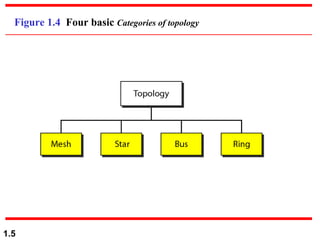
Figure 1.4 Four basic Categories of topology
1.6
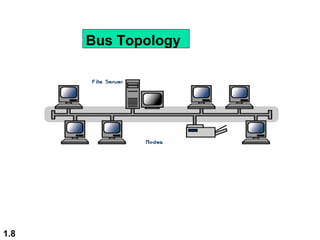
Bus Topology:Bus Topology:
•All devices are directly connected to a single main
cable
•Main cable act as the backbone for the network
•Computer are connected with the main cable via
local loop/drop line
•Only one device can send the data at a time
•Otherwise collision will occur.
•Terminator are used at the end of the main cable
•Main cable is used either thick net/ thick net.
1.7
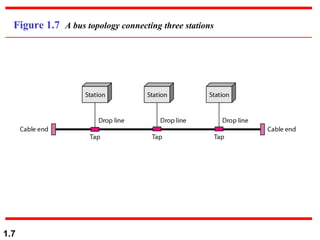
Figure 1.7 A bus topology connecting three stations
1.8
Bus Topology
1.9
Advantages
Use of cable is economical
Media is inexpensive and easy to work with
System is simple and reliable .
Bus is easy to extend
Disadvantages of Bus Topology:
Network can slow down in heavy traffic
Problems are difficult to isolate
Cable break can affect many users
1.10
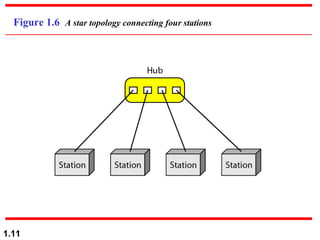
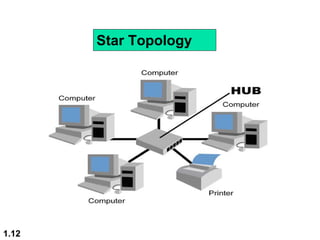
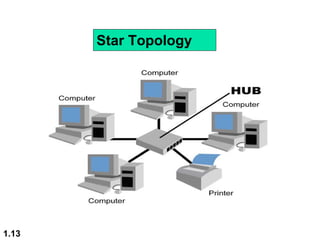
Star Topology:Star Topology:
•In a star topology, each device/computers has
a direct point-to-point link only to a central
controller
•central controller is called a hub/switch
•The devices/computers are not directly linked
to one another.
•If one device wants to send data to
another, it sends the data to the controller,
•Controller then send the data to the other
connected Device/computers
1.11
Figure 1.6 A star topology connecting four stations
1.12
Star Topology
1.13
Star Topology
Advantages of Star Topology
 Modifying system and adding new
computers is easy . Centralized
monitoring and management are possible
Failure of one computer does not affect
the rest of the network
Disadvantages of Star Topology :
 If the centralized point fails, the network
fails
1.15
Ring Topology:Ring Topology:
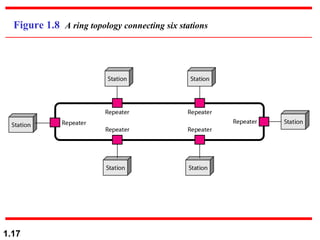
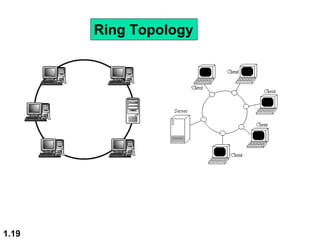
•In a Ring topology, each device has a
dedicated point-to-point connection with only
the two devices on either side of it.
• A signal is passed in ring in one direction,
from device to device, until it reaches its
destination.
• token (frame) is circulating in the ring
1.16
Ring Topology:Ring Topology:
•Each device wait for its number to send the
data
•At a time only one device can send the data
•Each device in the ring contain a repeater.
Note: Repeater is used to Re-generate the
weaken signals
1.17
Figure 1.8 A ring topology connecting six stations
1.18
Advantages of Ring Topology
System provides equal access for all computer
Performance is even despite many users
Disadvantages of Ring Topology:
Failure of one computer can impact the rest
of the network
Problems are hard to isolate.
1.19
Ring Topology
1.20
Mesh Topology:Mesh Topology:
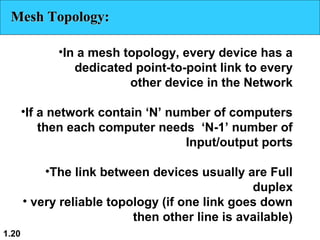
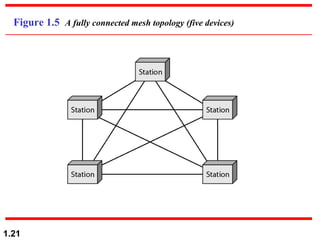
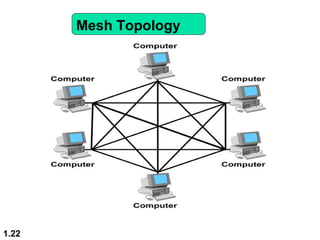
•In a mesh topology, every device has a
dedicated point-to-point link to every
other device in the Network
•If a network contain ‘N’ number of computers
then each computer needs ‘N-1’ number of
Input/output ports
•The link between devices usually are Full
duplex
• very reliable topology (if one link goes down
then other line is available)
1.21
Figure 1.5 A fully connected mesh topology (five devices)
1.22
Mesh Topology
1.23
•End of Chapter

Chapter 02 topology networking

  • 1.
  • 2.
    1.2 1.3 Data Flow(Modes of Communication)1.3 Data Flow (Modes of Communication) •Simplex:Simplex: in simplex mode communication isin simplex mode communication is unidirectional. Only one device on a linkunidirectional. Only one device on a link can send the data. The other device willcan send the data. The other device will only receive the data. E.g Keyboard &only receive the data. E.g Keyboard & MonitorMonitor •Half Duplex:Half Duplex: in this mode both sender and receiverin this mode both sender and receiver can send and receive, but not at the samecan send and receive, but not at the same time. At a time one is sender the other acttime. At a time one is sender the other act as receiver. E.g Walki-talkiesas receiver. E.g Walki-talkies
  • 3.
    1.3 Conti...Conti... •Full Duplex:Full Duplex:in this mode both sender andin this mode both sender and receiver can send and receive at thereceiver can send and receive at the same time. E.g telephonesame time. E.g telephone
  • 4.
    1.4 Topology:Topology: •The Physical structureof the network is known as Topology. •The Physical layout of the links and devices is called topology.
  • 5.
    1.5 Figure 1.4 Fourbasic Categories of topology
  • 6.
    1.6 Bus Topology:Bus Topology: •Alldevices are directly connected to a single main cable •Main cable act as the backbone for the network •Computer are connected with the main cable via local loop/drop line •Only one device can send the data at a time •Otherwise collision will occur. •Terminator are used at the end of the main cable •Main cable is used either thick net/ thick net.
  • 7.
    1.7 Figure 1.7 Abus topology connecting three stations
  • 8.
  • 9.
    1.9 Advantages Use of cableis economical Media is inexpensive and easy to work with System is simple and reliable . Bus is easy to extend Disadvantages of Bus Topology: Network can slow down in heavy traffic Problems are difficult to isolate Cable break can affect many users
  • 10.
    1.10 Star Topology:Star Topology: •Ina star topology, each device/computers has a direct point-to-point link only to a central controller •central controller is called a hub/switch •The devices/computers are not directly linked to one another. •If one device wants to send data to another, it sends the data to the controller, •Controller then send the data to the other connected Device/computers
  • 11.
    1.11 Figure 1.6 Astar topology connecting four stations
  • 12.
  • 13.
  • 14.
    Advantages of StarTopology  Modifying system and adding new computers is easy . Centralized monitoring and management are possible Failure of one computer does not affect the rest of the network Disadvantages of Star Topology :  If the centralized point fails, the network fails
  • 15.
    1.15 Ring Topology:Ring Topology: •Ina Ring topology, each device has a dedicated point-to-point connection with only the two devices on either side of it. • A signal is passed in ring in one direction, from device to device, until it reaches its destination. • token (frame) is circulating in the ring
  • 16.
    1.16 Ring Topology:Ring Topology: •Eachdevice wait for its number to send the data •At a time only one device can send the data •Each device in the ring contain a repeater. Note: Repeater is used to Re-generate the weaken signals
  • 17.
    1.17 Figure 1.8 Aring topology connecting six stations
  • 18.
    1.18 Advantages of RingTopology System provides equal access for all computer Performance is even despite many users Disadvantages of Ring Topology: Failure of one computer can impact the rest of the network Problems are hard to isolate.
  • 19.
  • 20.
    1.20 Mesh Topology:Mesh Topology: •Ina mesh topology, every device has a dedicated point-to-point link to every other device in the Network •If a network contain ‘N’ number of computers then each computer needs ‘N-1’ number of Input/output ports •The link between devices usually are Full duplex • very reliable topology (if one link goes down then other line is available)
  • 21.
    1.21 Figure 1.5 Afully connected mesh topology (five devices)
  • 22.
  • 23.