1 
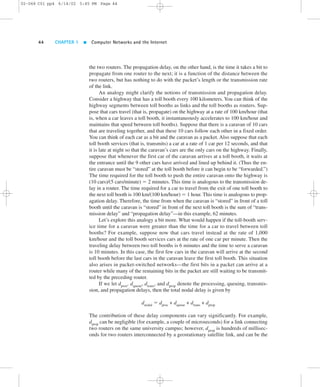
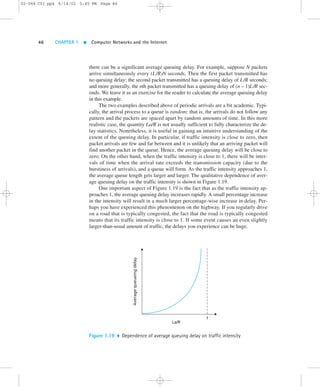
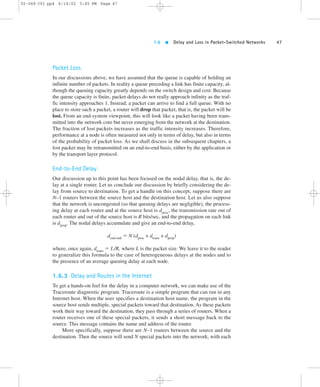
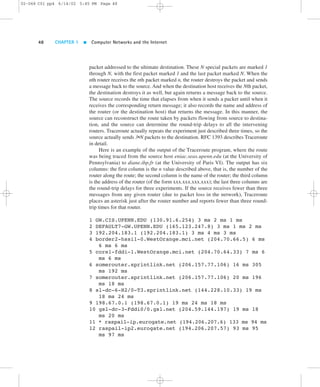
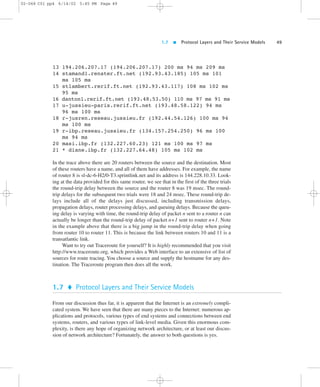
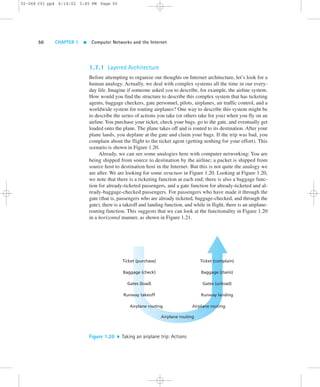
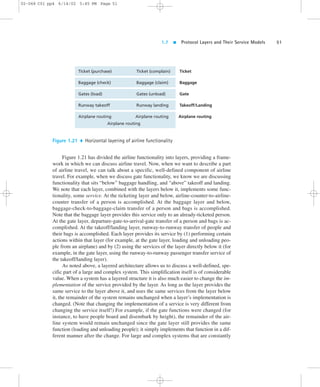
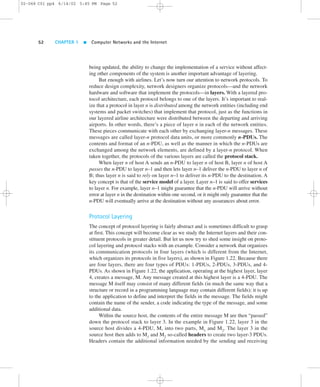
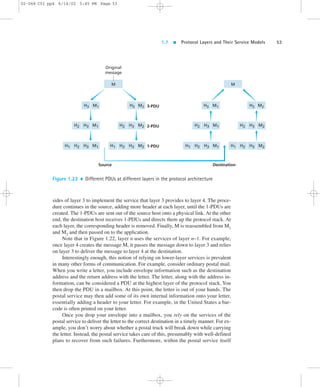
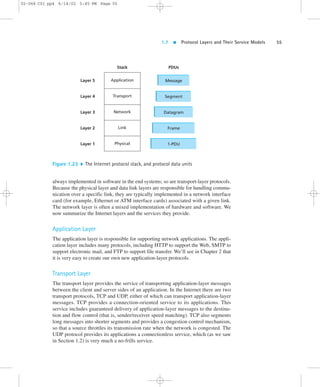
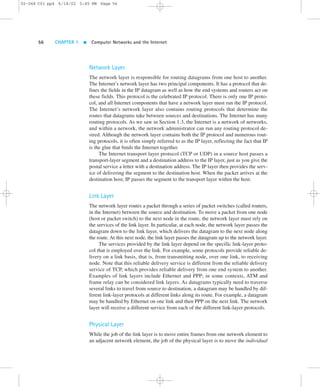
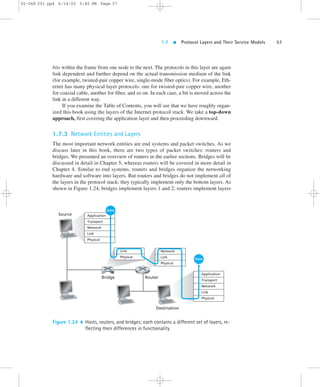
Chapter 1 
Computer 
Networks and 
the Internet 
02-068 C01 pp4 6/14/02 5:45 PM Page 1 
Computer networking is one of the most exciting and important technological fields 
of our time. The Internet interconnects millions (and soon billions) of computers, 
providing a global communication, storage, and computation infrastructure. More-over, 
the Internet is currently being integrated with mobile and wireless technology, 
ushering in an impressive array of new applications. Yes, computer networking has 
indeed come a long way since its infancy in the 1960s. But this is only the begin-ning— 
a new generation of creative engineers and computer scientists will drive the 
Internet to yet unforeseen terrains. This book will provide today’s students with the 
vehicles they need to journey to and explore the new lands in this exciting field. 
This first chapter presents an overview of computer networking and the Inter-net. 
Our goal here is to paint a broad-brush picture of computer networking, to see 
the forest through the trees. We’ll cover a lot of ground in this introductory chapter 
and discuss a lot of “pieces” of a computer network, while not losing sight of the 
“big picture.” The chapter lays the groundwork for the rest of the book. It can also 
be used for a mini-course on computer networking. 
In this chapter, after introducing some basic terminology and concepts, we will 
first examine the “edge” of a computer network. We’ll look at the end systems and 
network applications, and the transport services provided to these applications. 
We’ll then explore the “core” of a computer network, examining the links and the 
switches that transport data, as well as the access networks and physical media that
02-068 C01 pp4 6/14/02 5:45 PM Page 2 
2 CHAPTER 1  Computer Networks and the Internet 
connect end systems to the network core. We’ll learn that the Internet is a network 
of networks, and we’ll learn about how these networks connect with each other. 
After having completed this overview of the “edge” and “core” of a computer 
network, we’ll take a broader view. We’ll examine the causes of data-transfer delay 
and loss in a computer network, and provide simple quantitative models for end-to-end 
delay, models that take into account transmission, propagation, and queuing de-lays. 
We’ll then introduce some of the key architectural principles in computer 
networking, namely, protocol layering and service models. Finally, we’ll close this 
chapter with a brief history of computer networking. 
1.1  What Is the Internet? 
In this book we use the public Internet, a specific computer network, as our princi-pal 
vehicle for discussing computer network protocols. But what is the Internet? We 
would like to be able to give you a one-sentence definition of the Internet, a defini-tion 
that you can take home and share with your family and friends. Alas, the Inter-net 
is very complex, both in terms of its hardware and software components, as well 
as in the services it provides. 
1.1.1 A Nuts-and-Bolts Description 
Instead of giving a one-sentence definition, let’s try a more descriptive approach. 
There are a couple of ways to do this. One way is to describe the nuts and bolts of 
the Internet, that is, the basic hardware and software components that make up the 
Internet. Another way is to describe the Internet in terms of a networking infrastruc-ture 
that provides services to distributed applications. Let’s begin with the nuts-and-bolts 
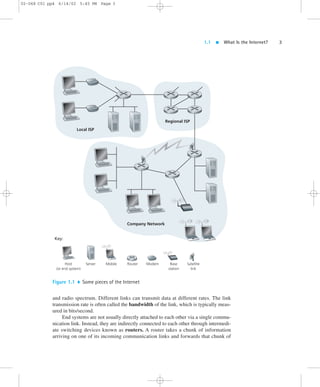
description, using Figure 1.1 to illustrate our discussion. 
The public Internet is a worldwide computer network, that is, a network that in-terconnects 
millions of computing devices throughout the world. Most of these com-puting 
devices are traditional desktop PCs, UNIX-based workstations, and so-called 
servers that store and transmit information such as Web pages and e-mail messages. 
Increasingly, nontraditional Internet end systems such as PDAs (Personal Digital 
Assistants), TVs, mobile computers, automobiles, and toasters are being connected 
to the Internet. (Toasters [Toasty 2002] are not the only rather unusual devices to 
have been hooked up to the Internet; see “Internet Home Appliances” [Appliance 
2002].) In the Internet jargon, all of these devices are called hosts or end systems. 
As of January 2002 there were 100–500 million end systems using the Internet; and 
this number continues to grow exponentially [ISC 2002]. 
End systems are connected together by communication links.We’ll see in Sec-tion 
1.4 that there are many types of communication links, which are made up of dif-ferent 
types of physical media, including coaxial cable, copper wire, fiber optics,
1.1  What Is the Internet? 3 
02-068 C01 pp4 6/14/02 5:45 PM Page 3 
Key: 
Local ISP 
Regional ISP 
Company Network 
Host 
(or end system) 
Server Mobile Router Modem Base 
station 
Satellite 
link 
Figure 1.1  Some pieces of the Internet 
and radio spectrum. Different links can transmit data at different rates. The link 
transmission rate is often called the bandwidth of the link, which is typically meas-ured 
in bits/second. 
End systems are not usually directly attached to each other via a single commu-nication 
link. Instead, they are indirectly connected to each other through intermedi-ate 
switching devices known as routers. A router takes a chunk of information 
arriving on one of its incoming communication links and forwards that chunk of
02-068 C01 pp4 6/14/02 5:45 PM Page 4 
4 CHAPTER 1  Computer Networks and the Internet 
information on one of its outgoing communication links. In the jargon of computer 
networking, the chunk of information is called a packet. The path that the packet 
takes from the sending end system, through a series of communication links and 
routers, to the receiving end system is known as a route or path through the net-work. 
Rather than provide a dedicated path between communicating end systems, 
the Internet uses a technique known as packet switching that allows multiple com-municating 
end systems to share a path, or parts of a path, at the same time. The first 
packet-switched networks, created in the 1970s, are the earliest ancestors of today’s 
Internet. 
End systems access the Internet through Internet Service Providers (ISPs), in-cluding 
residential ISPs such as AOL or MSN, university ISPs such as Stanford Uni-versity, 
and corporate ISPs such as Ford Motor Company. Each ISP is a network of 
routers and communication links. The different ISPs provide a variety of different 
types of network access to the end systems, including 56 Kbps dial-up modem ac-cess, 
residential broadband access such as cable modem or DSL, high-speed LAN 
access, and wireless access. ISPs also provide Internet access to content providers, 
connecting Web sites directly to the Internet. To allow communication among Inter-net 
users and to allow users to access worldwide Internet content, these lower-tier 
ISPs are interconnected through national and international upper-tier ISPs, such as 
the UUNet and Sprint. An upper-tier ISP consists of high-speed routers intercon-nected 
with high-speed fiber-optic links. Each ISP network, whether upper-tier or 
lower-tier, is managed independently, runs the IP protocol (see below), and con-forms 
to certain naming and address conventions. We will examine ISPs and their 
interconnection more closely in Section 1.5. 
End systems, routers, and other “pieces” of the Internet, run protocols that con-trol 
the sending and receiving of information within the Internet. TCP (the Trans-mission 
Control Protocol) and IP (the Internet Protocol) are two of the most 
important protocols in the Internet. The IP protocol specifies the format of the pack-ets 
that are sent and received among routers and end systems. The Internet’s princi-pal 
protocols are collectively known as TCP/IP. We begin looking into protocols in 
this introductory chapter. But that’s just a start—much of this book is concerned 
with computer network protocols! 
The public Internet (that is, the global network of networks discussed above) is 
the network that one typically refers to as the Internet. There are also many private 
networks, such as many corporate and government networks, whose hosts cannot 
exchange messages with hosts outside of the private network (unless the messages 
pass through so-called firewalls, which restrict the flow of messages to and from the 
network). These private networks are often referred to as intranets, as they use the 
same types of hosts, routers, links, and protocols as the public Internet. 
At the technical and developmental level, the Internet is made possible through 
creation, testing, and implementation of Internet standards. These standards are 
developed by the Internet Engineering Task Force (IETF)[IETF 2002]. The IETF 
standards documents are called RFCs (request for comments). RFCs started out as 
general requests for comments (hence the name) to resolve architecture problems
1.1  What Is the Internet? 5 
02-068 C01 pp4 6/14/02 5:45 PM Page 5 
that faced the precursor to the Internet. RFCs, though not formally standards, have 
evolved to the point where they are cited as such. RFCs tend to be quite technical 
and detailed. They define protocols such as TCP, IP, HTTP (for the Web), and SMTP 
(for open-standards e-mail). There are more than 3,000 different RFCs. 
1.1.2 A Service Description 
The preceding discussion has identified many of the pieces that make up the Inter-net. 
Let’s now leave the nuts-and-bolts description and take a service-oriented view. 
 The Internet allows distributed applications running on its end systems to ex-change 
data with each other. These applications include remote login, electronic 
mail,Web surfing, instant messaging, audio and video streaming, Internet teleph-ony, 
distributed games, peer-to-peer (P2P) file sharing, and much, much more. It 
is worth emphasizing that “the Web” is not a separate network but rather just one 
of many distributed applications that use the communication services provided 
by the Internet. 
 The Internet provides two services to its distributed applications: a connection-oriented 
reliable service and a connectionless unreliable service. Loosely 
speaking, the connection-oriented reliable service guarantees that data transmit-ted 
from a sender to a receiver will eventually be delivered to the receiver in or-der 
and in its entirety. The connectionless unreliable service does not make any 
guarantees about eventual delivery. Typically, a distributed application makes use 
of one or the other (but not both) of these two services. 
 Currently, the Internet does not provide a service that makes promises about how 
long it will take to deliver the data from sender to receiver. And except for increas-ing 
your access bandwidth to your Internet service provider, you currently cannot 
obtain better service (for example, bounded delays) by paying more—a state of 
affairs that some (particularly Americans!) find odd. We’ll take a look at state-of-the- 
art Internet research that is aimed at changing this situation in Chapter 6. 
This second description of the Internet—that is, in terms of the services it provides 
to distributed applications—is a nontraditional, but important, one. Increasingly, 
advances in the nuts-and-bolts components of the Internet are being driven by 
the needs of new applications. So it’s important to keep in mind that the Internet 
is an infrastructure in which new applications are being constantly invented and 
deployed. 
We have just given two descriptions of the Internet, one in terms of its hardware 
and software components, the other in terms of the services it provides to distrib-uted 
applications. But perhaps you are still confused as to what the Internet is. What 
are packet switching, TCP/IP, and connection-oriented service? What are routers? 
What kinds of communication links are present in the Internet? What is a distrib-uted 
application? If you feel a bit overwhelmed by all of this now, don’t worry—the
02-068 C01 pp4 6/14/02 5:45 PM Page 6 
6 CHAPTER 1  Computer Networks and the Internet 
purpose of this book is to introduce you to both the nuts and bolts of the Internet, as 
well as the principles that govern how and why it works. We will explain these im-portant 
terms and questions in the subsequent sections and chapters. 
1.1.3 What Is a Protocol? 
Now that we’ve got a bit of a feel for what the Internet is, let’s consider another im-portant 
buzzword in computer networking: “protocol.” What is a protocol? What 
does a protocol do? How would you recognize a protocol if you met one? 
A Human Analogy 
It is probably easiest to understand the notion of a computer network protocol by first 
considering some human analogies, since we humans execute protocols all of the 
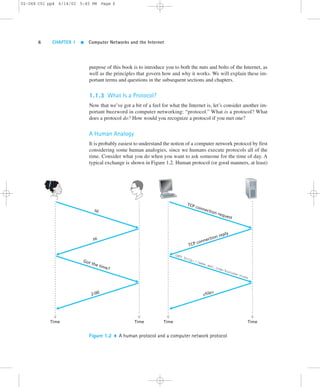
time. Consider what you do when you want to ask someone for the time of day. A 
typical exchange is shown in Figure 1.2. Human protocol (or good manners, at least) 
TCP connection request 
TCP connection reply 
GET http://www.awl.com/kurose-ross 
file 
Time Time 
Hi 
Hi 
Got the time? 
2:00 
Time Time 
Figure 1.2  A human protocol and a computer network protocol
1.1  What Is the Internet? 7 
02-068 C01 pp4 6/14/02 5:45 PM Page 7 
dictates that one first offer a greeting (the first “Hi” in Figure 1.2) to initiate commu-nication 
with someone else. The typical response to a “Hi” is a returned “Hi” mes-sage. 
Implicitly, one then takes a cordial “Hi” response as an indication that one can 
proceed and ask for the time of day. A different response to the initial “Hi” (such as 
“Don’t bother me!” or “I don’t speak English,” or some unprintable reply) might in-dicate 
an unwillingness or inability to communicate. In this case, the human protocol 
would be not to ask for the time of day. Sometimes one gets no response at all to a 
question, in which case one typically gives up asking that person for the time. Note 
that in our human protocol, there are specific messages we send, and specific actions 
we take in response to the received reply messages or other events (such as no reply 
within some given amount of time). Clearly, transmitted and received messages, and 
actions taken when these messages are sent or received or other events occur, play a 
central role in a human protocol. If people run different protocols (for example, if 
one person has manners but the other does not, or if one understands the concept of 
time and the other does not) the protocols do not interoperate and no useful work can 
be accomplished. The same is true in networking—it takes two (or more) communi-cating 
entities running the same protocol in order to accomplish a task. 
Let’s consider a second human analogy. Suppose you’re in a college class (a 
computer networking class, for example!). The teacher is droning on about proto-cols 
and you’re confused. The teacher stops to ask, “Are there any questions?” (a 
message that is transmitted to, and received by, all students who are not sleeping). 
You raise your hand (transmitting an implicit message to the teacher). Your teacher 
acknowledges you with a smile, saying “Yes . . .” (a transmitted message encourag-ing 
you to ask your question—teachers love to be asked questions), and you then ask 
your question (that is, transmit your message to your teacher). Your teacher hears 
your question (receives your question message) and answers (transmits a reply to 
you). Once again, we see that the transmission and receipt of messages, and a set of 
conventional actions taken when these messages are sent and received, are at the 
heart of this question-and-answer protocol. 
Network Protocols 
A network protocol is similar to a human protocol, except that the entities exchang-ing 
messages and taking actions are hardware or software components of some de-vice 
(for example, computer, router, or other network-capable device). All activity 
in the Internet that involves two or more communicating remote entities is governed 
by a protocol. For example, protocols in routers determine a packet’s path from 
source to destination; hardware-implemented protocols in the network interface 
cards of two physically connected computers control the flow of bits on the “wire” 
between the two network interface cards; congestion-control protocols in end sys-tems 
control the rate at which packets are transmitted between sender and receiver. 
Protocols are running everywhere in the Internet, and consequently much of this 
book is about computer network protocols.
02-068 C01 pp4 6/14/02 5:45 PM Page 8 
8 CHAPTER 1  Computer Networks and the Internet 
As an example of a computer network protocol with which you are probably fa-miliar, 
consider what happens when you make a request to a Web server, that is, 
when you type in the URL of a Web page into your Web browser. The scenario is il-lustrated 
in the right half of Figure 1.2. First, your computer will send a “connection 
request” message to the Web server and wait for a reply. The Web server will eventu-ally 
receive your connection request message and return a “connection reply” mes-sage. 
Knowing that it is now OK to request the Web document, your computer then 
sends the name of the Web page it wants to fetch from that Web server in a “GET” 
message. Finally, the Web server returns the Web page (file) to your computer. 
Given the human and networking examples above, the exchange of messages 
and the actions taken when these messages are sent and received are the key defin-ing 
elements of a protocol: 
A protocol defines the format and the order of messages exchanged between 
two or more communicating entities, as well as the actions taken on the trans-mission 
and/or receipt of a message or other event. 
The Internet, and computer networks in general, make extensive use of protocols. 
Different protocols are used to accomplish different communication tasks. As you 
read through this book, you will learn that some protocols are simple and straight-forward, 
while others are complex and intellectually deep. Mastering the field of 
computer networking is equivalent to understanding the what, why, and how of net-working 
protocols. 
1.1.4 Some Good Hyperlinks 
As every Internet researcher knows, some of the best and most accurate information 
about the Internet and its protocols is not in hard-copy books, journals, or maga-zines. 
Some of the best stuff about the Internet is in the Internet itself! Of course, 
there’s really too much material to sift through, and sometimes the gems are few and 
far between. Below, we list a few generally excellent Web sites for network- and 
Internet-related material. Throughout the book, we will also present links to rele-vant, 
high-quality URLs that provide background, original, or advanced material re-lated 
to the particular topic under study. Here is a set of key links that you may want 
to consult as you proceed through this book: 
 Internet Engineering Task Force (IETF), http://www.ietf.org: The IETF is an 
open international community concerned with the development and operation of 
the Internet and its architecture. The IETF was formally established by the Inter-net 
Architecture Board (IAB), http://www.iab.org, in 1986. The IETF meets three 
times a year; much of its ongoing work is conducted via mailing lists by working 
groups. The IETF is administered by the Internet Society, http://www.isoc.org, 
whose Web site contains lots of high-quality, Internet-related material.
1.2  The Network Edge 9 
02-068 C01 pp4 6/14/02 5:45 PM Page 9 
 The World Wide Web Consortium (W3C), http://www.w3.org: The W3C was 
founded in 1994 to develop common protocols for the evolution of the World 
Wide Web. This is an outstanding site with fascinating information on emerging 
Web technologies, protocols, and standards. 
 The Association for Computing Machinery (ACM), http://www.acm.org, and the 
Institute of Electrical and Electronics Engineers (IEEE), http://www.ieee.org: 
These are the two main international professional societies that have technical 
conferences, magazines, and journals in the networking area. The ACM Special 
Interest Group in Data Communications (SIGCOMM), http://www.acm.org/ 
sigcomm, the IEEE Communications Society, http://www.comsoc.org, and the 
IEEE Computer Society, http://www.computer.org, are the groups within these 
bodies whose efforts are most closely related to networking. 
 Computer Networking: A Top-Down Approach Featuring the Internet (that is, the 
Web site for this textbook!), http://www.awl.com/kurose-ross:You’ll find a wealth 
of resources at the Web site, including hyperlinks to relevant Web pages, Java ap-plets 
illustrating networking concepts, homework problems with answers, pro-gramming 
projects, streaming audio lectures coupled to slides, and much more. 
1.2  The Network Edge 
In the previous sections we presented a high-level overview of the Internet and net-working 
protocols. We are now going to delve a bit more deeply into the compo-nents 
of a computer network (and the Internet, in particular). We begin in this 
section at the edge of a network and look at the components with which we are most 
familiar—namely, the computers that we use on a daily basis. In the next section we 
will move from the network edge to the network core and examine switching and 
routing in computer networks. Then in Section 1.4 we will discuss the actual physi-cal 
links that carry the signals sent between computers and switches. 
1.2.1 End Systems, Clients, and Servers 
In computer networking jargon, the computers connected to the Internet are often 
referred to as end systems. They are referred to as end systems because they sit at 
the edge of the Internet, as shown in Figure 1.3. The Internet’s end systems include 
many different types of computers. End users directly interface with some of these 
computers, including desktop computers (desktop PCs, Macs, and UNIX-based 
workstations) and mobile computers (portable computers and PDAs with wireless 
Internet connections). The Internet’s end systems also include computers with which 
users do not directly interface, such as Web servers and e-mail servers. Furthermore, 
an increasing number of alternative devices, such as thin clients and household
02-068 C01 pp4 6/14/02 5:45 PM Page 10 
10 CHAPTER 1  Computer Networks and the Internet 
Local ISP 
Regional ISP 
Company Network 
Figure 1.3  End-system interaction 
appliances [Thinplanet 2002],Web TVs and set top boxes [Nesbitt 2002], and digi-tal 
cameras are being attached to the Internet as end systems. For interesting discus-sions 
of the future of Internet appliances see [Manelli 2001; Appliance 2001; 
Dertouzos 2001; Odlyzko 1999]. 
End systems are also referred to as hosts because they host (that is, run) appli-cation 
programs such as a Web browser program, a Web server program, an e-mail 
reader program, or an e-mail server program. Throughout this book we will use the 
terms hosts and end systems interchangeably; that is, host = end system. Hosts are 
sometimes further divided into two categories: clients and servers. Informally, 
clients tend to be desktop and mobile PCs, PDAs, and so on, whereas servers tend to 
be more powerful machines hosting servers such as Web servers and mail servers.
1.2  The Network Edge 11 
In the context of networking software, there is another definition of a client 
and server, a definition that we’ll refer to throughout this book. A client program 
is a program running on one end system that requests and receives a service from a 
server program running on another end system. Studied in detail in Chapter 2, this 
client/server model is undoubtedly the most prevalent structure for Internet appli-cations. 
The Web, e-mail, file transfer, remote login (for example, Telnet), news-groups, 
and many other popular applications adopt the client/server model. Since 
a client program typically runs on one computer and the server program runs on 
another computer, client/server Internet applications are, by definition, distributed 
applications. The client program and the server program interact with each 
other by sending each 
other messages over the 
Internet. At this level of 
abstraction, the routers, 
links and other “nuts and 
bolts” of the Internet serve 
as a “black box” that trans-fers 
messages between the 
distributed, communicat-ing 
components of an In-ternet 
application. This is 
the level of abstraction de-picted 
in Figure 1.3. 
Not all Internet appli-cations 
today consist of 
pure client programs in-teracting 
with pure server 
programs. For example, 
with the popular peer-to- 
peer file sharing appli-cations 
(Napster, Gnutella, 
KaZaA, and so on), the 
peer-to-peer application in 
the user’s end system acts 
as both a client program 
and a server program. The 
program running in a peer 
(that is, a user’s machine) 
acts as a client when it re-quests 
a file from another 
peer; and the program acts 
as a server when it sends a 
file to another peer. 
Case History 
SEARCH FOR EXTRATERRESTRIAL LIFE 
One of the niftiest applications of the Internet is the SETI@home project 
[SETI@home 2002], a scientific experiment that uses Internet-connected comput-ers 
in the Search for Extraterrestrial Intelligence (SETI). Anyone can participate by 
running a free client program that downloads and analyzes radio telescope data. 
The goal of the project is to find, in the radio telescope data, signals that were cre-ated 
by extraterrestrial life. 
SETI@home searches for signs of intelligent life by analyzing radio data that 
are collected from Arecibo, the largest radio telescope in the world, located in the 
hills of northern Puerto Rico. Massive quantities of radio data are collected on 
tapes and sent to Berkeley every week. At Berkeley, the data is divided into work 
units of about 300 Kbytes, which are stored in a central SETI@home server. To 
participate in this project, an Internet user (for example, you!) first downloads a 
client program from SETI@home that runs in the background on a host computer 
(for example, your PC). The client program then sets up a TCP connection to the 
central server, obtains a work unit, and closes the connection. Once a host has ob-tained 
a work unit, it processes the data—mostly FFT (Fast Fourier Transform) cal-culations— 
which may take from an hour to several days, depending on the power 
and usage of the host. When the calculations are finished, the client program re-connects 
to the central server, sends back the results, and gets a new work unit. 
Today, over 3 million users from more than 200 countries have downloaded and 
run the client program. In a typical day, the hosts together perform over 20 trillion 
floating-point operations per second, which is faster than the largest of the super-computers. 
And the SETI@home project is only the tip of the iceberg for peer-based 
scientific computing. If 10 percent of the approximately one billion Internet-connected 
hosts participate in peer-based computing projects, there will be enough 
computing power for 100 projects the size of SETI@home [Anderson 2001]. 
➤ 
02-068 C01 pp4 6/14/02 5:45 PM Page 11
02-068 C01 pp4 6/14/02 5:45 PM Page 12 
12 CHAPTER 1  Computer Networks and the Internet 
1.2.2 Connectionless and Connection-Oriented Service 
End systems use the Internet to communicate with each other. Specifically, end-system 
programs use the services of the Internet to send messages to each other. The 
links, routers, and other pieces of the Internet provide the means to transport these 
messages between the end-system programs. But what are the characteristics of the 
communication services that the Internet provides to its end systems? 
TCP/IP networks, and in particular the Internet, provide two types of services 
to end-system applications: connectionless service and connection-oriented ser-vice. 
A developer creating an Internet application (for example, an e-mail application, 
a file transfer application, a Web application, or an Internet phone application) must 
design the application to use one of these two services. We now briefly describe 
these two services. (We’ll discuss these two services in much more detail in Chapter 
3, which covers transport layer protocols.) 
Connection-Oriented Service 
When an application uses the connection-oriented service, the client program and 
the server program (residing in different end systems) send control packets to each 
other before sending packets with real data (such as e-mail messages). This so-called 
handshaking procedure alerts the client and server, allowing them to prepare 
for an onslaught of packets. Once the handshaking procedure is finished, a connec-tion 
is said to be established between the two end systems. 
It is interesting to note that this initial handshaking procedure is similar to the 
protocol used in human interaction. The exchange of “Hi’s” we saw in Figure 1.2 is 
an example of a human “handshaking protocol” (even though handshaking is not lit-erally 
taking place between the two people). For the Web interaction also shown in 
Figure 1.2, the first two messages exchanged are also handshaking messages. The 
subsequent two messages—the GET message and the response message containing 
the file—include real data and are sent only after the connection has been established. 
Why the terminology “connection-oriented service” and not just “connection 
service”? This terminology is due to the fact that the end systems are connected in a 
very loose manner. In particular, only the end systems themselves are aware of this 
connection; the packet switches (that is, routers) within the Internet are completely 
oblivious to the connection. Indeed, a connection in the Internet consists of nothing 
more than allocated buffers and state variables in the end systems; the intervening 
packet switches do not maintain any connection-state information. 
The Internet’s connection-oriented service comes bundled with several other 
services, including reliable data transfer, flow control, and congestion control. By 
reliable data transfer, we mean that an application can rely on the connection to 
deliver all of its data without error and in the proper order. Reliability in the Internet 
is achieved through the use of acknowledgments and retransmissions. To get a pre-liminary 
feel for how the Internet implements the reliable transport service, consider 
an application that has established a connection between end systems A and B.
1.2  The Network Edge 13 
02-068 C01 pp4 6/14/02 5:45 PM Page 13 
When end system B receives a packet from A, it sends an acknowledgment; when 
end system A receives the acknowledgment, it knows that the corresponding packet 
has definitely been received. When end system A doesn’t receive an acknowledg-ment, 
it assumes the packet it sent wasn’t received by B and thus retransmits the 
packet. Flow control makes sure that neither side of a connection overwhelms the 
other side by sending too many packets too fast. Indeed, there is a risk that the re-ceiver 
may not be able to keep up with the rate at which the sender is sending pack-ets. 
The flow-control service forces the sending end system to reduce its rate 
whenever there is such a risk. We’ll see in Chapter 3 that the Internet implements 
the flow-control service by using sender and receiver buffers in the communicating 
end systems. The Internet’s congestion-control service helps prevent the Internet 
from entering a state of gridlock. When a router becomes congested, its buffers can 
overflow and packet loss can occur. In such circumstances, if every pair of commu-nicating 
end systems continues to pump packets into the network as fast as they can, 
gridlock sets in and few packets are delivered to their destinations. The Internet 
avoids this problem by forcing end systems to decrease the rate at which they send 
packets into the network during periods of congestion. End systems are alerted to 
the existence of severe congestion when they stop receiving acknowledgments for 
the packets they have sent. 
We emphasize here that although the Internet’s connection-oriented service 
comes bundled with reliable data transfer, flow control, and congestion control, 
these three features are by no means essential components of a connection-oriented 
service. A different type of computer network may provide a connection-oriented 
service to its applications without bundling in one or more of these features. Indeed, 
any protocol that performs handshaking between the communicating entities before 
transferring data is a connection-oriented service [Iren 1999]. 
The Internet’s connection-oriented service has a name—TCP (Transmission 
Control Protocol); the initial version of the TCP protocol is defined in the Internet 
Request for Comments RFC 793 [RFC 793]. The services that TCP provides to an 
application include reliable transport, flow control, and congestion control. It is im-portant 
to note that an application need only care about the services that are pro-vided; 
it need not worry about how TCP actually implements reliability, flow 
control, or congestion control. We, of course, are very interested in how TCP imple-ments 
these services, and we shall cover these topics in detail in Chapter 3. 
Connectionless Service 
There is no handshaking with the Internet’s connectionless service. When one side 
of an application wants to send packets to the other side of the application, the 
sending program simply sends the packets. Since there is no handshaking proce-dure 
prior to data packet transmission, data can be delivered sooner. But there is no 
reliable data transfer either, so a source never knows for sure which packets have 
arrived at the destination. Moreover, the Internet’s connectionless service makes no 
provision for flow control or congestion control. The Internet’s connectionless
02-068 C01 pp4 6/14/02 5:45 PM Page 14 
14 CHAPTER 1  Computer Networks and the Internet 
service is called UDP (User Datagram Protocol); UDP is defined in the Internet 
Request for Comments RFC 768. 
Most of the more familiar Internet applications use TCP, the Internet’s connection-oriented 
service. These applications include Telnet (for remote login), SMTP (for 
electronic mail), FTP (for file transfer), and HTTP (for the Web). Nevertheless, UDP, 
the Internet’s connectionless service, is used by many applications, including many of 
the emerging multimedia applications, such as Internet phone and video conferencing. 
1.3  The Network Core 
Having examined the end systems and end-end transport service model of the Inter-net, 
let us now delve more deeply into the “inside” of the network. In this section 
we study the network core—the mesh of routers that interconnect the Internet’s end 
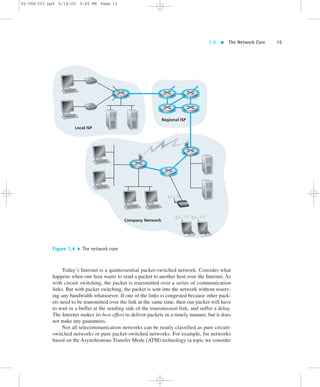
systems. Figure 1.4 highlights the network core with thick, shaded lines. 
1.3.1 Circuit Switching and Packet Switching 
There are two fundamental approaches toward building a network core: circuit 
switching and packet switching. In circuit-switched networks, the resources 
needed along a path (buffers, link bandwidth) to provide for communication be-tween 
the end systems are reserved for the duration of the communication session. 
In packet-switched networks, these resources are not reserved; a session’s messages 
use the resources on demand, and as a consequence, may have to wait (that is, 
queue) for access to a communication link. As a simple analogy, consider two 
restaurants—one that requires reservations and another that neither requires reserva-tions 
nor accepts them. For the restaurant that requires reservations, we have to go 
through the hassle of first calling before we leave home. But when we arrive at the 
restaurant we can, in principle, immediately communicate with the waiter and order 
our meal. For the restaurant that does not require reservations, we don’t need to 
bother to reserve a table. But when we arrive at the restaurant, we may have to wait 
for a table before we can communicate with the waiter. 
The ubiquitous telephone networks are examples of circuit-switched networks. 
Consider what happens when one person wants to send information (voice or facsim-ile) 
to another over a telephone network. Before the sender can send the information, 
the network must first establish a connection between the sender and the receiver. In 
contrast with the TCP connection that we discussed in the previous section, this is a 
bona fide connection for which the switches on the path between the sender and re-ceiver 
maintain connection state for that connection. In the jargon of telephony, this 
connection is called a circuit. When the network establishes the circuit, it also re-serves 
a constant transmission rate in the network’s links for the duration of the con-nection. 
Since bandwidth has been reserved for this sender-to-receiver connection, 
the sender can transfer the data to the receiver at the guaranteed constant rate.
1.3  The Network Core 15 
02-068 C01 pp4 6/14/02 5:45 PM Page 15 
Local ISP 
Regional ISP 
Company Network 
Figure 1.4  The network core 
Today’s Internet is a quintessential packet-switched network. Consider what 
happens when one host wants to send a packet to another host over the Internet. As 
with circuit switching, the packet is transmitted over a series of communication 
links. But with packet switching, the packet is sent into the network without reserv-ing 
any bandwidth whatsoever. If one of the links is congested because other pack-ets 
need to be transmitted over the link at the same time, then our packet will have 
to wait in a buffer at the sending side of the transmission link, and suffer a delay. 
The Internet makes its best effort to deliver packets in a timely manner, but it does 
not make any guarantees. 
Not all telecommunication networks can be neatly classified as pure circuit-switched 
networks or pure packet-switched networks. For example, for networks 
based on the Asynchronous Transfer Mode (ATM) technology (a topic we consider
16 CHAPTER 1  Computer Networks and the Internet 
in Chapter 5), a connection can make a reservation and yet its messages may still 
wait for congested resources! Nevertheless, this fundamental classification into 
packet- and circuit-switched networks is an excellent starting point in understanding 
telecommunication network technology. 
Circuit Switching 
This book is about computer networks, the Internet, and packet switching, not about 
telephone networks and circuit switching. Nevertheless, it is important to understand 
why the Internet and other computer networks use packet switching rather than the 
more traditional circuit-switching technology used in the telephone networks. For 
this reason, we now give a brief overview of circuit switching. 
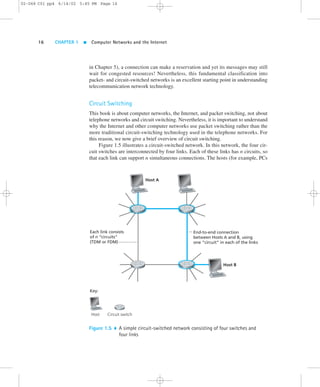
Figure 1.5 illustrates a circuit-switched network. In this network, the four cir-cuit 
switches are interconnected by four links. Each of these links has n circuits, so 
that each link can support n simultaneous connections. The hosts (for example, PCs 
End-to-end connection 
between Hosts A and B, using 
one “circuit” in each of the links 
Each link consists 
of n “circuits” 
(TDM or FDM) 
Key: 
Host Circuit switch 
Host A 
Host B 
Figure 1.5  A simple circuit-switched network consisting of four switches and 
four links 
02-068 C01 pp4 6/14/02 5:45 PM Page 16
1.3  The Network Core 17 
02-068 C01 pp4 6/14/02 5:45 PM Page 17 
and workstations) are each directly connected to one of the switches. When two 
hosts want to communicate, the network establishes a dedicated end-to-end connec-tion 
between two hosts. (Conference calls between more than two devices are, of 
course, also possible. But to keep things simple, let’s suppose for now that there are 
only two hosts for each connection.) Thus, in order for host A to send messages to 
host B, the network must first reserve one circuit on each of two links. Because each 
link has n circuits, for each link used by the end-to-end connection, the connection 
gets the fraction 1/n of the link’s bandwidth for the duration of the connection. 
Multiplexing in Circuit-Switched Networks 
A circuit in a link is implemented with either frequency-division multiplexing 
(FDM) or time-division multiplexing (TDM).With FDM, the frequency spectrum 
of a link is shared among the connections established across the link. Specifically, 
the link dedicates a frequency band to each connection for the duration of the con-nection. 
In telephone networks, this frequency band typically has a width of 4 kHz 
(that is, 4,000 Hertz or 4,000 cycles per second). The width of the band is called, not 
surprisingly, the bandwidth. FM radio stations also use FDM to share the mi-crowave 
frequency spectrum. 
The trend in modern telephony is to replace FDM with TDM. Most links in 
most telephone systems in developed countries currently employ TDM. For a TDM 
link, time is divided into frames of fixed duration, and each frame is divided into a 
fixed number of time slots. When the network establishes a connection across a link, 
the network dedicates one time slot in every frame to the connection. These slots are 
dedicated for the sole use of that connection, with a time slot available for use (in 
every frame) to transmit the connection’s data. 
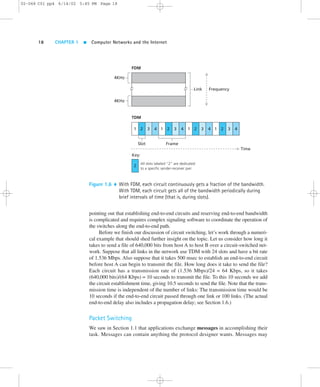
Figure 1.6 illustrates FDM and TDM for a specific network link supporting up 
to four circuits. For FDM, the frequency domain is segmented into four bands, each 
of bandwidth 4 kHz. For TDM, the time domain is segmented into frames, with four 
time slots in each frame; each circuit is assigned the same dedicated slot in the re-volving 
TDM frames. For TDM, the transmission rate of a circuit is equal to the 
frame rate multiplied by the number of bits in a slot. For example, if the link trans-mits 
8,000 frames per second and each slot consists of eight bits, then the transmis-sion 
rate of a circuit is 64 Kbps. 
Proponents of packet switching have always argued that circuit switching is 
wasteful because the dedicated circuits are idle during silent periods. For example, 
when one person in a telephone call stops talking, the idle network resources (fre-quency 
bands or slots in the links along the connection’s route) cannot be used by 
other ongoing connections. As another example of how these resources can be under-utilized, 
consider a radiologist who uses a circuit-switched network to remotely access 
a series of x-rays. The radiologist sets up a connection, requests an image, contem-plates 
the image, and then requests a new image. Network resources are wasted during 
the radiologist’s contemplation periods. Proponents of packet switching also enjoy
02-068 C01 pp4 6/14/02 5:45 PM Page 18 
18 CHAPTER 1  Computer Networks and the Internet 
4KHz 
FDM 
TDM 
Link Frequency 
4KHz 
2 3 4 1 2 3 4 1 2 3 4 1 2 3 4 
Slot 
1 
Key: 
Frame 
All slots labeled “2” are dedicated 
to a specific sender-receiver pair. 
2 
Time 
Figure 1.6  With FDM, each circuit continuously gets a fraction of the bandwidth. 
With TDM, each circuit gets all of the bandwidth periodically during 
brief intervals of time (that is, during slots). 
pointing out that establishing end-to-end circuits and reserving end-to-end bandwidth 
is complicated and requires complex signaling software to coordinate the operation of 
the switches along the end-to-end path. 
Before we finish our discussion of circuit switching, let’s work through a numeri-cal 
example that should shed further insight on the topic. Let us consider how long it 
takes to send a file of 640,000 bits from host A to host B over a circuit-switched net-work. 
Suppose that all links in the network use TDM with 24 slots and have a bit rate 
of 1.536 Mbps. Also suppose that it takes 500 msec to establish an end-to-end circuit 
before host A can begin to transmit the file. How long does it take to send the file? 
Each circuit has a transmission rate of (1.536 Mbps)/24 = 64 Kbps, so it takes 
(640,000 bits)/(64 Kbps) = 10 seconds to transmit the file. To this 10 seconds we add 
the circuit establishment time, giving 10.5 seconds to send the file. Note that the trans-mission 
time is independent of the number of links: The transmission time would be 
10 seconds if the end-to-end circuit passed through one link or 100 links. (The actual 
end-to-end delay also includes a propagation delay; see Section 1.6.) 
Packet Switching 
We saw in Section 1.1 that applications exchange messages in accomplishing their 
task. Messages can contain anything the protocol designer wants. Messages may
1.3  The Network Core 19 
02-068 C01 pp4 6/14/02 5:45 PM Page 19 
perform a control function (for example, the “Hi” messages in our handshaking ex-ample) 
or can contain data, such as an e-mail message, a JPEG image, or an MP3 
audio file. In modern computer networks, the source breaks long messages into 
smaller chunks of data known as packets. Between source and destination, each of 
these packets travels through communication links and packet switches (also 
known as routers). Packets are transmitted over each communication link at a rate 
equal to the full transmission rate of the link. Most packet switches use store-and-forward 
transmission at the inputs to the links. Store-and-forward transmission 
means that the switch must receive the entire packet before it can begin to transmit 
the first bit of the packet onto the outbound link. Thus store-and-forward packet 
switches introduce a store-and-forward delay at the input to each link along the 
packet’s route. This delay is proportional to the packet’s length in bits. In particular, 
if a packet consists of L bits, and the packet is to be forwarded onto an outbound link 
of R bps, then the store-and-forward delay at the switch is L/R seconds. 
Each router has multiple links attached to it. For each attached link, the router 
has an output buffer (also called an output queue), which stores packets that the 
router is about to send into that link. The output buffers play a key role in packet 
switching. If an arriving packet needs to be transmitted across a link but finds the 
link busy with the transmission of another packet, the arriving packet must wait in 
the output buffer. Thus, in addition to the store-and-forward delays, packets suffer 
output buffer queuing delays. These delays are variable and depend on the level of 
congestion in the network. Since the amount of buffer space is finite, an arriving 
packet may find that the buffer is completely filled with other packets waiting for 
transmission. In this case, packet loss will occur—either the arriving packet or one 
of the already-queued packets will be dropped. Returning to our restaurant analogy 
from earlier in this section, the queuing delay is analogous to the amount of time 
you spend waiting at the restaurant’s bar for a table to become free. Packet loss is 
analogous to being told by the waiter that you must leave the premises because there 
are already too many other people waiting at the bar for a table. 
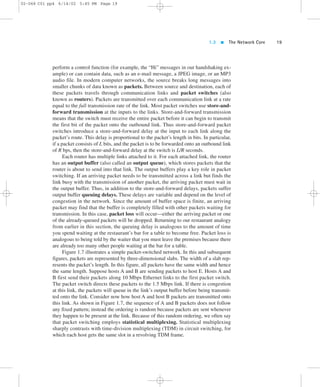
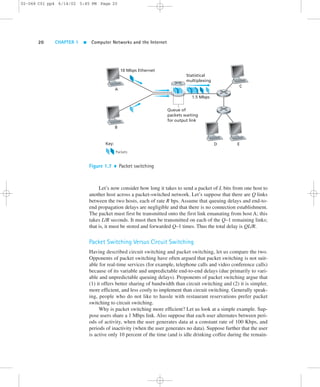
Figure 1.7 illustrates a simple packet-switched network. In this and subsequent 
figures, packets are represented by three-dimensional slabs. The width of a slab rep-resents 
the packet’s length. In this figure, all packets have the same width and hence 
the same length. Suppose hosts A and B are sending packets to host E. Hosts A and 
B first send their packets along 10 Mbps Ethernet links to the first packet switch. 
The packet switch directs these packets to the 1.5 Mbps link. If there is congestion 
at this link, the packets will queue in the link’s output buffer before being transmit-ted 
onto the link. Consider now how host A and host B packets are transmitted onto 
this link. As shown in Figure 1.7, the sequence of A and B packets does not follow 
any fixed pattern; instead the ordering is random because packets are sent whenever 
they happen to be present at the link. Because of this random ordering, we often say 
that packet switching employs statistical multiplexing. Statistical multiplexing 
sharply contrasts with time-division multiplexing (TDM) in circuit switching, for 
which each host gets the same slot in a revolving TDM frame.
02-068 C01 pp4 6/14/02 5:45 PM Page 20 
20 CHAPTER 1  Computer Networks and the Internet 
10 Mbps Ethernet 
Key: 
A 
B 
Packets 
C 
D E 
Statistical 
multiplexing 
1.5 Mbps 
Queue of 
packets waiting 
for output link 
Figure 1.7  Packet switching 
Let’s now consider how long it takes to send a packet of L bits from one host to 
another host across a packet-switched network. Let’s suppose that there are Q links 
between the two hosts, each of rate R bps. Assume that queuing delays and end-to-end 
propagation delays are negligible and that there is no connection establishment. 
The packet must first be transmitted onto the first link emanating from host A; this 
takes L/R seconds. It must then be transmitted on each of the Q–1 remaining links; 
that is, it must be stored and forwarded Q–1 times. Thus the total delay is QL/R. 
Packet Switching Versus Circuit Switching 
Having described circuit switching and packet switching, let us compare the two. 
Opponents of packet switching have often argued that packet switching is not suit-able 
for real-time services (for example, telephone calls and video conference calls) 
because of its variable and unpredictable end-to-end delays (due primarily to vari-able 
and unpredictable queuing delays). Proponents of packet switching argue that 
(1) it offers better sharing of bandwidth than circuit switching and (2) it is simpler, 
more efficient, and less costly to implement than circuit switching. Generally speak-ing, 
people who do not like to hassle with restaurant reservations prefer packet 
switching to circuit switching. 
Why is packet switching more efficient? Let us look at a simple example. Sup-pose 
users share a 1 Mbps link. Also suppose that each user alternates between peri-ods 
of activity, when the user generates data at a constant rate of 100 Kbps, and 
periods of inactivity (when the user generates no data). Suppose further that the user 
is active only 10 percent of the time (and is idle drinking coffee during the remain-
1.3  The Network Core 21 
02-068 C01 pp4 6/14/02 5:45 PM Page 21 
ing 90 percent of the time). With circuit switching, 100 Kbps must be reserved for 
each user at all times. Thus, the link can support only 10 ( = 1Mbps/100 Kbps) si-multaneous 
users. With packet switching, the probability that a specific user is ac-tive 
is 0.1 (that is, 10 percent). If there are 35 users, the probability that there are 11 
or more simultaneously active users is approximately 0.0004. (Problem 10 outlines 
how this probability is obtained.) When there are 10 or fewer simultaneously active 
users (which happens with probability 0.9996), the aggregate arrival rate of data is 
less than or equal to 1 Mbps, the output rate of the link. Thus, when there are 10 or 
fewer active users, users’ packets flow through the link essentially without delay, as 
is the case with circuit switching. When there are more than 10 simultaneously ac-tive 
users, then the aggregate arrival rate of packets exceeds the output capacity of 
the link, and the output queue will begin to grow. (It continues to grow until the ag-gregate 
input rate falls back below 1 Mbps, at which point the queue will begin to 
diminish in length.) Because the probability of having more than 10 simultaneously 
active users is minuscule in this example, packet switching almost always has the 
same delay performance as circuit switching, but does so while allowing for more 
than three times the number of users. 
Although packet switching and circuit switching are both prevalent in today’s 
telecommunication networks, the trend is certainly in the direction of packet switch-ing. 
Even many of today’s circuit-switched telephone networks are slowly migrat-ing 
toward packet switching. In particular, telephone networks often use packet 
switching for the expensive overseas portion of a telephone call. 
Message Segmenting 
In a modern packet-switched network, the source host segments long, application-layer 
messages into smaller packets and sends the smaller packets into the network; 
the receiver later reassembles the packets back into the original messages. But why 
bother to segment the messages into packets in the first place, only to have to re-assemble 
packets into messages? Doesn’t this place an additional and unnecessary 
burden on the source and destination? Although segmentation and reassembly do 
complicate the design of the source and receiver, researchers and network designers 
concluded in the early days of packet switching that the advantages of segmentation 
greatly compensate for its complexity. Before discussing some of these advantages, 
we need to introduce some terminology. We say that a packet-switched network per-forms 
message switching if the sources do not segment messages (that is, they send 
a message into the network as a whole). Thus message switching is a specific kind 
of packet switching, in which the packets traversing the network are themselves en-tire 
application messages. 
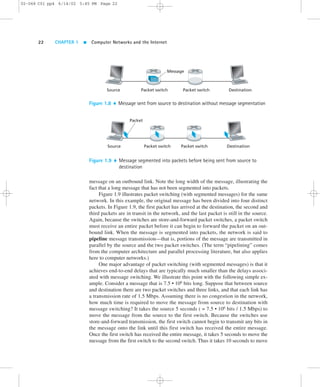
Figure 1.8 illustrates message switching in a route consisting of two packet 
switches and three links. With message switching, the message stays intact as it tra-verses 
the network. Because the switches are store-and-forward packet switches, a 
packet switch must receive the entire message before it can begin to forward the
02-068 C01 pp4 6/14/02 5:45 PM Page 22 
22 CHAPTER 1  Computer Networks and the Internet 
Message 
Source Packet switch Packet switch Destination 
Figure 1.8  Message sent from source to destination without message segmentation 
Packet 
Source Packet switch 
Packet switch Destination 
Figure 1.9  Message segmented into packets before being sent from source to 
destination 
message on an outbound link. Note the long width of the message, illustrating the 
fact that a long message that has not been segmented into packets. 
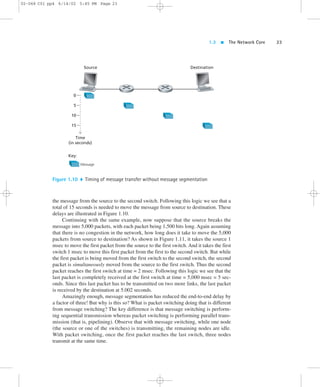
Figure 1.9 illustrates packet switching (with segmented messages) for the same 
network. In this example, the original message has been divided into four distinct 
packets. In Figure 1.9, the first packet has arrived at the destination, the second and 
third packets are in transit in the network, and the last packet is still in the source. 
Again, because the switches are store-and-forward packet switches, a packet switch 
must receive an entire packet before it can begin to forward the packet on an out-bound 
link. When the message is segmented into packets, the network is said to 
pipeline message transmission—that is, portions of the message are transmitted in 
parallel by the source and the two packet switches. (The term “pipelining” comes 
from the computer architecture and parallel processing literature, but also applies 
here to computer networks.) 
One major advantage of packet switching (with segmented messages) is that it 
achieves end-to-end delays that are typically much smaller than the delays associ-ated 
with message switching. We illustrate this point with the following simple ex-ample. 
Consider a message that is 7.5 • 106 bits long. Suppose that between source 
and destination there are two packet switches and three links, and that each link has 
a transmission rate of 1.5 Mbps. Assuming there is no congestion in the network, 
how much time is required to move the message from source to destination with 
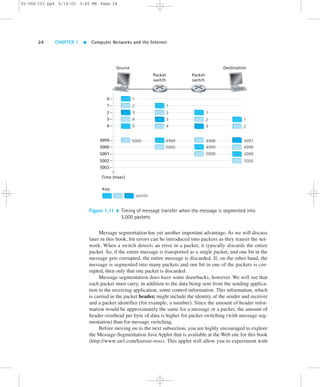
message switching? It takes the source 5 seconds ( = 7.5 • 106 bits / 1.5 Mbps) to 
move the message from the source to the first switch. Because the switches use 
store-and-forward transmission, the first switch cannot begin to transmit any bits in 
the message onto the link until this first switch has received the entire message. 
Once the first switch has received the entire message, it takes 5 seconds to move the 
message from the first switch to the second switch. Thus it takes 10 seconds to move
1.3  The Network Core 23 
02-068 C01 pp4 6/14/02 5:45 PM Page 23 
Source Destination 
Time 
(in seconds) 
Message 
0 
5 
10 
15 
Key: 
Figure 1.10  Timing of message transfer without message segmentation 
the message from the source to the second switch. Following this logic we see that a 
total of 15 seconds is needed to move the message from source to destination. These 
delays are illustrated in Figure 1.10. 
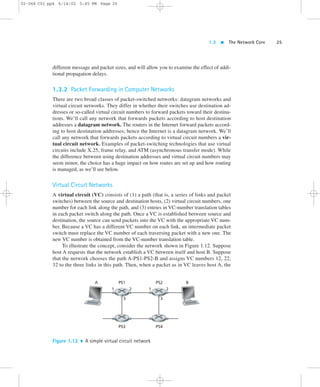
Continuing with the same example, now suppose that the source breaks the 
message into 5,000 packets, with each packet being 1,500 bits long. Again assuming 
that there is no congestion in the network, how long does it take to move the 5,000 
packets from source to destination? As shown in Figure 1.11, it takes the source 1 
msec to move the first packet from the source to the first switch. And it takes the first 
switch 1 msec to move this first packet from the first to the second switch. But while 
the first packet is being moved from the first switch to the second switch, the second 
packet is simultaneously moved from the source to the first switch. Thus the second 
packet reaches the first switch at time = 2 msec. Following this logic we see that the 
last packet is completely received at the first switch at time = 5,000 msec = 5 sec-onds. 
Since this last packet has to be transmitted on two more links, the last packet 
is received by the destination at 5.002 seconds. 
Amazingly enough, message segmentation has reduced the end-to-end delay by 
a factor of three! But why is this so? What is packet switching doing that is different 
from message switching? The key difference is that message switching is perform-ing 
sequential transmission whereas packet switching is performing parallel trans-mission 
(that is, pipelining). Observe that with message switching, while one node 
(the source or one of the switches) is transmitting, the remaining nodes are idle. 
With packet switching, once the first packet reaches the last switch, three nodes 
transmit at the same time.
02-068 C01 pp4 6/14/02 5:45 PM Page 24 
24 CHAPTER 1  Computer Networks and the Internet 
0 
1 
2 
3 
4 
1 
2 
3 
4 
5 
5000 
packets 
Source 
4999 
5000 
5001 
5002 
5003 
Time (msec) 
Key: 
Packet 
switch 
Packet 
switch 
Destination 
1 
2 
4997 
4998 
4999 
5000 
1 
2 
3 
4 
4999 
5000 
1 
2 
3 
4998 
4999 
5000 
Figure 1.11  Timing of message transfer when the message is segmented into 
5,000 packets 
Message segmentation has yet another important advantage. As we will discuss 
later in this book, bit errors can be introduced into packets as they transit the net-work. 
When a switch detects an error in a packet, it typically discards the entire 
packet. So, if the entire message is transported as a single packet, and one bit in the 
message gets corrupted, the entire message is discarded. If, on the other hand, the 
message is segmented into many packets and one bit in one of the packets is cor-rupted, 
then only that one packet is discarded. 
Message segmentation does have some drawbacks, however. We will see that 
each packet must carry, in addition to the data being sent from the sending applica-tion 
to the receiving application, some control information. This information, which 
is carried in the packet header, might include the identity of the sender and receiver 
and a packet identifier (for example, a number). Since the amount of header infor-mation 
would be approximately the same for a message or a packet, the amount of 
header overhead per byte of data is higher for packet switching (with message seg-mentation) 
than for message switching. 
Before moving on to the next subsection, you are highly encouraged to explore 
the Message-Segmentation Java Applet that is available at the Web site for this book 
(http://www.awl.com/kurose-ross). This applet will allow you to experiment with
1.3  The Network Core 25 
02-068 C01 pp4 6/14/02 5:45 PM Page 25 
different message and packet sizes, and will allow you to examine the effect of addi-tional 
propagation delays. 
1.3.2 Packet Forwarding in Computer Networks 
There are two broad classes of packet-switched networks: datagram networks and 
virtual circuit networks. They differ in whether their switches use destination ad-dresses 
or so-called virtual circuit numbers to forward packets toward their destina-tions. 
We’ll call any network that forwards packets according to host destination 
addresses a datagram network. The routers in the Internet forward packets accord-ing 
to host destination addresses; hence the Internet is a datagram network. We’ll 
call any network that forwards packets according to virtual circuit numbers a vir-tual 
circuit network. Examples of packet-switching technologies that use virtual 
circuits include X.25, frame relay, and ATM (asynchronous transfer mode). While 
the difference between using destination addresses and virtual circuit numbers may 
seem minor, the choice has a huge impact on how routes are set up and how routing 
is managed, as we’ll see below. 
Virtual Circuit Networks 
A virtual circuit (VC) consists of (1) a path (that is, a series of links and packet 
switches) between the source and destination hosts, (2) virtual circuit numbers, one 
number for each link along the path, and (3) entries in VC-number translation tables 
in each packet switch along the path. Once a VC is established between source and 
destination, the source can send packets into the VC with the appropriate VC num-ber. 
Because a VC has a different VC number on each link, an intermediate packet 
switch must replace the VC number of each traversing packet with a new one. The 
new VC number is obtained from the VC-number translation table. 
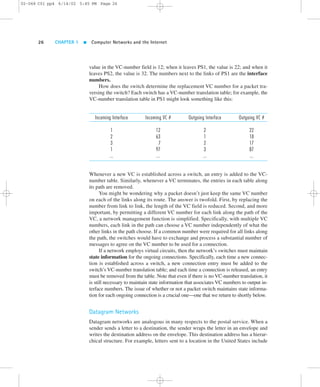
To illustrate the concept, consider the network shown in Figure 1.12. Suppose 
host A requests that the network establish a VC between itself and host B. Suppose 
that the network chooses the path A-PS1-PS2-B and assigns VC numbers 12, 22, 
32 to the three links in this path. Then, when a packet as in VC leaves host A, the 
A PS1 PS2 B 
1 2 
3 
1 2 
3 
PS3 PS4 
Figure 1.12  A simple virtual circuit network
02-068 C01 pp4 6/14/02 5:45 PM Page 26 
26 CHAPTER 1  Computer Networks and the Internet 
value in the VC-number field is 12; when it leaves PS1, the value is 22; and when it 
leaves PS2, the value is 32. The numbers next to the links of PS1 are the interface 
numbers. 
How does the switch determine the replacement VC number for a packet tra-versing 
the switch? Each switch has a VC-number translation table; for example, the 
VC-number translation table in PS1 might look something like this: 
Incoming Interface Incoming VC # Outgoing Interface Outgoing VC # 
1 12 2 22 
2 63 1 18 
3 7 2 17 
1 97 3 87 
... ... ... ... 
Whenever a new VC is established across a switch, an entry is added to the VC-number 
table. Similarly, whenever a VC terminates, the entries in each table along 
its path are removed. 
You might be wondering why a packet doesn’t just keep the same VC number 
on each of the links along its route. The answer is twofold. First, by replacing the 
number from link to link, the length of the VC field is reduced. Second, and more 
important, by permitting a different VC number for each link along the path of the 
VC, a network management function is simplified. Specifically, with multiple VC 
numbers, each link in the path can choose a VC number independently of what the 
other links in the path choose. If a common number were required for all links along 
the path, the switches would have to exchange and process a substantial number of 
messages to agree on the VC number to be used for a connection. 
If a network employs virtual circuits, then the network’s switches must maintain 
state information for the ongoing connections. Specifically, each time a new connec-tion 
is established across a switch, a new connection entry must be added to the 
switch’s VC-number translation table; and each time a connection is released, an entry 
must be removed from the table. Note that even if there is no VC-number translation, it 
is still necessary to maintain state information that associates VC numbers to output in-terface 
numbers. The issue of whether or not a packet switch maintains state informa-tion 
for each ongoing connection is a crucial one—one that we return to shortly below. 
Datagram Networks 
Datagram networks are analogous in many respects to the postal service. When a 
sender sends a letter to a destination, the sender wraps the letter in an envelope and 
writes the destination address on the envelope. This destination address has a hierar-chical 
structure. For example, letters sent to a location in the United States include
1.3  The Network Core 27 
02-068 C01 pp4 6/14/02 5:45 PM Page 27 
the country (USA), the state (for example, Pennsylvania), the city (for example, 
Philadelphia), the street (for example, Walnut Street), and the number of the house 
on the street (for example, 421). The postal service uses the address on the envelope 
to route the letter to its destination. For example, if the letter is sent from France, 
then a postal office in France will first forward the letter to a postal center in the 
United States. This postal center in the United States will then forward the letter to a 
postal center in Philadelphia. Finally, a mail carrier working in Philadelphia will de-liver 
the letter to its ultimate destination. 
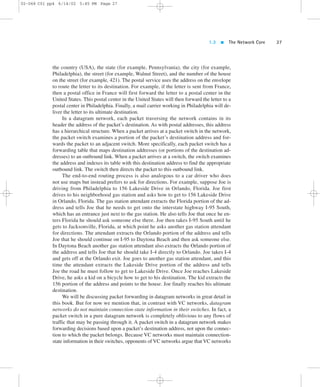
In a datagram network, each packet traversing the network contains in its 
header the address of the packet’s destination. As with postal addresses, this address 
has a hierarchical structure. When a packet arrives at a packet switch in the network, 
the packet switch examines a portion of the packet’s destination address and for-wards 
the packet to an adjacent switch. More specifically, each packet switch has a 
forwarding table that maps destination addresses (or portions of the destination ad-dresses) 
to an outbound link. When a packet arrives at a switch, the switch examines 
the address and indexes its table with this destination address to find the appropriate 
outbound link. The switch then directs the packet to this outbound link. 
The end-to-end routing process is also analogous to a car driver who does 
not use maps but instead prefers to ask for directions. For example, suppose Joe is 
driving from Philadelphia to 156 Lakeside Drive in Orlando, Florida. Joe first 
drives to his neighborhood gas station and asks how to get to 156 Lakeside Drive 
in Orlando, Florida. The gas station attendant extracts the Florida portion of the ad-dress 
and tells Joe that he needs to get onto the interstate highway I-95 South, 
which has an entrance just next to the gas station. He also tells Joe that once he en-ters 
Florida he should ask someone else there. Joe then takes I-95 South until he 
gets to Jacksonville, Florida, at which point he asks another gas station attendant 
for directions. The attendant extracts the Orlando portion of the address and tells 
Joe that he should continue on I-95 to Daytona Beach and then ask someone else. 
In Daytona Beach another gas station attendant also extracts the Orlando portion of 
the address and tells Joe that he should take I-4 directly to Orlando. Joe takes I-4 
and gets off at the Orlando exit. Joe goes to another gas station attendant, and this 
time the attendant extracts the Lakeside Drive portion of the address and tells 
Joe the road he must follow to get to Lakeside Drive. Once Joe reaches Lakeside 
Drive, he asks a kid on a bicycle how to get to his destination. The kid extracts the 
156 portion of the address and points to the house. Joe finally reaches his ultimate 
destination. 
We will be discussing packet forwarding in datagram networks in great detail in 
this book. But for now we mention that, in contrast with VC networks, datagram 
networks do not maintain connection-state information in their switches. In fact, a 
packet switch in a pure datagram network is completely oblivious to any flows of 
traffic that may be passing through it. A packet switch in a datagram network makes 
forwarding decisions based upon a packet’s destination address, not upon the connec-tion 
to which the packet belongs. Because VC networks must maintain connection-state 
information in their switches, opponents of VC networks argue that VC networks
02-068 C01 pp4 6/14/02 5:45 PM Page 28 
28 CHAPTER 1  Computer Networks and the Internet 
are overly complex. These opponents include most researchers and engineers in the 
Internet community. Proponents of VC networks feel that VCs can offer applications 
a richer variety of networking services. 
How would you actually like to see the end-to-end route that packets take in the 
Internet? We now invite you to get your hands dirty by interacting with the Trace-route 
program, by visiting the site http://www.traceroute.org. (See a discussion of 
Traceroute in Section 1.6.) 
Network Taxonomy 
We have now introduced several important networking concepts: circuit switching, 
packet switching, virtual circuits, connectionless service, and connection-oriented 
service. How does it all fit together? 
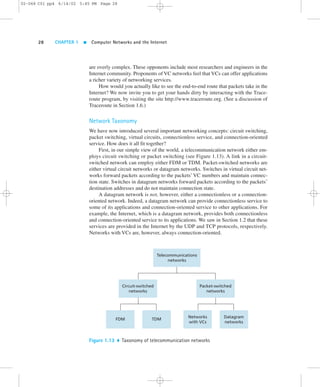
First, in our simple view of the world, a telecommunication network either em-ploys 
circuit switching or packet switching (see Figure 1.13). A link in a circuit-switched 
network can employ either FDM or TDM. Packet-switched networks are 
either virtual circuit networks or datagram networks. Switches in virtual circuit net-works 
forward packets according to the packets’ VC numbers and maintain connec-tion 
state. Switches in datagram networks forward packets according to the packets’ 
destination addresses and do not maintain connection state. 
A datagram network is not, however, either a connectionless or a connection-oriented 
network. Indeed, a datagram network can provide connectionless service to 
some of its applications and connection-oriented service to other applications. For 
example, the Internet, which is a datagram network, provides both connectionless 
and connection-oriented service to its applications. We saw in Section 1.2 that these 
services are provided in the Internet by the UDP and TCP protocols, respectively. 
Networks with VCs are, however, always connection-oriented. 
Telecommunications 
networks 
Circuit-switched 
networks 
Packet-switched 
networks 
FDM TDM Networks 
with VCs 
Datagram 
networks 
Figure 1.13  Taxonomy of telecommunication networks
1.4  Network Access and Physical Media 29 
02-068 C01 pp4 6/14/02 5:45 PM Page 29 
1.4  Network Access and Physical Media 
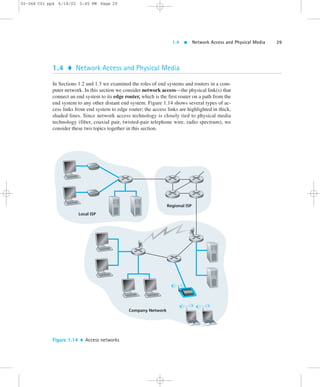
In Sections 1.2 and 1.3 we examined the roles of end systems and routers in a com-puter 
network. In this section we consider network access—the physical link(s) that 
connect an end system to its edge router, which is the first router on a path from the 
end system to any other distant end system. Figure 1.14 shows several types of ac-cess 
links from end system to edge router; the access links are highlighted in thick, 
shaded lines. Since network access technology is closely tied to physical media 
technology (fiber, coaxial pair, twisted-pair telephone wire, radio spectrum), we 
consider these two topics together in this section. 
Local ISP 
Regional ISP 
Company Network 
Figure 1.14  Access networks
02-068 C01 pp4 6/14/02 5:45 PM Page 30 
30 CHAPTER 1  Computer Networks and the Internet 
1.4.1 Network Access 
Network access can be loosely classified into three categories: 
 Residential access, connecting home end systems into the network 
 Company access, connecting end systems in a business or educational institu-tion 
into the network 
 Mobile access, connecting mobile end systems into the network 
These categories are not hard and fast—for example, some company end systems 
may use the access technology that we ascribe to residential access, and vice versa. 
The following descriptions are meant to hold for the common cases. 
Residential Access 
Residential access refers to connecting a home end system (typically a PC, but per-haps 
a Web TV or some Internet home appliance) to an edge router. A prevalent 
form of residential access remains the dial-up modem over an ordinary analog tele-phone 
line into a residential ISP (such as America Online). The home modem con-verts 
the digital output of the PC into analog format for transmission over the analog 
phone line. This analog phone line is made of twisted-pair copper wire, and is the 
same telephone line used to make ordinary phone calls. (We will discuss twisted pair 
later in this section.) At the other end of the analog phone line, a modem in the ISP 
converts the analog signal back into digital form for input to the ISP router. Thus, 
the access network is simply a pair of modems along with a point-to-point dial-up 
phone line. Today’s modem speeds allow dial-up access at rates up to 56 Kbps. 
However, due to the poor quality of the twisted-pair line between many homes and 
ISPs, many users get an effective rate significantly less than 56 Kbps. 
Many residential users find a dial-up modem’s 56 Kbps access to be excruciat-ingly 
slow. For example, it takes approximately eight minutes to download a single 
three-minute MP3 song over a 56 Kbps dial-up modem. Moreover, dial-up modem 
access ties up a user’s ordinary phone line—while a residential user uses a dial-up 
modem to surf the Web, the user cannot receive and make ordinary phone calls over 
the phone line. Fortunately, new broadband access technologies are providing resi-dential 
users higher bit rates; and they are also providing a means for users to access 
the Internet and talk on the phone at the same time. There are two common types of 
broadband residential access: digital subscriber line (DSL) [DSL 2002] and hy-brid 
fiber coaxial cable (HFC) [Cable 2002]. 
As of January 2001, broadband residential access was much less prevalent than 
56 Kbps dial-up modem access: the percentage of homes with broadband Internet 
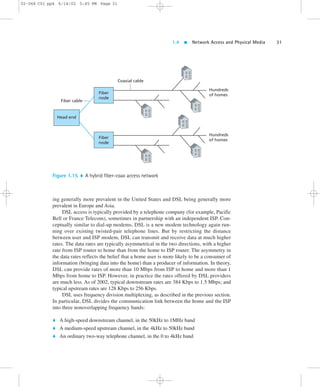
access was 9.2 percent in South Korea, 4.2 percent in Canada, and 2.2 percent in the 
United States, with even lower penetration rates in Europe [Economist 2001]. How-ever, 
DSL and HFC are being rapidly deployed throughout the world, with HFC be-
1.4  Network Access and Physical Media 31 
02-068 C01 pp4 6/14/02 5:45 PM Page 31 
Fiber 
node 
Fiber cable 
Coaxial cable 
ing generally more prevalent in the United States and DSL being generally more 
prevalent in Europe and Asia. 
DSL access is typically provided by a telephone company (for example, Pacific 
Bell or France Telecom), sometimes in partnership with an independent ISP. Con-ceptually 
similar to dial-up modems, DSL is a new modem technology again run-ning 
over existing twisted-pair telephone lines. But by restricting the distance 
between user and ISP modem, DSL can transmit and receive data at much higher 
rates. The data rates are typically asymmetrical in the two directions, with a higher 
rate from ISP router to home than from the home to ISP router. The asymmetry in 
the data rates reflects the belief that a home user is more likely to be a consumer of 
information (bringing data into the home) than a producer of information. In theory, 
DSL can provide rates of more than 10 Mbps from ISP to home and more than 1 
Mbps from home to ISP. However, in practice the rates offered by DSL providers 
are much less. As of 2002, typical downstream rates are 384 Kbps to 1.5 Mbps; and 
typical upstream rates are 128 Kbps to 256 Kbps. 
DSL uses frequency division multiplexing, as described in the previous section. 
In particular, DSL divides the communication link between the home and the ISP 
into three nonoverlapping frequency bands: 
 A high-speed downstream channel, in the 50kHz to 1MHz band 
 A medium-speed upstream channel, in the 4kHz to 50kHz band 
 An ordinary two-way telephone channel, in the 0 to 4kHz band 
Hundreds 
of homes 
Head end 
Hundreds 
Fiber of homes 
node 
Figure 1.15  A hybrid fiber-coax access network
02-068 C01 pp4 6/14/02 5:45 PM Page 32 
32 CHAPTER 1  Computer Networks and the Internet 
The actual amount of downstream and upstream bandwidth potentially available to 
the user is a function of the distance between the home modem and the ISP modem, 
the gauge of the twisted-pair line, and the degree of electrical interference. In fact, 
unlike dial-up modems, engineers have explicitly designed DSL for short distances 
between residential and ISP modems, allowing for substantially higher transmission 
rates than dial-up access. 
While DSL and dial-up modems use ordinary phone lines, HFC access net-works 
are extensions of the current cable network used for broadcasting cable tele-vision. 
In a traditional cable system, a cable head end broadcasts through a 
distribution network of coaxial cable and amplifiers to residences. As illustrated in 
Figure 1.15, fiber optics connect the cable head end to neighborhood-level junctions, 
from which traditional coaxial cable is then used to reach individual houses and 
apartments. Each neighborhood junction typically supports 500 to 5,000 homes. 
As with DSL, HFC requires special modems, called cable modems. Compa-nies 
that provide cable Internet access require their customers to either purchase 
or lease a modem. Typically, the cable modem is an external device and connects 
to the home PC through a 10-BaseT Ethernet port. (We will discuss Ethernet in 
great detail in Chapter 5.) Cable modems divide the HFC network into two chan-nels, 
a downstream and an upstream channel. As with DSL, the downstream chan-nel 
is typically allocated more bandwidth and hence a faster transmission rate. 
However, with HFC (and not with DSL), these rates are shared among the homes, 
as we discuss next. 
One important characteristic of HFC is that it is a shared broadcast medium. In 
particular, every packet sent by the head end travels downstream on every link to 
every home; and every packet sent by a home travels on the upstream channel to the 
head end. For this reason, if several users are simultaneously downloading different 
MP3s on the downstream channel, the actual rate at which each user receives its 
MP3 will be significantly less than the downstream rate. On the other hand, if there 
are only a few active users and they are all Web surfing, then each of the users may 
actually receive Web pages at the full downstream rate, as users will rarely request a 
Web page at exactly the same time. Because the upstream channel is also shared, 
packets sent by two different homes at the same time will collide, which further de-creases 
the effective upstream bandwidth. (We will discuss this collision issue in 
some detail when we discuss Ethernet in Chapter 5.) Advocates of DSL are quick to 
point out that DSL is a point-to-point connection between the home and ISP, and 
therefore all the DSL bandwidth is dedicated rather than shared. Cable advocates, 
however, argue that a reasonably dimensioned HFC network provides higher band-widths 
than DSL. The battle between DSL and HFC for high-speed residential ac-cess 
has clearly begun. 
One of the attractive features of DSL and HFC is that the services are always on; 
that is, the user can leave his or her computer on and remain permanently connected 
to an ISP while simultaneously making and receiving ordinary telephone calls.
1.4  Network Access and Physical Media 33 
02-068 C01 pp4 6/14/02 5:45 PM Page 33 
Company Access 
On corporate and university campuses, a local area network (LAN) is typically used to 
connect an end system to the edge router. As we will see in Chapter 5, there are many 
different types of LAN technology. However, Ethernet technology is currently by far 
the most prevalent access technology in company networks. Ethernet operates at 10 
Mbps or 100 Mbps (and now even at 1 Gbps and 10 Gbps). It uses either twisted-pair 
copper wire or coaxial cable to connect a number of end systems with each other and 
with an edge router. The edge router is responsible for routing packets that have desti-nations 
outside of that LAN. Like HFC, Ethernet uses a shared medium, so that end 
users share the transmission rate of the LAN. More recently, shared Ethernet technol-ogy 
has been migrating toward switched Ethernet technology. Switched Ethernet uses 
multiple twisted-pair Ethernet segments connected at a “switch” to allow the full 
bandwidth of an Ethernet to be delivered to different users on the same LAN simulta-neously. 
We will explore shared and switched Ethernet in detail in Chapter 5. 
Mobile Access 
Accompanying the current Internet revolution, the wireless revolution is also having 
a profound impact on the way people work and live. In the year 2000, more people 
in Europe had a mobile phone than had a PC or a car. And the wireless trend is con-tinuing, 
with many analysts predicting that mobile handheld devices—such as mo-bile 
phones and PDAs—will overtake wired computers as the dominant Internet 
access devices throughout the world by 2004 [Dornan 2001]. Today, there are 
two broad types of wireless Internet access. In a wireless LAN, mobile users trans-mit/ 
receive packets to/from a base station (also known as a wireless access point) 
within a radius of a few tens of meters. The base station is typically connected to the 
wired Internet and thus serves to connect wireless users to the wired network. In 
wide-area wireless access networks, the base station is managed by a telecommu-nications 
provider and serves users within a radius of tens of kilometers. 
Wireless LANs, based on IEEE 802.11b technology (also known as wireless 
Ethernet and Wi-Fi), are currently enjoying rapid deployment in university depart-ments, 
business offices, coffee cafes, and homes. For example, Polytechnic Univer-sity 
has installed IEEE 802.11b base stations on its Brooklyn campus, and all of 
Polytechnic’s students are required to purchase a portable computer equipped with 
802.11b. Using this wireless LAN infrastructure, students send and receive e-mail 
or surf the Web from anywhere on campus (for example, library, dorm room, class-room, 
or outdoor campus bench). The 802.11b technology, which we will discuss in 
detail in Chapter 5, provides a shared bandwidth of 11 Mbps. 
Today many homes are combining broadband residential access (that is, cable 
modems or DSL) with inexpensive wireless LAN technology to create powerful 
home networks. Figure 1.16 shows a schematic of a typical home network (actually,
02-068 C01 pp4 6/14/02 5:45 PM Page 34 
34 CHAPTER 1  Computer Networks and the Internet 
Cable 
headend 
House 
Internet 
Figure 1.16  A schematic of a typical home network 
this is precisely the home network setup of one of the authors). This home network 
consists of a roaming laptop as well as a stationary PC; a base station (the wireless 
access point) which communicates with the roaming PC; a cable modem, providing 
the broadband access to the Internet; and a router, which interconnects the base sta-tion 
and the stationary PC with the cable modem. This network allows two house-hold 
members to have broadband access to the Internet, with one member roaming 
from the kitchen to the backyard to the bedrooms. The total fixed cost for such a net-work 
is less than $500 (including the cable/DSL modem) and is dropping rapidly 
[Bricklin 2001]. 
When you access the Internet through wireless LAN technology, you typically 
need to be within a few tens of meters of a base station. This is feasible for home ac-cess, 
coffee shop access, and, more generally, access within and around a building. 
But what if you are on the beach or in your car and you need Internet access? For 
such wide-area access, roaming Internet users make use of the portable phone infra-structure, 
accessing base stations that are up to tens of kilometers away. 
WAP (wireless access protocol), widely available in Europe, and i-mode, widely 
available in Japan, are two technologies that allow for Internet access over the portable 
phone infrastructure. Resembling ordinary wireless phones but with somewhat bigger 
screens, WAP phones provide low-speed Internet access as well as portable phone 
service. Instead of HTML, WAP phones use a special markup language—WML 
(WAP Markup Language)—that has been optimized for small screens and low-speed 
access. In Europe, the WAP protocol runs on top of Europe’s highly successful GSM 
wireless telephony infrastructure, which uses time-division multiplexing. WAP has
1.4  Network Access and Physical Media 35 
02-068 C01 pp4 6/14/02 5:45 PM Page 35 
been a flop in Europe to date but is expected to become more popular when the new 
GPRS (General Packet Radio Service) packet technology is widely available in 
2002–2003. On the other hand, the proprietary i-mode technology, which is similar in 
concept and functionality to WAP, has been a huge success in Japan. 
Telecommunications companies are currently making enormous investments in 
3G, standing for Third Generation wireless, which will provide packet-switched 
wide-area wireless Internet access at speeds in excess of 384 Kbps [Dornan 2001]. 
3G systems should provide high-speed access to the Web and interactive video, and 
should provide voice quality that is better than that of an ordinary wired telephone. 
The first 3G systems have been deployed in Japan. With such huge investments be-ing 
made in 3G technology, infrastructure, and licenses, many analysts (and in-vestors!) 
wonder whether 3G will be the great success that it is hyped to be. Will it 
instead lose out to competing technologies such as IEEE 802.11? The jury is still 
out. (See [Weinstein 2002] and the case history in Section 5.7.) 
1.4.2 Physical Media 
In the previous subsection, we gave an overview of some of the most important net-work 
access technologies in the Internet. As we described these technologies, we 
also indicated the physical media used. For example, we said that HFC uses a com-bination 
of fiber cable and coaxial cable. We said that dial-up 56 Kbps modems and 
ADSL use twisted-pair copper wire. And we said that mobile access networks use 
the radio spectrum. In this subsection we provide a brief overview of these and other 
transmission media that are commonly employed in the Internet. 
In order to define what is meant by a physical medium, let us reflect on the brief 
life of a bit. Consider a bit traveling from one end system, through a series of links 
and routers, to another end system. This poor bit gets transmitted many, many times! 
The source end system first transmits the bit, and shortly thereafter the first router in 
the series receives the bit; the first router then transmits the bit, and shortly there-after 
the second router receives the bit; and so on. Thus our bit, when traveling from 
source to destination, passes through a series of transmitter-receiver pairs. For each 
transmitter-receiver pair, the bit is sent by propagating electromagnetic waves or op-tical 
pulses across a physical medium. The physical medium can take many shapes 
and forms and does not have to be of the same type for each transmitter-receiver pair 
along the path. Examples of physical media include twisted-pair copper wire, coax-ial 
cable, multi-mode fiber-optic cable, terrestrial radio spectrum, and satellite radio 
spectrum. Physical media fall into two categories: guided media and unguided 
media. With guided media, the waves are guided along a solid medium, such as a 
fiber-optic cable, a twisted-pair copper wire, or a coaxial cable. With unguided me-dia, 
the waves propagate in the atmosphere and in outer space, such as in a wireless 
LAN or a digital satellite channel. 
But before we get into the characteristics of the various media types, let us say 
a few words about their costs. The actual cost of the physical link (copper wire,
02-068 C01 pp4 6/14/02 5:45 PM Page 36 
36 CHAPTER 1  Computer Networks and the Internet 
fiber-optic cable, and so on) is often relatively minor compared with other network-ing 
costs. In particular, the labor cost associated with the installation of the physical 
link can be orders of magnitude higher than the cost of the material. For this reason, 
many builders install twisted pair, optical fiber, and coaxial cable in every room in a 
building. Even if only one medium is initially used, there is a good chance that an-other 
medium could be used in the near future, and so money is saved by not having 
to lay additional wires in the future. 
Twisted-Pair Copper Wire 
The least expensive and most commonly used guided transmission medium is 
twisted-pair copper wire. For over 100 years it has been used by telephone networks. 
In fact, more than 99 percent of the wired connections from the telephone handset 
to the local telephone switch use twisted-pair copper wire. Most of us have seen 
twisted pair in our homes and work environments. Twisted pair consists of two insu-lated 
copper wires, each about 1 mm thick, arranged in a regular spiral pattern. The 
wires are twisted together to reduce the electrical interference from similar pairs 
close by. Typically, a number of pairs are bundled together in a cable by wrapping 
the pairs in a protective shield. A wire pair constitutes a single communication link. 
Unshielded twisted pair (UTP) is commonly used for computer networks 
within a building, that is, for local area networks (LANs). Data rates for LANs us-ing 
twisted pair today range from 10 Mbps to 1 Gbps. The data rates that can be 
achieved depend on the thickness of the wire and the distance between transmitter 
and receiver. Two types of UTP are common in LANs: category 3 and category 5. 
Category 3 corresponds to voice-grade twisted pair, commonly found in office 
buildings. Office buildings are often prewired with two or more parallel pairs of cat-egory 
3 twisted pair; one pair is used for telephone communication, and the addi-tional 
pairs can be used for additional telephone lines or for LAN networking. 10 
Mbps Ethernet, one of the most prevalent LAN types, can use category 3 UTP. Cat-egory 
5, with its more twists per centimeter and Teflon™ insulation, can handle 
higher bit rates. 100 Mbps Ethernet running on category 5 UTP has become very 
popular in recent years. Category 5 UTP has become common for preinstallation in 
new office buildings. 
When fiber-optic technology emerged in the 1980s, many people disparaged 
twisted pair because of its relatively low bit rates. Some people even felt that fiber-optic 
technology would completely replace twisted pair. But twisted pair did not 
give up so easily. Modern twisted-pair technology, such as category 5 UTP, can 
achieve data rates of 100 Mbps for distances up to a few hundred meters. Even 
higher rates are possible over shorter distances. In the end, twisted pair has emerged 
as the dominant solution for high-speed LAN networking. 
As discussed in the section on access networks, twisted pair is also commonly 
used for residential Internet access. We saw that dial-up modem technology enables 
access at rates of up to 56 Kbps over twisted pair. We also saw that DSL (digital sub-
1.4  Network Access and Physical Media 37 
02-068 C01 pp4 6/14/02 5:45 PM Page 37 
scriber line) technology has enabled residential users to access the Internet at rates 
in excess of 6 Mbps over twisted pair (when users live close to the ISP’s modem). 
Coaxial Cable 
Like twisted pair, coaxial cable consists of two copper conductors, but the two con-ductors 
are concentric rather than parallel. With this construction and a special insu-lation 
and shielding, coaxial cable can have high bit rates. Coaxial cable comes in 
two varieties: baseband coaxial cable and broadband coaxial cable. 
Baseband coaxial cable, also called 50-ohm cable, is about a centimeter thick, 
lightweight, and easy to bend. It is commonly used in LANs; in fact, the computer 
you use at work or at school may be connected to a LAN with either baseband coax-ial 
cable or with UTP. Take a look at the connection to your computer’s interface 
card. If you see a telephone-like jack and some wire that resembles telephone wire, 
you are using UTP; if you see a T-connector and a cable running out of both sides of 
the T-connector, you are using baseband coaxial cable. The term baseband comes 
from the fact that the stream of bits is dumped directly into the cable, without shift-ing 
the signal to a different frequency band. 10 Mbps Ethernets can use either UTP 
or baseband coaxial cable. However, almost all new Ethernet installments use UTP, 
rendering Ethernet with coaxial cable a legacy technology. 
Broadband coaxial cable, also called 75-ohm cable, is quite a bit thicker, heav-ier, 
and stiffer than the baseband variety. Broadband cable is quite common in cable 
television systems. As we saw earlier, cable television systems have recently been 
coupled with cable modems to provide residential users with Internet access at rates 
of 1 Mbps or higher. With broadband coaxial cable, the transmitter shifts the digital 
signal to a specific frequency band, and the resulting analog signal is sent from the 
transmitter to one or more receivers. Both baseband and broadband coaxial cable 
can be used as a guided shared medium. Specifically, a number of end systems can 
be connected directly to the cable, and all the end systems receive whatever is sent 
by the other end systems. 
Fiber Optics 
An optical fiber is a thin, flexible medium that conducts pulses of light, with each 
pulse representing a bit. A single optical fiber can support tremendous bit rates, up 
to tens or even hundreds of gigabits per second. They are immune to electromag-netic 
interference, have very low signal attenuation up to 100 kilometers, and are 
very hard to tap. These characteristics have made fiber optics the preferred long-haul 
guided transmission media, particularly for overseas links. Many of the long-distance 
telephone networks in the United States and elsewhere now use fiber optics 
exclusively. Fiber optics is also prevalent in the backbone of the Internet. However, 
the high cost of optical devices—such as transmitters, receivers, and switches—has 
hindered their deployment for short-haul transport, such as in a LAN or into the
02-068 C01 pp4 6/14/02 5:45 PM Page 38 
38 CHAPTER 1  Computer Networks and the Internet 
home in a residential access network. [Goralski 2001], [Ramaswami 1998], and 
[Green 1992] provide in-depth coverage of optical networks. 
Terrestrial Radio Channels 
Radio channels carry signals in the electromagnetic spectrum. They are an attractive 
medium because they require no physical wire to be installed, can penetrate walls, 
provide connectivity to a mobile user, and can potentially carry a signal for long 
distances. The characteristics of a radio channel depend significantly on the propa-gation 
environment and the distance over which a signal is to be carried. Environ-mental 
considerations determine path loss and shadow fading (which decrease the 
signal strength as the signal travels over a distance and around/through obstructing 
objects), multipath fading (due to signal reflection off of interfering objects), and in-terference 
(due to other radio channels or electromagnetic signals). 
Terrestrial radio channels can be broadly classified into two groups: those 
that operate in local areas, typically spanning from ten to a few hundred meters; 
and those that operate in the wide area, spanning tens of kilometers. The wireless 
LAN products described in Section 1.4.1 use local-area radio channels; WAP, 
i-mode, and 3G technologies, also discussed in Section 1.4.1, use wide-area radio 
channels. See [Dornan 2001] for a survey and discussion of the technology and 
products. 
Satellite Radio Channels 
A communication satellite links two or more Earth-based microwave transmitter/re-ceivers, 
known as ground stations. The satellite receives transmissions on one fre-quency 
band, regenerates the signal using a repeater (discussed below), and 
transmits the signal on another frequency. Satellites can provide bandwidths in the 
gigabit per second range. Two types of satellites are used in communications: geo-stationary 
satellites and low-altitude satellites. 
Geostationary satellites permanently remain above the same spot on Earth. This 
stationary presence is achieved by placing the satellite in orbit at 36,000 kilometers 
above Earth’s surface. This huge distance from ground station through satellite back 
to ground station introduces a substantial signal propagation delay of 250 millisec-onds. 
Nevertheless, satellite links, which can operate at speeds of hundreds of Mbps, 
are often used in telephone networks and in the backbone of the Internet. 
Low-altitude satellites are placed much closer to Earth and do not remain per-manently 
above one spot on Earth. They rotate around Earth just as the Moon does. 
To provide continuous coverage to an area, many satellites need to be placed in or-bit. 
There are currently many low-altitude communication systems in development. 
Lloyd’s satellite constellation Web page [Wood 2002] provides and collects infor-mation 
on satellite constellation systems for communications. Low-altitude satellite 
technology may be used for Internet access sometime in the future.
1.5  ISPs amd Internet Backbones 39 
02-068 C01 pp4 6/14/02 5:45 PM Page 39 
1.5  ISPs and Internet Backbones 
We saw earlier that end systems (user PCs, PDAs,Web servers, mail servers, and so 
on) connect into the Internet via an access network. Recall that the access network 
may be a wired or wireless local area network (for example, in a company, school, 
or library) or may be a residential Internet Service Provider (for example, AOL or 
MSN) that is reached via dial-up modem, cable modem, or DSL. But connecting 
end users and content providers into access networks is only a small piece of solv-ing 
the puzzle of connecting together the hundreds of millions of users and hundreds 
of thousands of networks that make up the Internet. The Internet is a “network of 
networks”—understanding this phrase will be the key to solving this puzzle. 
In the public Internet, access networks situated at the edge of the Internet are 
connected to the rest of the Internet through a tiered hierarchy of Internet Service 
Providers (ISPs), as shown in Figure 1.17. Access ISPs (for example, residential 
ISPs such as AOL, and company ISPs using LANs) are at the bottom of this hierar-chy. 
At the very top of the hierarchy is a relatively small number of so-called tier-1 
ISPs. In many ways, a tier-1 ISP is the same as any network—it has links and 
routers and is connected to other networks. In other ways, however, tier-1 ISPs are 
special. Their link speeds are often 622 Mbps or higher, with the larger tier-1 ISPs 
having links in the 2.5–10 Gbps range; their routers must consequently be able to 
forward packets at extremely high rates. Tier-1 ISPs are also characterized by being: 
 Directly connected to each of the other tier-1 ISPs 
 Connected to a large number of tier-2 ISPs and other customer networks 
 International in coverage 
Tier-1 ISPs are also known as Internet backbone networks. As of this writing, 
UUNet (a subsidiary of Worldcom) is the largest tier-1 ISP; other major backbone 
companies include Sprint, ATT, Genuity, and Cable and Wireless. 
A tier-2 ISP typically has regional or national coverage, and (importantly) con-nects 
to only a few of the tier-1 ISPs (see Figure 1.17). Thus, in order to reach a 
large portion of the global Internet, a tier-2 ISP needs to route traffic through one of 
the tier-1 ISPs to which it is connected. A tier-2 ISP is said to be a customer of the 
tier-1 ISPs to which it is connected, and the tier-1 ISP is said to be a provider to its 
customer. Many large companies and institutions connect their enterprise’s network 
directly into a tier-1 or tier-2 ISP, thus becoming a customer of that ISP. A provider 
ISP charges its customer ISP a fee, which typically depends on the bandwidth of the 
link connecting the two. A tier-2 network may also choose to connect directly to 
other tier-2 networks, in which case traffic can flow between the two tier-2 networks 
without having to pass through a tier-1 network. Below the tier-2 ISPs are the lower-tier 
ISPs, which connect to the larger Internet via one or more tier-2 ISPs. At the bot-tom 
of the hierarchy are the access ISPs. Further complicating matters, some tier-1
02-068 C01 pp4 6/14/02 5:45 PM Page 40 
40 CHAPTER 1  Computer Networks and the Internet 
Tier 1 
Tier 2 
Tier 3 
Figure 1.17  Interconnection of ISPs 
providers are also tier-2 providers (that is, vertically integrated), selling Internet ac-cess 
directly to end users and content providers, as well as to lower-tier ISPs. When 
two ISPs are directly connected to each other, they are said to peer with each other. 
Within an ISP’s network, the points at which the ISP connect to other ISPs 
(whether below, above, or at the same level in the hierarchy) are known as Points of 
Presence (POPs). A POP is simply a group of one or more routers in the ISP’s net-work 
at which routers in other ISPs can connect. A tier-1 provider typically has many 
POPs scattered across different geographical locations in its network, with multiple 
customer ISPs connecting into each POP. For a customer ISP to connect to a 
provider’s POP, the customer ISP typically leases a high-speed link from a third-party 
telecommunications provider and directly connects one of its routers to a router at the 
provider’s POP. Two tier-1 ISPs can also peer with each other by connecting together 
a pair of POPs, one from each of the two ISPs. Furthermore, two ISPs may have mul-tiple 
peering points connecting with each other at two or more pairs of POPs. 
In addition to connecting to each other at private peering points, ISPs often in-terconnect 
at Network Access Points (NAPs), each of which can be owned and op-
1.6  Delay and Loss in Packet-Switched Networks 41 
02-068 C01 pp4 6/14/02 5:45 PM Page 41 
erated by either some third-party telecommunications company or by an Internet 
backbone provider. NAPs exchange huge quantities of traffic among many ISPs. 
However, increasingly, tier-1 ISPs are bypassing the NAPs and are interconnecting 
directly at private peering points [Kende 2000]. The trend is for the tier-1 ISPs to in-terconnect 
with each other directly at private peering points, and for tier-2 ISPs to 
interconnect with other tier-2 ISPs and with tier-1 ISPs at NAPs. Because the NAPs 
relay and switch tremendous volumes of traffic, they are in themselves complex 
high-speed switching networks, often concentrated in a single building. Often a 
NAP uses high-speed ATM switching technology in the heart of the NAP, with IP 
riding on top of ATM. (ATM is discussed in Chapter 5.) 
In summary, the topology of the Internet is complex, consisting of dozens of 
tier-1 and tier-2 ISPs and thousands of lower-tier ISPs. The ISPs are diverse in their 
coverage, with some spanning multiple continents and oceans, and others limited to 
narrow regions of the world. The lower-tier ISPs connect to the higher-tier ISPs, and 
the higher-tier ISPs interconnect at (typically) private peering points and NAPs. 
Users and content providers are customers of lower-tier ISPs, and lower-tier ISPs 
are customers of higher-tier ISPs. 
We conclude this section by mentioning that any one of us can become an ac-cess 
ISP as soon as we have an Internet connection. All we need to do is purchase 
the necessary equipment (for example, router and modem pool) to allow other users 
to connect to us. Thus new tiers and branches can be added to the Internet topology 
just as a new piece of Lego can be attached to an existing Lego construction. 
1.6  Delay and Loss in Packet-Switched Networks 
Having now briefly considered the major pieces of the Internet architecture—the ap-plications, 
end systems, end-to-end transport protocols, routers, and links—let us now 
consider what can happen to a packet as it travels from its source to its destination. Re-call 
that a packet starts in a host (the source), passes through a series of routers, and 
ends its journey in another host (the destination). As a packet travels from one node 
(host or router) to the subsequent node (host or router) along this path, the packet suf-fers 
from several different types of delays at each node along the path. The most im-portant 
of these delays are the nodal processing delay, queuing delay, transmission 
delay, and propagation delay; together, these delays accumulate to give a total nodal 
delay. In order to acquire a deep understanding of packet switching and computer net-works, 
we must understand the nature and importance of these delays. 
1.6.1 Types of Delay 
Let us explore these delays in the context of Figure 1.18. As part of its end-to-end 
route between source and destination, a packet is sent from the upstream node
02-068 C01 pp4 6/14/02 5:45 PM Page 42 
42 CHAPTER 1  Computer Networks and the Internet 
A 
B 
Nodal 
processing 
Queueing 
(waiting for 
transmission) 
Propagation 
Transmission 
Figure 1.18  The nodal delay at router A 
through router A to router B. Our goal is to characterize the nodal delay at router A. 
Note that router A has an outbound link leading to router B. This link is preceded by 
a queue (also known as a buffer). When the packet arrives at router A from the up-stream 
node, router A examines the packet’s header to determine the appropriate 
outbound link for the packet, and then directs the packet to the link. In this example, 
the outbound link for the packet is the one that leads to router B. A packet can be 
transmitted on a link only if there is no other packet currently being transmitted on 
the link and if there are no other packets preceding it in the queue; if the link is cur-rently 
busy or if there are other packets already queued for the link, the newly arriv-ing 
packet will then join the queue. 
Processing Delay 
The time required to examine the packet’s header and determine where to direct the 
packet is part of the processing delay. The processing delay can also include other 
factors, such as the time needed to check for bit-level errors in the packet that oc-curred 
in transmitting the packet’s bits from the upstream node to router A. Process-ing 
delays in high-speed routers are typically on the order of microseconds or less. 
After this nodal processing, the router directs the packet to the queue that precedes 
the link to router B. (In Chapter 4 we will study the details of how a router operates.) 
Queuing Delay 
At the queue, the packet experiences a queuing delay as it waits to be transmitted 
onto the link. The queuing delay of a specific packet will depend on the number of 
earlier-arriving packets that are queued and waiting for transmission across the link. 
The delay of a given packet can vary significantly from packet to packet. If the 
queue is empty and no other packet is currently being transmitted, then our packet’s 
queuing delay is zero. On the other hand, if the traffic is heavy and many other pack-
1.6  Delay and Loss in Packet-Switched Networks 43 
02-068 C01 pp4 6/14/02 5:45 PM Page 43 
ets are also waiting to be transmitted, the queuing delay will be long. We will see 
shortly that the number of packets that an arriving packet might expect to find on ar-rival 
is a function of the intensity and nature of the traffic arriving at the queue. 
Queuing delays can be on the order of microseconds to milliseconds in practice. 
Transmission Delay 
Assuming that packets are transmitted in first-come-first-served manner, as is com-mon 
in packet-switched networks, our packet can be transmitted only after all the 
packets that have arrived before it have been transmitted. Denote the length of the 
packet by L bits, and denote the transmission rate of the link from router A to router 
B by R bits/sec. The rate R is determined by the transmission rate of the link to router 
B. For example, for a 10 Mbps Ethernet link, the rate is R 5 10 Mbps; for a 100 
Mbps Ethernet link, the rate is R 5 100 Mbps. The transmission delay (also called 
the store-and-forward delay, as discussed in Section 1.3) is L/R. This is the amount of 
time required to push (that is, transmit) all of the packet’s bits into the link. Transmis-sion 
delays are typically on the order of microseconds to milliseconds in practice. 
Propagation Delay 
Once a bit is pushed onto the link, it needs to propagate to router B. The time re-quired 
to propagate from the beginning of the link to router B is the propagation 
delay. The bit propagates at the propagation speed of the link. The propagation 
speed depends on the physical medium of the link (that is, fiber optics, twisted-pair 
copper wire, and so on) and is in the range of 
2 • 108 meters/sec to 3 • 108 meters/sec 
which is equal to, or a little less than, the speed of light. The propagation delay is 
the distance between two routers divided by the propagation speed. That is, the 
propagation delay is d/s, where d is the distance between router A and router B and 
s is the propagation speed of the link. Once the last bit of the packet propagates to 
node B, it and all the preceding bits of the packet are stored in router B. The whole 
process then continues with router B now performing the forwarding. In wide-area 
networks, propagation delays are on the order of milliseconds. 
Comparing Transmission and Propagation Delay 
Newcomers to the field of computer networking sometimes have difficulty under-standing 
the difference between transmission delay and propagation delay. The dif-ference 
is subtle but important. The transmission delay is the amount of time 
required for the router to push out the packet; it is a function of the packet’s length 
and the transmission rate of the link, but has nothing to do with the distance between
02-068 C01 pp4 6/14/02 5:45 PM Page 44 
44 CHAPTER 1  Computer Networks and the Internet 
the two routers. The propagation delay, on the other hand, is the time it takes a bit to 
propagate from one router to the next; it is a function of the distance between the 
two routers, but has nothing to do with the packet’s length or the transmission rate 
of the link. 
An analogy might clarify the notions of transmission and propagation delay. 
Consider a highway that has a toll booth every 100 kilometers. You can think of the 
highway segments between toll booths as links and the toll booths as routers. Sup-pose 
that cars travel (that is, propagate) on the highway at a rate of 100 km/hour (that 
is, when a car leaves a toll booth, it instantaneously accelerates to 100 km/hour and 
maintains that speed between toll booths). Suppose that there is a caravan of 10 cars 
that are traveling together, and that these 10 cars follow each other in a fixed order. 
You can think of each car as a bit and the caravan as a packet. Also suppose that each 
toll booth services (that is, transmits) a car at a rate of 1 car per 12 seconds, and that 
it is late at night so that the caravan’s cars are the only cars on the highway. Finally, 
suppose that whenever the first car of the caravan arrives at a toll booth, it waits at 
the entrance until the 9 other cars have arrived and lined up behind it. (Thus the en-tire 
caravan must be “stored” at the toll booth before it can begin to be “forwarded.”) 
The time required for the toll booth to push the entire caravan onto the highway is 
(10 cars)/(5 cars/minute) 5 2 minutes. This time is analogous to the transmission de-lay 
in a router. The time required for a car to travel from the exit of one toll booth to 
the next toll booth is 100 km/(100 km/hour) 5 1 hour. This time is analogous to prop-agation 
delay. Therefore, the time from when the caravan is “stored” in front of a toll 
booth until the caravan is “stored” in front of the next toll booth is the sum of “trans-mission 
delay” and “propagation delay”—in this example, 62 minutes. 
Let’s explore this analogy a bit more. What would happen if the toll-booth serv-ice 
time for a caravan were greater than the time for a car to travel between toll 
booths? For example, suppose now that cars travel instead at the rate of 1,000 
km/hour and the toll booth services cars at the rate of one car per minute. Then the 
traveling delay between two toll booths is 6 minutes and the time to serve a caravan 
is 10 minutes. In this case, the first few cars in the caravan will arrive at the second 
toll booth before the last cars in the caravan leave the first toll booth. This situation 
also arises in packet-switched networks—the first bits in a packet can arrive at a 
router while many of the remaining bits in the packet are still waiting to be transmit-ted 
by the preceding router. 
If we let dproc, dqueue, dtrans, and dprop denote the processing, queuing, transmis-sion, 
and propagation delays, then the total nodal delay is given by 
dnodal 5 dproc + dqueue + dtrans + dprop 
The contribution of these delay components can vary significantly. For example, 
dprop can be negligible (for example, a couple of microseconds) for a link connecting 
two routers on the same university campus; however, dprop is hundreds of millisec-onds 
for two routers interconnected by a geostationary satellite link, and can be the
1.6  Delay and Loss in Packet-Switched Networks 45 
02-068 C01 pp4 6/14/02 5:45 PM Page 45 
dominant term in dnodal. Similarly, dtrans can range from negligible to significant. Its 
contribution is typically negligible for transmission rates of 10 Mbps and higher (for 
example, for LANs); however, it can be hundreds of milliseconds for large Internet 
packets sent over low-speed dial-up modem links. The processing delay, dproc, is 
often negligible; however, it strongly influences a router’s maximum throughput, 
which is the maximum rate at which a router can forward packets. 
1.6.2 Queuing Delay and Packet Loss 
The most complicated and interesting component of nodal delay is the queuing de-lay, 
dqueue. In fact, queuing delay is so important and interesting in computer net-working 
that thousands of papers and numerous books have been written about it 
[Bertsekas 1991; Daigle 1991; Kleinrock 1975, 1976; Ross 1995]! We give only a 
high-level, intuitive discussion of queuing delay here; the more curious reader may 
want to browse through some of the books (or even eventually write a Ph.D. thesis 
on the subject!). Unlike the other three delays (namely, dproc, dtrans, and dprop), the 
queuing delay can vary from packet to packet. For example, if ten packets arrive at 
an empty queue at the same time, the first packet transmitted will suffer no queuing 
delay, while the last packet transmitted will suffer a relatively large queuing delay 
(while it waits for the other nine packets to be transmitted). Therefore, when charac-terizing 
queuing delay, one typically uses statistical measures, such as average queu-ing 
delay, variance of queuing delay, and the probability that the queuing delay 
exceeds some specified value. 
When is the queuing delay large and when is it insignificant? The answer to this 
question depends largely on the rate at which traffic arrives at the queue, the trans-mission 
rate of the link, and the nature of the arriving traffic, that is, whether the 
traffic arrives periodically or whether it arrives in bursts. To gain some insight here, 
let a denote the average rate at which packets arrive at the queue (a is in units of 
packets/sec). Recall that R is the transmission rate; that is, it is the rate (in bits/sec) 
at which bits are pushed out of the queue. Also suppose, for simplicity, that all pack-ets 
consist of L bits. Then the average rate at which bits arrive at the queue is La 
bits/sec. Finally, assume that the queue is very big, so that it can hold essentially an 
infinite number of bits. The ratio La/R, called the traffic intensity, often plays an 
important role in estimating the extent of the queuing delay. If La/R . 1, then the 
average rate at which bits arrive at the queue exceeds the rate at which the bits can 
be transmitted from the queue. In this unfortunate situation, the queue will tend to 
increase without bound and the queuing delay will approach infinity! Therefore, one 
of the golden rules in traffic engineering is: Design your system so that the traffic 
intensity is no greater than 1. 
Now consider the case La/R # 1. Here, the nature of the arriving traffic impacts 
the queuing delay. For example, if packets arrive periodically—that is, one packet ar-rives 
every L/R seconds—then every packet will arrive at an empty queue and there 
will be no queuing delay. On the other hand, if packets arrive in bursts but periodically,
02-068 C01 pp4 6/14/02 5:45 PM Page 46 
46 CHAPTER 1  Computer Networks and the Internet 
there can be a significant average queuing delay. For example, suppose N packets 
arrive simultaneously every (L/R)N seconds. Then the first packet transmitted has 
no queuing delay; the second packet transmitted has a queuing delay of L/R seconds; 
and more generally, the nth packet transmitted has a queuing delay of (n – 1)L/R sec-onds. 
We leave it as an exercise for the reader to calculate the average queuing delay 
in this example. 
The two examples described above of periodic arrivals are a bit academic. Typi-cally, 
the arrival process to a queue is random; that is, the arrivals do not follow any 
pattern and the packets are spaced apart by random amounts of time. In this more 
realistic case, the quantity La/R is not usually sufficient to fully characterize the de-lay 
statistics. Nonetheless, it is useful in gaining an intuitive understanding of the 
extent of the queuing delay. In particular, if traffic intensity is close to zero, then 
packet arrivals are few and far between and it is unlikely that an arriving packet will 
find another packet in the queue. Hence, the average queuing delay will be close to 
zero. On the other hand, when the traffic intensity is close to 1, there will be inter-vals 
of time when the arrival rate exceeds the transmission capacity (due to the 
burstiness of arrivals), and a queue will form. As the traffic intensity approaches 1, 
the average queue length gets larger and larger. The qualitative dependence of aver-age 
queuing delay on the traffic intensity is shown in Figure 1.19. 
One important aspect of Figure 1.19 is the fact that as the traffic intensity ap-proaches 
1, the average queuing delay increases rapidly. A small percentage increase 
in the intensity will result in a much larger percentage-wise increase in delay. Per-haps 
you have experienced this phenomenon on the highway. If you regularly drive 
on a road that is typically congested, the fact that the road is typically congested 
means that its traffic intensity is close to 1. If some event causes an even slightly 
larger-than-usual amount of traffic, the delays you experience can be huge. 
Average queueing delay 
La/R 
1 
Figure 1.19  Dependence of average queuing delay on traffic intensity
1.6  Delay and Loss in Packet-Switched Networks 47 
02-068 C01 pp4 6/14/02 5:45 PM Page 47 
Packet Loss 
In our discussions above, we have assumed that the queue is capable of holding an 
infinite number of packets. In reality a queue preceding a link has finite capacity, al-though 
the queuing capacity greatly depends on the switch design and cost. Because 
the queue capacity is finite, packet delays do not really approach infinity as the traf-fic 
intensity approaches 1. Instead, a packet can arrive to find a full queue. With no 
place to store such a packet, a router will drop that packet; that is, the packet will be 
lost. From an end-system viewpoint, this will look like a packet having been trans-mitted 
into the network core but never emerging from the network at the destination. 
The fraction of lost packets increases as the traffic intensity increases. Therefore, 
performance at a node is often measured not only in terms of delay, but also in terms 
of the probability of packet loss. As we shall discuss in the subsequent chapters, a 
lost packet may be retransmitted on an end-to-end basis, either by the application or 
by the transport layer protocol. 
End-to-End Delay 
Our discussion up to this point has been focused on the nodal delay, that is, the de-lay 
at a single router. Let us conclude our discussion by briefly considering the de-lay 
from source to destination. To get a handle on this concept, suppose there are 
N–1 routers between the source host and the destination host. Let us also suppose 
that the network is uncongested (so that queuing delays are negligible), the process-ing 
delay at each router and at the source host is dproc, the transmission rate out of 
each router and out of the source host is R bits/sec, and the propagation on each link 
is dprop. The nodal delays accumulate and give an end-to-end delay, 
dend-end 5 N (dproc + dtrans + dprop) 
where, once again, dtrans 5 L/R, where L is the packet size. We leave it to the reader 
to generalize this formula to the case of heterogeneous delays at the nodes and to 
the presence of an average queuing delay at each node. 
1.6.3 Delay and Routes in the Internet 
To get a hands-on feel for the delay in a computer network, we can make use of the 
Traceroute diagnostic program. Traceroute is a simple program that can run in any 
Internet host. When the user specifies a destination host name, the program in the 
source host sends multiple, special packets toward that destination. As these packets 
work their way toward the destination, they pass through a series of routers. When a 
router receives one of these special packets, it sends a short message back to the 
source. This message contains the name and address of the router. 
More specifically, suppose there are N–1 routers between the source and the 
destination. Then the source will send N special packets into the network, with each
02-068 C01 pp4 6/14/02 5:45 PM Page 48 
48 CHAPTER 1  Computer Networks and the Internet 
packet addressed to the ultimate destination. These N special packets are marked 1 
through N, with the first packet marked 1 and the last packet marked N. When the 
nth router receives the nth packet marked n, the router destroys the packet and sends 
a message back to the source. And when the destination host receives the Nth packet, 
the destination destroys it as well, but again returns a message back to the source. 
The source records the time that elapses from when it sends a packet until when it 
receives the corresponding return message; it also records the name and address of 
the router (or the destination host) that returns the message. In this manner, the 
source can reconstruct the route taken by packets flowing from source to destina-tion, 
and the source can determine the round-trip delays to all the intervening 
routers. Traceroute actually repeats the experiment just described three times, so the 
source actually sends 3•N packets to the destination. RFC 1393 describes Traceroute 
in detail. 
Here is an example of the output of the Traceroute program, where the route 
was being traced from the source host eniac.seas.upenn.edu (at the University of 
Pennsylvania) to diane.ibp.fr (at the University of Paris VI). The output has six 
columns: the first column is the n value described above, that is, the number of the 
router along the route; the second column is the name of the router; the third column 
is the address of the router (of the form xxx.xxx.xxx.xxx); the last three columns are 
the round-trip delays for three experiments. If the source receives fewer than three 
messages from any given router (due to packet loss in the network), Traceroute 
places an asterisk just after the router number and reports fewer than three round-trip 
times for that router. 
1 GW.CIS.UPENN.EDU (130.91.6.254) 3 ms 2 ms 1 ms 
2 DEFAULT7-GW.UPENN.EDU (165.123.247.8) 3 ms 1 ms 2 ms 
3 192.204.183.1 (192.204.183.1) 3 ms 4 ms 3 ms 
4 border2-hssi1-0.WestOrange.mci.net (204.70.66.5) 6 ms 
6 ms 6 ms 
5 core1-fddi-1.WestOrange.mci.net (204.70.64.33) 7 ms 6 
ms 6 ms 
6 somerouter.sprintlink.net (206.157.77.106) 16 ms 305 
ms 192 ms 
7 somerouter.sprintlink.net (206.157.77.106) 20 ms 196 
ms 18 ms 
8 sl-dc-6-H2/0-T3.sprintlink.net (144.228.10.33) 19 ms 
18 ms 24 ms 
9 198.67.0.1 (198.67.0.1) 19 ms 24 ms 18 ms 
10 gsl-dc-3-Fddi0/0.gsl.net (204.59.144.197) 19 ms 18 
ms 20 ms 
11 * raspail-ip.eurogate.net (194.206.207.6) 133 ms 94 ms 
12 raspail-ip2.eurogate.net (194.206.207.57) 93 ms 95 
ms 97 ms
1.7  Protocol Layers and Their Service Models 49 
02-068 C01 pp4 6/14/02 5:45 PM Page 49 
13 194.206.207.17 (194.206.207.17) 200 ms 94 ms 209 ms 
14 stamand1.renater.ft.net (192.93.43.185) 105 ms 101 
ms 105 ms 
15 stlambert.rerif.ft.net (192.93.43.117) 108 ms 102 ms 
95 ms 
16 danton1.rerif.ft.net (193.48.53.50) 110 ms 97 ms 91 ms 
17 u-jussieu-paris.rerif.ft.net (193.48.58.122) 94 ms 
96 ms 100 ms 
18 r-jusren.reseau.jussieu.fr (192.44.54.126) 100 ms 94 
ms 100 ms 
19 r-ibp.reseau.jussieu.fr (134.157.254.250) 96 ms 100 
ms 94 ms 
20 masi.ibp.fr (132.227.60.23) 121 ms 100 ms 97 ms 
21 * diane.ibp.fr (132.227.64.48) 105 ms 102 ms 
In the trace above there are 20 routers between the source and the destination. Most 
of these routers have a name, and all of them have addresses. For example, the name 
of router 8 is sl-dc-6-H2/0-T3.sprintlink.net and its address is 144.228.10.33. Look-ing 
at the data provided for this same router, we see that in the first of the three trials 
the round-trip delay between the source and the router 8 was 19 msec. The round-trip 
delays for the subsequent two trials were 18 and 24 msec. These round-trip de-lays 
include all of the delays just discussed, including transmission delays, 
propagation delays, router processing delays, and queuing delays. Because the queu-ing 
delay is varying with time, the round-trip delay of packet n sent to a router n can 
actually be longer than the round-trip delay of packet n+1 sent to router n+1. Note 
in the example above that there is a big jump in the round-trip delay when going 
from router 10 to router 11. This is because the link between routers 10 and 11 is a 
transatlantic link. 
Want to try out Traceroute for yourself? It is highly recommended that you visit 
http://www.traceroute.org, which provides a Web interface to an extensive of list of 
sources for route tracing. You choose a source and supply the hostname for any des-tination. 
The Traceroute program then does all the work. 
1.7  Protocol Layers and Their Service Models 
From our discussion thus far, it is apparent that the Internet is an extremely compli-cated 
system. We have seen that there are many pieces to the Internet: numerous ap-plications 
and protocols, various types of end systems and connections between end 
systems, routers, and various types of link-level media. Given this enormous com-plexity, 
is there any hope of organizing network architecture, or at least our discus-sion 
of network architecture? Fortunately, the answer to both questions is yes.
02-068 C01 pp4 6/14/02 5:45 PM Page 50 
50 CHAPTER 1  Computer Networks and the Internet 
1.7.1 Layered Architecture 
Before attempting to organize our thoughts on Internet architecture, let’s look for a 
human analogy. Actually, we deal with complex systems all the time in our every-day 
life. Imagine if someone asked you to describe, for example, the airline system. 
How would you find the structure to describe this complex system that has ticketing 
agents, baggage checkers, gate personnel, pilots, airplanes, air traffic control, and a 
worldwide system for routing airplanes? One way to describe this system might be 
to describe the series of actions you take (or others take for you) when you fly on an 
airline. You purchase your ticket, check your bags, go to the gate, and eventually get 
loaded onto the plane. The plane takes off and is routed to its destination. After your 
plane lands, you deplane at the gate and claim your bags. If the trip was bad, you 
complain about the flight to the ticket agent (getting nothing for your effort). This 
scenario is shown in Figure 1.20. 
Already, we can see some analogies here with computer networking: You are 
being shipped from source to destination by the airline; a packet is shipped from 
source host to destination host in the Internet. But this is not quite the analogy we 
are after. We are looking for some structure in Figure 1.20. Looking at Figure 1.20, 
we note that there is a ticketing function at each end; there is also a baggage func-tion 
for already-ticketed passengers, and a gate function for already-ticketed and al-ready- 
baggage-checked passengers. For passengers who have made it through the 
gate (that is, passengers who are already ticketed, baggage-checked, and through the 
gate), there is a takeoff and landing function, and while in flight, there is an airplane-routing 
function. This suggests that we can look at the functionality in Figure 1.20 
in a horizontal manner, as shown in Figure 1.21. 
Ticket (purchase) 
Baggage (check) 
Gates (load) 
Runway takeoff 
Airplane routing 
Ticket (complain) 
Baggage (claim) 
Gates (unload) 
Runway landing 
Airplane routing 
Airplane routing 
Figure 1.20  Taking an airplane trip: Actions
1.7  Protocol Layers and Their Service Models 51 
02-068 C01 pp4 6/14/02 5:45 PM Page 51 
Ticket (purchase) 
Baggage (check) 
Gates (load) 
Runway takeoff 
Airplane routing 
Ticket (complain) 
Baggage (claim) 
Gates (unload) 
Runway landing 
Airplane routing 
Ticket 
Baggage 
Gate 
Takeoff/Landing 
Airplane routing 
Airplane routing 
Figure 1.21  Horizontal layering of airline functionality 
Figure 1.21 has divided the airline functionality into layers, providing a frame-work 
in which we can discuss airline travel. Now, when we want to describe a part 
of airline travel, we can talk about a specific, well-defined component of airline 
travel. For example, when we discuss gate functionality, we know we are discussing 
functionality that sits “below” baggage handling, and “above” takeoff and landing. 
We note that each layer, combined with the layers below it, implements some func-tionality, 
some service. At the ticketing layer and below, airline-counter-to-airline-counter 
transfer of a person is accomplished. At the baggage layer and below, 
baggage-check-to-baggage-claim transfer of a person and bags is accomplished. 
Note that the baggage layer provides this service only to an already-ticketed person. 
At the gate layer, departure-gate-to-arrival-gate transfer of a person and bags is ac-complished. 
At the takeoff/landing layer, runway-to-runway transfer of people and 
their bags is accomplished. Each layer provides its service by (1) performing certain 
actions within that layer (for example, at the gate layer, loading and unloading peo-ple 
from an airplane) and by (2) using the services of the layer directly below it (for 
example, in the gate layer, using the runway-to-runway passenger transfer service of 
the takeoff/landing layer). 
As noted above, a layered architecture allows us to discuss a well-defined, spe-cific 
part of a large and complex system. This simplification itself is of considerable 
value. When a system has a layered structure it is also much easier to change the im-plementation 
of the service provided by the layer. As long as the layer provides the 
same service to the layer above it, and uses the same services from the layer below 
it, the remainder of the system remains unchanged when a layer’s implementation is 
changed. (Note that changing the implementation of a service is very different from 
changing the service itself!) For example, if the gate functions were changed (for 
instance, to have people board and disembark by height), the remainder of the air-line 
system would remain unchanged since the gate layer still provides the same 
function (loading and unloading people); it simply implements that function in a dif-ferent 
manner after the change. For large and complex systems that are constantly
02-068 C01 pp4 6/14/02 5:45 PM Page 52 
52 CHAPTER 1  Computer Networks and the Internet 
being updated, the ability to change the implementation of a service without affect-ing 
other components of the system is another important advantage of layering. 
But enough with airlines. Let’s now turn our attention to network protocols. To 
reduce design complexity, network designers organize protocols—and the network 
hardware and software that implement the protocols—in layers.With a layered pro-tocol 
architecture, each protocol belongs to one of the layers. It’s important to real-ize 
that a protocol in layer n is distributed among the network entities (including end 
systems and packet switches) that implement that protocol, just as the functions in 
our layered airline architecture were distributed between the departing and arriving 
airports. In other words, there’s a piece of layer n in each of the network entities. 
These pieces communicate with each other by exchanging layer-n messages. These 
messages are called layer-n protocol data units, or more commonly n-PDUs. The 
contents and format of an n-PDU, as well as the manner in which the n-PDUs are 
exchanged among the network elements, are defined by a layer-n protocol. When 
taken together, the protocols of the various layers are called the protocol stack. 
When layer n of host A sends an n-PDU to layer n of host B, layer n of host A 
passes the n-PDU to layer n–1 and then lets layer n–1 deliver the n-PDU to layer n of 
B; thus layer n is said to rely on layer n–1 to deliver its n-PDU to the destination. A 
key concept is that of the service model of a layer. Layer n–1 is said to offer services 
to layer n. For example, layer n–1 might guarantee that the n-PDU will arrive without 
error at layer n in the destination within one second, or it might only guarantee that the 
n-PDU will eventually arrive at the destination without any assurances about error. 
Protocol Layering 
The concept of protocol layering is fairly abstract and is sometimes difficult to grasp 
at first. This concept will become clear as we study the Internet layers and their con-stituent 
protocols in greater detail. But let us now try to shed some insight on proto-col 
layering and protocol stacks with an example. Consider a network that organizes 
its communication protocols in four layers (which is different from the Internet, 
which organizes its protocols in five layers), as shown in Figure 1.22. Because there 
are four layers, there are four types of PDUs: 1-PDUs, 2-PDUs, 3-PDUs, and 4- 
PDUs. As shown in Figure 1.22, the application, operating at the highest layer, layer 
4, creates a message, M. Any message created at this highest layer is a 4-PDU. The 
message M itself may consist of many different fields (in much the same way that a 
structure or record in a programming language may contain different fields); it is up 
to the application to define and interpret the fields in the message. The fields might 
contain the name of the sender, a code indicating the type of the message, and some 
additional data. 
Within the source host, the contents of the entire message M are then “passed” 
down the protocol stack to layer 3. In the example in Figure 1.22, layer 3 in the 
source host divides a 4-PDU, M, into two parts, M1 and M2. The layer 3 in the 
source host then adds to M1 and M2 so-called headers to create two layer-3 PDUs. 
Headers contain the additional information needed by the sending and receiving
1.7  Protocol Layers and Their Service Models 53 
02-068 C01 pp4 6/14/02 5:45 PM Page 53 
H2 
H3 M1 
Original 
message 
M M 
H2 H3 M2 
H2 H3 M1 H2 H3 M2 
H1 H2 H3 M1 H1 H2 H3 M1 
H1 H2 H3 M2 H1 H2 H3 M2 
Source 
H3 M2 H3 M1 H3 M2 
Destination 
3-PDU 
2-PDU 
1-PDU 
H3 M1 
Figure 1.22  Different PDUs at different layers in the protocol architecture 
sides of layer 3 to implement the service that layer 3 provides to layer 4. The proce-dure 
continues in the source, adding more header at each layer, until the 1-PDUs are 
created. The 1-PDUs are sent out of the source host onto a physical link. At the other 
end, the destination host receives 1-PDUs and directs them up the protocol stack. At 
each layer, the corresponding header is removed. Finally, M is reassembled from M1 
and M2 and then passed on to the application. 
Note that in Figure 1.22, layer n uses the services of layer n–1. For example, 
once layer 4 creates the message M, it passes the message down to layer 3 and relies 
on layer 3 to deliver the message to layer 4 at the destination. 
Interestingly enough, this notion of relying on lower-layer services is prevalent 
in many other forms of communication. For example, consider ordinary postal mail. 
When you write a letter, you include envelope information such as the destination 
address and the return address with the letter. The letter, along with the address in-formation, 
can be considered a PDU at the highest layer of the protocol stack. You 
then drop the PDU in a mailbox. At this point, the letter is out of your hands. The 
postal service may then add some of its own internal information onto your letter, 
essentially adding a header to your letter. For example, in the United States a bar-code 
is often printed on your letter. 
Once you drop your envelope into a mailbox, you rely on the services of the 
postal service to deliver the letter to the correct destination in a timely manner. For ex-ample, 
you don’t worry about whether a postal truck will break down while carrying 
the letter. Instead, the postal service takes care of this, presumably with well-defined 
plans to recover from such failures. Furthermore, within the postal service itself
02-068 C01 pp4 6/14/02 5:45 PM Page 54 
54 CHAPTER 1  Computer Networks and the Internet 
there are layers, and the protocols at one layer rely on and use the services of the 
layer below. 
In order for one layer to interoperate with the layer below it, the interfaces be-tween 
the two layers must be precisely defined. Standards bodies define precisely 
the interfaces between adjacent layers (for example, the format of the PDUs passed 
between the layers) and permit the developers of networking software and hardware 
to implement the interior of the layers as they please. Therefore, if a new and im-proved 
implementation of a layer is released, the new implementation can replace 
the old implementation and, in theory, the layers will continue to interoperate. 
Layer Functions 
In a computer network, each layer may perform one or more of the following 
generic set of tasks: 
 Error control, which makes the logical channel between the layers in two peer 
network elements more reliable 
 Flow control, which avoids overwhelming a slower peer with PDUs 
 Segmentation and reassembly, which at the transmitting side divides, large data 
chunk into smaller pieces and at the receiving side reassembles the smaller 
pieces into the original large chunk 
 Multiplexing, which allows several higher-level sessions to share a single lower-level 
connection 
 Connection setup, which provides handshaking with a peer 
Protocol layering has conceptual and structural advantages. We mention, however, 
that some researchers and networking engineers are vehemently opposed to layering 
[Wakeman 1992]. One potential drawback of layering is that one layer may duplicate 
lower-layer functionality. For example, many protocol stacks provide error recovery 
on both a link basis and an end-to-end basis. A second potential drawback is that 
functionality at one layer may need information (for example, a timestamp value) 
that is present only in another layer; this violates the goal of separation of layers. 
1.7.2 The Internet Protocol Stack 
The Internet stack consists of five layers: the physical, data link, network, transport, 
and application layers. Rather than use the cumbersome terminology n-PDU for 
each of the five layers, we instead give special names to the PDUs in four of the five 
layers: frame, datagram, segment, and message. We don’t name a data unit for the 
physical layer, as no name is commonly used at this layer. The Internet stack and the 
corresponding PDU names are illustrated in Figure 1.23. 
A protocol layer can be implemented in software, in hardware, or in a combina-tion 
of the two. Application-layer protocols—such as HTTP and SMTP—are almost
1.7  Protocol Layers and Their Service Models 55 
02-068 C01 pp4 6/14/02 5:45 PM Page 55 
Stack PDUs 
Layer 5 Application Message 
Layer 4 Transport Segment 
Layer 3 Network Datagram 
Layer 2 Link Frame 
Layer 1 Physical 1-PDU 
Figure 1.23  The Internet protocol stack, and protocol data units 
always implemented in software in the end systems; so are transport-layer protocols. 
Because the physical layer and data link layers are responsible for handling commu-nication 
over a specific link, they are typically implemented in a network interface 
card (for example, Ethernet or ATM interface cards) associated with a given link. 
The network layer is often a mixed implementation of hardware and software. We 
now summarize the Internet layers and the services they provide. 
Application Layer 
The application layer is responsible for supporting network applications. The appli-cation 
layer includes many protocols, including HTTP to support the Web, SMTP to 
support electronic mail, and FTP to support file transfer. We’ll see in Chapter 2 that 
it is very easy to create our own new application-layer protocols. 
Transport Layer 
The transport layer provides the service of transporting application-layer messages 
between the client and server sides of an application. In the Internet there are two 
transport protocols, TCP and UDP, either of which can transport application-layer 
messages. TCP provides a connection-oriented service to its applications. This 
service includes guaranteed delivery of application-layer messages to the destina-tion 
and flow control (that is, sender/receiver speed matching). TCP also segments 
long messages into shorter segments and provides a congestion control mechanism, 
so that a source throttles its transmission rate when the network is congested. The 
UDP protocol provides its applications a connectionless service, which (as we saw 
in Section 1.2) is very much a no-frills service.
02-068 C01 pp4 6/14/02 5:45 PM Page 56 
56 CHAPTER 1  Computer Networks and the Internet 
Network Layer 
The network layer is responsible for routing datagrams from one host to another. 
The Internet’s network layer has two principal components. It has a protocol that de-fines 
the fields in the IP datagram as well as how the end systems and routers act on 
these fields. This protocol is the celebrated IP protocol. There is only one IP proto-col, 
and all Internet components that have a network layer must run the IP protocol. 
The Internet’s network layer also contains routing protocols that determine the 
routes that datagrams take between sources and destinations. The Internet has many 
routing protocols. As we saw in Section 1.3, the Internet is a network of networks, 
and within a network, the network administrator can run any routing protocol de-sired. 
Although the network layer contains both the IP protocol and numerous rout-ing 
protocols, it is often simply referred to as the IP layer, reflecting the fact that IP 
is the glue that binds the Internet together. 
The Internet transport layer protocol (TCP or UDP) in a source host passes a 
transport-layer segment and a destination address to the IP layer, just as you give the 
postal service a letter with a destination address. The IP layer then provides the serv-ice 
of delivering the segment to the destination host. When the packet arrives at the 
destination host, IP passes the segment to the transport layer within the host. 
Link Layer 
The network layer routes a packet through a series of packet switches (called routers, 
in the Internet) between the source and destination. To move a packet from one node 
(host or packet switch) to the next node in the route, the network layer must rely on 
the services of the link layer. In particular, at each node, the network layer passes the 
datagram down to the link layer, which delivers the datagram to the next node along 
the route. At this next node, the link layer passes the datagram up to the network layer. 
The services provided by the link layer depend on the specific link-layer proto-col 
that is employed over the link. For example, some protocols provide reliable de-livery 
on a link basis, that is, from transmitting node, over one link, to receiving 
node. Note that this reliable delivery service is different from the reliable delivery 
service of TCP, which provides reliable delivery from one end system to another. 
Examples of link layers include Ethernet and PPP; in some contexts, ATM and 
frame relay can be considered link layers. As datagrams typically need to traverse 
several links to travel from source to destination, a datagram may be handled by dif-ferent 
link-layer protocols at different links along its route. For example, a datagram 
may be handled by Ethernet on one link and then PPP on the next link. The network 
layer will receive a different service from each of the different link-layer protocols. 
Physical Layer 
While the job of the link layer is to move entire frames from one network element to 
an adjacent network element, the job of the physical layer is to move the individual
1.7  Protocol Layers and Their Service Models 57 
02-068 C01 pp4 6/14/02 5:45 PM Page 57 
bits within the frame from one node to the next. The protocols in this layer are again 
link dependent and further depend on the actual transmission medium of the link 
(for example, twisted-pair copper wire, single-mode fiber optics). For example, Eth-ernet 
has many physical layer protocols: one for twisted-pair copper wire, another 
for coaxial cable, another for fiber, and so on. In each case, a bit is moved across the 
link in a different way. 
If you examine the Table of Contents, you will see that we have roughly organ-ized 
this book using the layers of the Internet protocol stack. We take a top-down 
approach, first covering the application layer and then proceeding downward. 
1.7.3 Network Entities and Layers 
The most important network entities are end systems and packet switches. As we 
discuss later in this book, there are two types of packet switches: routers and 
bridges. We presented an overview of routers in the earlier sections. Bridges will be 
discussed in detail in Chapter 5, whereas routers will be covered in more detail in 
Chapter 4. Similar to end systems, routers and bridges organize the networking 
hardware and software into layers. But routers and bridges do not implement all of 
the layers in the protocol stack; they typically implement only the bottom layers. As 
shown in Figure 1.24, bridges implement layers 1 and 2; routers implement layers 
Application 
Transport 
Network 
Link 
Physical 
Link 
Bridge 
Source 
Router 
Destination 
Physical 
Network 
Link 
Physical 
Application 
Transport 
Network 
Link 
Physical 
Data 
Data 
Figure 1.24  Hosts, routers, and bridges; each contains a different set of layers, re-flecting 
their differences in functionality
02-068 C01 pp4 6/14/02 5:45 PM Page 58 
58 CHAPTER 1  Computer Networks and the Internet 
1 through 3. This means, for example, that Internet routers are capable of imple-menting 
the IP protocol (a layer 3 protocol), while bridges are not. We will see later 
that while bridges do not recognize IP addresses, they are capable of recognizing 
layer 2 addresses, such as Ethernet addresses. Note that hosts implement all five lay-ers; 
this is consistent with the view that the Internet architecture puts much of its 
complexity at the “edges” of the network. 
1.8  History of Computer Networking and the Internet 
Sections 1.1–1.7 presented an overview of the technology of computer networking and 
the Internet. You should know enough now to impress your family and friends! How-ever, 
if you really want to be a big hit at the next cocktail party, you should sprinkle 
your discourse with tidbits about the fascinating history of the Internet [Segaller 1998]. 
1.8.1 The Development of Packet Switching: 1961–1972 
The field of computer networking and today’s Internet trace their beginnings back 
to the early 1960s, a time at which the telephone network was the world’s dominant 
communication network. Recall from Section 1.3 that the telephone network uses 
circuit switching to transmit information from a sender to receiver—an appropriate 
choice given that voice is transmitted at a constant rate between sender and receiver. 
Given the increasing importance (and great expense) of computers in the early 
1960s and the advent of timeshared computers, it was perhaps natural (at least with 
perfect hindsight!) to consider the question of how to hook computers together so 
that they could be shared among geographically distributed users. The traffic gener-ated 
by such users was likely to be “bursty”—intervals of activity, such as the send-ing 
of a command to a remote computer, followed by periods of inactivity while 
waiting for a reply or while contemplating the received response. 
Three research groups around the world, all unaware of the others’work [Leiner 
1998], began inventing the notion of packet switching as an efficient and robust al-ternative 
to circuit switching. The first published work on packet-switching tech-niques 
was that of Leonard Kleinrock [Kleinrock 1961; Kleinrock 1964], at that 
time a graduate student at MIT. Using queuing theory, Kleinrock’s work elegantly 
demonstrated the effectiveness of the packet-switching approach for bursty traffic 
sources. In 1964, Paul Baran [Baran 1964] at the Rand Institute had begun investi-gating 
the use of packet switching for secure voice over military networks, and at 
the National Physical Laboratory in England, Donald Davies and Roger Scantlebury 
were also developing their ideas on packet switching. 
The work at MIT, Rand, and NPL laid the foundations for today’s Internet. But 
the Internet also has a long history of a let’s-build-it-and-demonstrate-it attitude that
1.8  History of Computer Networking and the Internet 59 
02-068 C01 pp4 6/14/02 5:45 PM Page 59 
Figure 1.25  The first interface message processor (IMP), with L. Kleinrock 
also dates back to the early 1960s. J.C.R. Licklider [DEC 1990] and Lawrence 
Roberts, both colleagues of Kleinrock’s at MIT, went on to lead the computer sci-ence 
program at the Advanced Research Projects Agency (ARPA) in the United 
States. Roberts published an overall plan for the so-called ARPAnet [Roberts 1967], 
the first packet-switched computer network and a direct ancestor of today’s public 
Internet. The early packet switches were known as interface message processors 
(IMPs), and the contract to build these switches was awarded to the BBN company. 
On Labor Day in 1969, the first IMP was installed at UCLA under Kleinrock’s su-pervision, 
with three additional IMPs being installed shortly thereafter at the Stan-ford 
Research Institute (SRI), UC Santa Barbara, and the University of Utah (Figure 
1.25). The fledgling precursor to the Internet was four nodes large by the end of 
1969. Kleinrock recalls the very first use of the network to perform a remote login 
from UCLA to SRI, crashing the system [Kleinrock 1998]. 
By 1972, ARPAnet had grown to approximately 15 nodes, and was given its 
first public demonstration by Robert Kahn at the 1972 International Conference on 
Computer Communications. The first host-to-host protocol between ARPAnet end 
systems, known as the network-control protocol (NCP), was completed [RFC 001].
02-068 C01 pp4 6/14/02 5:45 PM Page 60 
60 CHAPTER 1  Computer Networks and the Internet 
With an end-to-end protocol available, applications could now be written. The first 
e-mail program was written by Ray Tomlinson at BBN in 1972. 
1.8.2 Proprietary Networks and Internetworking: 1972–1980 
The initial ARPAnet was a single, closed network. In order to communicate with an 
ARPAnet host, one had to be actually attached to another ARPAnet IMP. In the early to 
mid-1970s, additional packet-switching networks besides ARPAnet came into being: 
 ALOHAnet, a microwave network linking together universities on the Hawaiian 
islands [Abramson 1970] 
 Telenet, a BBN commercial packet-switching network based on ARPAnet tech-nology 
 Cyclades, a French packet-switching network pioneered by Louis Pouzin [Think 
2002] 
 Time-sharing networks such as Tymnet and the GE Information Services net-work, 
among others in the late 1960s to early 1970s [Schwartz 1977] 
 IBM’s SNA (1969–1974), which paralleled the ARPAnet work [Schwartz 1977] 
The number of networks was beginning to grow. In 1973, Robert Metcalfe’s Ph.D. 
thesis laid out the principle of Ethernet, which would later lead to a huge growth in 
so-called local area networks (LANs) that operated over a small distance based on 
the Ethernet protocol. 
Once again, with perfect hindsight one might now see that the time was ripe for 
developing an encompassing architecture for connecting networks together. Pioneer-ing 
work on interconnecting networks (once again under the sponsorship of 
DARPA—Defense Advanced Research Projects Agency), in essence creating a net-work 
of networks, was done by Vinton Cerf and Robert Kahn [Cerf 1974]; the term 
“internetting” was coined to describe this work. 
These architectural principles were embodied in the TCP protocol. The early 
versions of TCP, however, were quite different from today’s TCPs. The early ver-sions 
of TCP combined a reliable in-sequence delivery of data via end-system re-transmission 
(still part of today’s TCP) with forwarding functions (which today 
are performed by IP). Early experimentation with TCP, combined with the recog-nition 
of the importance of an unreliable, non-flow-controlled end-end transport 
service for applications such as packetized voice, led to the separation of IP out of 
TCP and the development of the UDP protocol. The three key Internet protocols 
that we see today—TCP, UDP, and IP—were conceptually in place by the end of 
the 1970s. 
In addition to the DARPA Internet-related research, many other important net-working 
activities were under way. In Hawaii, Norman Abramson was developing
1.8  History of Computer Networking and the Internet 61 
02-068 C01 pp4 6/14/02 5:45 PM Page 61 
Figure 1.26  Metcalfe’s original conception of the Ethernet 
ALOHAnet, a packet-based radio network that allowed multiple remote sites on the 
Hawaiian islands to communicate with each other. The ALOHA protocol [Abram-son 
1970] was the first so-called multiple-access protocol, allowing geographically 
distributed users to share a single broadcast communication medium (a radio fre-quency). 
Abramson’s work on multiple-access protocols was built upon by Metcalfe 
and Boggs in the development of the Ethernet protocol [Metcalfe 1976] for wire-based 
shared broadcast networks; see Figure 1.26. Interestingly, Metcalfe and 
Boggs’ Ethernet protocol was motivated by the need to connect multiple PCs, print-ers, 
and shared disks together [Perkins 1994]. Twenty-five years ago, well before the 
PC revolution and the explosion of networks, Metcalfe and Boggs were laying the 
foundation for today’s PC LANs. Ethernet technology represented an important step 
for internetworking as well. Each Ethernet local area network was itself a network, 
and as the number of LANs proliferated, the need to internetwork these LANs to-gether 
became increasingly important. We discuss Ethernet, ALOHA, and other 
LAN technologies in detail in Chapter 5. 
1.8.3 A Proliferation of Networks: 1980–1990 
By the end of the 1970s, approximately 200 hosts were connected to the ARPAnet. 
By the end of the 1980s the number of hosts connected to the public Internet, a con-federation 
of networks looking much like today’s Internet, would reach 100,000. 
The 1980s would be a time of tremendous growth.
02-068 C01 pp4 6/14/02 5:45 PM Page 62 
62 CHAPTER 1  Computer Networks and the Internet 
Much of the growth in the early 1980s resulted from several distinct efforts to 
create computer networks linking universities together. BITNET provided e-mail 
and file transfers among several universities in the Northeast. CSNET (computer 
science network) was formed to link together university researchers without access 
to ARPAnet. In 1986, NSFNET was created to provide access to NSF-sponsored 
supercomputing centers. Starting with an initial backbone speed of 56 Kbps, 
NSFNET’s backbone would be running at 1.5 Mbps by the end of the decade, and 
would be serving as a primary backbone linking together regional networks. 
In the ARPAnet community, many of the final pieces of today’s Internet archi-tecture 
were falling into place. January 1, 1983, saw the official deployment of 
TCP/IP as the new standard host protocol for ARPAnet (replacing the NCP proto-col). 
The transition [RFC 801] from NCP to TCP/IP was a “flag day” type event— 
all hosts were required to transfer over to TCP/IP as of that day. In the late 1980s, 
important extensions were made to TCP to implement host-based congestion con-trol 
[Jacobson 1988]. The Domain Name System, used to map between a human-readable 
Internet name (for example, gaia.cs.umass.edu) and its 32-bit IP address, 
was also developed [RFC 1034]. 
Paralleling this development of the ARPAnet (which was for the most part a 
United States effort), in the early 1980s the French launched the Minitel project, an 
ambitious plan to bring data networking into everyone’s home. Sponsored by the 
French government, the Minitel system consisted of a public packet-switched net-work 
(based on the X.25 protocol suite, which uses virtual circuits), Minitel servers, 
and inexpensive terminals with built-in low-speed modems. The Minitel became a 
huge success in 1984 when the French government gave away a free Minitel terminal 
to each French household that wanted one. Minitel sites included free sites—such as 
a telephone directory site—as well as private sites, which collected a usage-based fee 
from each user. At its peak in the mid 1990s, it offered more than 20,000 different 
services, ranging from home banking to specialized research databases. It was used 
by over 20 percent of France’s population, generated more than $1 billion in revenue 
each year, and created 10,000 jobs. The Minitel was in a large proportion of French 
homes ten years before most Americans had ever heard of the Internet. 
1.8.4 The Internet Explosion: The 1990s 
The 1990s were ushered in with a number of events that symbolized the continued 
evolution and the soon-to-arrive commercialization of the Internet. ARPAnet, the 
progenitor of the Internet, ceased to exist. MILNET and the Defense Data Network 
had grown in the 1980s to carry most of the U.S. Department of Defense–related 
traffic and NSFNET had begun to serve as a backbone network connecting regional 
networks in the United States and national networks overseas. In 1991, NSFNET 
lifted its restrictions on use of NSFNET for commercial purposes. NSFNET itself 
would be decommissioned in 1995, with Internet backbone traffic being carried by 
commercial Internet service providers.
1.8  History of Computer Networking and the Internet 63 
02-068 C01 pp4 6/14/02 5:45 PM Page 63 
The main event of the 1990s, however, was to be the emergence of the World 
Wide Web, which brought the Internet into the homes and businesses of millions of 
people worldwide. The Web also served as a platform for enabling and deploying 
hundreds of new applications, including online stock trading and banking, streamed 
multimedia services, and information retrieval services. For a brief history of the 
early days of the Web, see [W3C 1995]. 
The Web was invented at CERN by Tim Berners-Lee in 1989–1991 [Berners- 
Lee 1989], based on ideas originating in earlier work on hypertext from the 1940s 
by Bush [Bush 1945] and since the 1960s by Ted Nelson [Ziff-Davis 1998]. Berners- 
Lee and his associates developed initial versions of HTML, HTTP, a Web server, 
and a browser—the four key components of the Web. The original CERN browsers 
provided only a line-mode interface. Around the end of 1992 there were about 200 
Web servers in operation, this collection of servers being the tip of the iceberg for 
what was about to come. At about this time several researchers were developing 
Web browsers with GUI interfaces, including Marc Andreesen, who led the devel-opment 
of the popular GUI browser Mosaic. Andreesen and his colleagues released 
an alpha version of their browser in 1993, and in 1994 he and Jim Clark formed Mo-saic 
Communications, which later became Netscape Communications Corporation 
[Cusumano 1998; Quittner 1998]. By 1995, university students were using Mosaic 
and Netscape browsers to surf the Web on a daily basis. At about this time com-panies— 
big and small—began to operate Web servers and transact commerce over 
the Web. In 1996, Microsoft started to make browsers, which started the “browser 
war” between Netscape and Microsoft, which Microsoft won a few years later 
[Cusumano 1998]. 
The second half of the 1990s was a period of tremendous growth and innovation 
for the Internet, with major corporations and thousands of startups creating Internet 
products and services. Internet e-mail continued to evolve with feature-rich mail 
readers providing address books, attachments, hot links, and multimedia transport. 
By the end of the millennium the Internet was supporting hundreds of popular appli-cations, 
including four killer applications: 
 E-mail, including attachments and Web-accessible e-mail 
 The Web, including Web browsing and Internet commerce 
 Instant messaging, with “contact lists,” pioneered by ICQ 
 Peer-to-peer file sharing of MP3s, pioneered by Napster 
Interestingly, the first two killer applications came from the research community, 
whereas the last two were created by a few young entrepreneurs. 
The period 1995–2001 was also a roller-coaster ride for the Internet in the fi-nancial 
markets. Before becoming profitable companies, hundreds of Internet start-ups 
IPOed (that is, started to be traded in a stock market with an Initial Public 
Offering). Many companies were valued in the billions of dollars without having
02-068 C01 pp4 6/14/02 5:45 PM Page 64 
64 CHAPTER 1  Computer Networks and the Internet 
any significant revenue streams. The Internet stocks collapsed in 2000–2001, with 
many startups shutting down. Nevertheless, a number of companies emerged as big 
winners in the Internet space (even if their stock prices suffered in the crash), includ-ing 
Microsoft, Cisco, AOL, and Yahoo. 
During the 1990s, networking research and development also made signifi-cant 
advances in the areas of high-speed routers and routing (see Chapter 4) and 
local area networks (see Chapter 5). The technical community struggled with the 
problems of defining and implementing an Internet service model for traffic re-quiring 
real-time constraints, such as continuous media applications (see Chapter 
6). The need to secure and manage Internet infrastructure (see Chapters 7 and 8) 
also became of paramount importance as e-commerce applications proliferated 
and the Internet became a central component of the world’s telecommunications 
infrastructure. 
1.8.5 Recent Developments 
Innovation in computer networking continues at a rapid pace. Advances are being 
made on all fronts, including deployment of new applications, security, content dis-tribution, 
Internet telephony, higher transmission speeds in LANs, and faster routers. 
But there are three developments that merit special attention: broadband residential 
Internet access, wireless Internet access, and peer-to-peer (P2P) networking. 
Broadband residential Internet access, using cable modem and DSL technol-ogy 
(discussed in Section 1.4), is enjoying rapid deployment throughout the world. 
Many analysts predict that by 2005 roughly 50 percent of residential access will be 
broadband. This sets the stage for a wealth of new multimedia applications, includ-ing 
streaming high-quality video-on-demand and high-quality interactive video 
conferencing. 
Wireless Internet access has already been deployed in Japan with tremendous 
success with i-mode, NTT’s DoCoMo’s mobile Internet access system [DoCoMo 
2002]. The typical i-mode handset resembles an ordinary mobile phone but with a 
somewhat larger screen for displaying text and images. The handsets provide both 
mobile telephone and mobile Internet access. As of August 2001, there were over 20 
million i-mode subscribers in Japan, and the number continues to grow rapidly. In 
Europe and North America, numerous deployments of wireless Internet technolo-gies 
are currently taking place. The i-mode technology leverages the mobile phone 
infrastructure to provide low-speed wide-area mobile access to the Internet. The first 
few years of the new decade also witnessed the rapid deployment of wireless LANs, 
providing higher-speed wireless access to the Internet from hotels, cafes, corporate 
buildings, university buildings, and homes. 
The last innovation of which we take special note is that of P2P networking. 
A P2P networking application exploits the resources in users’ computers—stor-age, 
content, CPU cycles, and human presence—and has significant autonomy
1.9  Summary 65 
02-068 C01 pp4 6/14/02 5:45 PM Page 65 
from central servers. Typically, the users’ computers (that is, “the peers”) have 
intermittent connectivity. Napster was the first successful P2P file-sharing appli-cation 
for MP3s. More recent P2P file-sharing applications distribute not only 
MP3s but also videos, images, and text files. Instant messaging systems with con-tact 
lists are P2P communication applications since messages are sent directly 
between pairs of peers (typically over TCP connections) without passing through 
central servers. Finally, the successful SETI@home project is an example of P2P 
computing. 
1.9 Summary 
In this chapter we’ve covered a tremendous amount of material! We’ve looked at the 
various pieces of hardware and software that make up the Internet in particular, and 
computer networks in general. We started at the “edge” of the network, looking at 
end systems and applications, and at the transport service provided to the applica-tions 
running on the end systems. Using network-based distributed applications as 
examples, we introduced the notion of a protocol—a key concept in networking. We 
then dove deeper inside the network, into the network core, identifying packet 
switching and circuit switching as the two basic approaches for transporting data 
through a telecommunication network, and we examined the strengths and weak-nesses 
of each approach. We then looked at the lowest (from an architectural stand-point) 
parts of the network—the link-layer technologies and physical media 
typically found in the access network. We also examined the structure of the global 
Internet, learning that the Internet is a network of networks. We saw that the Inter-net’s 
hierarchical structure, consisting of higher- and lower-tier ISPs, has allowed it 
to scale to include thousands of networks. 
In the second part of this introductory chapter, we examined several topics that 
are central to the field of computer networking. We first examined the causes of de-lay 
and packet loss in a packet-switched network. We developed simple quantitative 
models of transmission, propagation, and queuing delays; we will make extensive 
use of these delay models in the homework problems throughout this book. Next we 
examined protocol layering and service models, key architectural principles in net-working 
that we will also refer back to throughout this book. We finished our intro-duction 
to networking with a brief history of computer networking. The first chapter 
in itself constitutes a mini-course in computer networking. 
So, we have indeed covered a tremendous amount of ground in this first chap-ter! 
If you’re a bit overwhelmed, don’t worry. In the following chapters we will re-visit 
all of these ideas, covering them in much more detail (that’s a promise, not a 
threat!). At this point, we hope you leave this chapter with a still-developing intu-ition 
for the pieces that make up a network, a still-developing command of the
02-068 C01 pp4 6/14/02 5:45 PM Page 66 
66 CHAPTER 1  Computer Networks and the Internet 
vocabulary of networking (don’t be shy about referring back to this chapter), and an 
ever-growing desire to learn more about networking. That’s the task ahead of us for 
the rest of this book. 
Road-Mapping This Book 
Before starting any trip, we should always glance at a road map in order to become 
familiar with the major roads and junctures that lie ahead. For the trip we are about 
to embark on, the ultimate destination is a deep understanding of the how, what, and 
why of computer networks. Our road map is the sequence of chapters of this book: 
1. Computer Networks and the Internet 
2. Application Layer 
3. Transport Layer 
4. Network Layer and Routing 
5. Link Layer and Local Area Networks 
6. Multimedia Networking 
7. Security in Computer Networks 
8. Network Management 
Taking a look at this road map, we identify Chapters 2 through 5 as the four core 
chapters of this book. You should notice that there is one chapter for each of the top 
four layers of the Internet protocol stack. Further note that our journey will begin at 
the top of the Internet protocol stack, namely, the application layer, and will work 
its way downward. The rationale behind this top-down journey is that once we un-derstand 
the applications, we can then understand the network services needed to 
support these applications. We can then, in turn, examine the various ways in which 
such services might be implemented by a network architecture. Covering applica-tions 
early thus provides motivation for the remainder of the text. 
The second half of the book—Chapters 6 through 8—zooms in on three 
enormously important (and somewhat independent) topics in modern computer 
networking. In Chapter 6 (Multimedia Networking), we examine audio and video 
applications such as Internet phone, video conferencing, and streaming of stored 
media. We also look at how a packet-switched network can be designed to pro-vide 
consistent quality of service to audio and video applications. In Chapter 7 
(Security in Computer Networks), we first look at the underpinnings of encryp-tion 
and network security, and then we examine how the basic theory is being 
applied in a broad range of Internet contexts. The last chapter (Network Manage-ment) 
examines the key issues in network management as well as the primary 
Internet protocols used for network management.
Homework Problems and Questions 67 
02-068 C01 pp4 6/14/02 5:45 PM Page 67 
Homework Problems and Questions 
Chapter 1  Review Questions 
Sections 1.1–1.5 
1. What is the difference between a “host” and an “end system”? List different 
types of end systems. Is a Web server an end system? 
2. The word “protocol” is often used in the media in terms of diplomatic rela-tions. 
Give an example of a diplomatic protocol. 
3. What is a client program? What is a server program? Does a server program re-quest 
and receive services from a client program? 
4. What are the two types of services that the Internet provides to its applications? 
What are some characteristics of each of these services? 
5. It has been said that flow control and congestion control are equivalent. Is this 
true for the Internet’s connection-oriented service? Are the objectives of flow 
control and congestion control the same? 
6. Provide a brief, high-level description of how the Internet’s connection-oriented 
service provides reliable transport. 
7. What advantage does a circuit-switched network have over a packet-switched net-work? 
What advantages does TDM have over FDM in a circuit-switched network? 
8. Why is it that packet switching is said to employ statistical multiplexing? Con-trast 
statistical multiplexing with the multiplexing that takes place in TDM. 
9. Suppose there is exactly one packet switch between a sending host and a re-ceiving 
host. The transmission rates between the sending host and the switch 
and between the switch and the receiving host are R1 and R2, respectively. As-suming 
that the switch uses store-and-forward packet switching, what is the to-tal 
end-to-end delay to send a packet of length L? (Ignore queuing, propagation 
delay, and processing delay.) 
10. What is meant by connection state information in a virtual circuit network? If 
in a switch in a VC network, connections are established and torn down at a 
rate of one connection per millisecond (on average), at what rate does the for-warding 
table in the switch need to be modified? 
11. Suppose you are developing a standard for a new type of network. You need to 
decide whether your network will use VCs or datagram routing. What are the 
pros and cons for using VCs? 
12. What are the advantages of message segmentation in packet-switched net-works? 
What are the disadvantages? 
13. List six different access technologies. Classify each one as residential access, 
company access, or mobile access. 
14. What is the key distinguishing difference between a tier-1 ISP and a tier-2 ISP?
02-068 C01 pp4 6/14/02 5:45 PM Page 68 
68 CHAPTER 1  Computer Networks and the Internet 
15. What is the difference between a POP and a NAP? 
16. Is HFC bandwidth dedicated or shared among users? Are collisions possible in 
a downstream HFC channel? Why or why not? 
17. What is the transmission rate of Ethernet LANs? For a given transmission rate, 
can each user on the LAN continuously transmit at that rate? 
18. What are some of the physical media that Ethernet can run over? 
19. Dial-up modems, HFC, and ADSL are all used for residential access. For each 
of these access technologies, provide a range of transmission rates and com-ment 
on whether the bandwidth is shared or dedicated. 
Sections 1.6–1.8 
20. Consider sending a series of packets from a sending host to a receiving host 
over a fixed route. List the delay components in the end-to-end delay for a sin-gle 
packet. Which of these delays are constant and which are variable? 
21. List five tasks that a layer can perform. Is it possible that one (or more) of these 
tasks could be performed by two (or more) layers? 
22. What are the five layers in the Internet protocol stack? What are the principal 
responsibilities of each of these layers? 
23. Which layers in the Internet protocol stack does a router process? 
Problems 
1. Design and describe an application-level protocol to be used between an auto-matic 
teller machine and a bank’s centralized computer. Your protocol should 
allow a user’s card and password to be verified, the account balance (which is 
maintained at the centralized computer) to be queried, and an account with-drawal 
to be made (that is, money disbursed to the user). Your protocol entities 
should be able to handle the all-too-common case in which there is not enough 
money in the account to cover the withdrawal. Specify your protocol by listing 
the messages exchanged and the action taken by the automatic teller machine 
or the bank’s centralized computer on transmission and receipt of messages. 
Sketch the operation of your protocol for the case of a simple withdrawal with 
no errors, using a diagram similar to that in Figure 1.2. Explicitly state the as-sumptions 
made by your protocol about the underlying end-to-end transport 
service. 
2. Consider an application that transmits data at a steady rate (for example, the 
sender generates an N-bit unit of data every k time units, where k is small and 
fixed). Also, when such an application starts, it will continue running for a rela-tively 
long period of time. Answer the following questions, briefly justifying 
your answer:
Problems 69 
02-068 C01 pp4 6/14/02 5:45 PM Page 69 
a. Would a packet-switched network or a circuit-switched network be more 
appropriate for this application? Why? 
b. Suppose that a packet-switched network is used and the only traffic in this 
network comes from such applications as described above. Furthermore, as-sume 
that the sum of the application data rates is less than the capacities of 
each and every link. Is some form of congestion control needed? Why? 
3. Consider the circuit-switched network in Figure 1.5. Recall that there are n 
“circuits” on each link. 
a. What is the maximum number of simultaneous connections that can be in 
progress at any one time in this network? 
b. Suppose that all connections are between the switch in the upper-left-hand 
corner and the switch in the lower-right-hand corner. What is the maximum 
number of simultaneous connections that can be in progress? 
4. Review the car-caravan analogy in Section 1.6. Again assume a propagation 
speed of 100 km/hour. 
a. Suppose the caravan travels 200 km, beginning in front of one toll booth, 
passing through a second toll booth, and finishing just before a third toll 
booth. What is the end-to-end delay? 
b. Repeat (a), now assuming that there are seven cars in the caravan instead 
of ten. 
5. Consider sending a file of F 5 M • L bits over a path of Q links. Each link 
transmits at R bps. The network is lightly loaded so that there are no queuing 
delays. When a form of packet switching is used, the M • L bits are broken up 
into M packets, each packet with L bits. Propagation delay is negligible. 
a. Suppose the network is a packet-switched virtual circuit network. Denote 
the VC set-up time by ts seconds. Suppose the sending layers add a total of 
h bits of header to each packet. How long does it take to send the file from 
source to destination? 
b. Suppose the network is a packet-switched datagram network and a connec-tionless 
service is used. Now suppose each packet has 2h bits of header. 
How long does it take to send the file? 
c. Repeat (b), but assume message switching is used (that is, 2h bits are added 
to the message, and the message is not segmented). 
d. Finally, suppose that the network is a circuit-switched network. Further sup-pose 
that the transmission rate of the circuit between source and destination 
is R bps. Assuming ts set-up time and h bits of header appended to the entire 
file, how long does it take to send the file? 
6. Experiment with the message-segmentation Java applet at the book’s Web site. 
Do the delays in the applet correspond to the delays in the previous question? 
How do link propagation delays affect the overall end-to-end delay for packet 
switching (with message segmentation) and for message switching?
02-068 C01 pp4 6/14/02 5:45 PM Page 70 
70 CHAPTER 1  Computer Networks and the Internet 
7. Consider sending a large file of F bits from host A to host B. There are two links 
(and one switch) between A and B, and the links are uncongested (that is, no 
queuing delays). Host A segments the file into segments of S bits each and adds 
40 bits of header to each segment, forming packets of L 5 40 + S bits. Each link 
has a transmission rate of R bps. Find the value of S that minimizes the delay of 
moving the file from host A to host B. Disregard propagation delay. 
8. This elementary problem begins to explore propagation delay and transmission 
delay, two central concepts in data networking. Consider two hosts, A and B, 
connected by a single link of rate R bps. Suppose that the two hosts are sepa-rated 
by m meters, and suppose the propagation speed along the link is s me-ters/ 
sec. Host A is to send a packet of size L bits to host B. 
a. Express the propagation delay, dprop, in terms of m and s. 
b. Determine the transmission time of the packet, dtrans, in terms of L and R. 
c. Ignoring processing and queuing delays, obtain an expression for the end-to- 
end delay. 
d. Suppose host A begins to transmit the packet at time t 5 0. At time t 5 
dtrans, where is the last bit of the packet? 
e. Suppose dprop is greater than dtrans. At time t 5 dtrans, where is the first bit of 
the packet? 
f. Suppose dprop is less than dtrans. At time t 5 dtrans, where is the first bit of the 
packet? 
g. Suppose s 5 2.5 • 108, L 5 100 bits, and R 5 28 Kbps. Find the distance m 
so that dprop equals dtrans. 
9. In this problem we consider sending voice from host A to host B over a packet-switched 
network (for example, Internet phone). Host A converts analog voice 
to a digital 64 Kbps bit stream on the fly. Host A then groups the bits into 48- 
byte packets. There is one link between host A and B; its transmission rate is 1 
Mbps and its propagation delay is 2 msec. As soon as host A gathers a packet, 
it sends it to host B. As soon as host B receives an entire packet, it converts the 
packet’s bits to an analog signal. How much time elapses from the time a bit is 
created (from the original analog signal at host A) until the bit is decoded (as 
part of the analog signal at host B)? 
10. Suppose users share a 1 Mbps link. Also suppose each user requires 100 Kbps 
when transmitting, but each user transmits only 10 percent of the time. (See the 
discussion Packet Switching Versus Circuit Switching in Section 1.3.) 
a. When circuit switching is used, how many users can be supported? 
b. For the remainder of this problem, suppose packet switching is used. Find 
the probability that a given user is transmitting. 
c. Suppose there are 40 users. Find the probability that at any given time, exactly 
n users are transmitting simultaneously. (Hint: Use the binomial distribution.)
Problems 71 
02-068 C01 pp4 6/14/02 5:45 PM Page 71 
d. Find the probability that there are 11 or more users transmitting simul-taneously. 
11. Consider the discussion in Section 1.3 under the heading of Packet Switching 
Versus Circuit Switching, in which an example is provided with a 1 Mbps link. 
Users are generating data at a rate of 100 Kbps when busy, but are busy gener-ating 
data only with probability p 5 0.1. Suppose that the 1 Mbps link is re-placed 
by a 1 Gbps link. 
a. What is N, the maximum number of users that can be supported simultane-ously 
under circuit switching? 
b. Now consider packet switching and a user population of M users. Give a 
formula (in terms of p, M, N) for the probability that more than N users are 
sending data. 
12. Consider the queuing delay in a router buffer (preceding an outbound link). 
Suppose all packets are L bits, the transmission rate is R bps, and that N pack-ets 
simultaneously arrive at the buffer every LN/R seconds. Find the average 
queuing delay of a packet. (Hint: The queuing delay for the first packet is zero; 
for the second packet L/R; for the third packet 2L/R. The Nth packet has al-ready 
been transmitted when the second batch of packets arrives.) 
13. Consider the queuing delay in a router buffer. Let I denote traffic intensity; 
that is, I 5 La/R. Suppose that the queuing delay takes the form IL/R (1 – I) 
for I  1. 
a. Provide a formula for the total delay, that is, the queuing delay plus the 
transmission delay. 
b. Plot the total delay as a function of L/R. 
14. a. Generalize the end-to-end delay formula in Section 1.6 for heterogeneous 
processing rates, transmission rates, and propagation delays. 
b. Repeat (a), but now also suppose that there is an average queuing delay of 
dqueue at each node. 
15. Perform a Traceroute between source and destination on the same continent at 
three different hours of the day. 
a. Find the average and standard deviation of the round-trip delays at each of 
the three hours. 
b. Find the number of routers in the path at each of the three hours. Did the 
paths change during any of the hours? 
c. Try to identify the number of ISP networks that the Traceroute packets 
pass through from source to destination. Routers with similar names and/or 
similar IP addresses should be considered as part of the same ISP. In your 
experiments, do the largest delays occur at the peering interfaces between 
adjacent ISPs?
02-068 C01 pp4 6/14/02 5:45 PM Page 72 
72 CHAPTER 1  Computer Networks and the Internet 
d. Repeat the above for a source and destination on different continents. Com-pare 
the intracontinent and intercontinent results. 
16. Suppose two hosts, A and B, are separated by 10,000 kilometers and are con-nected 
by a direct link of R 5 1 Mbps. Suppose the propagation speed over the 
link is 2.5 • 108 meters/sec. 
a. Calculate the “bandwidth-delay product,” R • tprop . 
b. Consider sending a file of 400,000 bits from host A to host B. Suppose the 
file is sent continuously as one big message. What is the maximum number 
of bits that will be in the link at any given time. 
c. Provide an interpretation of the bandwidth-delay product. 
d. What is the width (in meters) of a bit in the link? Is it longer than a football 
field? 
e. Derive a general expression for the width of a bit in terms of the propaga-tion 
speed s, the bandwidth R, and the length of the link m. 
17. Referring to problem 16, suppose we can modify R. For what value of R is the 
width of a bit as long as the length of the link? 
18. Consider problem 16 but now with a link of R 5 1 Gbps. 
a. Calculate the bandwidth-delay product, R • tprop. 
b. Consider sending a file of 400,000 bits from host A to host B. Suppose the 
file is sent continuously as one big message. What is the maximum number 
of bits that will be in the link at any given time? 
c. What is the width (in meters) of a bit in the link? 
19. Refer again to problem 16. 
a. How long does it take to send the file, assuming it is sent continuously? 
b. Suppose now the file is broken up into ten packets with each packet con-taining 
40,000 bits. Suppose that each packet is acknowledged by the re-ceiver 
and the transmission time of an acknowledgment packet is negligible. 
Finally, assume that the sender cannot send a packet until the preceding one 
is acknowledged. How long does it take to send the file? 
c. Compare the results from (a) and (b). 
20. Suppose there is a 10 Mbps microwave link between a geostationary satellite 
and its base station on Earth. Every minute the satellite takes a digital photo and 
sends it to the base station. Assume a propagation speed of 2.4 • 108 meters/sec. 
a. What is the propagation delay of the link? 
b. What is the bandwidth-delay product, R • tprop? 
c. Let x denote the size of the photo. What is the minimum value of x for the 
microwave link to be continuously transmitting? 
21. Consider the airline travel analogy in our discussion of layering in Section 1.7, 
and the addition of headers to protocol data units as they flow down the proto-
Discussion Questions 73 
02-068 C01 pp4 6/14/02 5:45 PM Page 73 
col stack. Is there an equivalent notion of header information that is added to 
passengers and baggage as they move down the airline protocol stack? 
Discussion Questions 
1. Write a one-paragraph description for each of three major projects currently 
under way at the World Wide Web Consortium (W3C). 
2. Using the 802.11b wireless LAN technology, design a home network for your 
home or your parents’ home. List the specific product models in your home 
network along with their costs. 
3. What is PC-to-phone? Find some of the Web sites of companies that are in the 
PC-to-phone business. 
4. What is Short Message Service (SMS)? Is this service popular in any part of 
the world, and if so, where and how popular? Is it possible to send an SMS 
message from a Web site to a portable phone? 
5. What is streaming of stored audio? Describe some of the existing products for 
Internet audio streaming. Find some of the Web sites of companies that are in 
the Internet audio-streaming business. 
6. What is Internet video conferencing? Describe some of the existing products 
for Internet video conferencing. Find some of the Web sites of companies that 
are in the Internet video-conferencing business. 
7. What is peer-to-peer file sharing? Find five companies that provide peer-to-peer 
file sharing. For each company, what kind of files (that is, content) do they 
handle? 
8. What is instant messaging? Are there any products that allow you to access an 
instant messaging service through a hand-held device? 
9. Who invented ICQ, the first instant messaging service? When was it invented, 
and how old were the inventors? Similarly, who invented Napster? When was it 
invented, and how old were the inventors? 
10. Surf the Web to find a company that is offering HFC Internet access. What is 
the transmission rate of the cable modem? Is this rate always guaranteed for 
each user on the network? 
11. Suppose you are developing an application for the Internet. Would you have 
your application run over TCP or UDP? Elaborate. (We will explore this ques-tion 
in some detail in subsequent chapters. For now, appeal to your intuition to 
answer the question.)
02-068 C01 pp4 6/14/02 5:45 PM Page 74 
 What made you decide to specialize in networking/Internet technology? 
As a Ph.D. student at MIT in 1959, I looked around and found that most of my classmates 
were doing research in the area of information theory and coding theory. At MIT, there was 
the great researcher Claude Shannon who had launched these fields and had solved most of 
the important problems already. The research problems that were left were hard and of lesser 
consequence. So I decided to launch out in a new area that no one else had yet conceived of. 
Remember that at MIT I was surrounded by lots of computers, and it was clear to me that soon 
these machines would need to communicate with each other. At the time, there was no effec-tive 
way for them to do so, so I decided to develop the technology that would permit efficient 
data networks to be created. 
 What was your first job in the computer industry? What did it entail? 
I went to the evening session at CCNY from 1951–1957 for my bachelor’s degree in electrical 
engineering. During the day, I worked first as a technician and then as an engineer at a small, 
industrial electronics firm called Photobell. While there, I introduced digital technology to 
their product line. Essentially, we were using photoelectric devices to detect the presence of 
certain items (boxes, people, etc.) and the use of a circuit known then as a bistable multivibra-tor 
was just the kind of technology we needed to bring digital processing into this field of 
detection. These circuits happen to be the building blocks for computers, and have come to 
be known as “flip-flops” or “switches” in today’s vernacular. 
 What was going through your mind when you sent the first host-to-host message (from 
UCLA to the Stanford Research Institute)? 
The first host-to-host message was a bit of an anticlimax. In my mind, the more impressive first 
event took place on September 2, 1969, when the first piece of networking equipment (the IMP) 
connected to the first operational system in the outside world (my host computer at UCLA). That’s 
when the Internet was born. Earlier that year, I was quoted in a UCLA press release saying that once 
the network was up and running, it would be possible to gain access to computer utilities from our 
74 
Interview 
Leonard Kleinrock 
Leonard Kleinrock is a Professor of Computer Science at the Uni-versity 
of California, Los Angeles. In 1969, his computer at UCLA 
became the first node of the Internet. His creation of packet 
switching principles in 1961 became the technology behind the 
Internet. Leonard is also the chairman and founder of Nomadix, 
Inc., a company whose technology provides greater accessibility of 
broadband Internet service. He received his BEE from the City 
College of New York (CCNY) and his Masters and Ph.D. in Electrical 
Engineering from MIT.
75 
02-068 C01 pp4 6/14/02 5:45 PM Page 75 
homes and offices as easily as we gain access to electricity and telephone connectivity. So my vision 
at that time was that the Internet would be ubiquitous, always on, always available, anyone with 
any device could connect from any location, and it would be invisible. However, I never antici-pated 
that my 94-year-old mother would be on the Internet today—and indeed she is! 
 What is your vision for the future of networking? 
The clearest part of my vision is that of nomadic computing and smart spaces. The availability 
of lightweight, inexpensive, high-performance, portable computing devices plus the ubiquity 
of the Internet has enabled us to become nomads. Nomadic computing refers to the technol-ogy 
that enables end users who travel from place to place to gain access to Internet services in 
a transparent fashion, no matter where they travel. However, nomadic computing is only one 
step. The next step will enable us to move out from the netherworld of cyberspace to the phys-ical 
world of smart spaces. Our environments (desks, walls, vehicles, watches, belts, and so 
on) will come alive with technology, through actuators, sensors, logic, processing, storage, 
cameras, microphones, speakers, displays, and communication. This embedded technology 
will allow our environment to provide the IP services we want. When I walk into a room, the 
room will know I entered. I will be able to communicate with my environment naturally, as in 
spoken English; my requests will generate replies that present Web pages to me from wall dis-plays, 
through my eyeglasses, as speech, holograms, and so forth. 
Looking a bit further out, I see a networking future that includes the following addi-tional 
key components. I see intelligent software agents deployed across the network whose 
function it is to mine data, act on that data, observe trends, and carry out tasks dynamically 
and adaptively. I see considerably more network traffic generated not so much by humans, 
but by these embedded devices and these intelligent software agents. I see large collections 
of self-organizing systems controlling this vast fast network. I see huge amounts of informa-tion 
flashing across this network instantaneously with this information undergoing enor-mous 
processing and filtering. The Internet will essentially be a pervasive global nervous 
system. I see all these things and more as we move headlong through the 21st century. 
 What people have inspired you professionally? 
By far, it was Claude Shannon from MIT, a brilliant researcher who had the ability to relate 
his mathematical ideas to the physical world in highly intuitive ways. He was on my Ph.D. 
thesis committee. 
 Do you have any advice for students entering the networking/Internet field? 
The Internet and all that it enables is a vast new frontier, full of amazing challenges. There is 
room for great innovation. Don’t be constrained by today’s technology. Reach out and imagine 
what could be and then make it happen.

Ch01.pdf kurose and ross

  • 1.
    1 Chapter 1 Computer Networks and the Internet 02-068 C01 pp4 6/14/02 5:45 PM Page 1 Computer networking is one of the most exciting and important technological fields of our time. The Internet interconnects millions (and soon billions) of computers, providing a global communication, storage, and computation infrastructure. More-over, the Internet is currently being integrated with mobile and wireless technology, ushering in an impressive array of new applications. Yes, computer networking has indeed come a long way since its infancy in the 1960s. But this is only the begin-ning— a new generation of creative engineers and computer scientists will drive the Internet to yet unforeseen terrains. This book will provide today’s students with the vehicles they need to journey to and explore the new lands in this exciting field. This first chapter presents an overview of computer networking and the Inter-net. Our goal here is to paint a broad-brush picture of computer networking, to see the forest through the trees. We’ll cover a lot of ground in this introductory chapter and discuss a lot of “pieces” of a computer network, while not losing sight of the “big picture.” The chapter lays the groundwork for the rest of the book. It can also be used for a mini-course on computer networking. In this chapter, after introducing some basic terminology and concepts, we will first examine the “edge” of a computer network. We’ll look at the end systems and network applications, and the transport services provided to these applications. We’ll then explore the “core” of a computer network, examining the links and the switches that transport data, as well as the access networks and physical media that
  • 2.
    02-068 C01 pp46/14/02 5:45 PM Page 2 2 CHAPTER 1 Computer Networks and the Internet connect end systems to the network core. We’ll learn that the Internet is a network of networks, and we’ll learn about how these networks connect with each other. After having completed this overview of the “edge” and “core” of a computer network, we’ll take a broader view. We’ll examine the causes of data-transfer delay and loss in a computer network, and provide simple quantitative models for end-to-end delay, models that take into account transmission, propagation, and queuing de-lays. We’ll then introduce some of the key architectural principles in computer networking, namely, protocol layering and service models. Finally, we’ll close this chapter with a brief history of computer networking. 1.1  What Is the Internet? In this book we use the public Internet, a specific computer network, as our princi-pal vehicle for discussing computer network protocols. But what is the Internet? We would like to be able to give you a one-sentence definition of the Internet, a defini-tion that you can take home and share with your family and friends. Alas, the Inter-net is very complex, both in terms of its hardware and software components, as well as in the services it provides. 1.1.1 A Nuts-and-Bolts Description Instead of giving a one-sentence definition, let’s try a more descriptive approach. There are a couple of ways to do this. One way is to describe the nuts and bolts of the Internet, that is, the basic hardware and software components that make up the Internet. Another way is to describe the Internet in terms of a networking infrastruc-ture that provides services to distributed applications. Let’s begin with the nuts-and-bolts description, using Figure 1.1 to illustrate our discussion. The public Internet is a worldwide computer network, that is, a network that in-terconnects millions of computing devices throughout the world. Most of these com-puting devices are traditional desktop PCs, UNIX-based workstations, and so-called servers that store and transmit information such as Web pages and e-mail messages. Increasingly, nontraditional Internet end systems such as PDAs (Personal Digital Assistants), TVs, mobile computers, automobiles, and toasters are being connected to the Internet. (Toasters [Toasty 2002] are not the only rather unusual devices to have been hooked up to the Internet; see “Internet Home Appliances” [Appliance 2002].) In the Internet jargon, all of these devices are called hosts or end systems. As of January 2002 there were 100–500 million end systems using the Internet; and this number continues to grow exponentially [ISC 2002]. End systems are connected together by communication links.We’ll see in Sec-tion 1.4 that there are many types of communication links, which are made up of dif-ferent types of physical media, including coaxial cable, copper wire, fiber optics,
  • 3.
    1.1 WhatIs the Internet? 3 02-068 C01 pp4 6/14/02 5:45 PM Page 3 Key: Local ISP Regional ISP Company Network Host (or end system) Server Mobile Router Modem Base station Satellite link Figure 1.1  Some pieces of the Internet and radio spectrum. Different links can transmit data at different rates. The link transmission rate is often called the bandwidth of the link, which is typically meas-ured in bits/second. End systems are not usually directly attached to each other via a single commu-nication link. Instead, they are indirectly connected to each other through intermedi-ate switching devices known as routers. A router takes a chunk of information arriving on one of its incoming communication links and forwards that chunk of
  • 4.
    02-068 C01 pp46/14/02 5:45 PM Page 4 4 CHAPTER 1 Computer Networks and the Internet information on one of its outgoing communication links. In the jargon of computer networking, the chunk of information is called a packet. The path that the packet takes from the sending end system, through a series of communication links and routers, to the receiving end system is known as a route or path through the net-work. Rather than provide a dedicated path between communicating end systems, the Internet uses a technique known as packet switching that allows multiple com-municating end systems to share a path, or parts of a path, at the same time. The first packet-switched networks, created in the 1970s, are the earliest ancestors of today’s Internet. End systems access the Internet through Internet Service Providers (ISPs), in-cluding residential ISPs such as AOL or MSN, university ISPs such as Stanford Uni-versity, and corporate ISPs such as Ford Motor Company. Each ISP is a network of routers and communication links. The different ISPs provide a variety of different types of network access to the end systems, including 56 Kbps dial-up modem ac-cess, residential broadband access such as cable modem or DSL, high-speed LAN access, and wireless access. ISPs also provide Internet access to content providers, connecting Web sites directly to the Internet. To allow communication among Inter-net users and to allow users to access worldwide Internet content, these lower-tier ISPs are interconnected through national and international upper-tier ISPs, such as the UUNet and Sprint. An upper-tier ISP consists of high-speed routers intercon-nected with high-speed fiber-optic links. Each ISP network, whether upper-tier or lower-tier, is managed independently, runs the IP protocol (see below), and con-forms to certain naming and address conventions. We will examine ISPs and their interconnection more closely in Section 1.5. End systems, routers, and other “pieces” of the Internet, run protocols that con-trol the sending and receiving of information within the Internet. TCP (the Trans-mission Control Protocol) and IP (the Internet Protocol) are two of the most important protocols in the Internet. The IP protocol specifies the format of the pack-ets that are sent and received among routers and end systems. The Internet’s princi-pal protocols are collectively known as TCP/IP. We begin looking into protocols in this introductory chapter. But that’s just a start—much of this book is concerned with computer network protocols! The public Internet (that is, the global network of networks discussed above) is the network that one typically refers to as the Internet. There are also many private networks, such as many corporate and government networks, whose hosts cannot exchange messages with hosts outside of the private network (unless the messages pass through so-called firewalls, which restrict the flow of messages to and from the network). These private networks are often referred to as intranets, as they use the same types of hosts, routers, links, and protocols as the public Internet. At the technical and developmental level, the Internet is made possible through creation, testing, and implementation of Internet standards. These standards are developed by the Internet Engineering Task Force (IETF)[IETF 2002]. The IETF standards documents are called RFCs (request for comments). RFCs started out as general requests for comments (hence the name) to resolve architecture problems
  • 5.
    1.1 WhatIs the Internet? 5 02-068 C01 pp4 6/14/02 5:45 PM Page 5 that faced the precursor to the Internet. RFCs, though not formally standards, have evolved to the point where they are cited as such. RFCs tend to be quite technical and detailed. They define protocols such as TCP, IP, HTTP (for the Web), and SMTP (for open-standards e-mail). There are more than 3,000 different RFCs. 1.1.2 A Service Description The preceding discussion has identified many of the pieces that make up the Inter-net. Let’s now leave the nuts-and-bolts description and take a service-oriented view.  The Internet allows distributed applications running on its end systems to ex-change data with each other. These applications include remote login, electronic mail,Web surfing, instant messaging, audio and video streaming, Internet teleph-ony, distributed games, peer-to-peer (P2P) file sharing, and much, much more. It is worth emphasizing that “the Web” is not a separate network but rather just one of many distributed applications that use the communication services provided by the Internet.  The Internet provides two services to its distributed applications: a connection-oriented reliable service and a connectionless unreliable service. Loosely speaking, the connection-oriented reliable service guarantees that data transmit-ted from a sender to a receiver will eventually be delivered to the receiver in or-der and in its entirety. The connectionless unreliable service does not make any guarantees about eventual delivery. Typically, a distributed application makes use of one or the other (but not both) of these two services.  Currently, the Internet does not provide a service that makes promises about how long it will take to deliver the data from sender to receiver. And except for increas-ing your access bandwidth to your Internet service provider, you currently cannot obtain better service (for example, bounded delays) by paying more—a state of affairs that some (particularly Americans!) find odd. We’ll take a look at state-of-the- art Internet research that is aimed at changing this situation in Chapter 6. This second description of the Internet—that is, in terms of the services it provides to distributed applications—is a nontraditional, but important, one. Increasingly, advances in the nuts-and-bolts components of the Internet are being driven by the needs of new applications. So it’s important to keep in mind that the Internet is an infrastructure in which new applications are being constantly invented and deployed. We have just given two descriptions of the Internet, one in terms of its hardware and software components, the other in terms of the services it provides to distrib-uted applications. But perhaps you are still confused as to what the Internet is. What are packet switching, TCP/IP, and connection-oriented service? What are routers? What kinds of communication links are present in the Internet? What is a distrib-uted application? If you feel a bit overwhelmed by all of this now, don’t worry—the
  • 6.
    02-068 C01 pp46/14/02 5:45 PM Page 6 6 CHAPTER 1 Computer Networks and the Internet purpose of this book is to introduce you to both the nuts and bolts of the Internet, as well as the principles that govern how and why it works. We will explain these im-portant terms and questions in the subsequent sections and chapters. 1.1.3 What Is a Protocol? Now that we’ve got a bit of a feel for what the Internet is, let’s consider another im-portant buzzword in computer networking: “protocol.” What is a protocol? What does a protocol do? How would you recognize a protocol if you met one? A Human Analogy It is probably easiest to understand the notion of a computer network protocol by first considering some human analogies, since we humans execute protocols all of the time. Consider what you do when you want to ask someone for the time of day. A typical exchange is shown in Figure 1.2. Human protocol (or good manners, at least) TCP connection request TCP connection reply GET http://www.awl.com/kurose-ross file Time Time Hi Hi Got the time? 2:00 Time Time Figure 1.2  A human protocol and a computer network protocol
  • 7.
    1.1 WhatIs the Internet? 7 02-068 C01 pp4 6/14/02 5:45 PM Page 7 dictates that one first offer a greeting (the first “Hi” in Figure 1.2) to initiate commu-nication with someone else. The typical response to a “Hi” is a returned “Hi” mes-sage. Implicitly, one then takes a cordial “Hi” response as an indication that one can proceed and ask for the time of day. A different response to the initial “Hi” (such as “Don’t bother me!” or “I don’t speak English,” or some unprintable reply) might in-dicate an unwillingness or inability to communicate. In this case, the human protocol would be not to ask for the time of day. Sometimes one gets no response at all to a question, in which case one typically gives up asking that person for the time. Note that in our human protocol, there are specific messages we send, and specific actions we take in response to the received reply messages or other events (such as no reply within some given amount of time). Clearly, transmitted and received messages, and actions taken when these messages are sent or received or other events occur, play a central role in a human protocol. If people run different protocols (for example, if one person has manners but the other does not, or if one understands the concept of time and the other does not) the protocols do not interoperate and no useful work can be accomplished. The same is true in networking—it takes two (or more) communi-cating entities running the same protocol in order to accomplish a task. Let’s consider a second human analogy. Suppose you’re in a college class (a computer networking class, for example!). The teacher is droning on about proto-cols and you’re confused. The teacher stops to ask, “Are there any questions?” (a message that is transmitted to, and received by, all students who are not sleeping). You raise your hand (transmitting an implicit message to the teacher). Your teacher acknowledges you with a smile, saying “Yes . . .” (a transmitted message encourag-ing you to ask your question—teachers love to be asked questions), and you then ask your question (that is, transmit your message to your teacher). Your teacher hears your question (receives your question message) and answers (transmits a reply to you). Once again, we see that the transmission and receipt of messages, and a set of conventional actions taken when these messages are sent and received, are at the heart of this question-and-answer protocol. Network Protocols A network protocol is similar to a human protocol, except that the entities exchang-ing messages and taking actions are hardware or software components of some de-vice (for example, computer, router, or other network-capable device). All activity in the Internet that involves two or more communicating remote entities is governed by a protocol. For example, protocols in routers determine a packet’s path from source to destination; hardware-implemented protocols in the network interface cards of two physically connected computers control the flow of bits on the “wire” between the two network interface cards; congestion-control protocols in end sys-tems control the rate at which packets are transmitted between sender and receiver. Protocols are running everywhere in the Internet, and consequently much of this book is about computer network protocols.
  • 8.
    02-068 C01 pp46/14/02 5:45 PM Page 8 8 CHAPTER 1 Computer Networks and the Internet As an example of a computer network protocol with which you are probably fa-miliar, consider what happens when you make a request to a Web server, that is, when you type in the URL of a Web page into your Web browser. The scenario is il-lustrated in the right half of Figure 1.2. First, your computer will send a “connection request” message to the Web server and wait for a reply. The Web server will eventu-ally receive your connection request message and return a “connection reply” mes-sage. Knowing that it is now OK to request the Web document, your computer then sends the name of the Web page it wants to fetch from that Web server in a “GET” message. Finally, the Web server returns the Web page (file) to your computer. Given the human and networking examples above, the exchange of messages and the actions taken when these messages are sent and received are the key defin-ing elements of a protocol: A protocol defines the format and the order of messages exchanged between two or more communicating entities, as well as the actions taken on the trans-mission and/or receipt of a message or other event. The Internet, and computer networks in general, make extensive use of protocols. Different protocols are used to accomplish different communication tasks. As you read through this book, you will learn that some protocols are simple and straight-forward, while others are complex and intellectually deep. Mastering the field of computer networking is equivalent to understanding the what, why, and how of net-working protocols. 1.1.4 Some Good Hyperlinks As every Internet researcher knows, some of the best and most accurate information about the Internet and its protocols is not in hard-copy books, journals, or maga-zines. Some of the best stuff about the Internet is in the Internet itself! Of course, there’s really too much material to sift through, and sometimes the gems are few and far between. Below, we list a few generally excellent Web sites for network- and Internet-related material. Throughout the book, we will also present links to rele-vant, high-quality URLs that provide background, original, or advanced material re-lated to the particular topic under study. Here is a set of key links that you may want to consult as you proceed through this book:  Internet Engineering Task Force (IETF), http://www.ietf.org: The IETF is an open international community concerned with the development and operation of the Internet and its architecture. The IETF was formally established by the Inter-net Architecture Board (IAB), http://www.iab.org, in 1986. The IETF meets three times a year; much of its ongoing work is conducted via mailing lists by working groups. The IETF is administered by the Internet Society, http://www.isoc.org, whose Web site contains lots of high-quality, Internet-related material.
  • 9.
    1.2 TheNetwork Edge 9 02-068 C01 pp4 6/14/02 5:45 PM Page 9  The World Wide Web Consortium (W3C), http://www.w3.org: The W3C was founded in 1994 to develop common protocols for the evolution of the World Wide Web. This is an outstanding site with fascinating information on emerging Web technologies, protocols, and standards.  The Association for Computing Machinery (ACM), http://www.acm.org, and the Institute of Electrical and Electronics Engineers (IEEE), http://www.ieee.org: These are the two main international professional societies that have technical conferences, magazines, and journals in the networking area. The ACM Special Interest Group in Data Communications (SIGCOMM), http://www.acm.org/ sigcomm, the IEEE Communications Society, http://www.comsoc.org, and the IEEE Computer Society, http://www.computer.org, are the groups within these bodies whose efforts are most closely related to networking.  Computer Networking: A Top-Down Approach Featuring the Internet (that is, the Web site for this textbook!), http://www.awl.com/kurose-ross:You’ll find a wealth of resources at the Web site, including hyperlinks to relevant Web pages, Java ap-plets illustrating networking concepts, homework problems with answers, pro-gramming projects, streaming audio lectures coupled to slides, and much more. 1.2  The Network Edge In the previous sections we presented a high-level overview of the Internet and net-working protocols. We are now going to delve a bit more deeply into the compo-nents of a computer network (and the Internet, in particular). We begin in this section at the edge of a network and look at the components with which we are most familiar—namely, the computers that we use on a daily basis. In the next section we will move from the network edge to the network core and examine switching and routing in computer networks. Then in Section 1.4 we will discuss the actual physi-cal links that carry the signals sent between computers and switches. 1.2.1 End Systems, Clients, and Servers In computer networking jargon, the computers connected to the Internet are often referred to as end systems. They are referred to as end systems because they sit at the edge of the Internet, as shown in Figure 1.3. The Internet’s end systems include many different types of computers. End users directly interface with some of these computers, including desktop computers (desktop PCs, Macs, and UNIX-based workstations) and mobile computers (portable computers and PDAs with wireless Internet connections). The Internet’s end systems also include computers with which users do not directly interface, such as Web servers and e-mail servers. Furthermore, an increasing number of alternative devices, such as thin clients and household
  • 10.
    02-068 C01 pp46/14/02 5:45 PM Page 10 10 CHAPTER 1 Computer Networks and the Internet Local ISP Regional ISP Company Network Figure 1.3  End-system interaction appliances [Thinplanet 2002],Web TVs and set top boxes [Nesbitt 2002], and digi-tal cameras are being attached to the Internet as end systems. For interesting discus-sions of the future of Internet appliances see [Manelli 2001; Appliance 2001; Dertouzos 2001; Odlyzko 1999]. End systems are also referred to as hosts because they host (that is, run) appli-cation programs such as a Web browser program, a Web server program, an e-mail reader program, or an e-mail server program. Throughout this book we will use the terms hosts and end systems interchangeably; that is, host = end system. Hosts are sometimes further divided into two categories: clients and servers. Informally, clients tend to be desktop and mobile PCs, PDAs, and so on, whereas servers tend to be more powerful machines hosting servers such as Web servers and mail servers.
  • 11.
    1.2 TheNetwork Edge 11 In the context of networking software, there is another definition of a client and server, a definition that we’ll refer to throughout this book. A client program is a program running on one end system that requests and receives a service from a server program running on another end system. Studied in detail in Chapter 2, this client/server model is undoubtedly the most prevalent structure for Internet appli-cations. The Web, e-mail, file transfer, remote login (for example, Telnet), news-groups, and many other popular applications adopt the client/server model. Since a client program typically runs on one computer and the server program runs on another computer, client/server Internet applications are, by definition, distributed applications. The client program and the server program interact with each other by sending each other messages over the Internet. At this level of abstraction, the routers, links and other “nuts and bolts” of the Internet serve as a “black box” that trans-fers messages between the distributed, communicat-ing components of an In-ternet application. This is the level of abstraction de-picted in Figure 1.3. Not all Internet appli-cations today consist of pure client programs in-teracting with pure server programs. For example, with the popular peer-to- peer file sharing appli-cations (Napster, Gnutella, KaZaA, and so on), the peer-to-peer application in the user’s end system acts as both a client program and a server program. The program running in a peer (that is, a user’s machine) acts as a client when it re-quests a file from another peer; and the program acts as a server when it sends a file to another peer. Case History SEARCH FOR EXTRATERRESTRIAL LIFE One of the niftiest applications of the Internet is the SETI@home project [SETI@home 2002], a scientific experiment that uses Internet-connected comput-ers in the Search for Extraterrestrial Intelligence (SETI). Anyone can participate by running a free client program that downloads and analyzes radio telescope data. The goal of the project is to find, in the radio telescope data, signals that were cre-ated by extraterrestrial life. SETI@home searches for signs of intelligent life by analyzing radio data that are collected from Arecibo, the largest radio telescope in the world, located in the hills of northern Puerto Rico. Massive quantities of radio data are collected on tapes and sent to Berkeley every week. At Berkeley, the data is divided into work units of about 300 Kbytes, which are stored in a central SETI@home server. To participate in this project, an Internet user (for example, you!) first downloads a client program from SETI@home that runs in the background on a host computer (for example, your PC). The client program then sets up a TCP connection to the central server, obtains a work unit, and closes the connection. Once a host has ob-tained a work unit, it processes the data—mostly FFT (Fast Fourier Transform) cal-culations— which may take from an hour to several days, depending on the power and usage of the host. When the calculations are finished, the client program re-connects to the central server, sends back the results, and gets a new work unit. Today, over 3 million users from more than 200 countries have downloaded and run the client program. In a typical day, the hosts together perform over 20 trillion floating-point operations per second, which is faster than the largest of the super-computers. And the SETI@home project is only the tip of the iceberg for peer-based scientific computing. If 10 percent of the approximately one billion Internet-connected hosts participate in peer-based computing projects, there will be enough computing power for 100 projects the size of SETI@home [Anderson 2001]. ➤ 02-068 C01 pp4 6/14/02 5:45 PM Page 11
  • 12.
    02-068 C01 pp46/14/02 5:45 PM Page 12 12 CHAPTER 1 Computer Networks and the Internet 1.2.2 Connectionless and Connection-Oriented Service End systems use the Internet to communicate with each other. Specifically, end-system programs use the services of the Internet to send messages to each other. The links, routers, and other pieces of the Internet provide the means to transport these messages between the end-system programs. But what are the characteristics of the communication services that the Internet provides to its end systems? TCP/IP networks, and in particular the Internet, provide two types of services to end-system applications: connectionless service and connection-oriented ser-vice. A developer creating an Internet application (for example, an e-mail application, a file transfer application, a Web application, or an Internet phone application) must design the application to use one of these two services. We now briefly describe these two services. (We’ll discuss these two services in much more detail in Chapter 3, which covers transport layer protocols.) Connection-Oriented Service When an application uses the connection-oriented service, the client program and the server program (residing in different end systems) send control packets to each other before sending packets with real data (such as e-mail messages). This so-called handshaking procedure alerts the client and server, allowing them to prepare for an onslaught of packets. Once the handshaking procedure is finished, a connec-tion is said to be established between the two end systems. It is interesting to note that this initial handshaking procedure is similar to the protocol used in human interaction. The exchange of “Hi’s” we saw in Figure 1.2 is an example of a human “handshaking protocol” (even though handshaking is not lit-erally taking place between the two people). For the Web interaction also shown in Figure 1.2, the first two messages exchanged are also handshaking messages. The subsequent two messages—the GET message and the response message containing the file—include real data and are sent only after the connection has been established. Why the terminology “connection-oriented service” and not just “connection service”? This terminology is due to the fact that the end systems are connected in a very loose manner. In particular, only the end systems themselves are aware of this connection; the packet switches (that is, routers) within the Internet are completely oblivious to the connection. Indeed, a connection in the Internet consists of nothing more than allocated buffers and state variables in the end systems; the intervening packet switches do not maintain any connection-state information. The Internet’s connection-oriented service comes bundled with several other services, including reliable data transfer, flow control, and congestion control. By reliable data transfer, we mean that an application can rely on the connection to deliver all of its data without error and in the proper order. Reliability in the Internet is achieved through the use of acknowledgments and retransmissions. To get a pre-liminary feel for how the Internet implements the reliable transport service, consider an application that has established a connection between end systems A and B.
  • 13.
    1.2 TheNetwork Edge 13 02-068 C01 pp4 6/14/02 5:45 PM Page 13 When end system B receives a packet from A, it sends an acknowledgment; when end system A receives the acknowledgment, it knows that the corresponding packet has definitely been received. When end system A doesn’t receive an acknowledg-ment, it assumes the packet it sent wasn’t received by B and thus retransmits the packet. Flow control makes sure that neither side of a connection overwhelms the other side by sending too many packets too fast. Indeed, there is a risk that the re-ceiver may not be able to keep up with the rate at which the sender is sending pack-ets. The flow-control service forces the sending end system to reduce its rate whenever there is such a risk. We’ll see in Chapter 3 that the Internet implements the flow-control service by using sender and receiver buffers in the communicating end systems. The Internet’s congestion-control service helps prevent the Internet from entering a state of gridlock. When a router becomes congested, its buffers can overflow and packet loss can occur. In such circumstances, if every pair of commu-nicating end systems continues to pump packets into the network as fast as they can, gridlock sets in and few packets are delivered to their destinations. The Internet avoids this problem by forcing end systems to decrease the rate at which they send packets into the network during periods of congestion. End systems are alerted to the existence of severe congestion when they stop receiving acknowledgments for the packets they have sent. We emphasize here that although the Internet’s connection-oriented service comes bundled with reliable data transfer, flow control, and congestion control, these three features are by no means essential components of a connection-oriented service. A different type of computer network may provide a connection-oriented service to its applications without bundling in one or more of these features. Indeed, any protocol that performs handshaking between the communicating entities before transferring data is a connection-oriented service [Iren 1999]. The Internet’s connection-oriented service has a name—TCP (Transmission Control Protocol); the initial version of the TCP protocol is defined in the Internet Request for Comments RFC 793 [RFC 793]. The services that TCP provides to an application include reliable transport, flow control, and congestion control. It is im-portant to note that an application need only care about the services that are pro-vided; it need not worry about how TCP actually implements reliability, flow control, or congestion control. We, of course, are very interested in how TCP imple-ments these services, and we shall cover these topics in detail in Chapter 3. Connectionless Service There is no handshaking with the Internet’s connectionless service. When one side of an application wants to send packets to the other side of the application, the sending program simply sends the packets. Since there is no handshaking proce-dure prior to data packet transmission, data can be delivered sooner. But there is no reliable data transfer either, so a source never knows for sure which packets have arrived at the destination. Moreover, the Internet’s connectionless service makes no provision for flow control or congestion control. The Internet’s connectionless
  • 14.
    02-068 C01 pp46/14/02 5:45 PM Page 14 14 CHAPTER 1 Computer Networks and the Internet service is called UDP (User Datagram Protocol); UDP is defined in the Internet Request for Comments RFC 768. Most of the more familiar Internet applications use TCP, the Internet’s connection-oriented service. These applications include Telnet (for remote login), SMTP (for electronic mail), FTP (for file transfer), and HTTP (for the Web). Nevertheless, UDP, the Internet’s connectionless service, is used by many applications, including many of the emerging multimedia applications, such as Internet phone and video conferencing. 1.3  The Network Core Having examined the end systems and end-end transport service model of the Inter-net, let us now delve more deeply into the “inside” of the network. In this section we study the network core—the mesh of routers that interconnect the Internet’s end systems. Figure 1.4 highlights the network core with thick, shaded lines. 1.3.1 Circuit Switching and Packet Switching There are two fundamental approaches toward building a network core: circuit switching and packet switching. In circuit-switched networks, the resources needed along a path (buffers, link bandwidth) to provide for communication be-tween the end systems are reserved for the duration of the communication session. In packet-switched networks, these resources are not reserved; a session’s messages use the resources on demand, and as a consequence, may have to wait (that is, queue) for access to a communication link. As a simple analogy, consider two restaurants—one that requires reservations and another that neither requires reserva-tions nor accepts them. For the restaurant that requires reservations, we have to go through the hassle of first calling before we leave home. But when we arrive at the restaurant we can, in principle, immediately communicate with the waiter and order our meal. For the restaurant that does not require reservations, we don’t need to bother to reserve a table. But when we arrive at the restaurant, we may have to wait for a table before we can communicate with the waiter. The ubiquitous telephone networks are examples of circuit-switched networks. Consider what happens when one person wants to send information (voice or facsim-ile) to another over a telephone network. Before the sender can send the information, the network must first establish a connection between the sender and the receiver. In contrast with the TCP connection that we discussed in the previous section, this is a bona fide connection for which the switches on the path between the sender and re-ceiver maintain connection state for that connection. In the jargon of telephony, this connection is called a circuit. When the network establishes the circuit, it also re-serves a constant transmission rate in the network’s links for the duration of the con-nection. Since bandwidth has been reserved for this sender-to-receiver connection, the sender can transfer the data to the receiver at the guaranteed constant rate.
  • 15.
    1.3 TheNetwork Core 15 02-068 C01 pp4 6/14/02 5:45 PM Page 15 Local ISP Regional ISP Company Network Figure 1.4  The network core Today’s Internet is a quintessential packet-switched network. Consider what happens when one host wants to send a packet to another host over the Internet. As with circuit switching, the packet is transmitted over a series of communication links. But with packet switching, the packet is sent into the network without reserv-ing any bandwidth whatsoever. If one of the links is congested because other pack-ets need to be transmitted over the link at the same time, then our packet will have to wait in a buffer at the sending side of the transmission link, and suffer a delay. The Internet makes its best effort to deliver packets in a timely manner, but it does not make any guarantees. Not all telecommunication networks can be neatly classified as pure circuit-switched networks or pure packet-switched networks. For example, for networks based on the Asynchronous Transfer Mode (ATM) technology (a topic we consider
  • 16.
    16 CHAPTER 1 Computer Networks and the Internet in Chapter 5), a connection can make a reservation and yet its messages may still wait for congested resources! Nevertheless, this fundamental classification into packet- and circuit-switched networks is an excellent starting point in understanding telecommunication network technology. Circuit Switching This book is about computer networks, the Internet, and packet switching, not about telephone networks and circuit switching. Nevertheless, it is important to understand why the Internet and other computer networks use packet switching rather than the more traditional circuit-switching technology used in the telephone networks. For this reason, we now give a brief overview of circuit switching. Figure 1.5 illustrates a circuit-switched network. In this network, the four cir-cuit switches are interconnected by four links. Each of these links has n circuits, so that each link can support n simultaneous connections. The hosts (for example, PCs End-to-end connection between Hosts A and B, using one “circuit” in each of the links Each link consists of n “circuits” (TDM or FDM) Key: Host Circuit switch Host A Host B Figure 1.5  A simple circuit-switched network consisting of four switches and four links 02-068 C01 pp4 6/14/02 5:45 PM Page 16
  • 17.
    1.3 TheNetwork Core 17 02-068 C01 pp4 6/14/02 5:45 PM Page 17 and workstations) are each directly connected to one of the switches. When two hosts want to communicate, the network establishes a dedicated end-to-end connec-tion between two hosts. (Conference calls between more than two devices are, of course, also possible. But to keep things simple, let’s suppose for now that there are only two hosts for each connection.) Thus, in order for host A to send messages to host B, the network must first reserve one circuit on each of two links. Because each link has n circuits, for each link used by the end-to-end connection, the connection gets the fraction 1/n of the link’s bandwidth for the duration of the connection. Multiplexing in Circuit-Switched Networks A circuit in a link is implemented with either frequency-division multiplexing (FDM) or time-division multiplexing (TDM).With FDM, the frequency spectrum of a link is shared among the connections established across the link. Specifically, the link dedicates a frequency band to each connection for the duration of the con-nection. In telephone networks, this frequency band typically has a width of 4 kHz (that is, 4,000 Hertz or 4,000 cycles per second). The width of the band is called, not surprisingly, the bandwidth. FM radio stations also use FDM to share the mi-crowave frequency spectrum. The trend in modern telephony is to replace FDM with TDM. Most links in most telephone systems in developed countries currently employ TDM. For a TDM link, time is divided into frames of fixed duration, and each frame is divided into a fixed number of time slots. When the network establishes a connection across a link, the network dedicates one time slot in every frame to the connection. These slots are dedicated for the sole use of that connection, with a time slot available for use (in every frame) to transmit the connection’s data. Figure 1.6 illustrates FDM and TDM for a specific network link supporting up to four circuits. For FDM, the frequency domain is segmented into four bands, each of bandwidth 4 kHz. For TDM, the time domain is segmented into frames, with four time slots in each frame; each circuit is assigned the same dedicated slot in the re-volving TDM frames. For TDM, the transmission rate of a circuit is equal to the frame rate multiplied by the number of bits in a slot. For example, if the link trans-mits 8,000 frames per second and each slot consists of eight bits, then the transmis-sion rate of a circuit is 64 Kbps. Proponents of packet switching have always argued that circuit switching is wasteful because the dedicated circuits are idle during silent periods. For example, when one person in a telephone call stops talking, the idle network resources (fre-quency bands or slots in the links along the connection’s route) cannot be used by other ongoing connections. As another example of how these resources can be under-utilized, consider a radiologist who uses a circuit-switched network to remotely access a series of x-rays. The radiologist sets up a connection, requests an image, contem-plates the image, and then requests a new image. Network resources are wasted during the radiologist’s contemplation periods. Proponents of packet switching also enjoy
  • 18.
    02-068 C01 pp46/14/02 5:45 PM Page 18 18 CHAPTER 1 Computer Networks and the Internet 4KHz FDM TDM Link Frequency 4KHz 2 3 4 1 2 3 4 1 2 3 4 1 2 3 4 Slot 1 Key: Frame All slots labeled “2” are dedicated to a specific sender-receiver pair. 2 Time Figure 1.6  With FDM, each circuit continuously gets a fraction of the bandwidth. With TDM, each circuit gets all of the bandwidth periodically during brief intervals of time (that is, during slots). pointing out that establishing end-to-end circuits and reserving end-to-end bandwidth is complicated and requires complex signaling software to coordinate the operation of the switches along the end-to-end path. Before we finish our discussion of circuit switching, let’s work through a numeri-cal example that should shed further insight on the topic. Let us consider how long it takes to send a file of 640,000 bits from host A to host B over a circuit-switched net-work. Suppose that all links in the network use TDM with 24 slots and have a bit rate of 1.536 Mbps. Also suppose that it takes 500 msec to establish an end-to-end circuit before host A can begin to transmit the file. How long does it take to send the file? Each circuit has a transmission rate of (1.536 Mbps)/24 = 64 Kbps, so it takes (640,000 bits)/(64 Kbps) = 10 seconds to transmit the file. To this 10 seconds we add the circuit establishment time, giving 10.5 seconds to send the file. Note that the trans-mission time is independent of the number of links: The transmission time would be 10 seconds if the end-to-end circuit passed through one link or 100 links. (The actual end-to-end delay also includes a propagation delay; see Section 1.6.) Packet Switching We saw in Section 1.1 that applications exchange messages in accomplishing their task. Messages can contain anything the protocol designer wants. Messages may
  • 19.
    1.3 TheNetwork Core 19 02-068 C01 pp4 6/14/02 5:45 PM Page 19 perform a control function (for example, the “Hi” messages in our handshaking ex-ample) or can contain data, such as an e-mail message, a JPEG image, or an MP3 audio file. In modern computer networks, the source breaks long messages into smaller chunks of data known as packets. Between source and destination, each of these packets travels through communication links and packet switches (also known as routers). Packets are transmitted over each communication link at a rate equal to the full transmission rate of the link. Most packet switches use store-and-forward transmission at the inputs to the links. Store-and-forward transmission means that the switch must receive the entire packet before it can begin to transmit the first bit of the packet onto the outbound link. Thus store-and-forward packet switches introduce a store-and-forward delay at the input to each link along the packet’s route. This delay is proportional to the packet’s length in bits. In particular, if a packet consists of L bits, and the packet is to be forwarded onto an outbound link of R bps, then the store-and-forward delay at the switch is L/R seconds. Each router has multiple links attached to it. For each attached link, the router has an output buffer (also called an output queue), which stores packets that the router is about to send into that link. The output buffers play a key role in packet switching. If an arriving packet needs to be transmitted across a link but finds the link busy with the transmission of another packet, the arriving packet must wait in the output buffer. Thus, in addition to the store-and-forward delays, packets suffer output buffer queuing delays. These delays are variable and depend on the level of congestion in the network. Since the amount of buffer space is finite, an arriving packet may find that the buffer is completely filled with other packets waiting for transmission. In this case, packet loss will occur—either the arriving packet or one of the already-queued packets will be dropped. Returning to our restaurant analogy from earlier in this section, the queuing delay is analogous to the amount of time you spend waiting at the restaurant’s bar for a table to become free. Packet loss is analogous to being told by the waiter that you must leave the premises because there are already too many other people waiting at the bar for a table. Figure 1.7 illustrates a simple packet-switched network. In this and subsequent figures, packets are represented by three-dimensional slabs. The width of a slab rep-resents the packet’s length. In this figure, all packets have the same width and hence the same length. Suppose hosts A and B are sending packets to host E. Hosts A and B first send their packets along 10 Mbps Ethernet links to the first packet switch. The packet switch directs these packets to the 1.5 Mbps link. If there is congestion at this link, the packets will queue in the link’s output buffer before being transmit-ted onto the link. Consider now how host A and host B packets are transmitted onto this link. As shown in Figure 1.7, the sequence of A and B packets does not follow any fixed pattern; instead the ordering is random because packets are sent whenever they happen to be present at the link. Because of this random ordering, we often say that packet switching employs statistical multiplexing. Statistical multiplexing sharply contrasts with time-division multiplexing (TDM) in circuit switching, for which each host gets the same slot in a revolving TDM frame.
  • 20.
    02-068 C01 pp46/14/02 5:45 PM Page 20 20 CHAPTER 1 Computer Networks and the Internet 10 Mbps Ethernet Key: A B Packets C D E Statistical multiplexing 1.5 Mbps Queue of packets waiting for output link Figure 1.7  Packet switching Let’s now consider how long it takes to send a packet of L bits from one host to another host across a packet-switched network. Let’s suppose that there are Q links between the two hosts, each of rate R bps. Assume that queuing delays and end-to-end propagation delays are negligible and that there is no connection establishment. The packet must first be transmitted onto the first link emanating from host A; this takes L/R seconds. It must then be transmitted on each of the Q–1 remaining links; that is, it must be stored and forwarded Q–1 times. Thus the total delay is QL/R. Packet Switching Versus Circuit Switching Having described circuit switching and packet switching, let us compare the two. Opponents of packet switching have often argued that packet switching is not suit-able for real-time services (for example, telephone calls and video conference calls) because of its variable and unpredictable end-to-end delays (due primarily to vari-able and unpredictable queuing delays). Proponents of packet switching argue that (1) it offers better sharing of bandwidth than circuit switching and (2) it is simpler, more efficient, and less costly to implement than circuit switching. Generally speak-ing, people who do not like to hassle with restaurant reservations prefer packet switching to circuit switching. Why is packet switching more efficient? Let us look at a simple example. Sup-pose users share a 1 Mbps link. Also suppose that each user alternates between peri-ods of activity, when the user generates data at a constant rate of 100 Kbps, and periods of inactivity (when the user generates no data). Suppose further that the user is active only 10 percent of the time (and is idle drinking coffee during the remain-
  • 21.
    1.3 TheNetwork Core 21 02-068 C01 pp4 6/14/02 5:45 PM Page 21 ing 90 percent of the time). With circuit switching, 100 Kbps must be reserved for each user at all times. Thus, the link can support only 10 ( = 1Mbps/100 Kbps) si-multaneous users. With packet switching, the probability that a specific user is ac-tive is 0.1 (that is, 10 percent). If there are 35 users, the probability that there are 11 or more simultaneously active users is approximately 0.0004. (Problem 10 outlines how this probability is obtained.) When there are 10 or fewer simultaneously active users (which happens with probability 0.9996), the aggregate arrival rate of data is less than or equal to 1 Mbps, the output rate of the link. Thus, when there are 10 or fewer active users, users’ packets flow through the link essentially without delay, as is the case with circuit switching. When there are more than 10 simultaneously ac-tive users, then the aggregate arrival rate of packets exceeds the output capacity of the link, and the output queue will begin to grow. (It continues to grow until the ag-gregate input rate falls back below 1 Mbps, at which point the queue will begin to diminish in length.) Because the probability of having more than 10 simultaneously active users is minuscule in this example, packet switching almost always has the same delay performance as circuit switching, but does so while allowing for more than three times the number of users. Although packet switching and circuit switching are both prevalent in today’s telecommunication networks, the trend is certainly in the direction of packet switch-ing. Even many of today’s circuit-switched telephone networks are slowly migrat-ing toward packet switching. In particular, telephone networks often use packet switching for the expensive overseas portion of a telephone call. Message Segmenting In a modern packet-switched network, the source host segments long, application-layer messages into smaller packets and sends the smaller packets into the network; the receiver later reassembles the packets back into the original messages. But why bother to segment the messages into packets in the first place, only to have to re-assemble packets into messages? Doesn’t this place an additional and unnecessary burden on the source and destination? Although segmentation and reassembly do complicate the design of the source and receiver, researchers and network designers concluded in the early days of packet switching that the advantages of segmentation greatly compensate for its complexity. Before discussing some of these advantages, we need to introduce some terminology. We say that a packet-switched network per-forms message switching if the sources do not segment messages (that is, they send a message into the network as a whole). Thus message switching is a specific kind of packet switching, in which the packets traversing the network are themselves en-tire application messages. Figure 1.8 illustrates message switching in a route consisting of two packet switches and three links. With message switching, the message stays intact as it tra-verses the network. Because the switches are store-and-forward packet switches, a packet switch must receive the entire message before it can begin to forward the
  • 22.
    02-068 C01 pp46/14/02 5:45 PM Page 22 22 CHAPTER 1 Computer Networks and the Internet Message Source Packet switch Packet switch Destination Figure 1.8  Message sent from source to destination without message segmentation Packet Source Packet switch Packet switch Destination Figure 1.9  Message segmented into packets before being sent from source to destination message on an outbound link. Note the long width of the message, illustrating the fact that a long message that has not been segmented into packets. Figure 1.9 illustrates packet switching (with segmented messages) for the same network. In this example, the original message has been divided into four distinct packets. In Figure 1.9, the first packet has arrived at the destination, the second and third packets are in transit in the network, and the last packet is still in the source. Again, because the switches are store-and-forward packet switches, a packet switch must receive an entire packet before it can begin to forward the packet on an out-bound link. When the message is segmented into packets, the network is said to pipeline message transmission—that is, portions of the message are transmitted in parallel by the source and the two packet switches. (The term “pipelining” comes from the computer architecture and parallel processing literature, but also applies here to computer networks.) One major advantage of packet switching (with segmented messages) is that it achieves end-to-end delays that are typically much smaller than the delays associ-ated with message switching. We illustrate this point with the following simple ex-ample. Consider a message that is 7.5 • 106 bits long. Suppose that between source and destination there are two packet switches and three links, and that each link has a transmission rate of 1.5 Mbps. Assuming there is no congestion in the network, how much time is required to move the message from source to destination with message switching? It takes the source 5 seconds ( = 7.5 • 106 bits / 1.5 Mbps) to move the message from the source to the first switch. Because the switches use store-and-forward transmission, the first switch cannot begin to transmit any bits in the message onto the link until this first switch has received the entire message. Once the first switch has received the entire message, it takes 5 seconds to move the message from the first switch to the second switch. Thus it takes 10 seconds to move
  • 23.
    1.3 TheNetwork Core 23 02-068 C01 pp4 6/14/02 5:45 PM Page 23 Source Destination Time (in seconds) Message 0 5 10 15 Key: Figure 1.10  Timing of message transfer without message segmentation the message from the source to the second switch. Following this logic we see that a total of 15 seconds is needed to move the message from source to destination. These delays are illustrated in Figure 1.10. Continuing with the same example, now suppose that the source breaks the message into 5,000 packets, with each packet being 1,500 bits long. Again assuming that there is no congestion in the network, how long does it take to move the 5,000 packets from source to destination? As shown in Figure 1.11, it takes the source 1 msec to move the first packet from the source to the first switch. And it takes the first switch 1 msec to move this first packet from the first to the second switch. But while the first packet is being moved from the first switch to the second switch, the second packet is simultaneously moved from the source to the first switch. Thus the second packet reaches the first switch at time = 2 msec. Following this logic we see that the last packet is completely received at the first switch at time = 5,000 msec = 5 sec-onds. Since this last packet has to be transmitted on two more links, the last packet is received by the destination at 5.002 seconds. Amazingly enough, message segmentation has reduced the end-to-end delay by a factor of three! But why is this so? What is packet switching doing that is different from message switching? The key difference is that message switching is perform-ing sequential transmission whereas packet switching is performing parallel trans-mission (that is, pipelining). Observe that with message switching, while one node (the source or one of the switches) is transmitting, the remaining nodes are idle. With packet switching, once the first packet reaches the last switch, three nodes transmit at the same time.
  • 24.
    02-068 C01 pp46/14/02 5:45 PM Page 24 24 CHAPTER 1 Computer Networks and the Internet 0 1 2 3 4 1 2 3 4 5 5000 packets Source 4999 5000 5001 5002 5003 Time (msec) Key: Packet switch Packet switch Destination 1 2 4997 4998 4999 5000 1 2 3 4 4999 5000 1 2 3 4998 4999 5000 Figure 1.11  Timing of message transfer when the message is segmented into 5,000 packets Message segmentation has yet another important advantage. As we will discuss later in this book, bit errors can be introduced into packets as they transit the net-work. When a switch detects an error in a packet, it typically discards the entire packet. So, if the entire message is transported as a single packet, and one bit in the message gets corrupted, the entire message is discarded. If, on the other hand, the message is segmented into many packets and one bit in one of the packets is cor-rupted, then only that one packet is discarded. Message segmentation does have some drawbacks, however. We will see that each packet must carry, in addition to the data being sent from the sending applica-tion to the receiving application, some control information. This information, which is carried in the packet header, might include the identity of the sender and receiver and a packet identifier (for example, a number). Since the amount of header infor-mation would be approximately the same for a message or a packet, the amount of header overhead per byte of data is higher for packet switching (with message seg-mentation) than for message switching. Before moving on to the next subsection, you are highly encouraged to explore the Message-Segmentation Java Applet that is available at the Web site for this book (http://www.awl.com/kurose-ross). This applet will allow you to experiment with
  • 25.
    1.3 TheNetwork Core 25 02-068 C01 pp4 6/14/02 5:45 PM Page 25 different message and packet sizes, and will allow you to examine the effect of addi-tional propagation delays. 1.3.2 Packet Forwarding in Computer Networks There are two broad classes of packet-switched networks: datagram networks and virtual circuit networks. They differ in whether their switches use destination ad-dresses or so-called virtual circuit numbers to forward packets toward their destina-tions. We’ll call any network that forwards packets according to host destination addresses a datagram network. The routers in the Internet forward packets accord-ing to host destination addresses; hence the Internet is a datagram network. We’ll call any network that forwards packets according to virtual circuit numbers a vir-tual circuit network. Examples of packet-switching technologies that use virtual circuits include X.25, frame relay, and ATM (asynchronous transfer mode). While the difference between using destination addresses and virtual circuit numbers may seem minor, the choice has a huge impact on how routes are set up and how routing is managed, as we’ll see below. Virtual Circuit Networks A virtual circuit (VC) consists of (1) a path (that is, a series of links and packet switches) between the source and destination hosts, (2) virtual circuit numbers, one number for each link along the path, and (3) entries in VC-number translation tables in each packet switch along the path. Once a VC is established between source and destination, the source can send packets into the VC with the appropriate VC num-ber. Because a VC has a different VC number on each link, an intermediate packet switch must replace the VC number of each traversing packet with a new one. The new VC number is obtained from the VC-number translation table. To illustrate the concept, consider the network shown in Figure 1.12. Suppose host A requests that the network establish a VC between itself and host B. Suppose that the network chooses the path A-PS1-PS2-B and assigns VC numbers 12, 22, 32 to the three links in this path. Then, when a packet as in VC leaves host A, the A PS1 PS2 B 1 2 3 1 2 3 PS3 PS4 Figure 1.12  A simple virtual circuit network
  • 26.
    02-068 C01 pp46/14/02 5:45 PM Page 26 26 CHAPTER 1 Computer Networks and the Internet value in the VC-number field is 12; when it leaves PS1, the value is 22; and when it leaves PS2, the value is 32. The numbers next to the links of PS1 are the interface numbers. How does the switch determine the replacement VC number for a packet tra-versing the switch? Each switch has a VC-number translation table; for example, the VC-number translation table in PS1 might look something like this: Incoming Interface Incoming VC # Outgoing Interface Outgoing VC # 1 12 2 22 2 63 1 18 3 7 2 17 1 97 3 87 ... ... ... ... Whenever a new VC is established across a switch, an entry is added to the VC-number table. Similarly, whenever a VC terminates, the entries in each table along its path are removed. You might be wondering why a packet doesn’t just keep the same VC number on each of the links along its route. The answer is twofold. First, by replacing the number from link to link, the length of the VC field is reduced. Second, and more important, by permitting a different VC number for each link along the path of the VC, a network management function is simplified. Specifically, with multiple VC numbers, each link in the path can choose a VC number independently of what the other links in the path choose. If a common number were required for all links along the path, the switches would have to exchange and process a substantial number of messages to agree on the VC number to be used for a connection. If a network employs virtual circuits, then the network’s switches must maintain state information for the ongoing connections. Specifically, each time a new connec-tion is established across a switch, a new connection entry must be added to the switch’s VC-number translation table; and each time a connection is released, an entry must be removed from the table. Note that even if there is no VC-number translation, it is still necessary to maintain state information that associates VC numbers to output in-terface numbers. The issue of whether or not a packet switch maintains state informa-tion for each ongoing connection is a crucial one—one that we return to shortly below. Datagram Networks Datagram networks are analogous in many respects to the postal service. When a sender sends a letter to a destination, the sender wraps the letter in an envelope and writes the destination address on the envelope. This destination address has a hierar-chical structure. For example, letters sent to a location in the United States include
  • 27.
    1.3 TheNetwork Core 27 02-068 C01 pp4 6/14/02 5:45 PM Page 27 the country (USA), the state (for example, Pennsylvania), the city (for example, Philadelphia), the street (for example, Walnut Street), and the number of the house on the street (for example, 421). The postal service uses the address on the envelope to route the letter to its destination. For example, if the letter is sent from France, then a postal office in France will first forward the letter to a postal center in the United States. This postal center in the United States will then forward the letter to a postal center in Philadelphia. Finally, a mail carrier working in Philadelphia will de-liver the letter to its ultimate destination. In a datagram network, each packet traversing the network contains in its header the address of the packet’s destination. As with postal addresses, this address has a hierarchical structure. When a packet arrives at a packet switch in the network, the packet switch examines a portion of the packet’s destination address and for-wards the packet to an adjacent switch. More specifically, each packet switch has a forwarding table that maps destination addresses (or portions of the destination ad-dresses) to an outbound link. When a packet arrives at a switch, the switch examines the address and indexes its table with this destination address to find the appropriate outbound link. The switch then directs the packet to this outbound link. The end-to-end routing process is also analogous to a car driver who does not use maps but instead prefers to ask for directions. For example, suppose Joe is driving from Philadelphia to 156 Lakeside Drive in Orlando, Florida. Joe first drives to his neighborhood gas station and asks how to get to 156 Lakeside Drive in Orlando, Florida. The gas station attendant extracts the Florida portion of the ad-dress and tells Joe that he needs to get onto the interstate highway I-95 South, which has an entrance just next to the gas station. He also tells Joe that once he en-ters Florida he should ask someone else there. Joe then takes I-95 South until he gets to Jacksonville, Florida, at which point he asks another gas station attendant for directions. The attendant extracts the Orlando portion of the address and tells Joe that he should continue on I-95 to Daytona Beach and then ask someone else. In Daytona Beach another gas station attendant also extracts the Orlando portion of the address and tells Joe that he should take I-4 directly to Orlando. Joe takes I-4 and gets off at the Orlando exit. Joe goes to another gas station attendant, and this time the attendant extracts the Lakeside Drive portion of the address and tells Joe the road he must follow to get to Lakeside Drive. Once Joe reaches Lakeside Drive, he asks a kid on a bicycle how to get to his destination. The kid extracts the 156 portion of the address and points to the house. Joe finally reaches his ultimate destination. We will be discussing packet forwarding in datagram networks in great detail in this book. But for now we mention that, in contrast with VC networks, datagram networks do not maintain connection-state information in their switches. In fact, a packet switch in a pure datagram network is completely oblivious to any flows of traffic that may be passing through it. A packet switch in a datagram network makes forwarding decisions based upon a packet’s destination address, not upon the connec-tion to which the packet belongs. Because VC networks must maintain connection-state information in their switches, opponents of VC networks argue that VC networks
  • 28.
    02-068 C01 pp46/14/02 5:45 PM Page 28 28 CHAPTER 1 Computer Networks and the Internet are overly complex. These opponents include most researchers and engineers in the Internet community. Proponents of VC networks feel that VCs can offer applications a richer variety of networking services. How would you actually like to see the end-to-end route that packets take in the Internet? We now invite you to get your hands dirty by interacting with the Trace-route program, by visiting the site http://www.traceroute.org. (See a discussion of Traceroute in Section 1.6.) Network Taxonomy We have now introduced several important networking concepts: circuit switching, packet switching, virtual circuits, connectionless service, and connection-oriented service. How does it all fit together? First, in our simple view of the world, a telecommunication network either em-ploys circuit switching or packet switching (see Figure 1.13). A link in a circuit-switched network can employ either FDM or TDM. Packet-switched networks are either virtual circuit networks or datagram networks. Switches in virtual circuit net-works forward packets according to the packets’ VC numbers and maintain connec-tion state. Switches in datagram networks forward packets according to the packets’ destination addresses and do not maintain connection state. A datagram network is not, however, either a connectionless or a connection-oriented network. Indeed, a datagram network can provide connectionless service to some of its applications and connection-oriented service to other applications. For example, the Internet, which is a datagram network, provides both connectionless and connection-oriented service to its applications. We saw in Section 1.2 that these services are provided in the Internet by the UDP and TCP protocols, respectively. Networks with VCs are, however, always connection-oriented. Telecommunications networks Circuit-switched networks Packet-switched networks FDM TDM Networks with VCs Datagram networks Figure 1.13  Taxonomy of telecommunication networks
  • 29.
    1.4 NetworkAccess and Physical Media 29 02-068 C01 pp4 6/14/02 5:45 PM Page 29 1.4  Network Access and Physical Media In Sections 1.2 and 1.3 we examined the roles of end systems and routers in a com-puter network. In this section we consider network access—the physical link(s) that connect an end system to its edge router, which is the first router on a path from the end system to any other distant end system. Figure 1.14 shows several types of ac-cess links from end system to edge router; the access links are highlighted in thick, shaded lines. Since network access technology is closely tied to physical media technology (fiber, coaxial pair, twisted-pair telephone wire, radio spectrum), we consider these two topics together in this section. Local ISP Regional ISP Company Network Figure 1.14  Access networks
  • 30.
    02-068 C01 pp46/14/02 5:45 PM Page 30 30 CHAPTER 1 Computer Networks and the Internet 1.4.1 Network Access Network access can be loosely classified into three categories:  Residential access, connecting home end systems into the network  Company access, connecting end systems in a business or educational institu-tion into the network  Mobile access, connecting mobile end systems into the network These categories are not hard and fast—for example, some company end systems may use the access technology that we ascribe to residential access, and vice versa. The following descriptions are meant to hold for the common cases. Residential Access Residential access refers to connecting a home end system (typically a PC, but per-haps a Web TV or some Internet home appliance) to an edge router. A prevalent form of residential access remains the dial-up modem over an ordinary analog tele-phone line into a residential ISP (such as America Online). The home modem con-verts the digital output of the PC into analog format for transmission over the analog phone line. This analog phone line is made of twisted-pair copper wire, and is the same telephone line used to make ordinary phone calls. (We will discuss twisted pair later in this section.) At the other end of the analog phone line, a modem in the ISP converts the analog signal back into digital form for input to the ISP router. Thus, the access network is simply a pair of modems along with a point-to-point dial-up phone line. Today’s modem speeds allow dial-up access at rates up to 56 Kbps. However, due to the poor quality of the twisted-pair line between many homes and ISPs, many users get an effective rate significantly less than 56 Kbps. Many residential users find a dial-up modem’s 56 Kbps access to be excruciat-ingly slow. For example, it takes approximately eight minutes to download a single three-minute MP3 song over a 56 Kbps dial-up modem. Moreover, dial-up modem access ties up a user’s ordinary phone line—while a residential user uses a dial-up modem to surf the Web, the user cannot receive and make ordinary phone calls over the phone line. Fortunately, new broadband access technologies are providing resi-dential users higher bit rates; and they are also providing a means for users to access the Internet and talk on the phone at the same time. There are two common types of broadband residential access: digital subscriber line (DSL) [DSL 2002] and hy-brid fiber coaxial cable (HFC) [Cable 2002]. As of January 2001, broadband residential access was much less prevalent than 56 Kbps dial-up modem access: the percentage of homes with broadband Internet access was 9.2 percent in South Korea, 4.2 percent in Canada, and 2.2 percent in the United States, with even lower penetration rates in Europe [Economist 2001]. How-ever, DSL and HFC are being rapidly deployed throughout the world, with HFC be-
  • 31.
    1.4 NetworkAccess and Physical Media 31 02-068 C01 pp4 6/14/02 5:45 PM Page 31 Fiber node Fiber cable Coaxial cable ing generally more prevalent in the United States and DSL being generally more prevalent in Europe and Asia. DSL access is typically provided by a telephone company (for example, Pacific Bell or France Telecom), sometimes in partnership with an independent ISP. Con-ceptually similar to dial-up modems, DSL is a new modem technology again run-ning over existing twisted-pair telephone lines. But by restricting the distance between user and ISP modem, DSL can transmit and receive data at much higher rates. The data rates are typically asymmetrical in the two directions, with a higher rate from ISP router to home than from the home to ISP router. The asymmetry in the data rates reflects the belief that a home user is more likely to be a consumer of information (bringing data into the home) than a producer of information. In theory, DSL can provide rates of more than 10 Mbps from ISP to home and more than 1 Mbps from home to ISP. However, in practice the rates offered by DSL providers are much less. As of 2002, typical downstream rates are 384 Kbps to 1.5 Mbps; and typical upstream rates are 128 Kbps to 256 Kbps. DSL uses frequency division multiplexing, as described in the previous section. In particular, DSL divides the communication link between the home and the ISP into three nonoverlapping frequency bands:  A high-speed downstream channel, in the 50kHz to 1MHz band  A medium-speed upstream channel, in the 4kHz to 50kHz band  An ordinary two-way telephone channel, in the 0 to 4kHz band Hundreds of homes Head end Hundreds Fiber of homes node Figure 1.15  A hybrid fiber-coax access network
  • 32.
    02-068 C01 pp46/14/02 5:45 PM Page 32 32 CHAPTER 1 Computer Networks and the Internet The actual amount of downstream and upstream bandwidth potentially available to the user is a function of the distance between the home modem and the ISP modem, the gauge of the twisted-pair line, and the degree of electrical interference. In fact, unlike dial-up modems, engineers have explicitly designed DSL for short distances between residential and ISP modems, allowing for substantially higher transmission rates than dial-up access. While DSL and dial-up modems use ordinary phone lines, HFC access net-works are extensions of the current cable network used for broadcasting cable tele-vision. In a traditional cable system, a cable head end broadcasts through a distribution network of coaxial cable and amplifiers to residences. As illustrated in Figure 1.15, fiber optics connect the cable head end to neighborhood-level junctions, from which traditional coaxial cable is then used to reach individual houses and apartments. Each neighborhood junction typically supports 500 to 5,000 homes. As with DSL, HFC requires special modems, called cable modems. Compa-nies that provide cable Internet access require their customers to either purchase or lease a modem. Typically, the cable modem is an external device and connects to the home PC through a 10-BaseT Ethernet port. (We will discuss Ethernet in great detail in Chapter 5.) Cable modems divide the HFC network into two chan-nels, a downstream and an upstream channel. As with DSL, the downstream chan-nel is typically allocated more bandwidth and hence a faster transmission rate. However, with HFC (and not with DSL), these rates are shared among the homes, as we discuss next. One important characteristic of HFC is that it is a shared broadcast medium. In particular, every packet sent by the head end travels downstream on every link to every home; and every packet sent by a home travels on the upstream channel to the head end. For this reason, if several users are simultaneously downloading different MP3s on the downstream channel, the actual rate at which each user receives its MP3 will be significantly less than the downstream rate. On the other hand, if there are only a few active users and they are all Web surfing, then each of the users may actually receive Web pages at the full downstream rate, as users will rarely request a Web page at exactly the same time. Because the upstream channel is also shared, packets sent by two different homes at the same time will collide, which further de-creases the effective upstream bandwidth. (We will discuss this collision issue in some detail when we discuss Ethernet in Chapter 5.) Advocates of DSL are quick to point out that DSL is a point-to-point connection between the home and ISP, and therefore all the DSL bandwidth is dedicated rather than shared. Cable advocates, however, argue that a reasonably dimensioned HFC network provides higher band-widths than DSL. The battle between DSL and HFC for high-speed residential ac-cess has clearly begun. One of the attractive features of DSL and HFC is that the services are always on; that is, the user can leave his or her computer on and remain permanently connected to an ISP while simultaneously making and receiving ordinary telephone calls.
  • 33.
    1.4 NetworkAccess and Physical Media 33 02-068 C01 pp4 6/14/02 5:45 PM Page 33 Company Access On corporate and university campuses, a local area network (LAN) is typically used to connect an end system to the edge router. As we will see in Chapter 5, there are many different types of LAN technology. However, Ethernet technology is currently by far the most prevalent access technology in company networks. Ethernet operates at 10 Mbps or 100 Mbps (and now even at 1 Gbps and 10 Gbps). It uses either twisted-pair copper wire or coaxial cable to connect a number of end systems with each other and with an edge router. The edge router is responsible for routing packets that have desti-nations outside of that LAN. Like HFC, Ethernet uses a shared medium, so that end users share the transmission rate of the LAN. More recently, shared Ethernet technol-ogy has been migrating toward switched Ethernet technology. Switched Ethernet uses multiple twisted-pair Ethernet segments connected at a “switch” to allow the full bandwidth of an Ethernet to be delivered to different users on the same LAN simulta-neously. We will explore shared and switched Ethernet in detail in Chapter 5. Mobile Access Accompanying the current Internet revolution, the wireless revolution is also having a profound impact on the way people work and live. In the year 2000, more people in Europe had a mobile phone than had a PC or a car. And the wireless trend is con-tinuing, with many analysts predicting that mobile handheld devices—such as mo-bile phones and PDAs—will overtake wired computers as the dominant Internet access devices throughout the world by 2004 [Dornan 2001]. Today, there are two broad types of wireless Internet access. In a wireless LAN, mobile users trans-mit/ receive packets to/from a base station (also known as a wireless access point) within a radius of a few tens of meters. The base station is typically connected to the wired Internet and thus serves to connect wireless users to the wired network. In wide-area wireless access networks, the base station is managed by a telecommu-nications provider and serves users within a radius of tens of kilometers. Wireless LANs, based on IEEE 802.11b technology (also known as wireless Ethernet and Wi-Fi), are currently enjoying rapid deployment in university depart-ments, business offices, coffee cafes, and homes. For example, Polytechnic Univer-sity has installed IEEE 802.11b base stations on its Brooklyn campus, and all of Polytechnic’s students are required to purchase a portable computer equipped with 802.11b. Using this wireless LAN infrastructure, students send and receive e-mail or surf the Web from anywhere on campus (for example, library, dorm room, class-room, or outdoor campus bench). The 802.11b technology, which we will discuss in detail in Chapter 5, provides a shared bandwidth of 11 Mbps. Today many homes are combining broadband residential access (that is, cable modems or DSL) with inexpensive wireless LAN technology to create powerful home networks. Figure 1.16 shows a schematic of a typical home network (actually,
  • 34.
    02-068 C01 pp46/14/02 5:45 PM Page 34 34 CHAPTER 1 Computer Networks and the Internet Cable headend House Internet Figure 1.16  A schematic of a typical home network this is precisely the home network setup of one of the authors). This home network consists of a roaming laptop as well as a stationary PC; a base station (the wireless access point) which communicates with the roaming PC; a cable modem, providing the broadband access to the Internet; and a router, which interconnects the base sta-tion and the stationary PC with the cable modem. This network allows two house-hold members to have broadband access to the Internet, with one member roaming from the kitchen to the backyard to the bedrooms. The total fixed cost for such a net-work is less than $500 (including the cable/DSL modem) and is dropping rapidly [Bricklin 2001]. When you access the Internet through wireless LAN technology, you typically need to be within a few tens of meters of a base station. This is feasible for home ac-cess, coffee shop access, and, more generally, access within and around a building. But what if you are on the beach or in your car and you need Internet access? For such wide-area access, roaming Internet users make use of the portable phone infra-structure, accessing base stations that are up to tens of kilometers away. WAP (wireless access protocol), widely available in Europe, and i-mode, widely available in Japan, are two technologies that allow for Internet access over the portable phone infrastructure. Resembling ordinary wireless phones but with somewhat bigger screens, WAP phones provide low-speed Internet access as well as portable phone service. Instead of HTML, WAP phones use a special markup language—WML (WAP Markup Language)—that has been optimized for small screens and low-speed access. In Europe, the WAP protocol runs on top of Europe’s highly successful GSM wireless telephony infrastructure, which uses time-division multiplexing. WAP has
  • 35.
    1.4 NetworkAccess and Physical Media 35 02-068 C01 pp4 6/14/02 5:45 PM Page 35 been a flop in Europe to date but is expected to become more popular when the new GPRS (General Packet Radio Service) packet technology is widely available in 2002–2003. On the other hand, the proprietary i-mode technology, which is similar in concept and functionality to WAP, has been a huge success in Japan. Telecommunications companies are currently making enormous investments in 3G, standing for Third Generation wireless, which will provide packet-switched wide-area wireless Internet access at speeds in excess of 384 Kbps [Dornan 2001]. 3G systems should provide high-speed access to the Web and interactive video, and should provide voice quality that is better than that of an ordinary wired telephone. The first 3G systems have been deployed in Japan. With such huge investments be-ing made in 3G technology, infrastructure, and licenses, many analysts (and in-vestors!) wonder whether 3G will be the great success that it is hyped to be. Will it instead lose out to competing technologies such as IEEE 802.11? The jury is still out. (See [Weinstein 2002] and the case history in Section 5.7.) 1.4.2 Physical Media In the previous subsection, we gave an overview of some of the most important net-work access technologies in the Internet. As we described these technologies, we also indicated the physical media used. For example, we said that HFC uses a com-bination of fiber cable and coaxial cable. We said that dial-up 56 Kbps modems and ADSL use twisted-pair copper wire. And we said that mobile access networks use the radio spectrum. In this subsection we provide a brief overview of these and other transmission media that are commonly employed in the Internet. In order to define what is meant by a physical medium, let us reflect on the brief life of a bit. Consider a bit traveling from one end system, through a series of links and routers, to another end system. This poor bit gets transmitted many, many times! The source end system first transmits the bit, and shortly thereafter the first router in the series receives the bit; the first router then transmits the bit, and shortly there-after the second router receives the bit; and so on. Thus our bit, when traveling from source to destination, passes through a series of transmitter-receiver pairs. For each transmitter-receiver pair, the bit is sent by propagating electromagnetic waves or op-tical pulses across a physical medium. The physical medium can take many shapes and forms and does not have to be of the same type for each transmitter-receiver pair along the path. Examples of physical media include twisted-pair copper wire, coax-ial cable, multi-mode fiber-optic cable, terrestrial radio spectrum, and satellite radio spectrum. Physical media fall into two categories: guided media and unguided media. With guided media, the waves are guided along a solid medium, such as a fiber-optic cable, a twisted-pair copper wire, or a coaxial cable. With unguided me-dia, the waves propagate in the atmosphere and in outer space, such as in a wireless LAN or a digital satellite channel. But before we get into the characteristics of the various media types, let us say a few words about their costs. The actual cost of the physical link (copper wire,
  • 36.
    02-068 C01 pp46/14/02 5:45 PM Page 36 36 CHAPTER 1 Computer Networks and the Internet fiber-optic cable, and so on) is often relatively minor compared with other network-ing costs. In particular, the labor cost associated with the installation of the physical link can be orders of magnitude higher than the cost of the material. For this reason, many builders install twisted pair, optical fiber, and coaxial cable in every room in a building. Even if only one medium is initially used, there is a good chance that an-other medium could be used in the near future, and so money is saved by not having to lay additional wires in the future. Twisted-Pair Copper Wire The least expensive and most commonly used guided transmission medium is twisted-pair copper wire. For over 100 years it has been used by telephone networks. In fact, more than 99 percent of the wired connections from the telephone handset to the local telephone switch use twisted-pair copper wire. Most of us have seen twisted pair in our homes and work environments. Twisted pair consists of two insu-lated copper wires, each about 1 mm thick, arranged in a regular spiral pattern. The wires are twisted together to reduce the electrical interference from similar pairs close by. Typically, a number of pairs are bundled together in a cable by wrapping the pairs in a protective shield. A wire pair constitutes a single communication link. Unshielded twisted pair (UTP) is commonly used for computer networks within a building, that is, for local area networks (LANs). Data rates for LANs us-ing twisted pair today range from 10 Mbps to 1 Gbps. The data rates that can be achieved depend on the thickness of the wire and the distance between transmitter and receiver. Two types of UTP are common in LANs: category 3 and category 5. Category 3 corresponds to voice-grade twisted pair, commonly found in office buildings. Office buildings are often prewired with two or more parallel pairs of cat-egory 3 twisted pair; one pair is used for telephone communication, and the addi-tional pairs can be used for additional telephone lines or for LAN networking. 10 Mbps Ethernet, one of the most prevalent LAN types, can use category 3 UTP. Cat-egory 5, with its more twists per centimeter and Teflon™ insulation, can handle higher bit rates. 100 Mbps Ethernet running on category 5 UTP has become very popular in recent years. Category 5 UTP has become common for preinstallation in new office buildings. When fiber-optic technology emerged in the 1980s, many people disparaged twisted pair because of its relatively low bit rates. Some people even felt that fiber-optic technology would completely replace twisted pair. But twisted pair did not give up so easily. Modern twisted-pair technology, such as category 5 UTP, can achieve data rates of 100 Mbps for distances up to a few hundred meters. Even higher rates are possible over shorter distances. In the end, twisted pair has emerged as the dominant solution for high-speed LAN networking. As discussed in the section on access networks, twisted pair is also commonly used for residential Internet access. We saw that dial-up modem technology enables access at rates of up to 56 Kbps over twisted pair. We also saw that DSL (digital sub-
  • 37.
    1.4 NetworkAccess and Physical Media 37 02-068 C01 pp4 6/14/02 5:45 PM Page 37 scriber line) technology has enabled residential users to access the Internet at rates in excess of 6 Mbps over twisted pair (when users live close to the ISP’s modem). Coaxial Cable Like twisted pair, coaxial cable consists of two copper conductors, but the two con-ductors are concentric rather than parallel. With this construction and a special insu-lation and shielding, coaxial cable can have high bit rates. Coaxial cable comes in two varieties: baseband coaxial cable and broadband coaxial cable. Baseband coaxial cable, also called 50-ohm cable, is about a centimeter thick, lightweight, and easy to bend. It is commonly used in LANs; in fact, the computer you use at work or at school may be connected to a LAN with either baseband coax-ial cable or with UTP. Take a look at the connection to your computer’s interface card. If you see a telephone-like jack and some wire that resembles telephone wire, you are using UTP; if you see a T-connector and a cable running out of both sides of the T-connector, you are using baseband coaxial cable. The term baseband comes from the fact that the stream of bits is dumped directly into the cable, without shift-ing the signal to a different frequency band. 10 Mbps Ethernets can use either UTP or baseband coaxial cable. However, almost all new Ethernet installments use UTP, rendering Ethernet with coaxial cable a legacy technology. Broadband coaxial cable, also called 75-ohm cable, is quite a bit thicker, heav-ier, and stiffer than the baseband variety. Broadband cable is quite common in cable television systems. As we saw earlier, cable television systems have recently been coupled with cable modems to provide residential users with Internet access at rates of 1 Mbps or higher. With broadband coaxial cable, the transmitter shifts the digital signal to a specific frequency band, and the resulting analog signal is sent from the transmitter to one or more receivers. Both baseband and broadband coaxial cable can be used as a guided shared medium. Specifically, a number of end systems can be connected directly to the cable, and all the end systems receive whatever is sent by the other end systems. Fiber Optics An optical fiber is a thin, flexible medium that conducts pulses of light, with each pulse representing a bit. A single optical fiber can support tremendous bit rates, up to tens or even hundreds of gigabits per second. They are immune to electromag-netic interference, have very low signal attenuation up to 100 kilometers, and are very hard to tap. These characteristics have made fiber optics the preferred long-haul guided transmission media, particularly for overseas links. Many of the long-distance telephone networks in the United States and elsewhere now use fiber optics exclusively. Fiber optics is also prevalent in the backbone of the Internet. However, the high cost of optical devices—such as transmitters, receivers, and switches—has hindered their deployment for short-haul transport, such as in a LAN or into the
  • 38.
    02-068 C01 pp46/14/02 5:45 PM Page 38 38 CHAPTER 1 Computer Networks and the Internet home in a residential access network. [Goralski 2001], [Ramaswami 1998], and [Green 1992] provide in-depth coverage of optical networks. Terrestrial Radio Channels Radio channels carry signals in the electromagnetic spectrum. They are an attractive medium because they require no physical wire to be installed, can penetrate walls, provide connectivity to a mobile user, and can potentially carry a signal for long distances. The characteristics of a radio channel depend significantly on the propa-gation environment and the distance over which a signal is to be carried. Environ-mental considerations determine path loss and shadow fading (which decrease the signal strength as the signal travels over a distance and around/through obstructing objects), multipath fading (due to signal reflection off of interfering objects), and in-terference (due to other radio channels or electromagnetic signals). Terrestrial radio channels can be broadly classified into two groups: those that operate in local areas, typically spanning from ten to a few hundred meters; and those that operate in the wide area, spanning tens of kilometers. The wireless LAN products described in Section 1.4.1 use local-area radio channels; WAP, i-mode, and 3G technologies, also discussed in Section 1.4.1, use wide-area radio channels. See [Dornan 2001] for a survey and discussion of the technology and products. Satellite Radio Channels A communication satellite links two or more Earth-based microwave transmitter/re-ceivers, known as ground stations. The satellite receives transmissions on one fre-quency band, regenerates the signal using a repeater (discussed below), and transmits the signal on another frequency. Satellites can provide bandwidths in the gigabit per second range. Two types of satellites are used in communications: geo-stationary satellites and low-altitude satellites. Geostationary satellites permanently remain above the same spot on Earth. This stationary presence is achieved by placing the satellite in orbit at 36,000 kilometers above Earth’s surface. This huge distance from ground station through satellite back to ground station introduces a substantial signal propagation delay of 250 millisec-onds. Nevertheless, satellite links, which can operate at speeds of hundreds of Mbps, are often used in telephone networks and in the backbone of the Internet. Low-altitude satellites are placed much closer to Earth and do not remain per-manently above one spot on Earth. They rotate around Earth just as the Moon does. To provide continuous coverage to an area, many satellites need to be placed in or-bit. There are currently many low-altitude communication systems in development. Lloyd’s satellite constellation Web page [Wood 2002] provides and collects infor-mation on satellite constellation systems for communications. Low-altitude satellite technology may be used for Internet access sometime in the future.
  • 39.
    1.5 ISPsamd Internet Backbones 39 02-068 C01 pp4 6/14/02 5:45 PM Page 39 1.5  ISPs and Internet Backbones We saw earlier that end systems (user PCs, PDAs,Web servers, mail servers, and so on) connect into the Internet via an access network. Recall that the access network may be a wired or wireless local area network (for example, in a company, school, or library) or may be a residential Internet Service Provider (for example, AOL or MSN) that is reached via dial-up modem, cable modem, or DSL. But connecting end users and content providers into access networks is only a small piece of solv-ing the puzzle of connecting together the hundreds of millions of users and hundreds of thousands of networks that make up the Internet. The Internet is a “network of networks”—understanding this phrase will be the key to solving this puzzle. In the public Internet, access networks situated at the edge of the Internet are connected to the rest of the Internet through a tiered hierarchy of Internet Service Providers (ISPs), as shown in Figure 1.17. Access ISPs (for example, residential ISPs such as AOL, and company ISPs using LANs) are at the bottom of this hierar-chy. At the very top of the hierarchy is a relatively small number of so-called tier-1 ISPs. In many ways, a tier-1 ISP is the same as any network—it has links and routers and is connected to other networks. In other ways, however, tier-1 ISPs are special. Their link speeds are often 622 Mbps or higher, with the larger tier-1 ISPs having links in the 2.5–10 Gbps range; their routers must consequently be able to forward packets at extremely high rates. Tier-1 ISPs are also characterized by being:  Directly connected to each of the other tier-1 ISPs  Connected to a large number of tier-2 ISPs and other customer networks  International in coverage Tier-1 ISPs are also known as Internet backbone networks. As of this writing, UUNet (a subsidiary of Worldcom) is the largest tier-1 ISP; other major backbone companies include Sprint, ATT, Genuity, and Cable and Wireless. A tier-2 ISP typically has regional or national coverage, and (importantly) con-nects to only a few of the tier-1 ISPs (see Figure 1.17). Thus, in order to reach a large portion of the global Internet, a tier-2 ISP needs to route traffic through one of the tier-1 ISPs to which it is connected. A tier-2 ISP is said to be a customer of the tier-1 ISPs to which it is connected, and the tier-1 ISP is said to be a provider to its customer. Many large companies and institutions connect their enterprise’s network directly into a tier-1 or tier-2 ISP, thus becoming a customer of that ISP. A provider ISP charges its customer ISP a fee, which typically depends on the bandwidth of the link connecting the two. A tier-2 network may also choose to connect directly to other tier-2 networks, in which case traffic can flow between the two tier-2 networks without having to pass through a tier-1 network. Below the tier-2 ISPs are the lower-tier ISPs, which connect to the larger Internet via one or more tier-2 ISPs. At the bot-tom of the hierarchy are the access ISPs. Further complicating matters, some tier-1
  • 40.
    02-068 C01 pp46/14/02 5:45 PM Page 40 40 CHAPTER 1 Computer Networks and the Internet Tier 1 Tier 2 Tier 3 Figure 1.17  Interconnection of ISPs providers are also tier-2 providers (that is, vertically integrated), selling Internet ac-cess directly to end users and content providers, as well as to lower-tier ISPs. When two ISPs are directly connected to each other, they are said to peer with each other. Within an ISP’s network, the points at which the ISP connect to other ISPs (whether below, above, or at the same level in the hierarchy) are known as Points of Presence (POPs). A POP is simply a group of one or more routers in the ISP’s net-work at which routers in other ISPs can connect. A tier-1 provider typically has many POPs scattered across different geographical locations in its network, with multiple customer ISPs connecting into each POP. For a customer ISP to connect to a provider’s POP, the customer ISP typically leases a high-speed link from a third-party telecommunications provider and directly connects one of its routers to a router at the provider’s POP. Two tier-1 ISPs can also peer with each other by connecting together a pair of POPs, one from each of the two ISPs. Furthermore, two ISPs may have mul-tiple peering points connecting with each other at two or more pairs of POPs. In addition to connecting to each other at private peering points, ISPs often in-terconnect at Network Access Points (NAPs), each of which can be owned and op-
  • 41.
    1.6 Delayand Loss in Packet-Switched Networks 41 02-068 C01 pp4 6/14/02 5:45 PM Page 41 erated by either some third-party telecommunications company or by an Internet backbone provider. NAPs exchange huge quantities of traffic among many ISPs. However, increasingly, tier-1 ISPs are bypassing the NAPs and are interconnecting directly at private peering points [Kende 2000]. The trend is for the tier-1 ISPs to in-terconnect with each other directly at private peering points, and for tier-2 ISPs to interconnect with other tier-2 ISPs and with tier-1 ISPs at NAPs. Because the NAPs relay and switch tremendous volumes of traffic, they are in themselves complex high-speed switching networks, often concentrated in a single building. Often a NAP uses high-speed ATM switching technology in the heart of the NAP, with IP riding on top of ATM. (ATM is discussed in Chapter 5.) In summary, the topology of the Internet is complex, consisting of dozens of tier-1 and tier-2 ISPs and thousands of lower-tier ISPs. The ISPs are diverse in their coverage, with some spanning multiple continents and oceans, and others limited to narrow regions of the world. The lower-tier ISPs connect to the higher-tier ISPs, and the higher-tier ISPs interconnect at (typically) private peering points and NAPs. Users and content providers are customers of lower-tier ISPs, and lower-tier ISPs are customers of higher-tier ISPs. We conclude this section by mentioning that any one of us can become an ac-cess ISP as soon as we have an Internet connection. All we need to do is purchase the necessary equipment (for example, router and modem pool) to allow other users to connect to us. Thus new tiers and branches can be added to the Internet topology just as a new piece of Lego can be attached to an existing Lego construction. 1.6  Delay and Loss in Packet-Switched Networks Having now briefly considered the major pieces of the Internet architecture—the ap-plications, end systems, end-to-end transport protocols, routers, and links—let us now consider what can happen to a packet as it travels from its source to its destination. Re-call that a packet starts in a host (the source), passes through a series of routers, and ends its journey in another host (the destination). As a packet travels from one node (host or router) to the subsequent node (host or router) along this path, the packet suf-fers from several different types of delays at each node along the path. The most im-portant of these delays are the nodal processing delay, queuing delay, transmission delay, and propagation delay; together, these delays accumulate to give a total nodal delay. In order to acquire a deep understanding of packet switching and computer net-works, we must understand the nature and importance of these delays. 1.6.1 Types of Delay Let us explore these delays in the context of Figure 1.18. As part of its end-to-end route between source and destination, a packet is sent from the upstream node
  • 42.
    02-068 C01 pp46/14/02 5:45 PM Page 42 42 CHAPTER 1 Computer Networks and the Internet A B Nodal processing Queueing (waiting for transmission) Propagation Transmission Figure 1.18  The nodal delay at router A through router A to router B. Our goal is to characterize the nodal delay at router A. Note that router A has an outbound link leading to router B. This link is preceded by a queue (also known as a buffer). When the packet arrives at router A from the up-stream node, router A examines the packet’s header to determine the appropriate outbound link for the packet, and then directs the packet to the link. In this example, the outbound link for the packet is the one that leads to router B. A packet can be transmitted on a link only if there is no other packet currently being transmitted on the link and if there are no other packets preceding it in the queue; if the link is cur-rently busy or if there are other packets already queued for the link, the newly arriv-ing packet will then join the queue. Processing Delay The time required to examine the packet’s header and determine where to direct the packet is part of the processing delay. The processing delay can also include other factors, such as the time needed to check for bit-level errors in the packet that oc-curred in transmitting the packet’s bits from the upstream node to router A. Process-ing delays in high-speed routers are typically on the order of microseconds or less. After this nodal processing, the router directs the packet to the queue that precedes the link to router B. (In Chapter 4 we will study the details of how a router operates.) Queuing Delay At the queue, the packet experiences a queuing delay as it waits to be transmitted onto the link. The queuing delay of a specific packet will depend on the number of earlier-arriving packets that are queued and waiting for transmission across the link. The delay of a given packet can vary significantly from packet to packet. If the queue is empty and no other packet is currently being transmitted, then our packet’s queuing delay is zero. On the other hand, if the traffic is heavy and many other pack-
  • 43.
    1.6 Delayand Loss in Packet-Switched Networks 43 02-068 C01 pp4 6/14/02 5:45 PM Page 43 ets are also waiting to be transmitted, the queuing delay will be long. We will see shortly that the number of packets that an arriving packet might expect to find on ar-rival is a function of the intensity and nature of the traffic arriving at the queue. Queuing delays can be on the order of microseconds to milliseconds in practice. Transmission Delay Assuming that packets are transmitted in first-come-first-served manner, as is com-mon in packet-switched networks, our packet can be transmitted only after all the packets that have arrived before it have been transmitted. Denote the length of the packet by L bits, and denote the transmission rate of the link from router A to router B by R bits/sec. The rate R is determined by the transmission rate of the link to router B. For example, for a 10 Mbps Ethernet link, the rate is R 5 10 Mbps; for a 100 Mbps Ethernet link, the rate is R 5 100 Mbps. The transmission delay (also called the store-and-forward delay, as discussed in Section 1.3) is L/R. This is the amount of time required to push (that is, transmit) all of the packet’s bits into the link. Transmis-sion delays are typically on the order of microseconds to milliseconds in practice. Propagation Delay Once a bit is pushed onto the link, it needs to propagate to router B. The time re-quired to propagate from the beginning of the link to router B is the propagation delay. The bit propagates at the propagation speed of the link. The propagation speed depends on the physical medium of the link (that is, fiber optics, twisted-pair copper wire, and so on) and is in the range of 2 • 108 meters/sec to 3 • 108 meters/sec which is equal to, or a little less than, the speed of light. The propagation delay is the distance between two routers divided by the propagation speed. That is, the propagation delay is d/s, where d is the distance between router A and router B and s is the propagation speed of the link. Once the last bit of the packet propagates to node B, it and all the preceding bits of the packet are stored in router B. The whole process then continues with router B now performing the forwarding. In wide-area networks, propagation delays are on the order of milliseconds. Comparing Transmission and Propagation Delay Newcomers to the field of computer networking sometimes have difficulty under-standing the difference between transmission delay and propagation delay. The dif-ference is subtle but important. The transmission delay is the amount of time required for the router to push out the packet; it is a function of the packet’s length and the transmission rate of the link, but has nothing to do with the distance between
  • 44.
    02-068 C01 pp46/14/02 5:45 PM Page 44 44 CHAPTER 1 Computer Networks and the Internet the two routers. The propagation delay, on the other hand, is the time it takes a bit to propagate from one router to the next; it is a function of the distance between the two routers, but has nothing to do with the packet’s length or the transmission rate of the link. An analogy might clarify the notions of transmission and propagation delay. Consider a highway that has a toll booth every 100 kilometers. You can think of the highway segments between toll booths as links and the toll booths as routers. Sup-pose that cars travel (that is, propagate) on the highway at a rate of 100 km/hour (that is, when a car leaves a toll booth, it instantaneously accelerates to 100 km/hour and maintains that speed between toll booths). Suppose that there is a caravan of 10 cars that are traveling together, and that these 10 cars follow each other in a fixed order. You can think of each car as a bit and the caravan as a packet. Also suppose that each toll booth services (that is, transmits) a car at a rate of 1 car per 12 seconds, and that it is late at night so that the caravan’s cars are the only cars on the highway. Finally, suppose that whenever the first car of the caravan arrives at a toll booth, it waits at the entrance until the 9 other cars have arrived and lined up behind it. (Thus the en-tire caravan must be “stored” at the toll booth before it can begin to be “forwarded.”) The time required for the toll booth to push the entire caravan onto the highway is (10 cars)/(5 cars/minute) 5 2 minutes. This time is analogous to the transmission de-lay in a router. The time required for a car to travel from the exit of one toll booth to the next toll booth is 100 km/(100 km/hour) 5 1 hour. This time is analogous to prop-agation delay. Therefore, the time from when the caravan is “stored” in front of a toll booth until the caravan is “stored” in front of the next toll booth is the sum of “trans-mission delay” and “propagation delay”—in this example, 62 minutes. Let’s explore this analogy a bit more. What would happen if the toll-booth serv-ice time for a caravan were greater than the time for a car to travel between toll booths? For example, suppose now that cars travel instead at the rate of 1,000 km/hour and the toll booth services cars at the rate of one car per minute. Then the traveling delay between two toll booths is 6 minutes and the time to serve a caravan is 10 minutes. In this case, the first few cars in the caravan will arrive at the second toll booth before the last cars in the caravan leave the first toll booth. This situation also arises in packet-switched networks—the first bits in a packet can arrive at a router while many of the remaining bits in the packet are still waiting to be transmit-ted by the preceding router. If we let dproc, dqueue, dtrans, and dprop denote the processing, queuing, transmis-sion, and propagation delays, then the total nodal delay is given by dnodal 5 dproc + dqueue + dtrans + dprop The contribution of these delay components can vary significantly. For example, dprop can be negligible (for example, a couple of microseconds) for a link connecting two routers on the same university campus; however, dprop is hundreds of millisec-onds for two routers interconnected by a geostationary satellite link, and can be the
  • 45.
    1.6 Delayand Loss in Packet-Switched Networks 45 02-068 C01 pp4 6/14/02 5:45 PM Page 45 dominant term in dnodal. Similarly, dtrans can range from negligible to significant. Its contribution is typically negligible for transmission rates of 10 Mbps and higher (for example, for LANs); however, it can be hundreds of milliseconds for large Internet packets sent over low-speed dial-up modem links. The processing delay, dproc, is often negligible; however, it strongly influences a router’s maximum throughput, which is the maximum rate at which a router can forward packets. 1.6.2 Queuing Delay and Packet Loss The most complicated and interesting component of nodal delay is the queuing de-lay, dqueue. In fact, queuing delay is so important and interesting in computer net-working that thousands of papers and numerous books have been written about it [Bertsekas 1991; Daigle 1991; Kleinrock 1975, 1976; Ross 1995]! We give only a high-level, intuitive discussion of queuing delay here; the more curious reader may want to browse through some of the books (or even eventually write a Ph.D. thesis on the subject!). Unlike the other three delays (namely, dproc, dtrans, and dprop), the queuing delay can vary from packet to packet. For example, if ten packets arrive at an empty queue at the same time, the first packet transmitted will suffer no queuing delay, while the last packet transmitted will suffer a relatively large queuing delay (while it waits for the other nine packets to be transmitted). Therefore, when charac-terizing queuing delay, one typically uses statistical measures, such as average queu-ing delay, variance of queuing delay, and the probability that the queuing delay exceeds some specified value. When is the queuing delay large and when is it insignificant? The answer to this question depends largely on the rate at which traffic arrives at the queue, the trans-mission rate of the link, and the nature of the arriving traffic, that is, whether the traffic arrives periodically or whether it arrives in bursts. To gain some insight here, let a denote the average rate at which packets arrive at the queue (a is in units of packets/sec). Recall that R is the transmission rate; that is, it is the rate (in bits/sec) at which bits are pushed out of the queue. Also suppose, for simplicity, that all pack-ets consist of L bits. Then the average rate at which bits arrive at the queue is La bits/sec. Finally, assume that the queue is very big, so that it can hold essentially an infinite number of bits. The ratio La/R, called the traffic intensity, often plays an important role in estimating the extent of the queuing delay. If La/R . 1, then the average rate at which bits arrive at the queue exceeds the rate at which the bits can be transmitted from the queue. In this unfortunate situation, the queue will tend to increase without bound and the queuing delay will approach infinity! Therefore, one of the golden rules in traffic engineering is: Design your system so that the traffic intensity is no greater than 1. Now consider the case La/R # 1. Here, the nature of the arriving traffic impacts the queuing delay. For example, if packets arrive periodically—that is, one packet ar-rives every L/R seconds—then every packet will arrive at an empty queue and there will be no queuing delay. On the other hand, if packets arrive in bursts but periodically,
  • 46.
    02-068 C01 pp46/14/02 5:45 PM Page 46 46 CHAPTER 1 Computer Networks and the Internet there can be a significant average queuing delay. For example, suppose N packets arrive simultaneously every (L/R)N seconds. Then the first packet transmitted has no queuing delay; the second packet transmitted has a queuing delay of L/R seconds; and more generally, the nth packet transmitted has a queuing delay of (n – 1)L/R sec-onds. We leave it as an exercise for the reader to calculate the average queuing delay in this example. The two examples described above of periodic arrivals are a bit academic. Typi-cally, the arrival process to a queue is random; that is, the arrivals do not follow any pattern and the packets are spaced apart by random amounts of time. In this more realistic case, the quantity La/R is not usually sufficient to fully characterize the de-lay statistics. Nonetheless, it is useful in gaining an intuitive understanding of the extent of the queuing delay. In particular, if traffic intensity is close to zero, then packet arrivals are few and far between and it is unlikely that an arriving packet will find another packet in the queue. Hence, the average queuing delay will be close to zero. On the other hand, when the traffic intensity is close to 1, there will be inter-vals of time when the arrival rate exceeds the transmission capacity (due to the burstiness of arrivals), and a queue will form. As the traffic intensity approaches 1, the average queue length gets larger and larger. The qualitative dependence of aver-age queuing delay on the traffic intensity is shown in Figure 1.19. One important aspect of Figure 1.19 is the fact that as the traffic intensity ap-proaches 1, the average queuing delay increases rapidly. A small percentage increase in the intensity will result in a much larger percentage-wise increase in delay. Per-haps you have experienced this phenomenon on the highway. If you regularly drive on a road that is typically congested, the fact that the road is typically congested means that its traffic intensity is close to 1. If some event causes an even slightly larger-than-usual amount of traffic, the delays you experience can be huge. Average queueing delay La/R 1 Figure 1.19  Dependence of average queuing delay on traffic intensity
  • 47.
    1.6 Delayand Loss in Packet-Switched Networks 47 02-068 C01 pp4 6/14/02 5:45 PM Page 47 Packet Loss In our discussions above, we have assumed that the queue is capable of holding an infinite number of packets. In reality a queue preceding a link has finite capacity, al-though the queuing capacity greatly depends on the switch design and cost. Because the queue capacity is finite, packet delays do not really approach infinity as the traf-fic intensity approaches 1. Instead, a packet can arrive to find a full queue. With no place to store such a packet, a router will drop that packet; that is, the packet will be lost. From an end-system viewpoint, this will look like a packet having been trans-mitted into the network core but never emerging from the network at the destination. The fraction of lost packets increases as the traffic intensity increases. Therefore, performance at a node is often measured not only in terms of delay, but also in terms of the probability of packet loss. As we shall discuss in the subsequent chapters, a lost packet may be retransmitted on an end-to-end basis, either by the application or by the transport layer protocol. End-to-End Delay Our discussion up to this point has been focused on the nodal delay, that is, the de-lay at a single router. Let us conclude our discussion by briefly considering the de-lay from source to destination. To get a handle on this concept, suppose there are N–1 routers between the source host and the destination host. Let us also suppose that the network is uncongested (so that queuing delays are negligible), the process-ing delay at each router and at the source host is dproc, the transmission rate out of each router and out of the source host is R bits/sec, and the propagation on each link is dprop. The nodal delays accumulate and give an end-to-end delay, dend-end 5 N (dproc + dtrans + dprop) where, once again, dtrans 5 L/R, where L is the packet size. We leave it to the reader to generalize this formula to the case of heterogeneous delays at the nodes and to the presence of an average queuing delay at each node. 1.6.3 Delay and Routes in the Internet To get a hands-on feel for the delay in a computer network, we can make use of the Traceroute diagnostic program. Traceroute is a simple program that can run in any Internet host. When the user specifies a destination host name, the program in the source host sends multiple, special packets toward that destination. As these packets work their way toward the destination, they pass through a series of routers. When a router receives one of these special packets, it sends a short message back to the source. This message contains the name and address of the router. More specifically, suppose there are N–1 routers between the source and the destination. Then the source will send N special packets into the network, with each
  • 48.
    02-068 C01 pp46/14/02 5:45 PM Page 48 48 CHAPTER 1 Computer Networks and the Internet packet addressed to the ultimate destination. These N special packets are marked 1 through N, with the first packet marked 1 and the last packet marked N. When the nth router receives the nth packet marked n, the router destroys the packet and sends a message back to the source. And when the destination host receives the Nth packet, the destination destroys it as well, but again returns a message back to the source. The source records the time that elapses from when it sends a packet until when it receives the corresponding return message; it also records the name and address of the router (or the destination host) that returns the message. In this manner, the source can reconstruct the route taken by packets flowing from source to destina-tion, and the source can determine the round-trip delays to all the intervening routers. Traceroute actually repeats the experiment just described three times, so the source actually sends 3•N packets to the destination. RFC 1393 describes Traceroute in detail. Here is an example of the output of the Traceroute program, where the route was being traced from the source host eniac.seas.upenn.edu (at the University of Pennsylvania) to diane.ibp.fr (at the University of Paris VI). The output has six columns: the first column is the n value described above, that is, the number of the router along the route; the second column is the name of the router; the third column is the address of the router (of the form xxx.xxx.xxx.xxx); the last three columns are the round-trip delays for three experiments. If the source receives fewer than three messages from any given router (due to packet loss in the network), Traceroute places an asterisk just after the router number and reports fewer than three round-trip times for that router. 1 GW.CIS.UPENN.EDU (130.91.6.254) 3 ms 2 ms 1 ms 2 DEFAULT7-GW.UPENN.EDU (165.123.247.8) 3 ms 1 ms 2 ms 3 192.204.183.1 (192.204.183.1) 3 ms 4 ms 3 ms 4 border2-hssi1-0.WestOrange.mci.net (204.70.66.5) 6 ms 6 ms 6 ms 5 core1-fddi-1.WestOrange.mci.net (204.70.64.33) 7 ms 6 ms 6 ms 6 somerouter.sprintlink.net (206.157.77.106) 16 ms 305 ms 192 ms 7 somerouter.sprintlink.net (206.157.77.106) 20 ms 196 ms 18 ms 8 sl-dc-6-H2/0-T3.sprintlink.net (144.228.10.33) 19 ms 18 ms 24 ms 9 198.67.0.1 (198.67.0.1) 19 ms 24 ms 18 ms 10 gsl-dc-3-Fddi0/0.gsl.net (204.59.144.197) 19 ms 18 ms 20 ms 11 * raspail-ip.eurogate.net (194.206.207.6) 133 ms 94 ms 12 raspail-ip2.eurogate.net (194.206.207.57) 93 ms 95 ms 97 ms
  • 49.
    1.7 ProtocolLayers and Their Service Models 49 02-068 C01 pp4 6/14/02 5:45 PM Page 49 13 194.206.207.17 (194.206.207.17) 200 ms 94 ms 209 ms 14 stamand1.renater.ft.net (192.93.43.185) 105 ms 101 ms 105 ms 15 stlambert.rerif.ft.net (192.93.43.117) 108 ms 102 ms 95 ms 16 danton1.rerif.ft.net (193.48.53.50) 110 ms 97 ms 91 ms 17 u-jussieu-paris.rerif.ft.net (193.48.58.122) 94 ms 96 ms 100 ms 18 r-jusren.reseau.jussieu.fr (192.44.54.126) 100 ms 94 ms 100 ms 19 r-ibp.reseau.jussieu.fr (134.157.254.250) 96 ms 100 ms 94 ms 20 masi.ibp.fr (132.227.60.23) 121 ms 100 ms 97 ms 21 * diane.ibp.fr (132.227.64.48) 105 ms 102 ms In the trace above there are 20 routers between the source and the destination. Most of these routers have a name, and all of them have addresses. For example, the name of router 8 is sl-dc-6-H2/0-T3.sprintlink.net and its address is 144.228.10.33. Look-ing at the data provided for this same router, we see that in the first of the three trials the round-trip delay between the source and the router 8 was 19 msec. The round-trip delays for the subsequent two trials were 18 and 24 msec. These round-trip de-lays include all of the delays just discussed, including transmission delays, propagation delays, router processing delays, and queuing delays. Because the queu-ing delay is varying with time, the round-trip delay of packet n sent to a router n can actually be longer than the round-trip delay of packet n+1 sent to router n+1. Note in the example above that there is a big jump in the round-trip delay when going from router 10 to router 11. This is because the link between routers 10 and 11 is a transatlantic link. Want to try out Traceroute for yourself? It is highly recommended that you visit http://www.traceroute.org, which provides a Web interface to an extensive of list of sources for route tracing. You choose a source and supply the hostname for any des-tination. The Traceroute program then does all the work. 1.7  Protocol Layers and Their Service Models From our discussion thus far, it is apparent that the Internet is an extremely compli-cated system. We have seen that there are many pieces to the Internet: numerous ap-plications and protocols, various types of end systems and connections between end systems, routers, and various types of link-level media. Given this enormous com-plexity, is there any hope of organizing network architecture, or at least our discus-sion of network architecture? Fortunately, the answer to both questions is yes.
  • 50.
    02-068 C01 pp46/14/02 5:45 PM Page 50 50 CHAPTER 1 Computer Networks and the Internet 1.7.1 Layered Architecture Before attempting to organize our thoughts on Internet architecture, let’s look for a human analogy. Actually, we deal with complex systems all the time in our every-day life. Imagine if someone asked you to describe, for example, the airline system. How would you find the structure to describe this complex system that has ticketing agents, baggage checkers, gate personnel, pilots, airplanes, air traffic control, and a worldwide system for routing airplanes? One way to describe this system might be to describe the series of actions you take (or others take for you) when you fly on an airline. You purchase your ticket, check your bags, go to the gate, and eventually get loaded onto the plane. The plane takes off and is routed to its destination. After your plane lands, you deplane at the gate and claim your bags. If the trip was bad, you complain about the flight to the ticket agent (getting nothing for your effort). This scenario is shown in Figure 1.20. Already, we can see some analogies here with computer networking: You are being shipped from source to destination by the airline; a packet is shipped from source host to destination host in the Internet. But this is not quite the analogy we are after. We are looking for some structure in Figure 1.20. Looking at Figure 1.20, we note that there is a ticketing function at each end; there is also a baggage func-tion for already-ticketed passengers, and a gate function for already-ticketed and al-ready- baggage-checked passengers. For passengers who have made it through the gate (that is, passengers who are already ticketed, baggage-checked, and through the gate), there is a takeoff and landing function, and while in flight, there is an airplane-routing function. This suggests that we can look at the functionality in Figure 1.20 in a horizontal manner, as shown in Figure 1.21. Ticket (purchase) Baggage (check) Gates (load) Runway takeoff Airplane routing Ticket (complain) Baggage (claim) Gates (unload) Runway landing Airplane routing Airplane routing Figure 1.20  Taking an airplane trip: Actions
  • 51.
    1.7 ProtocolLayers and Their Service Models 51 02-068 C01 pp4 6/14/02 5:45 PM Page 51 Ticket (purchase) Baggage (check) Gates (load) Runway takeoff Airplane routing Ticket (complain) Baggage (claim) Gates (unload) Runway landing Airplane routing Ticket Baggage Gate Takeoff/Landing Airplane routing Airplane routing Figure 1.21  Horizontal layering of airline functionality Figure 1.21 has divided the airline functionality into layers, providing a frame-work in which we can discuss airline travel. Now, when we want to describe a part of airline travel, we can talk about a specific, well-defined component of airline travel. For example, when we discuss gate functionality, we know we are discussing functionality that sits “below” baggage handling, and “above” takeoff and landing. We note that each layer, combined with the layers below it, implements some func-tionality, some service. At the ticketing layer and below, airline-counter-to-airline-counter transfer of a person is accomplished. At the baggage layer and below, baggage-check-to-baggage-claim transfer of a person and bags is accomplished. Note that the baggage layer provides this service only to an already-ticketed person. At the gate layer, departure-gate-to-arrival-gate transfer of a person and bags is ac-complished. At the takeoff/landing layer, runway-to-runway transfer of people and their bags is accomplished. Each layer provides its service by (1) performing certain actions within that layer (for example, at the gate layer, loading and unloading peo-ple from an airplane) and by (2) using the services of the layer directly below it (for example, in the gate layer, using the runway-to-runway passenger transfer service of the takeoff/landing layer). As noted above, a layered architecture allows us to discuss a well-defined, spe-cific part of a large and complex system. This simplification itself is of considerable value. When a system has a layered structure it is also much easier to change the im-plementation of the service provided by the layer. As long as the layer provides the same service to the layer above it, and uses the same services from the layer below it, the remainder of the system remains unchanged when a layer’s implementation is changed. (Note that changing the implementation of a service is very different from changing the service itself!) For example, if the gate functions were changed (for instance, to have people board and disembark by height), the remainder of the air-line system would remain unchanged since the gate layer still provides the same function (loading and unloading people); it simply implements that function in a dif-ferent manner after the change. For large and complex systems that are constantly
  • 52.
    02-068 C01 pp46/14/02 5:45 PM Page 52 52 CHAPTER 1 Computer Networks and the Internet being updated, the ability to change the implementation of a service without affect-ing other components of the system is another important advantage of layering. But enough with airlines. Let’s now turn our attention to network protocols. To reduce design complexity, network designers organize protocols—and the network hardware and software that implement the protocols—in layers.With a layered pro-tocol architecture, each protocol belongs to one of the layers. It’s important to real-ize that a protocol in layer n is distributed among the network entities (including end systems and packet switches) that implement that protocol, just as the functions in our layered airline architecture were distributed between the departing and arriving airports. In other words, there’s a piece of layer n in each of the network entities. These pieces communicate with each other by exchanging layer-n messages. These messages are called layer-n protocol data units, or more commonly n-PDUs. The contents and format of an n-PDU, as well as the manner in which the n-PDUs are exchanged among the network elements, are defined by a layer-n protocol. When taken together, the protocols of the various layers are called the protocol stack. When layer n of host A sends an n-PDU to layer n of host B, layer n of host A passes the n-PDU to layer n–1 and then lets layer n–1 deliver the n-PDU to layer n of B; thus layer n is said to rely on layer n–1 to deliver its n-PDU to the destination. A key concept is that of the service model of a layer. Layer n–1 is said to offer services to layer n. For example, layer n–1 might guarantee that the n-PDU will arrive without error at layer n in the destination within one second, or it might only guarantee that the n-PDU will eventually arrive at the destination without any assurances about error. Protocol Layering The concept of protocol layering is fairly abstract and is sometimes difficult to grasp at first. This concept will become clear as we study the Internet layers and their con-stituent protocols in greater detail. But let us now try to shed some insight on proto-col layering and protocol stacks with an example. Consider a network that organizes its communication protocols in four layers (which is different from the Internet, which organizes its protocols in five layers), as shown in Figure 1.22. Because there are four layers, there are four types of PDUs: 1-PDUs, 2-PDUs, 3-PDUs, and 4- PDUs. As shown in Figure 1.22, the application, operating at the highest layer, layer 4, creates a message, M. Any message created at this highest layer is a 4-PDU. The message M itself may consist of many different fields (in much the same way that a structure or record in a programming language may contain different fields); it is up to the application to define and interpret the fields in the message. The fields might contain the name of the sender, a code indicating the type of the message, and some additional data. Within the source host, the contents of the entire message M are then “passed” down the protocol stack to layer 3. In the example in Figure 1.22, layer 3 in the source host divides a 4-PDU, M, into two parts, M1 and M2. The layer 3 in the source host then adds to M1 and M2 so-called headers to create two layer-3 PDUs. Headers contain the additional information needed by the sending and receiving
  • 53.
    1.7 ProtocolLayers and Their Service Models 53 02-068 C01 pp4 6/14/02 5:45 PM Page 53 H2 H3 M1 Original message M M H2 H3 M2 H2 H3 M1 H2 H3 M2 H1 H2 H3 M1 H1 H2 H3 M1 H1 H2 H3 M2 H1 H2 H3 M2 Source H3 M2 H3 M1 H3 M2 Destination 3-PDU 2-PDU 1-PDU H3 M1 Figure 1.22  Different PDUs at different layers in the protocol architecture sides of layer 3 to implement the service that layer 3 provides to layer 4. The proce-dure continues in the source, adding more header at each layer, until the 1-PDUs are created. The 1-PDUs are sent out of the source host onto a physical link. At the other end, the destination host receives 1-PDUs and directs them up the protocol stack. At each layer, the corresponding header is removed. Finally, M is reassembled from M1 and M2 and then passed on to the application. Note that in Figure 1.22, layer n uses the services of layer n–1. For example, once layer 4 creates the message M, it passes the message down to layer 3 and relies on layer 3 to deliver the message to layer 4 at the destination. Interestingly enough, this notion of relying on lower-layer services is prevalent in many other forms of communication. For example, consider ordinary postal mail. When you write a letter, you include envelope information such as the destination address and the return address with the letter. The letter, along with the address in-formation, can be considered a PDU at the highest layer of the protocol stack. You then drop the PDU in a mailbox. At this point, the letter is out of your hands. The postal service may then add some of its own internal information onto your letter, essentially adding a header to your letter. For example, in the United States a bar-code is often printed on your letter. Once you drop your envelope into a mailbox, you rely on the services of the postal service to deliver the letter to the correct destination in a timely manner. For ex-ample, you don’t worry about whether a postal truck will break down while carrying the letter. Instead, the postal service takes care of this, presumably with well-defined plans to recover from such failures. Furthermore, within the postal service itself
  • 54.
    02-068 C01 pp46/14/02 5:45 PM Page 54 54 CHAPTER 1 Computer Networks and the Internet there are layers, and the protocols at one layer rely on and use the services of the layer below. In order for one layer to interoperate with the layer below it, the interfaces be-tween the two layers must be precisely defined. Standards bodies define precisely the interfaces between adjacent layers (for example, the format of the PDUs passed between the layers) and permit the developers of networking software and hardware to implement the interior of the layers as they please. Therefore, if a new and im-proved implementation of a layer is released, the new implementation can replace the old implementation and, in theory, the layers will continue to interoperate. Layer Functions In a computer network, each layer may perform one or more of the following generic set of tasks:  Error control, which makes the logical channel between the layers in two peer network elements more reliable  Flow control, which avoids overwhelming a slower peer with PDUs  Segmentation and reassembly, which at the transmitting side divides, large data chunk into smaller pieces and at the receiving side reassembles the smaller pieces into the original large chunk  Multiplexing, which allows several higher-level sessions to share a single lower-level connection  Connection setup, which provides handshaking with a peer Protocol layering has conceptual and structural advantages. We mention, however, that some researchers and networking engineers are vehemently opposed to layering [Wakeman 1992]. One potential drawback of layering is that one layer may duplicate lower-layer functionality. For example, many protocol stacks provide error recovery on both a link basis and an end-to-end basis. A second potential drawback is that functionality at one layer may need information (for example, a timestamp value) that is present only in another layer; this violates the goal of separation of layers. 1.7.2 The Internet Protocol Stack The Internet stack consists of five layers: the physical, data link, network, transport, and application layers. Rather than use the cumbersome terminology n-PDU for each of the five layers, we instead give special names to the PDUs in four of the five layers: frame, datagram, segment, and message. We don’t name a data unit for the physical layer, as no name is commonly used at this layer. The Internet stack and the corresponding PDU names are illustrated in Figure 1.23. A protocol layer can be implemented in software, in hardware, or in a combina-tion of the two. Application-layer protocols—such as HTTP and SMTP—are almost
  • 55.
    1.7 ProtocolLayers and Their Service Models 55 02-068 C01 pp4 6/14/02 5:45 PM Page 55 Stack PDUs Layer 5 Application Message Layer 4 Transport Segment Layer 3 Network Datagram Layer 2 Link Frame Layer 1 Physical 1-PDU Figure 1.23  The Internet protocol stack, and protocol data units always implemented in software in the end systems; so are transport-layer protocols. Because the physical layer and data link layers are responsible for handling commu-nication over a specific link, they are typically implemented in a network interface card (for example, Ethernet or ATM interface cards) associated with a given link. The network layer is often a mixed implementation of hardware and software. We now summarize the Internet layers and the services they provide. Application Layer The application layer is responsible for supporting network applications. The appli-cation layer includes many protocols, including HTTP to support the Web, SMTP to support electronic mail, and FTP to support file transfer. We’ll see in Chapter 2 that it is very easy to create our own new application-layer protocols. Transport Layer The transport layer provides the service of transporting application-layer messages between the client and server sides of an application. In the Internet there are two transport protocols, TCP and UDP, either of which can transport application-layer messages. TCP provides a connection-oriented service to its applications. This service includes guaranteed delivery of application-layer messages to the destina-tion and flow control (that is, sender/receiver speed matching). TCP also segments long messages into shorter segments and provides a congestion control mechanism, so that a source throttles its transmission rate when the network is congested. The UDP protocol provides its applications a connectionless service, which (as we saw in Section 1.2) is very much a no-frills service.
  • 56.
    02-068 C01 pp46/14/02 5:45 PM Page 56 56 CHAPTER 1 Computer Networks and the Internet Network Layer The network layer is responsible for routing datagrams from one host to another. The Internet’s network layer has two principal components. It has a protocol that de-fines the fields in the IP datagram as well as how the end systems and routers act on these fields. This protocol is the celebrated IP protocol. There is only one IP proto-col, and all Internet components that have a network layer must run the IP protocol. The Internet’s network layer also contains routing protocols that determine the routes that datagrams take between sources and destinations. The Internet has many routing protocols. As we saw in Section 1.3, the Internet is a network of networks, and within a network, the network administrator can run any routing protocol de-sired. Although the network layer contains both the IP protocol and numerous rout-ing protocols, it is often simply referred to as the IP layer, reflecting the fact that IP is the glue that binds the Internet together. The Internet transport layer protocol (TCP or UDP) in a source host passes a transport-layer segment and a destination address to the IP layer, just as you give the postal service a letter with a destination address. The IP layer then provides the serv-ice of delivering the segment to the destination host. When the packet arrives at the destination host, IP passes the segment to the transport layer within the host. Link Layer The network layer routes a packet through a series of packet switches (called routers, in the Internet) between the source and destination. To move a packet from one node (host or packet switch) to the next node in the route, the network layer must rely on the services of the link layer. In particular, at each node, the network layer passes the datagram down to the link layer, which delivers the datagram to the next node along the route. At this next node, the link layer passes the datagram up to the network layer. The services provided by the link layer depend on the specific link-layer proto-col that is employed over the link. For example, some protocols provide reliable de-livery on a link basis, that is, from transmitting node, over one link, to receiving node. Note that this reliable delivery service is different from the reliable delivery service of TCP, which provides reliable delivery from one end system to another. Examples of link layers include Ethernet and PPP; in some contexts, ATM and frame relay can be considered link layers. As datagrams typically need to traverse several links to travel from source to destination, a datagram may be handled by dif-ferent link-layer protocols at different links along its route. For example, a datagram may be handled by Ethernet on one link and then PPP on the next link. The network layer will receive a different service from each of the different link-layer protocols. Physical Layer While the job of the link layer is to move entire frames from one network element to an adjacent network element, the job of the physical layer is to move the individual
  • 57.
    1.7 ProtocolLayers and Their Service Models 57 02-068 C01 pp4 6/14/02 5:45 PM Page 57 bits within the frame from one node to the next. The protocols in this layer are again link dependent and further depend on the actual transmission medium of the link (for example, twisted-pair copper wire, single-mode fiber optics). For example, Eth-ernet has many physical layer protocols: one for twisted-pair copper wire, another for coaxial cable, another for fiber, and so on. In each case, a bit is moved across the link in a different way. If you examine the Table of Contents, you will see that we have roughly organ-ized this book using the layers of the Internet protocol stack. We take a top-down approach, first covering the application layer and then proceeding downward. 1.7.3 Network Entities and Layers The most important network entities are end systems and packet switches. As we discuss later in this book, there are two types of packet switches: routers and bridges. We presented an overview of routers in the earlier sections. Bridges will be discussed in detail in Chapter 5, whereas routers will be covered in more detail in Chapter 4. Similar to end systems, routers and bridges organize the networking hardware and software into layers. But routers and bridges do not implement all of the layers in the protocol stack; they typically implement only the bottom layers. As shown in Figure 1.24, bridges implement layers 1 and 2; routers implement layers Application Transport Network Link Physical Link Bridge Source Router Destination Physical Network Link Physical Application Transport Network Link Physical Data Data Figure 1.24  Hosts, routers, and bridges; each contains a different set of layers, re-flecting their differences in functionality
  • 58.
    02-068 C01 pp46/14/02 5:45 PM Page 58 58 CHAPTER 1 Computer Networks and the Internet 1 through 3. This means, for example, that Internet routers are capable of imple-menting the IP protocol (a layer 3 protocol), while bridges are not. We will see later that while bridges do not recognize IP addresses, they are capable of recognizing layer 2 addresses, such as Ethernet addresses. Note that hosts implement all five lay-ers; this is consistent with the view that the Internet architecture puts much of its complexity at the “edges” of the network. 1.8  History of Computer Networking and the Internet Sections 1.1–1.7 presented an overview of the technology of computer networking and the Internet. You should know enough now to impress your family and friends! How-ever, if you really want to be a big hit at the next cocktail party, you should sprinkle your discourse with tidbits about the fascinating history of the Internet [Segaller 1998]. 1.8.1 The Development of Packet Switching: 1961–1972 The field of computer networking and today’s Internet trace their beginnings back to the early 1960s, a time at which the telephone network was the world’s dominant communication network. Recall from Section 1.3 that the telephone network uses circuit switching to transmit information from a sender to receiver—an appropriate choice given that voice is transmitted at a constant rate between sender and receiver. Given the increasing importance (and great expense) of computers in the early 1960s and the advent of timeshared computers, it was perhaps natural (at least with perfect hindsight!) to consider the question of how to hook computers together so that they could be shared among geographically distributed users. The traffic gener-ated by such users was likely to be “bursty”—intervals of activity, such as the send-ing of a command to a remote computer, followed by periods of inactivity while waiting for a reply or while contemplating the received response. Three research groups around the world, all unaware of the others’work [Leiner 1998], began inventing the notion of packet switching as an efficient and robust al-ternative to circuit switching. The first published work on packet-switching tech-niques was that of Leonard Kleinrock [Kleinrock 1961; Kleinrock 1964], at that time a graduate student at MIT. Using queuing theory, Kleinrock’s work elegantly demonstrated the effectiveness of the packet-switching approach for bursty traffic sources. In 1964, Paul Baran [Baran 1964] at the Rand Institute had begun investi-gating the use of packet switching for secure voice over military networks, and at the National Physical Laboratory in England, Donald Davies and Roger Scantlebury were also developing their ideas on packet switching. The work at MIT, Rand, and NPL laid the foundations for today’s Internet. But the Internet also has a long history of a let’s-build-it-and-demonstrate-it attitude that
  • 59.
    1.8 Historyof Computer Networking and the Internet 59 02-068 C01 pp4 6/14/02 5:45 PM Page 59 Figure 1.25  The first interface message processor (IMP), with L. Kleinrock also dates back to the early 1960s. J.C.R. Licklider [DEC 1990] and Lawrence Roberts, both colleagues of Kleinrock’s at MIT, went on to lead the computer sci-ence program at the Advanced Research Projects Agency (ARPA) in the United States. Roberts published an overall plan for the so-called ARPAnet [Roberts 1967], the first packet-switched computer network and a direct ancestor of today’s public Internet. The early packet switches were known as interface message processors (IMPs), and the contract to build these switches was awarded to the BBN company. On Labor Day in 1969, the first IMP was installed at UCLA under Kleinrock’s su-pervision, with three additional IMPs being installed shortly thereafter at the Stan-ford Research Institute (SRI), UC Santa Barbara, and the University of Utah (Figure 1.25). The fledgling precursor to the Internet was four nodes large by the end of 1969. Kleinrock recalls the very first use of the network to perform a remote login from UCLA to SRI, crashing the system [Kleinrock 1998]. By 1972, ARPAnet had grown to approximately 15 nodes, and was given its first public demonstration by Robert Kahn at the 1972 International Conference on Computer Communications. The first host-to-host protocol between ARPAnet end systems, known as the network-control protocol (NCP), was completed [RFC 001].
  • 60.
    02-068 C01 pp46/14/02 5:45 PM Page 60 60 CHAPTER 1 Computer Networks and the Internet With an end-to-end protocol available, applications could now be written. The first e-mail program was written by Ray Tomlinson at BBN in 1972. 1.8.2 Proprietary Networks and Internetworking: 1972–1980 The initial ARPAnet was a single, closed network. In order to communicate with an ARPAnet host, one had to be actually attached to another ARPAnet IMP. In the early to mid-1970s, additional packet-switching networks besides ARPAnet came into being:  ALOHAnet, a microwave network linking together universities on the Hawaiian islands [Abramson 1970]  Telenet, a BBN commercial packet-switching network based on ARPAnet tech-nology  Cyclades, a French packet-switching network pioneered by Louis Pouzin [Think 2002]  Time-sharing networks such as Tymnet and the GE Information Services net-work, among others in the late 1960s to early 1970s [Schwartz 1977]  IBM’s SNA (1969–1974), which paralleled the ARPAnet work [Schwartz 1977] The number of networks was beginning to grow. In 1973, Robert Metcalfe’s Ph.D. thesis laid out the principle of Ethernet, which would later lead to a huge growth in so-called local area networks (LANs) that operated over a small distance based on the Ethernet protocol. Once again, with perfect hindsight one might now see that the time was ripe for developing an encompassing architecture for connecting networks together. Pioneer-ing work on interconnecting networks (once again under the sponsorship of DARPA—Defense Advanced Research Projects Agency), in essence creating a net-work of networks, was done by Vinton Cerf and Robert Kahn [Cerf 1974]; the term “internetting” was coined to describe this work. These architectural principles were embodied in the TCP protocol. The early versions of TCP, however, were quite different from today’s TCPs. The early ver-sions of TCP combined a reliable in-sequence delivery of data via end-system re-transmission (still part of today’s TCP) with forwarding functions (which today are performed by IP). Early experimentation with TCP, combined with the recog-nition of the importance of an unreliable, non-flow-controlled end-end transport service for applications such as packetized voice, led to the separation of IP out of TCP and the development of the UDP protocol. The three key Internet protocols that we see today—TCP, UDP, and IP—were conceptually in place by the end of the 1970s. In addition to the DARPA Internet-related research, many other important net-working activities were under way. In Hawaii, Norman Abramson was developing
  • 61.
    1.8 Historyof Computer Networking and the Internet 61 02-068 C01 pp4 6/14/02 5:45 PM Page 61 Figure 1.26  Metcalfe’s original conception of the Ethernet ALOHAnet, a packet-based radio network that allowed multiple remote sites on the Hawaiian islands to communicate with each other. The ALOHA protocol [Abram-son 1970] was the first so-called multiple-access protocol, allowing geographically distributed users to share a single broadcast communication medium (a radio fre-quency). Abramson’s work on multiple-access protocols was built upon by Metcalfe and Boggs in the development of the Ethernet protocol [Metcalfe 1976] for wire-based shared broadcast networks; see Figure 1.26. Interestingly, Metcalfe and Boggs’ Ethernet protocol was motivated by the need to connect multiple PCs, print-ers, and shared disks together [Perkins 1994]. Twenty-five years ago, well before the PC revolution and the explosion of networks, Metcalfe and Boggs were laying the foundation for today’s PC LANs. Ethernet technology represented an important step for internetworking as well. Each Ethernet local area network was itself a network, and as the number of LANs proliferated, the need to internetwork these LANs to-gether became increasingly important. We discuss Ethernet, ALOHA, and other LAN technologies in detail in Chapter 5. 1.8.3 A Proliferation of Networks: 1980–1990 By the end of the 1970s, approximately 200 hosts were connected to the ARPAnet. By the end of the 1980s the number of hosts connected to the public Internet, a con-federation of networks looking much like today’s Internet, would reach 100,000. The 1980s would be a time of tremendous growth.
  • 62.
    02-068 C01 pp46/14/02 5:45 PM Page 62 62 CHAPTER 1 Computer Networks and the Internet Much of the growth in the early 1980s resulted from several distinct efforts to create computer networks linking universities together. BITNET provided e-mail and file transfers among several universities in the Northeast. CSNET (computer science network) was formed to link together university researchers without access to ARPAnet. In 1986, NSFNET was created to provide access to NSF-sponsored supercomputing centers. Starting with an initial backbone speed of 56 Kbps, NSFNET’s backbone would be running at 1.5 Mbps by the end of the decade, and would be serving as a primary backbone linking together regional networks. In the ARPAnet community, many of the final pieces of today’s Internet archi-tecture were falling into place. January 1, 1983, saw the official deployment of TCP/IP as the new standard host protocol for ARPAnet (replacing the NCP proto-col). The transition [RFC 801] from NCP to TCP/IP was a “flag day” type event— all hosts were required to transfer over to TCP/IP as of that day. In the late 1980s, important extensions were made to TCP to implement host-based congestion con-trol [Jacobson 1988]. The Domain Name System, used to map between a human-readable Internet name (for example, gaia.cs.umass.edu) and its 32-bit IP address, was also developed [RFC 1034]. Paralleling this development of the ARPAnet (which was for the most part a United States effort), in the early 1980s the French launched the Minitel project, an ambitious plan to bring data networking into everyone’s home. Sponsored by the French government, the Minitel system consisted of a public packet-switched net-work (based on the X.25 protocol suite, which uses virtual circuits), Minitel servers, and inexpensive terminals with built-in low-speed modems. The Minitel became a huge success in 1984 when the French government gave away a free Minitel terminal to each French household that wanted one. Minitel sites included free sites—such as a telephone directory site—as well as private sites, which collected a usage-based fee from each user. At its peak in the mid 1990s, it offered more than 20,000 different services, ranging from home banking to specialized research databases. It was used by over 20 percent of France’s population, generated more than $1 billion in revenue each year, and created 10,000 jobs. The Minitel was in a large proportion of French homes ten years before most Americans had ever heard of the Internet. 1.8.4 The Internet Explosion: The 1990s The 1990s were ushered in with a number of events that symbolized the continued evolution and the soon-to-arrive commercialization of the Internet. ARPAnet, the progenitor of the Internet, ceased to exist. MILNET and the Defense Data Network had grown in the 1980s to carry most of the U.S. Department of Defense–related traffic and NSFNET had begun to serve as a backbone network connecting regional networks in the United States and national networks overseas. In 1991, NSFNET lifted its restrictions on use of NSFNET for commercial purposes. NSFNET itself would be decommissioned in 1995, with Internet backbone traffic being carried by commercial Internet service providers.
  • 63.
    1.8 Historyof Computer Networking and the Internet 63 02-068 C01 pp4 6/14/02 5:45 PM Page 63 The main event of the 1990s, however, was to be the emergence of the World Wide Web, which brought the Internet into the homes and businesses of millions of people worldwide. The Web also served as a platform for enabling and deploying hundreds of new applications, including online stock trading and banking, streamed multimedia services, and information retrieval services. For a brief history of the early days of the Web, see [W3C 1995]. The Web was invented at CERN by Tim Berners-Lee in 1989–1991 [Berners- Lee 1989], based on ideas originating in earlier work on hypertext from the 1940s by Bush [Bush 1945] and since the 1960s by Ted Nelson [Ziff-Davis 1998]. Berners- Lee and his associates developed initial versions of HTML, HTTP, a Web server, and a browser—the four key components of the Web. The original CERN browsers provided only a line-mode interface. Around the end of 1992 there were about 200 Web servers in operation, this collection of servers being the tip of the iceberg for what was about to come. At about this time several researchers were developing Web browsers with GUI interfaces, including Marc Andreesen, who led the devel-opment of the popular GUI browser Mosaic. Andreesen and his colleagues released an alpha version of their browser in 1993, and in 1994 he and Jim Clark formed Mo-saic Communications, which later became Netscape Communications Corporation [Cusumano 1998; Quittner 1998]. By 1995, university students were using Mosaic and Netscape browsers to surf the Web on a daily basis. At about this time com-panies— big and small—began to operate Web servers and transact commerce over the Web. In 1996, Microsoft started to make browsers, which started the “browser war” between Netscape and Microsoft, which Microsoft won a few years later [Cusumano 1998]. The second half of the 1990s was a period of tremendous growth and innovation for the Internet, with major corporations and thousands of startups creating Internet products and services. Internet e-mail continued to evolve with feature-rich mail readers providing address books, attachments, hot links, and multimedia transport. By the end of the millennium the Internet was supporting hundreds of popular appli-cations, including four killer applications:  E-mail, including attachments and Web-accessible e-mail  The Web, including Web browsing and Internet commerce  Instant messaging, with “contact lists,” pioneered by ICQ  Peer-to-peer file sharing of MP3s, pioneered by Napster Interestingly, the first two killer applications came from the research community, whereas the last two were created by a few young entrepreneurs. The period 1995–2001 was also a roller-coaster ride for the Internet in the fi-nancial markets. Before becoming profitable companies, hundreds of Internet start-ups IPOed (that is, started to be traded in a stock market with an Initial Public Offering). Many companies were valued in the billions of dollars without having
  • 64.
    02-068 C01 pp46/14/02 5:45 PM Page 64 64 CHAPTER 1 Computer Networks and the Internet any significant revenue streams. The Internet stocks collapsed in 2000–2001, with many startups shutting down. Nevertheless, a number of companies emerged as big winners in the Internet space (even if their stock prices suffered in the crash), includ-ing Microsoft, Cisco, AOL, and Yahoo. During the 1990s, networking research and development also made signifi-cant advances in the areas of high-speed routers and routing (see Chapter 4) and local area networks (see Chapter 5). The technical community struggled with the problems of defining and implementing an Internet service model for traffic re-quiring real-time constraints, such as continuous media applications (see Chapter 6). The need to secure and manage Internet infrastructure (see Chapters 7 and 8) also became of paramount importance as e-commerce applications proliferated and the Internet became a central component of the world’s telecommunications infrastructure. 1.8.5 Recent Developments Innovation in computer networking continues at a rapid pace. Advances are being made on all fronts, including deployment of new applications, security, content dis-tribution, Internet telephony, higher transmission speeds in LANs, and faster routers. But there are three developments that merit special attention: broadband residential Internet access, wireless Internet access, and peer-to-peer (P2P) networking. Broadband residential Internet access, using cable modem and DSL technol-ogy (discussed in Section 1.4), is enjoying rapid deployment throughout the world. Many analysts predict that by 2005 roughly 50 percent of residential access will be broadband. This sets the stage for a wealth of new multimedia applications, includ-ing streaming high-quality video-on-demand and high-quality interactive video conferencing. Wireless Internet access has already been deployed in Japan with tremendous success with i-mode, NTT’s DoCoMo’s mobile Internet access system [DoCoMo 2002]. The typical i-mode handset resembles an ordinary mobile phone but with a somewhat larger screen for displaying text and images. The handsets provide both mobile telephone and mobile Internet access. As of August 2001, there were over 20 million i-mode subscribers in Japan, and the number continues to grow rapidly. In Europe and North America, numerous deployments of wireless Internet technolo-gies are currently taking place. The i-mode technology leverages the mobile phone infrastructure to provide low-speed wide-area mobile access to the Internet. The first few years of the new decade also witnessed the rapid deployment of wireless LANs, providing higher-speed wireless access to the Internet from hotels, cafes, corporate buildings, university buildings, and homes. The last innovation of which we take special note is that of P2P networking. A P2P networking application exploits the resources in users’ computers—stor-age, content, CPU cycles, and human presence—and has significant autonomy
  • 65.
    1.9 Summary65 02-068 C01 pp4 6/14/02 5:45 PM Page 65 from central servers. Typically, the users’ computers (that is, “the peers”) have intermittent connectivity. Napster was the first successful P2P file-sharing appli-cation for MP3s. More recent P2P file-sharing applications distribute not only MP3s but also videos, images, and text files. Instant messaging systems with con-tact lists are P2P communication applications since messages are sent directly between pairs of peers (typically over TCP connections) without passing through central servers. Finally, the successful SETI@home project is an example of P2P computing. 1.9 Summary In this chapter we’ve covered a tremendous amount of material! We’ve looked at the various pieces of hardware and software that make up the Internet in particular, and computer networks in general. We started at the “edge” of the network, looking at end systems and applications, and at the transport service provided to the applica-tions running on the end systems. Using network-based distributed applications as examples, we introduced the notion of a protocol—a key concept in networking. We then dove deeper inside the network, into the network core, identifying packet switching and circuit switching as the two basic approaches for transporting data through a telecommunication network, and we examined the strengths and weak-nesses of each approach. We then looked at the lowest (from an architectural stand-point) parts of the network—the link-layer technologies and physical media typically found in the access network. We also examined the structure of the global Internet, learning that the Internet is a network of networks. We saw that the Inter-net’s hierarchical structure, consisting of higher- and lower-tier ISPs, has allowed it to scale to include thousands of networks. In the second part of this introductory chapter, we examined several topics that are central to the field of computer networking. We first examined the causes of de-lay and packet loss in a packet-switched network. We developed simple quantitative models of transmission, propagation, and queuing delays; we will make extensive use of these delay models in the homework problems throughout this book. Next we examined protocol layering and service models, key architectural principles in net-working that we will also refer back to throughout this book. We finished our intro-duction to networking with a brief history of computer networking. The first chapter in itself constitutes a mini-course in computer networking. So, we have indeed covered a tremendous amount of ground in this first chap-ter! If you’re a bit overwhelmed, don’t worry. In the following chapters we will re-visit all of these ideas, covering them in much more detail (that’s a promise, not a threat!). At this point, we hope you leave this chapter with a still-developing intu-ition for the pieces that make up a network, a still-developing command of the
  • 66.
    02-068 C01 pp46/14/02 5:45 PM Page 66 66 CHAPTER 1 Computer Networks and the Internet vocabulary of networking (don’t be shy about referring back to this chapter), and an ever-growing desire to learn more about networking. That’s the task ahead of us for the rest of this book. Road-Mapping This Book Before starting any trip, we should always glance at a road map in order to become familiar with the major roads and junctures that lie ahead. For the trip we are about to embark on, the ultimate destination is a deep understanding of the how, what, and why of computer networks. Our road map is the sequence of chapters of this book: 1. Computer Networks and the Internet 2. Application Layer 3. Transport Layer 4. Network Layer and Routing 5. Link Layer and Local Area Networks 6. Multimedia Networking 7. Security in Computer Networks 8. Network Management Taking a look at this road map, we identify Chapters 2 through 5 as the four core chapters of this book. You should notice that there is one chapter for each of the top four layers of the Internet protocol stack. Further note that our journey will begin at the top of the Internet protocol stack, namely, the application layer, and will work its way downward. The rationale behind this top-down journey is that once we un-derstand the applications, we can then understand the network services needed to support these applications. We can then, in turn, examine the various ways in which such services might be implemented by a network architecture. Covering applica-tions early thus provides motivation for the remainder of the text. The second half of the book—Chapters 6 through 8—zooms in on three enormously important (and somewhat independent) topics in modern computer networking. In Chapter 6 (Multimedia Networking), we examine audio and video applications such as Internet phone, video conferencing, and streaming of stored media. We also look at how a packet-switched network can be designed to pro-vide consistent quality of service to audio and video applications. In Chapter 7 (Security in Computer Networks), we first look at the underpinnings of encryp-tion and network security, and then we examine how the basic theory is being applied in a broad range of Internet contexts. The last chapter (Network Manage-ment) examines the key issues in network management as well as the primary Internet protocols used for network management.
  • 67.
    Homework Problems andQuestions 67 02-068 C01 pp4 6/14/02 5:45 PM Page 67 Homework Problems and Questions Chapter 1 Review Questions Sections 1.1–1.5 1. What is the difference between a “host” and an “end system”? List different types of end systems. Is a Web server an end system? 2. The word “protocol” is often used in the media in terms of diplomatic rela-tions. Give an example of a diplomatic protocol. 3. What is a client program? What is a server program? Does a server program re-quest and receive services from a client program? 4. What are the two types of services that the Internet provides to its applications? What are some characteristics of each of these services? 5. It has been said that flow control and congestion control are equivalent. Is this true for the Internet’s connection-oriented service? Are the objectives of flow control and congestion control the same? 6. Provide a brief, high-level description of how the Internet’s connection-oriented service provides reliable transport. 7. What advantage does a circuit-switched network have over a packet-switched net-work? What advantages does TDM have over FDM in a circuit-switched network? 8. Why is it that packet switching is said to employ statistical multiplexing? Con-trast statistical multiplexing with the multiplexing that takes place in TDM. 9. Suppose there is exactly one packet switch between a sending host and a re-ceiving host. The transmission rates between the sending host and the switch and between the switch and the receiving host are R1 and R2, respectively. As-suming that the switch uses store-and-forward packet switching, what is the to-tal end-to-end delay to send a packet of length L? (Ignore queuing, propagation delay, and processing delay.) 10. What is meant by connection state information in a virtual circuit network? If in a switch in a VC network, connections are established and torn down at a rate of one connection per millisecond (on average), at what rate does the for-warding table in the switch need to be modified? 11. Suppose you are developing a standard for a new type of network. You need to decide whether your network will use VCs or datagram routing. What are the pros and cons for using VCs? 12. What are the advantages of message segmentation in packet-switched net-works? What are the disadvantages? 13. List six different access technologies. Classify each one as residential access, company access, or mobile access. 14. What is the key distinguishing difference between a tier-1 ISP and a tier-2 ISP?
  • 68.
    02-068 C01 pp46/14/02 5:45 PM Page 68 68 CHAPTER 1 Computer Networks and the Internet 15. What is the difference between a POP and a NAP? 16. Is HFC bandwidth dedicated or shared among users? Are collisions possible in a downstream HFC channel? Why or why not? 17. What is the transmission rate of Ethernet LANs? For a given transmission rate, can each user on the LAN continuously transmit at that rate? 18. What are some of the physical media that Ethernet can run over? 19. Dial-up modems, HFC, and ADSL are all used for residential access. For each of these access technologies, provide a range of transmission rates and com-ment on whether the bandwidth is shared or dedicated. Sections 1.6–1.8 20. Consider sending a series of packets from a sending host to a receiving host over a fixed route. List the delay components in the end-to-end delay for a sin-gle packet. Which of these delays are constant and which are variable? 21. List five tasks that a layer can perform. Is it possible that one (or more) of these tasks could be performed by two (or more) layers? 22. What are the five layers in the Internet protocol stack? What are the principal responsibilities of each of these layers? 23. Which layers in the Internet protocol stack does a router process? Problems 1. Design and describe an application-level protocol to be used between an auto-matic teller machine and a bank’s centralized computer. Your protocol should allow a user’s card and password to be verified, the account balance (which is maintained at the centralized computer) to be queried, and an account with-drawal to be made (that is, money disbursed to the user). Your protocol entities should be able to handle the all-too-common case in which there is not enough money in the account to cover the withdrawal. Specify your protocol by listing the messages exchanged and the action taken by the automatic teller machine or the bank’s centralized computer on transmission and receipt of messages. Sketch the operation of your protocol for the case of a simple withdrawal with no errors, using a diagram similar to that in Figure 1.2. Explicitly state the as-sumptions made by your protocol about the underlying end-to-end transport service. 2. Consider an application that transmits data at a steady rate (for example, the sender generates an N-bit unit of data every k time units, where k is small and fixed). Also, when such an application starts, it will continue running for a rela-tively long period of time. Answer the following questions, briefly justifying your answer:
  • 69.
    Problems 69 02-068C01 pp4 6/14/02 5:45 PM Page 69 a. Would a packet-switched network or a circuit-switched network be more appropriate for this application? Why? b. Suppose that a packet-switched network is used and the only traffic in this network comes from such applications as described above. Furthermore, as-sume that the sum of the application data rates is less than the capacities of each and every link. Is some form of congestion control needed? Why? 3. Consider the circuit-switched network in Figure 1.5. Recall that there are n “circuits” on each link. a. What is the maximum number of simultaneous connections that can be in progress at any one time in this network? b. Suppose that all connections are between the switch in the upper-left-hand corner and the switch in the lower-right-hand corner. What is the maximum number of simultaneous connections that can be in progress? 4. Review the car-caravan analogy in Section 1.6. Again assume a propagation speed of 100 km/hour. a. Suppose the caravan travels 200 km, beginning in front of one toll booth, passing through a second toll booth, and finishing just before a third toll booth. What is the end-to-end delay? b. Repeat (a), now assuming that there are seven cars in the caravan instead of ten. 5. Consider sending a file of F 5 M • L bits over a path of Q links. Each link transmits at R bps. The network is lightly loaded so that there are no queuing delays. When a form of packet switching is used, the M • L bits are broken up into M packets, each packet with L bits. Propagation delay is negligible. a. Suppose the network is a packet-switched virtual circuit network. Denote the VC set-up time by ts seconds. Suppose the sending layers add a total of h bits of header to each packet. How long does it take to send the file from source to destination? b. Suppose the network is a packet-switched datagram network and a connec-tionless service is used. Now suppose each packet has 2h bits of header. How long does it take to send the file? c. Repeat (b), but assume message switching is used (that is, 2h bits are added to the message, and the message is not segmented). d. Finally, suppose that the network is a circuit-switched network. Further sup-pose that the transmission rate of the circuit between source and destination is R bps. Assuming ts set-up time and h bits of header appended to the entire file, how long does it take to send the file? 6. Experiment with the message-segmentation Java applet at the book’s Web site. Do the delays in the applet correspond to the delays in the previous question? How do link propagation delays affect the overall end-to-end delay for packet switching (with message segmentation) and for message switching?
  • 70.
    02-068 C01 pp46/14/02 5:45 PM Page 70 70 CHAPTER 1 Computer Networks and the Internet 7. Consider sending a large file of F bits from host A to host B. There are two links (and one switch) between A and B, and the links are uncongested (that is, no queuing delays). Host A segments the file into segments of S bits each and adds 40 bits of header to each segment, forming packets of L 5 40 + S bits. Each link has a transmission rate of R bps. Find the value of S that minimizes the delay of moving the file from host A to host B. Disregard propagation delay. 8. This elementary problem begins to explore propagation delay and transmission delay, two central concepts in data networking. Consider two hosts, A and B, connected by a single link of rate R bps. Suppose that the two hosts are sepa-rated by m meters, and suppose the propagation speed along the link is s me-ters/ sec. Host A is to send a packet of size L bits to host B. a. Express the propagation delay, dprop, in terms of m and s. b. Determine the transmission time of the packet, dtrans, in terms of L and R. c. Ignoring processing and queuing delays, obtain an expression for the end-to- end delay. d. Suppose host A begins to transmit the packet at time t 5 0. At time t 5 dtrans, where is the last bit of the packet? e. Suppose dprop is greater than dtrans. At time t 5 dtrans, where is the first bit of the packet? f. Suppose dprop is less than dtrans. At time t 5 dtrans, where is the first bit of the packet? g. Suppose s 5 2.5 • 108, L 5 100 bits, and R 5 28 Kbps. Find the distance m so that dprop equals dtrans. 9. In this problem we consider sending voice from host A to host B over a packet-switched network (for example, Internet phone). Host A converts analog voice to a digital 64 Kbps bit stream on the fly. Host A then groups the bits into 48- byte packets. There is one link between host A and B; its transmission rate is 1 Mbps and its propagation delay is 2 msec. As soon as host A gathers a packet, it sends it to host B. As soon as host B receives an entire packet, it converts the packet’s bits to an analog signal. How much time elapses from the time a bit is created (from the original analog signal at host A) until the bit is decoded (as part of the analog signal at host B)? 10. Suppose users share a 1 Mbps link. Also suppose each user requires 100 Kbps when transmitting, but each user transmits only 10 percent of the time. (See the discussion Packet Switching Versus Circuit Switching in Section 1.3.) a. When circuit switching is used, how many users can be supported? b. For the remainder of this problem, suppose packet switching is used. Find the probability that a given user is transmitting. c. Suppose there are 40 users. Find the probability that at any given time, exactly n users are transmitting simultaneously. (Hint: Use the binomial distribution.)
  • 71.
    Problems 71 02-068C01 pp4 6/14/02 5:45 PM Page 71 d. Find the probability that there are 11 or more users transmitting simul-taneously. 11. Consider the discussion in Section 1.3 under the heading of Packet Switching Versus Circuit Switching, in which an example is provided with a 1 Mbps link. Users are generating data at a rate of 100 Kbps when busy, but are busy gener-ating data only with probability p 5 0.1. Suppose that the 1 Mbps link is re-placed by a 1 Gbps link. a. What is N, the maximum number of users that can be supported simultane-ously under circuit switching? b. Now consider packet switching and a user population of M users. Give a formula (in terms of p, M, N) for the probability that more than N users are sending data. 12. Consider the queuing delay in a router buffer (preceding an outbound link). Suppose all packets are L bits, the transmission rate is R bps, and that N pack-ets simultaneously arrive at the buffer every LN/R seconds. Find the average queuing delay of a packet. (Hint: The queuing delay for the first packet is zero; for the second packet L/R; for the third packet 2L/R. The Nth packet has al-ready been transmitted when the second batch of packets arrives.) 13. Consider the queuing delay in a router buffer. Let I denote traffic intensity; that is, I 5 La/R. Suppose that the queuing delay takes the form IL/R (1 – I) for I 1. a. Provide a formula for the total delay, that is, the queuing delay plus the transmission delay. b. Plot the total delay as a function of L/R. 14. a. Generalize the end-to-end delay formula in Section 1.6 for heterogeneous processing rates, transmission rates, and propagation delays. b. Repeat (a), but now also suppose that there is an average queuing delay of dqueue at each node. 15. Perform a Traceroute between source and destination on the same continent at three different hours of the day. a. Find the average and standard deviation of the round-trip delays at each of the three hours. b. Find the number of routers in the path at each of the three hours. Did the paths change during any of the hours? c. Try to identify the number of ISP networks that the Traceroute packets pass through from source to destination. Routers with similar names and/or similar IP addresses should be considered as part of the same ISP. In your experiments, do the largest delays occur at the peering interfaces between adjacent ISPs?
  • 72.
    02-068 C01 pp46/14/02 5:45 PM Page 72 72 CHAPTER 1 Computer Networks and the Internet d. Repeat the above for a source and destination on different continents. Com-pare the intracontinent and intercontinent results. 16. Suppose two hosts, A and B, are separated by 10,000 kilometers and are con-nected by a direct link of R 5 1 Mbps. Suppose the propagation speed over the link is 2.5 • 108 meters/sec. a. Calculate the “bandwidth-delay product,” R • tprop . b. Consider sending a file of 400,000 bits from host A to host B. Suppose the file is sent continuously as one big message. What is the maximum number of bits that will be in the link at any given time. c. Provide an interpretation of the bandwidth-delay product. d. What is the width (in meters) of a bit in the link? Is it longer than a football field? e. Derive a general expression for the width of a bit in terms of the propaga-tion speed s, the bandwidth R, and the length of the link m. 17. Referring to problem 16, suppose we can modify R. For what value of R is the width of a bit as long as the length of the link? 18. Consider problem 16 but now with a link of R 5 1 Gbps. a. Calculate the bandwidth-delay product, R • tprop. b. Consider sending a file of 400,000 bits from host A to host B. Suppose the file is sent continuously as one big message. What is the maximum number of bits that will be in the link at any given time? c. What is the width (in meters) of a bit in the link? 19. Refer again to problem 16. a. How long does it take to send the file, assuming it is sent continuously? b. Suppose now the file is broken up into ten packets with each packet con-taining 40,000 bits. Suppose that each packet is acknowledged by the re-ceiver and the transmission time of an acknowledgment packet is negligible. Finally, assume that the sender cannot send a packet until the preceding one is acknowledged. How long does it take to send the file? c. Compare the results from (a) and (b). 20. Suppose there is a 10 Mbps microwave link between a geostationary satellite and its base station on Earth. Every minute the satellite takes a digital photo and sends it to the base station. Assume a propagation speed of 2.4 • 108 meters/sec. a. What is the propagation delay of the link? b. What is the bandwidth-delay product, R • tprop? c. Let x denote the size of the photo. What is the minimum value of x for the microwave link to be continuously transmitting? 21. Consider the airline travel analogy in our discussion of layering in Section 1.7, and the addition of headers to protocol data units as they flow down the proto-
  • 73.
    Discussion Questions 73 02-068 C01 pp4 6/14/02 5:45 PM Page 73 col stack. Is there an equivalent notion of header information that is added to passengers and baggage as they move down the airline protocol stack? Discussion Questions 1. Write a one-paragraph description for each of three major projects currently under way at the World Wide Web Consortium (W3C). 2. Using the 802.11b wireless LAN technology, design a home network for your home or your parents’ home. List the specific product models in your home network along with their costs. 3. What is PC-to-phone? Find some of the Web sites of companies that are in the PC-to-phone business. 4. What is Short Message Service (SMS)? Is this service popular in any part of the world, and if so, where and how popular? Is it possible to send an SMS message from a Web site to a portable phone? 5. What is streaming of stored audio? Describe some of the existing products for Internet audio streaming. Find some of the Web sites of companies that are in the Internet audio-streaming business. 6. What is Internet video conferencing? Describe some of the existing products for Internet video conferencing. Find some of the Web sites of companies that are in the Internet video-conferencing business. 7. What is peer-to-peer file sharing? Find five companies that provide peer-to-peer file sharing. For each company, what kind of files (that is, content) do they handle? 8. What is instant messaging? Are there any products that allow you to access an instant messaging service through a hand-held device? 9. Who invented ICQ, the first instant messaging service? When was it invented, and how old were the inventors? Similarly, who invented Napster? When was it invented, and how old were the inventors? 10. Surf the Web to find a company that is offering HFC Internet access. What is the transmission rate of the cable modem? Is this rate always guaranteed for each user on the network? 11. Suppose you are developing an application for the Internet. Would you have your application run over TCP or UDP? Elaborate. (We will explore this ques-tion in some detail in subsequent chapters. For now, appeal to your intuition to answer the question.)
  • 74.
    02-068 C01 pp46/14/02 5:45 PM Page 74  What made you decide to specialize in networking/Internet technology? As a Ph.D. student at MIT in 1959, I looked around and found that most of my classmates were doing research in the area of information theory and coding theory. At MIT, there was the great researcher Claude Shannon who had launched these fields and had solved most of the important problems already. The research problems that were left were hard and of lesser consequence. So I decided to launch out in a new area that no one else had yet conceived of. Remember that at MIT I was surrounded by lots of computers, and it was clear to me that soon these machines would need to communicate with each other. At the time, there was no effec-tive way for them to do so, so I decided to develop the technology that would permit efficient data networks to be created.  What was your first job in the computer industry? What did it entail? I went to the evening session at CCNY from 1951–1957 for my bachelor’s degree in electrical engineering. During the day, I worked first as a technician and then as an engineer at a small, industrial electronics firm called Photobell. While there, I introduced digital technology to their product line. Essentially, we were using photoelectric devices to detect the presence of certain items (boxes, people, etc.) and the use of a circuit known then as a bistable multivibra-tor was just the kind of technology we needed to bring digital processing into this field of detection. These circuits happen to be the building blocks for computers, and have come to be known as “flip-flops” or “switches” in today’s vernacular.  What was going through your mind when you sent the first host-to-host message (from UCLA to the Stanford Research Institute)? The first host-to-host message was a bit of an anticlimax. In my mind, the more impressive first event took place on September 2, 1969, when the first piece of networking equipment (the IMP) connected to the first operational system in the outside world (my host computer at UCLA). That’s when the Internet was born. Earlier that year, I was quoted in a UCLA press release saying that once the network was up and running, it would be possible to gain access to computer utilities from our 74 Interview Leonard Kleinrock Leonard Kleinrock is a Professor of Computer Science at the Uni-versity of California, Los Angeles. In 1969, his computer at UCLA became the first node of the Internet. His creation of packet switching principles in 1961 became the technology behind the Internet. Leonard is also the chairman and founder of Nomadix, Inc., a company whose technology provides greater accessibility of broadband Internet service. He received his BEE from the City College of New York (CCNY) and his Masters and Ph.D. in Electrical Engineering from MIT.
  • 75.
    75 02-068 C01pp4 6/14/02 5:45 PM Page 75 homes and offices as easily as we gain access to electricity and telephone connectivity. So my vision at that time was that the Internet would be ubiquitous, always on, always available, anyone with any device could connect from any location, and it would be invisible. However, I never antici-pated that my 94-year-old mother would be on the Internet today—and indeed she is!  What is your vision for the future of networking? The clearest part of my vision is that of nomadic computing and smart spaces. The availability of lightweight, inexpensive, high-performance, portable computing devices plus the ubiquity of the Internet has enabled us to become nomads. Nomadic computing refers to the technol-ogy that enables end users who travel from place to place to gain access to Internet services in a transparent fashion, no matter where they travel. However, nomadic computing is only one step. The next step will enable us to move out from the netherworld of cyberspace to the phys-ical world of smart spaces. Our environments (desks, walls, vehicles, watches, belts, and so on) will come alive with technology, through actuators, sensors, logic, processing, storage, cameras, microphones, speakers, displays, and communication. This embedded technology will allow our environment to provide the IP services we want. When I walk into a room, the room will know I entered. I will be able to communicate with my environment naturally, as in spoken English; my requests will generate replies that present Web pages to me from wall dis-plays, through my eyeglasses, as speech, holograms, and so forth. Looking a bit further out, I see a networking future that includes the following addi-tional key components. I see intelligent software agents deployed across the network whose function it is to mine data, act on that data, observe trends, and carry out tasks dynamically and adaptively. I see considerably more network traffic generated not so much by humans, but by these embedded devices and these intelligent software agents. I see large collections of self-organizing systems controlling this vast fast network. I see huge amounts of informa-tion flashing across this network instantaneously with this information undergoing enor-mous processing and filtering. The Internet will essentially be a pervasive global nervous system. I see all these things and more as we move headlong through the 21st century.  What people have inspired you professionally? By far, it was Claude Shannon from MIT, a brilliant researcher who had the ability to relate his mathematical ideas to the physical world in highly intuitive ways. He was on my Ph.D. thesis committee.  Do you have any advice for students entering the networking/Internet field? The Internet and all that it enables is a vast new frontier, full of amazing challenges. There is room for great innovation. Don’t be constrained by today’s technology. Reach out and imagine what could be and then make it happen.