Disclaimer:This presentation is prepared by trainees of
baabtra as a part of mentoring program. This is not official
document of baabtra –Mentoring Partner
Baabtra-Mentoring Partner is the mentoring division of baabte System Technologies Pvt .
Ltd
Cascading Style Sheets (CSS)

           Ashwin Anand V
           Email:ashwinanand99@gmail.com
           Facebook id:ashwinanand99@gmail.com
The Breakdown

• All web pages can be broken down into
   bucketized content areas
• These areas can updated by changing the
   code on every page,
  - or -
• By using cascading style sheets!
Cascading Style Sheets
• Cascading Style Sheets (CSS) is a style sheet
  language used to describe the presentation
  (that is, the look and formatting) of a document
  written in a markup language. Its most common
  application is to style web pages written in
  HTML and XHTML, but the language can be
  applied to any kind of XML document
• Created by: CSS was created by Håkon Wium Lie
  and Bert Bos and was adopted as a W3C
  Recommendation in late 1996.
What Are Cascading Style Sheets?
• A standards-based method for controlling the
  look and feel of XML content.
• Comprised of Rules to control elements in the
  document.
• Designed to separate formatting from the
  content while being flexible and scalable
What Can CSS Do?
• Text formatting
• Element sizing
• Element positioning
• Change link attributes
• Cursor manipulation
• Most importantly, CSS can support the control
  of hundreds or thousands of documents from a
  single control file
• This makes your life much easier when it is time
  to make updates
Types of CSS
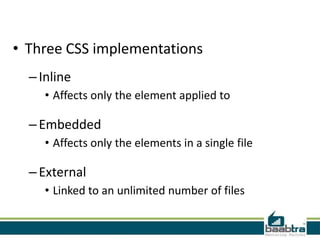
• Three CSS implementations
  – Inline
     • Affects only the element applied to

  – Embedded
     • Affects only the elements in a single file

  – External
     • Linked to an unlimited number of files
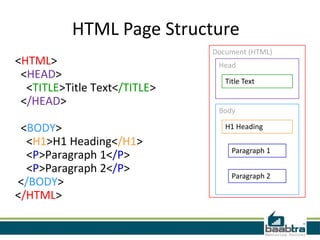
HTML Page Structure
                              Document (HTML)
<HTML>                         Head
 <HEAD>                          Title Text
  <TITLE>Title Text</TITLE>
 </HEAD>
                               Body

 <BODY>                          H1 Heading

  <H1>H1 Heading</H1>
                                   Paragraph 1
  <P>Paragraph 1</P>
  <P>Paragraph 2</P>
                                   Paragraph 2
</BODY>
</HTML>
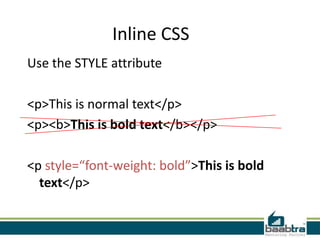
Inline CSS
Use the STYLE attribute

<p>This is normal text</p>
<p><b>This is bold text</b></p>

<p style=“font-weight: bold”>This is bold
  text</p>
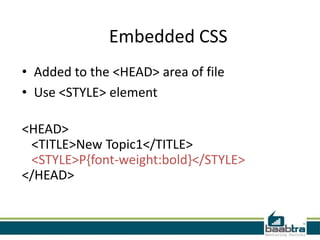
Embedded CSS
• Added to the <HEAD> area of file
• Use <STYLE> element

<HEAD>
 <TITLE>New Topic1</TITLE>
 <STYLE>P{font-weight:bold}</STYLE>
</HEAD>
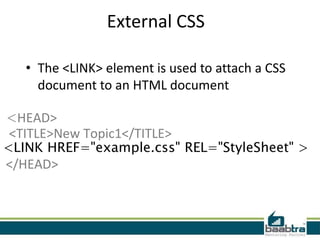
External CSS

   • The <LINK> element is used to attach a CSS
     document to an HTML document

<HEAD>
<TITLE>New Topic1</TITLE>
<LINK HREF="example.css" REL="StyleSheet" >
</HEAD>
What is Cascading?
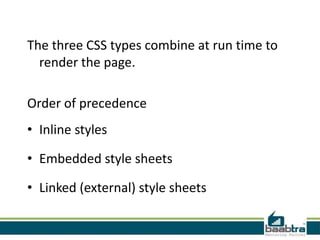
The three CSS types combine at run time to
  render the page.

Order of precedence
• Inline styles

• Embedded style sheets

• Linked (external) style sheets
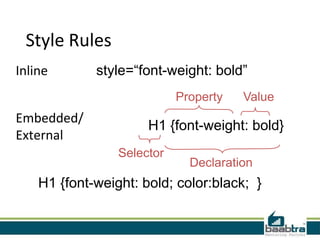
Style Rules
Inline       style=“font-weight: bold”
                            Property   Value
Embedded/
                      H1 {font-weight: bold}
External
                 Selector
                              Declaration
    H1 {font-weight: bold; color:black; }
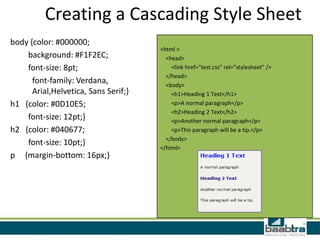
Creating a Cascading Style Sheet
body {color: #000000;
                                      <html >
    background: #F1F2EC;                <head>
    font-size: 8pt;                       <link href="test.css" rel="stylesheet" />
                                        </head>
      font-family: Verdana,             <body>
      Arial,Helvetica, Sans Serif;}       <h1>Heading 1 Text</h1>
h1 {color: #0D10E5;                       <p>A normal paragraph</p>
                                          <h2>Heading 2 Text</h2>
    font-size: 12pt;}                     <p>Another normal paragraph</p>
h2 {color: #040677;                       <p>This paragraph will be a tip.</p>
                                        </body>
    font-size: 10pt;}
                                      </html>
p {margin-bottom: 16px;}
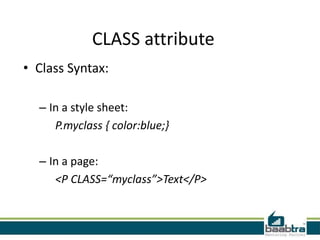
CLASS attribute
• Class Syntax:

  – In a style sheet:
     P.myclass { color:blue;}

  – In a page:
     <P CLASS=“myclass”>Text</P>
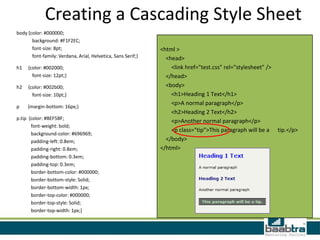
Creating a Cascading Style Sheet
body {color: #000000;
       background: #F1F2EC;
       font-size: 8pt;                                        <html >
       font-family: Verdana, Arial, Helvetica, Sans Serif;}     <head>
h1   {color: #002000;                                             <link href="test.css" rel="stylesheet" />
       font-size: 12pt;}                                        </head>
h2   {color: #002b00;                                           <body>
       font-size: 10pt;}                                          <h1>Heading 1 Text</h1>
                                                                  <p>A normal paragraph</p>
p    {margin-bottom: 16px;}
                                                                  <h2>Heading 2 Text</h2>
p.tip {color: #BEF5BF;
                                                                  <p>Another normal paragraph</p>
       font-weight: bold;
                                                                  <p class=“tip”>This paragraph will be a     tip.</p>
       background-color: #696969;
       padding-left: 0.8em;                                     </body>
       padding-right: 0.8em;                                  </html>
       padding-bottom: 0.3em;
       padding-top: 0.3em;
       border-bottom-color: #000000;
       border-bottom-style: Solid;
       border-bottom-width: 1px;
       border-top-color: #000000;
       border-top-style: Solid;
       border-top-width: 1px;}
• If this presentation helped you, please visit
  our page facebook.com/baabtra and like it.
  Thanks in advance.

• www.baabtra.com | www.massbaab.com |ww
  w.baabte.com
Thank you
Contact Us

Cascade.ss

  • 2.
    Disclaimer:This presentation isprepared by trainees of baabtra as a part of mentoring program. This is not official document of baabtra –Mentoring Partner Baabtra-Mentoring Partner is the mentoring division of baabte System Technologies Pvt . Ltd
  • 3.
    Cascading Style Sheets(CSS) Ashwin Anand V Email:ashwinanand99@gmail.com Facebook id:ashwinanand99@gmail.com
  • 4.
    The Breakdown • Allweb pages can be broken down into bucketized content areas • These areas can updated by changing the code on every page, - or - • By using cascading style sheets!
  • 5.
    Cascading Style Sheets •Cascading Style Sheets (CSS) is a style sheet language used to describe the presentation (that is, the look and formatting) of a document written in a markup language. Its most common application is to style web pages written in HTML and XHTML, but the language can be applied to any kind of XML document • Created by: CSS was created by Håkon Wium Lie and Bert Bos and was adopted as a W3C Recommendation in late 1996.
  • 6.
    What Are CascadingStyle Sheets? • A standards-based method for controlling the look and feel of XML content. • Comprised of Rules to control elements in the document. • Designed to separate formatting from the content while being flexible and scalable
  • 7.
    What Can CSSDo? • Text formatting • Element sizing • Element positioning • Change link attributes • Cursor manipulation
  • 8.
    • Most importantly,CSS can support the control of hundreds or thousands of documents from a single control file • This makes your life much easier when it is time to make updates
  • 9.
  • 10.
    • Three CSSimplementations – Inline • Affects only the element applied to – Embedded • Affects only the elements in a single file – External • Linked to an unlimited number of files
  • 11.
    HTML Page Structure Document (HTML) <HTML> Head <HEAD> Title Text <TITLE>Title Text</TITLE> </HEAD> Body <BODY> H1 Heading <H1>H1 Heading</H1> Paragraph 1 <P>Paragraph 1</P> <P>Paragraph 2</P> Paragraph 2 </BODY> </HTML>
  • 12.
    Inline CSS Use theSTYLE attribute <p>This is normal text</p> <p><b>This is bold text</b></p> <p style=“font-weight: bold”>This is bold text</p>
  • 13.
    Embedded CSS • Addedto the <HEAD> area of file • Use <STYLE> element <HEAD> <TITLE>New Topic1</TITLE> <STYLE>P{font-weight:bold}</STYLE> </HEAD>
  • 14.
    External CSS • The <LINK> element is used to attach a CSS document to an HTML document <HEAD> <TITLE>New Topic1</TITLE> <LINK HREF="example.css" REL="StyleSheet" > </HEAD>
  • 15.
  • 16.
    The three CSStypes combine at run time to render the page. Order of precedence • Inline styles • Embedded style sheets • Linked (external) style sheets
  • 17.
    Style Rules Inline style=“font-weight: bold” Property Value Embedded/ H1 {font-weight: bold} External Selector Declaration H1 {font-weight: bold; color:black; }
  • 18.
    Creating a CascadingStyle Sheet body {color: #000000; <html > background: #F1F2EC; <head> font-size: 8pt; <link href="test.css" rel="stylesheet" /> </head> font-family: Verdana, <body> Arial,Helvetica, Sans Serif;} <h1>Heading 1 Text</h1> h1 {color: #0D10E5; <p>A normal paragraph</p> <h2>Heading 2 Text</h2> font-size: 12pt;} <p>Another normal paragraph</p> h2 {color: #040677; <p>This paragraph will be a tip.</p> </body> font-size: 10pt;} </html> p {margin-bottom: 16px;}
  • 19.
    CLASS attribute • ClassSyntax: – In a style sheet: P.myclass { color:blue;} – In a page: <P CLASS=“myclass”>Text</P>
  • 20.
    Creating a CascadingStyle Sheet body {color: #000000; background: #F1F2EC; font-size: 8pt; <html > font-family: Verdana, Arial, Helvetica, Sans Serif;} <head> h1 {color: #002000; <link href="test.css" rel="stylesheet" /> font-size: 12pt;} </head> h2 {color: #002b00; <body> font-size: 10pt;} <h1>Heading 1 Text</h1> <p>A normal paragraph</p> p {margin-bottom: 16px;} <h2>Heading 2 Text</h2> p.tip {color: #BEF5BF; <p>Another normal paragraph</p> font-weight: bold; <p class=“tip”>This paragraph will be a tip.</p> background-color: #696969; padding-left: 0.8em; </body> padding-right: 0.8em; </html> padding-bottom: 0.3em; padding-top: 0.3em; border-bottom-color: #000000; border-bottom-style: Solid; border-bottom-width: 1px; border-top-color: #000000; border-top-style: Solid; border-top-width: 1px;}
  • 21.
    • If thispresentation helped you, please visit our page facebook.com/baabtra and like it. Thanks in advance. • www.baabtra.com | www.massbaab.com |ww w.baabte.com
  • 22.
  • 23.