


Disclaimer: This presentation is prepared by trainees of
baabtra as a part of mentoring program. This is not official
document of baabtra –Mentoring Partner
Baabtra-Mentoring Partner is the mentoring division of baabte System Technologies Pvt .
Ltd
DOM STRUCTURE


     Ashwin Ananad V
     Email/facebook_id:ashwinanand99@gmail.com
What is the DOM?

• The Document Object Model (DOM) is a
  model of programming that concerns the way
  in which we represent objects contained in a
  web document (single web page).
• There are several different levels of the DOM
  Standard, as proposed by the W3C.
DOM Standard Levels

• Level 0: Not really a standard level. Refers to
  models developed by browser vendors for
  handling documents prior to a standard.
• Level 1: First recommendation from W3C for a
  DOM Standard. Includes two parts: a core
  (covers XML & HTML) and an HTML-only
  section.
DOM Standard Levels
• Level 2: Includes additions for events and style
  sheets. Supported by current versions of the
  most popular browsers.
• Level 3: Still under development. Includes
  additions for XML features.
Javascript and the DOM

• Originally, the Document Object Model (DOM) and Javascript were
  tightly bound
• Each major browser line (Netscape) had their own overlapping DOM
  implementation
• Now, the DOM is a separate standard, and can be manipulated by
  other languages (eg Java, server side javascript, python, etc)
• Browsers still differ in what parts of the standard they support, but
  things are much better now
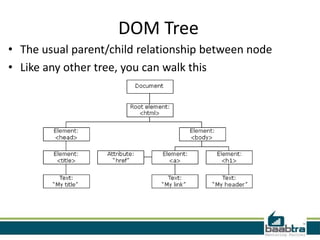
DOM Tree
• The usual parent/child relationship between node
• Like any other tree, you can walk this
Preparing Your Pages for DOM
• All pages must be well-formed XHTML
  documents.
• All pages must include a valid DOCTYPE.
• You must include all text inside valid XHTML
  elements.
• Identify relevant elements using the ’id’
  attribute.
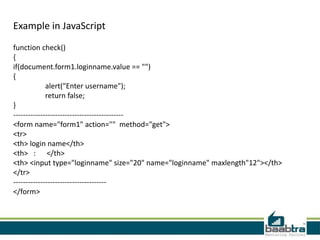
Example in JavaScript
function check()
{
if(document.form1.loginname.value == "")
{
             alert("Enter username");
             return false;
}
---------------------------------------------
<form name="form1" action="" method="get">
<tr>
<th> login name</th>
<th> : </th>
<th> <input type="loginname" size="20" name="loginname" maxlength"12"></th>
</tr>
--------------------------------------
</form>
If this presentation helped you, please visit our
           page facebook.com/baabtra and like it.
               Thanks in advance.
www.baabtra.com | www.massbaab.com |www.baabte.com
Thank you
Contact Us

DOM Structure

  • 2.
    Disclaimer: This presentationis prepared by trainees of baabtra as a part of mentoring program. This is not official document of baabtra –Mentoring Partner Baabtra-Mentoring Partner is the mentoring division of baabte System Technologies Pvt . Ltd
  • 3.
    DOM STRUCTURE Ashwin Ananad V Email/facebook_id:ashwinanand99@gmail.com
  • 4.
    What is theDOM? • The Document Object Model (DOM) is a model of programming that concerns the way in which we represent objects contained in a web document (single web page). • There are several different levels of the DOM Standard, as proposed by the W3C.
  • 5.
    DOM Standard Levels •Level 0: Not really a standard level. Refers to models developed by browser vendors for handling documents prior to a standard. • Level 1: First recommendation from W3C for a DOM Standard. Includes two parts: a core (covers XML & HTML) and an HTML-only section.
  • 6.
    DOM Standard Levels •Level 2: Includes additions for events and style sheets. Supported by current versions of the most popular browsers. • Level 3: Still under development. Includes additions for XML features.
  • 7.
    Javascript and theDOM • Originally, the Document Object Model (DOM) and Javascript were tightly bound • Each major browser line (Netscape) had their own overlapping DOM implementation • Now, the DOM is a separate standard, and can be manipulated by other languages (eg Java, server side javascript, python, etc) • Browsers still differ in what parts of the standard they support, but things are much better now
  • 8.
    DOM Tree • Theusual parent/child relationship between node • Like any other tree, you can walk this
  • 9.
    Preparing Your Pagesfor DOM • All pages must be well-formed XHTML documents. • All pages must include a valid DOCTYPE. • You must include all text inside valid XHTML elements. • Identify relevant elements using the ’id’ attribute.
  • 10.
    Example in JavaScript functioncheck() { if(document.form1.loginname.value == "") { alert("Enter username"); return false; } --------------------------------------------- <form name="form1" action="" method="get"> <tr> <th> login name</th> <th> : </th> <th> <input type="loginname" size="20" name="loginname" maxlength"12"></th> </tr> -------------------------------------- </form>
  • 11.
    If this presentationhelped you, please visit our page facebook.com/baabtra and like it. Thanks in advance. www.baabtra.com | www.massbaab.com |www.baabte.com
  • 12.
  • 13.