INTRODUCTION TO CASCADING
  Introduction to cascading
      style sheetsSHEETS

        Session 5
Module Introduction
   Style Sheets
   Style Sheets Elements
   Text and Font Properties
Style Sheets
   Explain Cascading Style Sheet
   Describe the CSS design goal
   Explain the working of CSS
Cascading Style Sheet
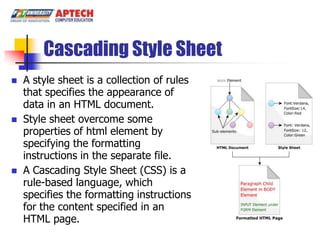
   A style sheet is a collection of rules
    that specifies the appearance of
    data in an HTML document.
   Style sheet overcome some
    properties of html element by
    specifying the formatting
    instructions in the separate file.
   A Cascading Style Sheet (CSS) is a
    rule-based language, which
    specifies the formatting instructions
    for the content specified in an
    HTML page.
Cascading Style Sheet
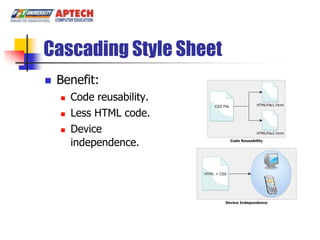
   Benefit:
       Code reusability.
       Less HTML code.
       Device
        independence.
Cascading Style Sheet
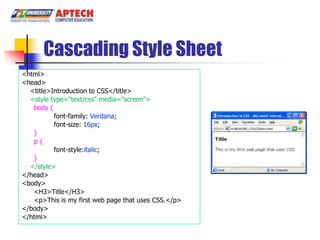
<html>
<head>
  <title>Introduction to CSS</title>
  <style type="text/css" media="screen">
   body {
          font-family: Verdana;
          font-size: 16px;
   }
   p{
          font-style:italic;
   }
  </style>
</head>
<body>
   <H3>Title</H3>
   <p>This is my first web page that uses CSS.</p>
</body>
</html>
CSS design goal
   The latest version of CSS        More design goal:
    in use is CSS2. These                Network
    goals are:                            performance
       Compatibility                    Flexibility
       Complementary to html            Richness
       Independent Functioning          Alternative language
       Maintainability                   bindings
       Simplify                         Accessibility.
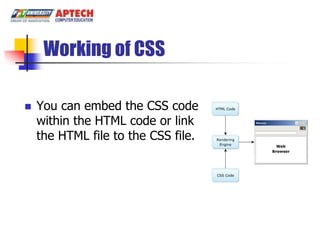
Working of CSS

   You can embed the CSS code
    within the HTML code or link
    the HTML file to the CSS file.
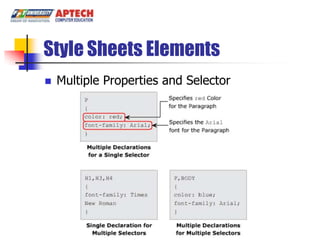
Style Sheets Elements
   Multiple Properties and Selector
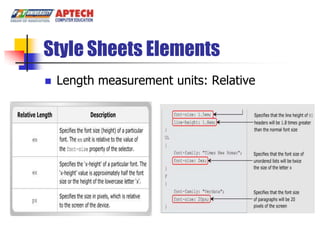
Style Sheets Elements
   Length measurement units: Relative
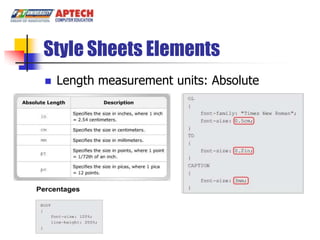
Style Sheets Elements
   Length measurement units: Absolute
Style Sheets Elements
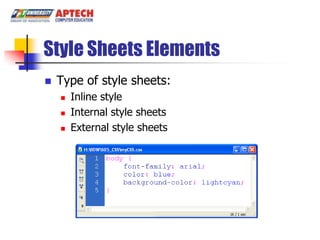
   Type of style sheets:
       Inline style
       Internal style sheets
       External style sheets
Style Sheets Elements
<html>
<head>
    <title>Introduction to CSS</title>
    <link rel="stylesheet" type="text/css" href="myCSS.css"/>
  <style type="text/css" media="screen">
    p{
            font-style:italic;
    }
  </style>
</head>
<body>
    <H3>Title</H3>
    <h2 style="color:red; font-family:'Courier New';">
            This is sub title</h2>
    <p>This is my first web page that uses CSS.</p>
</body>
</html>
Style Sheets Elements: Selector
   CSS provides four different types of selectors:
       Type selector
       Class selectors
       ID selectors
       Universal selector
Style Sheets Elements: Selector
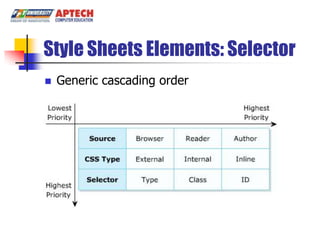
   Generic cascading order
Text and Font Properties
   Explain the text properties.
   Explain the font properties.
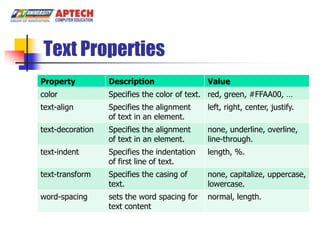
Text Properties
Property          Description                 Value
color             Specifies the color of text. red, green, #FFAA00, …
text-align        Specifies the alignment     left, right, center, justify.
                  of text in an element.
text-decoration   Specifies the alignment     none, underline, overline,
                  of text in an element.      line-through.
text-indent       Specifies the indentation   length, %.
                  of first line of text.
text-transform    Specifies the casing of     none, capitalize, uppercase,
                  text.                       lowercase.
word-spacing      sets the word spacing for   normal, length.
                  text content
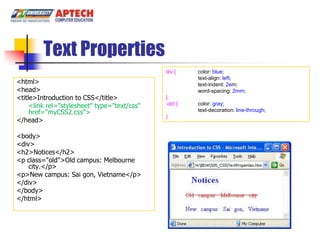
Text Properties
                                              div {    color: blue;
                                                       text-align: left;
<html>                                                 text-indent: 2em;
<head>                                                 word-spacing: 2mm;
<title>Introduction to CSS</title>            }
     <link rel="stylesheet" type="text/css"   .old {   color: gray;
     href="myCSS2.css">                                text-decoration: line-through;
                                              }
</head>

<body>
<div>
<h2>Notices</h2>
<p class="old">Old campus: Melbourne
    city.</p>
<p>New campus: Sai gon, Vietname</p>
</div>
</body>
</html>
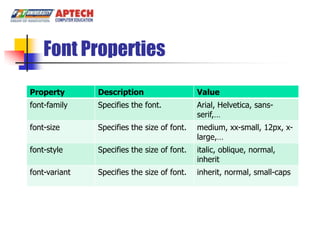
Font Properties
Property       Description                   Value
font-family    Specifies the font.           Arial, Helvetica, sans-
                                             serif,…
font-size      Specifies the size of font.   medium, xx-small, 12px, x-
                                             large,…
font-style     Specifies the size of font.   italic, oblique, normal,
                                             inherit
font-variant   Specifies the size of font.   inherit, normal, small-caps
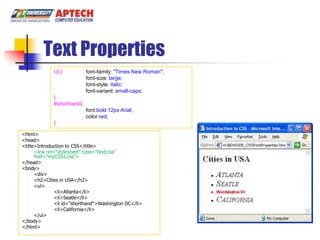
Text Properties
              UL{           font-family: "Times New Roman";
                            font-size: large;
                            font-style: italic;
                            font-variant: small-caps;
              }
              #shorthand{
                            font:bold 12px Arial;
                            color:red;
              }

<html>
<head>
<title>Introduction to CSS</title>
      <link rel="stylesheet" type="text/css"
      href="myCSS3.css">
</head>
<body>
      <div>
      <h2>Cities in USA</h2>
      <ul>
                <li>Atlanta</li>
                <li>Seatle</li>
                <li id="shorthand">Washington DC</li>
                <li>California</li>
      </ul>
</body>
</html>
Summary
   A style sheet is a collection of rules that specifies
    the appearance of data in an HTML document.
   A Cascading Style Sheet (CSS) is a rule-based
    language, which specifies the formatting
    instructions for the content specified in an HTML
    page.
   You can embed the CSS code within the HTML
    code or link the HTML file to the CSS file.


                                  Building Dynamic Websites/Session 1/ 22 of 16
Summary …
   There are three types style sheets: inline,
    internal and external.
   Can apply style from multiple style sheets to
    HTML elements
   The Text properties specify and control the
    appearance of the text in the Web page.
   The Font properties allow to specify the font
    for the text.

                              Building Dynamic Websites/Session 1/ 23 of 16

05. session 05 introducing css

  • 1.
    INTRODUCTION TO CASCADING Introduction to cascading style sheetsSHEETS Session 5
  • 2.
    Module Introduction  Style Sheets  Style Sheets Elements  Text and Font Properties
  • 3.
    Style Sheets  Explain Cascading Style Sheet  Describe the CSS design goal  Explain the working of CSS
  • 4.
    Cascading Style Sheet  A style sheet is a collection of rules that specifies the appearance of data in an HTML document.  Style sheet overcome some properties of html element by specifying the formatting instructions in the separate file.  A Cascading Style Sheet (CSS) is a rule-based language, which specifies the formatting instructions for the content specified in an HTML page.
  • 5.
    Cascading Style Sheet  Benefit:  Code reusability.  Less HTML code.  Device independence.
  • 6.
    Cascading Style Sheet <html> <head> <title>Introduction to CSS</title> <style type="text/css" media="screen"> body { font-family: Verdana; font-size: 16px; } p{ font-style:italic; } </style> </head> <body> <H3>Title</H3> <p>This is my first web page that uses CSS.</p> </body> </html>
  • 7.
    CSS design goal  The latest version of CSS  More design goal: in use is CSS2. These  Network goals are: performance  Compatibility  Flexibility  Complementary to html  Richness  Independent Functioning  Alternative language  Maintainability bindings  Simplify  Accessibility.
  • 8.
    Working of CSS  You can embed the CSS code within the HTML code or link the HTML file to the CSS file.
  • 9.
    Style Sheets Elements  Multiple Properties and Selector
  • 10.
    Style Sheets Elements  Length measurement units: Relative
  • 11.
    Style Sheets Elements  Length measurement units: Absolute
  • 12.
    Style Sheets Elements  Type of style sheets:  Inline style  Internal style sheets  External style sheets
  • 13.
    Style Sheets Elements <html> <head> <title>Introduction to CSS</title> <link rel="stylesheet" type="text/css" href="myCSS.css"/> <style type="text/css" media="screen"> p{ font-style:italic; } </style> </head> <body> <H3>Title</H3> <h2 style="color:red; font-family:'Courier New';"> This is sub title</h2> <p>This is my first web page that uses CSS.</p> </body> </html>
  • 14.
    Style Sheets Elements:Selector  CSS provides four different types of selectors:  Type selector  Class selectors  ID selectors  Universal selector
  • 15.
  • 16.
    Style Sheets Elements:Selector  Generic cascading order
  • 17.
    Text and FontProperties  Explain the text properties.  Explain the font properties.
  • 18.
    Text Properties Property Description Value color Specifies the color of text. red, green, #FFAA00, … text-align Specifies the alignment left, right, center, justify. of text in an element. text-decoration Specifies the alignment none, underline, overline, of text in an element. line-through. text-indent Specifies the indentation length, %. of first line of text. text-transform Specifies the casing of none, capitalize, uppercase, text. lowercase. word-spacing sets the word spacing for normal, length. text content
  • 19.
    Text Properties div { color: blue; text-align: left; <html> text-indent: 2em; <head> word-spacing: 2mm; <title>Introduction to CSS</title> } <link rel="stylesheet" type="text/css" .old { color: gray; href="myCSS2.css"> text-decoration: line-through; } </head> <body> <div> <h2>Notices</h2> <p class="old">Old campus: Melbourne city.</p> <p>New campus: Sai gon, Vietname</p> </div> </body> </html>
  • 20.
    Font Properties Property Description Value font-family Specifies the font. Arial, Helvetica, sans- serif,… font-size Specifies the size of font. medium, xx-small, 12px, x- large,… font-style Specifies the size of font. italic, oblique, normal, inherit font-variant Specifies the size of font. inherit, normal, small-caps
  • 21.
    Text Properties UL{ font-family: "Times New Roman"; font-size: large; font-style: italic; font-variant: small-caps; } #shorthand{ font:bold 12px Arial; color:red; } <html> <head> <title>Introduction to CSS</title> <link rel="stylesheet" type="text/css" href="myCSS3.css"> </head> <body> <div> <h2>Cities in USA</h2> <ul> <li>Atlanta</li> <li>Seatle</li> <li id="shorthand">Washington DC</li> <li>California</li> </ul> </body> </html>
  • 22.
    Summary  A style sheet is a collection of rules that specifies the appearance of data in an HTML document.  A Cascading Style Sheet (CSS) is a rule-based language, which specifies the formatting instructions for the content specified in an HTML page.  You can embed the CSS code within the HTML code or link the HTML file to the CSS file. Building Dynamic Websites/Session 1/ 22 of 16
  • 23.
    Summary …  There are three types style sheets: inline, internal and external.  Can apply style from multiple style sheets to HTML elements  The Text properties specify and control the appearance of the text in the Web page.  The Font properties allow to specify the font for the text. Building Dynamic Websites/Session 1/ 23 of 16