Unit -2
Need for Security, Business Needs, Threats, Attacks,
Legal, Ethical and Professional Issues - An Overview of
Computer Security - Access Control Matrix, Policy-
Security policies, Confidentiality policies, Integrity
policies and Hybrid policies
Business Needs First
Information security performs four important functions for
an organization:
 Protects the organization’s ability to function
 Enables the safe operation of applications
implemented on the organization’s IT systems
 Protects the data the organization collects and uses
 Safeguards the technology assets in use at the
organization
Protecting the Ability to Function
Management is responsible
Information security is
• a management issue
• a people issue
• (information security is more to do with
management than with technology)
• Communities of interest must argue for
information security in terms of impact
and cost
Enabling Safe Operation
Organizations must create integrated,
efficient, and capable applications
Organization need environments that
safeguard applications
Management must not abdicate to the IT
department its responsibility to make
choices and enforce decisions
Protecting Data
 One of the most valuable assets is data
 Without data, an organization loses its record of
transactions and/or its ability to deliver value to its
customers
 An effective information security program is essential
to the protection of the integrity and value of the
organization’s data
Safeguarding Technology Assets
 Organizations must have secure infrastructure
services based on the size and scope of the enterprise
 Additional security services may have to be provided
 More robust solutions may be needed to replace
security programs the organization has outgrown
Threats
To protect the organization’s information,one should be familiar with the
information to be protected,and the systems that store,transport,and
process it;and the the threats to be identified.
Threats
A threat is an object, person, or other entity that represents a constant
danger to an asset
Management must be informed of the various kinds of threats facing the
organization
By examining each threat category in turn, management effectively
protects its information through policy, education and training, and
technology controls
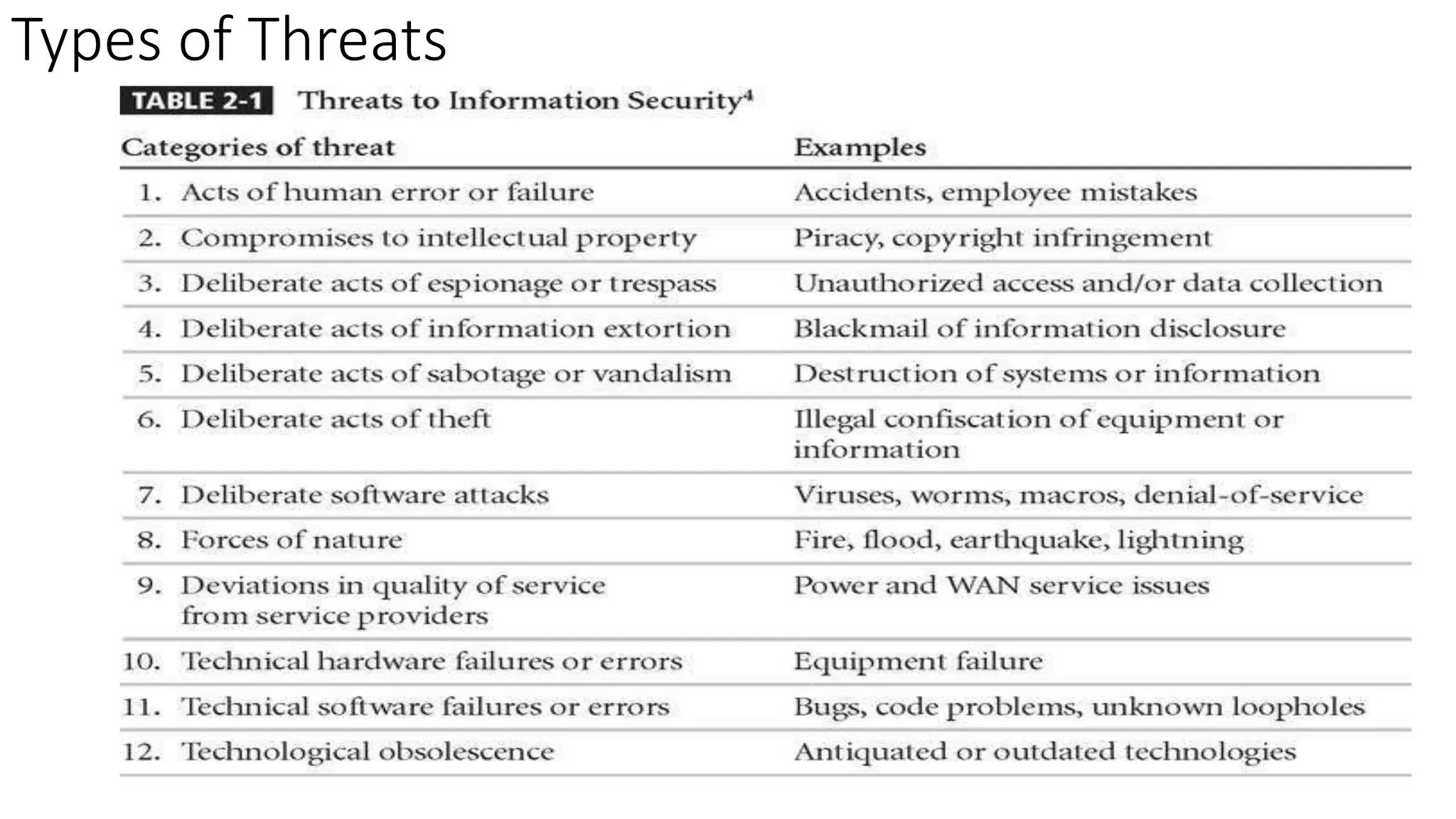
Types of Threats
Threats
To protect the organization’s information,one should be familiar with the
information to be protected,and the systems that store,transport,and
process it;and the the threats to be identified.
Threats
A threat is an object, person, or other entity that represents a constant
danger to an asset
Management must be informed of the various kinds of threats facing the
organization
By examining each threat category in turn, management effectively
protects its information through policy, education and training, and
technology controls
An attack is an act that takes advantage of a vulnerability to compromise a
controlled system. It is accomplished by a threat agent that damages or steals an
organization’s information or physical asset.
A vulnerability is an identified weakness in a controlled system, where controls are
not present or are no longer effective. Unlike threats, which are always present,
Attacks only exist when a specific act may cause a loss. For example, the threat of
damage from a thunderstorm is present throughout the summer in many places, but an
attack and its associated risk of loss only exist for the duration of an actual
thunderstorm.
Attacks :
Types of Attacks
A passive attack attempts to learn or make use of
information from the system but does not affect
system resources.
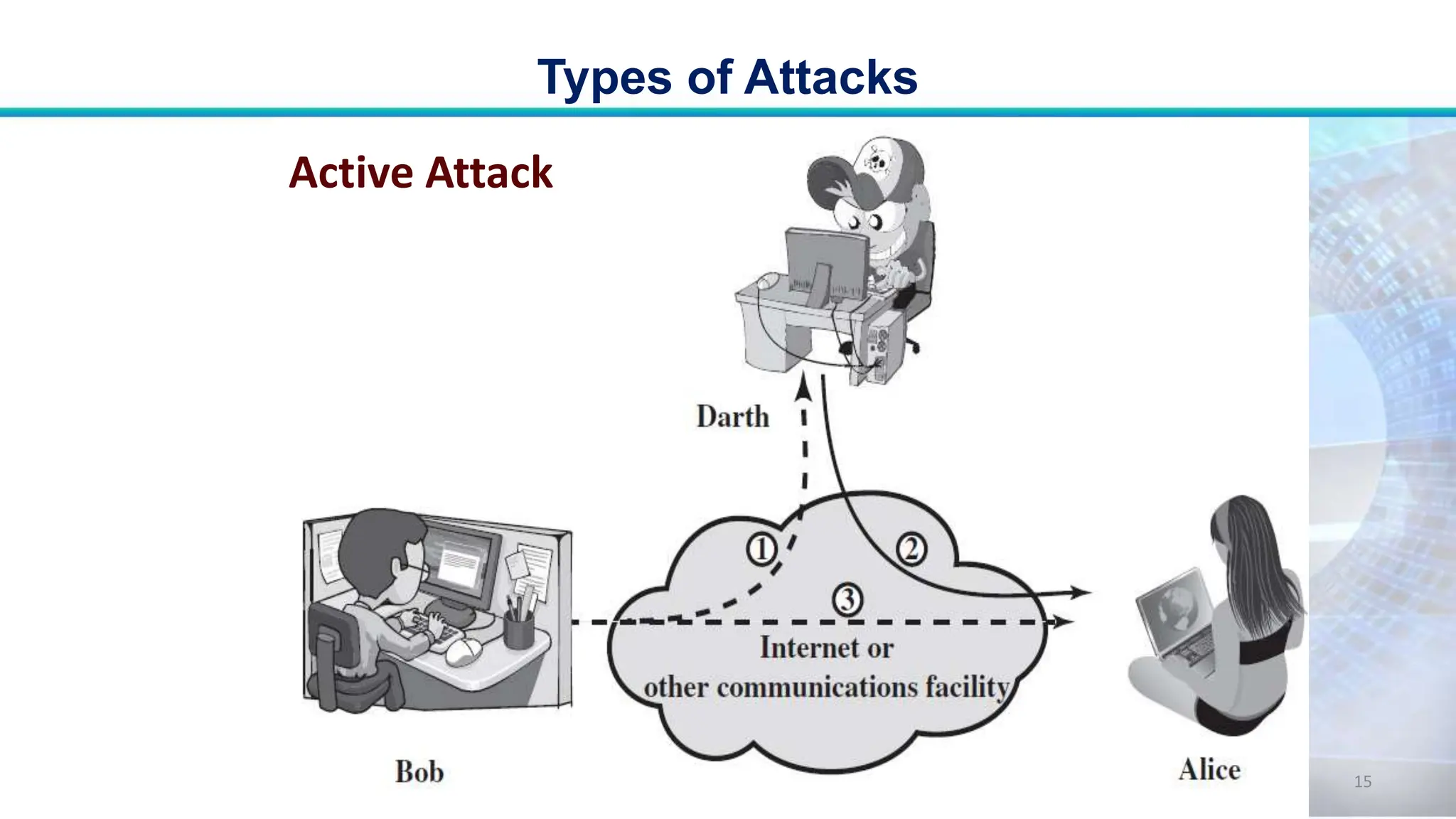
An active attack attempts to alter system resources or
affect their operation.
Passive Attacks:
• Passive attacks are in the nature of
eavesdropping on, or monitoring of,
transmissions.
• The goal of the opponent is to obtain
information that is being transmitted.
Types of Attacks
12
Types of Attacks
13
Passive Attack
Active Attacks:
• Active attacks involve some modification of
the data stream or the creation of a false
stream.
Security Attacks
14
Types of Attacks
15
Active Attack
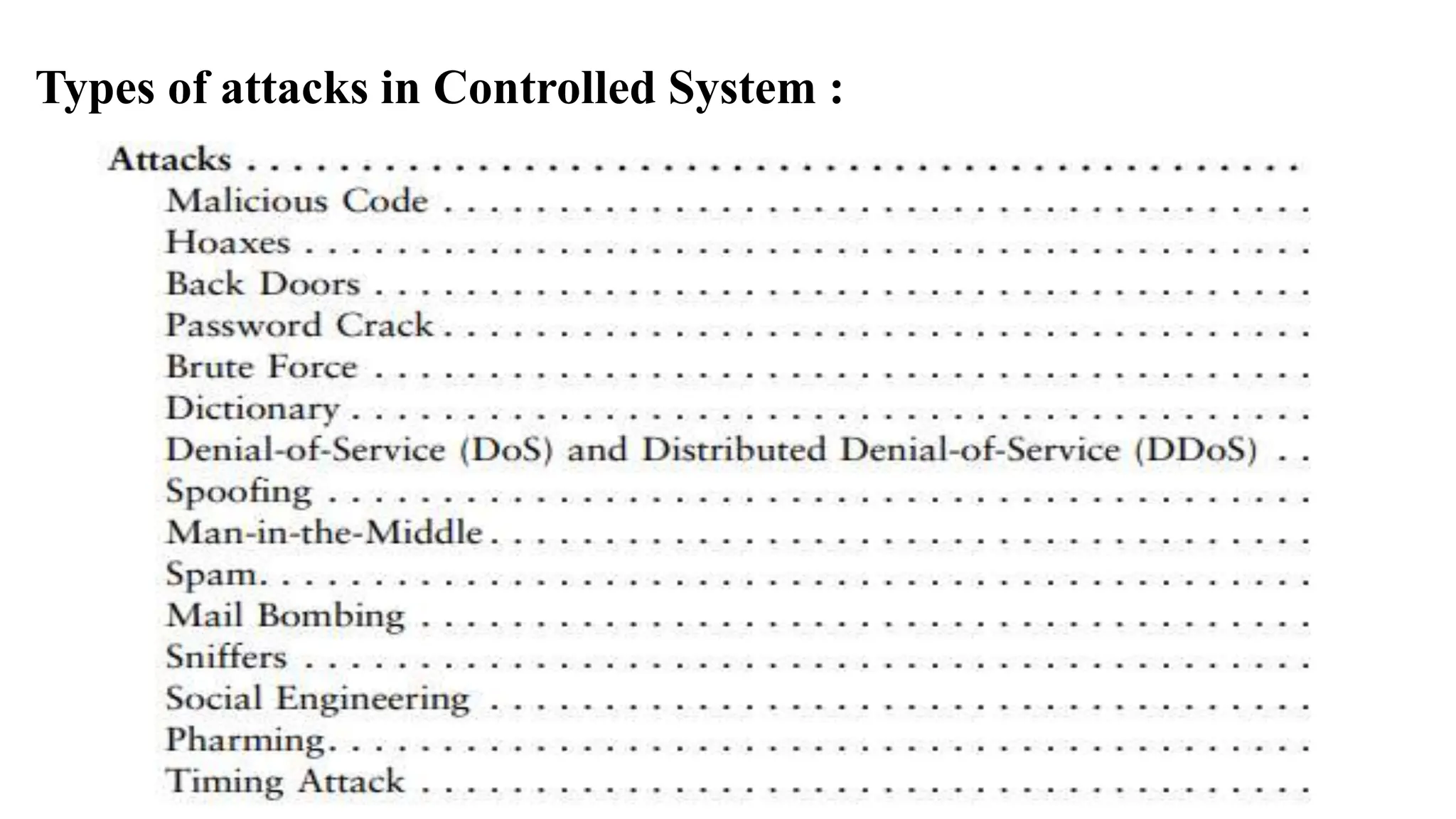
Types of attacks in Controlled System :
17
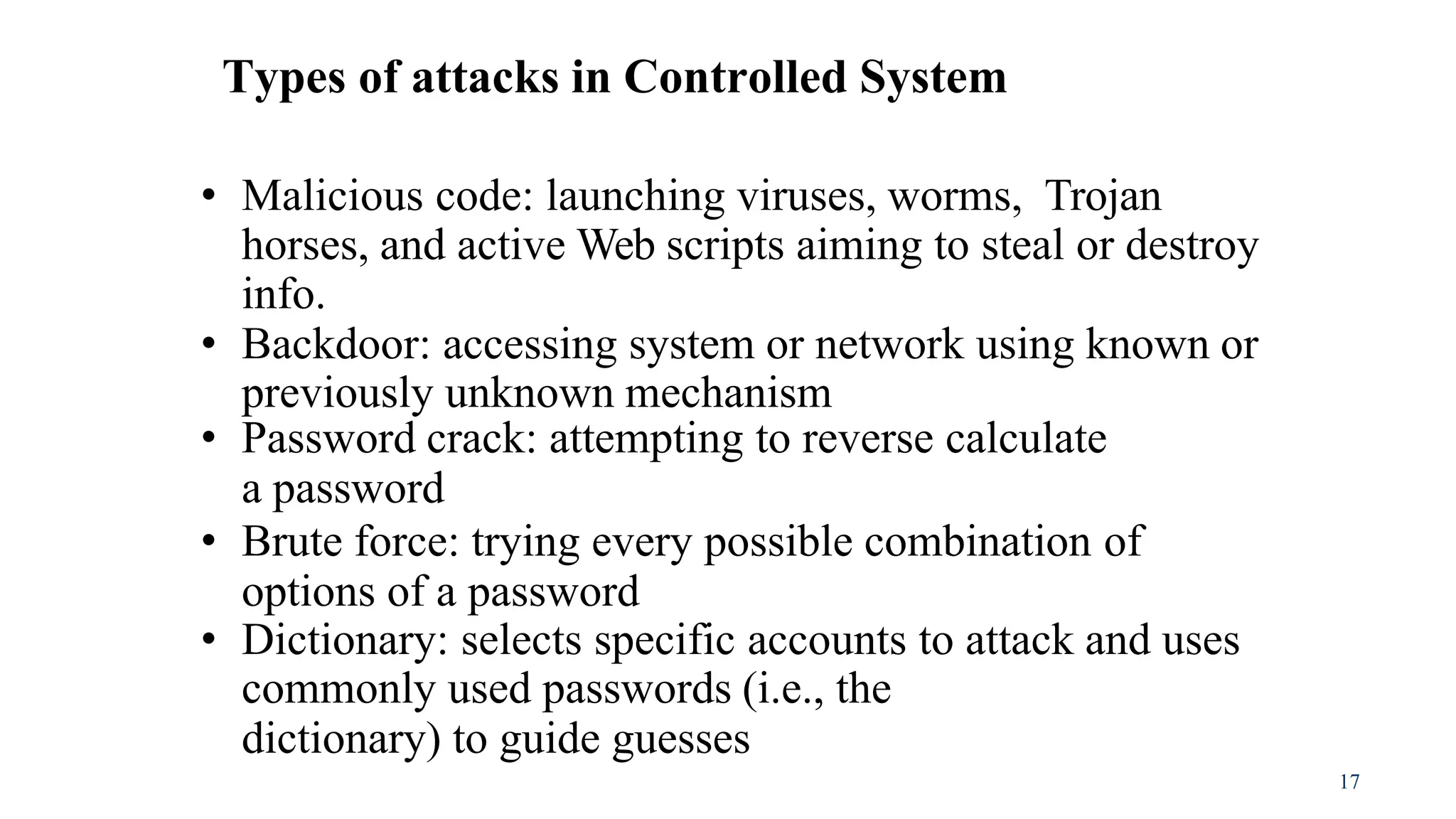
Types of attacks in Controlled System
• Malicious code: launching viruses, worms, Trojan
horses, and active Web scripts aiming to steal or destroy
info.
• Backdoor: accessing system or network using known or
previously unknown mechanism
• Password crack: attempting to reverse calculate
a password
• Brute force: trying every possible combination of
options of a password
• Dictionary: selects specific accounts to attack and uses
commonly used passwords (i.e., the
dictionary) to guide guesses
18
 Denial-of-service (DoS): attacker sends large number of
connection or information requests to a target
 Target system cannot handle successfully along with other,
legitimate service requests
 May result in system crash or inability to perform ordinary
functions
 Distributed denial-of-service (DDoS): coordinated
stream of requests is launched against target from
many locations simultaneously
Types of attacks in Controlled System
19
• Spoofing: technique used to gain unauthorized
access; intruder assumes a trusted IP address
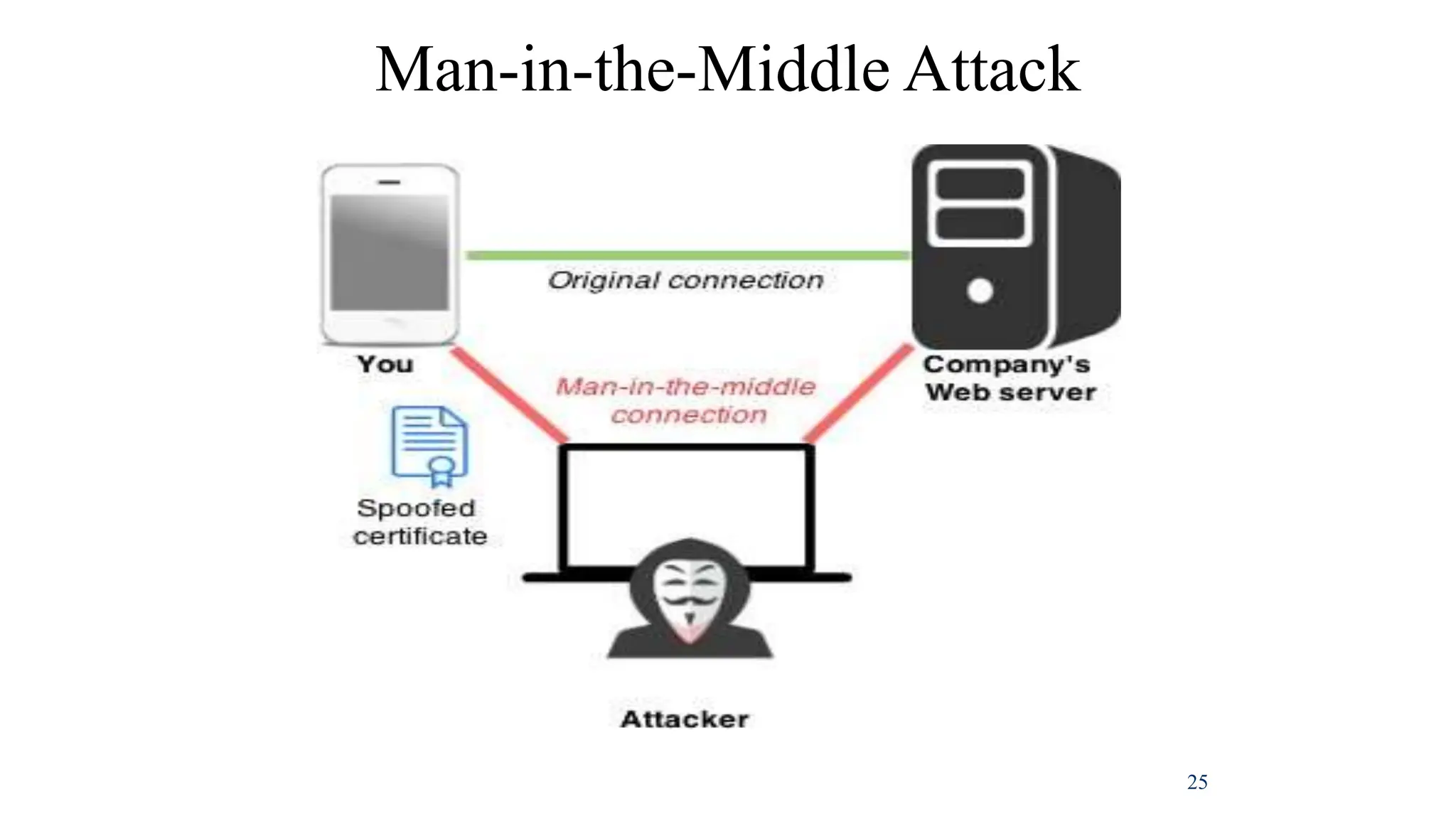
• Man-in-the-middle: attacker monitors network
packets, modifies them, and inserts them back
into network
• Spam: unsolicited commercial e-mail; more a
nuisance than an attack, though is emerging as a
vector for some attacks
Types of attacks in Controlled System
20
• Mail bombing: also a DoS; attacker routes
large quantities of e-mail to target
• Sniffers: program or device that monitors
data traveling over network; can be used both
for legitimate purposes and for stealing
information from a network
• Social engineering: using social skills to
convince people to reveal access credentials
or other valuable information to attacker
Types of attacks in Controlled System
21
• Buffer overflow: application error where more
data sent to a buffer than can be handled
• Timing attack: explores contents of a Web
browser’s cache to create malicious cookie
• Side-channel attacks: secretly observes
computer screen contents/electromagnetic
radiation, keystroke sounds, etc.
Types of attacks in Controlled System
22
Table 2.2: Attack Replication Vectors
Attack Vector Description
IP Scan and Attack Malware-infected system scans for target IP addresses, then
probes for vulnerable system components (e.g., Conficker).
Web Browsing Malware-infected systems with webpage write privileges
infects Web content (e.g., HTML files).
Viruses Malware-infected system infects other systems to which it
has access via executable scripts (human activity required).
Unprotected Shares Malware-infected system uses file system vulnerabilities to
spread malware to all writable locations.
Mass Email Malware-infected system spams all contacts found in users’
address books.
Simple Network
Management Protocol
(SNMP)
Malware-infected systems use SNMP to guess common or
weak passwords on other network-connected systems, then
spread. (Vendors have fixed many of these bugs.)
IP Spoofing Attack
23
Denial-of-Service Attack
24
Man-in-the-Middle Attack
25

Business Needs First.pptx

  • 1.
    Unit -2 Need forSecurity, Business Needs, Threats, Attacks, Legal, Ethical and Professional Issues - An Overview of Computer Security - Access Control Matrix, Policy- Security policies, Confidentiality policies, Integrity policies and Hybrid policies
  • 2.
    Business Needs First Informationsecurity performs four important functions for an organization:  Protects the organization’s ability to function  Enables the safe operation of applications implemented on the organization’s IT systems  Protects the data the organization collects and uses  Safeguards the technology assets in use at the organization
  • 3.
    Protecting the Abilityto Function Management is responsible Information security is • a management issue • a people issue • (information security is more to do with management than with technology) • Communities of interest must argue for information security in terms of impact and cost
  • 4.
    Enabling Safe Operation Organizationsmust create integrated, efficient, and capable applications Organization need environments that safeguard applications Management must not abdicate to the IT department its responsibility to make choices and enforce decisions
  • 5.
    Protecting Data  Oneof the most valuable assets is data  Without data, an organization loses its record of transactions and/or its ability to deliver value to its customers  An effective information security program is essential to the protection of the integrity and value of the organization’s data
  • 6.
    Safeguarding Technology Assets Organizations must have secure infrastructure services based on the size and scope of the enterprise  Additional security services may have to be provided  More robust solutions may be needed to replace security programs the organization has outgrown
  • 7.
    Threats To protect theorganization’s information,one should be familiar with the information to be protected,and the systems that store,transport,and process it;and the the threats to be identified. Threats A threat is an object, person, or other entity that represents a constant danger to an asset Management must be informed of the various kinds of threats facing the organization By examining each threat category in turn, management effectively protects its information through policy, education and training, and technology controls
  • 8.
  • 9.
    Threats To protect theorganization’s information,one should be familiar with the information to be protected,and the systems that store,transport,and process it;and the the threats to be identified. Threats A threat is an object, person, or other entity that represents a constant danger to an asset Management must be informed of the various kinds of threats facing the organization By examining each threat category in turn, management effectively protects its information through policy, education and training, and technology controls
  • 10.
    An attack isan act that takes advantage of a vulnerability to compromise a controlled system. It is accomplished by a threat agent that damages or steals an organization’s information or physical asset. A vulnerability is an identified weakness in a controlled system, where controls are not present or are no longer effective. Unlike threats, which are always present, Attacks only exist when a specific act may cause a loss. For example, the threat of damage from a thunderstorm is present throughout the summer in many places, but an attack and its associated risk of loss only exist for the duration of an actual thunderstorm. Attacks :
  • 11.
    Types of Attacks Apassive attack attempts to learn or make use of information from the system but does not affect system resources. An active attack attempts to alter system resources or affect their operation.
  • 12.
    Passive Attacks: • Passiveattacks are in the nature of eavesdropping on, or monitoring of, transmissions. • The goal of the opponent is to obtain information that is being transmitted. Types of Attacks 12
  • 13.
  • 14.
    Active Attacks: • Activeattacks involve some modification of the data stream or the creation of a false stream. Security Attacks 14
  • 15.
  • 16.
    Types of attacksin Controlled System :
  • 17.
    17 Types of attacksin Controlled System • Malicious code: launching viruses, worms, Trojan horses, and active Web scripts aiming to steal or destroy info. • Backdoor: accessing system or network using known or previously unknown mechanism • Password crack: attempting to reverse calculate a password • Brute force: trying every possible combination of options of a password • Dictionary: selects specific accounts to attack and uses commonly used passwords (i.e., the dictionary) to guide guesses
  • 18.
    18  Denial-of-service (DoS):attacker sends large number of connection or information requests to a target  Target system cannot handle successfully along with other, legitimate service requests  May result in system crash or inability to perform ordinary functions  Distributed denial-of-service (DDoS): coordinated stream of requests is launched against target from many locations simultaneously Types of attacks in Controlled System
  • 19.
    19 • Spoofing: techniqueused to gain unauthorized access; intruder assumes a trusted IP address • Man-in-the-middle: attacker monitors network packets, modifies them, and inserts them back into network • Spam: unsolicited commercial e-mail; more a nuisance than an attack, though is emerging as a vector for some attacks Types of attacks in Controlled System
  • 20.
    20 • Mail bombing:also a DoS; attacker routes large quantities of e-mail to target • Sniffers: program or device that monitors data traveling over network; can be used both for legitimate purposes and for stealing information from a network • Social engineering: using social skills to convince people to reveal access credentials or other valuable information to attacker Types of attacks in Controlled System
  • 21.
    21 • Buffer overflow:application error where more data sent to a buffer than can be handled • Timing attack: explores contents of a Web browser’s cache to create malicious cookie • Side-channel attacks: secretly observes computer screen contents/electromagnetic radiation, keystroke sounds, etc. Types of attacks in Controlled System
  • 22.
    22 Table 2.2: AttackReplication Vectors Attack Vector Description IP Scan and Attack Malware-infected system scans for target IP addresses, then probes for vulnerable system components (e.g., Conficker). Web Browsing Malware-infected systems with webpage write privileges infects Web content (e.g., HTML files). Viruses Malware-infected system infects other systems to which it has access via executable scripts (human activity required). Unprotected Shares Malware-infected system uses file system vulnerabilities to spread malware to all writable locations. Mass Email Malware-infected system spams all contacts found in users’ address books. Simple Network Management Protocol (SNMP) Malware-infected systems use SNMP to guess common or weak passwords on other network-connected systems, then spread. (Vendors have fixed many of these bugs.)
  • 23.
  • 24.
  • 25.