High Performance Solr
Shalin Shekhar Mangar
shalin@apache.org
https://twitter.com/shalinmangar
Performance constraints
• CPU
• Memory
• Disk
• Network
Tuning (CPU) Queries
• Phrase query
• Boolean query (AND)
• Boolean query (OR)
• Wildcard
• Fuzzy
• Soundex
• …roughly in order of increasing cost
• Query performance inversely proportional to matches (doc frequency)
Tuning (CPU) Queries
• Reduce frequent-term queries
• Remove stopwords
• Try CommonGramsFilter
• Index pruning (advanced)
• Some function queries match ALL documents -
terribly inefficient
Tuning (CPU) Queries
• Make efficient use of caches
• Watch those eviction counts
• Beware of NOW in date range queries. Use NOW/DAY or NOW/HOUR
• No need to cache every filter
• Use fq={!cache=false}year:[2005 TO *]
• Specify cost for non-cached filters for efficiency
• fq={!geofilt sfield=location pt=22,-127 d=50 cache=false
cost=50}
• Use PostFilters for very expensive filters (cache=false, cost > 100)
Tuning (CPU) Queries
• Warm those caches
• Auto-warming
• Warming queries
• firstSearcher
• newSearcher
Tuning (CPU) Queries
• Stop using primitive number/date fields if you are performing range queries
• facet.query (sometimes) or facet.range are also range queries
• Use Trie* Fields
• When performing range queries on a string field (rare use-case), use frange
to trade off memory for speed
• It will un-invert the field
• No additional cost is paid if the field is already being used for sorting or
other function queries
• fq={!frange l=martin u=rowling}author_last_name instead of
fq=author_last_name:[martin TO rowling]
Tuning (CPU) Queries
• Faceting methods
• facet.method=enum - great for less unique values
• facet.enum.cache.minDf - use filter cache or iterate
through DocsEnum
• facet.method=fc
• facet.method=fcs (per-segment)
• facet.sort=index faster than facet.sort=count but useless
in typical cases
Tuning (CPU) Queries
• ReRankQueryParser
• Like a PostFilter but for queries!
• Run expensive queries at the very last
• Solr 4.9+ only (soon to be released)
Tuning (CPU) Queries
• Divide and conquer
• Shard’em out
• Use multiple CPUs
• Sometime multiple cores are the answer even for
small indexes and specially for high-updates
Tuning Memory Usage
• Use DocValues for sorting/faceting/grouping
• There are docValueFormats: {‘default’, ‘memory’,
‘direct’} with different trade-offs.
• default - Helps avoid OOM but uses disk and OS
page cache
• memory - compressed in-memory format
• direct - no-compression, in-memory format
Tuning Memory usage
• termIndexInterval - Choose how often terms are
loaded into term dictionary. Default is 128.
Tuning Memory Usage
• Garbage Collection pauses kill search performance
• GC pauses expire ZK sessions in SolrCloud
leading to many problems
• Large heap sizes are almost never the answer
• Leave a lot of memory for the OS page cache
• http://wiki.apache.org/solr/ShawnHeisey
Tuning Disk usage
• Atomic updates are costly
• Lookup from transaction log
• Lookup from Index (all stored fields)
• Combine
• Index
Tuning Disk Usage
• Experiment with merge policies
• TieredMergePolicy is great but
LogByteSizeMergePolicy can be better if multiple
indexes are sharing a single disk
• Increase buffer size - ramBufferSizeMB (>1024M
doesn’t help, may reduce performance)
Tuning Disk Usage
• Always hard commit once in a while
• Best to use autoCommit and maxDocs
• Trims transaction logs
• Solution for slow startup times
• Use autoSoftCommit for new searchers
• commitWithin is a great way to commit frequently
Tuning Network
• Batch writes together as much as possible
• Use CloudSolrServer in SolrCloud always
• Routes updates intelligently to correct leader
• ConcurrentUpdateSolrServer (previously known as
StreamingUpdateSolrServer) for indexing in non-
Cloud mode
• Don’t use it for querying!
Tuning network
• Share HttpClient instance for all Solrj clients or just
re-use the same client object
• Disable retries on HttpClient
Tuning Network
• Distributed Search is optimised if you ask for
fl=id,score only
• Avoid numShard*rows stored field lookups
• Saves numShard network calls
Tuning Network
• Consider setting up a caching proxy such as squid or varnish in front of
your Solr cluster
• Solr can emit the right cache headers if configured in solrconfig.xml
• Last-Modified and ETag headers are generated based on the
properties of the index such as last searcher open time
• You can even force new ETag headers by changing the ETag seed
value
• <httpCaching never304=“true”><cacheControl>max-age=30, public</
cacheControl></httpCaching>
• The above config will set responses to be cached for 30s by your
caching proxy unless the index is modifed.
Avoid wastage
• Don’t store what you don’t need back
• Use stored=false
• Don’t index what you don’t search
• Use indexed=false
• Don’t retrieve what you don’t need back
• Don’t use fl=* unless necessary
• Don’t use rows=10 when all you need is numFound
Reduce indexed info
• omitNorms=true - Use if you don’t need index-time boosts
• omitTermFreqAndPositions=true - Use if you don’t need
term frequencies and positions
• No fuzzy query, no phrase queries
• Can do simple exists check, can do simple AND/OR
searches on terms
• No scoring difference whether the term exists once or a
thousand times
DocValue tricks & gotchas
• DocValue field should be stored=false, indexed=false
• It can still be retrieved using fl=field(my_dv_field)
• If you store DocValue field, it uses extra space as a stored
field also.
• In future, update-able doc value fields will be supported
by Solr but they’ll work only if stored=false,
indexed=false
• DocValues save disk space also (all values, next to each
other lead to very efficient compression)
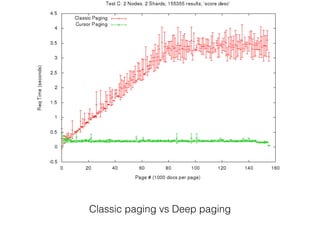
Deep paging
• Bulk exporting documents from Solr will bring it to
its knees
• Enter deep paging and cursorMark parameter
• Specify cursorMark=* on the first request
• Use the returned ‘nextCursorMark’ value as the
nextCursorMark parameter
Classic paging vs Deep paging
LucidWorks Open Source
• Effortless AWS deployment and monitoring http://
www.github.com/lucidworks/solr-scale-tk
• Logstash for Solr: https://github.com/LucidWorks/
solrlogmanager
• Banana (Kibana for Solr): https://github.com/LucidWorks/
banana
• Data Quality Toolkit: https://github.com/LucidWorks/data-quality
• Coming Soon for Big Data: Hadoop, Pig, Hive 2-way support w/
Lucene and Solr, different file formats, pipelines, Logstash
LucidWorks
• We’re hiring!
• Work on open source Apache Lucene/Solr
• Help our customers win
• Work remotely from home! Location no bar!
• Contact me at shalin@apache.org

High Performance Solr

  • 1.
    High Performance Solr ShalinShekhar Mangar shalin@apache.org https://twitter.com/shalinmangar
  • 2.
    Performance constraints • CPU •Memory • Disk • Network
  • 3.
    Tuning (CPU) Queries •Phrase query • Boolean query (AND) • Boolean query (OR) • Wildcard • Fuzzy • Soundex • …roughly in order of increasing cost • Query performance inversely proportional to matches (doc frequency)
  • 4.
    Tuning (CPU) Queries •Reduce frequent-term queries • Remove stopwords • Try CommonGramsFilter • Index pruning (advanced) • Some function queries match ALL documents - terribly inefficient
  • 5.
    Tuning (CPU) Queries •Make efficient use of caches • Watch those eviction counts • Beware of NOW in date range queries. Use NOW/DAY or NOW/HOUR • No need to cache every filter • Use fq={!cache=false}year:[2005 TO *] • Specify cost for non-cached filters for efficiency • fq={!geofilt sfield=location pt=22,-127 d=50 cache=false cost=50} • Use PostFilters for very expensive filters (cache=false, cost > 100)
  • 6.
    Tuning (CPU) Queries •Warm those caches • Auto-warming • Warming queries • firstSearcher • newSearcher
  • 7.
    Tuning (CPU) Queries •Stop using primitive number/date fields if you are performing range queries • facet.query (sometimes) or facet.range are also range queries • Use Trie* Fields • When performing range queries on a string field (rare use-case), use frange to trade off memory for speed • It will un-invert the field • No additional cost is paid if the field is already being used for sorting or other function queries • fq={!frange l=martin u=rowling}author_last_name instead of fq=author_last_name:[martin TO rowling]
  • 8.
    Tuning (CPU) Queries •Faceting methods • facet.method=enum - great for less unique values • facet.enum.cache.minDf - use filter cache or iterate through DocsEnum • facet.method=fc • facet.method=fcs (per-segment) • facet.sort=index faster than facet.sort=count but useless in typical cases
  • 9.
    Tuning (CPU) Queries •ReRankQueryParser • Like a PostFilter but for queries! • Run expensive queries at the very last • Solr 4.9+ only (soon to be released)
  • 10.
    Tuning (CPU) Queries •Divide and conquer • Shard’em out • Use multiple CPUs • Sometime multiple cores are the answer even for small indexes and specially for high-updates
  • 11.
    Tuning Memory Usage •Use DocValues for sorting/faceting/grouping • There are docValueFormats: {‘default’, ‘memory’, ‘direct’} with different trade-offs. • default - Helps avoid OOM but uses disk and OS page cache • memory - compressed in-memory format • direct - no-compression, in-memory format
  • 12.
    Tuning Memory usage •termIndexInterval - Choose how often terms are loaded into term dictionary. Default is 128.
  • 13.
    Tuning Memory Usage •Garbage Collection pauses kill search performance • GC pauses expire ZK sessions in SolrCloud leading to many problems • Large heap sizes are almost never the answer • Leave a lot of memory for the OS page cache • http://wiki.apache.org/solr/ShawnHeisey
  • 14.
    Tuning Disk usage •Atomic updates are costly • Lookup from transaction log • Lookup from Index (all stored fields) • Combine • Index
  • 15.
    Tuning Disk Usage •Experiment with merge policies • TieredMergePolicy is great but LogByteSizeMergePolicy can be better if multiple indexes are sharing a single disk • Increase buffer size - ramBufferSizeMB (>1024M doesn’t help, may reduce performance)
  • 16.
    Tuning Disk Usage •Always hard commit once in a while • Best to use autoCommit and maxDocs • Trims transaction logs • Solution for slow startup times • Use autoSoftCommit for new searchers • commitWithin is a great way to commit frequently
  • 17.
    Tuning Network • Batchwrites together as much as possible • Use CloudSolrServer in SolrCloud always • Routes updates intelligently to correct leader • ConcurrentUpdateSolrServer (previously known as StreamingUpdateSolrServer) for indexing in non- Cloud mode • Don’t use it for querying!
  • 18.
    Tuning network • ShareHttpClient instance for all Solrj clients or just re-use the same client object • Disable retries on HttpClient
  • 19.
    Tuning Network • DistributedSearch is optimised if you ask for fl=id,score only • Avoid numShard*rows stored field lookups • Saves numShard network calls
  • 20.
    Tuning Network • Considersetting up a caching proxy such as squid or varnish in front of your Solr cluster • Solr can emit the right cache headers if configured in solrconfig.xml • Last-Modified and ETag headers are generated based on the properties of the index such as last searcher open time • You can even force new ETag headers by changing the ETag seed value • <httpCaching never304=“true”><cacheControl>max-age=30, public</ cacheControl></httpCaching> • The above config will set responses to be cached for 30s by your caching proxy unless the index is modifed.
  • 21.
    Avoid wastage • Don’tstore what you don’t need back • Use stored=false • Don’t index what you don’t search • Use indexed=false • Don’t retrieve what you don’t need back • Don’t use fl=* unless necessary • Don’t use rows=10 when all you need is numFound
  • 22.
    Reduce indexed info •omitNorms=true - Use if you don’t need index-time boosts • omitTermFreqAndPositions=true - Use if you don’t need term frequencies and positions • No fuzzy query, no phrase queries • Can do simple exists check, can do simple AND/OR searches on terms • No scoring difference whether the term exists once or a thousand times
  • 23.
    DocValue tricks &gotchas • DocValue field should be stored=false, indexed=false • It can still be retrieved using fl=field(my_dv_field) • If you store DocValue field, it uses extra space as a stored field also. • In future, update-able doc value fields will be supported by Solr but they’ll work only if stored=false, indexed=false • DocValues save disk space also (all values, next to each other lead to very efficient compression)
  • 24.
    Deep paging • Bulkexporting documents from Solr will bring it to its knees • Enter deep paging and cursorMark parameter • Specify cursorMark=* on the first request • Use the returned ‘nextCursorMark’ value as the nextCursorMark parameter
  • 25.
    Classic paging vsDeep paging
  • 26.
    LucidWorks Open Source •Effortless AWS deployment and monitoring http:// www.github.com/lucidworks/solr-scale-tk • Logstash for Solr: https://github.com/LucidWorks/ solrlogmanager • Banana (Kibana for Solr): https://github.com/LucidWorks/ banana • Data Quality Toolkit: https://github.com/LucidWorks/data-quality • Coming Soon for Big Data: Hadoop, Pig, Hive 2-way support w/ Lucene and Solr, different file formats, pipelines, Logstash
  • 27.
    LucidWorks • We’re hiring! •Work on open source Apache Lucene/Solr • Help our customers win • Work remotely from home! Location no bar! • Contact me at shalin@apache.org