Page 1 of 90
JAWAHARLAL NEHRU TECHNOLOGICAL UNIVERSITY HYDERABAD
ELECTRONICS AND COMMUNICATION ENGINEERING
B.Tech II-I Sem. (E.C.E.)
II Year B.Tech. ECE - I Sem L T/P/D C
- -/3/- 2
(A30481) BASIC SIMULATION LAB
Note:
• All the experiments are to be simulated using MATLAB or equivalent software.
• Minimum of 15 experiments are to be completed.
List of Experiments
S.NO EXPERIMENT NAME PAGE NO
1. Basic Operations on Matrices
2. Generation of Various Signals and Sequences (periodic & Aperiodic), Such as Unit
impluse, Unit step, Square, Saw tooth, Triangular, Sinusoidal, Ramp, Sinc function
3. Operations on signals and Sequences such as Addition, Multiplication, Scaling, Shifting,
Folding, Computation of energy and Average Power.
4. Finding Even and Odd Parts of Signal or Sequence and Real and Imaginary Parts of a
signal/Sequence
5. Convolution between signals and Sequences.
6. Auto Correlation and Cross Correlation between signals and Sequences.
7. Verification of Linearity and Time Invariance properties of a given continuous / Discrete
system.
8. Computation of Unit Sample, Unit Step, Sinusoidal Responses of given LTI System and
verifying its physical realizability and Stability properties.
9. Gibb’s Phenomenon
10. Finding the Fourier Transform of given signal and plotting its magnitude and phase
spectrum.
11. Wave form synthesis using Laplace Transform
12. Locating the Zeros and poles, and plotting the pole zero maps in s-plane and Z-plane for the
given Transfer Function
13. Generation of Gaussian Noise (Real & Complex), computation of its mean, Mean Square
values and its Skew, Kurtosis and PSD, Probability Distribution function
14. Sampling Theorem verification
15. Removal of noise by autocorrelation/ cross correlation in a given signal corrupted by noise.
16.Extraction of periodic signal masked by noise using correlation.
17.Verification of Weiner-Khinchine Relations.
18.Checking a Random process for stationary in wide sense.
Page 2 of 90
1. Operations on matrices
Aim: To perform different operations on matrices using MATLAB software.
Equipment: PC loaded with MATLAB software 7.0 and above.
Procedure:
• Open MATLAB
• Open new M-file
• Type the program
• Save in current directory
• Compile and run the program
•
For the output see command window Figure window
Program:
r=[1 2 3]
Output:
r =
1 2 3
c=[1;2;3;4]
Output:
c =
1
2
3
4
I=eye (3,3)
Output:
I =
1 0 0
0 1 0
0 0 1
o=zeros(3,3)
Output:
o =
Page 3 of 90
0 0 0
0 0 0
0 0 0
i=ones(3,3)
Output:
i =
1 1 1
1 1 1
1 1 1
m=[3 4;7 8]
Output:
m =
3 4
7 8
z=[1 2 4;1 7 3;1 9 8]
Output:
z =
1 2 4
1 7 3
1 9 8
e=z(1,2)
Output:
e = 2
x=[4 5;7 4]
Output:
x =
4 5
7 4
y=[9 4;9 7]
Page 4 of 90
Output:
y =
9 4
9 7
A=x+y
Output:
A =
13 9
16 11
M=x*y
Output:
M =
81 51
99 56
S=x-y
Output:
S =
-5 1
-2 -3
ai=-x
Output:
ai =
-4 -5
-7 -4
sm=2*x
Output:
sm =
8 10
14 8
Page 5 of 90
em=x.*y
Output:
em =
36 20
63 28
z=[1 2 4;1 7 3;1 9 8]
Output:
z =
1 2 4
1 7 3
1 9 8
n=[7;16;21]
Output:
n =
7
16
21
z(:,1)=n
Output:
z =
7 2 4
16 7 3
21 9 8
z(2,:)=r
Output:
z =
7 2 4
1 2 3
21 9 8
Page 6 of 90
m=[1 5;9 4]
Output:
m =
1 5
9 4
p=m'
Output:
p =
1 9
5 4
q=inv(m)
Output:
q =
-0.0976 0.1220
0.2195 -0.0244
a=adjoint(m)
Output:
a =
4.0000 -5.0000
-9.0000 1.0000
d=det(m)
Output:
d =
-41
s=[1 1 1;1 2 3;1 3 4]
Output:
s =
1 1 1
1 2 3
1 3 4
Page 7 of 90
n=[7 16 22]
Output:
n =
7 16 22
b=[1 2 3;4 6 8;4 5 7]
Output:
b =
1 2 3
4 6 8
4 5 7
v = [16 5 9 4 2 11 7 14];
v(3) % Extract the third element
Output:
ans =
9
v([1 5 6]) % Extract the first, fifth, and sixth elements
Output:
ans =
16 2 11
v(3:7) % Extract the third through the seventh elements
Output:
ans =
9 4 2 11 7
v(1:2:end) % Extract all the odd elements
Output:
ans =
16 9 2 7
v([2 3 4]) = [10 15 20] % Replace some elements of v
Output:
v =
16 10 15 20 2 11 7 14
Page 8 of 90
A = magic(4)
Output:
A =
16 2 3 13
5 11 10 8
9 7 6 12
4 14 15 1
A(2:4,1:2)
Output:
ans =
5 11
9 7
4 14
A(3,:) % Extract third row
Output:
ans =
9 7 6 12
A(:,end) % Extract last column
Output:
ans =
13
8
12
1
idx = sub2ind(size(A), [2 3 4], [1 2 4]) %returns the linear indices ind
corresponding to the row and column subscripts in row and col for a matrix of size
sz.
Output:
idx =
2 7 16
Page 9 of 90
figure(1);
plot(c);
grid on;
1 1.5 2 2.5 3 3.5 4
1
1.5
2
2.5
3
3.5
4
Figure 1. 1
figure(2);
bar(b);
Output:
1 2 3
0
1
2
3
4
5
6
7
8
Figure 1. 2
Page 10 of 90
figure(3);
pie(b);
Output:
3%
10%
10%
5%
15%
13%
8%
20%
18%
Figure 1. 3
figure(4);
stem(b);
Output:
1 1.2 1.4 1.6 1.8 2 2.2 2.4 2.6 2.8 3
0
1
2
3
4
5
6
7
8
Figure 1. 4
Conclusion: In this program various operations on matrices is done using MATLAB.
Page 11 of 90
Viva questions:
1. Define matrix
2. Find rank, determinant, and inverse of a matrix.
3. Explain the steps to extract a sub matrix?
4. Distinguish between a row and column matrix.
5. Define transpose of a matrix.
6. What is bar representation?
Page 12 of 90
2. Generation of various signals and sequences
Aim: To generate different types of signals using MATLAB software.
Equipment: MATLAB software 7.0 and above.
Theory: If the amplitude of the signal is defined at every instant of time, then it is called
continuous signal. If the amplitude of the signal is defined at only at some instants of time, then
it is called discrete signal.
If the signal repeats itself at regular intervals, then it is called periodic signal. Otherwise,
they are called aperiodic signals
.
Example: Ramp, Impulse, unit step, sinc - Aperiodic signals
Square, saw tooth, triangular, sinusoidal – periodic signals.
Ramp signal :
r(t)= t when t>=0
Unit impulse signal :
= undefined when t=0
=0 other wise and
Unit step signal:
u(t)= 1 only when t>=0
=0 other wise
Sinc signal:
G(x)=(sinx)/x
Procedure:
• Open MATLAB
• Open new M-file
• Type the program
• Save in current directory
• Compile and run the program
• For the output see command window Figure window
Page 13 of 90
Program:
%To generate impulse signal and unit impulse sequence
clc;
clear all; %clears all variables from the work space
close all; %closes the current figure window
t = -1:0.1:1; %assigning the values to t
y = dirac(t);
idx = y == Inf; % find Inf
y(idx) = 1; % set Inf to finite value
subplot(1,2,1); %gives the number of rows and columns, position of the figure
plot(t,y)
xlabel('time'); %adds text to the current x axis
ylabel('amplitude'); %adds text to the current y axis
title('unit impulse signal'); %adds text on top of current figure
n=-1:1;
x=1.*(n==0);
subplot(1,2,2); %creates axes in titled position
stem(n,x); %plots the discrete sequence x versus t
xlabel('time index n') %adds text besides x axis
ylabel('x(n)'); %adds text besides x axis
title('unit impulse sequence'); %adds text on top of current axis
Output:
Figure 2.1
Page 14 of 90
%Program to generate unit step signal
clc;
clear all; %removes all variables from the work
close all; %closes the current figure window
t=-1:0.03:1; %the range on x-axis and 0.01 represents distance of points to
be x
y=(t>=0) %assigning the values of y
subplot(1,2,1); %gives the number of rows and columns position
plot(t,y); % plots signal y versus t
xlabel('time axis'); %adds text besides the x axis on the current axis
ylabel('amplitude'); %adds text besides the y axis on the current axis
title('unit step signal'); %adds text on top of current axis
n=-10:10
y=(n>=0)
subplot(1,2,2); %gives the number of rows and columns position
stem(n,y); %plots the discrete sequence y versus t
xlabel('n') %adds text besides x axis
ylabel('y[n]'); % adds text besides y axis
title('unit step sequence') %adds text on top of current axis
Output:
Figure 2. 2
%Program to generate ramp signal
clc;
clear all;
close all;
t=0:5;
y=t;
subplot(1,2,1);
plot(t,y);
xlabel('time');
ylabel('amplitude');
title('Continuous ramp signal');
subplot(1,2,2);
stem(t,y);
xlabel('n')
ylabel('amplitude');
title(' Discrete ramp function ');
Page 15 of 90
Output:
0 2 4 6
0
0.5
1
1.5
2
2.5
3
3.5
4
4.5
5
time
amplitude Continuous ramp signal
0 2 4 6
0
0.5
1
1.5
2
2.5
3
3.5
4
4.5
5
n
amplitude
Discrete ramp function
Figure 2.3
% Program to generate triangular signal
clc;
clear all;
close all;
t=-5:1:5;
x=sawtooth(t,0.5);
subplot(1,2,1)
plot(t,x);
axis([-5 5 -3 3])
grid
xlabel('time');
ylabel(' amplitude');
title('triangular signal');
n=-5:1:5;
x=sawtooth(n,0.5);
subplot(1,2,2)
stem(n,x);
axis([-5 5 -3 3])
grid
xlabel('time index n');
ylabel(' amplitude');
title('triangular Sequence');
Page 16 of 90
Output:
Figure 2.4
% Program to generate sinc signal
clc;
clear all;
close all;
t=linspace(-5,5,100);
y=sinc(t);
subplot(2,2,3);
plot(t,y);
xlabel('time');
ylabel('amplitude');
title(' sinc signal');
%generation of sinc sequence
n=linspace(-5,5,21);
y1=sinc(n);
subplot(2,2,4);
stem(n,y1);
xlabel('n');
ylabel('amplitude');
title('sinc sequence');
Output:
Figure 2.5
Page 17 of 90
% Program to generate sine signal and sequence
clc;
clear all;
close all;
t=0:63;
x=sin(2*pi*0.0625*t);
subplot(1,2,1);
plot(t,x);
xlabel('time axis');
ylabel('amplitude');
title('sinusoidal signal');
subplot(1,2,2)
stem(t,x);
xlabel('time index n');
ylabel('amplitude');
title('sinusoidal sequence');
Output:
0 20 40 60 80
-1
-0.8
-0.6
-0.4
-0.2
0
0.2
0.4
0.6
0.8
1
time axis
amplitude
sinusoidal signal
0 20 40 60 80
-1
-0.8
-0.6
-0.4
-0.2
0
0.2
0.4
0.6
0.8
1
time index n
amplitude
sinusoidal sequence
Figure 2.6
% Program to generate sawtooth signal
clc;
clear all;
close all;
t=-15:1:15;
x=sawtooth(0.5*t);
subplot(1,2,1)
plot(t,x);
axis([-15 15 -3 3])
grid
xlabel('time');
ylabel(' amplitude');
title('sawtooth signal');
n=-15:1:15;
x=sawtooth(0.5*n);
subplot(1,2,2)
stem(n,x);
axis([-15 15 -3 3])
grid
xlabel('time index n');
ylabel(' amplitude');
title('sawtooth Sequence');
Page 18 of 90
Output:-
Figure 2.7
% Program to generate square signal
clc;
clear all;
close all;
t=-10:0.01:10;
x=square(t,50);
subplot(1,2,1)
plot(t,x);
axis([-10 10 -3 3])
grid
xlabel('time');
ylabel(' amplitude');
title('square signal');
n=-10:1:10;
x=square(n,50);
subplot(1,2,2)
stem(n,x);
axis([-10 10 -3 3])
grid
xlabel('time index n');
ylabel(' amplitude');
title('square Sequence');
Output:-
Figure 2.8
Page 19 of 90
% Program to generate square pulse
clc;
clear all;
close all;
t=linspace(-5,5,100);
x1=1;
x2=0;
y=x1.*(abs(t)<=1);
subplot(121);
plot(t,y);
xlabel('time');
ylabel(' amplitude');
title('square pulse');
n=linspace(-5,5,11);
y1=x1.*(abs(n)<=1);
subplot(122);
stem(n,y1);
xlabel('time index');
ylabel(' amplitude');
title('discrete square pulse');
Output:-
Figure 2.9
% Program to generate triangular pulse
clc;
clear all;
close all;
t=linspace(-5,5,100);
a=3;
y=(1-abs(t)/a).*(abs(t)<=a);
subplot(121);
plot(t,y);
xlabel('time');
ylabel(' amplitude');
title('triangular pulse');
n=linspace(-5,5,11);
y1=(1-abs(n)/a).*(abs(n)<=a);
subplot(122);
stem(n,y1);
xlabel('time index n');
Page 20 of 90
ylabel(' amplitude');
title('discrete triangular pulse');
Output:-
Figure 2.10
Conclusion: - Various aperiodic and periodic signals are generated using MATLAB software.
Viva questions:
1. What is a signal?
2. Define unit step signal.
3. What is cosine signal?
4. Draw the waveform for triangular and saw tooth signals.
5. What is ramp signal?
6. Compare Continuous and Discrete Time Signals.
Page 21 of 90
3. Operations on signals and sequences such as addition, multiplication,
scaling, shifting, and folding
Aim: To perform the arithmetic operations on different types using MATLAB software.
Equipment: MATLAB software7.0 and above.
Theory:
Signal Addition:
Addition: any two signals can be added to form a third signal,
z (t) = x (t) + y (t)
Multiplication :
Multiplication of two signals can be obtained by multiplying their values at
every instants .
z (t) = x (t) y (t)
Time reversal/Folding:
Time reversal of a signal x(t) can be obtained by folding the signal about
t=0.
Y(t)=y(-t)
Signal Amplification/Scaling :
Y(n)=ax(n) if a < 1 attenuation
a >1 amplification
Time shifting:
The time shifting of x(n) obtained by delay or advance the
signal in time by using
y(n)=x(n+k)
If k is a positive number, y(n) shifted to the right i e the shifting delays the signal
If k is a negative number, y(n ) it gets shifted left. Signal Shifting advances
the signal
Program:
%To generate addition of two signals
clc;
clear all;
close all;
t=0:.01:1;
% generating two input signals
x1=sin(2*pi*4*t);
x2=sin(2*pi*8*t);
subplot(2,2,1);
plot(t,x1);
xlabel('time');
ylabel('amplitude');
title('signal1:sine wave of frequency 4Hz');
subplot(2,2,2);
plot(t,x2);
Page 22 of 90
xlabel('time');
ylabel('amplitude');
title('signal2:sine wave of frequency 8Hz');
% addition of signals
y1=x1+x2;
subplot(2,2,3);
plot(t,y1);
xlabel('time');
ylabel('amplitude');
title('resultant signal:signal1+signal2');
% multiplication of signals
y2=x1.*x2;
subplot(2,2,4);
plot(t,y2);
xlabel('time');
ylabel('amplitude');
title('resultant signal: dot product of signal1 and signal2');
0 0.5 1
-1
-0.5
0
0.5
1
time
amplitude
signal1:sine wave of frequency 4Hz
0 0.5 1
-1
-0.5
0
0.5
1
time
amplitude signal2:sine wave of frequency 8Hz
0 0.5 1
-2
-1
0
1
2
time
amplitude
resultant signal:signal1+signal2
0 0.5 1
-1
-0.5
0
0.5
1
time
amplitude
resultant signal:dot product of signal1 and signal2
Figure 3.1
% Program to perform amplitude scaling for sinusoidal signal
clc;
clear all;
close all;
t=[0:0.01:1];
A=8;
f1=2;
s1=sin(2*pi*f1*t);
subplot(4,1,1)
plot(s1);
xlabel('t');
ylabel('amplitude');
title('input signal');
s2=A*s1;
Page 23 of 90
subplot(4,1,2);
plot(s2);
xlabel('t');
ylabel('amplitude');
title('amplified input signal');
%Amplitude scaling of discrete sequence
n=0:1:6;
s3=[1 2 3 3 1 1 1 ];
subplot(4,1,3);
stem(n,s3);
xlabel('n');
ylabel('amplitude');
title(' input sequence');
s4=4*s3;
subplot(4,1,4);
stem(n,s4);
xlabel('n');
ylabel('amplitude');
title ('amplified input sequence')
Output:
0 20 40 60 80 100 120
-1
0
1
t
amplitude
input signal
0 20 40 60 80 100 120
-10
0
10
t
amplitude
amplified input signal
0 1 2 3 4 5 6
0
2
4
n
amplitude
input sequence
0 1 2 3 4 5 6
0
10
20
n
amplitude
amplified input sequence
Figure 3.2
% Program to generate time scaling
clc;
clear all;
close all;
t=0:0.001:2
y=sin(2*pi*1*t);
subplot(3,1,1)
plot(t,y)
xlabel('t');
Page 24 of 90
ylabel('x(t)');
title('sinusoidal signal');
y1=sin(2*pi*1*t*2)
subplot(3,1,2)
plot(t,y1)
xlabel('t')
ylabel('x(t)')
title('compressed signal');
y2=sin(2*pi*1*t*0.5);
subplot(3,1,3)
plot(t,y2)
xlabel('t');
ylabel('x(t)');
title('expanded signal');
Output:
0 0.2 0.4 0.6 0.8 1 1.2 1.4 1.6 1.8 2
-1
0
1
t
x(t)
sinusoidal signal
0 0.2 0.4 0.6 0.8 1 1.2 1.4 1.6 1.8 2
-1
0
1
t
x(t)
compressed signal
0 0.2 0.4 0.6 0.8 1 1.2 1.4 1.6 1.8 2
-1
0
1
t
x(t)
expanded signal
Figure 3.3
% Program to generate amplitude shifting
clc;
clear all;
close all;
t=0:0.001:2;
a=3;
y=sin(2*pi*1*t);
subplot(3,1,1)
plot(t,y)
axis([0 2 -5 5]);
xlabel('t');
ylabel('x(t)');
title('sinusoidal signal');
y1=a+sin(2*pi*1*t);
subplot(3,1,2)
plot(t,y1)
axis([0 2 -5 5]);
xlabel('t')
ylabel('x(t)')
Page 25 of 90
title('Up shifted signal');
y2=-a+sin(2*pi*1*t);
subplot(3,1,3)
plot(t,y2)
axis([0 2 -5 5]);
xlabel('t');
ylabel('x(t)');
title('Down shifted signal');
Output:
Figure 3.4
% Program to perform time Shifting
clc;
clear all;
close all;
syms t;
shift=2;
x=heaviside(t)
subplot(3,1,1)
fplot(x, [-10,10])
xlabel('t');
ylabel('x(t)');
title('unit step signal');
xleft=heaviside(t+2);
subplot(3,1,2)
fplot(xleft,[-10,10])
xlabel('tleft')
ylabel('amplitude')
title('left shifted signal');
xright=heaviside(t-2);
Page 26 of 90
subplot(3,1,3)
fplot(xright,[-10,10])
xlabel('tright');
ylabel('amplitude');
title('right shifted signal');
Output:
Figure 3.4
% Program to generate time reversal of a signal
clc;
clear all;
close all;
y=-2.5:0.05:2.5;
ly=length(y)
ny=0:ly-1
subplot(2,1,1)
stem(ny,y)
xlabel('n')
ylabel('amplitude')
title('original signal')
yf=fliplr(y)
nf=-fliplr(ny)
subplot(2,1,2)
stem(nf,yf)
xlabel('n')
ylabel('amplitude')
title('folded signal')
Page 27 of 90
Output:
0 10 20 30 40 50 60 70 80 90 100
-3
-2
-1
0
1
2
3
n
amplitude
original signal
-100 -90 -80 -70 -60 -50 -40 -30 -20 -10 0
-3
-2
-1
0
1
2
3
n
amplitude
folded signal
Figure 3.5
% Program to generate compute energy and power of a signal
clc;
clear all;
close all;
t=-10:0.01:10;
T=10;
x=10*sin(2*pi*5*t);
xsq=x.^2;
E=trapz(t,xsq);
P=E/(2*T);
disp(['Energy,E=',num2str(E),'Joules'])
disp(['Power,P=',num2str(P),'Watts'])
Output:-
Energy,E=1000Joules
Power,P=50Watts
Conclusion: Various operations on signals and sequences are performed.
Viva Questions:
1. What is a system.
2. Define a Linear System.
3. What is Time scaling Property?
4. Define Amplitude scaling .
5. What is Time Shifting Property?
6. Define Duality and folding of a signal.
Page 28 of 90
4. Finding the even and odd parts of signal/sequence real and imaginary parts
of signal.
Aim: To find the even & odd parts and real & imaginary parts of a signal using MATLAB
software.
Equipment: MATLAB software7.0 and above.
Theory:
Even and odd part of a signal:
Even Signal:
A signal is referred to as an even if it is identical to its time-reversed Counter parts;
x(t) = x(-t).
Odd signal:
A signal is odd if x(t) = -x(-t).
An odd signal must be 0 at t=0, in other words, odd signal passes through the origin.
Any signal x(t) can be expressed as sum of even and odd components
x(t)=xe(t)+xo(t)
 
)
(
)
(
2
1
)
( t
x
t
x
t
x
e −
+
=
 
)
(
)
(
2
1
)
( t
x
t
x
t
x
e −
−
=
)
(
)
(
)
( t
x
t
x
t
x o
e +
=
=   
)
(
)
(
2
1
)
(
)
(
2
1
t
x
t
x
t
x
t
x −
−
+
−
+
%Program to find the even and odd parts of a signal:
clc
clear all
close all
syms t;
x1=heaviside(t);
x2=heaviside(-t);
xe=(x1+x2)/2;
xo=(x1-x2)/2;
subplot(4,1,1)
fplot(x1);
xlabel('t')
ylabel('x1')
title('Original signal')
subplot(4,1,2)
fplot(x2)
xlabel('t')
ylabel('x2')
title('Folded signal')
subplot(4,1,3)
fplot(xe)
xlabel('t')
Page 29 of 90
ylabel('xe')
title('Even part of the signal')
subplot(4,1,4)
fplot(xo)
xlabel('t')
ylabel('xo')
title('Odd part of the signal')
Figure 4.1
%Program to find the real and imaginary parts of the complex sequence
clc;
clear all;
close all;
n=0:1:5;
x=input('enter the complex no sequence');
y=real(x)
z=imag(x)
subplot(2,1,1);
stem(y);
xlabel('n');
ylabel('x(n)');
title('real part');
subplot(2,1,2);
stem(z);
xlabel('n');
ylabel('x(n)');
title('imaginary part');
Output:
enter the complex no sequence[2+3i 1+2i 5+3i 8+7i]
Page 30 of 90
y =
2 1 5 8
z =
3 2 3 7
1 1.5 2 2.5 3 3.5 4
0
2
4
6
8
n
x(n)
real part
1 1.5 2 2.5 3 3.5 4
0
2
4
6
8
n
x(n)
imaginary part
Figure 4.2
%program to find real and imaginary part of signal
clc;
clear all
close all
t=0:0.0001:5;
y=exp(2*pi*1*t*i);
y1=(y+conj(y))/2;
y2=(y-conj(y))/(2*i);
subplot(2,1,1);
plot(y1);
xlabel('t');
ylabel('x(t)')
title('Real part of the signal y')
subplot(2,1,2);
plot(y2);
xlabel('t');
Page 31 of 90
ylabel('x(t)')
title('Imaginary part of the signal y ')
Output:
Figure 4.3
Conclusion:- Even & odd parts and real & imaginary parts of given signals are obtained using
MATLAB.
Viva questions :-
1. What is a even signal?
2. Define an odd signal.
3. write an expression for even signal.
4. Define a real signal.
5. What is a imaginary signal?
Page 32 of 90
5. Convolution of sequences and signals
Aim: To perform the convolution operation between two sequences and two signals using
MATLAB software.
Equipment: MATLAB software7.0 and above.
Theory:
Linear Convolution:
Convolution is an integral concatenation of two signals. It is used for the determination of the output
signal of a linear time-invariant system by convolving the input signal with the impulse response of the
system.
Note that convolving two signals is equivalent to multiplying the Fourier transform of the two signals.
Y(t)=x(t)*h(t)= )
(
)
( 
 −



−
t
h
x d
For discrete time signals the integration is replaced by a summation
Linear Convolution involves the following operations.
1. Folding
2. Multiplication
3. Addition
4. Shifting
If x(n)=δ(n) (impulse ) then, output y(n) is known as impulse response of the system.
The linear convolution of two continuous time signals and is defined by :
y(n)=T[x(n)]=h(n) similarlyδ (n-k)= h(n-k)
x(n) cab represented as weighted sum of impulses such as
Page 33 of 90
Program:
% convolution of two sequences
clc;
clear all;
close all;
x=input('enter first sequence')
k1=0:length(x)-1;
subplot(3,1,1)
stem(k1,x)
xlabel('n');
ylabel('x(n)');
title('x1(n)')
h=input('enter second sequence');
k2= 0:length(h)-1
subplot(3,1,2)
stem(k2,h)
xlabel('n');
ylabel('x(n)');
title('x2(n)');
k=k1(1)+k2(1);
p=length(x)+length(h)-1;
n=k:p-1+k;
y=conv(x,h)
subplot(3,1,3)
stem(n,y)
xlabel('n');
ylabel('y(n)');
title('linear convolution');
disp('the resultant signal is:')
disp(y)
Output:
enter first sequence [1 2 3 ]
x = 1 2 3
enter second sequence[-1 2 3 ]
h = -1 2 3
y = -1 0 4 12 9
the resultant signal is:
-1 0 4 12 9
Page 34 of 90
Figure 5.1
%Convolution of two rectangular pulses
clc
clear all
close all
k1=-2:-1
k2=2:3;
a=10;
b=10;
x1=a*(k1>-2)+a*(k1<-1);
x2=b*(k2>2)+b*(k2<3);
z=conv(x1,x2)
subplot(3,1,1)
plot(k1,x1)
xlabel('k1')
ylabel('amplitude')
title('x1')
subplot(3,1,2)
plot(k2,x2)
xlabel('k2')
ylabel('amplitude')
title('x2')
k=k1(1)+k2(1);
p=length(x1)+length(x2)-1;
t=k:p-1+k;
subplot(3,1,3)
plot(t,z)
xlabel ('t')
ylabel('amplitude')
title('convolution')
Page 35 of 90
Output:
z =
100 200 100
-2 -1.9 -1.8 -1.7 -1.6 -1.5 -1.4 -1.3 -1.2 -1.1 -1
9
10
11
k1
amplitude
x1
2 2.1 2.2 2.3 2.4 2.5 2.6 2.7 2.8 2.9 3
9
10
11
k2
amplitude
x2
0 0.2 0.4 0.6 0.8 1 1.2 1.4 1.6 1.8 2
100
150
200
t
amplitude
convolution
Figure 5.2
Conclusion:- Convolution of two sequences and two given signals is performed
Viva questions:-
1. What is convolution?
2. What are the types of convolution?
3. Write the expression for convolution.
4. what is correlation ?
5. Compare convolution and correlation.
Page 36 of 90
6. Auto correlation and cross correlation
Aim: - Program to compute Auto Correlation and Cross Correlation between Signals and
sequences.
Equipment: MATLAB software7.0 and above.
Theory:
Correlations of sequences:
It is a measure of the degree to which two sequences are similar. Given two real-valued
sequences x(n) and y(n) of finite energy,
Convolution involves the following operations.
1. Shifting
2. Multiplication
3. Addition
These operations can be represented by a Mathematical Expression as follows:
Cross correlation


−
=
−
=
n
y
x l
n
y
n
x
l
r )
(
)
(
)
(
,
The index l is called the shift or lag parameter
Autocorrelation


−
=
−
=
n
x
x l
n
y
n
x
l
r )
(
)
(
)
(
,
Page 37 of 90
%Program to compute cross correlation of two sequences
clc
clear all
close all
x=input('enter first sequence')
k1=0:length(x)-1;
subplot(2,2,1)
stem(k1,x)
xlabel('k1')
ylabel('x1(k1)')
title('First sequence')
y=input('second sequence')
k2=0:length(y)-1;
subplot(2,2,2)
stem(k2,y)
xlabel('k2')
ylabel('y(k2)')
title('Second sequence')
[rxy,lag]=xcorr(x,y)
subplot(2,2,3)
stem(lag,rxy)
xlabel('lag')
ylabel('rxy(l)')
title('cross correlation rxy(lag)')
[ryx,lag]=xcorr(y,x)
subplot(2,2,4)
stem(lag,ryx)
xlabel('lag')
ylabel('ryx(l)')
title('cross correlation ryx(lag)')
if rxy==fliplr(ryx)
display('rxy(l) is equal to ryx(-l)')
else
display('rxy(l) is not equal to ryx(-l)')
end
Output:
enter first sequence[1 2 3 ]
x = 1 2 3
second sequence[3 2 1 ]
y = 3 2 1
r = 1.0000 4.0000 10.0000 12.0000 9.0000
lag = -2 -1 0 1 2
r = 9.0000 12.0000 10.0000 4.0000 1.0000
lag = -2 -1 0 1 2
rxy(l) is equal to ryx(-l)
Page 38 of 90
Figure 6.1
%Program to compute Autocorrelation a signal and sequence
clc
clear all
close all
x= input ('enter the sequence')
k=0:length(x)-1;
subplot(2,1,1)
stem (k,x)
xlabel('k');
ylabel('x(k)')
title('input signal')
[r,lag]=xcorr(x)
subplot(2,1,2)
stem(lag,r)
xlabel('lag')
ylabel('rxx(lag)')
title('auto correlation')
Output:
enter the sequence[1 2 3 ]
x = 1 2 3
r = 3.0000 8.0000 14.0000 8.0000 3.0000
lag = -2 -1 0 1 2
Page 39 of 90
Figure 6.2
%Program to compute Autocorrelation and Cross correlation of two signals
clc
clear all
close all
t=0:0.01:1;
x1=sin(2*pi*5*t)
x2=sin(2*pi*2*t)
[y lag]=xcorr(x1,x2)
[z lags]=xcorr(x1)
subplot(4,1,1)
plot(t,x1)
xlabel('t')
ylabel('amplitude')
title('first signal')
subplot(4,1,2)
plot(t,x2)
xlabel('t')
ylabel('amplitude')
title('second signal')
subplot(4,1,3)
plot(lag,y)
xlabel('lag')
Page 40 of 90
ylabel('amplitude')
title('cross correlation')
subplot(4,1,4)
plot(lags,z) xlabel('lag')
ylabel('amplitude')
title('auto correlation')
Output:
Figure 6.3
Conclusion: In this program auto and cross correlations of signals given are performed using
MATLAB.
Viva questions: -
1. Define Auto Correlation.
2. Define Cross Correlation
3. What is the difference between correlation and autocorrelation?
4. List out the properties of Auto Correlation.
5. Give an example for correlation.
Page 41 of 90
7. Verification of linearity and shift invariance property of discrete system
Aim: To verify linearity and shift invariance properties of a given discrete system using
MATLAB software.
Equipment: MATLAB software7.0 and above.
Theory:-
Linearity property:
Any system is said to be linear if it satisfies the superposition principle.
Superposition principle state that response to a weighted sum of input signal equal to the
corresponding weighted sum of the outputs of the system to each of the individual input signals.
x(n) -----------input signal
Y(n) --------- output signal
Y(n)=T[x(n)]
Y1(n)=T[X1(n)] : Y2(n)=T[X2(n)]
x3=[a X1(n)] +b [X2(n) ]
Y3(n)= T [x3(n)]
If T [a X1(n)] +b [X2(n) ] = a Y1(n)+ b Y2(n) then the system is said to be linear.
Let a [Y1(n)]+ b [X2(n) ] =Z 3(n)
%Program to verify the Linearity Property
clc
clear all
close all
x1=input('enter first sequence')
x2=input('enter second sequence')
h=[1 -3 4 -2 7 2 -1 3];
a1=input('enter coefficient of x1');
a2=input('enter coefficient of x2');
y1=a1*conv(x1,h)
y2=a2*conv(x2,h)
z=y1+y2;
x3=a1*x1+a2*x2;
y3=conv(x3,h);
disp('y3 is')
disp(y3)
disp('z is')
II B.Tech. ECE- I Semester R18 Basic Simulation Laboratory Manual
BRECW, Saidabad, Hyderabad-59 Page 42 of 90
disp(z)
if(y3==z)
disp('the given system is linear')
else
disp('the given system is not linear')
end
subplot(3,1,1)
stem(y3)
xlabel('n')
ylabel('y3')
title('Output to weighted sum of inputs')
subplot(3,1,2)
stem(z)
xlabel('n')
ylabel('z')
title('weighted sum of outputs')
d=y3-z;
subplot(3,1,3)
stem(d)
title('Difference between output to weighted sum of inputs and weighted sum of
outputs')
Output:
enter first sequence [1 2 3 4 5 ]
x1 = 1 2 3 4 5
enter second sequence [ 6 7 8 9 1 ]
x2 = 6 7 8 9 1
enter coefficient of x11
enter coefficient of x21
y1 = 1 -1 1 1 8 11 36 25 46 15 7 15
y2 = 6 -11 11 1 34 78 50 88 38 17 26 3
y01 is 7 -12 12 2 42 89 86 113 84 32 33 18
y02 is 7 -12 12 2 42 89 86 113 84 32 33 18
the given system is linear
II B.Tech. ECE- I Semester R18 Basic Simulation Laboratory Manual
BRECW, Saidabad, Hyderabad-59 Page 43 of 90
Figure 7.1
%Program for verification of Time Invariance Property
clc
clear all
close all
n=0:40;
d=10
x=3*cos(2*pi*0.1*n)-2*cos(2*pi*0.4*n)
xd=[zeros(1,d),x]
num=[2.2403 2.4908 2.2403];
den=[1 -0.4 0.75];
y= filter(num,den,x);
yd=filter(num,den,xd);
dy=[zeros(1,d) y];
subplot(3,1,1)
stem(y)
xlabel('n')
ylabel('y(n)')
title('original output')
subplot(3,1,2);
stem(yd);
xlabel('n')
II B.Tech. ECE- I Semester R18 Basic Simulation Laboratory Manual
BRECW, Saidabad, Hyderabad-59 Page 44 of 90
ylabel('yd(n)')
title('output due to delayed input');
subplot(3,1,3);
stem(dy)
xlabel('n')
ylabel('dy(n)')
title('delayed output')
if(yd==dy)
disp('the given system is time invarient')
else
disp('the given system is time varient')
end
Output:-
the given system is time invarient
Figure 7. 2
Conclusion:- In this program linearity and time variance properties of a system are verified
using MATLAB.
II B.Tech. ECE- I Semester R18 Basic Simulation Laboratory Manual
BRECW, Saidabad, Hyderabad-59 Page 45 of 90
Viva questions:-
1. What is linearity?
2. Define the time variance property.
3. What is the difference between time variant and time invariant system?
4. Define a cosine signal.
II B.Tech. ECE- I Semester R18 Basic Simulation Laboratory Manual
BRECW, Saidabad, Hyderabad-59 Page 46 of 90
8. Computation of unit impulse, unit step, sinusoidal responses of given LTI
system and verifying its physical realizability and stability properties.
Aim: To get the response of analog system.
Equipment: Matlab software 7.0 and above.
Theory:-
Linear systems satisfy the properties of superposition and homogeneity. Any
system that does not satisfy these properties is nonlinear. Linear systems have one
equilibrium point at the origin.
The principle of superposition states that for two different inputs, x and y, in the domain
of the function f,
f(x+y)= f(x)+f(y)
The property of homogeneity states that for a given input, x, in the domain of the function
f, and for any real number k,
f(kx)=kf(x)
clc;
close all;
clear all;
num=[1]
den=[1 -0.7 0.12]
% num=[1]
% den=[1 -0.9 0.81]
t=-1:0.01:1;
x1=(t==0);
y1=filter(num,den,x1);
subplot(3,1,1);
plot(t,y1,'r');
hold
title('impulse response');
xlabel('time');
ylabel('amplitude')
II B.Tech. ECE- I Semester R18 Basic Simulation Laboratory Manual
BRECW, Saidabad, Hyderabad-59 Page 47 of 90
x2=(t>=0);
y2=filter(num,den,x2);
subplot(3,1,2);
plot(t,y2);
hold
title('step response');
xlabel('time');
ylabel('amplitude');
x3=sin(2*pi*t);
y3=filter(num,den,x3);
subplot(3,1,3);
plot(t,y3);
title('Sinusoidal response');
xlabel('time');
ylabel('amplitude')
Output:
Figure 8.1
Conclusion: computation of unit step and impulse responses are performed using MATLAB.
II B.Tech. ECE- I Semester R18 Basic Simulation Laboratory Manual
BRECW, Saidabad, Hyderabad-59 Page 48 of 90
Viva questions:
1. Define a unit step signal.
2. what is a system.
3. Define Transfer function.
4. what is a LTI system?
5. Explain the response of a unit step delay by a time period t.
6. Compare LTI and LTV system.
II B.Tech. ECE- I Semester R18 Basic Simulation Laboratory Manual
BRECW, Saidabad, Hyderabad-59 Page 49 of 90
9. Gibbs phenomenon
Aim: To reconstruct a periodic square wave represented by its Fourier series (verification of
Gibbs phenomenon) using MATLAB software.
Equipment: MATLAB 7.0 and above
Theory:
The Gibbs phenomenon, the Fourier series of a piecewise continuously differentiable periodic
function behaves at a jump discontinuity. The n the approximated function shows amounts of
ripples at the points of discontinuity. This is known as the Gibbs Phenomenon, partial sum of the
Fourier series has large oscillations near the jump, which might increase the maximum of the
partial sum above that of the function itself. The overshoot does not die out as the frequency
increases, but approaches a finite limit The Gibbs phenomenon involves both the fact that
Fourier sums overshoot at a jump discontinuity, and that this overshoot does not die out as the
frequency increases. Also the Gibbs phenomenon is described for the Fourier series of a function
at its jump, the function being defined along the finite interval .Following figure illustrates the
concept of gibb’s phenomenon.
II B.Tech. ECE- I Semester R18 Basic Simulation Laboratory Manual
BRECW, Saidabad, Hyderabad-59 Page 50 of 90
Program:
clc;
clear all;
close all;
N=input('type the number of harmonics')
t=0:0.0001:1;
y=square(2*pi*1*t);
plot(t,y,'r','linewidth',2);
axis([0 1 -1.5 1.5]);
hold;
a=zeros(size(t));
for n=1:2:N
a=a+(4/(pi*n)*sin(2*pi*n*t));
end
plot(t,a);
grid;
xlabel('t');
ylabel('sq(t)')
title('reconstructed signal')
Output:
type the number of harmonics9
N =
9
Current plot held
0 0.1 0.2 0.3 0.4 0.5 0.6 0.7 0.8 0.9 1
-1.5
-1
-0.5
0
0.5
1
1.5
t
sq(t)
reconstructed signal
Figure 9. 1
II B.Tech. ECE- I Semester R18 Basic Simulation Laboratory Manual
BRECW, Saidabad, Hyderabad-59 Page 51 of 90
function[a0,a,b]=Fourierseries2(f,T,N)
syms t;
w0=2*pi/T;
a0_sym=1/T*int(f,t,0,T);
a0=double(a0_sym);
for n=1:N
a_sym=2/T*int(f*cos(n*w0*t),t,0,T);
b_sym=2/T*int(f*sin(n*w0*t),t,0,T);
a(n)=double(a_sym);
b(n)=double(b_sym);
end
end
clear all;
close all;
clc;
syms t;
T=2;
w0=2*pi/T;
f=heaviside(t)-2*heaviside(t-1)+2*heaviside(t-2)-2*heaviside(t-3);
% fplot(f)
% axis([0 6 -2 2])
% hold on;
N=input('Enter the number of harmonics');
[a0,a,b]=Fourierseries(f,T,N);
display(a0);
display(a);
display(b);
tnum=[0:0.01:4];
fnum=a0;
for n=1:N
harmonic=a(n)*cos(n*w0*tnum)+b(n)*sin(n*w0*tnum);
fnum=fnum+harmonic;
pause(0.75)
plot(tnum,fnum)
end
hold on;
fplot(f)
axis([0 4 -2 2])
legend('Reconstructed signal','Original periodic signal');
xlabel('time');
ylabel('amplitude')
Enter the number of harmonics
10
II B.Tech. ECE- I Semester R18 Basic Simulation Laboratory Manual
BRECW, Saidabad, Hyderabad-59 Page 52 of 90
a0 =
0
a =
0 0 0 0 0 0 0 0 0 0
b =
1.2732 0 0.4244 0 0.2546 0 0.1819 0
0.1415 0
Figure 9.2
II B.Tech. ECE- I Semester R18 Basic Simulation Laboratory Manual
BRECW, Saidabad, Hyderabad-59 Page 53 of 90
Conclusion: Gibb’s phenomenon is verified.
Viva questions:
1: Explain gibb’s phenomenon in detail.
2: Explain representation of signal using FOURIER SERIES.
3: With respect to FOURIES SEREIS justify the following statements
(i) even functions has only cosine terms
(ii) odd functions have only sine terms.
4: Discuss properties of fourier series.
5: Discuss applications of fourier series.
II B.Tech. ECE- I Semester R18 Basic Simulation Laboratory Manual
BRECW, Saidabad, Hyderabad-59 Page 54 of 90
10. Finding the Fourier transform of a given signal and plotting its magnitude
and phase spectrum.
Aim: To find Fourier transform of a signal and to plot its magnitude and phase spectrum using
MATLAB software.
Equipment: MATLAB software7.0 and above.
Theory:
The Fourier transform is as follows. Suppose that ƒ is a function then by definition Fourier
Transform of signal f(t) is defined as
∞
F(w)= ∫ f(t) e
jwt
−
dt
- ∞
Inverse Fourier Transform of signal F(w) is defined as
∞
f(t) = 
2
1
∫ F(w) e
jwt
dw
- ∞
The frequency spectrum of time domain signal is a representation of that signal in frequency
domain. The frequency spectrum can be generated via Fourier transform of the signal, and the
resulting values are usually presented as AMPLITUDE and PHASE, both plotted versus
frequency known as MAGNITUDE and PHASE SPECTRUM respectively.
II B.Tech. ECE- I Semester R18 Basic Simulation Laboratory Manual
BRECW, Saidabad, Hyderabad-59 Page 55 of 90
Program:
clc
clear all
close all
x=[1 1 1 1 0 0 0 0]
N=8
y1=fft(x,N);
mag=abs(y1)
phase=angle(y1)*180/pi
figure(1)
plot(mag)
xlabel('k')
ylabel('Magnitude of y(k)')
title('magnitude spectrum')
grid
figure(2)
plot(phase)
xlabel('k')
ylabel('Angle of y(k)')
title(‘phase spectrum')
grid
Output:
x =
1 1 1 1 0 0 0 0
N =
8
mag =
4.0000 2.6131 0 1.0824 0 1.0824 0 2.6131
phase =
0 -67.5000 0 -22.5000 0 22.5000 0 67.5000
II B.Tech. ECE- I Semester R18 Basic Simulation Laboratory Manual
BRECW, Saidabad, Hyderabad-59 Page 56 of 90
1 2 3 4 5 6 7 8
0
0.5
1
1.5
2
2.5
3
3.5
4
k
y(k)
magnitude spectrum
Figure 10. 1
Figure 10. 2
1 2 3 4 5 6 7 8
-80
-60
-40
-20
0
20
40
60
80
k
Angle
of
y(k)
phase spectrum
II B.Tech. ECE- I Semester R18 Basic Simulation Laboratory Manual
BRECW, Saidabad, Hyderabad-59 Page 57 of 90
Program:
%program to find ft of 3e(-t)u(t)
clc
close all
clear all
syms t;
f=3*exp(-t)*heaviside(t);
F=fourier(f);
disp('THE FOURIER TRANSFORM OF f=');
disp(F);
w=-2*pi:pi/50:2*pi;
F1=subs(F,w);
Fmag=abs(F1);
Fphase=angle(F1)*180/pi;
subplot(2,1,1);
plot(w,Fmag);
grid on;
xlabel('w');
ylabel('magnitude');
title('magnitude spectrum of f');
subplot(2,1,2);
plot(w,Fphase);
grid on;
xlabel('w');
ylabel('Phase');
title('phase spectrum of f');
Output:
THE FOURIER TRANSFORM OF f=
3/(1+i*w)
II B.Tech. ECE- I Semester R18 Basic Simulation Laboratory Manual
BRECW, Saidabad, Hyderabad-59 Page 58 of 90
-8 -6 -4 -2 0 2 4 6 8
0
1
2
3
w
magnitude
magnitude spectrum of f
-8 -6 -4 -2 0 2 4 6 8
-100
-50
0
50
100
w
Phase
phase spectrum of f
Figure 10. 3
Program:
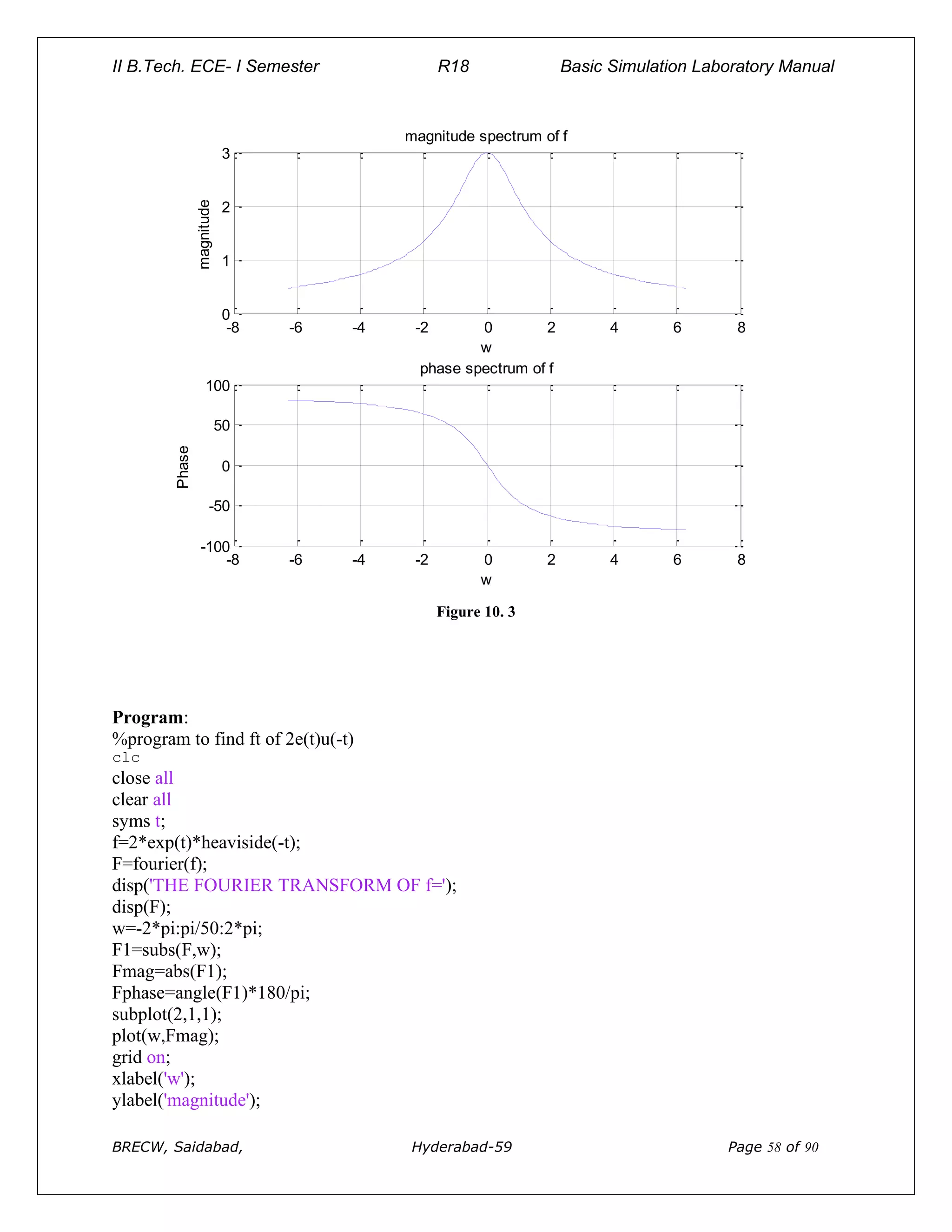
%program to find ft of 2e(t)u(-t)
clc
close all
clear all
syms t;
f=2*exp(t)*heaviside(-t);
F=fourier(f);
disp('THE FOURIER TRANSFORM OF f=');
disp(F);
w=-2*pi:pi/50:2*pi;
F1=subs(F,w);
Fmag=abs(F1);
Fphase=angle(F1)*180/pi;
subplot(2,1,1);
plot(w,Fmag);
grid on;
xlabel('w');
ylabel('magnitude');
II B.Tech. ECE- I Semester R18 Basic Simulation Laboratory Manual
BRECW, Saidabad, Hyderabad-59 Page 59 of 90
title('magnitude spectrum of f');
subplot(2,1,2);
plot(w,Fphase);
grid on;
xlabel('w');
ylabel('Phase');
title('phase spectrum of f');
Output:
THE FOURIER TRANSFORM OF f=
2/(1-i*w)
-8 -6 -4 -2 0 2 4 6 8
0
0.5
1
1.5
2
w
magnitude
magnitude spectrum of f
-8 -6 -4 -2 0 2 4 6 8
-100
-50
0
50
100
w
Phase
phase spectrum of f
Figure 10. 4
Program:
%program to find ft of te(t)u(t)
clc
close all
clear all
II B.Tech. ECE- I Semester R18 Basic Simulation Laboratory Manual
BRECW, Saidabad, Hyderabad-59 Page 60 of 90
syms t;
f=t*exp(t)*heaviside(t);
F=fourier(f);
disp('THE FOURIER TRANSFORM OF f=');
disp(F);
w=-2*pi:pi/50:2*pi;
F1=subs(F,w);
Fmag=abs(F1);
Fphase=angle(F1)*180/pi;
subplot(2,1,1);
plot(w,Fmag);
grid on;
xlabel('w');
ylabel('magnitude');
title('magnitude spectrum of f');
subplot(2,1,2);
plot(w,Fphase);
grid on;
xlabel('w');
ylabel('phase');
title('phase spectrum of f');
Output:
THE FOURIER TRANSFORM OF f=
1/(-1+i*w)^2
Figure 10. 5
-8 -6 -4 -2 0 2 4 6 8
0
0.5
1
w
magnitude
magnitude spectrum of f
-8 -6 -4 -2 0 2 4 6 8
-200
-100
0
100
200
w
Phase
phase spectrum of f
II B.Tech. ECE- I Semester R18 Basic Simulation Laboratory Manual
BRECW, Saidabad, Hyderabad-59 Page 61 of 90
Program:
%program to find ft of sgn(t)
clc
close all
clear all
syms t a;
f=limit(exp(-a*t),a,0)*heaviside(t)-limit(exp(a*t),a,0)*heaviside(-t);
F=fourier(f);
disp('THE FOURIER TRANSFORM OF f=');
disp(F);
w=-2*pi:pi/50:2*pi;
F1=subs(F,w);
Fmag=abs(F1);
Fphase=angle(F1)*180/pi;
subplot(2,1,1);
plot(w,Fmag);
grid on;
xlabel('w');
ylabel('magnitude');
title('magnitude spectrum of f');
subplot(2,1,2);
plot(w,Fphase);
grid on;
xlabel('w');
ylabel('phase');
title('phase spectrum of f');
Output:
THE FOURIER TRANSFORM OF f=
-2*i/w
Figure 10. 6
-8 -6 -4 -2 0 2 4 6 8
0
10
20
30
40
w
magnitude
magnitude spectrum of f
-8 -6 -4 -2 0 2 4 6 8
-100
-50
0
50
100
w
Phase
phase spectrum of f
II B.Tech. ECE- I Semester R18 Basic Simulation Laboratory Manual
BRECW, Saidabad, Hyderabad-59 Page 62 of 90
Conclusion:
Fourier transform of a given signal is calculated, its magnitude and phase spectrum is plotted.
Viva questions:
1: Explain fourier transform in detail.
2: Distinguish between fourier series and fourier transform.
3: Derive fourier transform of unit-step, unit impulse signal, sine and cosine waveforms.
4: Discuss properties of fourier tranform.
5: Discuss applications of fourier transform.
II B.Tech. ECE- I Semester R18 Basic Simulation Laboratory Manual
BRECW, Saidabad, Hyderabad-59 Page 63 of 90
11. Waveform synthesis using Laplace transform.
Aim: To perform waveform synthesis using Laplace transform of a signal using MATLAB
software.
Equipment: MATLAB software7.0 and above.
Theory: The Laplace transform for a signal f(t) is defined as
∞
L{f(t)}= F(s)=∫ f(t) e
st
−
dt where s=6+jw
- ∞
Consider the square wave of period ‘T’ which can be represented with unit
step functions as f(t)=u(t)-2u(t-T/2)+2u(t-T)-2u(t-3T/2)+………..
Program:
clc
close all
clear all
syms s complex;
L=(1/s)+(1/s)*exp(-s)-(2/s)*exp(-2*s);
l=ilaplace(L);
pretty(simplify(l));
ezplot(l,[0,3]);
grid;
Output:
1 + heaviside(t - 1) - 2 heaviside(t - 2)
0 0.5 1 1.5 2 2.5 3
0
0.5
1
1.5
2
t
1+heaviside(t-1)-2 heaviside(t-2)
Figure 11. 1
II B.Tech. ECE- I Semester R18 Basic Simulation Laboratory Manual
BRECW, Saidabad, Hyderabad-59 Page 64 of 90
Program:
% Signal synthesis using Laplace transform
clear all
close allclc
syms t s=t;
figure(1)
subplot(2,3,1)
fplot(s);
u=heaviside(t);
subplot(2,3,2)
fplot(u); f1=t.*u;
subplot(2,3,3)
fplot(f1);
u1=heaviside(t-1);
f2=-2.*(t-1).*u1;
subplot(2,3,4);
fplot(f2);
u2=heaviside(t-2);
f3=(t-2).*u2;
subplot(2,3,5);
fplot(f3);
f=f1+f2+f3;
figure(2);
fplot(t,f);
xlabel('time t');
ylabel('f(t)');
L=laplace(f)
f =
heaviside(t - 2)*(t - 2) + t*heaviside(t) - heaviside(t - 1)*(2*t - 2)
L =
exp(-2*s)/s^2 - (2*exp(-s))/s^2 + 1/s^2
l =
t - 2*heaviside(t - 1)*(t - 1) + heaviside(t - 2)*(t - 2)
II B.Tech. ECE- I Semester R18 Basic Simulation Laboratory Manual
BRECW, Saidabad, Hyderabad-59 Page 65 of 90
Figure 11. 2
Figure 11. 3
Conclusion: waveform synthesis is done using Laplace transform.
Viva questions:
1: Explain laplace transform in detail. Explain the concept of ROC.
2: Distinguish between laplace and fourier transform.
3: Derive laplace transform of unit-step,unit impulse signal, sine and cosine waveforms.
4: Discuss properties of lapalce tranform.
5: Discuss applications of lapalce transform.
II B.Tech. ECE- I Semester R18 Basic Simulation Laboratory Manual
BRECW, Saidabad, Hyderabad-59 Page 66 of 90
12. Locating the zeros and poles and plotting the pole zero maps in s-plane
and z-plane for the given transfer function.
Aim: To locate the zeros and poles and plotting the pole-zero maps in s-plane and z-plane for the
given transfer function using MATLAB software.
Equipment: MATLAB software7.0 and above.
Theory:
Z-transforms
The Z-transform, like many other integral transforms, can be defined as
either a one-sided or two-sided transform.
Bilateral Z-transform
The bilateral or two-sided Z-transform of a discrete-time signal x[n] is the
function X(z) defined as
Z{x(n)}=X(z)= 
−
=
8
8
n
x(n) z
n
−
Unilateral Z-transform
Alternatively, in cases where x[n] is defined only for n ≥ 0, the single-sided
or unilateral Z-transform is defined as
Z{x(n)}=X(z)=
=
8
0
n
x(n) z
n
−
where z=re
jw
In signal processing, this definition is used when the signal is causal. If H(z) is a transfer
function in z-domain then
H(z)= )
(
)
(
z
Q
z
P
The roots of the equation P(z) = 0 correspond to the 'zeros' of X(z) The roots of the equation Q(z)
= 0 correspond to the 'poles' of X(z). We denote poles in a z-plane plot by " X” we denote zeros
by “O”. The ROC is the set of points in the complex plane for which the Z-transform summation
converges. The Transfer function H(s) of a system in s-plane is defined as
H(s)= )
(
)
(
s
X
s
Y
Where Y(s) = laplace transform of output signal y(t)
X(s) =Laplace transform of input signal x(t)
II B.Tech. ECE- I Semester R18 Basic Simulation Laboratory Manual
BRECW, Saidabad, Hyderabad-59 Page 67 of 90
Program:
%plot poles and zeros in s-plane for a given transfer function
clc
clear all
close all
num=input('ENTER THE COEFFICIENTS OF NUMERATOR POLYNOMIAL');
den=input('ENTER THE COEFFICIENTS OF DENOMINATOR POLYNOMIAL');
H=tf(num,den)
[P Z]=pzmap(H);
disp('ZEROS ARE AT');disp(Z)
disp('POLES ARE AT');disp(P)
pzmap(H);
if max(real(P))>=0
disp('THE SYSYTEM IS UNSTABLE');
else
disp('THE SYSYTEM IS STABLE');
end;
Output:
ENTER THE COEFFICIENTS OF NUMERATOR POLYNOMIAL [1 2 1]
ENTER THE COEFFICIENTS OF DENOMINATOR POLYNOMIAL [1 -9 26 -24]
Transfer function:
s^2 + 2 s + 1
-----------------------
s^3 - 9 s^2 + 26 s - 24
ZEROS ARE AT
-1
-1
POLES ARE AT
4.0000
3.0000
2.0000
THE SYSYTEM IS UNSTABLE
II B.Tech. ECE- I Semester R18 Basic Simulation Laboratory Manual
BRECW, Saidabad, Hyderabad-59 Page 68 of 90
-1 -0.5 0 0.5 1 1.5 2 2.5 3 3.5 4
-1
-0.8
-0.6
-0.4
-0.2
0
0.2
0.4
0.6
0.8
1
Pole-Zero Map
Real Axis
Imaginary
Axis
Figure 12. 1
Program:
%plot poles and zeros in z-plane for a given transfer function
clc
clear all
close all
num=input('ENTER THE COEFFICIENTS OF NUMERATOR POLYNOMIAL')
den=input('ENTER THE COEFFICIENTS OF DENOMINATOR POLYNOMIAL')
H=tf(num,den,0.1)
[Z,P]=tf2zp(num,den)
zplane(num,den)
disp('ZEROS ARE AT');disp(Z)
disp('POLES ARE AT');disp(P)
Output:
ENTER THE COEFFICIENTS OF NUMERATOR POLYNOMIAL[1 -1]
II B.Tech. ECE- I Semester R18 Basic Simulation Laboratory Manual
BRECW, Saidabad, Hyderabad-59 Page 69 of 90
num =
1 -1
ENTER THE COEFFICIENTS OF DENOMINATOR POLYNOMIAL[1 1 0.16]
den =
1.0000 1.0000 0.1600
H =
z - 1
z^2 + z + 0.16
Sample time: 0.1 seconds
Discrete-time transfer function.
Z =
1
P =
-0.8000
-0.2000
ZEROS ARE AT 1
POLES ARE AT
-0.8000 -0.2000
II B.Tech. ECE- I Semester R18 Basic Simulation Laboratory Manual
BRECW, Saidabad, Hyderabad-59 Page 70 of 90
-1 -0.5 0 0.5 1
-1
-0.8
-0.6
-0.4
-0.2
0
0.2
0.4
0.6
0.8
1
Real Part
Imaginary
Part
Figure 12. 2
Output:
ENTER THE COEFFICIENTS OF NUMERATOR POLYNOMIAL[1 1]
num =
1 1
ENTER THE COEFFICIENTS OF DENOMINATOR POLYNOMIAL[1 -1 0.5]
den =
1.0000 -1.0000 0.5000
H =
z + 1
z^2 - z + 0.5
II B.Tech. ECE- I Semester R18 Basic Simulation Laboratory Manual
BRECW, Saidabad, Hyderabad-59 Page 71 of 90
Sample time: 0.1 seconds
Discrete-time transfer function.
Z =
-1
P =
0.5000 + 0.5000i
0.5000 - 0.5000i
ZEROS ARE AT
-1
POLES ARE AT
0.5000 + 0.5000i
0.5000 - 0.5000i
-1 -0.5 0 0.5 1
-1
-0.8
-0.6
-0.4
-0.2
0
0.2
0.4
0.6
0.8
1
Real Part
Imaginary
Part
Figure 12. 3
II B.Tech. ECE- I Semester R18 Basic Simulation Laboratory Manual
BRECW, Saidabad, Hyderabad-59 Page 72 of 90
Output:
ENTER THE COEFFICIENTS OF NUMERATOR POLYNOMIAL[1]
num =1
ENTER THE COEFFICIENTS OF DENOMINATOR POLYNOMIAL[1 0.5 -1.25 0.375]
den =
1.0000 0.5000 -1.2500 0.3750
H =
1
z^3 + 0.5z^2 – 1.25z+ 0.375
Sample time: 0.1 seconds
Discrete-time transfer function.
Z =
Empty matrix: 0-by-1
P =
-1.5000
0.5000 + 0.0000i
0.5000 - 0.0000i
ZEROS ARE AT
POLES ARE AT
-1.5000
0.5000 + 0.0000i
0.5000 - 0.0000i
II B.Tech. ECE- I Semester R18 Basic Simulation Laboratory Manual
BRECW, Saidabad, Hyderabad-59 Page 73 of 90
-1.5 -1 -0.5 0 0.5 1
-1
-0.8
-0.6
-0.4
-0.2
0
0.2
0.4
0.6
0.8
1
3 2
Real Part
Imaginary
Part
Figure 12. 4
Conclusion: Poles and zeros are calculated, and pole-zero map is plotted in s-plane and z-plane
for given transfer function.
Viva questions:
1: Explain Z-transform in detail. Explain the concept of ROC.
2: Define the terms pole, zero and pole-zero plot, transfer function.
3: Derive Z-transform of unit-step, unit impulse signal, sine and cosine waveforms.
4: Discuss properties of Z- transform. Discuss applications of Z-transform
5: Distinguish between fourier, laplace and Z-transform.
II B.Tech. ECE- I Semester R18 Basic Simulation Laboratory Manual
BRECW, Saidabad, Hyderabad-59 Page 74 of 90
13. Generation of gaussian noise, computation of its mean, Mean square value
and its skew, kurtosis, and probability distribution function
Aim: Write the program for generation of Gaussian noise and computation
of its mean, mean square value, skew, kurtosis, and probability distribution
Equipment: MATLAB 7.0 and above
Theory: Gaussian noise is statistical noise having a probability density function (PDF) equal to
that of the normal distribution (is also known as the Gaussian distribution). In other words, the
values that the noise can take on are Gaussian-distributed. Mean of Gaussian distributed numbers
is defined as
µ= N
1

−
=
1
0
N
i
x i
Where N=total number of samples
Program:
clc
clear all
close all
%generates set of 5000 samples of Gaussian distributed random numbers
x=randn(1,5000);
figure;
hist(x)
title('histogram of gaussian distribution')
mu=mean(x)
musq=sum(x.^2)
sigma=std(x)
Output:
mu =
-0.0168
musq =
4.8788e+03
sigma =
0.9878
II B.Tech. ECE- I Semester R18 Basic Simulation Laboratory Manual
BRECW, Saidabad, Hyderabad-59 Page 75 of 90
-4 -3 -2 -1 0 1 2 3 4
0
200
400
600
800
1000
1200
1400
histogram of gaussian distribution
Figure 13. 1
Program:
%program to find mean, m.s.value, skew,kurtosis and pdf
clc
close all
clear all
t=linspace(0,10,1000);
n=randn(1,1000);
subplot(4,1,1);
hist(n);
subplot(4,1,2);
plot(t,n);
xlabel('t');
ylabel('n');
II B.Tech. ECE- I Semester R18 Basic Simulation Laboratory Manual
BRECW, Saidabad, Hyderabad-59 Page 76 of 90
mu=mean(n)
sigmasq=var(n)
nkurtosis=kurtosis(n)
nskew=skewness(n)
nmeansq=sum(n.^2/length(n))
sigma=std(n)
f=normpdf(n,mu,sigma);
F=normpdf(n,mu,sigma);
subplot(4,1,3);
plot(n,f);
xlabel('n');
ylabel('fx(n)');
title('PROBABILITY DENSITY FUNCTION');
subplot(4,1,4);
plot(n,f);
xlabel('n');
ylabel('fx(n)');
title('COMMULATIVE DENSITY FUNCTION');
Output:
mu =
0.0455
sigmasq =
1.0635
nkurtosis =
2.9957
nskew =
-0.0151
nmeansq =
1.0645
II B.Tech. ECE- I Semester R18 Basic Simulation Laboratory Manual
BRECW, Saidabad, Hyderabad-59 Page 77 of 90
sigma =
1.0313
-4 -3 -2 -1 0 1 2 3 4
0
200
400
0 1 2 3 4 5 6 7 8 9 10
-5
0
5
t
n
-4 -3 -2 -1 0 1 2 3 4
0
0.2
0.4
n
fx(n)
PROBABILITY DENSITY FUNCTION
-4 -3 -2 -1 0 1 2 3 4
0
0.2
0.4
n
fx(n)
COMMULATIVE DENSITY FUNCTION
Figure 13. 2
Conclusion: mean, m.s value, skew, kurtosis are calculated and pdf (cdf) is plotted for Gaussian
noise.
Viva question:
1: Explain the term noise in detail.
2: Discuss various types of noise.
3: Distinguish between uniform and Gaussian noise.
4: Explain the terms mean, m.s value, skew, and kurtosis.
5: For Gaussian noise, always kurtosis is ____________.
II B.Tech. ECE- I Semester R18 Basic Simulation Laboratory Manual
BRECW, Saidabad, Hyderabad-59 Page 78 of 90
14. Sampling theorem verification
Aim: To verify the sampling theorem using MATLAB software.
Equipment: MATLAB software 7.0 and above.
Theory:
Sampling Theorem:
A bandlimited signal can be reconstructed exactly if it is sampled at a rate atleast twice the
maximum frequency component in it." Figure 1 shows a signal g(t) that is bandlimited.
Figure 1: Spectrum of bandlimited signal g(t)
The maximum frequency component of g(t) is fm. To recover the signal g(t) exactly from its
samples it has to be sampled at a rate fs ≥ 2fm. The minimum required sampling rate fs = 2fm is
called ' Nyquist rate
Proof: Let g(t) be a bandlimited signal whose bandwidth is fm (wm = 2πfm).
Figure 2: (a) Original signal g(t) (b) Spectrum G(w). δ (t) is the sampling signal with fs = 1/T >
2fm.
II B.Tech. ECE- I Semester R18 Basic Simulation Laboratory Manual
BRECW, Saidabad, Hyderabad-59 Page 79 of 90
Figure 3: (a) sampling signal δ (t) ) (b) Spectrum δ (w)
Figure 4: (a) sampled signal gs(t) (b) Spectrum Gs(w)
To recover the original signal G(w):
1. Filter with a Gate function, H2wm(w) of width 2wm Scale it by T.
Figure 5: Recovery of signal by filtering with a fiter of width 2wm
Aliasing ws < 2wm.
II B.Tech. ECE- I Semester R18 Basic Simulation Laboratory Manual
BRECW, Saidabad, Hyderabad-59 Page 80 of 90
Figure 6: Aliasing due to inadequate sampling
Aliasing leads to distortion in recovered signal. This is the reason why sampling frequency
should be atleast twice thebandwidth of the signal.
Oversampling ws >2wm. This condition avoid aliasing.
Figure 7: Oversampled signal-avoids aliasing
II B.Tech. ECE- I Semester R18 Basic Simulation Laboratory Manual
BRECW, Saidabad, Hyderabad-59 Page 81 of 90
Program:
% This is an example program for verifying Sampling Theorem for sine waveforms
with fm=0.5kHz :
clc; % clear the command window
close all; % clear all the variables in workspaceclear
all; % deletes all figure windows
t=-10:0.1:10;
fm=0.5; % declaring frequency
xt=cos(2*pi*fm*t); % input signal with fm=1kHz
subplot(4,1,1); % creates axes in 1st position in a figure window with 4 rows and
1 column
plot(t,xt,'Linewidth',2); %Plot the input signal
xlabel('Time(msec)'); % labels the x-axis
ylabel('Amplitude(Volts)'); % labels the y-axis
title('Message Signal'); % adds title to current axes
grid on ; % adds major grid line to current axes
fs1=1.6*fm;fs2=2*fm;fs3=8*fm; % Different sampling frequencies
n1=-10:1/fs1:10;
x1=cos(2*pi*fm*n1); % Discrete time signal with fs<2fm
subplot(4,1,2); % creates axes in 2nd position in a figure window with 4 rows and
1 column
stem(n1,x1,'r','Linewidth',2); % Plot the Discrete time signal with fs<2fm
title('Discrete Time Signal with fs<2fm'); % adds title to current axes
xlabel('Time(msec)'); % labels the x-axis
ylabel('Amplitude(Volts)'); % labels the y-axis
hold on; % retains the current graph
plot(n1,x1,'g','Linewidth',2); % Plot the continuous signal
grid on; % adds major grid line to current axes
n2=-10:1/fs2:10; % create integer vector from -5 to 5
x2=cos(2*pi*fm*n2); % Discrete time signal with fs=2fm
subplot(4,1,3); % creates axes in 3rd position in a figure window with 4 rows and
1 column
stem(n2,x2,'r','Linewidth',2); % Plot the Discrete time signal with fs=2fm
xlabel('Time(msec)'); % labels the x-axis
ylabel('Amplitude(Volts)'); % labels the y-axis
title('Discrete Time Signal with fs=2fm'); % adds title to current axes
hold on; % retains the current graph
plot(n2,x2,'g','Linewidth',2); % Plot the continuous signal
grid on; % adds major grid line to current axes
n3=-10:1/fs3:10; % create integer vector from -20 to 20
x3=cos(2*pi*fm*n3); % Discrete time signal with fs>2fm
subplot(4,1,4); % creates axes in 4th position in a figure window with 4 rows and
1 column
stem(n3,x3,'r','Linewidth',2); % Plot the Discrete time signal with fs>2fm
xlabel('Time(msec)' ); % labels the x-axis
ylabel('Amplitude(Volts)'); % labels the y-axis
title('Discrete Time Signal with fs>2fm'); % adds title to current axes
hold on; % retains the current graph
plot(n3,x3,'g','Linewidth',2); % Plot the continuous signal
grid on; % adds major grid line to current axes
II B.Tech. ECE- I Semester R18 Basic Simulation Laboratory Manual
BRECW, Saidabad, Hyderabad-59 Page 82 of 90
Output:
Fig 14.1 Sampled and reconstructed signals
Conclusion: Sampling theorem is verified.
Viva questions:
1: Explain sampling theorem.
2: Define Nyquist rate and Nyquist interval.
3: Define the term sampling interval and sampling frequency.
4: Explain the terms aliasing. How it can be avoided
5: Explain the term over and under sampling
II B.Tech. ECE- I Semester R18 Basic Simulation Laboratory Manual
BRECW, Saidabad, Hyderabad-59 Page 83 of 90
15. Removal of noise by auto/cross correlation
Aim: To verify the sampling theorem using MATLAB software.
Equipment: MATLAB software 7.0 and above.
Theory:
Detection of a periodic signal masked by random noise is of great importance. The noise signal
encountered in practice is a signal with random amplitude variations. A signal is uncorrelated
with any periodic signal. If s(t) is a periodic signal and n(t) is a noise signal, then
T/2
Lim 1/T ∫ S(t)n(t-T) dt=0 for all T
T--∞ -T/2
Qsn(T)= cross correlation function of s(t) and n(t) Then Qsn(T)=0
Detection of noise by Auto-Correlation:
S(t)=Periodic Signal (Transmitted) , mixed with a noise signal n(t). Then f(t) is received signal is
[s(t ) + n(t) ].Let Qff(T) =Auto Correlation Function of f(t),Qss(t) = Auto Correlation Function of
S(t),Qnn(T) = Auto Correlation Function of n(t)
T/2
Qff(T)= Lim 1/T ∫ f(t)f(t-T) dt
T→∞ -T/2
T/2
= Lim 1/T ∫ [s(t)+n(t)] [s(t-T)+n(t-T)] dt
T→∞ -T/2
=Qss(T)+Qnn(T)+Qsn(T)+Qns(T)
The periodic signal s(t) and noise signal n(t) are uncorrelated. Hence Qsn(t)=Qns(t)=0 ;
Then Qff(t)=Qss(t)+Qnn(t)
The Auto correlation function of a periodic signal is periodic of the same frequency and the Auto
correlation function of a non-periodic signal is tendsto zero for large value of T since s(t) is a
periodic signal and n(t) is nonperiodic signal so Qss(T) is a periodic whereas Qnn(T) becomes
small forlarge values of T Therefore for sufficiently large values of T Qff(T) is equal to Qss(T).
Program:
clc;
clear all;
close all;
t=0:0.2:pi*8;
%input signal
s=sin(t);
subplot(6,1,1);
plot(s);
title('signal s');
xlabel('t');
II B.Tech. ECE- I Semester R18 Basic Simulation Laboratory Manual
BRECW, Saidabad, Hyderabad-59 Page 84 of 90
ylabel('amplitude');
%generating noise
n = randn([1 126]);
%noisy signal
f=s+n;
subplot(6,1,2)
plot(f);
title('signal f=s+n');
xlabel('t');
ylabel('amplitude');
%aucorrelation of input signal
as=xcorr(s,s);
subplot(6,1,3);
plot(as);
title('auto correlation of s');
xlabel('t');
ylabel('amplitude');
%aucorrelation of noise signal
an=xcorr(n,n);
subplot(6,1,4)
plot(an);
title('auto correlation of n');
xlabel('t');
ylabel('amplitude');
%aucorrelation of transmitted signal
cff=xcorr(f,f);
subplot(6,1,5)
plot(cff);
title('auto correlation of f');
xlabel('t');
ylabel('amplitude');
%aucorrelation of received signal
hh=as+an;
subplot(6,1,6)
plot(hh);
title('addition of as+an');
xlabel('t');
ylabel('amplitude');
II B.Tech. ECE- I Semester R18 Basic Simulation Laboratory Manual
BRECW, Saidabad, Hyderabad-59 Page 85 of 90
0 20 40 60 80 100 120 140
-1
0
1
signal s
t
amplitude
0 20 40 60 80 100 120 140
-5
0
5
signal f=s+n
t
amplitude
0 50 100 150 200 250 300
-100
0
100
auto correlation of s
t
amplitude
0 50 100 150 200 250 300
-200
0
200
auto correlation of n
t
amplitude
0 50 100 150 200 250 300
-500
0
500
auto correlation of f
t
amplitude
0 50 100 150 200 250 300
-200
0
200
addition of as+an
t
amplitude
Figure 15. 1
Conclusion: Removal of noise using autocorrelation is performed.
Viva questions:
1: Explain the term noise.
2: Distinguish between auto and cross correlation.
3: Discuss types of noise.
4: Explain how noise can be removed using auto correlation.
5: Explain how noise can be removed using cross correlation.
II B.Tech. ECE- I Semester R18 Basic Simulation Laboratory Manual
BRECW, Saidabad, Hyderabad-59 Page 86 of 90
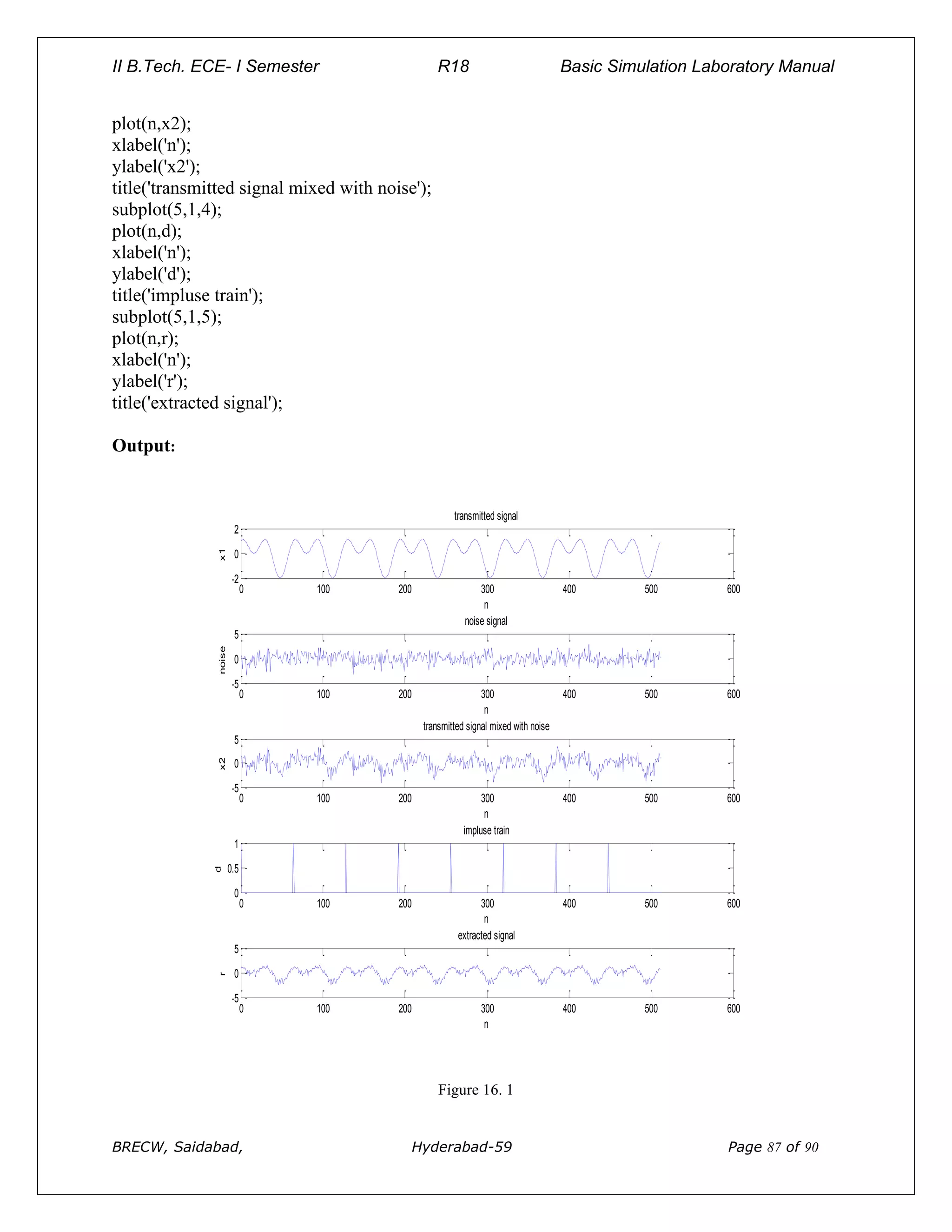
16. Extraction of transmitted signal from a corrupted signal
(Masked by noise)
Aim: extraction of transmitted signal from corrupted signal using correlation
Apparatus: MATLAB software7.0 and above.
Theory:
A signal is masked by noise can be detected either by correlation techniques or by filtering.
Actually, the two techniques are equivalent. The correlation technique is a measure of extraction
of a given signal in the time domain whereas filtering achieves exactly the same results in
frequency domain.
Program:
%extraction of transmitted signal from corrupted signal
m=512;n=0:m-1;
x1=sin(16*pi*n/m)+cos(32*pi*n/m);
noise=randn(size(n));
x2=x1+noise;
N=m/8;
l=floor(m/N);
d=zeros(1,m);
for i=1:m
if rem(i-1,N)==0
d(i)=1;
end;
end;
Y=d(l:m)
cyd=ifft(fft(x2,m).*fft(d,m))/m;
r=cyd*N;
subplot(5,1,1);
plot(n,x1);
xlabel('n');
ylabel('x1');
title('transmitted signal');
subplot(5,1,2);
plot(n,noise);
xlabel('n');
ylabel('noise');
title('noise signal');
subplot(5,1,3);
II B.Tech. ECE- I Semester R18 Basic Simulation Laboratory Manual
BRECW, Saidabad, Hyderabad-59 Page 87 of 90
plot(n,x2);
xlabel('n');
ylabel('x2');
title('transmitted signal mixed with noise');
subplot(5,1,4);
plot(n,d);
xlabel('n');
ylabel('d');
title('impluse train');
subplot(5,1,5);
plot(n,r);
xlabel('n');
ylabel('r');
title('extracted signal');
Output:
0 100 200 300 400 500 600
-2
0
2
n
x1
transmitted signal
0 100 200 300 400 500 600
-5
0
5
n
noise
noise signal
0 100 200 300 400 500 600
-5
0
5
n
x2
transmitted signal mixed with noise
0 100 200 300 400 500 600
0
0.5
1
n
d
impluse train
0 100 200 300 400 500 600
-5
0
5
n
r
extracted signal
Figure 16. 1
II B.Tech. ECE- I Semester R18 Basic Simulation Laboratory Manual
BRECW, Saidabad, Hyderabad-59 Page 88 of 90
Conclusion: Transmitted signal is extracted from corrupted signal (corrupted by noise) .
Viva questions:
1: Explain the term “corrupted” signal.
2: Define masking. Explain various techniques for masking.
3: Discuss the methods by which original signal can be recovered from corrupted signal
4: Explain how noise can be removed using auto correlation.
5: Explain how noise can be removed using cross correlation.
II B.Tech. ECE- I Semester R18 Basic Simulation Laboratory Manual
BRECW, Saidabad, Hyderabad-59 Page 89 of 90
17. Verification of wiener khintchine relation
Aim: To verify wiener khintchine relation.
Apparatus: MATLAB software7.0 and above.
Theory:
The wiener-khinchine theorem states that the power spectral density of a wide sense stationary
random process is the fourier transform of the corresponding autocorrelation function.
Continuous case:
Sxx(f)=∫rxx(T)e-j2πft dT
Where
rxx(T)=E[x(t)x*(t-T)]
Discrete case:
Sxx(f)=Σrxx[k]e-j2πkf
Where
rxx[k]=E[x(n)x*(n-k)]
Program:
clc clear
allclose
allfs=100;
t=0:1/fs:3;
N=512;
x=sin(2*pi*3*t);
x1=fft(x,N);
f=(0:N-1)*fs/N;
x2=(abs(x1)).^2;
subplot(2,1,1);
plot(f,x2);
xlabel('freq');
ylabel('Energy')
title('ENERGY SPECTRAL DENSITY')
x3=xcorr(x);
x4=fft(x3,N);
x5=abs(x4);
subplot(2,1,2);
plot(f,x5);
xlabel('freq');
ylabel('Energy')
title('FOURIER TRANSFORM OF AUTOCORRELATION');
II B.Tech. ECE- I Semester R18 Basic Simulation Laboratory Manual
BRECW, Saidabad, Hyderabad-59 Page 90 of 90
Figure 17. 1
Conclusion: Weiner-Khinchine relation is verified.
Viva questions:
1: Explain weiner-khinchine relation.
2: Define the term ESD.
3: Distinguish between ESD and PSD.
4: Explain the term fourier transform and auto correlation.
5: Discuss applications of ESD and PSD.

BS LAB Manual (1).pdf

  • 1.
    Page 1 of90 JAWAHARLAL NEHRU TECHNOLOGICAL UNIVERSITY HYDERABAD ELECTRONICS AND COMMUNICATION ENGINEERING B.Tech II-I Sem. (E.C.E.) II Year B.Tech. ECE - I Sem L T/P/D C - -/3/- 2 (A30481) BASIC SIMULATION LAB Note: • All the experiments are to be simulated using MATLAB or equivalent software. • Minimum of 15 experiments are to be completed. List of Experiments S.NO EXPERIMENT NAME PAGE NO 1. Basic Operations on Matrices 2. Generation of Various Signals and Sequences (periodic & Aperiodic), Such as Unit impluse, Unit step, Square, Saw tooth, Triangular, Sinusoidal, Ramp, Sinc function 3. Operations on signals and Sequences such as Addition, Multiplication, Scaling, Shifting, Folding, Computation of energy and Average Power. 4. Finding Even and Odd Parts of Signal or Sequence and Real and Imaginary Parts of a signal/Sequence 5. Convolution between signals and Sequences. 6. Auto Correlation and Cross Correlation between signals and Sequences. 7. Verification of Linearity and Time Invariance properties of a given continuous / Discrete system. 8. Computation of Unit Sample, Unit Step, Sinusoidal Responses of given LTI System and verifying its physical realizability and Stability properties. 9. Gibb’s Phenomenon 10. Finding the Fourier Transform of given signal and plotting its magnitude and phase spectrum. 11. Wave form synthesis using Laplace Transform 12. Locating the Zeros and poles, and plotting the pole zero maps in s-plane and Z-plane for the given Transfer Function 13. Generation of Gaussian Noise (Real & Complex), computation of its mean, Mean Square values and its Skew, Kurtosis and PSD, Probability Distribution function 14. Sampling Theorem verification 15. Removal of noise by autocorrelation/ cross correlation in a given signal corrupted by noise. 16.Extraction of periodic signal masked by noise using correlation. 17.Verification of Weiner-Khinchine Relations. 18.Checking a Random process for stationary in wide sense.
  • 2.
    Page 2 of90 1. Operations on matrices Aim: To perform different operations on matrices using MATLAB software. Equipment: PC loaded with MATLAB software 7.0 and above. Procedure: • Open MATLAB • Open new M-file • Type the program • Save in current directory • Compile and run the program • For the output see command window Figure window Program: r=[1 2 3] Output: r = 1 2 3 c=[1;2;3;4] Output: c = 1 2 3 4 I=eye (3,3) Output: I = 1 0 0 0 1 0 0 0 1 o=zeros(3,3) Output: o =
  • 3.
    Page 3 of90 0 0 0 0 0 0 0 0 0 i=ones(3,3) Output: i = 1 1 1 1 1 1 1 1 1 m=[3 4;7 8] Output: m = 3 4 7 8 z=[1 2 4;1 7 3;1 9 8] Output: z = 1 2 4 1 7 3 1 9 8 e=z(1,2) Output: e = 2 x=[4 5;7 4] Output: x = 4 5 7 4 y=[9 4;9 7]
  • 4.
    Page 4 of90 Output: y = 9 4 9 7 A=x+y Output: A = 13 9 16 11 M=x*y Output: M = 81 51 99 56 S=x-y Output: S = -5 1 -2 -3 ai=-x Output: ai = -4 -5 -7 -4 sm=2*x Output: sm = 8 10 14 8
  • 5.
    Page 5 of90 em=x.*y Output: em = 36 20 63 28 z=[1 2 4;1 7 3;1 9 8] Output: z = 1 2 4 1 7 3 1 9 8 n=[7;16;21] Output: n = 7 16 21 z(:,1)=n Output: z = 7 2 4 16 7 3 21 9 8 z(2,:)=r Output: z = 7 2 4 1 2 3 21 9 8
  • 6.
    Page 6 of90 m=[1 5;9 4] Output: m = 1 5 9 4 p=m' Output: p = 1 9 5 4 q=inv(m) Output: q = -0.0976 0.1220 0.2195 -0.0244 a=adjoint(m) Output: a = 4.0000 -5.0000 -9.0000 1.0000 d=det(m) Output: d = -41 s=[1 1 1;1 2 3;1 3 4] Output: s = 1 1 1 1 2 3 1 3 4
  • 7.
    Page 7 of90 n=[7 16 22] Output: n = 7 16 22 b=[1 2 3;4 6 8;4 5 7] Output: b = 1 2 3 4 6 8 4 5 7 v = [16 5 9 4 2 11 7 14]; v(3) % Extract the third element Output: ans = 9 v([1 5 6]) % Extract the first, fifth, and sixth elements Output: ans = 16 2 11 v(3:7) % Extract the third through the seventh elements Output: ans = 9 4 2 11 7 v(1:2:end) % Extract all the odd elements Output: ans = 16 9 2 7 v([2 3 4]) = [10 15 20] % Replace some elements of v Output: v = 16 10 15 20 2 11 7 14
  • 8.
    Page 8 of90 A = magic(4) Output: A = 16 2 3 13 5 11 10 8 9 7 6 12 4 14 15 1 A(2:4,1:2) Output: ans = 5 11 9 7 4 14 A(3,:) % Extract third row Output: ans = 9 7 6 12 A(:,end) % Extract last column Output: ans = 13 8 12 1 idx = sub2ind(size(A), [2 3 4], [1 2 4]) %returns the linear indices ind corresponding to the row and column subscripts in row and col for a matrix of size sz. Output: idx = 2 7 16
  • 9.
    Page 9 of90 figure(1); plot(c); grid on; 1 1.5 2 2.5 3 3.5 4 1 1.5 2 2.5 3 3.5 4 Figure 1. 1 figure(2); bar(b); Output: 1 2 3 0 1 2 3 4 5 6 7 8 Figure 1. 2
  • 10.
    Page 10 of90 figure(3); pie(b); Output: 3% 10% 10% 5% 15% 13% 8% 20% 18% Figure 1. 3 figure(4); stem(b); Output: 1 1.2 1.4 1.6 1.8 2 2.2 2.4 2.6 2.8 3 0 1 2 3 4 5 6 7 8 Figure 1. 4 Conclusion: In this program various operations on matrices is done using MATLAB.
  • 11.
    Page 11 of90 Viva questions: 1. Define matrix 2. Find rank, determinant, and inverse of a matrix. 3. Explain the steps to extract a sub matrix? 4. Distinguish between a row and column matrix. 5. Define transpose of a matrix. 6. What is bar representation?
  • 12.
    Page 12 of90 2. Generation of various signals and sequences Aim: To generate different types of signals using MATLAB software. Equipment: MATLAB software 7.0 and above. Theory: If the amplitude of the signal is defined at every instant of time, then it is called continuous signal. If the amplitude of the signal is defined at only at some instants of time, then it is called discrete signal. If the signal repeats itself at regular intervals, then it is called periodic signal. Otherwise, they are called aperiodic signals . Example: Ramp, Impulse, unit step, sinc - Aperiodic signals Square, saw tooth, triangular, sinusoidal – periodic signals. Ramp signal : r(t)= t when t>=0 Unit impulse signal : = undefined when t=0 =0 other wise and Unit step signal: u(t)= 1 only when t>=0 =0 other wise Sinc signal: G(x)=(sinx)/x Procedure: • Open MATLAB • Open new M-file • Type the program • Save in current directory • Compile and run the program • For the output see command window Figure window
  • 13.
    Page 13 of90 Program: %To generate impulse signal and unit impulse sequence clc; clear all; %clears all variables from the work space close all; %closes the current figure window t = -1:0.1:1; %assigning the values to t y = dirac(t); idx = y == Inf; % find Inf y(idx) = 1; % set Inf to finite value subplot(1,2,1); %gives the number of rows and columns, position of the figure plot(t,y) xlabel('time'); %adds text to the current x axis ylabel('amplitude'); %adds text to the current y axis title('unit impulse signal'); %adds text on top of current figure n=-1:1; x=1.*(n==0); subplot(1,2,2); %creates axes in titled position stem(n,x); %plots the discrete sequence x versus t xlabel('time index n') %adds text besides x axis ylabel('x(n)'); %adds text besides x axis title('unit impulse sequence'); %adds text on top of current axis Output: Figure 2.1
  • 14.
    Page 14 of90 %Program to generate unit step signal clc; clear all; %removes all variables from the work close all; %closes the current figure window t=-1:0.03:1; %the range on x-axis and 0.01 represents distance of points to be x y=(t>=0) %assigning the values of y subplot(1,2,1); %gives the number of rows and columns position plot(t,y); % plots signal y versus t xlabel('time axis'); %adds text besides the x axis on the current axis ylabel('amplitude'); %adds text besides the y axis on the current axis title('unit step signal'); %adds text on top of current axis n=-10:10 y=(n>=0) subplot(1,2,2); %gives the number of rows and columns position stem(n,y); %plots the discrete sequence y versus t xlabel('n') %adds text besides x axis ylabel('y[n]'); % adds text besides y axis title('unit step sequence') %adds text on top of current axis Output: Figure 2. 2 %Program to generate ramp signal clc; clear all; close all; t=0:5; y=t; subplot(1,2,1); plot(t,y); xlabel('time'); ylabel('amplitude'); title('Continuous ramp signal'); subplot(1,2,2); stem(t,y); xlabel('n') ylabel('amplitude'); title(' Discrete ramp function ');
  • 15.
    Page 15 of90 Output: 0 2 4 6 0 0.5 1 1.5 2 2.5 3 3.5 4 4.5 5 time amplitude Continuous ramp signal 0 2 4 6 0 0.5 1 1.5 2 2.5 3 3.5 4 4.5 5 n amplitude Discrete ramp function Figure 2.3 % Program to generate triangular signal clc; clear all; close all; t=-5:1:5; x=sawtooth(t,0.5); subplot(1,2,1) plot(t,x); axis([-5 5 -3 3]) grid xlabel('time'); ylabel(' amplitude'); title('triangular signal'); n=-5:1:5; x=sawtooth(n,0.5); subplot(1,2,2) stem(n,x); axis([-5 5 -3 3]) grid xlabel('time index n'); ylabel(' amplitude'); title('triangular Sequence');
  • 16.
    Page 16 of90 Output: Figure 2.4 % Program to generate sinc signal clc; clear all; close all; t=linspace(-5,5,100); y=sinc(t); subplot(2,2,3); plot(t,y); xlabel('time'); ylabel('amplitude'); title(' sinc signal'); %generation of sinc sequence n=linspace(-5,5,21); y1=sinc(n); subplot(2,2,4); stem(n,y1); xlabel('n'); ylabel('amplitude'); title('sinc sequence'); Output: Figure 2.5
  • 17.
    Page 17 of90 % Program to generate sine signal and sequence clc; clear all; close all; t=0:63; x=sin(2*pi*0.0625*t); subplot(1,2,1); plot(t,x); xlabel('time axis'); ylabel('amplitude'); title('sinusoidal signal'); subplot(1,2,2) stem(t,x); xlabel('time index n'); ylabel('amplitude'); title('sinusoidal sequence'); Output: 0 20 40 60 80 -1 -0.8 -0.6 -0.4 -0.2 0 0.2 0.4 0.6 0.8 1 time axis amplitude sinusoidal signal 0 20 40 60 80 -1 -0.8 -0.6 -0.4 -0.2 0 0.2 0.4 0.6 0.8 1 time index n amplitude sinusoidal sequence Figure 2.6 % Program to generate sawtooth signal clc; clear all; close all; t=-15:1:15; x=sawtooth(0.5*t); subplot(1,2,1) plot(t,x); axis([-15 15 -3 3]) grid xlabel('time'); ylabel(' amplitude'); title('sawtooth signal'); n=-15:1:15; x=sawtooth(0.5*n); subplot(1,2,2) stem(n,x); axis([-15 15 -3 3]) grid xlabel('time index n'); ylabel(' amplitude'); title('sawtooth Sequence');
  • 18.
    Page 18 of90 Output:- Figure 2.7 % Program to generate square signal clc; clear all; close all; t=-10:0.01:10; x=square(t,50); subplot(1,2,1) plot(t,x); axis([-10 10 -3 3]) grid xlabel('time'); ylabel(' amplitude'); title('square signal'); n=-10:1:10; x=square(n,50); subplot(1,2,2) stem(n,x); axis([-10 10 -3 3]) grid xlabel('time index n'); ylabel(' amplitude'); title('square Sequence'); Output:- Figure 2.8
  • 19.
    Page 19 of90 % Program to generate square pulse clc; clear all; close all; t=linspace(-5,5,100); x1=1; x2=0; y=x1.*(abs(t)<=1); subplot(121); plot(t,y); xlabel('time'); ylabel(' amplitude'); title('square pulse'); n=linspace(-5,5,11); y1=x1.*(abs(n)<=1); subplot(122); stem(n,y1); xlabel('time index'); ylabel(' amplitude'); title('discrete square pulse'); Output:- Figure 2.9 % Program to generate triangular pulse clc; clear all; close all; t=linspace(-5,5,100); a=3; y=(1-abs(t)/a).*(abs(t)<=a); subplot(121); plot(t,y); xlabel('time'); ylabel(' amplitude'); title('triangular pulse'); n=linspace(-5,5,11); y1=(1-abs(n)/a).*(abs(n)<=a); subplot(122); stem(n,y1); xlabel('time index n');
  • 20.
    Page 20 of90 ylabel(' amplitude'); title('discrete triangular pulse'); Output:- Figure 2.10 Conclusion: - Various aperiodic and periodic signals are generated using MATLAB software. Viva questions: 1. What is a signal? 2. Define unit step signal. 3. What is cosine signal? 4. Draw the waveform for triangular and saw tooth signals. 5. What is ramp signal? 6. Compare Continuous and Discrete Time Signals.
  • 21.
    Page 21 of90 3. Operations on signals and sequences such as addition, multiplication, scaling, shifting, and folding Aim: To perform the arithmetic operations on different types using MATLAB software. Equipment: MATLAB software7.0 and above. Theory: Signal Addition: Addition: any two signals can be added to form a third signal, z (t) = x (t) + y (t) Multiplication : Multiplication of two signals can be obtained by multiplying their values at every instants . z (t) = x (t) y (t) Time reversal/Folding: Time reversal of a signal x(t) can be obtained by folding the signal about t=0. Y(t)=y(-t) Signal Amplification/Scaling : Y(n)=ax(n) if a < 1 attenuation a >1 amplification Time shifting: The time shifting of x(n) obtained by delay or advance the signal in time by using y(n)=x(n+k) If k is a positive number, y(n) shifted to the right i e the shifting delays the signal If k is a negative number, y(n ) it gets shifted left. Signal Shifting advances the signal Program: %To generate addition of two signals clc; clear all; close all; t=0:.01:1; % generating two input signals x1=sin(2*pi*4*t); x2=sin(2*pi*8*t); subplot(2,2,1); plot(t,x1); xlabel('time'); ylabel('amplitude'); title('signal1:sine wave of frequency 4Hz'); subplot(2,2,2); plot(t,x2);
  • 22.
    Page 22 of90 xlabel('time'); ylabel('amplitude'); title('signal2:sine wave of frequency 8Hz'); % addition of signals y1=x1+x2; subplot(2,2,3); plot(t,y1); xlabel('time'); ylabel('amplitude'); title('resultant signal:signal1+signal2'); % multiplication of signals y2=x1.*x2; subplot(2,2,4); plot(t,y2); xlabel('time'); ylabel('amplitude'); title('resultant signal: dot product of signal1 and signal2'); 0 0.5 1 -1 -0.5 0 0.5 1 time amplitude signal1:sine wave of frequency 4Hz 0 0.5 1 -1 -0.5 0 0.5 1 time amplitude signal2:sine wave of frequency 8Hz 0 0.5 1 -2 -1 0 1 2 time amplitude resultant signal:signal1+signal2 0 0.5 1 -1 -0.5 0 0.5 1 time amplitude resultant signal:dot product of signal1 and signal2 Figure 3.1 % Program to perform amplitude scaling for sinusoidal signal clc; clear all; close all; t=[0:0.01:1]; A=8; f1=2; s1=sin(2*pi*f1*t); subplot(4,1,1) plot(s1); xlabel('t'); ylabel('amplitude'); title('input signal'); s2=A*s1;
  • 23.
    Page 23 of90 subplot(4,1,2); plot(s2); xlabel('t'); ylabel('amplitude'); title('amplified input signal'); %Amplitude scaling of discrete sequence n=0:1:6; s3=[1 2 3 3 1 1 1 ]; subplot(4,1,3); stem(n,s3); xlabel('n'); ylabel('amplitude'); title(' input sequence'); s4=4*s3; subplot(4,1,4); stem(n,s4); xlabel('n'); ylabel('amplitude'); title ('amplified input sequence') Output: 0 20 40 60 80 100 120 -1 0 1 t amplitude input signal 0 20 40 60 80 100 120 -10 0 10 t amplitude amplified input signal 0 1 2 3 4 5 6 0 2 4 n amplitude input sequence 0 1 2 3 4 5 6 0 10 20 n amplitude amplified input sequence Figure 3.2 % Program to generate time scaling clc; clear all; close all; t=0:0.001:2 y=sin(2*pi*1*t); subplot(3,1,1) plot(t,y) xlabel('t');
  • 24.
    Page 24 of90 ylabel('x(t)'); title('sinusoidal signal'); y1=sin(2*pi*1*t*2) subplot(3,1,2) plot(t,y1) xlabel('t') ylabel('x(t)') title('compressed signal'); y2=sin(2*pi*1*t*0.5); subplot(3,1,3) plot(t,y2) xlabel('t'); ylabel('x(t)'); title('expanded signal'); Output: 0 0.2 0.4 0.6 0.8 1 1.2 1.4 1.6 1.8 2 -1 0 1 t x(t) sinusoidal signal 0 0.2 0.4 0.6 0.8 1 1.2 1.4 1.6 1.8 2 -1 0 1 t x(t) compressed signal 0 0.2 0.4 0.6 0.8 1 1.2 1.4 1.6 1.8 2 -1 0 1 t x(t) expanded signal Figure 3.3 % Program to generate amplitude shifting clc; clear all; close all; t=0:0.001:2; a=3; y=sin(2*pi*1*t); subplot(3,1,1) plot(t,y) axis([0 2 -5 5]); xlabel('t'); ylabel('x(t)'); title('sinusoidal signal'); y1=a+sin(2*pi*1*t); subplot(3,1,2) plot(t,y1) axis([0 2 -5 5]); xlabel('t') ylabel('x(t)')
  • 25.
    Page 25 of90 title('Up shifted signal'); y2=-a+sin(2*pi*1*t); subplot(3,1,3) plot(t,y2) axis([0 2 -5 5]); xlabel('t'); ylabel('x(t)'); title('Down shifted signal'); Output: Figure 3.4 % Program to perform time Shifting clc; clear all; close all; syms t; shift=2; x=heaviside(t) subplot(3,1,1) fplot(x, [-10,10]) xlabel('t'); ylabel('x(t)'); title('unit step signal'); xleft=heaviside(t+2); subplot(3,1,2) fplot(xleft,[-10,10]) xlabel('tleft') ylabel('amplitude') title('left shifted signal'); xright=heaviside(t-2);
  • 26.
    Page 26 of90 subplot(3,1,3) fplot(xright,[-10,10]) xlabel('tright'); ylabel('amplitude'); title('right shifted signal'); Output: Figure 3.4 % Program to generate time reversal of a signal clc; clear all; close all; y=-2.5:0.05:2.5; ly=length(y) ny=0:ly-1 subplot(2,1,1) stem(ny,y) xlabel('n') ylabel('amplitude') title('original signal') yf=fliplr(y) nf=-fliplr(ny) subplot(2,1,2) stem(nf,yf) xlabel('n') ylabel('amplitude') title('folded signal')
  • 27.
    Page 27 of90 Output: 0 10 20 30 40 50 60 70 80 90 100 -3 -2 -1 0 1 2 3 n amplitude original signal -100 -90 -80 -70 -60 -50 -40 -30 -20 -10 0 -3 -2 -1 0 1 2 3 n amplitude folded signal Figure 3.5 % Program to generate compute energy and power of a signal clc; clear all; close all; t=-10:0.01:10; T=10; x=10*sin(2*pi*5*t); xsq=x.^2; E=trapz(t,xsq); P=E/(2*T); disp(['Energy,E=',num2str(E),'Joules']) disp(['Power,P=',num2str(P),'Watts']) Output:- Energy,E=1000Joules Power,P=50Watts Conclusion: Various operations on signals and sequences are performed. Viva Questions: 1. What is a system. 2. Define a Linear System. 3. What is Time scaling Property? 4. Define Amplitude scaling . 5. What is Time Shifting Property? 6. Define Duality and folding of a signal.
  • 28.
    Page 28 of90 4. Finding the even and odd parts of signal/sequence real and imaginary parts of signal. Aim: To find the even & odd parts and real & imaginary parts of a signal using MATLAB software. Equipment: MATLAB software7.0 and above. Theory: Even and odd part of a signal: Even Signal: A signal is referred to as an even if it is identical to its time-reversed Counter parts; x(t) = x(-t). Odd signal: A signal is odd if x(t) = -x(-t). An odd signal must be 0 at t=0, in other words, odd signal passes through the origin. Any signal x(t) can be expressed as sum of even and odd components x(t)=xe(t)+xo(t)   ) ( ) ( 2 1 ) ( t x t x t x e − + =   ) ( ) ( 2 1 ) ( t x t x t x e − − = ) ( ) ( ) ( t x t x t x o e + = =    ) ( ) ( 2 1 ) ( ) ( 2 1 t x t x t x t x − − + − + %Program to find the even and odd parts of a signal: clc clear all close all syms t; x1=heaviside(t); x2=heaviside(-t); xe=(x1+x2)/2; xo=(x1-x2)/2; subplot(4,1,1) fplot(x1); xlabel('t') ylabel('x1') title('Original signal') subplot(4,1,2) fplot(x2) xlabel('t') ylabel('x2') title('Folded signal') subplot(4,1,3) fplot(xe) xlabel('t')
  • 29.
    Page 29 of90 ylabel('xe') title('Even part of the signal') subplot(4,1,4) fplot(xo) xlabel('t') ylabel('xo') title('Odd part of the signal') Figure 4.1 %Program to find the real and imaginary parts of the complex sequence clc; clear all; close all; n=0:1:5; x=input('enter the complex no sequence'); y=real(x) z=imag(x) subplot(2,1,1); stem(y); xlabel('n'); ylabel('x(n)'); title('real part'); subplot(2,1,2); stem(z); xlabel('n'); ylabel('x(n)'); title('imaginary part'); Output: enter the complex no sequence[2+3i 1+2i 5+3i 8+7i]
  • 30.
    Page 30 of90 y = 2 1 5 8 z = 3 2 3 7 1 1.5 2 2.5 3 3.5 4 0 2 4 6 8 n x(n) real part 1 1.5 2 2.5 3 3.5 4 0 2 4 6 8 n x(n) imaginary part Figure 4.2 %program to find real and imaginary part of signal clc; clear all close all t=0:0.0001:5; y=exp(2*pi*1*t*i); y1=(y+conj(y))/2; y2=(y-conj(y))/(2*i); subplot(2,1,1); plot(y1); xlabel('t'); ylabel('x(t)') title('Real part of the signal y') subplot(2,1,2); plot(y2); xlabel('t');
  • 31.
    Page 31 of90 ylabel('x(t)') title('Imaginary part of the signal y ') Output: Figure 4.3 Conclusion:- Even & odd parts and real & imaginary parts of given signals are obtained using MATLAB. Viva questions :- 1. What is a even signal? 2. Define an odd signal. 3. write an expression for even signal. 4. Define a real signal. 5. What is a imaginary signal?
  • 32.
    Page 32 of90 5. Convolution of sequences and signals Aim: To perform the convolution operation between two sequences and two signals using MATLAB software. Equipment: MATLAB software7.0 and above. Theory: Linear Convolution: Convolution is an integral concatenation of two signals. It is used for the determination of the output signal of a linear time-invariant system by convolving the input signal with the impulse response of the system. Note that convolving two signals is equivalent to multiplying the Fourier transform of the two signals. Y(t)=x(t)*h(t)= ) ( ) (   −    − t h x d For discrete time signals the integration is replaced by a summation Linear Convolution involves the following operations. 1. Folding 2. Multiplication 3. Addition 4. Shifting If x(n)=δ(n) (impulse ) then, output y(n) is known as impulse response of the system. The linear convolution of two continuous time signals and is defined by : y(n)=T[x(n)]=h(n) similarlyδ (n-k)= h(n-k) x(n) cab represented as weighted sum of impulses such as
  • 33.
    Page 33 of90 Program: % convolution of two sequences clc; clear all; close all; x=input('enter first sequence') k1=0:length(x)-1; subplot(3,1,1) stem(k1,x) xlabel('n'); ylabel('x(n)'); title('x1(n)') h=input('enter second sequence'); k2= 0:length(h)-1 subplot(3,1,2) stem(k2,h) xlabel('n'); ylabel('x(n)'); title('x2(n)'); k=k1(1)+k2(1); p=length(x)+length(h)-1; n=k:p-1+k; y=conv(x,h) subplot(3,1,3) stem(n,y) xlabel('n'); ylabel('y(n)'); title('linear convolution'); disp('the resultant signal is:') disp(y) Output: enter first sequence [1 2 3 ] x = 1 2 3 enter second sequence[-1 2 3 ] h = -1 2 3 y = -1 0 4 12 9 the resultant signal is: -1 0 4 12 9
  • 34.
    Page 34 of90 Figure 5.1 %Convolution of two rectangular pulses clc clear all close all k1=-2:-1 k2=2:3; a=10; b=10; x1=a*(k1>-2)+a*(k1<-1); x2=b*(k2>2)+b*(k2<3); z=conv(x1,x2) subplot(3,1,1) plot(k1,x1) xlabel('k1') ylabel('amplitude') title('x1') subplot(3,1,2) plot(k2,x2) xlabel('k2') ylabel('amplitude') title('x2') k=k1(1)+k2(1); p=length(x1)+length(x2)-1; t=k:p-1+k; subplot(3,1,3) plot(t,z) xlabel ('t') ylabel('amplitude') title('convolution')
  • 35.
    Page 35 of90 Output: z = 100 200 100 -2 -1.9 -1.8 -1.7 -1.6 -1.5 -1.4 -1.3 -1.2 -1.1 -1 9 10 11 k1 amplitude x1 2 2.1 2.2 2.3 2.4 2.5 2.6 2.7 2.8 2.9 3 9 10 11 k2 amplitude x2 0 0.2 0.4 0.6 0.8 1 1.2 1.4 1.6 1.8 2 100 150 200 t amplitude convolution Figure 5.2 Conclusion:- Convolution of two sequences and two given signals is performed Viva questions:- 1. What is convolution? 2. What are the types of convolution? 3. Write the expression for convolution. 4. what is correlation ? 5. Compare convolution and correlation.
  • 36.
    Page 36 of90 6. Auto correlation and cross correlation Aim: - Program to compute Auto Correlation and Cross Correlation between Signals and sequences. Equipment: MATLAB software7.0 and above. Theory: Correlations of sequences: It is a measure of the degree to which two sequences are similar. Given two real-valued sequences x(n) and y(n) of finite energy, Convolution involves the following operations. 1. Shifting 2. Multiplication 3. Addition These operations can be represented by a Mathematical Expression as follows: Cross correlation   − = − = n y x l n y n x l r ) ( ) ( ) ( , The index l is called the shift or lag parameter Autocorrelation   − = − = n x x l n y n x l r ) ( ) ( ) ( ,
  • 37.
    Page 37 of90 %Program to compute cross correlation of two sequences clc clear all close all x=input('enter first sequence') k1=0:length(x)-1; subplot(2,2,1) stem(k1,x) xlabel('k1') ylabel('x1(k1)') title('First sequence') y=input('second sequence') k2=0:length(y)-1; subplot(2,2,2) stem(k2,y) xlabel('k2') ylabel('y(k2)') title('Second sequence') [rxy,lag]=xcorr(x,y) subplot(2,2,3) stem(lag,rxy) xlabel('lag') ylabel('rxy(l)') title('cross correlation rxy(lag)') [ryx,lag]=xcorr(y,x) subplot(2,2,4) stem(lag,ryx) xlabel('lag') ylabel('ryx(l)') title('cross correlation ryx(lag)') if rxy==fliplr(ryx) display('rxy(l) is equal to ryx(-l)') else display('rxy(l) is not equal to ryx(-l)') end Output: enter first sequence[1 2 3 ] x = 1 2 3 second sequence[3 2 1 ] y = 3 2 1 r = 1.0000 4.0000 10.0000 12.0000 9.0000 lag = -2 -1 0 1 2 r = 9.0000 12.0000 10.0000 4.0000 1.0000 lag = -2 -1 0 1 2 rxy(l) is equal to ryx(-l)
  • 38.
    Page 38 of90 Figure 6.1 %Program to compute Autocorrelation a signal and sequence clc clear all close all x= input ('enter the sequence') k=0:length(x)-1; subplot(2,1,1) stem (k,x) xlabel('k'); ylabel('x(k)') title('input signal') [r,lag]=xcorr(x) subplot(2,1,2) stem(lag,r) xlabel('lag') ylabel('rxx(lag)') title('auto correlation') Output: enter the sequence[1 2 3 ] x = 1 2 3 r = 3.0000 8.0000 14.0000 8.0000 3.0000 lag = -2 -1 0 1 2
  • 39.
    Page 39 of90 Figure 6.2 %Program to compute Autocorrelation and Cross correlation of two signals clc clear all close all t=0:0.01:1; x1=sin(2*pi*5*t) x2=sin(2*pi*2*t) [y lag]=xcorr(x1,x2) [z lags]=xcorr(x1) subplot(4,1,1) plot(t,x1) xlabel('t') ylabel('amplitude') title('first signal') subplot(4,1,2) plot(t,x2) xlabel('t') ylabel('amplitude') title('second signal') subplot(4,1,3) plot(lag,y) xlabel('lag')
  • 40.
    Page 40 of90 ylabel('amplitude') title('cross correlation') subplot(4,1,4) plot(lags,z) xlabel('lag') ylabel('amplitude') title('auto correlation') Output: Figure 6.3 Conclusion: In this program auto and cross correlations of signals given are performed using MATLAB. Viva questions: - 1. Define Auto Correlation. 2. Define Cross Correlation 3. What is the difference between correlation and autocorrelation? 4. List out the properties of Auto Correlation. 5. Give an example for correlation.
  • 41.
    Page 41 of90 7. Verification of linearity and shift invariance property of discrete system Aim: To verify linearity and shift invariance properties of a given discrete system using MATLAB software. Equipment: MATLAB software7.0 and above. Theory:- Linearity property: Any system is said to be linear if it satisfies the superposition principle. Superposition principle state that response to a weighted sum of input signal equal to the corresponding weighted sum of the outputs of the system to each of the individual input signals. x(n) -----------input signal Y(n) --------- output signal Y(n)=T[x(n)] Y1(n)=T[X1(n)] : Y2(n)=T[X2(n)] x3=[a X1(n)] +b [X2(n) ] Y3(n)= T [x3(n)] If T [a X1(n)] +b [X2(n) ] = a Y1(n)+ b Y2(n) then the system is said to be linear. Let a [Y1(n)]+ b [X2(n) ] =Z 3(n) %Program to verify the Linearity Property clc clear all close all x1=input('enter first sequence') x2=input('enter second sequence') h=[1 -3 4 -2 7 2 -1 3]; a1=input('enter coefficient of x1'); a2=input('enter coefficient of x2'); y1=a1*conv(x1,h) y2=a2*conv(x2,h) z=y1+y2; x3=a1*x1+a2*x2; y3=conv(x3,h); disp('y3 is') disp(y3) disp('z is')
  • 42.
    II B.Tech. ECE-I Semester R18 Basic Simulation Laboratory Manual BRECW, Saidabad, Hyderabad-59 Page 42 of 90 disp(z) if(y3==z) disp('the given system is linear') else disp('the given system is not linear') end subplot(3,1,1) stem(y3) xlabel('n') ylabel('y3') title('Output to weighted sum of inputs') subplot(3,1,2) stem(z) xlabel('n') ylabel('z') title('weighted sum of outputs') d=y3-z; subplot(3,1,3) stem(d) title('Difference between output to weighted sum of inputs and weighted sum of outputs') Output: enter first sequence [1 2 3 4 5 ] x1 = 1 2 3 4 5 enter second sequence [ 6 7 8 9 1 ] x2 = 6 7 8 9 1 enter coefficient of x11 enter coefficient of x21 y1 = 1 -1 1 1 8 11 36 25 46 15 7 15 y2 = 6 -11 11 1 34 78 50 88 38 17 26 3 y01 is 7 -12 12 2 42 89 86 113 84 32 33 18 y02 is 7 -12 12 2 42 89 86 113 84 32 33 18 the given system is linear
  • 43.
    II B.Tech. ECE-I Semester R18 Basic Simulation Laboratory Manual BRECW, Saidabad, Hyderabad-59 Page 43 of 90 Figure 7.1 %Program for verification of Time Invariance Property clc clear all close all n=0:40; d=10 x=3*cos(2*pi*0.1*n)-2*cos(2*pi*0.4*n) xd=[zeros(1,d),x] num=[2.2403 2.4908 2.2403]; den=[1 -0.4 0.75]; y= filter(num,den,x); yd=filter(num,den,xd); dy=[zeros(1,d) y]; subplot(3,1,1) stem(y) xlabel('n') ylabel('y(n)') title('original output') subplot(3,1,2); stem(yd); xlabel('n')
  • 44.
    II B.Tech. ECE-I Semester R18 Basic Simulation Laboratory Manual BRECW, Saidabad, Hyderabad-59 Page 44 of 90 ylabel('yd(n)') title('output due to delayed input'); subplot(3,1,3); stem(dy) xlabel('n') ylabel('dy(n)') title('delayed output') if(yd==dy) disp('the given system is time invarient') else disp('the given system is time varient') end Output:- the given system is time invarient Figure 7. 2 Conclusion:- In this program linearity and time variance properties of a system are verified using MATLAB.
  • 45.
    II B.Tech. ECE-I Semester R18 Basic Simulation Laboratory Manual BRECW, Saidabad, Hyderabad-59 Page 45 of 90 Viva questions:- 1. What is linearity? 2. Define the time variance property. 3. What is the difference between time variant and time invariant system? 4. Define a cosine signal.
  • 46.
    II B.Tech. ECE-I Semester R18 Basic Simulation Laboratory Manual BRECW, Saidabad, Hyderabad-59 Page 46 of 90 8. Computation of unit impulse, unit step, sinusoidal responses of given LTI system and verifying its physical realizability and stability properties. Aim: To get the response of analog system. Equipment: Matlab software 7.0 and above. Theory:- Linear systems satisfy the properties of superposition and homogeneity. Any system that does not satisfy these properties is nonlinear. Linear systems have one equilibrium point at the origin. The principle of superposition states that for two different inputs, x and y, in the domain of the function f, f(x+y)= f(x)+f(y) The property of homogeneity states that for a given input, x, in the domain of the function f, and for any real number k, f(kx)=kf(x) clc; close all; clear all; num=[1] den=[1 -0.7 0.12] % num=[1] % den=[1 -0.9 0.81] t=-1:0.01:1; x1=(t==0); y1=filter(num,den,x1); subplot(3,1,1); plot(t,y1,'r'); hold title('impulse response'); xlabel('time'); ylabel('amplitude')
  • 47.
    II B.Tech. ECE-I Semester R18 Basic Simulation Laboratory Manual BRECW, Saidabad, Hyderabad-59 Page 47 of 90 x2=(t>=0); y2=filter(num,den,x2); subplot(3,1,2); plot(t,y2); hold title('step response'); xlabel('time'); ylabel('amplitude'); x3=sin(2*pi*t); y3=filter(num,den,x3); subplot(3,1,3); plot(t,y3); title('Sinusoidal response'); xlabel('time'); ylabel('amplitude') Output: Figure 8.1 Conclusion: computation of unit step and impulse responses are performed using MATLAB.
  • 48.
    II B.Tech. ECE-I Semester R18 Basic Simulation Laboratory Manual BRECW, Saidabad, Hyderabad-59 Page 48 of 90 Viva questions: 1. Define a unit step signal. 2. what is a system. 3. Define Transfer function. 4. what is a LTI system? 5. Explain the response of a unit step delay by a time period t. 6. Compare LTI and LTV system.
  • 49.
    II B.Tech. ECE-I Semester R18 Basic Simulation Laboratory Manual BRECW, Saidabad, Hyderabad-59 Page 49 of 90 9. Gibbs phenomenon Aim: To reconstruct a periodic square wave represented by its Fourier series (verification of Gibbs phenomenon) using MATLAB software. Equipment: MATLAB 7.0 and above Theory: The Gibbs phenomenon, the Fourier series of a piecewise continuously differentiable periodic function behaves at a jump discontinuity. The n the approximated function shows amounts of ripples at the points of discontinuity. This is known as the Gibbs Phenomenon, partial sum of the Fourier series has large oscillations near the jump, which might increase the maximum of the partial sum above that of the function itself. The overshoot does not die out as the frequency increases, but approaches a finite limit The Gibbs phenomenon involves both the fact that Fourier sums overshoot at a jump discontinuity, and that this overshoot does not die out as the frequency increases. Also the Gibbs phenomenon is described for the Fourier series of a function at its jump, the function being defined along the finite interval .Following figure illustrates the concept of gibb’s phenomenon.
  • 50.
    II B.Tech. ECE-I Semester R18 Basic Simulation Laboratory Manual BRECW, Saidabad, Hyderabad-59 Page 50 of 90 Program: clc; clear all; close all; N=input('type the number of harmonics') t=0:0.0001:1; y=square(2*pi*1*t); plot(t,y,'r','linewidth',2); axis([0 1 -1.5 1.5]); hold; a=zeros(size(t)); for n=1:2:N a=a+(4/(pi*n)*sin(2*pi*n*t)); end plot(t,a); grid; xlabel('t'); ylabel('sq(t)') title('reconstructed signal') Output: type the number of harmonics9 N = 9 Current plot held 0 0.1 0.2 0.3 0.4 0.5 0.6 0.7 0.8 0.9 1 -1.5 -1 -0.5 0 0.5 1 1.5 t sq(t) reconstructed signal Figure 9. 1
  • 51.
    II B.Tech. ECE-I Semester R18 Basic Simulation Laboratory Manual BRECW, Saidabad, Hyderabad-59 Page 51 of 90 function[a0,a,b]=Fourierseries2(f,T,N) syms t; w0=2*pi/T; a0_sym=1/T*int(f,t,0,T); a0=double(a0_sym); for n=1:N a_sym=2/T*int(f*cos(n*w0*t),t,0,T); b_sym=2/T*int(f*sin(n*w0*t),t,0,T); a(n)=double(a_sym); b(n)=double(b_sym); end end clear all; close all; clc; syms t; T=2; w0=2*pi/T; f=heaviside(t)-2*heaviside(t-1)+2*heaviside(t-2)-2*heaviside(t-3); % fplot(f) % axis([0 6 -2 2]) % hold on; N=input('Enter the number of harmonics'); [a0,a,b]=Fourierseries(f,T,N); display(a0); display(a); display(b); tnum=[0:0.01:4]; fnum=a0; for n=1:N harmonic=a(n)*cos(n*w0*tnum)+b(n)*sin(n*w0*tnum); fnum=fnum+harmonic; pause(0.75) plot(tnum,fnum) end hold on; fplot(f) axis([0 4 -2 2]) legend('Reconstructed signal','Original periodic signal'); xlabel('time'); ylabel('amplitude') Enter the number of harmonics 10
  • 52.
    II B.Tech. ECE-I Semester R18 Basic Simulation Laboratory Manual BRECW, Saidabad, Hyderabad-59 Page 52 of 90 a0 = 0 a = 0 0 0 0 0 0 0 0 0 0 b = 1.2732 0 0.4244 0 0.2546 0 0.1819 0 0.1415 0 Figure 9.2
  • 53.
    II B.Tech. ECE-I Semester R18 Basic Simulation Laboratory Manual BRECW, Saidabad, Hyderabad-59 Page 53 of 90 Conclusion: Gibb’s phenomenon is verified. Viva questions: 1: Explain gibb’s phenomenon in detail. 2: Explain representation of signal using FOURIER SERIES. 3: With respect to FOURIES SEREIS justify the following statements (i) even functions has only cosine terms (ii) odd functions have only sine terms. 4: Discuss properties of fourier series. 5: Discuss applications of fourier series.
  • 54.
    II B.Tech. ECE-I Semester R18 Basic Simulation Laboratory Manual BRECW, Saidabad, Hyderabad-59 Page 54 of 90 10. Finding the Fourier transform of a given signal and plotting its magnitude and phase spectrum. Aim: To find Fourier transform of a signal and to plot its magnitude and phase spectrum using MATLAB software. Equipment: MATLAB software7.0 and above. Theory: The Fourier transform is as follows. Suppose that ƒ is a function then by definition Fourier Transform of signal f(t) is defined as ∞ F(w)= ∫ f(t) e jwt − dt - ∞ Inverse Fourier Transform of signal F(w) is defined as ∞ f(t) =  2 1 ∫ F(w) e jwt dw - ∞ The frequency spectrum of time domain signal is a representation of that signal in frequency domain. The frequency spectrum can be generated via Fourier transform of the signal, and the resulting values are usually presented as AMPLITUDE and PHASE, both plotted versus frequency known as MAGNITUDE and PHASE SPECTRUM respectively.
  • 55.
    II B.Tech. ECE-I Semester R18 Basic Simulation Laboratory Manual BRECW, Saidabad, Hyderabad-59 Page 55 of 90 Program: clc clear all close all x=[1 1 1 1 0 0 0 0] N=8 y1=fft(x,N); mag=abs(y1) phase=angle(y1)*180/pi figure(1) plot(mag) xlabel('k') ylabel('Magnitude of y(k)') title('magnitude spectrum') grid figure(2) plot(phase) xlabel('k') ylabel('Angle of y(k)') title(‘phase spectrum') grid Output: x = 1 1 1 1 0 0 0 0 N = 8 mag = 4.0000 2.6131 0 1.0824 0 1.0824 0 2.6131 phase = 0 -67.5000 0 -22.5000 0 22.5000 0 67.5000
  • 56.
    II B.Tech. ECE-I Semester R18 Basic Simulation Laboratory Manual BRECW, Saidabad, Hyderabad-59 Page 56 of 90 1 2 3 4 5 6 7 8 0 0.5 1 1.5 2 2.5 3 3.5 4 k y(k) magnitude spectrum Figure 10. 1 Figure 10. 2 1 2 3 4 5 6 7 8 -80 -60 -40 -20 0 20 40 60 80 k Angle of y(k) phase spectrum
  • 57.
    II B.Tech. ECE-I Semester R18 Basic Simulation Laboratory Manual BRECW, Saidabad, Hyderabad-59 Page 57 of 90 Program: %program to find ft of 3e(-t)u(t) clc close all clear all syms t; f=3*exp(-t)*heaviside(t); F=fourier(f); disp('THE FOURIER TRANSFORM OF f='); disp(F); w=-2*pi:pi/50:2*pi; F1=subs(F,w); Fmag=abs(F1); Fphase=angle(F1)*180/pi; subplot(2,1,1); plot(w,Fmag); grid on; xlabel('w'); ylabel('magnitude'); title('magnitude spectrum of f'); subplot(2,1,2); plot(w,Fphase); grid on; xlabel('w'); ylabel('Phase'); title('phase spectrum of f'); Output: THE FOURIER TRANSFORM OF f= 3/(1+i*w)
  • 58.
    II B.Tech. ECE-I Semester R18 Basic Simulation Laboratory Manual BRECW, Saidabad, Hyderabad-59 Page 58 of 90 -8 -6 -4 -2 0 2 4 6 8 0 1 2 3 w magnitude magnitude spectrum of f -8 -6 -4 -2 0 2 4 6 8 -100 -50 0 50 100 w Phase phase spectrum of f Figure 10. 3 Program: %program to find ft of 2e(t)u(-t) clc close all clear all syms t; f=2*exp(t)*heaviside(-t); F=fourier(f); disp('THE FOURIER TRANSFORM OF f='); disp(F); w=-2*pi:pi/50:2*pi; F1=subs(F,w); Fmag=abs(F1); Fphase=angle(F1)*180/pi; subplot(2,1,1); plot(w,Fmag); grid on; xlabel('w'); ylabel('magnitude');
  • 59.
    II B.Tech. ECE-I Semester R18 Basic Simulation Laboratory Manual BRECW, Saidabad, Hyderabad-59 Page 59 of 90 title('magnitude spectrum of f'); subplot(2,1,2); plot(w,Fphase); grid on; xlabel('w'); ylabel('Phase'); title('phase spectrum of f'); Output: THE FOURIER TRANSFORM OF f= 2/(1-i*w) -8 -6 -4 -2 0 2 4 6 8 0 0.5 1 1.5 2 w magnitude magnitude spectrum of f -8 -6 -4 -2 0 2 4 6 8 -100 -50 0 50 100 w Phase phase spectrum of f Figure 10. 4 Program: %program to find ft of te(t)u(t) clc close all clear all
  • 60.
    II B.Tech. ECE-I Semester R18 Basic Simulation Laboratory Manual BRECW, Saidabad, Hyderabad-59 Page 60 of 90 syms t; f=t*exp(t)*heaviside(t); F=fourier(f); disp('THE FOURIER TRANSFORM OF f='); disp(F); w=-2*pi:pi/50:2*pi; F1=subs(F,w); Fmag=abs(F1); Fphase=angle(F1)*180/pi; subplot(2,1,1); plot(w,Fmag); grid on; xlabel('w'); ylabel('magnitude'); title('magnitude spectrum of f'); subplot(2,1,2); plot(w,Fphase); grid on; xlabel('w'); ylabel('phase'); title('phase spectrum of f'); Output: THE FOURIER TRANSFORM OF f= 1/(-1+i*w)^2 Figure 10. 5 -8 -6 -4 -2 0 2 4 6 8 0 0.5 1 w magnitude magnitude spectrum of f -8 -6 -4 -2 0 2 4 6 8 -200 -100 0 100 200 w Phase phase spectrum of f
  • 61.
    II B.Tech. ECE-I Semester R18 Basic Simulation Laboratory Manual BRECW, Saidabad, Hyderabad-59 Page 61 of 90 Program: %program to find ft of sgn(t) clc close all clear all syms t a; f=limit(exp(-a*t),a,0)*heaviside(t)-limit(exp(a*t),a,0)*heaviside(-t); F=fourier(f); disp('THE FOURIER TRANSFORM OF f='); disp(F); w=-2*pi:pi/50:2*pi; F1=subs(F,w); Fmag=abs(F1); Fphase=angle(F1)*180/pi; subplot(2,1,1); plot(w,Fmag); grid on; xlabel('w'); ylabel('magnitude'); title('magnitude spectrum of f'); subplot(2,1,2); plot(w,Fphase); grid on; xlabel('w'); ylabel('phase'); title('phase spectrum of f'); Output: THE FOURIER TRANSFORM OF f= -2*i/w Figure 10. 6 -8 -6 -4 -2 0 2 4 6 8 0 10 20 30 40 w magnitude magnitude spectrum of f -8 -6 -4 -2 0 2 4 6 8 -100 -50 0 50 100 w Phase phase spectrum of f
  • 62.
    II B.Tech. ECE-I Semester R18 Basic Simulation Laboratory Manual BRECW, Saidabad, Hyderabad-59 Page 62 of 90 Conclusion: Fourier transform of a given signal is calculated, its magnitude and phase spectrum is plotted. Viva questions: 1: Explain fourier transform in detail. 2: Distinguish between fourier series and fourier transform. 3: Derive fourier transform of unit-step, unit impulse signal, sine and cosine waveforms. 4: Discuss properties of fourier tranform. 5: Discuss applications of fourier transform.
  • 63.
    II B.Tech. ECE-I Semester R18 Basic Simulation Laboratory Manual BRECW, Saidabad, Hyderabad-59 Page 63 of 90 11. Waveform synthesis using Laplace transform. Aim: To perform waveform synthesis using Laplace transform of a signal using MATLAB software. Equipment: MATLAB software7.0 and above. Theory: The Laplace transform for a signal f(t) is defined as ∞ L{f(t)}= F(s)=∫ f(t) e st − dt where s=6+jw - ∞ Consider the square wave of period ‘T’ which can be represented with unit step functions as f(t)=u(t)-2u(t-T/2)+2u(t-T)-2u(t-3T/2)+……….. Program: clc close all clear all syms s complex; L=(1/s)+(1/s)*exp(-s)-(2/s)*exp(-2*s); l=ilaplace(L); pretty(simplify(l)); ezplot(l,[0,3]); grid; Output: 1 + heaviside(t - 1) - 2 heaviside(t - 2) 0 0.5 1 1.5 2 2.5 3 0 0.5 1 1.5 2 t 1+heaviside(t-1)-2 heaviside(t-2) Figure 11. 1
  • 64.
    II B.Tech. ECE-I Semester R18 Basic Simulation Laboratory Manual BRECW, Saidabad, Hyderabad-59 Page 64 of 90 Program: % Signal synthesis using Laplace transform clear all close allclc syms t s=t; figure(1) subplot(2,3,1) fplot(s); u=heaviside(t); subplot(2,3,2) fplot(u); f1=t.*u; subplot(2,3,3) fplot(f1); u1=heaviside(t-1); f2=-2.*(t-1).*u1; subplot(2,3,4); fplot(f2); u2=heaviside(t-2); f3=(t-2).*u2; subplot(2,3,5); fplot(f3); f=f1+f2+f3; figure(2); fplot(t,f); xlabel('time t'); ylabel('f(t)'); L=laplace(f) f = heaviside(t - 2)*(t - 2) + t*heaviside(t) - heaviside(t - 1)*(2*t - 2) L = exp(-2*s)/s^2 - (2*exp(-s))/s^2 + 1/s^2 l = t - 2*heaviside(t - 1)*(t - 1) + heaviside(t - 2)*(t - 2)
  • 65.
    II B.Tech. ECE-I Semester R18 Basic Simulation Laboratory Manual BRECW, Saidabad, Hyderabad-59 Page 65 of 90 Figure 11. 2 Figure 11. 3 Conclusion: waveform synthesis is done using Laplace transform. Viva questions: 1: Explain laplace transform in detail. Explain the concept of ROC. 2: Distinguish between laplace and fourier transform. 3: Derive laplace transform of unit-step,unit impulse signal, sine and cosine waveforms. 4: Discuss properties of lapalce tranform. 5: Discuss applications of lapalce transform.
  • 66.
    II B.Tech. ECE-I Semester R18 Basic Simulation Laboratory Manual BRECW, Saidabad, Hyderabad-59 Page 66 of 90 12. Locating the zeros and poles and plotting the pole zero maps in s-plane and z-plane for the given transfer function. Aim: To locate the zeros and poles and plotting the pole-zero maps in s-plane and z-plane for the given transfer function using MATLAB software. Equipment: MATLAB software7.0 and above. Theory: Z-transforms The Z-transform, like many other integral transforms, can be defined as either a one-sided or two-sided transform. Bilateral Z-transform The bilateral or two-sided Z-transform of a discrete-time signal x[n] is the function X(z) defined as Z{x(n)}=X(z)=  − = 8 8 n x(n) z n − Unilateral Z-transform Alternatively, in cases where x[n] is defined only for n ≥ 0, the single-sided or unilateral Z-transform is defined as Z{x(n)}=X(z)= = 8 0 n x(n) z n − where z=re jw In signal processing, this definition is used when the signal is causal. If H(z) is a transfer function in z-domain then H(z)= ) ( ) ( z Q z P The roots of the equation P(z) = 0 correspond to the 'zeros' of X(z) The roots of the equation Q(z) = 0 correspond to the 'poles' of X(z). We denote poles in a z-plane plot by " X” we denote zeros by “O”. The ROC is the set of points in the complex plane for which the Z-transform summation converges. The Transfer function H(s) of a system in s-plane is defined as H(s)= ) ( ) ( s X s Y Where Y(s) = laplace transform of output signal y(t) X(s) =Laplace transform of input signal x(t)
  • 67.
    II B.Tech. ECE-I Semester R18 Basic Simulation Laboratory Manual BRECW, Saidabad, Hyderabad-59 Page 67 of 90 Program: %plot poles and zeros in s-plane for a given transfer function clc clear all close all num=input('ENTER THE COEFFICIENTS OF NUMERATOR POLYNOMIAL'); den=input('ENTER THE COEFFICIENTS OF DENOMINATOR POLYNOMIAL'); H=tf(num,den) [P Z]=pzmap(H); disp('ZEROS ARE AT');disp(Z) disp('POLES ARE AT');disp(P) pzmap(H); if max(real(P))>=0 disp('THE SYSYTEM IS UNSTABLE'); else disp('THE SYSYTEM IS STABLE'); end; Output: ENTER THE COEFFICIENTS OF NUMERATOR POLYNOMIAL [1 2 1] ENTER THE COEFFICIENTS OF DENOMINATOR POLYNOMIAL [1 -9 26 -24] Transfer function: s^2 + 2 s + 1 ----------------------- s^3 - 9 s^2 + 26 s - 24 ZEROS ARE AT -1 -1 POLES ARE AT 4.0000 3.0000 2.0000 THE SYSYTEM IS UNSTABLE
  • 68.
    II B.Tech. ECE-I Semester R18 Basic Simulation Laboratory Manual BRECW, Saidabad, Hyderabad-59 Page 68 of 90 -1 -0.5 0 0.5 1 1.5 2 2.5 3 3.5 4 -1 -0.8 -0.6 -0.4 -0.2 0 0.2 0.4 0.6 0.8 1 Pole-Zero Map Real Axis Imaginary Axis Figure 12. 1 Program: %plot poles and zeros in z-plane for a given transfer function clc clear all close all num=input('ENTER THE COEFFICIENTS OF NUMERATOR POLYNOMIAL') den=input('ENTER THE COEFFICIENTS OF DENOMINATOR POLYNOMIAL') H=tf(num,den,0.1) [Z,P]=tf2zp(num,den) zplane(num,den) disp('ZEROS ARE AT');disp(Z) disp('POLES ARE AT');disp(P) Output: ENTER THE COEFFICIENTS OF NUMERATOR POLYNOMIAL[1 -1]
  • 69.
    II B.Tech. ECE-I Semester R18 Basic Simulation Laboratory Manual BRECW, Saidabad, Hyderabad-59 Page 69 of 90 num = 1 -1 ENTER THE COEFFICIENTS OF DENOMINATOR POLYNOMIAL[1 1 0.16] den = 1.0000 1.0000 0.1600 H = z - 1 z^2 + z + 0.16 Sample time: 0.1 seconds Discrete-time transfer function. Z = 1 P = -0.8000 -0.2000 ZEROS ARE AT 1 POLES ARE AT -0.8000 -0.2000
  • 70.
    II B.Tech. ECE-I Semester R18 Basic Simulation Laboratory Manual BRECW, Saidabad, Hyderabad-59 Page 70 of 90 -1 -0.5 0 0.5 1 -1 -0.8 -0.6 -0.4 -0.2 0 0.2 0.4 0.6 0.8 1 Real Part Imaginary Part Figure 12. 2 Output: ENTER THE COEFFICIENTS OF NUMERATOR POLYNOMIAL[1 1] num = 1 1 ENTER THE COEFFICIENTS OF DENOMINATOR POLYNOMIAL[1 -1 0.5] den = 1.0000 -1.0000 0.5000 H = z + 1 z^2 - z + 0.5
  • 71.
    II B.Tech. ECE-I Semester R18 Basic Simulation Laboratory Manual BRECW, Saidabad, Hyderabad-59 Page 71 of 90 Sample time: 0.1 seconds Discrete-time transfer function. Z = -1 P = 0.5000 + 0.5000i 0.5000 - 0.5000i ZEROS ARE AT -1 POLES ARE AT 0.5000 + 0.5000i 0.5000 - 0.5000i -1 -0.5 0 0.5 1 -1 -0.8 -0.6 -0.4 -0.2 0 0.2 0.4 0.6 0.8 1 Real Part Imaginary Part Figure 12. 3
  • 72.
    II B.Tech. ECE-I Semester R18 Basic Simulation Laboratory Manual BRECW, Saidabad, Hyderabad-59 Page 72 of 90 Output: ENTER THE COEFFICIENTS OF NUMERATOR POLYNOMIAL[1] num =1 ENTER THE COEFFICIENTS OF DENOMINATOR POLYNOMIAL[1 0.5 -1.25 0.375] den = 1.0000 0.5000 -1.2500 0.3750 H = 1 z^3 + 0.5z^2 – 1.25z+ 0.375 Sample time: 0.1 seconds Discrete-time transfer function. Z = Empty matrix: 0-by-1 P = -1.5000 0.5000 + 0.0000i 0.5000 - 0.0000i ZEROS ARE AT POLES ARE AT -1.5000 0.5000 + 0.0000i 0.5000 - 0.0000i
  • 73.
    II B.Tech. ECE-I Semester R18 Basic Simulation Laboratory Manual BRECW, Saidabad, Hyderabad-59 Page 73 of 90 -1.5 -1 -0.5 0 0.5 1 -1 -0.8 -0.6 -0.4 -0.2 0 0.2 0.4 0.6 0.8 1 3 2 Real Part Imaginary Part Figure 12. 4 Conclusion: Poles and zeros are calculated, and pole-zero map is plotted in s-plane and z-plane for given transfer function. Viva questions: 1: Explain Z-transform in detail. Explain the concept of ROC. 2: Define the terms pole, zero and pole-zero plot, transfer function. 3: Derive Z-transform of unit-step, unit impulse signal, sine and cosine waveforms. 4: Discuss properties of Z- transform. Discuss applications of Z-transform 5: Distinguish between fourier, laplace and Z-transform.
  • 74.
    II B.Tech. ECE-I Semester R18 Basic Simulation Laboratory Manual BRECW, Saidabad, Hyderabad-59 Page 74 of 90 13. Generation of gaussian noise, computation of its mean, Mean square value and its skew, kurtosis, and probability distribution function Aim: Write the program for generation of Gaussian noise and computation of its mean, mean square value, skew, kurtosis, and probability distribution Equipment: MATLAB 7.0 and above Theory: Gaussian noise is statistical noise having a probability density function (PDF) equal to that of the normal distribution (is also known as the Gaussian distribution). In other words, the values that the noise can take on are Gaussian-distributed. Mean of Gaussian distributed numbers is defined as µ= N 1  − = 1 0 N i x i Where N=total number of samples Program: clc clear all close all %generates set of 5000 samples of Gaussian distributed random numbers x=randn(1,5000); figure; hist(x) title('histogram of gaussian distribution') mu=mean(x) musq=sum(x.^2) sigma=std(x) Output: mu = -0.0168 musq = 4.8788e+03 sigma = 0.9878
  • 75.
    II B.Tech. ECE-I Semester R18 Basic Simulation Laboratory Manual BRECW, Saidabad, Hyderabad-59 Page 75 of 90 -4 -3 -2 -1 0 1 2 3 4 0 200 400 600 800 1000 1200 1400 histogram of gaussian distribution Figure 13. 1 Program: %program to find mean, m.s.value, skew,kurtosis and pdf clc close all clear all t=linspace(0,10,1000); n=randn(1,1000); subplot(4,1,1); hist(n); subplot(4,1,2); plot(t,n); xlabel('t'); ylabel('n');
  • 76.
    II B.Tech. ECE-I Semester R18 Basic Simulation Laboratory Manual BRECW, Saidabad, Hyderabad-59 Page 76 of 90 mu=mean(n) sigmasq=var(n) nkurtosis=kurtosis(n) nskew=skewness(n) nmeansq=sum(n.^2/length(n)) sigma=std(n) f=normpdf(n,mu,sigma); F=normpdf(n,mu,sigma); subplot(4,1,3); plot(n,f); xlabel('n'); ylabel('fx(n)'); title('PROBABILITY DENSITY FUNCTION'); subplot(4,1,4); plot(n,f); xlabel('n'); ylabel('fx(n)'); title('COMMULATIVE DENSITY FUNCTION'); Output: mu = 0.0455 sigmasq = 1.0635 nkurtosis = 2.9957 nskew = -0.0151 nmeansq = 1.0645
  • 77.
    II B.Tech. ECE-I Semester R18 Basic Simulation Laboratory Manual BRECW, Saidabad, Hyderabad-59 Page 77 of 90 sigma = 1.0313 -4 -3 -2 -1 0 1 2 3 4 0 200 400 0 1 2 3 4 5 6 7 8 9 10 -5 0 5 t n -4 -3 -2 -1 0 1 2 3 4 0 0.2 0.4 n fx(n) PROBABILITY DENSITY FUNCTION -4 -3 -2 -1 0 1 2 3 4 0 0.2 0.4 n fx(n) COMMULATIVE DENSITY FUNCTION Figure 13. 2 Conclusion: mean, m.s value, skew, kurtosis are calculated and pdf (cdf) is plotted for Gaussian noise. Viva question: 1: Explain the term noise in detail. 2: Discuss various types of noise. 3: Distinguish between uniform and Gaussian noise. 4: Explain the terms mean, m.s value, skew, and kurtosis. 5: For Gaussian noise, always kurtosis is ____________.
  • 78.
    II B.Tech. ECE-I Semester R18 Basic Simulation Laboratory Manual BRECW, Saidabad, Hyderabad-59 Page 78 of 90 14. Sampling theorem verification Aim: To verify the sampling theorem using MATLAB software. Equipment: MATLAB software 7.0 and above. Theory: Sampling Theorem: A bandlimited signal can be reconstructed exactly if it is sampled at a rate atleast twice the maximum frequency component in it." Figure 1 shows a signal g(t) that is bandlimited. Figure 1: Spectrum of bandlimited signal g(t) The maximum frequency component of g(t) is fm. To recover the signal g(t) exactly from its samples it has to be sampled at a rate fs ≥ 2fm. The minimum required sampling rate fs = 2fm is called ' Nyquist rate Proof: Let g(t) be a bandlimited signal whose bandwidth is fm (wm = 2πfm). Figure 2: (a) Original signal g(t) (b) Spectrum G(w). δ (t) is the sampling signal with fs = 1/T > 2fm.
  • 79.
    II B.Tech. ECE-I Semester R18 Basic Simulation Laboratory Manual BRECW, Saidabad, Hyderabad-59 Page 79 of 90 Figure 3: (a) sampling signal δ (t) ) (b) Spectrum δ (w) Figure 4: (a) sampled signal gs(t) (b) Spectrum Gs(w) To recover the original signal G(w): 1. Filter with a Gate function, H2wm(w) of width 2wm Scale it by T. Figure 5: Recovery of signal by filtering with a fiter of width 2wm Aliasing ws < 2wm.
  • 80.
    II B.Tech. ECE-I Semester R18 Basic Simulation Laboratory Manual BRECW, Saidabad, Hyderabad-59 Page 80 of 90 Figure 6: Aliasing due to inadequate sampling Aliasing leads to distortion in recovered signal. This is the reason why sampling frequency should be atleast twice thebandwidth of the signal. Oversampling ws >2wm. This condition avoid aliasing. Figure 7: Oversampled signal-avoids aliasing
  • 81.
    II B.Tech. ECE-I Semester R18 Basic Simulation Laboratory Manual BRECW, Saidabad, Hyderabad-59 Page 81 of 90 Program: % This is an example program for verifying Sampling Theorem for sine waveforms with fm=0.5kHz : clc; % clear the command window close all; % clear all the variables in workspaceclear all; % deletes all figure windows t=-10:0.1:10; fm=0.5; % declaring frequency xt=cos(2*pi*fm*t); % input signal with fm=1kHz subplot(4,1,1); % creates axes in 1st position in a figure window with 4 rows and 1 column plot(t,xt,'Linewidth',2); %Plot the input signal xlabel('Time(msec)'); % labels the x-axis ylabel('Amplitude(Volts)'); % labels the y-axis title('Message Signal'); % adds title to current axes grid on ; % adds major grid line to current axes fs1=1.6*fm;fs2=2*fm;fs3=8*fm; % Different sampling frequencies n1=-10:1/fs1:10; x1=cos(2*pi*fm*n1); % Discrete time signal with fs<2fm subplot(4,1,2); % creates axes in 2nd position in a figure window with 4 rows and 1 column stem(n1,x1,'r','Linewidth',2); % Plot the Discrete time signal with fs<2fm title('Discrete Time Signal with fs<2fm'); % adds title to current axes xlabel('Time(msec)'); % labels the x-axis ylabel('Amplitude(Volts)'); % labels the y-axis hold on; % retains the current graph plot(n1,x1,'g','Linewidth',2); % Plot the continuous signal grid on; % adds major grid line to current axes n2=-10:1/fs2:10; % create integer vector from -5 to 5 x2=cos(2*pi*fm*n2); % Discrete time signal with fs=2fm subplot(4,1,3); % creates axes in 3rd position in a figure window with 4 rows and 1 column stem(n2,x2,'r','Linewidth',2); % Plot the Discrete time signal with fs=2fm xlabel('Time(msec)'); % labels the x-axis ylabel('Amplitude(Volts)'); % labels the y-axis title('Discrete Time Signal with fs=2fm'); % adds title to current axes hold on; % retains the current graph plot(n2,x2,'g','Linewidth',2); % Plot the continuous signal grid on; % adds major grid line to current axes n3=-10:1/fs3:10; % create integer vector from -20 to 20 x3=cos(2*pi*fm*n3); % Discrete time signal with fs>2fm subplot(4,1,4); % creates axes in 4th position in a figure window with 4 rows and 1 column stem(n3,x3,'r','Linewidth',2); % Plot the Discrete time signal with fs>2fm xlabel('Time(msec)' ); % labels the x-axis ylabel('Amplitude(Volts)'); % labels the y-axis title('Discrete Time Signal with fs>2fm'); % adds title to current axes hold on; % retains the current graph plot(n3,x3,'g','Linewidth',2); % Plot the continuous signal grid on; % adds major grid line to current axes
  • 82.
    II B.Tech. ECE-I Semester R18 Basic Simulation Laboratory Manual BRECW, Saidabad, Hyderabad-59 Page 82 of 90 Output: Fig 14.1 Sampled and reconstructed signals Conclusion: Sampling theorem is verified. Viva questions: 1: Explain sampling theorem. 2: Define Nyquist rate and Nyquist interval. 3: Define the term sampling interval and sampling frequency. 4: Explain the terms aliasing. How it can be avoided 5: Explain the term over and under sampling
  • 83.
    II B.Tech. ECE-I Semester R18 Basic Simulation Laboratory Manual BRECW, Saidabad, Hyderabad-59 Page 83 of 90 15. Removal of noise by auto/cross correlation Aim: To verify the sampling theorem using MATLAB software. Equipment: MATLAB software 7.0 and above. Theory: Detection of a periodic signal masked by random noise is of great importance. The noise signal encountered in practice is a signal with random amplitude variations. A signal is uncorrelated with any periodic signal. If s(t) is a periodic signal and n(t) is a noise signal, then T/2 Lim 1/T ∫ S(t)n(t-T) dt=0 for all T T--∞ -T/2 Qsn(T)= cross correlation function of s(t) and n(t) Then Qsn(T)=0 Detection of noise by Auto-Correlation: S(t)=Periodic Signal (Transmitted) , mixed with a noise signal n(t). Then f(t) is received signal is [s(t ) + n(t) ].Let Qff(T) =Auto Correlation Function of f(t),Qss(t) = Auto Correlation Function of S(t),Qnn(T) = Auto Correlation Function of n(t) T/2 Qff(T)= Lim 1/T ∫ f(t)f(t-T) dt T→∞ -T/2 T/2 = Lim 1/T ∫ [s(t)+n(t)] [s(t-T)+n(t-T)] dt T→∞ -T/2 =Qss(T)+Qnn(T)+Qsn(T)+Qns(T) The periodic signal s(t) and noise signal n(t) are uncorrelated. Hence Qsn(t)=Qns(t)=0 ; Then Qff(t)=Qss(t)+Qnn(t) The Auto correlation function of a periodic signal is periodic of the same frequency and the Auto correlation function of a non-periodic signal is tendsto zero for large value of T since s(t) is a periodic signal and n(t) is nonperiodic signal so Qss(T) is a periodic whereas Qnn(T) becomes small forlarge values of T Therefore for sufficiently large values of T Qff(T) is equal to Qss(T). Program: clc; clear all; close all; t=0:0.2:pi*8; %input signal s=sin(t); subplot(6,1,1); plot(s); title('signal s'); xlabel('t');
  • 84.
    II B.Tech. ECE-I Semester R18 Basic Simulation Laboratory Manual BRECW, Saidabad, Hyderabad-59 Page 84 of 90 ylabel('amplitude'); %generating noise n = randn([1 126]); %noisy signal f=s+n; subplot(6,1,2) plot(f); title('signal f=s+n'); xlabel('t'); ylabel('amplitude'); %aucorrelation of input signal as=xcorr(s,s); subplot(6,1,3); plot(as); title('auto correlation of s'); xlabel('t'); ylabel('amplitude'); %aucorrelation of noise signal an=xcorr(n,n); subplot(6,1,4) plot(an); title('auto correlation of n'); xlabel('t'); ylabel('amplitude'); %aucorrelation of transmitted signal cff=xcorr(f,f); subplot(6,1,5) plot(cff); title('auto correlation of f'); xlabel('t'); ylabel('amplitude'); %aucorrelation of received signal hh=as+an; subplot(6,1,6) plot(hh); title('addition of as+an'); xlabel('t'); ylabel('amplitude');
  • 85.
    II B.Tech. ECE-I Semester R18 Basic Simulation Laboratory Manual BRECW, Saidabad, Hyderabad-59 Page 85 of 90 0 20 40 60 80 100 120 140 -1 0 1 signal s t amplitude 0 20 40 60 80 100 120 140 -5 0 5 signal f=s+n t amplitude 0 50 100 150 200 250 300 -100 0 100 auto correlation of s t amplitude 0 50 100 150 200 250 300 -200 0 200 auto correlation of n t amplitude 0 50 100 150 200 250 300 -500 0 500 auto correlation of f t amplitude 0 50 100 150 200 250 300 -200 0 200 addition of as+an t amplitude Figure 15. 1 Conclusion: Removal of noise using autocorrelation is performed. Viva questions: 1: Explain the term noise. 2: Distinguish between auto and cross correlation. 3: Discuss types of noise. 4: Explain how noise can be removed using auto correlation. 5: Explain how noise can be removed using cross correlation.
  • 86.
    II B.Tech. ECE-I Semester R18 Basic Simulation Laboratory Manual BRECW, Saidabad, Hyderabad-59 Page 86 of 90 16. Extraction of transmitted signal from a corrupted signal (Masked by noise) Aim: extraction of transmitted signal from corrupted signal using correlation Apparatus: MATLAB software7.0 and above. Theory: A signal is masked by noise can be detected either by correlation techniques or by filtering. Actually, the two techniques are equivalent. The correlation technique is a measure of extraction of a given signal in the time domain whereas filtering achieves exactly the same results in frequency domain. Program: %extraction of transmitted signal from corrupted signal m=512;n=0:m-1; x1=sin(16*pi*n/m)+cos(32*pi*n/m); noise=randn(size(n)); x2=x1+noise; N=m/8; l=floor(m/N); d=zeros(1,m); for i=1:m if rem(i-1,N)==0 d(i)=1; end; end; Y=d(l:m) cyd=ifft(fft(x2,m).*fft(d,m))/m; r=cyd*N; subplot(5,1,1); plot(n,x1); xlabel('n'); ylabel('x1'); title('transmitted signal'); subplot(5,1,2); plot(n,noise); xlabel('n'); ylabel('noise'); title('noise signal'); subplot(5,1,3);
  • 87.
    II B.Tech. ECE-I Semester R18 Basic Simulation Laboratory Manual BRECW, Saidabad, Hyderabad-59 Page 87 of 90 plot(n,x2); xlabel('n'); ylabel('x2'); title('transmitted signal mixed with noise'); subplot(5,1,4); plot(n,d); xlabel('n'); ylabel('d'); title('impluse train'); subplot(5,1,5); plot(n,r); xlabel('n'); ylabel('r'); title('extracted signal'); Output: 0 100 200 300 400 500 600 -2 0 2 n x1 transmitted signal 0 100 200 300 400 500 600 -5 0 5 n noise noise signal 0 100 200 300 400 500 600 -5 0 5 n x2 transmitted signal mixed with noise 0 100 200 300 400 500 600 0 0.5 1 n d impluse train 0 100 200 300 400 500 600 -5 0 5 n r extracted signal Figure 16. 1
  • 88.
    II B.Tech. ECE-I Semester R18 Basic Simulation Laboratory Manual BRECW, Saidabad, Hyderabad-59 Page 88 of 90 Conclusion: Transmitted signal is extracted from corrupted signal (corrupted by noise) . Viva questions: 1: Explain the term “corrupted” signal. 2: Define masking. Explain various techniques for masking. 3: Discuss the methods by which original signal can be recovered from corrupted signal 4: Explain how noise can be removed using auto correlation. 5: Explain how noise can be removed using cross correlation.
  • 89.
    II B.Tech. ECE-I Semester R18 Basic Simulation Laboratory Manual BRECW, Saidabad, Hyderabad-59 Page 89 of 90 17. Verification of wiener khintchine relation Aim: To verify wiener khintchine relation. Apparatus: MATLAB software7.0 and above. Theory: The wiener-khinchine theorem states that the power spectral density of a wide sense stationary random process is the fourier transform of the corresponding autocorrelation function. Continuous case: Sxx(f)=∫rxx(T)e-j2πft dT Where rxx(T)=E[x(t)x*(t-T)] Discrete case: Sxx(f)=Σrxx[k]e-j2πkf Where rxx[k]=E[x(n)x*(n-k)] Program: clc clear allclose allfs=100; t=0:1/fs:3; N=512; x=sin(2*pi*3*t); x1=fft(x,N); f=(0:N-1)*fs/N; x2=(abs(x1)).^2; subplot(2,1,1); plot(f,x2); xlabel('freq'); ylabel('Energy') title('ENERGY SPECTRAL DENSITY') x3=xcorr(x); x4=fft(x3,N); x5=abs(x4); subplot(2,1,2); plot(f,x5); xlabel('freq'); ylabel('Energy') title('FOURIER TRANSFORM OF AUTOCORRELATION');
  • 90.
    II B.Tech. ECE-I Semester R18 Basic Simulation Laboratory Manual BRECW, Saidabad, Hyderabad-59 Page 90 of 90 Figure 17. 1 Conclusion: Weiner-Khinchine relation is verified. Viva questions: 1: Explain weiner-khinchine relation. 2: Define the term ESD. 3: Distinguish between ESD and PSD. 4: Explain the term fourier transform and auto correlation. 5: Discuss applications of ESD and PSD.