Bringing Patch Management to Spiceworks


Jason Bahls, VMware SaaS Territory Manager, SpiceHead
Grey Howe, SpiceHead, SpiceCorps Leader - Denver


                                                        © 2010 VMware Inc. All rights reserved
Agenda


 The latest on Shavlik and VMware
 The importance of patch management
 “Latest Software Patches” Widget
 IT.Shavlik demonstration
 The future of patch management in Spiceworks


 2
The Need


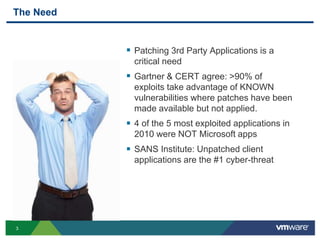
            Patching 3rd Party Applications is a
             critical need
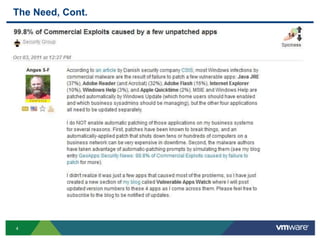
            Gartner & CERT agree: >90% of
             exploits take advantage of KNOWN
             vulnerabilities where patches have been
             made available but not applied.
            4 of the 5 most exploited applications in
             2010 were NOT Microsoft apps
            SANS Institute: Unpatched client
             applications are the #1 cyber-threat


3
The Need, Cont.


4
Challenges of Patch Management
 Do more with less
    • Management expecting security at a
     minimal cost
 Physical and virtual environment to
    secure
    • Not just a data center to secure, now virtual
     too
 Limited resources and time
    • Can’t keep up with the latest threats
    • Minimal patching – WSUS
    • Not just Microsoft but now 3rd party
     vulnerabilities
 Jack of all trades
    • Must be good at everything


5
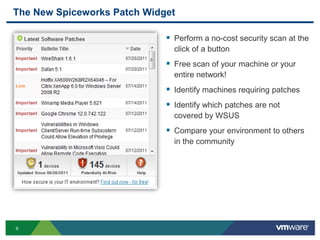
The New Spiceworks Patch Widget

                              Perform a no-cost security scan at the
                               click of a button
                              Free scan of your machine or your
                               entire network!
                              Identify machines requiring patches
                              Identify which patches are not
                               covered by WSUS
                              Compare your environment to others
                               in the community


6
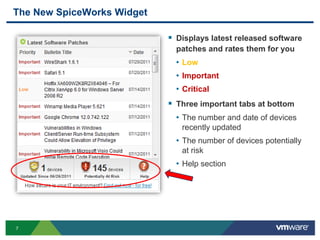
The New SpiceWorks Widget

                             Displays latest released software
                              patches and rates them for you
                              • Low
                              • Important
                              • Critical
                             Three important tabs at bottom
                              • The number and date of devices
                               recently updated
                              • The number of devices potentially
                               at risk
                              • Help section


7
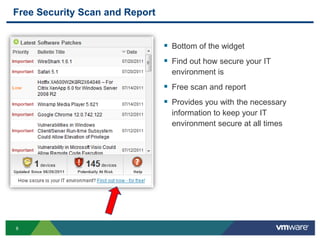
Free Security Scan and Report


                                 Bottom of the widget
                                 Find out how secure your IT
                                  environment is
                                 Free scan and report
                                 Provides you with the necessary
                                  information to keep your IT
                                  environment secure at all times


8
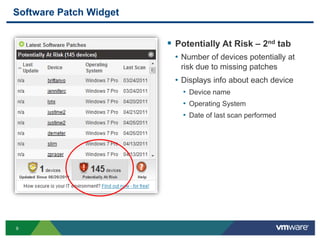
Software Patch Widget


                         Potentially At Risk – 2nd tab
                          • Number of devices potentially at
                           risk due to missing patches
                          • Displays info about each device
                            • Device name
                            • Operating System
                            • Date of last scan performed


9
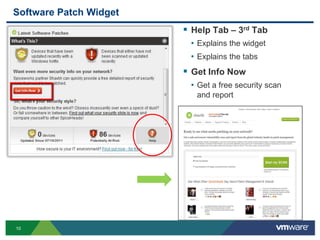
Software Patch Widget
                         Help Tab – 3rd Tab
                         • Explains the widget
                         • Explains the tabs
                         Get Info Now
                         • Get a free security scan
                           and report


10
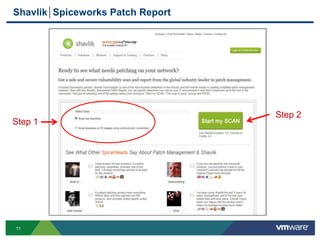
Shavlik Spiceworks Patch Report


                                  Step 2
Step 1


11
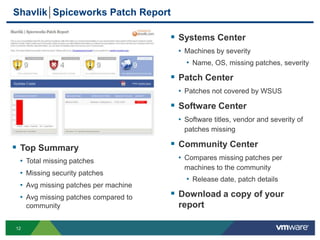
Shavlik Spiceworks Patch Report

                                      Systems Center
                                      • Machines by severity
                                        • Name, OS, missing patches, severity
                                      Patch Center
                                      • Patches not covered by WSUS
                                      Software Center
                                      • Software titles, vendor and severity of
                                        patches missing

 Top Summary                         Community Center
 • Total missing patches              • Compares missing patches per
                                        machines to the community
 • Missing security patches
                                        • Release date, patch details
 • Avg missing patches per machine
 • Avg missing patches compared to    Download a copy of your
     community                        report

12
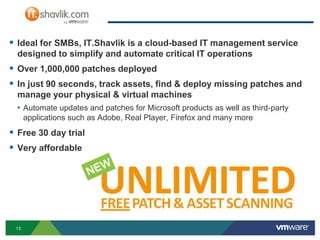
 Ideal for SMBs, IT.Shavlik is a cloud-based IT management service
  designed to simplify and automate critical IT operations
 Over 1,000,000 patches deployed
 In just 90 seconds, track assets, find & deploy missing patches and
  manage your physical & virtual machines
  • Automate updates and patches for Microsoft products as well as third-party
      applications such as Adobe, Real Player, Firefox and many more
 Free 30 day trial
 Very affordable


 13
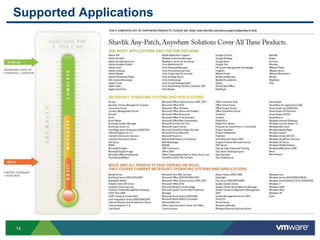
Supported Applications


14
Demonstration


15
Patch Management Inside Spiceworks???

.                           +                                     =

 Coming soon to a dashboard near you!
 Unlimited patch scanning, absolutely FREE

 Try the Functionality Now
  • Go to: https://it.shavlik.com/

  • Try: 1 machine free with remediation for up to 3 years

  • Buy: 3 Year Promotional Pricing for Remediation (through Oct. 31st)


 16
How secure is your IT environment?


 Win $100 Best Buy Gift Card
  • Run a free scan and download the report by October 31st
  • Your email address submitted for the report will be entered into drawing


 Questions
  • Contact Jason Bahls
      • Email address: jbahls@vmware.com
      • Call: 651-255-5498


 17

                                                                          SLIDE
Backup Slides


18
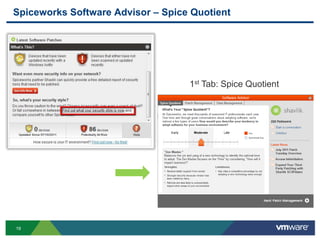
Spiceworks Software Advisor – Spice Quotient


                                   1st Tab: Spice Quotient


19
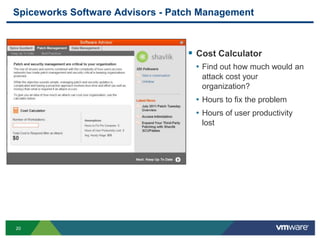
Spiceworks Software Advisors - Patch Management


                                   Cost Calculator
                                   • Find out how much would an
                                     attack cost your
                                     organization?
                                   • Hours to fix the problem
                                   • Hours of user productivity
                                     lost


20
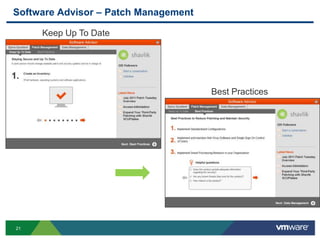
Software Advisor – Patch Management

     Keep Up To Date


                                      Best Practices


21
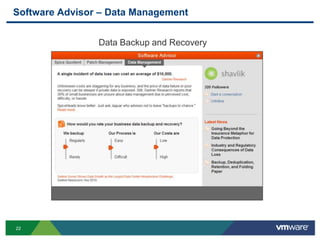
Software Advisor – Data Management


                Data Backup and Recovery


22

Bringing Patch Management to Spiceworks

  • 1.
    Bringing Patch Managementto Spiceworks Jason Bahls, VMware SaaS Territory Manager, SpiceHead Grey Howe, SpiceHead, SpiceCorps Leader - Denver © 2010 VMware Inc. All rights reserved
  • 2.
    Agenda  The lateston Shavlik and VMware  The importance of patch management  “Latest Software Patches” Widget  IT.Shavlik demonstration  The future of patch management in Spiceworks 2
  • 3.
    The Need  Patching 3rd Party Applications is a critical need  Gartner & CERT agree: >90% of exploits take advantage of KNOWN vulnerabilities where patches have been made available but not applied.  4 of the 5 most exploited applications in 2010 were NOT Microsoft apps  SANS Institute: Unpatched client applications are the #1 cyber-threat 3
  • 4.
  • 5.
    Challenges of PatchManagement  Do more with less • Management expecting security at a minimal cost  Physical and virtual environment to secure • Not just a data center to secure, now virtual too  Limited resources and time • Can’t keep up with the latest threats • Minimal patching – WSUS • Not just Microsoft but now 3rd party vulnerabilities  Jack of all trades • Must be good at everything 5
  • 6.
    The New SpiceworksPatch Widget  Perform a no-cost security scan at the click of a button  Free scan of your machine or your entire network!  Identify machines requiring patches  Identify which patches are not covered by WSUS  Compare your environment to others in the community 6
  • 7.
    The New SpiceWorksWidget  Displays latest released software patches and rates them for you • Low • Important • Critical  Three important tabs at bottom • The number and date of devices recently updated • The number of devices potentially at risk • Help section 7
  • 8.
    Free Security Scanand Report  Bottom of the widget  Find out how secure your IT environment is  Free scan and report  Provides you with the necessary information to keep your IT environment secure at all times 8
  • 9.
    Software Patch Widget  Potentially At Risk – 2nd tab • Number of devices potentially at risk due to missing patches • Displays info about each device • Device name • Operating System • Date of last scan performed 9
  • 10.
    Software Patch Widget  Help Tab – 3rd Tab • Explains the widget • Explains the tabs  Get Info Now • Get a free security scan and report 10
  • 11.
    Shavlik Spiceworks PatchReport Step 2 Step 1 11
  • 12.
    Shavlik Spiceworks PatchReport  Systems Center • Machines by severity • Name, OS, missing patches, severity  Patch Center • Patches not covered by WSUS  Software Center • Software titles, vendor and severity of patches missing  Top Summary  Community Center • Total missing patches • Compares missing patches per machines to the community • Missing security patches • Release date, patch details • Avg missing patches per machine • Avg missing patches compared to  Download a copy of your community report 12
  • 13.
     Ideal forSMBs, IT.Shavlik is a cloud-based IT management service designed to simplify and automate critical IT operations  Over 1,000,000 patches deployed  In just 90 seconds, track assets, find & deploy missing patches and manage your physical & virtual machines • Automate updates and patches for Microsoft products as well as third-party applications such as Adobe, Real Player, Firefox and many more  Free 30 day trial  Very affordable 13
  • 14.
  • 15.
  • 16.
    Patch Management InsideSpiceworks??? . + =  Coming soon to a dashboard near you!  Unlimited patch scanning, absolutely FREE  Try the Functionality Now • Go to: https://it.shavlik.com/ • Try: 1 machine free with remediation for up to 3 years • Buy: 3 Year Promotional Pricing for Remediation (through Oct. 31st) 16
  • 17.
    How secure isyour IT environment?  Win $100 Best Buy Gift Card • Run a free scan and download the report by October 31st • Your email address submitted for the report will be entered into drawing  Questions • Contact Jason Bahls • Email address: jbahls@vmware.com • Call: 651-255-5498 17 SLIDE
  • 18.
  • 19.
    Spiceworks Software Advisor– Spice Quotient 1st Tab: Spice Quotient 19
  • 20.
    Spiceworks Software Advisors- Patch Management  Cost Calculator • Find out how much would an attack cost your organization? • Hours to fix the problem • Hours of user productivity lost 20
  • 21.
    Software Advisor –Patch Management Keep Up To Date Best Practices 21
  • 22.
    Software Advisor –Data Management Data Backup and Recovery 22

Editor's Notes

  • #4 You need:
  • #7 All new users will automatically have the widget installed on their dashboard. For existing users they need to add it manually by click the "Add Content" button in the top left of the interface (screen shot attached, 10). A pop-up menu will show several widget they can add (screen shot attached, 11)
  • #8 Ask questions here: How many of you have used the widget? How many of you are interested in using the widget?
  • #11 Let’s talk more about this free security scan.
  • #14 Save money and time…in 90 seconds or less…