Managing the Power Infrastructure
within your Virtualized Environments
    SpiceWorld London – 25 May 2012
           Matthieu Jaeger
Agenda


 •   EATON Monitoring tool: Intelligent Power Manager
 •   Virtualization (VM, VA, HA, hypervisors, manager..)
 •   Eaton solutions for virtual infrastructure
 •   Live demo
 •   EATON ePDU new features
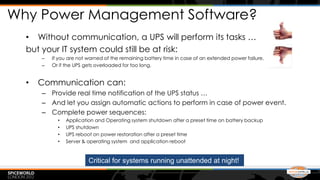
Why Power Management Software?
  • Without communication, a UPS will perform its tasks …
  but your IT system could still be at risk:
      –   If you are not warned of the remaining battery time in case of an extended power failure,
      –   Or if the UPS gets overloaded for too long.


  •   Communication can:
      – Provide real time notification of the UPS status …
      – And let you assign automatic actions to perform in case of power event.
      – Complete power sequences:
            •   Application and Operating system shutdown after a preset time on battery backup
            •   UPS shutdown
            •   UPS reboot on power restoration after a preset time
            •   Server & operating system and application reboot


                         Critical for systems running unattended at night!
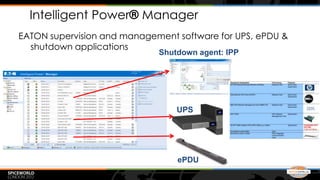
Intelligent Power® Manager
EATON supervision and management software for UPS, ePDU &
  shutdown applications
                             Shutdown agent: IPP


                                 UPS


                                 ePDU
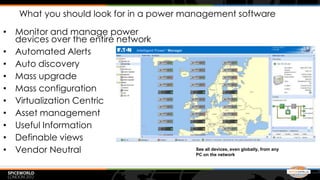
What you should look for in a power management software

• Monitor and manage power
  devices over the entire network
• Automated Alerts
• Auto discovery
• Mass upgrade
• Mass configuration
• Virtualization Centric
• Asset management
• Useful Information
• Definable views
• Vendor Neutral                        See all devices, even globally, from any
                                        PC on the network
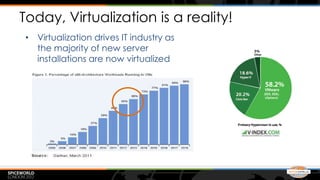
Today, Virtualization is a reality!
• Virtualization drives IT industry as
  the majority of new server
  installations are now virtualized
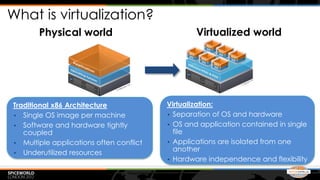
What is virtualization?
       Physical world                                                   Virtualized world


Traditional x86 Architecture                           Virtualization:
• Single OS image per machine                          • Separation of OS and hardware
• Software and hardware tightly                        • OS and application contained in single
   coupled                                               file
• Multiple applications often conflict                 • Applications are isolated from one
• Underutilized resources
                                                         another
                                                       • Hardware independence and flexibility

                                 These images are courtesy of VMware.
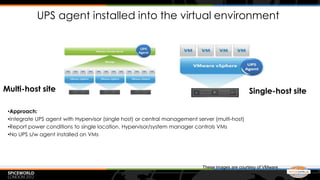
UPS agent installed into the virtual environment


Multi-host site                                                                                  Single-host site

 •Approach:
 •Integrate UPS agent with Hypervisor (single host) or central management server (multi-host)
 •Report power conditions to single location. Hypervisor/system manager controls VMs
 •No UPS s/w agent installed on VMs


                                                                            These images are courtesy of VMware.
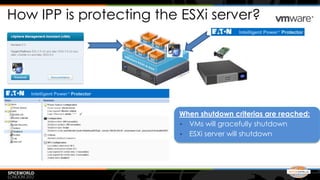
How IPP is protecting the ESXi server?


                         When shutdown criterias are reached:
                         • VMs will gracefully shutdown
                         • ESXi server will shutdown
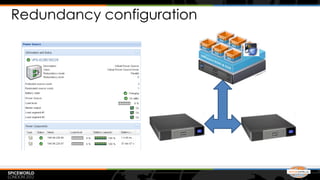
Redundancy configuration
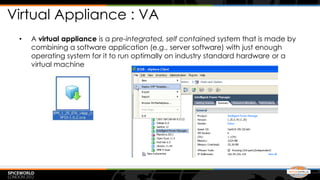
Virtual Appliance : VA
 •   A virtual appliance is a pre-integrated, self contained system that is made by
     combining a software application (e.g., server software) with just enough
     operating system for it to run optimally on industry standard hardware or a
     virtual machine
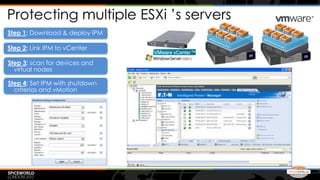
Protecting multiple ESXi ’s servers
Step 1: Download & deploy IPM

Step 2: Link IPM to vCenter

Step 3: scan for devices and
  virtual nodes

Step 4: Set IPM with shutdown
  criterias and vMotion
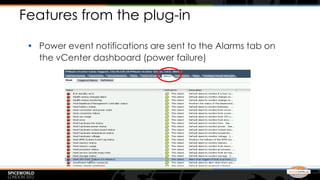
Features from the plug-in

 • Power event notifications are sent to the Alarms tab on
   the vCenter dashboard (power failure)
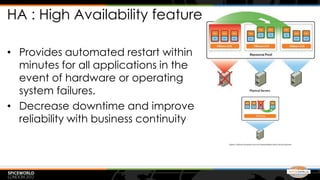
HA : High Availability feature

• Provides automated restart within
  minutes for all applications in the
  event of hardware or operating
  system failures.
• Decrease downtime and improve
  reliability with business continuity
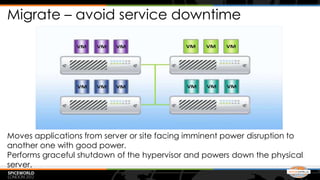
Migrate – avoid service downtime


Moves applications from server or site facing imminent power disruption to
another one with good power.
Performs graceful shutdown of the hypervisor and powers down the physical
server.
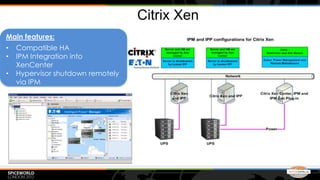
Citrix Xen
Main features:
•   Compatible HA
•   IPM Integration into
    XenCenter
•   Hypervisor shutdown remotely
    via IPM
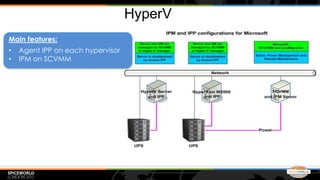
HyperV
Main features:
•   Agent IPP on each hypervisor
•   IPM on SCVMM
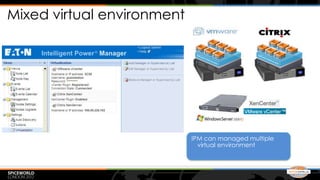
Mixed virtual environment


                            IPM can managed multiple
                              virtual environment
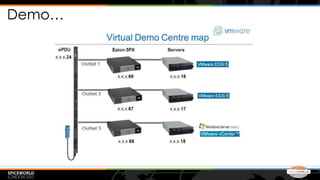
Demo…
IPM triggers vMotion - VMware
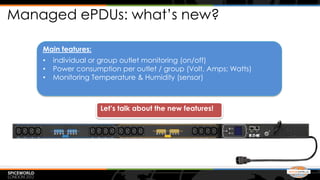
Managed ePDUs: what’s new?

    Main features:
    •   individual or group outlet monitoring (on/off)
    •   Power consumption per outlet / group (Volt, Amps; Watts)
    •   Monitoring Temperature & Humidity (sensor)


                     Let’s talk about the new features!
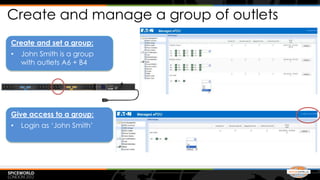
Create and manage a group of outlets
Create and set a group:
•   John Smith is a group
    with outlets A6 + B4


Give access to a group:
•   Login as ‘John Smith’
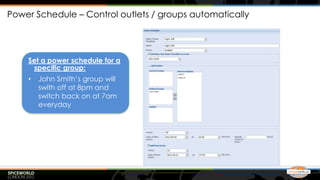
Power Schedule – Control outlets / groups automatically


    Set a power schedule for a
     specific group:
    •   John Smith’s group will
        swith off at 8pm and
        switch back on at 7am
        everyday
Two more things…

 • ePDU Energy Wise Compliant (Cisco)

 • ePDU is fully integrated into Intelligent Power
   Management (Mass config, Mass
   upgrade…)
Thank you! Any questions?!

SpiceWorld London 2012 presentation Eaton

  • 1.
    Managing the PowerInfrastructure within your Virtualized Environments SpiceWorld London – 25 May 2012 Matthieu Jaeger
  • 3.
    Agenda • EATON Monitoring tool: Intelligent Power Manager • Virtualization (VM, VA, HA, hypervisors, manager..) • Eaton solutions for virtual infrastructure • Live demo • EATON ePDU new features
  • 4.
    Why Power ManagementSoftware? • Without communication, a UPS will perform its tasks … but your IT system could still be at risk: – If you are not warned of the remaining battery time in case of an extended power failure, – Or if the UPS gets overloaded for too long. • Communication can: – Provide real time notification of the UPS status … – And let you assign automatic actions to perform in case of power event. – Complete power sequences: • Application and Operating system shutdown after a preset time on battery backup • UPS shutdown • UPS reboot on power restoration after a preset time • Server & operating system and application reboot Critical for systems running unattended at night!
  • 5.
    Intelligent Power® Manager EATONsupervision and management software for UPS, ePDU & shutdown applications Shutdown agent: IPP UPS ePDU
  • 6.
    What you shouldlook for in a power management software • Monitor and manage power devices over the entire network • Automated Alerts • Auto discovery • Mass upgrade • Mass configuration • Virtualization Centric • Asset management • Useful Information • Definable views • Vendor Neutral See all devices, even globally, from any PC on the network
  • 7.
    Today, Virtualization isa reality! • Virtualization drives IT industry as the majority of new server installations are now virtualized
  • 8.
    What is virtualization? Physical world Virtualized world Traditional x86 Architecture Virtualization: • Single OS image per machine • Separation of OS and hardware • Software and hardware tightly • OS and application contained in single coupled file • Multiple applications often conflict • Applications are isolated from one • Underutilized resources another • Hardware independence and flexibility These images are courtesy of VMware.
  • 9.
    UPS agent installedinto the virtual environment Multi-host site Single-host site •Approach: •Integrate UPS agent with Hypervisor (single host) or central management server (multi-host) •Report power conditions to single location. Hypervisor/system manager controls VMs •No UPS s/w agent installed on VMs These images are courtesy of VMware.
  • 10.
    How IPP isprotecting the ESXi server? When shutdown criterias are reached: • VMs will gracefully shutdown • ESXi server will shutdown
  • 11.
  • 12.
    Virtual Appliance :VA • A virtual appliance is a pre-integrated, self contained system that is made by combining a software application (e.g., server software) with just enough operating system for it to run optimally on industry standard hardware or a virtual machine
  • 13.
    Protecting multiple ESXi’s servers Step 1: Download & deploy IPM Step 2: Link IPM to vCenter Step 3: scan for devices and virtual nodes Step 4: Set IPM with shutdown criterias and vMotion
  • 14.
    Features from theplug-in • Power event notifications are sent to the Alarms tab on the vCenter dashboard (power failure)
  • 15.
    HA : HighAvailability feature • Provides automated restart within minutes for all applications in the event of hardware or operating system failures. • Decrease downtime and improve reliability with business continuity
  • 16.
    Migrate – avoidservice downtime Moves applications from server or site facing imminent power disruption to another one with good power. Performs graceful shutdown of the hypervisor and powers down the physical server.
  • 17.
    Citrix Xen Main features: • Compatible HA • IPM Integration into XenCenter • Hypervisor shutdown remotely via IPM
  • 18.
    HyperV Main features: • Agent IPP on each hypervisor • IPM on SCVMM
  • 19.
    Mixed virtual environment IPM can managed multiple virtual environment
  • 20.
  • 21.
  • 22.
    Managed ePDUs: what’snew? Main features: • individual or group outlet monitoring (on/off) • Power consumption per outlet / group (Volt, Amps; Watts) • Monitoring Temperature & Humidity (sensor) Let’s talk about the new features!
  • 23.
    Create and managea group of outlets Create and set a group: • John Smith is a group with outlets A6 + B4 Give access to a group: • Login as ‘John Smith’
  • 24.
    Power Schedule –Control outlets / groups automatically Set a power schedule for a specific group: • John Smith’s group will swith off at 8pm and switch back on at 7am everyday
  • 25.
    Two more things… • ePDU Energy Wise Compliant (Cisco) • ePDU is fully integrated into Intelligent Power Management (Mass config, Mass upgrade…)
  • 26.
    Thank you! Anyquestions?!

Editor's Notes

  • #17 In case of critical power events, traditionalshutdown software take care of shutting down the systemEATON Intelligent Power Software triggers Live Migration capabilities to transparently move virtual machines from a server affected by a power interruption to an available server on the network => data integrity and zerodowntime !