Virtual Desktop Infrastructure
and Desktop Virtualization
Smart Style Computing
Table of Contents

 Introducing Desktop Virtualization
 - Definitions and Drivers
 - Advantages and Limitations

 Use Cases for Desktop Virtualization
 - Remote Administration
 - Hosted Desktops
 - Desktop Migration
 - Securing Device and Data
 - Supporting a Changing Workforce

 SSO as Virtual Desktop Infrastructure
 - Technical Considerations
 - Configuration Example
 - Reseller Approach
 - Start Today
Introducing
Desktop
Virtualization
Definitions


 Desktop Virtualization
 - Also called client virtualization separates a personal computer desktop from a
   physical machine using a client-server model of computing

 Virtual Desktop Infrastructure
 - By using VDI you allow the IT responsible to switch to remote administration of
   desktops. One large computer acts as server for desktops and thin clients

 Remote Desktop Software
 - RDS is a operating sytem feature allowing applications to be run on a server,
   while being displayed locally on the device display screen

 Thin Clients
 - The most common type of modern thin clients is a low-end computer terminal
   which concentrates solely on providing GUI to the end-user
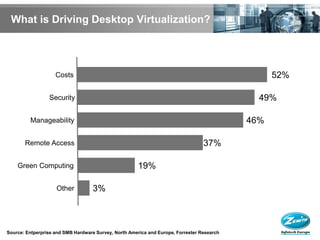
What is Driving Desktop Virtualization?


                    Costs                                                                         52%

                 Security                                                                     49%

         Manageability                                                                      46%

       Remote Access                                                              37%

    Green Computing                                   19%

                    Other           3%


Source: Entperprise and SMB Hardware Survey, North America and Europe, Forrester Research
Advantages

 VDI simplifies desktop provisioning, administrative and management
  tasks, while showing reduced downtimes in the event of server or
  hardware failures
 No need to reengineer your applications (compare to SaaS) and
  applications can quickly be added, deleted, upgraded & patched
 Go back to centralised computing models with thin clients as users
  access virtual desktops running in the data center or LAN
 Using SSO as VDI provides flexibility in performance requirements
  which allows for unlimited scalable resource allocation at hand
 Access desktops from any capable device at any time, while desktop
  security and data protection are centralized, such as backup.
 Avoid organizations paying steep power and cooling costs for many
  underutilized PCs
Limitations


 Some loss of user autonomy and privacy
 Challenges in setting up and maintaining drivers for printers and
  other peripherals
 Difficulty in running certain complex applications, such as
  multimedia, 3D-graphics,...
 Increased downtime in the even of serious network failures
 Reliance on connectivity to corporate or public network
 Potential security risks if the network is not properly managed
 Complexity and high costs of VDI demployment and management
Use Cases of Desktop Virtualization with Smart Style Office
SSO for Remote Administration


                        Opportunity
                        Businesses looking for IT support
                        companies to manage, monitor and
                        support user’s desktops

                        Challenge
                        Maximizing your desktop support
                        resources to handle as many
                        customers as possible

                        Solution
                        SSO allows resellers to remotely
                        administer desktops from a central
                        control panel. This includes creation,
                        monitoring, snapshots, uptime,
                        patch management, etc.
SSO for Hosted Desktops

Opportunity
Businesses looking for virtual
desktops that are provisioned
from a central data center

Challenge
Optimizing the economies of
scale in hardware and data
center investments

Solution
SSO has almost unlimited
resource scalability and grows
desktop availability when more
nodes are added to the cloud
SSO for Desktop Migration

                            Opportunity
                            Business looking to migrate their
                            users to Windows 7 in order to lower
                            system requirements and improve
                            user’s work and online experience

                            Challenge
                            Urgency of the desirable desktop
                            upgrade is stretching IT support
                            resoures

                            Solution
                            SSO allows resellers to set up
                            golden images and fast-track the
                            deployment of desktops for its
                            customers
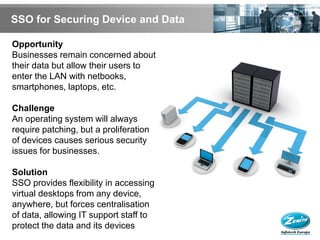
SSO for Securing Device and Data

Opportunity
Businesses remain concerned about
their data but allow their users to
enter the LAN with netbooks,
smartphones, laptops, etc.

Challenge
An operating system will always
require patching, but a proliferation
of devices causes serious security
issues for businesses.

Solution
SSO provides flexibility in accessing
virtual desktops from any device,
anywhere, but forces centralisation
of data, allowing IT support staff to
protect the data and its devices
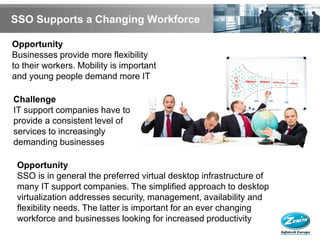
SSO Supports a Changing Workforce

Opportunity
Businesses provide more flexibility
to their workers. Mobility is important
and young people demand more IT

Challenge
IT support companies have to
provide a consistent level of
services to increasingly
demanding businesses

 Opportunity
 SSO is in general the preferred virtual desktop infrastructure of
 many IT support companies. The simplified approach to desktop
 virtualization addresses security, management, availability and
 flexibility needs. The latter is important for an ever changing
 workforce and businesses looking for increased productivity
Smart Style Office
as Virtual Desktop
Infrastructure
Technical Considerations


 Client server listening and NAT pass-through
 Operating system support levels
 Audio and multimedia support
 Encryption requirements
 Off-line application delivery
 Hosted application delivery
 Single instance management
 Remote assistance
 Seamless window
 File transfer
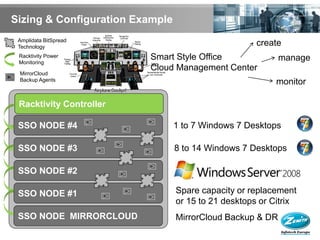
Sizing & Configuration Example
 Amplidata BitSpread
 Technology
                                                     create
 Racktivity Power        Smart Style Office                manage
 Monitoring
                         Cloud Management Center
 MirrorCloud
 Backup Agents
                                                         monitor

 Racktivity Controller

 SSO NODE #4                     1 to 7 Windows 7 Desktops

 SSO NODE #3                     8 to 14 Windows 7 Desktops

 SSO NODE #2

 SSO NODE #1                     Spare capacity or replacement
                                 or 15 to 21 desktops or Citrix
 SSO NODE MIRRORCLOUD            MirrorCloud Backup & DR
Reseller Approach


 High-level overview of the components of Smart Style Office virtual
  desktop infrastructure and how they come together to a for a
  complete, end-to-end solution
 - SSO virtual desktop infrastructure starts with a StarterKit package of 2 SSO
   nodes, 2 switches, 1 racktivity device, all fully racked and cabled.
 - SSO comes with all virtualization software and a proprietary Cloud Management
   Center which is an advanced dashboard to provision desktops as VMs
 - All virtual desktops are hosted on the SSO nodes running their standard desktop
   OS; Windows or linux for example
 - Introduce Mirror Cloud backup agents on all desktops in case you allow workers
   to store data within their virtual desktop environement
 - Users can be provisioned with hardware thin clients from Zenith Infotech or
   software thin clients to connect to their virtual desktops
 - A remote protocal, like Microsoft Remote Desktop Protocol is used to allow
   client devices in the desktop environment
Start Today: 3-Step Program

 Step 1: Start an Evaluation as a Reseller
 - Zenith Infotech enables IT support companies and service providers to deliver IT
   as a Service. Zenith Infotech is available to assist you during your evaluation
   and help you to create sales and marketing strategies for how the Smart Style
   Office models fits into your offerings.


 Step 2: Discuss a Smooth Migration with your Customer
 - Zenith Infotech van help you to transition smoothly from a physical desktop
   infrastructure to a virtual desktop infrastructure using MirrorCloud. This allows
   you without interupting normal program and business activity with your clients to
   migrate its desktops to Smart Style Office Desktop Virtualization solution.


 Step 3: Map the Customer’s Existing Network with Mirror Cloud
 - Mirror Cloud is an add-on technology to the Smart Style Computing platform,
   which provides business continuity and data restoration for existing physical or
   Virtual Windows servers or desktops.
Conclusion


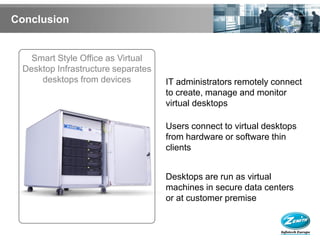
   Smart Style Office as Virtual
 Desktop Infrastructure separates
     desktops from devices          IT administrators remotely connect
                                    to create, manage and monitor
                                    virtual desktops

                                    Users connect to virtual desktops
                                    from hardware or software thin
                                    clients


                                    Desktops are run as virtual
                                    machines in secure data centers
                                    or at customer premise
Prepared by Sacha Vekeman
Zenith Infotech Europe
February 2010

Smart Style Office for Virtual Desktop Infrastructure

  • 1.
    Virtual Desktop Infrastructure andDesktop Virtualization Smart Style Computing
  • 2.
    Table of Contents Introducing Desktop Virtualization - Definitions and Drivers - Advantages and Limitations  Use Cases for Desktop Virtualization - Remote Administration - Hosted Desktops - Desktop Migration - Securing Device and Data - Supporting a Changing Workforce  SSO as Virtual Desktop Infrastructure - Technical Considerations - Configuration Example - Reseller Approach - Start Today
  • 3.
  • 4.
    Definitions  Desktop Virtualization - Also called client virtualization separates a personal computer desktop from a physical machine using a client-server model of computing  Virtual Desktop Infrastructure - By using VDI you allow the IT responsible to switch to remote administration of desktops. One large computer acts as server for desktops and thin clients  Remote Desktop Software - RDS is a operating sytem feature allowing applications to be run on a server, while being displayed locally on the device display screen  Thin Clients - The most common type of modern thin clients is a low-end computer terminal which concentrates solely on providing GUI to the end-user
  • 5.
    What is DrivingDesktop Virtualization? Costs 52% Security 49% Manageability 46% Remote Access 37% Green Computing 19% Other 3% Source: Entperprise and SMB Hardware Survey, North America and Europe, Forrester Research
  • 6.
    Advantages  VDI simplifiesdesktop provisioning, administrative and management tasks, while showing reduced downtimes in the event of server or hardware failures  No need to reengineer your applications (compare to SaaS) and applications can quickly be added, deleted, upgraded & patched  Go back to centralised computing models with thin clients as users access virtual desktops running in the data center or LAN  Using SSO as VDI provides flexibility in performance requirements which allows for unlimited scalable resource allocation at hand  Access desktops from any capable device at any time, while desktop security and data protection are centralized, such as backup.  Avoid organizations paying steep power and cooling costs for many underutilized PCs
  • 7.
    Limitations  Some lossof user autonomy and privacy  Challenges in setting up and maintaining drivers for printers and other peripherals  Difficulty in running certain complex applications, such as multimedia, 3D-graphics,...  Increased downtime in the even of serious network failures  Reliance on connectivity to corporate or public network  Potential security risks if the network is not properly managed  Complexity and high costs of VDI demployment and management
  • 8.
    Use Cases ofDesktop Virtualization with Smart Style Office
  • 9.
    SSO for RemoteAdministration Opportunity Businesses looking for IT support companies to manage, monitor and support user’s desktops Challenge Maximizing your desktop support resources to handle as many customers as possible Solution SSO allows resellers to remotely administer desktops from a central control panel. This includes creation, monitoring, snapshots, uptime, patch management, etc.
  • 10.
    SSO for HostedDesktops Opportunity Businesses looking for virtual desktops that are provisioned from a central data center Challenge Optimizing the economies of scale in hardware and data center investments Solution SSO has almost unlimited resource scalability and grows desktop availability when more nodes are added to the cloud
  • 11.
    SSO for DesktopMigration Opportunity Business looking to migrate their users to Windows 7 in order to lower system requirements and improve user’s work and online experience Challenge Urgency of the desirable desktop upgrade is stretching IT support resoures Solution SSO allows resellers to set up golden images and fast-track the deployment of desktops for its customers
  • 12.
    SSO for SecuringDevice and Data Opportunity Businesses remain concerned about their data but allow their users to enter the LAN with netbooks, smartphones, laptops, etc. Challenge An operating system will always require patching, but a proliferation of devices causes serious security issues for businesses. Solution SSO provides flexibility in accessing virtual desktops from any device, anywhere, but forces centralisation of data, allowing IT support staff to protect the data and its devices
  • 13.
    SSO Supports aChanging Workforce Opportunity Businesses provide more flexibility to their workers. Mobility is important and young people demand more IT Challenge IT support companies have to provide a consistent level of services to increasingly demanding businesses Opportunity SSO is in general the preferred virtual desktop infrastructure of many IT support companies. The simplified approach to desktop virtualization addresses security, management, availability and flexibility needs. The latter is important for an ever changing workforce and businesses looking for increased productivity
  • 14.
    Smart Style Office asVirtual Desktop Infrastructure
  • 15.
    Technical Considerations  Clientserver listening and NAT pass-through  Operating system support levels  Audio and multimedia support  Encryption requirements  Off-line application delivery  Hosted application delivery  Single instance management  Remote assistance  Seamless window  File transfer
  • 16.
    Sizing & ConfigurationExample Amplidata BitSpread Technology create Racktivity Power Smart Style Office manage Monitoring Cloud Management Center MirrorCloud Backup Agents monitor Racktivity Controller SSO NODE #4 1 to 7 Windows 7 Desktops SSO NODE #3 8 to 14 Windows 7 Desktops SSO NODE #2 SSO NODE #1 Spare capacity or replacement or 15 to 21 desktops or Citrix SSO NODE MIRRORCLOUD MirrorCloud Backup & DR
  • 17.
    Reseller Approach  High-leveloverview of the components of Smart Style Office virtual desktop infrastructure and how they come together to a for a complete, end-to-end solution - SSO virtual desktop infrastructure starts with a StarterKit package of 2 SSO nodes, 2 switches, 1 racktivity device, all fully racked and cabled. - SSO comes with all virtualization software and a proprietary Cloud Management Center which is an advanced dashboard to provision desktops as VMs - All virtual desktops are hosted on the SSO nodes running their standard desktop OS; Windows or linux for example - Introduce Mirror Cloud backup agents on all desktops in case you allow workers to store data within their virtual desktop environement - Users can be provisioned with hardware thin clients from Zenith Infotech or software thin clients to connect to their virtual desktops - A remote protocal, like Microsoft Remote Desktop Protocol is used to allow client devices in the desktop environment
  • 18.
    Start Today: 3-StepProgram  Step 1: Start an Evaluation as a Reseller - Zenith Infotech enables IT support companies and service providers to deliver IT as a Service. Zenith Infotech is available to assist you during your evaluation and help you to create sales and marketing strategies for how the Smart Style Office models fits into your offerings.  Step 2: Discuss a Smooth Migration with your Customer - Zenith Infotech van help you to transition smoothly from a physical desktop infrastructure to a virtual desktop infrastructure using MirrorCloud. This allows you without interupting normal program and business activity with your clients to migrate its desktops to Smart Style Office Desktop Virtualization solution.  Step 3: Map the Customer’s Existing Network with Mirror Cloud - Mirror Cloud is an add-on technology to the Smart Style Computing platform, which provides business continuity and data restoration for existing physical or Virtual Windows servers or desktops.
  • 19.
    Conclusion Smart Style Office as Virtual Desktop Infrastructure separates desktops from devices IT administrators remotely connect to create, manage and monitor virtual desktops Users connect to virtual desktops from hardware or software thin clients Desktops are run as virtual machines in secure data centers or at customer premise
  • 20.
    Prepared by SachaVekeman Zenith Infotech Europe February 2010