Brave New World: Developing Staff Competencies Around Mobile+Douglas J. Joubert, MS, MLIS; Alicia Livinski, MPH, MA; MaShana Davis, MSISDIVISION OF LIBRARY SERVICESOFFICE OF RESEARCH SERVICESNATIONAL INSTITUTES OF HEALTHU.S. DEPARTMENT OF HEALTH AND HUMAN SERVICES
DisclaimerAlthough the project I am describing is based on a project at the NIH Library, the views expressed in this paper are those of the authors and do not reflect the official policy or position of the NIH Library, the National Institutes of Health, or the Department of Health and Human Services.
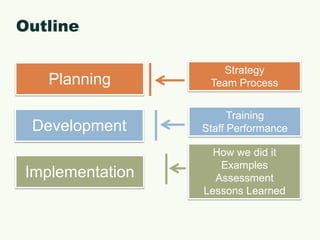
OutlineStrategyTeam ProcessPlanningTrainingStaff PerformanceDevelopmentHow we did itExamplesAssessmentLessons LearnedImplementation
Planning
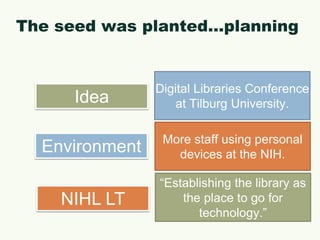
The seed was planted…planningDigital Libraries Conference at Tilburg University.IdeaMore staff using personal devices at the NIH.Environment“Establishing the library as the place to go for technology.”NIHL LT
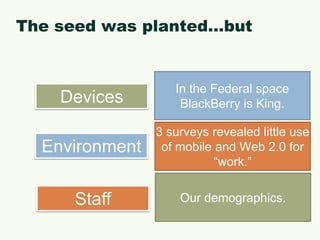
The seed was planted…butIn the Federal space BlackBerry is King. Devices3 surveys revealed little use of mobile and Web 2.0 for “work.”EnvironmentOur demographics.Staff
Planning…strategy
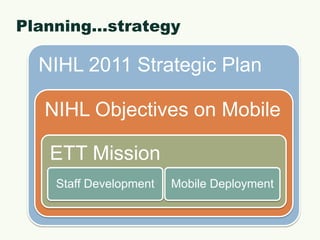
Planning…mobile objective from 2011 NIHL Strategic PlanIncluded building a competency among staff around mobile devices and applications and other emerging technologies.
Planning…the team and our missionThe Emerging Technologies Team helps plan and assess the effective use of technology to support research at the NIH. Additionally, the group will identify, implement, and assess technologies for the library, including those that supportmobile computing, social media, andother technologies critical to science and medicine.7 core members13 adjunct members
Planning…targetsCompile a list of available devices and their platform: Apple, Blackberry, Android.Identify and document issues related to authentication on mobile devices (iOS and Android).Planning for and supporting multiple devices.Sustaining the program.Partner with other techie folks on campus.
Planning…trainingSupporting staff development across platforms.What should be our training priorities.What training models have been successful and will they work at the NIHL?23 Things.Brown-bags versus hands-on.Accommodating adult learners.Librarians, Informationist, support staff, and the business office.
Planning…mobileDeciding who gets what.Device negotiation with vendors.Contract negotiation with vendors.Figuring out what is allowed by HHS & NIH CIOs.Deciding how to train staff on using their mobile devices.
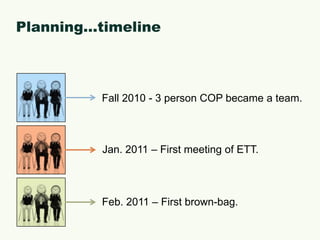
Planning…timelineFall 2010 - 3 person COP became a team.Jan. 2011 – First meeting of ETT.Feb. 2011 – First brown-bag.
Development
Development…mobileIAB Branch Chief met with ETT to discuss device deployment.ETT met with all library staff outlining team objectives, mobile deployment, and staff training.IAB Branch Chief sent out survey asking staff about preferences for a mobile device.
Development…trainingDeveloped curriculum that included a variety of methods for educatingstaff, developed a staff technology challenge, and leading by example.Developed methods to evaluate staff competencies with their devices.We really wanted to build a community of learners that was focused on mobile, social media, and emerging technologies.
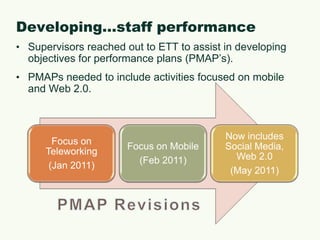
Developing…staff performanceSupervisors reached out to ETT to assist in developing objectives for performance plans (PMAP’s).PMAPs needed to include activities focused on mobile and Web 2.0.PMAP Revisions
Implementation
How we did itBrown-bags for staff education.Meet and Greet sessions with the ETT.Mobile “show and tell.”Reference Assistant (RA) Tech Challenge.Informal Communities of Practice.ETT served as “ambassadors” for the technology.
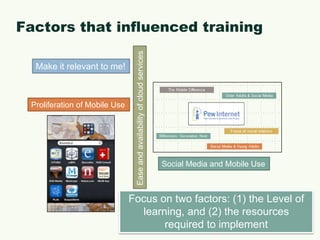
Factors that influenced trainingMake it relevant to me!Proliferation of Mobile UseEase and availability of cloud servicesSocial Media and Mobile UseFocus on two factors: (1) the Level of learning, and (2) the resources required to implement
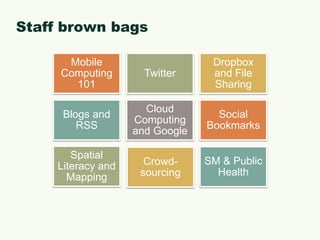
Staff brown bags
MobileExamples    RATECH
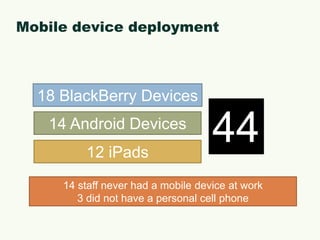
Mobile device deployment18 BlackBerry Devices4414 Android Devices12 iPads14 staff never had a mobile device at work3 did not have a personal cell phone
Our focus on mobilePre-surveyDistributed to all staff.Desire: gauge interest and experience.Two sessions:Orientation to mobile devices and applications.Mobile  “Show & Tell.”One-hour sessions.
Mobile 101 brown-bagOverview of mobile computing, devices, appsFocus: Android, Apple, and BlackBerry.Briefly mentioned other devices (Windows, e-readers, tablets).Comparison of devices (OS, features/capabilities).Defined mobile application, compared to mobile-compliant Web site.App markets for Android, Apple, and BlackBerry.
Mobile “show & tell”Device-specific sessions.Formed user groups based on devices (iPads, Androids, BlackBerry).“Lunch & learn” sessions or monthly meetingsBasics/setting up the deviceNew applications.ETT responsible for providing training and support.
RATECH challengeDeveloped a four month training program for the paraprofessional staff.Blogs & Wikis.Online Mapping and Spatial Literacy.Photos and Images.Social Media and Networking.The program was designed to foster the development of technology skills, encourage collaboration, and promote lifelong learning habits.The program was also designed to map to the PMAPs of the 7 participants.
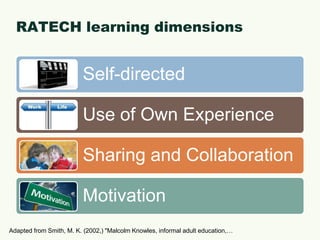
RATECH learning dimensionsAdapted from Smith, M. K. (2002,) "Malcolm Knowles, informal adult education,…
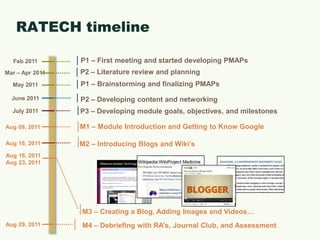
P1 – First meeting and started developing PMAPsFeb 2011P2 – Literature review and planning Mar – Apr 2011P1 – Brainstorming and finalizing PMAPsMay 2011June 2011RATECH timelineP2 – Developing content and networkingP3 – Developing module goals, objectives, and milestonesJuly 2011M1 – Module Introduction and Getting to Know Google Aug 09, 2011Aug 16, 2011Aug 23, 2011M2 – Introducing Blogs and Wiki’sAug 16, 2011M3 – Creating a Blog, Adding Images and Videos…M4 – Debriefing with RA’s, Journal Club, and AssessmentAug 29, 2011
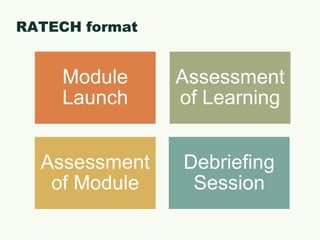
RATECH format
Assessment
EvaluationSurveys (used Google Forms & Survey Monkey).App evaluation form.Device evaluation form.Survey on mobile device (perceptions about getting the device).Narrative summary if devices were returned.Narrative Reports (iPads only).Assessment built into the RATECH Challenge.
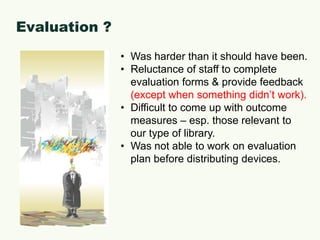
Evaluation ?Was harder than it should have been.
Reluctance of staff to complete evaluation forms & provide feedback (except when something didn’t work).
Difficult to come up with outcome measures – esp. those relevant to our type of library.
Was not able to work on evaluation plan before distributing devices.Lessons Learned
What did not work (or work as expected): [1]More guidance from senior library administration on why staff was being “pushed” into mobile.Long time to get the devices.How do we encourage the discovery of new services and applications.Just because you buy someone a device, you cannot expect them to be an engaged user.Evaluating staff competencies with their devices.
What did not work (or work as expected): [2]Deciding who got the iPads…since they were coveted devices.Not enough “worker bees.”Time to develop & conduct the trainings.Determine how to evaluate? What to evaluate?Staff attitude.
Lessons learned: [1]You need a dedicated team of “do-ers” who will take initiative and stay on timeline.Distribution of work: be prepared for a lot of hand-holding to get people up to speed.Ensuring that the entire team is aware of the plan and overarching goal(s), as well as their role.Jumping through government-specific TOS jargon/policies (iTunes, 3G, repurposing the BlackBerry devices).
Lessons learned: [2]Squeezing in time here and there to focus on this entire initiative does not work very well.Make what you are doing relevant. You cannot make people excited about something.Innovation is hard. Even if you have the support of leadership, implementing something new is not easy.

Brave New World: Developing Staff Competencies Around Mobile

  • 1.
    Brave New World:Developing Staff Competencies Around Mobile+Douglas J. Joubert, MS, MLIS; Alicia Livinski, MPH, MA; MaShana Davis, MSISDIVISION OF LIBRARY SERVICESOFFICE OF RESEARCH SERVICESNATIONAL INSTITUTES OF HEALTHU.S. DEPARTMENT OF HEALTH AND HUMAN SERVICES
  • 2.
    DisclaimerAlthough the projectI am describing is based on a project at the NIH Library, the views expressed in this paper are those of the authors and do not reflect the official policy or position of the NIH Library, the National Institutes of Health, or the Department of Health and Human Services.
  • 3.
    OutlineStrategyTeam ProcessPlanningTrainingStaff PerformanceDevelopmentHowwe did itExamplesAssessmentLessons LearnedImplementation
  • 4.
  • 5.
    The seed wasplanted…planningDigital Libraries Conference at Tilburg University.IdeaMore staff using personal devices at the NIH.Environment“Establishing the library as the place to go for technology.”NIHL LT
  • 6.
    The seed wasplanted…butIn the Federal space BlackBerry is King. Devices3 surveys revealed little use of mobile and Web 2.0 for “work.”EnvironmentOur demographics.Staff
  • 7.
  • 8.
    Planning…mobile objective from2011 NIHL Strategic PlanIncluded building a competency among staff around mobile devices and applications and other emerging technologies.
  • 9.
    Planning…the team andour missionThe Emerging Technologies Team helps plan and assess the effective use of technology to support research at the NIH. Additionally, the group will identify, implement, and assess technologies for the library, including those that supportmobile computing, social media, andother technologies critical to science and medicine.7 core members13 adjunct members
  • 10.
    Planning…targetsCompile a listof available devices and their platform: Apple, Blackberry, Android.Identify and document issues related to authentication on mobile devices (iOS and Android).Planning for and supporting multiple devices.Sustaining the program.Partner with other techie folks on campus.
  • 11.
    Planning…trainingSupporting staff developmentacross platforms.What should be our training priorities.What training models have been successful and will they work at the NIHL?23 Things.Brown-bags versus hands-on.Accommodating adult learners.Librarians, Informationist, support staff, and the business office.
  • 12.
    Planning…mobileDeciding who getswhat.Device negotiation with vendors.Contract negotiation with vendors.Figuring out what is allowed by HHS & NIH CIOs.Deciding how to train staff on using their mobile devices.
  • 13.
    Planning…timelineFall 2010 -3 person COP became a team.Jan. 2011 – First meeting of ETT.Feb. 2011 – First brown-bag.
  • 14.
  • 15.
    Development…mobileIAB Branch Chiefmet with ETT to discuss device deployment.ETT met with all library staff outlining team objectives, mobile deployment, and staff training.IAB Branch Chief sent out survey asking staff about preferences for a mobile device.
  • 16.
    Development…trainingDeveloped curriculum thatincluded a variety of methods for educatingstaff, developed a staff technology challenge, and leading by example.Developed methods to evaluate staff competencies with their devices.We really wanted to build a community of learners that was focused on mobile, social media, and emerging technologies.
  • 17.
    Developing…staff performanceSupervisors reachedout to ETT to assist in developing objectives for performance plans (PMAP’s).PMAPs needed to include activities focused on mobile and Web 2.0.PMAP Revisions
  • 18.
  • 19.
    How we diditBrown-bags for staff education.Meet and Greet sessions with the ETT.Mobile “show and tell.”Reference Assistant (RA) Tech Challenge.Informal Communities of Practice.ETT served as “ambassadors” for the technology.
  • 20.
    Factors that influencedtrainingMake it relevant to me!Proliferation of Mobile UseEase and availability of cloud servicesSocial Media and Mobile UseFocus on two factors: (1) the Level of learning, and (2) the resources required to implement
  • 21.
  • 22.
  • 23.
    Mobile device deployment18BlackBerry Devices4414 Android Devices12 iPads14 staff never had a mobile device at work3 did not have a personal cell phone
  • 24.
    Our focus onmobilePre-surveyDistributed to all staff.Desire: gauge interest and experience.Two sessions:Orientation to mobile devices and applications.Mobile “Show & Tell.”One-hour sessions.
  • 25.
    Mobile 101 brown-bagOverviewof mobile computing, devices, appsFocus: Android, Apple, and BlackBerry.Briefly mentioned other devices (Windows, e-readers, tablets).Comparison of devices (OS, features/capabilities).Defined mobile application, compared to mobile-compliant Web site.App markets for Android, Apple, and BlackBerry.
  • 26.
    Mobile “show &tell”Device-specific sessions.Formed user groups based on devices (iPads, Androids, BlackBerry).“Lunch & learn” sessions or monthly meetingsBasics/setting up the deviceNew applications.ETT responsible for providing training and support.
  • 27.
    RATECH challengeDeveloped afour month training program for the paraprofessional staff.Blogs & Wikis.Online Mapping and Spatial Literacy.Photos and Images.Social Media and Networking.The program was designed to foster the development of technology skills, encourage collaboration, and promote lifelong learning habits.The program was also designed to map to the PMAPs of the 7 participants.
  • 28.
    RATECH learning dimensionsAdaptedfrom Smith, M. K. (2002,) "Malcolm Knowles, informal adult education,…
  • 29.
    P1 – Firstmeeting and started developing PMAPsFeb 2011P2 – Literature review and planning Mar – Apr 2011P1 – Brainstorming and finalizing PMAPsMay 2011June 2011RATECH timelineP2 – Developing content and networkingP3 – Developing module goals, objectives, and milestonesJuly 2011M1 – Module Introduction and Getting to Know Google Aug 09, 2011Aug 16, 2011Aug 23, 2011M2 – Introducing Blogs and Wiki’sAug 16, 2011M3 – Creating a Blog, Adding Images and Videos…M4 – Debriefing with RA’s, Journal Club, and AssessmentAug 29, 2011
  • 30.
  • 31.
  • 32.
    EvaluationSurveys (used GoogleForms & Survey Monkey).App evaluation form.Device evaluation form.Survey on mobile device (perceptions about getting the device).Narrative summary if devices were returned.Narrative Reports (iPads only).Assessment built into the RATECH Challenge.
  • 33.
    Evaluation ?Was harderthan it should have been.
  • 34.
    Reluctance of staffto complete evaluation forms & provide feedback (except when something didn’t work).
  • 35.
    Difficult to comeup with outcome measures – esp. those relevant to our type of library.
  • 36.
    Was not ableto work on evaluation plan before distributing devices.Lessons Learned
  • 37.
    What did notwork (or work as expected): [1]More guidance from senior library administration on why staff was being “pushed” into mobile.Long time to get the devices.How do we encourage the discovery of new services and applications.Just because you buy someone a device, you cannot expect them to be an engaged user.Evaluating staff competencies with their devices.
  • 38.
    What did notwork (or work as expected): [2]Deciding who got the iPads…since they were coveted devices.Not enough “worker bees.”Time to develop & conduct the trainings.Determine how to evaluate? What to evaluate?Staff attitude.
  • 39.
    Lessons learned: [1]Youneed a dedicated team of “do-ers” who will take initiative and stay on timeline.Distribution of work: be prepared for a lot of hand-holding to get people up to speed.Ensuring that the entire team is aware of the plan and overarching goal(s), as well as their role.Jumping through government-specific TOS jargon/policies (iTunes, 3G, repurposing the BlackBerry devices).
  • 40.
    Lessons learned: [2]Squeezingin time here and there to focus on this entire initiative does not work very well.Make what you are doing relevant. You cannot make people excited about something.Innovation is hard. Even if you have the support of leadership, implementing something new is not easy.