Core HR BP.010 Business Process Document Process Document 
Doc Ref: BP010_CORE_HRS_Vep3t.e0mber 4, 2014 
AIM 
BP.010 BUSINESS PROCESS DOCUMENT 
FUJAIRAH CHAMBER OF COMMERCE 
Core HR 
Author: Raqmiyat Consultant 
Creation Date: 11-May-14 
Last Updated: 
Document Ref: BP010_V3.0 
Version: 3 
Approvals: 
Name Signature & Date 
Mr. 
Mr. 
Copy Number_____
Core HR BP.010 Business Process Document Process Document 
Document Control 
Change Record 
Doc Ref: BP010_CORE_HRS_Vep3t.e0mber 4, 2014 
1 
Date Author Version Change Reference 
27-mar-14 Feras Ahmad 1.0 No Previous Document 
28Apr-14 Feras Ahmad 2.0 No Previous Document 
08-May-14 Feras Ahmad 3.0 No Previous Document 
Reviewers 
Name Position 
Mr. Kashif Project Manager – Raqmiyat 
Mr. Sultan HR manager 
Distribution 
Copy No. Name Location 
1 Library Master Project Library 
2 Project Manager 
34 
Note To Holders: 
If you receive an electronic copy of this document and print it out, please write your name on the equivalent of 
the cover page, for document control purposes. 
If you receive a hard copy of this document, please write your name on the front cover, for document control 
purposes.
Core HR BP.010 Business Process Document Process Document 
Contents 
Doc Ref: BP010_CORE_HRS_Vep3t.e0mber 4, 2014 
Document Control...................................................................................................................2 
Business Process Identification..............................................................................................4 
CHR HR Departments .........................................................................................................12 
CHR Person Type..................................................................................................................13 
CHR Mandatory Fields of Employee Profile ...................................................................14 
CHR Hire Employee .............................................................................................................15 
CHR Grades ...........................................................................................................................16 
CHR People Group ...............................................................................................................17 
CHR Locations ......................................................................................................................18 
CHR Job...................................................................................................................................19 
CHR Termination ..................................................................................................................20 
CHR Employee Category ....................................................................................................21 
CHR Assignment Category .................................................................................................22 
CHR Effective Dates .............................................................................................................24 
CHR Assignment Status.......................................................................................................26 
CHR Supervisor.....................................................................................................................27 
CHR Special Information Types (SIT) ...............................................................................28 
Open and Closed Issues for this Deliverable....................................................................29 
Open Issues......................................................................................................................29 
Closed Issues...................................................................................................................29
Core HR BP.010 Business Process Document Process Document 
Business Process Identification 
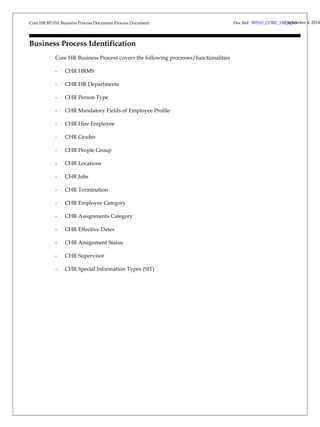
Core HR Business Process covers the following processes/functionalities 
- CHR HRMS 
- CHR HR Departments 
- CHR Person Type 
- CHR Mandatory Fields of Employee Profile 
- CHR Hire Employee 
- CHR Grades 
- CHR People Group 
- CHR Locations 
- CHR Jobs 
- CHR Termination 
- CHR Employee Category 
- CHR Assignments Category 
- CHR Effective Dates 
- CHR Assignment Status 
- CHR Supervisor 
- CHR Special Information Types (SIT) 
Doc Ref: BP010_CORE_HRS_Vep3t.e0mber 4, 2014
Core HR Process Document September Doc Ref: BP010_CORE_HR_V3.0 4, 2014
Core HR Process Document 
Doc Ref: BP010_CORE_HRS_Vep3t.e0mber 4, 2014 
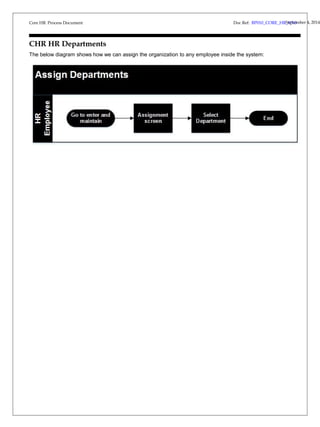
CHR HR Departments 
The below diagram shows how we can assign the organization to any employee inside the system:
Core HR Process Document 
Doc Ref: BP010_CORE_HRS_Vep3t.e0mber 4, 2014 
CHR Person Type 
Identify different groups of people to control access to records. They also associate different types of information 
for retention. There are three basic types of people for whom HRMS maintains information for Employees and 
Applicants. There are many Person Types recognized by the system and identified by a system name – 
Applicant, Employee, Ex-applicant, and Ex-employee.
Core HR Process Document 
CHR Mandatory Fields of Employee Profile 
Doc Ref: BP010_CORE_HRS_Vep3t.e0mber 4, 2014 
Title, First Name, Father Name, Family Name , Employee Number auto generation number (administration letter 
number + hire date+0001) , Religion , Emirates ID Number , Gender, Birth Date , Place of Birth , Age 
,Social/Marital Status. 
Administration Letter Number, Hire Date, Email Address (Official Email Address), Office Extension Number, 
Present Nationality, Educational Level.
Core HR Process Document 
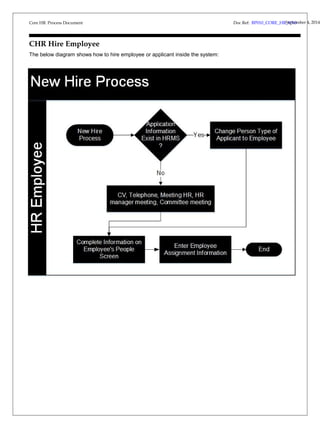
CHR Hire Employee 
The below diagram shows how to hire employee or applicant inside the system: 
Doc Ref: BP010_CORE_HRS_Vep3t.e0mber 4, 2014
Core HR Process Document 
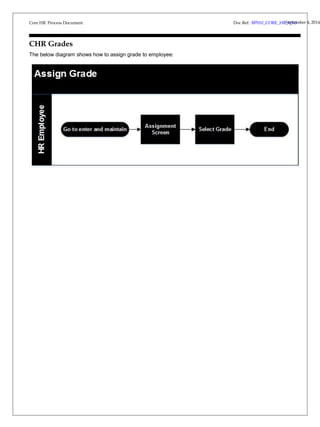
CHR Grades 
The below diagram shows how to assign grade to employee: 
Doc Ref: BP010_CORE_HRS_Vep3t.e0mber 4, 2014
Core HR Process Document 
Doc Ref: BP010_CORE_HRS_Vep3t.e0mber 4, 2014 
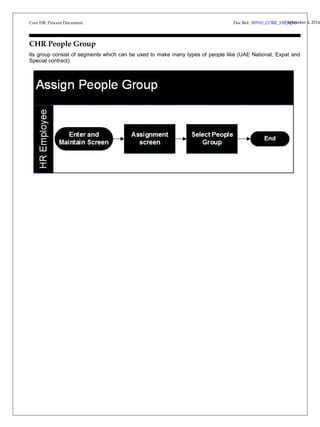
CHR People Group 
Its group consist of segments which can be used to make many types of people like (UAE National, Expat and 
Special contract)
Core HR Process Document 
Doc Ref: BP010_CORE_HRS_Vep3t.e0mber 4, 2014 
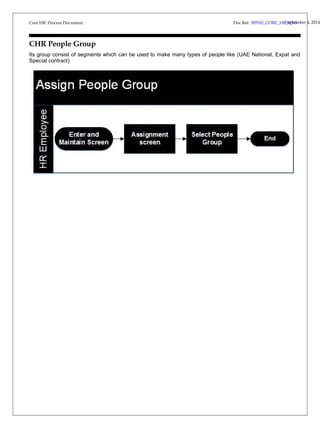
CHR People Group 
Its group consist of segments which can be used to make many types of people like (UAE National, Expat and 
Special contract)
Core HR Process Document 
Doc Ref: BP010_CORE_HRS_Vep3t.e0mber 4, 2014 
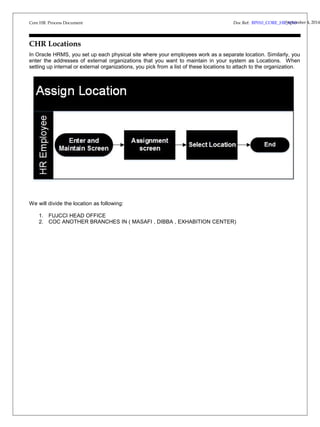
CHR Locations 
In Oracle HRMS, you set up each physical site where your employees work as a separate location. Similarly, you 
enter the addresses of external organizations that you want to maintain in your system as Locations. When 
setting up internal or external organizations, you pick from a list of these locations to attach to the organization. 
We will divide the location as following: 
1. FUJCCI HEAD OFFICE 
2. COC ANOTHER BRANCHES IN ( MASAFI , DIBBA , EXHABITION CENTER)
Core HR Process Document 
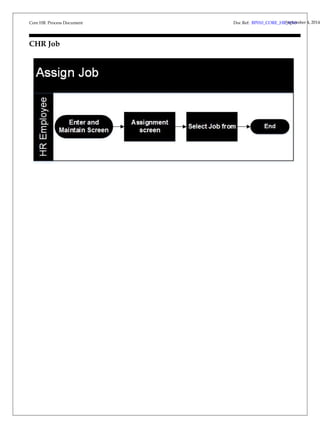
CHR Job 
Doc Ref: BP010_CORE_HRS_Vep3t.e0mber 4, 2014
Core HR Process Document 
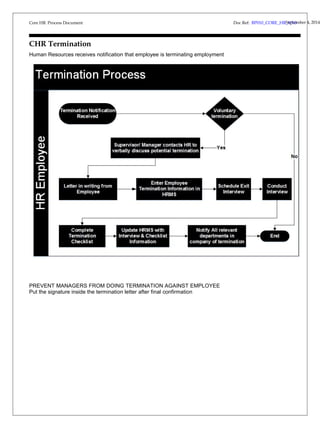
CHR Termination 
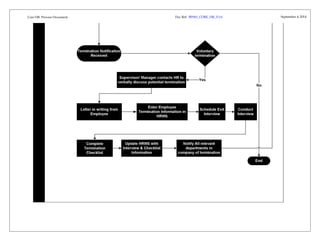
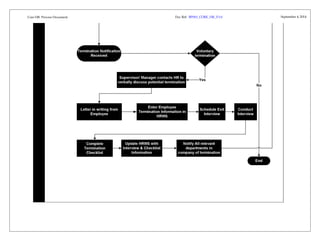
Human Resources receives notification that employee is terminating employment 
PREVENT MANAGERS FROM DOING TERMINATION AGAINST EMPLOYEE 
Put the signature inside the termination letter after final confirmation 
Doc Ref: BP010_CORE_HRS_Vep3t.e0mber 4, 2014
Core HR Process Document 
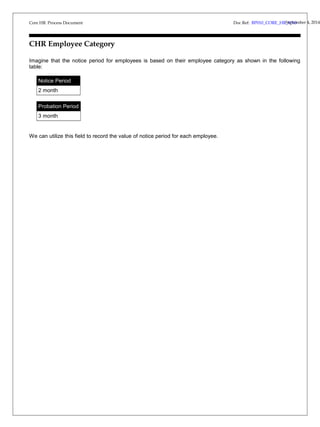
CHR Employee Category 
Imagine that the notice period for employees is based on their employee category as shown in the following 
table: 
Notice Period 
2 month 
Probation Period 
3 month 
We can utilize this field to record the value of notice period for each employee. 
Doc Ref: BP010_CORE_HRS_Vep3t.e0mber 4, 2014
Core HR Process Document 
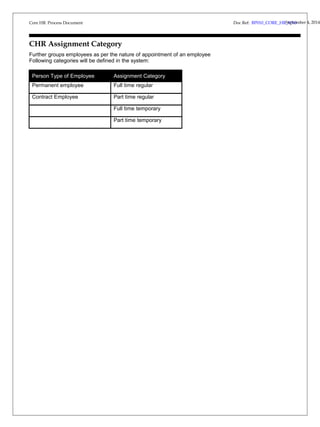
CHR Assignment Category 
Further groups employees as per the nature of appointment of an employee 
Following categories will be defined in the system: 
Person Type of Employee Assignment Category 
Permanent employee Full time regular 
Contract Employee Part time regular 
Full time temporary 
Part time temporary 
Doc Ref: BP010_CORE_HRS_Vep3t.e0mber 4, 2014
Core HR Process Document September Doc Ref: BP010_CORE_HR_V3.0 4, 2014
Core HR Process Document 
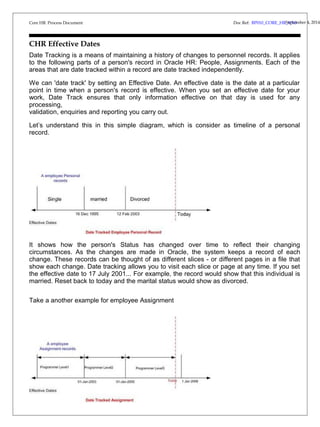
CHR Effective Dates 
Date Tracking is a means of maintaining a history of changes to personnel records. It applies 
to the following parts of a person's record in Oracle HR: People, Assignments. Each of the 
areas that are date tracked within a record are date tracked independently. 
We can 'date track' by setting an Effective Date. An effective date is the date at a particular 
point in time when a person's record is effective. When you set an effective date for your 
work, Date Track ensures that only information effective on that day is used for any 
processing, 
validation, enquiries and reporting you carry out. 
Let’s understand this in this simple diagram, which is consider as timeline of a personal 
record. 
It shows how the person's Status has changed over time to reflect their changing 
circumstances. As the changes are made in Oracle, the system keeps a record of each 
change. These records can be thought of as different slices - or different pages in a file that 
show each change. Date tracking allows you to visit each slice or page at any time. If you set 
the effective date to 17 July 2001... For example, the record would show that this individual is 
married. Reset back to today and the marital status would show as divorced. 
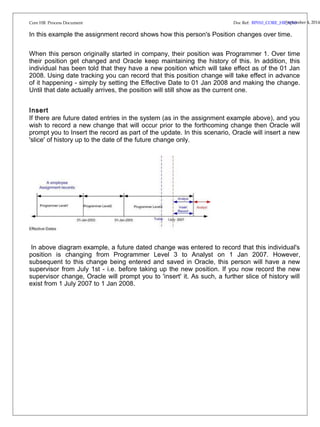
Take a another example for employee Assignment 
Doc Ref: BP010_CORE_HRS_Vep3t.e0mber 4, 2014
Doc Ref: BP010_CORE_HRS_Vep3t.e0mber 4, 2014 
Core HR Process Document 
In this example the assignment record shows how this person's Position changes over time. 
When this person originally started in company, their position was Programmer 1. Over time 
their position get changed and Oracle keep maintaining the history of this. In addition, this 
individual has been told that they have a new position which will take effect as of the 01 Jan 
2008. Using date tracking you can record that this position change will take effect in advance 
of it happening - simply by setting the Effective Date to 01 Jan 2008 and making the change. 
Until that date actually arrives, the position will still show as the current one. 
Insert 
If there are future dated entries in the system (as in the assignment example above), and you 
wish to record a new change that will occur prior to the forthcoming change then Oracle will 
prompt you to Insert the record as part of the update. In this scenario, Oracle will insert a new 
'slice' of history up to the date of the future change only. 
In above diagram example, a future dated change was entered to record that this individual's 
position is changing from Programmer Level 3 to Analyst on 1 Jan 2007. However, 
subsequent to this change being entered and saved in Oracle, this person will have a new 
supervisor from July 1st - i.e. before taking up the new position. If you now record the new 
supervisor change, Oracle will prompt you to 'insert' it. As such, a further slice of history will 
exist from 1 July 2007 to 1 Jan 2008.
Core HR Process Document 
Doc Ref: BP010_CORE_HRS_Vep3t.e0mber 4, 2014 
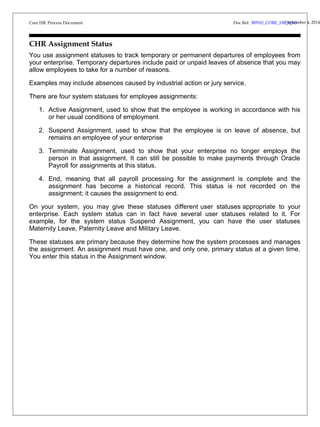
CHR Assignment Status 
You use assignment statuses to track temporary or permanent departures of employees from 
your enterprise. Temporary departures include paid or unpaid leaves of absence that you may 
allow employees to take for a number of reasons. 
Examples may include absences caused by industrial action or jury service. 
There are four system statuses for employee assignments: 
1. Active Assignment, used to show that the employee is working in accordance with his 
or her usual conditions of employment 
2. Suspend Assignment, used to show that the employee is on leave of absence, but 
remains an employee of your enterprise 
3. Terminate Assignment, used to show that your enterprise no longer employs the 
person in that assignment. It can still be possible to make payments through Oracle 
Payroll for assignments at this status. 
4. End, meaning that all payroll processing for the assignment is complete and the 
assignment has become a historical record. This status is not recorded on the 
assignment; it causes the assignment to end. 
On your system, you may give these statuses different user statuses appropriate to your 
enterprise. Each system status can in fact have several user statuses related to it. For 
example, for the system status Suspend Assignment, you can have the user statuses 
Maternity Leave, Paternity Leave and Military Leave. 
These statuses are primary because they determine how the system processes and manages 
the assignment. An assignment must have one, and only one, primary status at a given time. 
You enter this status in the Assignment window.
Core HR Process Document 
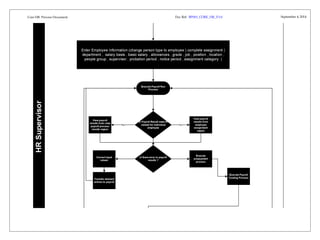
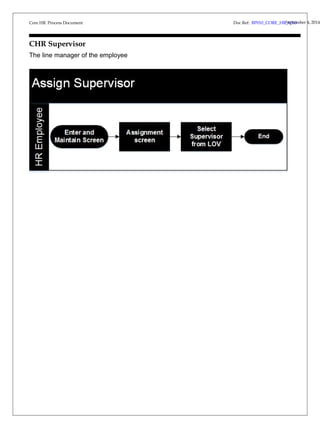
CHR Supervisor 
The line manager of the employee 
Doc Ref: BP010_CORE_HRS_Vep3t.e0mber 4, 2014
Core HR Process Document 
Doc Ref: BP010_CORE_HRS_Vep3t.e0mber 4, 2014 
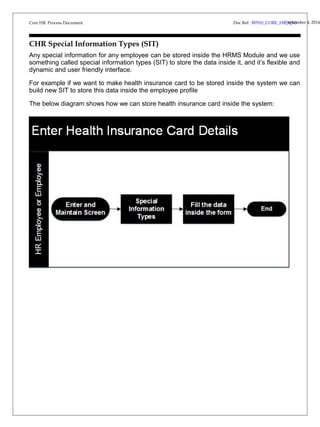
CHR Special Information Types (SIT) 
Any special information for any employee can be stored inside the HRMS Module and we use 
something called special information types (SIT) to store the data inside it, and it’s flexible and 
dynamic and user friendly interface. 
For example if we want to make health insurance card to be stored inside the system we can 
build new SIT to store this data inside the employee profile 
The below diagram shows how we can store health insurance card inside the system:
Core HR Process Document 
Open and Closed Issues for this Deliverable 
Open Issues 
Doc Ref: BP010_CORE_HRS_Vep3t.e0mber 4, 2014 
ID Issue Resolution Responsibility Target Date Impact 
Date 
Closed Issues 
ID Issue Resolution Responsibility Target Date Impact 
Date

BP010 Core HR

  • 1.
    Core HR BP.010Business Process Document Process Document Doc Ref: BP010_CORE_HRS_Vep3t.e0mber 4, 2014 AIM BP.010 BUSINESS PROCESS DOCUMENT FUJAIRAH CHAMBER OF COMMERCE Core HR Author: Raqmiyat Consultant Creation Date: 11-May-14 Last Updated: Document Ref: BP010_V3.0 Version: 3 Approvals: Name Signature & Date Mr. Mr. Copy Number_____
  • 2.
    Core HR BP.010Business Process Document Process Document Document Control Change Record Doc Ref: BP010_CORE_HRS_Vep3t.e0mber 4, 2014 1 Date Author Version Change Reference 27-mar-14 Feras Ahmad 1.0 No Previous Document 28Apr-14 Feras Ahmad 2.0 No Previous Document 08-May-14 Feras Ahmad 3.0 No Previous Document Reviewers Name Position Mr. Kashif Project Manager – Raqmiyat Mr. Sultan HR manager Distribution Copy No. Name Location 1 Library Master Project Library 2 Project Manager 34 Note To Holders: If you receive an electronic copy of this document and print it out, please write your name on the equivalent of the cover page, for document control purposes. If you receive a hard copy of this document, please write your name on the front cover, for document control purposes.
  • 3.
    Core HR BP.010Business Process Document Process Document Contents Doc Ref: BP010_CORE_HRS_Vep3t.e0mber 4, 2014 Document Control...................................................................................................................2 Business Process Identification..............................................................................................4 CHR HR Departments .........................................................................................................12 CHR Person Type..................................................................................................................13 CHR Mandatory Fields of Employee Profile ...................................................................14 CHR Hire Employee .............................................................................................................15 CHR Grades ...........................................................................................................................16 CHR People Group ...............................................................................................................17 CHR Locations ......................................................................................................................18 CHR Job...................................................................................................................................19 CHR Termination ..................................................................................................................20 CHR Employee Category ....................................................................................................21 CHR Assignment Category .................................................................................................22 CHR Effective Dates .............................................................................................................24 CHR Assignment Status.......................................................................................................26 CHR Supervisor.....................................................................................................................27 CHR Special Information Types (SIT) ...............................................................................28 Open and Closed Issues for this Deliverable....................................................................29 Open Issues......................................................................................................................29 Closed Issues...................................................................................................................29
  • 4.
    Core HR BP.010Business Process Document Process Document Business Process Identification Core HR Business Process covers the following processes/functionalities - CHR HRMS - CHR HR Departments - CHR Person Type - CHR Mandatory Fields of Employee Profile - CHR Hire Employee - CHR Grades - CHR People Group - CHR Locations - CHR Jobs - CHR Termination - CHR Employee Category - CHR Assignments Category - CHR Effective Dates - CHR Assignment Status - CHR Supervisor - CHR Special Information Types (SIT) Doc Ref: BP010_CORE_HRS_Vep3t.e0mber 4, 2014
  • 5.
    Core HR ProcessDocument September Doc Ref: BP010_CORE_HR_V3.0 4, 2014
  • 6.
    Core HR ProcessDocument September Doc Ref: BP010_CORE_HR_V3.0 4, 2014
  • 7.
    Core HR ProcessDocument September Doc Ref: BP010_CORE_HR_V3.0 4, 2014
  • 8.
    Core HR ProcessDocument September Doc Ref: BP010_CORE_HR_V3.0 4, 2014
  • 9.
    Core HR ProcessDocument September Doc Ref: BP010_CORE_HR_V3.0 4, 2014
  • 10.
    Core HR ProcessDocument September Doc Ref: BP010_CORE_HR_V3.0 4, 2014
  • 11.
    Core HR ProcessDocument Doc Ref: BP010_CORE_HRS_Vep3t.e0mber 4, 2014 CHR HR Departments The below diagram shows how we can assign the organization to any employee inside the system:
  • 12.
    Core HR ProcessDocument Doc Ref: BP010_CORE_HRS_Vep3t.e0mber 4, 2014 CHR Person Type Identify different groups of people to control access to records. They also associate different types of information for retention. There are three basic types of people for whom HRMS maintains information for Employees and Applicants. There are many Person Types recognized by the system and identified by a system name – Applicant, Employee, Ex-applicant, and Ex-employee.
  • 13.
    Core HR ProcessDocument CHR Mandatory Fields of Employee Profile Doc Ref: BP010_CORE_HRS_Vep3t.e0mber 4, 2014 Title, First Name, Father Name, Family Name , Employee Number auto generation number (administration letter number + hire date+0001) , Religion , Emirates ID Number , Gender, Birth Date , Place of Birth , Age ,Social/Marital Status. Administration Letter Number, Hire Date, Email Address (Official Email Address), Office Extension Number, Present Nationality, Educational Level.
  • 14.
    Core HR ProcessDocument CHR Hire Employee The below diagram shows how to hire employee or applicant inside the system: Doc Ref: BP010_CORE_HRS_Vep3t.e0mber 4, 2014
  • 15.
    Core HR ProcessDocument CHR Grades The below diagram shows how to assign grade to employee: Doc Ref: BP010_CORE_HRS_Vep3t.e0mber 4, 2014
  • 16.
    Core HR ProcessDocument Doc Ref: BP010_CORE_HRS_Vep3t.e0mber 4, 2014 CHR People Group Its group consist of segments which can be used to make many types of people like (UAE National, Expat and Special contract)
  • 17.
    Core HR ProcessDocument Doc Ref: BP010_CORE_HRS_Vep3t.e0mber 4, 2014 CHR People Group Its group consist of segments which can be used to make many types of people like (UAE National, Expat and Special contract)
  • 18.
    Core HR ProcessDocument Doc Ref: BP010_CORE_HRS_Vep3t.e0mber 4, 2014 CHR Locations In Oracle HRMS, you set up each physical site where your employees work as a separate location. Similarly, you enter the addresses of external organizations that you want to maintain in your system as Locations. When setting up internal or external organizations, you pick from a list of these locations to attach to the organization. We will divide the location as following: 1. FUJCCI HEAD OFFICE 2. COC ANOTHER BRANCHES IN ( MASAFI , DIBBA , EXHABITION CENTER)
  • 19.
    Core HR ProcessDocument CHR Job Doc Ref: BP010_CORE_HRS_Vep3t.e0mber 4, 2014
  • 20.
    Core HR ProcessDocument CHR Termination Human Resources receives notification that employee is terminating employment PREVENT MANAGERS FROM DOING TERMINATION AGAINST EMPLOYEE Put the signature inside the termination letter after final confirmation Doc Ref: BP010_CORE_HRS_Vep3t.e0mber 4, 2014
  • 21.
    Core HR ProcessDocument CHR Employee Category Imagine that the notice period for employees is based on their employee category as shown in the following table: Notice Period 2 month Probation Period 3 month We can utilize this field to record the value of notice period for each employee. Doc Ref: BP010_CORE_HRS_Vep3t.e0mber 4, 2014
  • 22.
    Core HR ProcessDocument CHR Assignment Category Further groups employees as per the nature of appointment of an employee Following categories will be defined in the system: Person Type of Employee Assignment Category Permanent employee Full time regular Contract Employee Part time regular Full time temporary Part time temporary Doc Ref: BP010_CORE_HRS_Vep3t.e0mber 4, 2014
  • 23.
    Core HR ProcessDocument September Doc Ref: BP010_CORE_HR_V3.0 4, 2014
  • 24.
    Core HR ProcessDocument CHR Effective Dates Date Tracking is a means of maintaining a history of changes to personnel records. It applies to the following parts of a person's record in Oracle HR: People, Assignments. Each of the areas that are date tracked within a record are date tracked independently. We can 'date track' by setting an Effective Date. An effective date is the date at a particular point in time when a person's record is effective. When you set an effective date for your work, Date Track ensures that only information effective on that day is used for any processing, validation, enquiries and reporting you carry out. Let’s understand this in this simple diagram, which is consider as timeline of a personal record. It shows how the person's Status has changed over time to reflect their changing circumstances. As the changes are made in Oracle, the system keeps a record of each change. These records can be thought of as different slices - or different pages in a file that show each change. Date tracking allows you to visit each slice or page at any time. If you set the effective date to 17 July 2001... For example, the record would show that this individual is married. Reset back to today and the marital status would show as divorced. Take a another example for employee Assignment Doc Ref: BP010_CORE_HRS_Vep3t.e0mber 4, 2014
  • 25.
    Doc Ref: BP010_CORE_HRS_Vep3t.e0mber4, 2014 Core HR Process Document In this example the assignment record shows how this person's Position changes over time. When this person originally started in company, their position was Programmer 1. Over time their position get changed and Oracle keep maintaining the history of this. In addition, this individual has been told that they have a new position which will take effect as of the 01 Jan 2008. Using date tracking you can record that this position change will take effect in advance of it happening - simply by setting the Effective Date to 01 Jan 2008 and making the change. Until that date actually arrives, the position will still show as the current one. Insert If there are future dated entries in the system (as in the assignment example above), and you wish to record a new change that will occur prior to the forthcoming change then Oracle will prompt you to Insert the record as part of the update. In this scenario, Oracle will insert a new 'slice' of history up to the date of the future change only. In above diagram example, a future dated change was entered to record that this individual's position is changing from Programmer Level 3 to Analyst on 1 Jan 2007. However, subsequent to this change being entered and saved in Oracle, this person will have a new supervisor from July 1st - i.e. before taking up the new position. If you now record the new supervisor change, Oracle will prompt you to 'insert' it. As such, a further slice of history will exist from 1 July 2007 to 1 Jan 2008.
  • 26.
    Core HR ProcessDocument Doc Ref: BP010_CORE_HRS_Vep3t.e0mber 4, 2014 CHR Assignment Status You use assignment statuses to track temporary or permanent departures of employees from your enterprise. Temporary departures include paid or unpaid leaves of absence that you may allow employees to take for a number of reasons. Examples may include absences caused by industrial action or jury service. There are four system statuses for employee assignments: 1. Active Assignment, used to show that the employee is working in accordance with his or her usual conditions of employment 2. Suspend Assignment, used to show that the employee is on leave of absence, but remains an employee of your enterprise 3. Terminate Assignment, used to show that your enterprise no longer employs the person in that assignment. It can still be possible to make payments through Oracle Payroll for assignments at this status. 4. End, meaning that all payroll processing for the assignment is complete and the assignment has become a historical record. This status is not recorded on the assignment; it causes the assignment to end. On your system, you may give these statuses different user statuses appropriate to your enterprise. Each system status can in fact have several user statuses related to it. For example, for the system status Suspend Assignment, you can have the user statuses Maternity Leave, Paternity Leave and Military Leave. These statuses are primary because they determine how the system processes and manages the assignment. An assignment must have one, and only one, primary status at a given time. You enter this status in the Assignment window.
  • 27.
    Core HR ProcessDocument CHR Supervisor The line manager of the employee Doc Ref: BP010_CORE_HRS_Vep3t.e0mber 4, 2014
  • 28.
    Core HR ProcessDocument Doc Ref: BP010_CORE_HRS_Vep3t.e0mber 4, 2014 CHR Special Information Types (SIT) Any special information for any employee can be stored inside the HRMS Module and we use something called special information types (SIT) to store the data inside it, and it’s flexible and dynamic and user friendly interface. For example if we want to make health insurance card to be stored inside the system we can build new SIT to store this data inside the employee profile The below diagram shows how we can store health insurance card inside the system:
  • 29.
    Core HR ProcessDocument Open and Closed Issues for this Deliverable Open Issues Doc Ref: BP010_CORE_HRS_Vep3t.e0mber 4, 2014 ID Issue Resolution Responsibility Target Date Impact Date Closed Issues ID Issue Resolution Responsibility Target Date Impact Date