Validation type 'Special' in Value sets in Oracle
Oracle Special Value Set
Special value set configuration and uses.
I have observed that many a times we need to restrict users to a limited, conditional value
entries either in DFF or when submitting concurrent request.
Normally we can use dependent value set, but when dynamic or some specific check is
required, then special value set is better and only choice.
Below I have described all the steps for configuring value set. Assign this value set to DFF
or concurrent req. parameter as required.
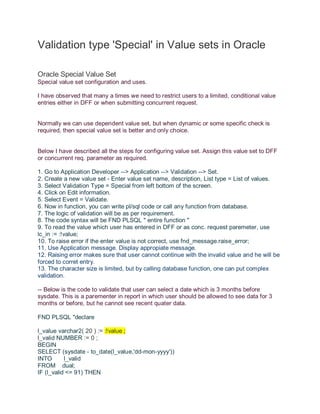
1. Go to Application Developer --> Application --> Validation --> Set.
2. Create a new value set - Enter value set name, description, List type = List of values.
3. Select Validation Type = Special from left bottom of the screen.
4. Click on Edit information.
5. Select Event = Validate.
6. Now in function, you can write pl/sql code or call any function from database.
7. The logic of validation will be as per requirement.
8. The code syntax will be FND PLSQL " entire function "
9. To read the value which user has entered in DFF or as conc. request paremeter, use
lc_in := :!value;
10. To raise error if the enter value is not correct, use fnd_message.raise_error;
11. Use Application message. Display appropiate message.
12. Raising error makes sure that user cannot continue with the invalid value and he will be
forced to corret entry.
13. The character size is limited, but by calling database function, one can put complex
validation.
-- Below is the code to validate that user can select a date which is 3 months before
sysdate. This is a parementer in report in which user should be allowed to see data for 3
months or before, but he cannot see recent quater data.
FND PLSQL "declare
l_value varchar2( 20 ) := :!value ;
l_valid NUMBER := 0 ;
BEGIN
SELECT (sysdate - to_date(l_value,'dd-mon-yyyy'))
INTO l_valid
FROM dual;
IF (l_valid <= 91) THEN
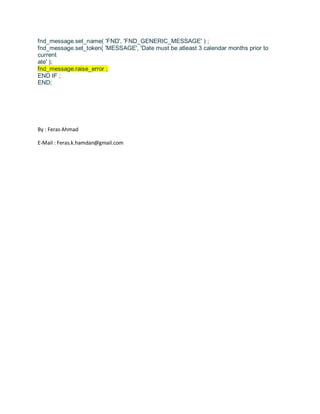
fnd_message.set_name( 'FND', 'FND_GENERIC_MESSAGE' ) ;
fnd_message.set_token( 'MESSAGE', 'Date must be atleast 3 calendar months prior to
current
ate' );
fnd_message.raise_error ;
END IF ;
END;
By : Feras Ahmad
E-Mail : Feras.k.hamdan@gmail.com

Validation type 'special' in value sets

  • 1.
    Validation type 'Special'in Value sets in Oracle Oracle Special Value Set Special value set configuration and uses. I have observed that many a times we need to restrict users to a limited, conditional value entries either in DFF or when submitting concurrent request. Normally we can use dependent value set, but when dynamic or some specific check is required, then special value set is better and only choice. Below I have described all the steps for configuring value set. Assign this value set to DFF or concurrent req. parameter as required. 1. Go to Application Developer --> Application --> Validation --> Set. 2. Create a new value set - Enter value set name, description, List type = List of values. 3. Select Validation Type = Special from left bottom of the screen. 4. Click on Edit information. 5. Select Event = Validate. 6. Now in function, you can write pl/sql code or call any function from database. 7. The logic of validation will be as per requirement. 8. The code syntax will be FND PLSQL " entire function " 9. To read the value which user has entered in DFF or as conc. request paremeter, use lc_in := :!value; 10. To raise error if the enter value is not correct, use fnd_message.raise_error; 11. Use Application message. Display appropiate message. 12. Raising error makes sure that user cannot continue with the invalid value and he will be forced to corret entry. 13. The character size is limited, but by calling database function, one can put complex validation. -- Below is the code to validate that user can select a date which is 3 months before sysdate. This is a parementer in report in which user should be allowed to see data for 3 months or before, but he cannot see recent quater data. FND PLSQL "declare l_value varchar2( 20 ) := :!value ; l_valid NUMBER := 0 ; BEGIN SELECT (sysdate - to_date(l_value,'dd-mon-yyyy')) INTO l_valid FROM dual; IF (l_valid <= 91) THEN
  • 2.
    fnd_message.set_name( 'FND', 'FND_GENERIC_MESSAGE') ; fnd_message.set_token( 'MESSAGE', 'Date must be atleast 3 calendar months prior to current ate' ); fnd_message.raise_error ; END IF ; END; By : Feras Ahmad E-Mail : Feras.k.hamdan@gmail.com