`
Human Resources & Payroll
Process Flowchart
Human Resources & Payroll
Process Flowchart
1. HR & Payroll – Staffing L6 to L11
2. HR & Payroll – Hire Personnel
3. HR & Payroll – Terminate Employees
4. HR & Payroll – Time Recording
5. Performance Management
6. PMP – Salary Increase
7. PMP – Bonus
8. C&B Process – Job Evaluations (JE)
9. Vacation Processing
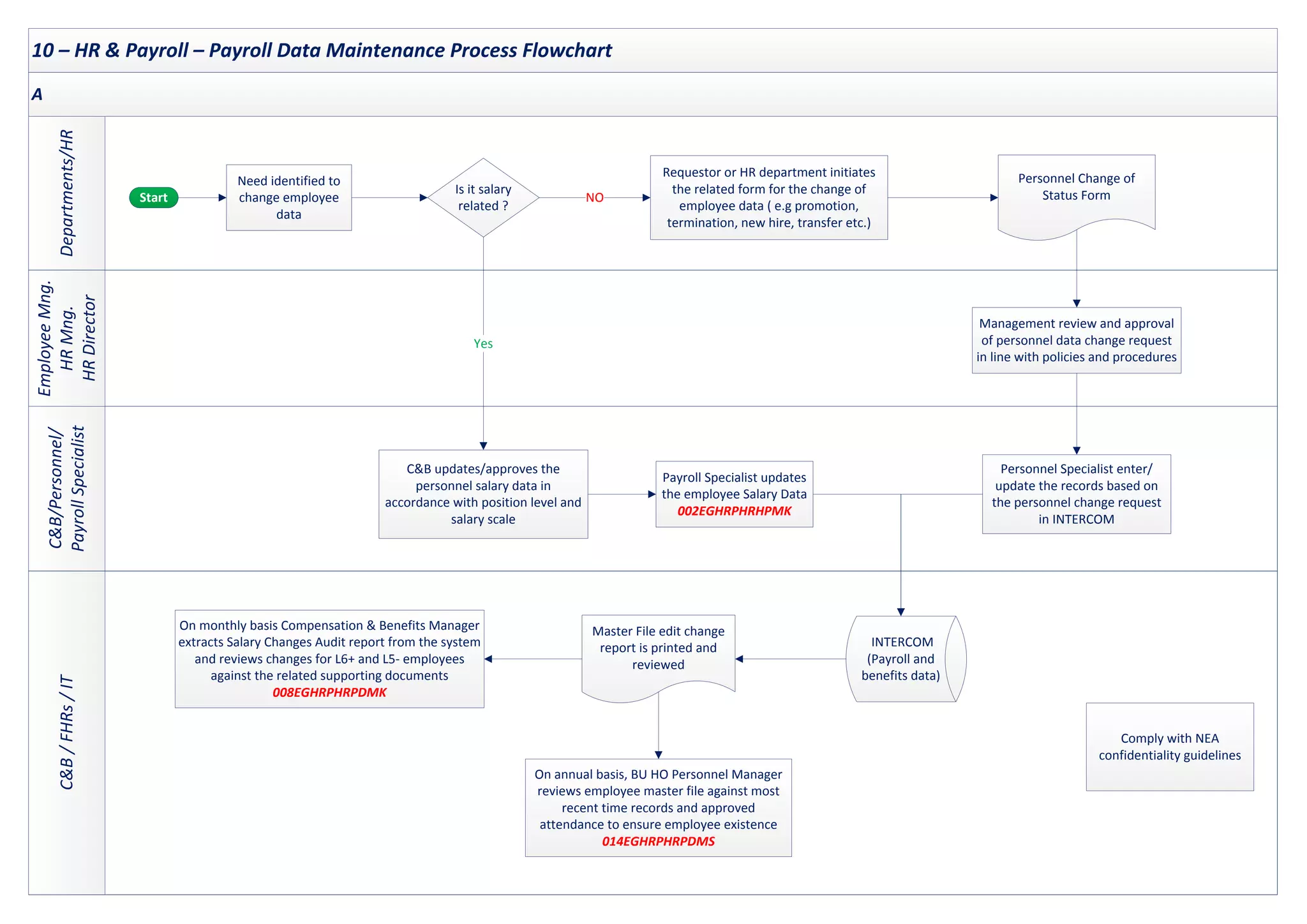
10. HR & Payroll – Payroll Data Maintenance
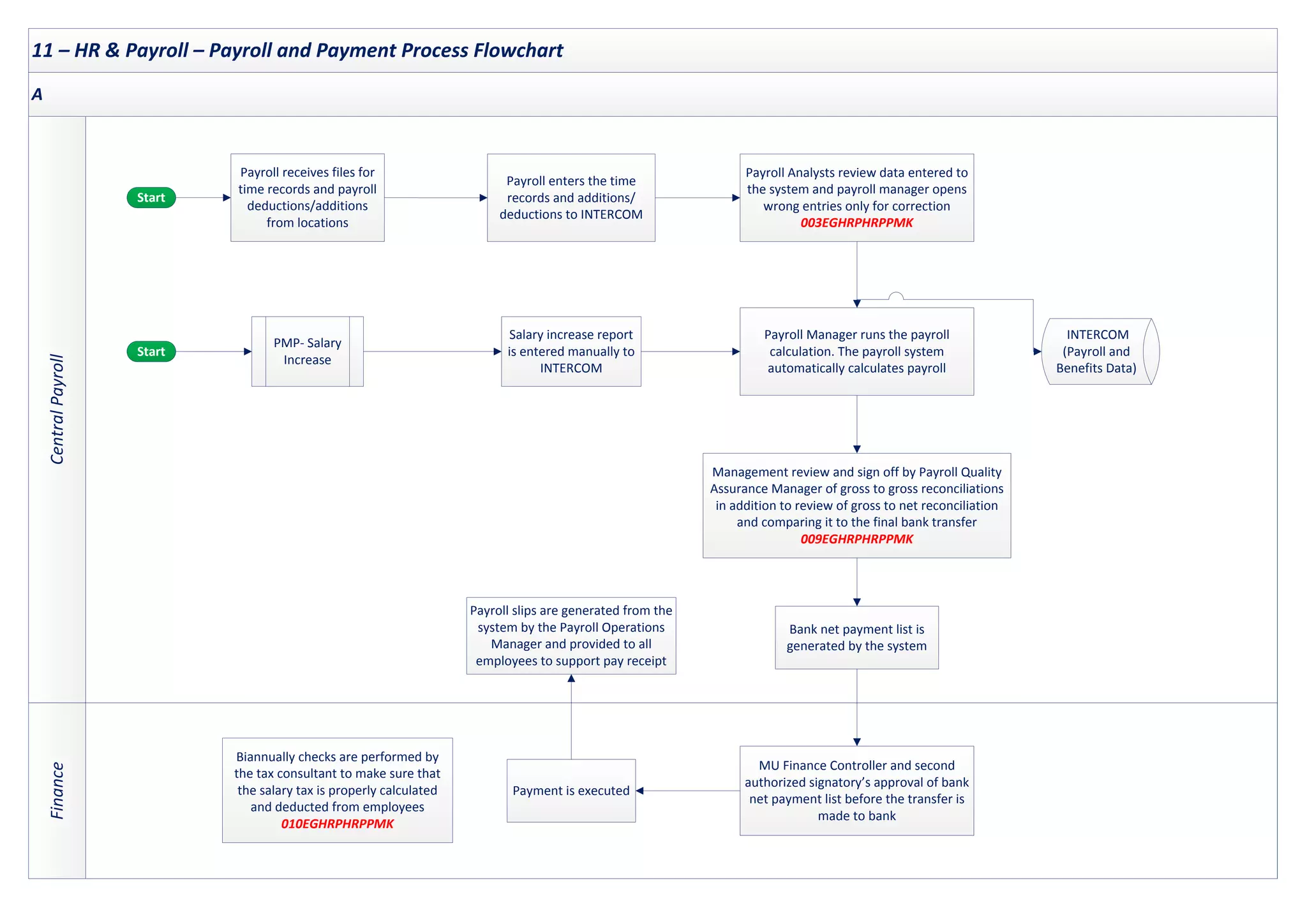
11. HR & Payroll – Payroll and Payment
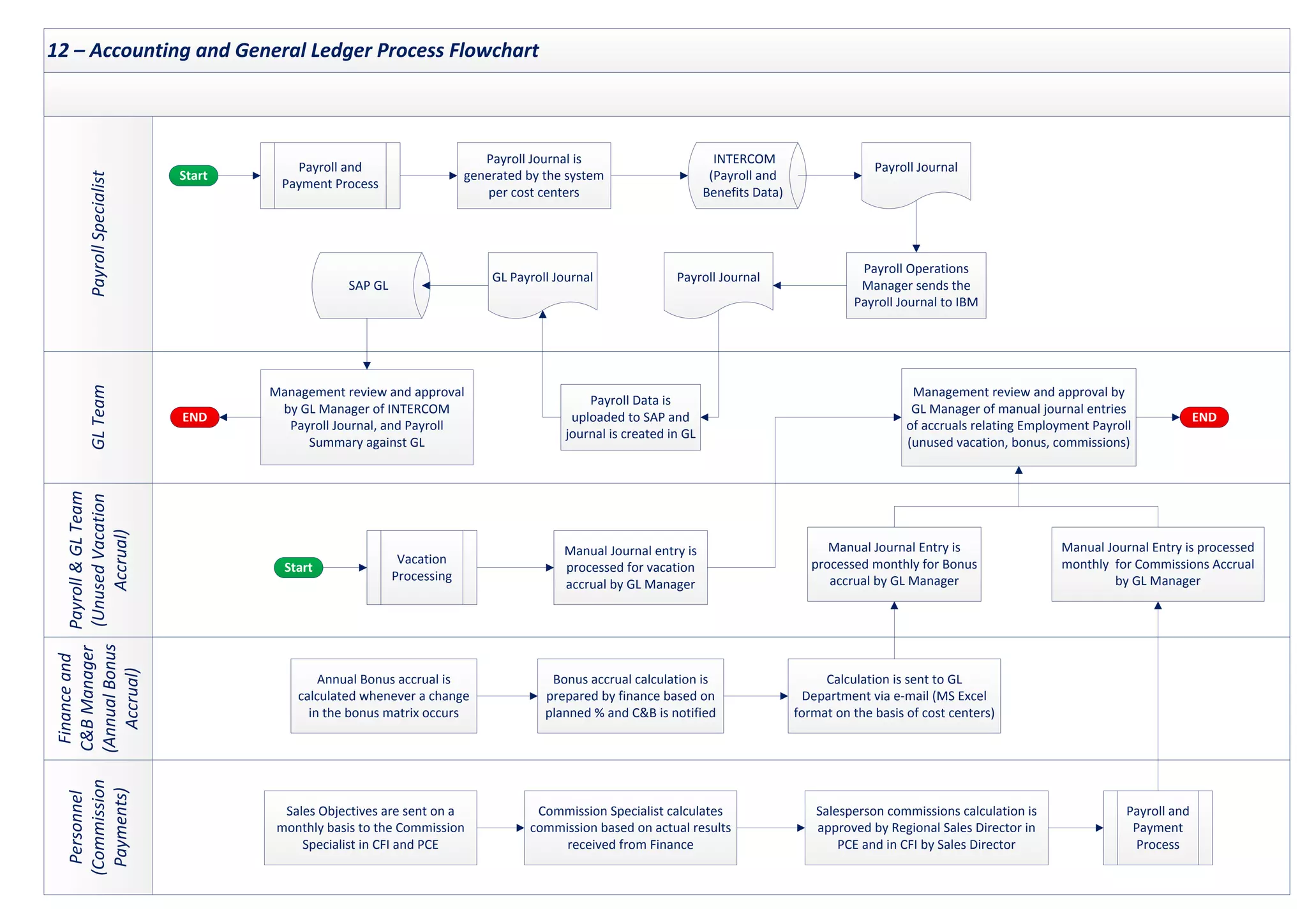
12. Accounting and General Ledger
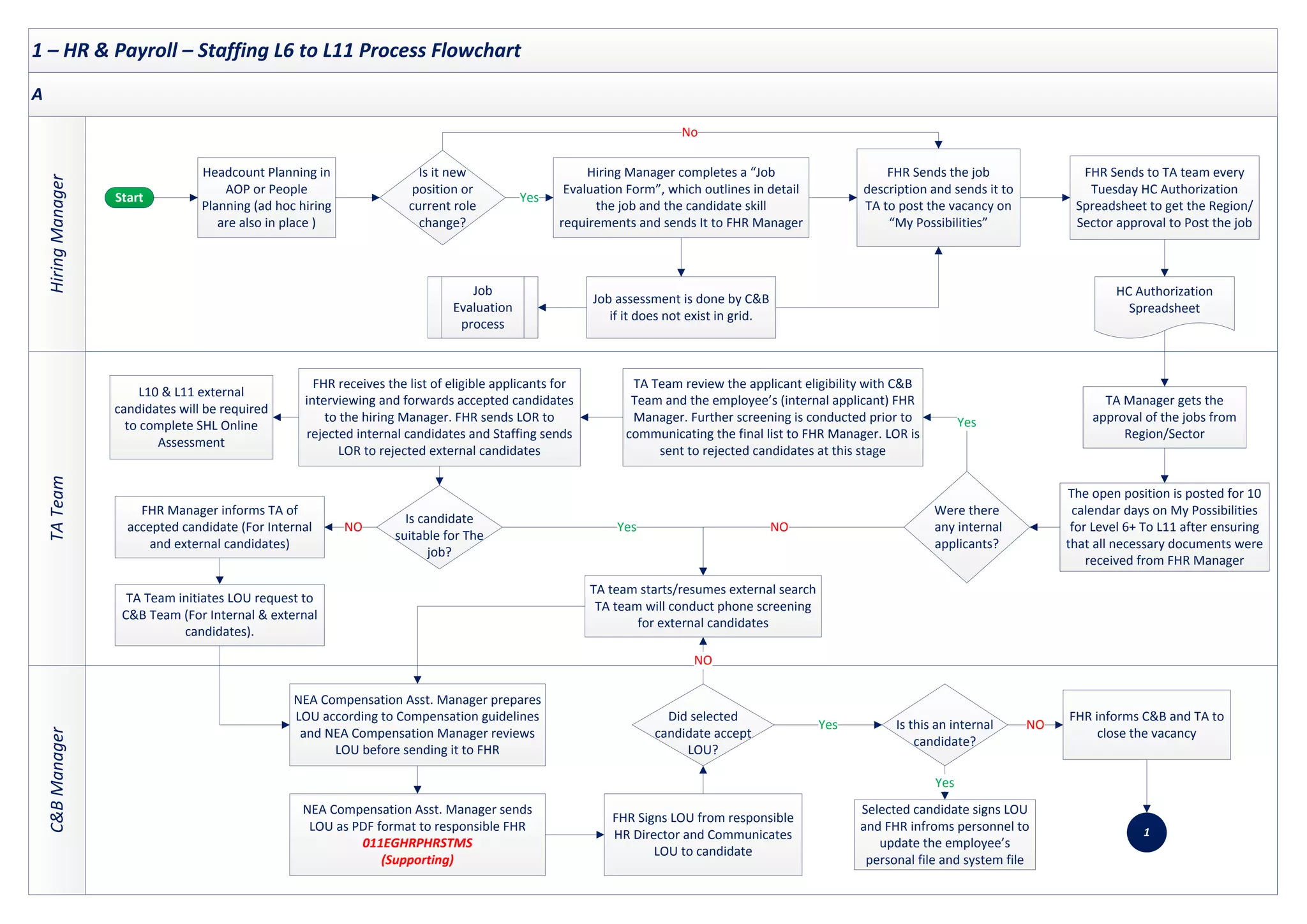
1 – HR & Payroll – Staffing L6 to L11 Process Flowchart
TA
Team
C&B
Manager
Hiring
Manager
A
Start Yes
No
FHR Sends the job
description and sends it to
TA to post the vacancy on
“My Possibilities”
Headcount Planning in
AOP or People
Planning (ad hoc hiring
are also in place )
Is it new
position or
current role
change?
Hiring Manager completes a “Job
Evaluation Form”, which outlines in detail
the job and the candidate skill
requirements and sends It to FHR Manager
Job
Evaluation
process
Job assessment is done by C&B
if it does not exist in grid.
FHR Sends to TA team every
Tuesday HC Authorization
Spreadsheet to get the Region/
Sector approval to Post the job
HC Authorization
Spreadsheet
Yes
The open position is posted for 10
calendar days on My Possibilities
for Level 6+ To L11 after ensuring
that all necessary documents were
received from FHR Manager
Were there
any internal
applicants?
TA Team review the applicant eligibility with C&B
Team and the employee’s (internal applicant) FHR
Manager. Further screening is conducted prior to
communicating the final list to FHR Manager. LOR is
sent to rejected candidates at this stage
FHR receives the list of eligible applicants for
interviewing and forwards accepted candidates
to the hiring Manager. FHR sends LOR to
rejected internal candidates and Staffing sends
LOR to rejected external candidates
L10 & L11 external
candidates will be required
to complete SHL Online
Assessment
TA Manager gets the
approval of the jobs from
Region/Sector
Is candidate
suitable for The
job?
TA team starts/resumes external search
TA team will conduct phone screening
for external candidates
NO
Yes
FHR Manager informs TA of
accepted candidate (For Internal
and external candidates)
TA Team initiates LOU request to
C&B Team (For Internal & external
candidates).
NO
FHR Signs LOU from responsible
HR Director and Communicates
LOU to candidate
NEA Compensation Asst. Manager prepares
LOU according to Compensation guidelines
and NEA Compensation Manager reviews
LOU before sending it to FHR
NEA Compensation Asst. Manager sends
LOU as PDF format to responsible FHR
011EGHRPHRSTMS
(Supporting)
Selected candidate signs LOU
and FHR infroms personnel to
update the employee’s
personal file and system file
Did selected
candidate accept
LOU?
Is this an internal
candidate?
FHR informs C&B and TA to
close the vacancy
NO
Yes
Yes
NO
1
2 – HR & Payroll – Hire Personnel Process Flowchart
Personnel
Specialist
HR
Director/FHR/
Personnel
Specialist
New
Hire
Payroll
Specalist
A
Start
Candidate is required to pass a pre-
employment medical check-up and
submit hiring documents and
experience certificates for issuing an
employment contract
END
1
Personnel Specialist prepares a contract of
three copies, assigns an employee number
to the new hire and initiates the “CRT
Form” including job details, salary, level
and date of employment
CRT Form
Approved LOU form is
attached to the CRT form
(*1)
Social Insurance & Labor Office documents
including a copy of the employment
contract are prepared by the Specialists
and sent to Social Insurance Authority/
Labor Office after signing
All new hires are required to sign an employment
contract and Code of Conduct within two weeks from
starting date. The employment contract is also signed by
HR after the employee completes the mandatory hiring
documents. Employment Contract and Code of Conduct
are kept in employee’s personnel file.
001EGHRPHRHPMK
Specialists record new
hire data except salary
(All employee data
except payroll)
Payroll Specialist records
the new hire salary on
INTERCOM
(Payroll and Benefits data)
INTERCOM
(*2)
INTERCOM
(*2)
END
(*1) - On-boarding schedule is prepared and HR policies are accessible to all relevant employees.
(*2) - Access to the payroll master file is restricted And only authorized users have access to Payroll master file based on on management authorization
with proper SOD (002EGHRPHRHPMK)
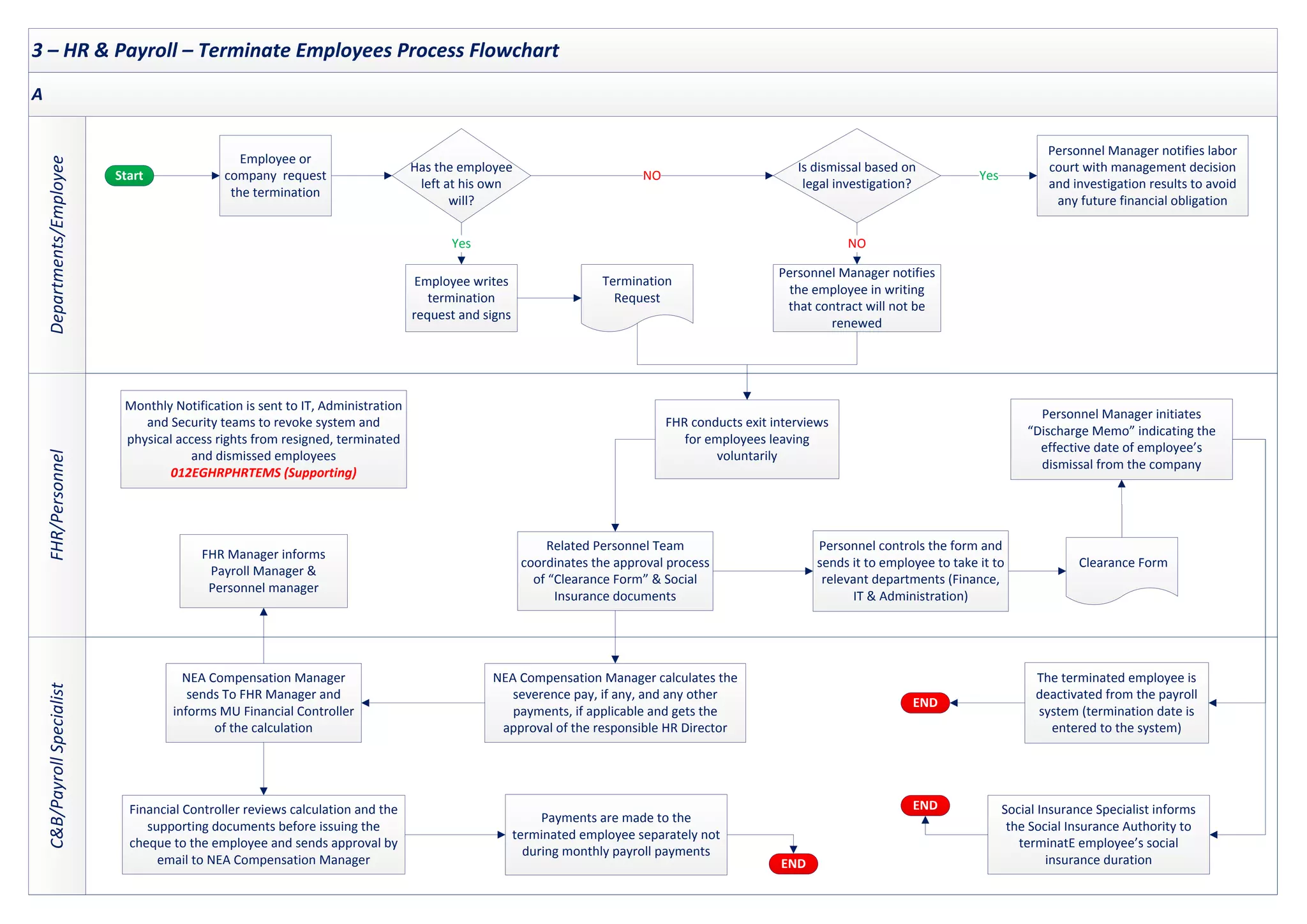
3 – HR & Payroll – Terminate Employees Process Flowchart
FHR/Personnel
C&B/Payroll
Specialist
Departments/Employee
A
Start
Employee or
company request
the termination
Has the employee
left at his own
will?
Personnel Manager notifies labor
court with management decision
and investigation results to avoid
any future financial obligation
Is dismissal based on
legal investigation?
NO Yes
Termination
Request
Employee writes
termination
request and signs
Yes
Personnel Manager notifies
the employee in writing
that contract will not be
renewed
NO
Personnel controls the form and
sends it to employee to take it to
relevant departments (Finance,
IT & Administration)
Clearance Form
Related Personnel Team
coordinates the approval process
of “Clearance Form” & Social
Insurance documents
FHR conducts exit interviews
for employees leaving
voluntarily
Personnel Manager initiates
“Discharge Memo” indicating the
effective date of employee’s
dismissal from the company
NEA Compensation Manager calculates the
severence pay, if any, and any other
payments, if applicable and gets the
approval of the responsible HR Director
Financial Controller reviews calculation and the
supporting documents before issuing the
cheque to the employee and sends approval by
email to NEA Compensation Manager
NEA Compensation Manager
sends To FHR Manager and
informs MU Financial Controller
of the calculation
The terminated employee is
deactivated from the payroll
system (termination date is
entered to the system)
Social Insurance Specialist informs
the Social Insurance Authority to
terminatE employee’s social
insurance duration
Payments are made to the
terminated employee separately not
during monthly payroll payments
FHR Manager informs
Payroll Manager &
Personnel manager
Monthly Notification is sent to IT, Administration
and Security teams to revoke system and
physical access rights from resigned, terminated
and dismissed employees
012EGHRPHRTEMS (Supporting)
END
END
END
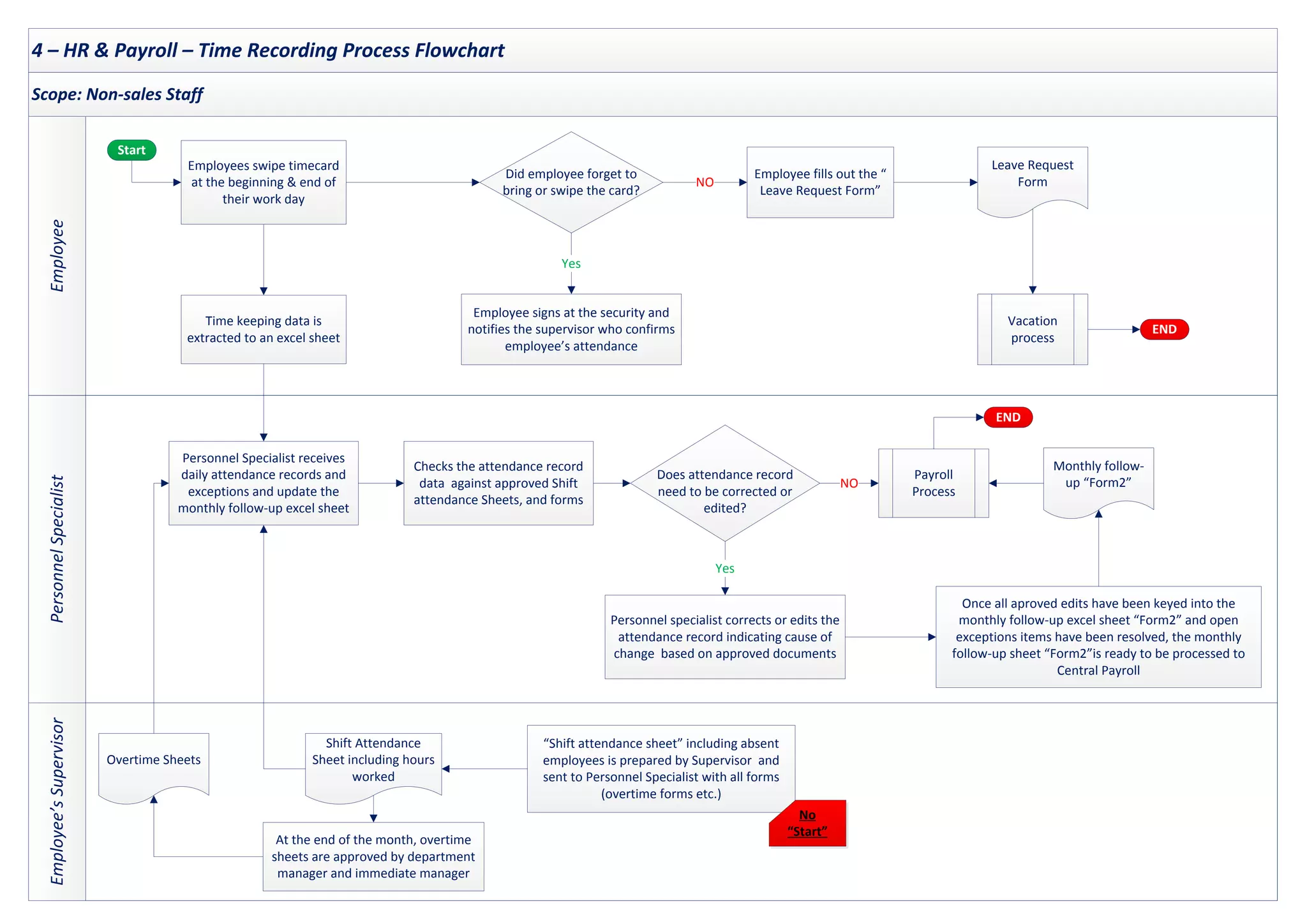
4 – HR & Payroll – Time Recording Process Flowchart
Employee’s
Supervisor
Personnel
Specialist
Employee
Scope: Non-sales Staff
Start
END
Employee fills out the “
Leave Request Form”
Employee signs at the security and
notifies the supervisor who confirms
employee’s attendance
Employees swipe timecard
at the beginning & end of
their work day
Leave Request
Form
Time keeping data is
extracted to an excel sheet
Did employee forget to
bring or swipe the card?
Vacation
process
Yes
NO
Shift Attendance
Sheet including hours
worked
“Shift attendance sheet” including absent
employees is prepared by Supervisor and
sent to Personnel Specialist with all forms
(overtime forms etc.)
Overtime Sheets
At the end of the month, overtime
sheets are approved by department
manager and immediate manager
Payroll
Process
Checks the attendance record
data against approved Shift
attendance Sheets, and forms
Personnel specialist corrects or edits the
attendance record indicating cause of
change based on approved documents
Does attendance record
need to be corrected or
edited?
Monthly follow-
up “Form2”
Once all aproved edits have been keyed into the
monthly follow-up excel sheet “Form2” and open
exceptions items have been resolved, the monthly
follow-up sheet “Form2”is ready to be processed to
Central Payroll
Personnel Specialist receives
daily attendance records and
exceptions and update the
monthly follow-up excel sheet
Yes
NO
END
No
“Start”
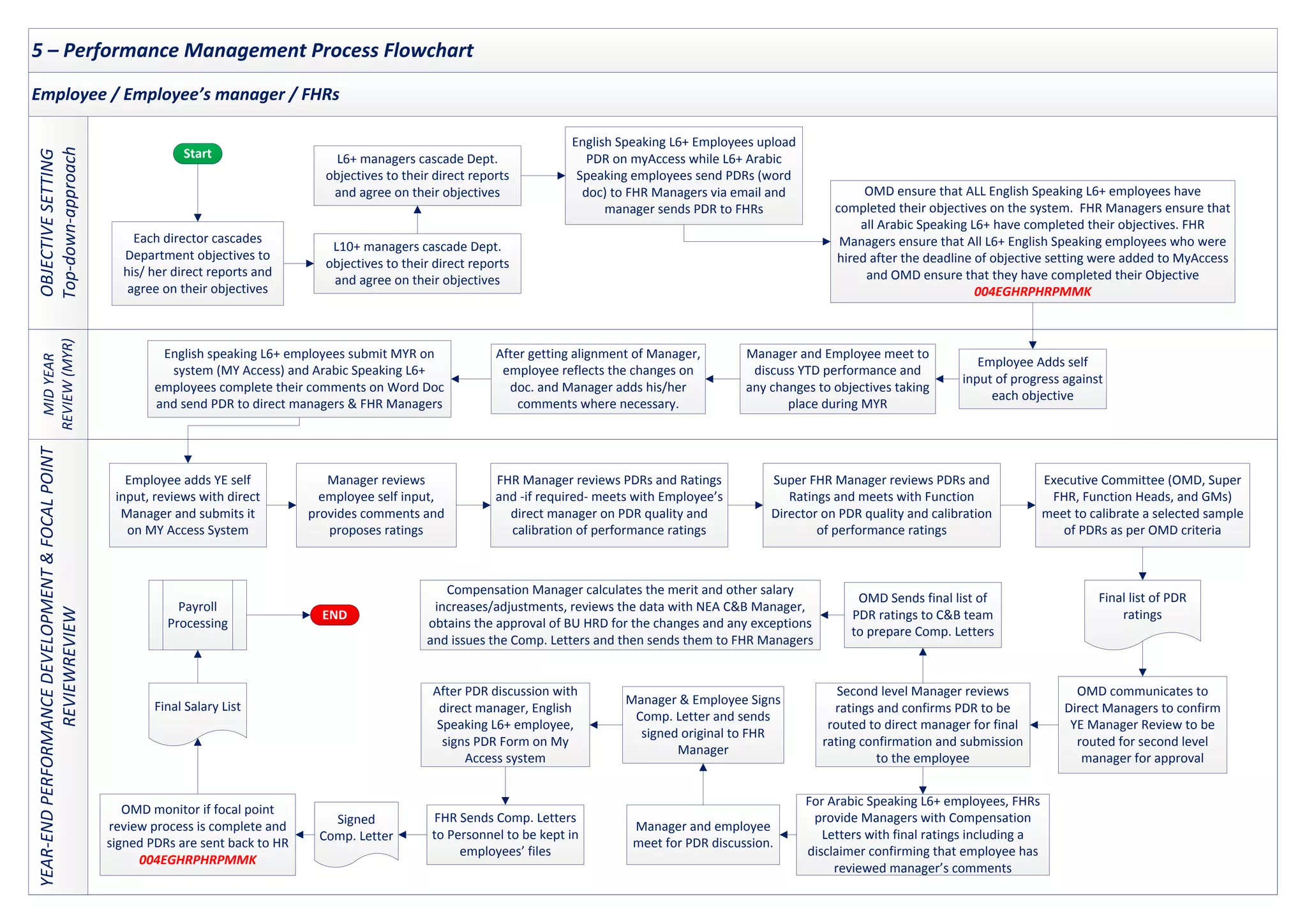
5 – Performance Management Process Flowchart
OBJECTIVE
SETTING
Top-down-approach
MID
YEAR
REVIEW
(MYR)
YEAR-END
PERFORMANCE
DEVELOPMENT
&
FOCAL
POINT
REVIEWREVIEW
Employee / Employee’s manager / FHRs
Start
OMD ensure that ALL English Speaking L6+ employees have
completed their objectives on the system. FHR Managers ensure that
all Arabic Speaking L6+ have completed their objectives. FHR
Managers ensure that All L6+ English Speaking employees who were
hired after the deadline of objective setting were added to MyAccess
and OMD ensure that they have completed their Objective
004EGHRPHRPMMK
English Speaking L6+ Employees upload
PDR on myAccess while L6+ Arabic
Speaking employees send PDRs (word
doc) to FHR Managers via email and
manager sends PDR to FHRs
Each director cascades
Department objectives to
his/ her direct reports and
agree on their objectives
L10+ managers cascade Dept.
objectives to their direct reports
and agree on their objectives
L6+ managers cascade Dept.
objectives to their direct reports
and agree on their objectives
Manager and Employee meet to
discuss YTD performance and
any changes to objectives taking
place during MYR
Employee Adds self
input of progress against
each objective
After getting alignment of Manager,
employee reflects the changes on
doc. and Manager adds his/her
comments where necessary.
English speaking L6+ employees submit MYR on
system (MY Access) and Arabic Speaking L6+
employees complete their comments on Word Doc
and send PDR to direct managers & FHR Managers
Final list of PDR
ratings
FHR Manager reviews PDRs and Ratings
and -if required- meets with Employee’s
direct manager on PDR quality and
calibration of performance ratings
Executive Committee (OMD, Super
FHR, Function Heads, and GMs)
meet to calibrate a selected sample
of PDRs as per OMD criteria
Employee adds YE self
input, reviews with direct
Manager and submits it
on MY Access System
Manager reviews
employee self input,
provides comments and
proposes ratings
Super FHR Manager reviews PDRs and
Ratings and meets with Function
Director on PDR quality and calibration
of performance ratings
Second level Manager reviews
ratings and confirms PDR to be
routed to direct manager for final
rating confirmation and submission
to the employee
OMD communicates to
Direct Managers to confirm
YE Manager Review to be
routed for second level
manager for approval
OMD Sends final list of
PDR ratings to C&B team
to prepare Comp. Letters
Compensation Manager calculates the merit and other salary
increases/adjustments, reviews the data with NEA C&B Manager,
obtains the approval of BU HRD for the changes and any exceptions
and issues the Comp. Letters and then sends them to FHR Managers
For Arabic Speaking L6+ employees, FHRs
provide Managers with Compensation
Letters with final ratings including a
disclaimer confirming that employee has
reviewed manager’s comments
Manager and employee
meet for PDR discussion.
Manager & Employee Signs
Comp. Letter and sends
signed original to FHR
Manager
FHR Sends Comp. Letters
to Personnel to be kept in
employees’ files
Signed
Comp. Letter
OMD monitor if focal point
review process is complete and
signed PDRs are sent back to HR
004EGHRPHRPMMK
Final Salary List
Payroll
Processing
After PDR discussion with
direct manager, English
Speaking L6+ employee,
signs PDR Form on My
Access system
END
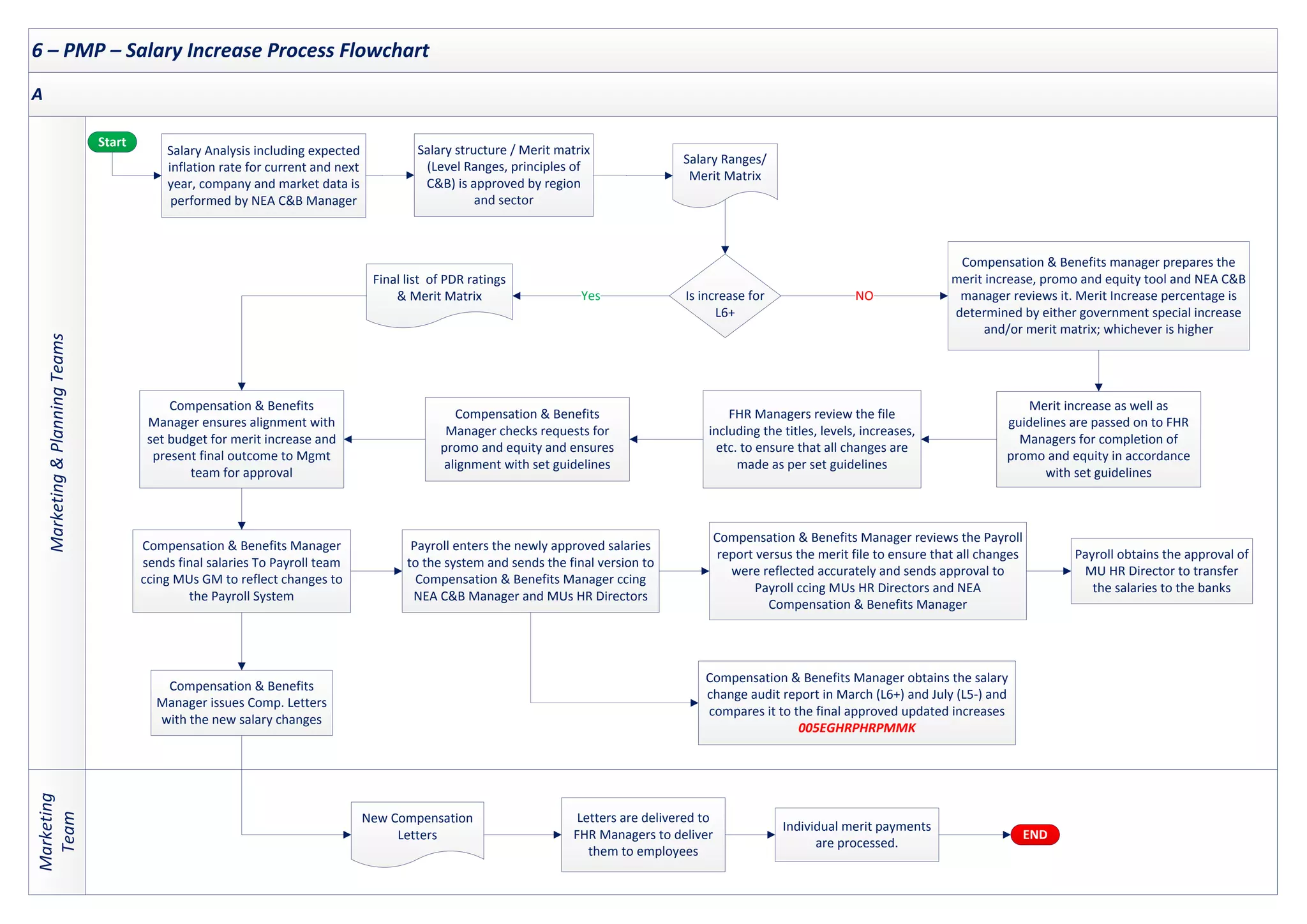
6 – PMP – Salary Increase Process Flowchart
Marketing
&
Planning
Teams
Marketing
Team
A
Start
END
Salary Ranges/
Merit Matrix
Salary structure / Merit matrix
(Level Ranges, principles of
C&B) is approved by region
and sector
Salary Analysis including expected
inflation rate for current and next
year, company and market data is
performed by NEA C&B Manager
Is increase for
L6+
Merit increase as well as
guidelines are passed on to FHR
Managers for completion of
promo and equity in accordance
with set guidelines
Compensation & Benefits manager prepares the
merit increase, promo and equity tool and NEA C&B
manager reviews it. Merit Increase percentage is
determined by either government special increase
and/or merit matrix; whichever is higher
FHR Managers review the file
including the titles, levels, increases,
etc. to ensure that all changes are
made as per set guidelines
Compensation & Benefits
Manager checks requests for
promo and equity and ensures
alignment with set guidelines
NO
Final list of PDR ratings
& Merit Matrix Yes
Compensation & Benefits
Manager ensures alignment with
set budget for merit increase and
present final outcome to Mgmt
team for approval
Compensation & Benefits Manager
sends final salaries To Payroll team
ccing MUs GM to reflect changes to
the Payroll System
Payroll enters the newly approved salaries
to the system and sends the final version to
Compensation & Benefits Manager ccing
NEA C&B Manager and MUs HR Directors
Compensation & Benefits Manager reviews the Payroll
report versus the merit file to ensure that all changes
were reflected accurately and sends approval to
Payroll ccing MUs HR Directors and NEA
Compensation & Benefits Manager
Payroll obtains the approval of
MU HR Director to transfer
the salaries to the banks
New Compensation
Letters
Individual merit payments
are processed.
Letters are delivered to
FHR Managers to deliver
them to employees
Compensation & Benefits Manager obtains the salary
change audit report in March (L6+) and July (L5-) and
compares it to the final approved updated increases
005EGHRPHRPMMK
Compensation & Benefits
Manager issues Comp. Letters
with the new salary changes
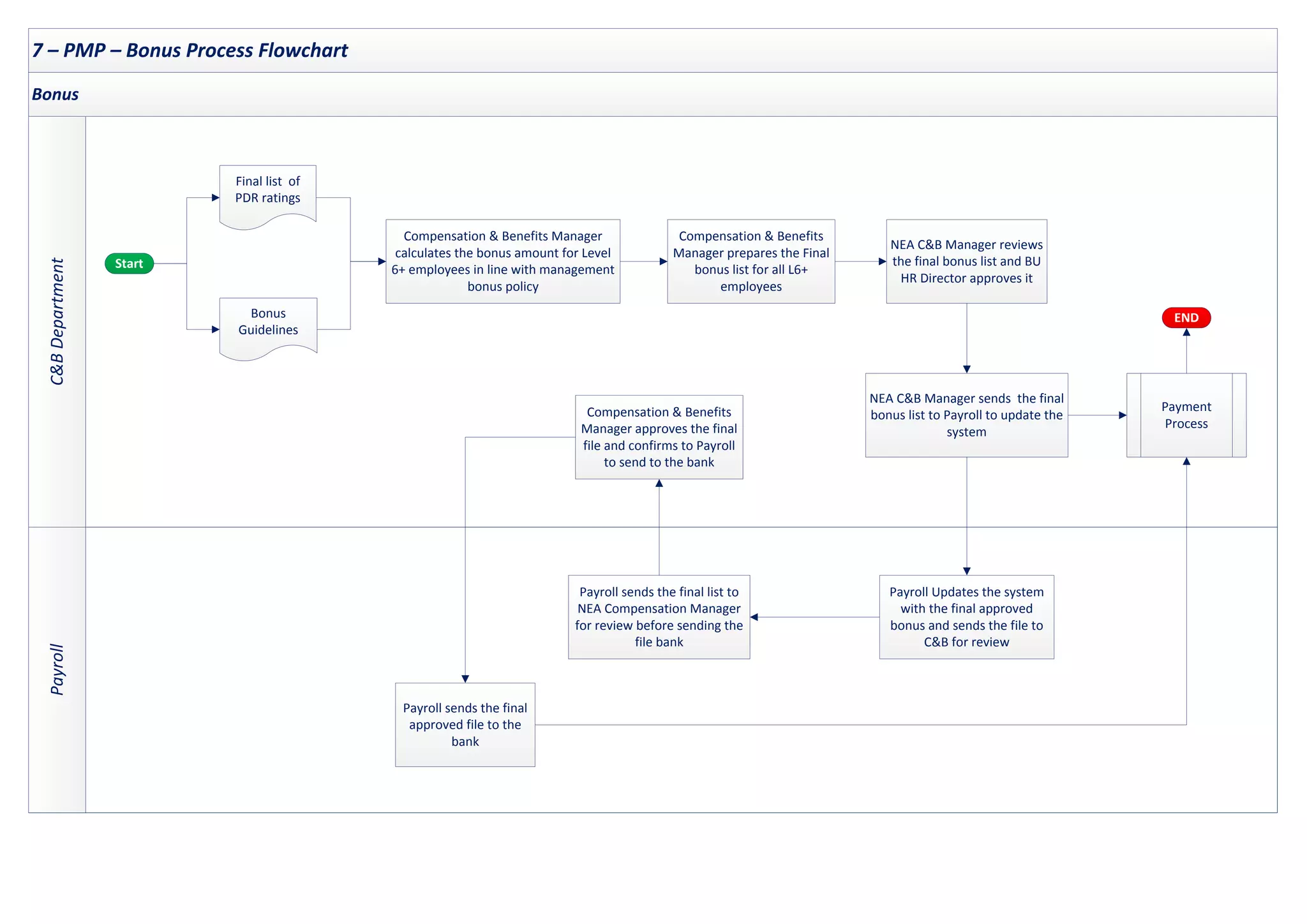
7 – PMP – Bonus Process Flowchart
Payroll
C&B
Department
Bonus
Start
END
Compensation & Benefits
Manager prepares the Final
bonus list for all L6+
employees
Payment
Process
NEA C&B Manager reviews
the final bonus list and BU
HR Director approves it
Compensation & Benefits Manager
calculates the bonus amount for Level
6+ employees in line with management
bonus policy
Final list of
PDR ratings
Bonus
Guidelines
Payroll sends the final list to
NEA Compensation Manager
for review before sending the
file bank
NEA C&B Manager sends the final
bonus list to Payroll to update the
system
Payroll Updates the system
with the final approved
bonus and sends the file to
C&B for review
Compensation & Benefits
Manager approves the final
file and confirms to Payroll
to send to the bank
Payroll sends the final
approved file to the
bank
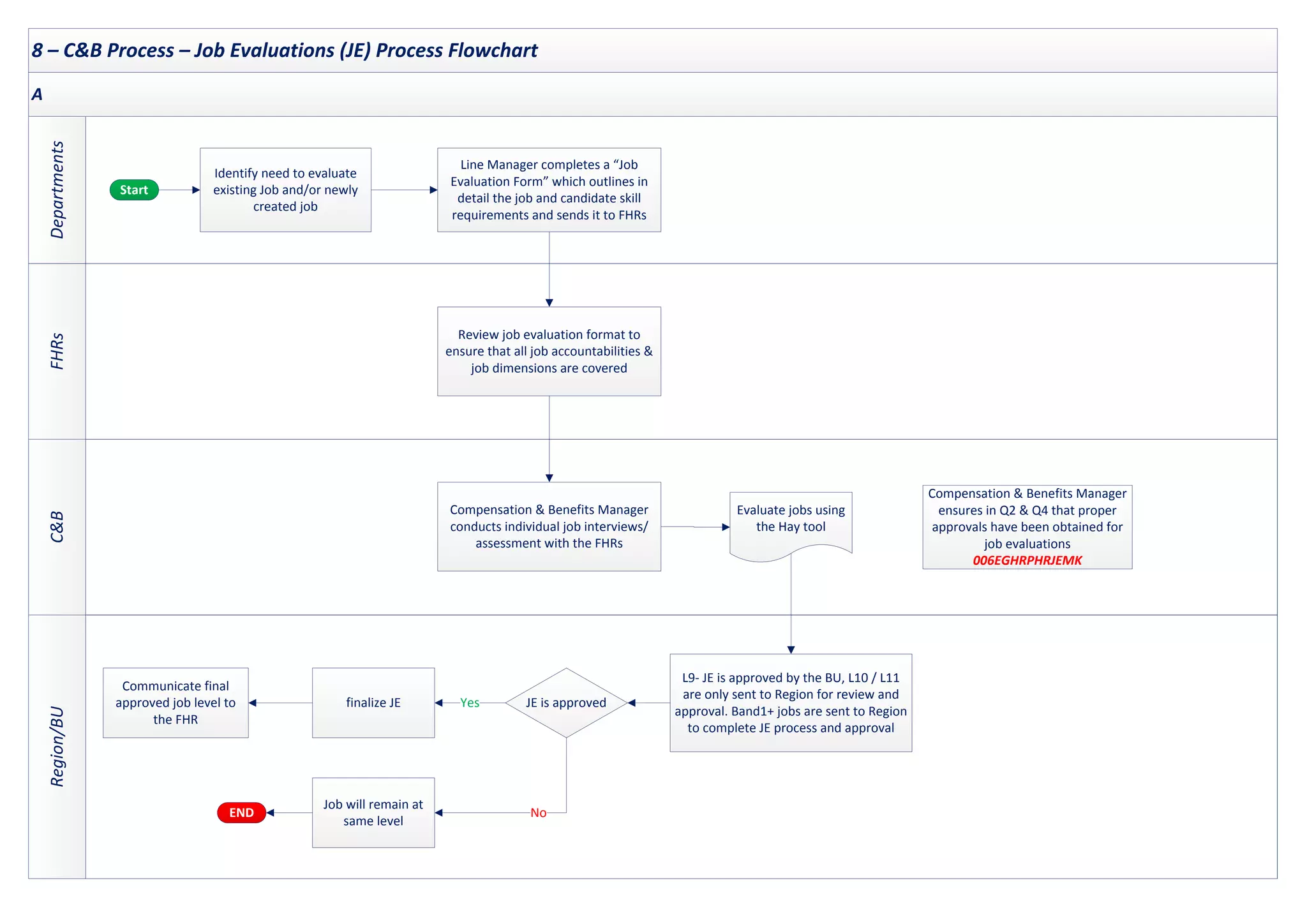
8 – C&B Process – Job Evaluations (JE) Process Flowchart
FHRs
C&B
Departments
Region/BU
A
Start
END
Identify need to evaluate
existing Job and/or newly
created job
Review job evaluation format to
ensure that all job accountabilities &
job dimensions are covered
Compensation & Benefits Manager
conducts individual job interviews/
assessment with the FHRs
Evaluate jobs using
the Hay tool
finalize JE
L9- JE is approved by the BU, L10 / L11
are only sent to Region for review and
approval. Band1+ jobs are sent to Region
to complete JE process and approval
JE is approved
Job will remain at
same level
Line Manager completes a “Job
Evaluation Form” which outlines in
detail the job and candidate skill
requirements and sends it to FHRs
Communicate final
approved job level to
the FHR
Compensation & Benefits Manager
ensures in Q2 & Q4 that proper
approvals have been obtained for
job evaluations
006EGHRPHRJEMK
Yes
No
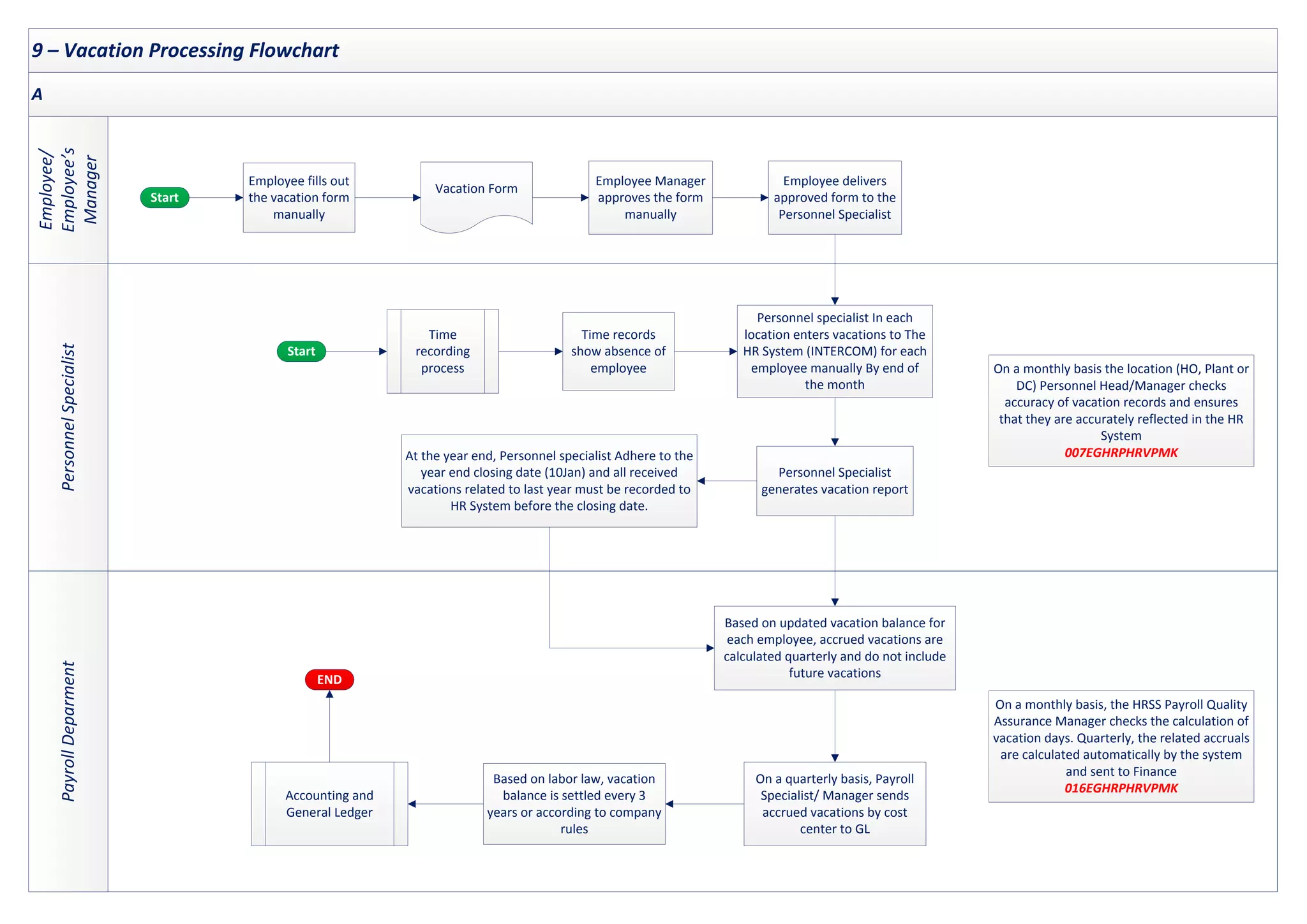
9 – Vacation Processing Flowchart
Personnel
Specialist
Payroll
Deparment
Employee/
Employee’s
Manager
A
Start
Employee Manager
approves the form
manually
Employee fills out
the vacation form
manually
Vacation Form
Personnel specialist In each
location enters vacations to The
HR System (INTERCOM) for each
employee manually By end of
the month
On a quarterly basis, Payroll
Specialist/ Manager sends
accrued vacations by cost
center to GL
Based on updated vacation balance for
each employee, accrued vacations are
calculated quarterly and do not include
future vacations
Accounting and
General Ledger
Personnel Specialist
generates vacation report
Employee delivers
approved form to the
Personnel Specialist
On a monthly basis, the HRSS Payroll Quality
Assurance Manager checks the calculation of
vacation days. Quarterly, the related accruals
are calculated automatically by the system
and sent to Finance
016EGHRPHRVPMK
Based on labor law, vacation
balance is settled every 3
years or according to company
rules
Time
recording
process
Time records
show absence of
employee On a monthly basis the location (HO, Plant or
DC) Personnel Head/Manager checks
accuracy of vacation records and ensures
that they are accurately reflected in the HR
System
007EGHRPHRVPMK
At the year end, Personnel specialist Adhere to the
year end closing date (10Jan) and all received
vacations related to last year must be recorded to
HR System before the closing date.
END
Start
10 – HR & Payroll – Payroll Data Maintenance Process Flowchart
C&B/Personnel/
Payroll
Specialist
C&B
/
FHRs
/
IT
Departments/HR
Employee
Mng.
HR
Mng.
HR
Director
A
Start
Personnel Specialist enter/
update the records based on
the personnel change request
in INTERCOM
Management review and approval
of personnel data change request
in line with policies and procedures
Personnel Change of
Status Form
C&B updates/approves the
personnel salary data in
accordance with position level and
salary scale
Requestor or HR department initiates
the related form for the change of
employee data ( e.g promotion,
termination, new hire, transfer etc.)
Payroll Specialist updates
the employee Salary Data
002EGHRPHRHPMK
Need identified to
change employee
data
Is it salary
related ?
Yes
NO
Master File edit change
report is printed and
reviewed
On monthly basis Compensation & Benefits Manager
extracts Salary Changes Audit report from the system
and reviews changes for L6+ and L5- employees
against the related supporting documents
008EGHRPHRPDMK
On annual basis, BU HO Personnel Manager
reviews employee master file against most
recent time records and approved
attendance to ensure employee existence
014EGHRPHRPDMS
Comply with NEA
confidentiality guidelines
INTERCOM
(Payroll and
benefits data)
11 – HR & Payroll – Payroll and Payment Process Flowchart
Central
Payroll
Finance
A
Start
Bank net payment list is
generated by the system
Payroll Manager runs the payroll
calculation. The payroll system
automatically calculates payroll
PMP- Salary
Increase
MU Finance Controller and second
authorized signatory’s approval of bank
net payment list before the transfer is
made to bank
Salary increase report
is entered manually to
INTERCOM
Payroll enters the time
records and additions/
deductions to INTERCOM
Payroll receives files for
time records and payroll
deductions/additions
from locations
Payroll Analysts review data entered to
the system and payroll manager opens
wrong entries only for correction
003EGHRPHRPPMK
Management review and sign off by Payroll Quality
Assurance Manager of gross to gross reconciliations
in addition to review of gross to net reconciliation
and comparing it to the final bank transfer
009EGHRPHRPPMK
Payment is executed
Payroll slips are generated from the
system by the Payroll Operations
Manager and provided to all
employees to support pay receipt
Biannually checks are performed by
the tax consultant to make sure that
the salary tax is properly calculated
and deducted from employees
010EGHRPHRPPMK
INTERCOM
(Payroll and
Benefits Data)
Start
12 – Accounting and General Ledger Process Flowchart
Payroll
Specialist
Personnel
(Commission
Payments)
Finance
and
C&B
Manager
(Annual
Bonus
Accrual)
Payroll
&
GL
Team
(Unused
Vacation
Accrual)
GL
Team
Payroll Journal
GL Payroll Journal
Payroll Journal
Payroll Journal is
generated by the system
per cost centers
Payroll and
Payment Process
Payroll Operations
Manager sends the
Payroll Journal to IBM
Start
INTERCOM
(Payroll and
Benefits Data)
SAP GL
Payroll Data is
uploaded to SAP and
journal is created in GL
Management review and approval
by GL Manager of INTERCOM
Payroll Journal, and Payroll
Summary against GL
END
Annual Bonus accrual is
calculated whenever a change
in the bonus matrix occurs
Salesperson commissions calculation is
approved by Regional Sales Director in
PCE and in CFI by Sales Director
Calculation is sent to GL
Department via e-mail (MS Excel
format on the basis of cost centers)
Bonus accrual calculation is
prepared by finance based on
planned % and C&B is notified
Sales Objectives are sent on a
monthly basis to the Commission
Specialist in CFI and PCE
Commission Specialist calculates
commission based on actual results
received from Finance
Payroll and
Payment
Process
Vacation
Processing
Manual Journal entry is
processed for vacation
accrual by GL Manager
Manual Journal Entry is
processed monthly for Bonus
accrual by GL Manager
Manual Journal Entry is processed
monthly for Commissions Accrual
by GL Manager
Start
Management review and approval by
GL Manager of manual journal entries
of accruals relating Employment Payroll
(unused vacation, bonus, commissions)
END

Payroll-Process-Flow-Chart.pdf

  • 1.
    ` Human Resources &Payroll Process Flowchart
  • 2.
    Human Resources &Payroll Process Flowchart 1. HR & Payroll – Staffing L6 to L11 2. HR & Payroll – Hire Personnel 3. HR & Payroll – Terminate Employees 4. HR & Payroll – Time Recording 5. Performance Management 6. PMP – Salary Increase 7. PMP – Bonus 8. C&B Process – Job Evaluations (JE) 9. Vacation Processing 10. HR & Payroll – Payroll Data Maintenance 11. HR & Payroll – Payroll and Payment 12. Accounting and General Ledger
  • 3.
    1 – HR& Payroll – Staffing L6 to L11 Process Flowchart TA Team C&B Manager Hiring Manager A Start Yes No FHR Sends the job description and sends it to TA to post the vacancy on “My Possibilities” Headcount Planning in AOP or People Planning (ad hoc hiring are also in place ) Is it new position or current role change? Hiring Manager completes a “Job Evaluation Form”, which outlines in detail the job and the candidate skill requirements and sends It to FHR Manager Job Evaluation process Job assessment is done by C&B if it does not exist in grid. FHR Sends to TA team every Tuesday HC Authorization Spreadsheet to get the Region/ Sector approval to Post the job HC Authorization Spreadsheet Yes The open position is posted for 10 calendar days on My Possibilities for Level 6+ To L11 after ensuring that all necessary documents were received from FHR Manager Were there any internal applicants? TA Team review the applicant eligibility with C&B Team and the employee’s (internal applicant) FHR Manager. Further screening is conducted prior to communicating the final list to FHR Manager. LOR is sent to rejected candidates at this stage FHR receives the list of eligible applicants for interviewing and forwards accepted candidates to the hiring Manager. FHR sends LOR to rejected internal candidates and Staffing sends LOR to rejected external candidates L10 & L11 external candidates will be required to complete SHL Online Assessment TA Manager gets the approval of the jobs from Region/Sector Is candidate suitable for The job? TA team starts/resumes external search TA team will conduct phone screening for external candidates NO Yes FHR Manager informs TA of accepted candidate (For Internal and external candidates) TA Team initiates LOU request to C&B Team (For Internal & external candidates). NO FHR Signs LOU from responsible HR Director and Communicates LOU to candidate NEA Compensation Asst. Manager prepares LOU according to Compensation guidelines and NEA Compensation Manager reviews LOU before sending it to FHR NEA Compensation Asst. Manager sends LOU as PDF format to responsible FHR 011EGHRPHRSTMS (Supporting) Selected candidate signs LOU and FHR infroms personnel to update the employee’s personal file and system file Did selected candidate accept LOU? Is this an internal candidate? FHR informs C&B and TA to close the vacancy NO Yes Yes NO 1
  • 4.
    2 – HR& Payroll – Hire Personnel Process Flowchart Personnel Specialist HR Director/FHR/ Personnel Specialist New Hire Payroll Specalist A Start Candidate is required to pass a pre- employment medical check-up and submit hiring documents and experience certificates for issuing an employment contract END 1 Personnel Specialist prepares a contract of three copies, assigns an employee number to the new hire and initiates the “CRT Form” including job details, salary, level and date of employment CRT Form Approved LOU form is attached to the CRT form (*1) Social Insurance & Labor Office documents including a copy of the employment contract are prepared by the Specialists and sent to Social Insurance Authority/ Labor Office after signing All new hires are required to sign an employment contract and Code of Conduct within two weeks from starting date. The employment contract is also signed by HR after the employee completes the mandatory hiring documents. Employment Contract and Code of Conduct are kept in employee’s personnel file. 001EGHRPHRHPMK Specialists record new hire data except salary (All employee data except payroll) Payroll Specialist records the new hire salary on INTERCOM (Payroll and Benefits data) INTERCOM (*2) INTERCOM (*2) END (*1) - On-boarding schedule is prepared and HR policies are accessible to all relevant employees. (*2) - Access to the payroll master file is restricted And only authorized users have access to Payroll master file based on on management authorization with proper SOD (002EGHRPHRHPMK)
  • 5.
    3 – HR& Payroll – Terminate Employees Process Flowchart FHR/Personnel C&B/Payroll Specialist Departments/Employee A Start Employee or company request the termination Has the employee left at his own will? Personnel Manager notifies labor court with management decision and investigation results to avoid any future financial obligation Is dismissal based on legal investigation? NO Yes Termination Request Employee writes termination request and signs Yes Personnel Manager notifies the employee in writing that contract will not be renewed NO Personnel controls the form and sends it to employee to take it to relevant departments (Finance, IT & Administration) Clearance Form Related Personnel Team coordinates the approval process of “Clearance Form” & Social Insurance documents FHR conducts exit interviews for employees leaving voluntarily Personnel Manager initiates “Discharge Memo” indicating the effective date of employee’s dismissal from the company NEA Compensation Manager calculates the severence pay, if any, and any other payments, if applicable and gets the approval of the responsible HR Director Financial Controller reviews calculation and the supporting documents before issuing the cheque to the employee and sends approval by email to NEA Compensation Manager NEA Compensation Manager sends To FHR Manager and informs MU Financial Controller of the calculation The terminated employee is deactivated from the payroll system (termination date is entered to the system) Social Insurance Specialist informs the Social Insurance Authority to terminatE employee’s social insurance duration Payments are made to the terminated employee separately not during monthly payroll payments FHR Manager informs Payroll Manager & Personnel manager Monthly Notification is sent to IT, Administration and Security teams to revoke system and physical access rights from resigned, terminated and dismissed employees 012EGHRPHRTEMS (Supporting) END END END
  • 6.
    4 – HR& Payroll – Time Recording Process Flowchart Employee’s Supervisor Personnel Specialist Employee Scope: Non-sales Staff Start END Employee fills out the “ Leave Request Form” Employee signs at the security and notifies the supervisor who confirms employee’s attendance Employees swipe timecard at the beginning & end of their work day Leave Request Form Time keeping data is extracted to an excel sheet Did employee forget to bring or swipe the card? Vacation process Yes NO Shift Attendance Sheet including hours worked “Shift attendance sheet” including absent employees is prepared by Supervisor and sent to Personnel Specialist with all forms (overtime forms etc.) Overtime Sheets At the end of the month, overtime sheets are approved by department manager and immediate manager Payroll Process Checks the attendance record data against approved Shift attendance Sheets, and forms Personnel specialist corrects or edits the attendance record indicating cause of change based on approved documents Does attendance record need to be corrected or edited? Monthly follow- up “Form2” Once all aproved edits have been keyed into the monthly follow-up excel sheet “Form2” and open exceptions items have been resolved, the monthly follow-up sheet “Form2”is ready to be processed to Central Payroll Personnel Specialist receives daily attendance records and exceptions and update the monthly follow-up excel sheet Yes NO END No “Start”
  • 7.
    5 – PerformanceManagement Process Flowchart OBJECTIVE SETTING Top-down-approach MID YEAR REVIEW (MYR) YEAR-END PERFORMANCE DEVELOPMENT & FOCAL POINT REVIEWREVIEW Employee / Employee’s manager / FHRs Start OMD ensure that ALL English Speaking L6+ employees have completed their objectives on the system. FHR Managers ensure that all Arabic Speaking L6+ have completed their objectives. FHR Managers ensure that All L6+ English Speaking employees who were hired after the deadline of objective setting were added to MyAccess and OMD ensure that they have completed their Objective 004EGHRPHRPMMK English Speaking L6+ Employees upload PDR on myAccess while L6+ Arabic Speaking employees send PDRs (word doc) to FHR Managers via email and manager sends PDR to FHRs Each director cascades Department objectives to his/ her direct reports and agree on their objectives L10+ managers cascade Dept. objectives to their direct reports and agree on their objectives L6+ managers cascade Dept. objectives to their direct reports and agree on their objectives Manager and Employee meet to discuss YTD performance and any changes to objectives taking place during MYR Employee Adds self input of progress against each objective After getting alignment of Manager, employee reflects the changes on doc. and Manager adds his/her comments where necessary. English speaking L6+ employees submit MYR on system (MY Access) and Arabic Speaking L6+ employees complete their comments on Word Doc and send PDR to direct managers & FHR Managers Final list of PDR ratings FHR Manager reviews PDRs and Ratings and -if required- meets with Employee’s direct manager on PDR quality and calibration of performance ratings Executive Committee (OMD, Super FHR, Function Heads, and GMs) meet to calibrate a selected sample of PDRs as per OMD criteria Employee adds YE self input, reviews with direct Manager and submits it on MY Access System Manager reviews employee self input, provides comments and proposes ratings Super FHR Manager reviews PDRs and Ratings and meets with Function Director on PDR quality and calibration of performance ratings Second level Manager reviews ratings and confirms PDR to be routed to direct manager for final rating confirmation and submission to the employee OMD communicates to Direct Managers to confirm YE Manager Review to be routed for second level manager for approval OMD Sends final list of PDR ratings to C&B team to prepare Comp. Letters Compensation Manager calculates the merit and other salary increases/adjustments, reviews the data with NEA C&B Manager, obtains the approval of BU HRD for the changes and any exceptions and issues the Comp. Letters and then sends them to FHR Managers For Arabic Speaking L6+ employees, FHRs provide Managers with Compensation Letters with final ratings including a disclaimer confirming that employee has reviewed manager’s comments Manager and employee meet for PDR discussion. Manager & Employee Signs Comp. Letter and sends signed original to FHR Manager FHR Sends Comp. Letters to Personnel to be kept in employees’ files Signed Comp. Letter OMD monitor if focal point review process is complete and signed PDRs are sent back to HR 004EGHRPHRPMMK Final Salary List Payroll Processing After PDR discussion with direct manager, English Speaking L6+ employee, signs PDR Form on My Access system END
  • 8.
    6 – PMP– Salary Increase Process Flowchart Marketing & Planning Teams Marketing Team A Start END Salary Ranges/ Merit Matrix Salary structure / Merit matrix (Level Ranges, principles of C&B) is approved by region and sector Salary Analysis including expected inflation rate for current and next year, company and market data is performed by NEA C&B Manager Is increase for L6+ Merit increase as well as guidelines are passed on to FHR Managers for completion of promo and equity in accordance with set guidelines Compensation & Benefits manager prepares the merit increase, promo and equity tool and NEA C&B manager reviews it. Merit Increase percentage is determined by either government special increase and/or merit matrix; whichever is higher FHR Managers review the file including the titles, levels, increases, etc. to ensure that all changes are made as per set guidelines Compensation & Benefits Manager checks requests for promo and equity and ensures alignment with set guidelines NO Final list of PDR ratings & Merit Matrix Yes Compensation & Benefits Manager ensures alignment with set budget for merit increase and present final outcome to Mgmt team for approval Compensation & Benefits Manager sends final salaries To Payroll team ccing MUs GM to reflect changes to the Payroll System Payroll enters the newly approved salaries to the system and sends the final version to Compensation & Benefits Manager ccing NEA C&B Manager and MUs HR Directors Compensation & Benefits Manager reviews the Payroll report versus the merit file to ensure that all changes were reflected accurately and sends approval to Payroll ccing MUs HR Directors and NEA Compensation & Benefits Manager Payroll obtains the approval of MU HR Director to transfer the salaries to the banks New Compensation Letters Individual merit payments are processed. Letters are delivered to FHR Managers to deliver them to employees Compensation & Benefits Manager obtains the salary change audit report in March (L6+) and July (L5-) and compares it to the final approved updated increases 005EGHRPHRPMMK Compensation & Benefits Manager issues Comp. Letters with the new salary changes
  • 9.
    7 – PMP– Bonus Process Flowchart Payroll C&B Department Bonus Start END Compensation & Benefits Manager prepares the Final bonus list for all L6+ employees Payment Process NEA C&B Manager reviews the final bonus list and BU HR Director approves it Compensation & Benefits Manager calculates the bonus amount for Level 6+ employees in line with management bonus policy Final list of PDR ratings Bonus Guidelines Payroll sends the final list to NEA Compensation Manager for review before sending the file bank NEA C&B Manager sends the final bonus list to Payroll to update the system Payroll Updates the system with the final approved bonus and sends the file to C&B for review Compensation & Benefits Manager approves the final file and confirms to Payroll to send to the bank Payroll sends the final approved file to the bank
  • 10.
    8 – C&BProcess – Job Evaluations (JE) Process Flowchart FHRs C&B Departments Region/BU A Start END Identify need to evaluate existing Job and/or newly created job Review job evaluation format to ensure that all job accountabilities & job dimensions are covered Compensation & Benefits Manager conducts individual job interviews/ assessment with the FHRs Evaluate jobs using the Hay tool finalize JE L9- JE is approved by the BU, L10 / L11 are only sent to Region for review and approval. Band1+ jobs are sent to Region to complete JE process and approval JE is approved Job will remain at same level Line Manager completes a “Job Evaluation Form” which outlines in detail the job and candidate skill requirements and sends it to FHRs Communicate final approved job level to the FHR Compensation & Benefits Manager ensures in Q2 & Q4 that proper approvals have been obtained for job evaluations 006EGHRPHRJEMK Yes No
  • 11.
    9 – VacationProcessing Flowchart Personnel Specialist Payroll Deparment Employee/ Employee’s Manager A Start Employee Manager approves the form manually Employee fills out the vacation form manually Vacation Form Personnel specialist In each location enters vacations to The HR System (INTERCOM) for each employee manually By end of the month On a quarterly basis, Payroll Specialist/ Manager sends accrued vacations by cost center to GL Based on updated vacation balance for each employee, accrued vacations are calculated quarterly and do not include future vacations Accounting and General Ledger Personnel Specialist generates vacation report Employee delivers approved form to the Personnel Specialist On a monthly basis, the HRSS Payroll Quality Assurance Manager checks the calculation of vacation days. Quarterly, the related accruals are calculated automatically by the system and sent to Finance 016EGHRPHRVPMK Based on labor law, vacation balance is settled every 3 years or according to company rules Time recording process Time records show absence of employee On a monthly basis the location (HO, Plant or DC) Personnel Head/Manager checks accuracy of vacation records and ensures that they are accurately reflected in the HR System 007EGHRPHRVPMK At the year end, Personnel specialist Adhere to the year end closing date (10Jan) and all received vacations related to last year must be recorded to HR System before the closing date. END Start
  • 12.
    10 – HR& Payroll – Payroll Data Maintenance Process Flowchart C&B/Personnel/ Payroll Specialist C&B / FHRs / IT Departments/HR Employee Mng. HR Mng. HR Director A Start Personnel Specialist enter/ update the records based on the personnel change request in INTERCOM Management review and approval of personnel data change request in line with policies and procedures Personnel Change of Status Form C&B updates/approves the personnel salary data in accordance with position level and salary scale Requestor or HR department initiates the related form for the change of employee data ( e.g promotion, termination, new hire, transfer etc.) Payroll Specialist updates the employee Salary Data 002EGHRPHRHPMK Need identified to change employee data Is it salary related ? Yes NO Master File edit change report is printed and reviewed On monthly basis Compensation & Benefits Manager extracts Salary Changes Audit report from the system and reviews changes for L6+ and L5- employees against the related supporting documents 008EGHRPHRPDMK On annual basis, BU HO Personnel Manager reviews employee master file against most recent time records and approved attendance to ensure employee existence 014EGHRPHRPDMS Comply with NEA confidentiality guidelines INTERCOM (Payroll and benefits data)
  • 13.
    11 – HR& Payroll – Payroll and Payment Process Flowchart Central Payroll Finance A Start Bank net payment list is generated by the system Payroll Manager runs the payroll calculation. The payroll system automatically calculates payroll PMP- Salary Increase MU Finance Controller and second authorized signatory’s approval of bank net payment list before the transfer is made to bank Salary increase report is entered manually to INTERCOM Payroll enters the time records and additions/ deductions to INTERCOM Payroll receives files for time records and payroll deductions/additions from locations Payroll Analysts review data entered to the system and payroll manager opens wrong entries only for correction 003EGHRPHRPPMK Management review and sign off by Payroll Quality Assurance Manager of gross to gross reconciliations in addition to review of gross to net reconciliation and comparing it to the final bank transfer 009EGHRPHRPPMK Payment is executed Payroll slips are generated from the system by the Payroll Operations Manager and provided to all employees to support pay receipt Biannually checks are performed by the tax consultant to make sure that the salary tax is properly calculated and deducted from employees 010EGHRPHRPPMK INTERCOM (Payroll and Benefits Data) Start
  • 14.
    12 – Accountingand General Ledger Process Flowchart Payroll Specialist Personnel (Commission Payments) Finance and C&B Manager (Annual Bonus Accrual) Payroll & GL Team (Unused Vacation Accrual) GL Team Payroll Journal GL Payroll Journal Payroll Journal Payroll Journal is generated by the system per cost centers Payroll and Payment Process Payroll Operations Manager sends the Payroll Journal to IBM Start INTERCOM (Payroll and Benefits Data) SAP GL Payroll Data is uploaded to SAP and journal is created in GL Management review and approval by GL Manager of INTERCOM Payroll Journal, and Payroll Summary against GL END Annual Bonus accrual is calculated whenever a change in the bonus matrix occurs Salesperson commissions calculation is approved by Regional Sales Director in PCE and in CFI by Sales Director Calculation is sent to GL Department via e-mail (MS Excel format on the basis of cost centers) Bonus accrual calculation is prepared by finance based on planned % and C&B is notified Sales Objectives are sent on a monthly basis to the Commission Specialist in CFI and PCE Commission Specialist calculates commission based on actual results received from Finance Payroll and Payment Process Vacation Processing Manual Journal entry is processed for vacation accrual by GL Manager Manual Journal Entry is processed monthly for Bonus accrual by GL Manager Manual Journal Entry is processed monthly for Commissions Accrual by GL Manager Start Management review and approval by GL Manager of manual journal entries of accruals relating Employment Payroll (unused vacation, bonus, commissions) END