INSTRUCTOR :
SIR AAZAM KHAN
MADE BY:
SHAHZEB PIRZADA(5701)
MUHAMMAD FAIZ(55903)
 A boot disk is actually not a computer disk in the
shape of a boot. If it was, most disk drives would
have a difficult time reading it. Instead, a boot disk
is a disk that a computer can start up or "boot"
from. The most common type of boot disk is an
internal hard drive, which most computers use to
start up from. The operating system installed on the
hard drive is loaded during the boot process.
 However, most computers allow you to boot
from other disks, including external Firewire
hard drives, CD-ROMs, DVD-ROMs, and
floppy disks. In order to function as boot disks,
these disks need to have an operating system
installed that is understandable by the
computer. This can either be a full-blown
operating system like Windows or Mac OS X,
or a small utility operating system, such as
Norton Utilities or Disk Warrior.
 CD and DVD boot disks are often used to start up a
computer when the operating system on the
internal hard drive won't load. This can happen
when bad data blocks or other errors occur on the
disk. By running a disk repair utility from the CD or
DVD, you can often fix the hard drive and restart
from it, using the full operating system.
 Boot loader is a program
situated at the first sector
of the hard drive; and it is
the sector where the boot
starts from. BIOS
automatically read all
content of the first sector
to the memory just after
the power is turned on,
and jump to it. The first
sector is also
called Master Boot
 Record. Actually it is not
obligatory for the first
sector of the hard drive to
boot something. This
name has been formed
historically because
developers used to boot
their operating systems
with such mechanism.
 In order to solve our task we should recall how the
system is booting.
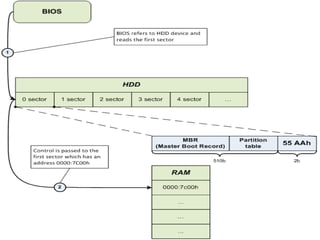
 Let’s consider briefly how the system components
are interacting when the system is booting (see
Fig.1).
 After the control has been passed
to the address 0000:7C00, Master
Boot Record (MBR) starts its work
and triggers the Operating System
boot.
 In the next sections we will be directly
occupied with the low-level programming – we
will develop our own boot loader.
o [BITS 16] ; 16 bit code generation
o [ORG 0x7C00] ; Origin location
o
o ; Main program
o main: ; Label for the start of the main program
o
o mov ax,0x0000 ; Setup the Data Segment register
o ; Location of data is DS:Offset
o mov ds,ax ; This can not be loaded directly it has to be in two steps.
o ; 'mov ds, 0x0000' will NOT work due to limitations on the CPU
o
o mov si, HelloWorld ; Load the string into position for the procedure.
o call PutStr ; Call/start the procedure
o
o jmp $ ; Never ending loop
o
o ; Procedures
o PutStr: ; Procedure label/start
o ; Set up the registers for the interrupt call
o mov ah,0x0E ; The function to display a chacter (teletype)
o mov bh,0x00 ; Page number
o mov bl,0x07 ; Normal text attribute
o
o .nextchar ; Internal label (needed to loop round for the next character)
o lodsb ; I think of this as Load String Block
o ; (Not sure if that's the real meaning though)
o ; Loads [SI] into AL and increases SI by one
o ; Check for end of string '0'
o or al,al ; Sets the zero flag if al = 0
o ; (OR outputs 0's where there is a zero bit in the register)
o jz .return ; If the zero flag has been set go to the end of the procedure.
o ; Zero flag gets set when an instruction returns 0 as the answer.
o int 0x10 ; Run the BIOS video interrupt
o jmp .nextchar ; Loop back round tothe top
o .return ; Label at the end to jump to when complete
o ret ; Return to main program

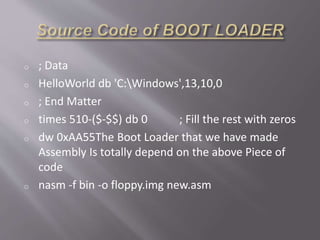
o ; Data
o HelloWorld db 'C:Windows',13,10,0
o ; End Matter
o times 510-($-$$) db 0 ; Fill the rest with zeros
o dw 0xAA55The Boot Loader that we have made
Assembly Is totally depend on the above Piece of
code
o nasm -f bin -o floppy.img new.asm
 Assembly languages are a type of low-level languages
for programming computers, microprocessors, micro
controllers, and other (usually) integrated circuits. They
implement a symbolic representation of the numeric
machine codes and other constants needed to program
a particular CPU architecture. This representation is
usually defined by the hardware manufacturer, and is
based on abbreviations (called mnemonics) that help
the programmer remember individual instructions,
registers, etc. An assembly language family is thus
specific to a certain physical (or virtual) computer
architecture. This is in contrast to most high-level
languages, which are (ideally) portable.

[BITS 16] [ORG 7C00H]
 ------- An operating System
can be 16bit , 32 bit 64bit
 we have made the boot
loader of 16BIT operating
System
 --------This is the Address
where we want to Run the
Operating System. Origin,
tells the compiler where
the code is going to be in
memory after it has been
loaded. (hex number)
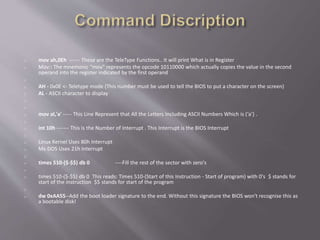
o mov ah,0Eh ------ These are the TeleType Functions.. It will print What is in Register
o Mov:: The mnemonic "mov" represents the opcode 10110000 which actually copies the value in the second
operand into the register indicated by the first operand
o
o AH - 0x0E <- Teletype mode (This number must be used to tell the BIOS to put a character on the screen)
o AL - ASCII character to display
o
o
o mov al,'a' ----- This Line Represent that All the Letters Including ASCII Numbers Which is (‘a’) .
o
o int 10h ------- This is the Number of Interrupt . This Interrupt is the BIOS Interrupt
o
o Linux Kernel Uses 80h Interrupt
o Ms-DOS Uses 21h Interrupt
o
o times 510-($-$$) db 0 ----Fill the rest of the sector with zero's
o
o times 510-($-$$) db 0 This reads: Times 510-(Start of this Instruction - Start of program) with 0's $ stands for
start of the instruction $$ stands for start of the program
o
o dw 0xAA55--Add the boot loader signature to the end. Without this signature the BIOS won't recognise this as
a bootable disk!
NASM KVM
 The Net wide Assembler
(NASM) is an assembler and
disassemble for the Intel x86
architecture. It can be used
to write 16-bit, 32-bit (IA-32)
and 64-bit (x86-64)
programs. NASM is
considered to be one of the
most popular assemblers for
Linux and is the second most
popular assembler overall.
 Kernel-based Virtual Machine
(KVM) is a Linux kernel
virtualization infrastructure. As
of 2010, KVM supports native
virtualization using Intel VT-x or
AMD-V. Para virtualization
support is also available for
Linux and Windows guests
using the VirtIO framework; this
includes a par virtual Ethernet
card, a disk I/O controller, a
balloon device for adjusting
guest memory-usage, and VGA
graphics interface using
VMware drivers.
BOOTABLE OPERATING SYSTEM PPT

BOOTABLE OPERATING SYSTEM PPT

  • 1.
    INSTRUCTOR : SIR AAZAMKHAN MADE BY: SHAHZEB PIRZADA(5701) MUHAMMAD FAIZ(55903)
  • 3.
     A bootdisk is actually not a computer disk in the shape of a boot. If it was, most disk drives would have a difficult time reading it. Instead, a boot disk is a disk that a computer can start up or "boot" from. The most common type of boot disk is an internal hard drive, which most computers use to start up from. The operating system installed on the hard drive is loaded during the boot process.
  • 4.
     However, mostcomputers allow you to boot from other disks, including external Firewire hard drives, CD-ROMs, DVD-ROMs, and floppy disks. In order to function as boot disks, these disks need to have an operating system installed that is understandable by the computer. This can either be a full-blown operating system like Windows or Mac OS X, or a small utility operating system, such as Norton Utilities or Disk Warrior.
  • 5.
     CD andDVD boot disks are often used to start up a computer when the operating system on the internal hard drive won't load. This can happen when bad data blocks or other errors occur on the disk. By running a disk repair utility from the CD or DVD, you can often fix the hard drive and restart from it, using the full operating system.
  • 6.
     Boot loaderis a program situated at the first sector of the hard drive; and it is the sector where the boot starts from. BIOS automatically read all content of the first sector to the memory just after the power is turned on, and jump to it. The first sector is also called Master Boot  Record. Actually it is not obligatory for the first sector of the hard drive to boot something. This name has been formed historically because developers used to boot their operating systems with such mechanism.
  • 7.
     In orderto solve our task we should recall how the system is booting.  Let’s consider briefly how the system components are interacting when the system is booting (see Fig.1).
  • 9.
     After thecontrol has been passed to the address 0000:7C00, Master Boot Record (MBR) starts its work and triggers the Operating System boot.
  • 10.
     In thenext sections we will be directly occupied with the low-level programming – we will develop our own boot loader.
  • 11.
    o [BITS 16]; 16 bit code generation o [ORG 0x7C00] ; Origin location o o ; Main program o main: ; Label for the start of the main program o o mov ax,0x0000 ; Setup the Data Segment register o ; Location of data is DS:Offset o mov ds,ax ; This can not be loaded directly it has to be in two steps. o ; 'mov ds, 0x0000' will NOT work due to limitations on the CPU o o mov si, HelloWorld ; Load the string into position for the procedure. o call PutStr ; Call/start the procedure o o jmp $ ; Never ending loop o
  • 12.
    o ; Procedures oPutStr: ; Procedure label/start o ; Set up the registers for the interrupt call o mov ah,0x0E ; The function to display a chacter (teletype) o mov bh,0x00 ; Page number o mov bl,0x07 ; Normal text attribute o o .nextchar ; Internal label (needed to loop round for the next character) o lodsb ; I think of this as Load String Block o ; (Not sure if that's the real meaning though) o ; Loads [SI] into AL and increases SI by one o ; Check for end of string '0' o or al,al ; Sets the zero flag if al = 0 o ; (OR outputs 0's where there is a zero bit in the register) o jz .return ; If the zero flag has been set go to the end of the procedure. o ; Zero flag gets set when an instruction returns 0 as the answer. o int 0x10 ; Run the BIOS video interrupt o jmp .nextchar ; Loop back round tothe top o .return ; Label at the end to jump to when complete o ret ; Return to main program 
  • 13.
    o ; Data oHelloWorld db 'C:Windows',13,10,0 o ; End Matter o times 510-($-$$) db 0 ; Fill the rest with zeros o dw 0xAA55The Boot Loader that we have made Assembly Is totally depend on the above Piece of code o nasm -f bin -o floppy.img new.asm
  • 14.
     Assembly languagesare a type of low-level languages for programming computers, microprocessors, micro controllers, and other (usually) integrated circuits. They implement a symbolic representation of the numeric machine codes and other constants needed to program a particular CPU architecture. This representation is usually defined by the hardware manufacturer, and is based on abbreviations (called mnemonics) that help the programmer remember individual instructions, registers, etc. An assembly language family is thus specific to a certain physical (or virtual) computer architecture. This is in contrast to most high-level languages, which are (ideally) portable. 
  • 15.
    [BITS 16] [ORG7C00H]  ------- An operating System can be 16bit , 32 bit 64bit  we have made the boot loader of 16BIT operating System  --------This is the Address where we want to Run the Operating System. Origin, tells the compiler where the code is going to be in memory after it has been loaded. (hex number)
  • 16.
    o mov ah,0Eh------ These are the TeleType Functions.. It will print What is in Register o Mov:: The mnemonic "mov" represents the opcode 10110000 which actually copies the value in the second operand into the register indicated by the first operand o o AH - 0x0E <- Teletype mode (This number must be used to tell the BIOS to put a character on the screen) o AL - ASCII character to display o o o mov al,'a' ----- This Line Represent that All the Letters Including ASCII Numbers Which is (‘a’) . o o int 10h ------- This is the Number of Interrupt . This Interrupt is the BIOS Interrupt o o Linux Kernel Uses 80h Interrupt o Ms-DOS Uses 21h Interrupt o o times 510-($-$$) db 0 ----Fill the rest of the sector with zero's o o times 510-($-$$) db 0 This reads: Times 510-(Start of this Instruction - Start of program) with 0's $ stands for start of the instruction $$ stands for start of the program o o dw 0xAA55--Add the boot loader signature to the end. Without this signature the BIOS won't recognise this as a bootable disk!
  • 17.
    NASM KVM  TheNet wide Assembler (NASM) is an assembler and disassemble for the Intel x86 architecture. It can be used to write 16-bit, 32-bit (IA-32) and 64-bit (x86-64) programs. NASM is considered to be one of the most popular assemblers for Linux and is the second most popular assembler overall.  Kernel-based Virtual Machine (KVM) is a Linux kernel virtualization infrastructure. As of 2010, KVM supports native virtualization using Intel VT-x or AMD-V. Para virtualization support is also available for Linux and Windows guests using the VirtIO framework; this includes a par virtual Ethernet card, a disk I/O controller, a balloon device for adjusting guest memory-usage, and VGA graphics interface using VMware drivers.