Students as Authors Blogging in the Classroom
Contact Me http://www.discoveryeducation.com/   Jennifer Dorman [email_address] http://denblogs.com/jendorman   Go to my  Presentations  page to download a copy of this  presentation
Blogs in Plain English http://www.commoncraft.com/blogs   Blogs IPE - Individual (.mov)
What is a Blog? Posts are displayed chronologically Online publishing platform Many social media sites allow for integration with blogs  Blog posts consist primarily of text with some embedded media and hyperlinks Many blogs allow for some static pages (e.g. About Me)
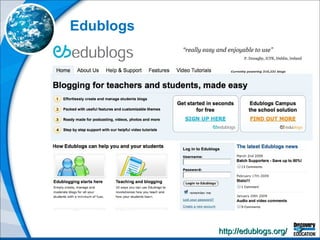
Edublogs http://edublogs.org/
Alternatives to Edublogs Class Blogmeister http://classblogmeister.com/   21 Classes http://21classes.com/ Blogger http://www.blogger.com/ Ning http://www.ning.com/
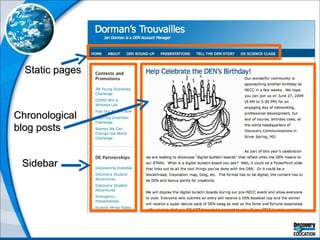
Static pages Chronological blog posts Sidebar
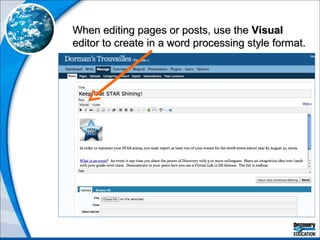
When editing pages or posts, use the  Visual  editor to create in a word processing style format.
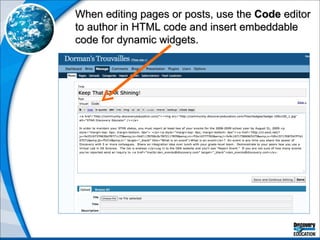
When editing pages or posts, use the  Code  editor to author in HTML code and insert embeddable code for dynamic widgets.
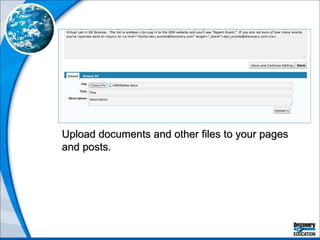
Upload documents and other files to your pages and posts.
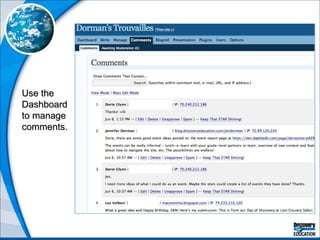
Use the Dashboard to manage comments.
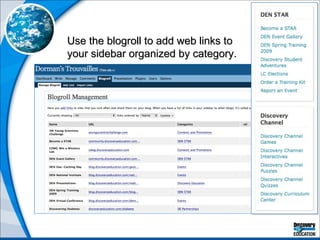
Use the blogroll to add web links to your sidebar organized by category.
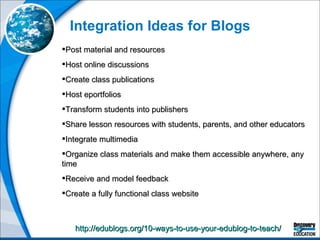
Integration Ideas for Blogs http://edublogs.org/10-ways-to-use-your-edublog-to-teach/   Post material and resources Host online discussions Create class publications Host eportfolios  Transform students into publishers Share lesson resources with students, parents, and other educators Integrate multimedia Organize class materials and make them accessible anywhere, any time Receive and model feedback Create a fully functional class website
For More Integration Ideas . . . http://jdorman.wikispaces.com/blogworkshop   You can also access training guides for Edublogs, Blogger, Wordress, and Class Blogmeister as well as dozens of examples of class and teacher blogs.
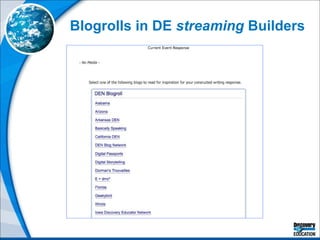
Blogs + DE  streaming Blogs can be used instead of Writing Prompt Builder when you want to encourage students to respond to each other’s writing. You can link to any DE  streaming  media assets for blog prompts.  Students will be required to sign into DE  streaming  in order to view them.  You can insert DE  streaming  images into blog posts as long as you include the citation information.  You can use a blog prompt as the student response element on a DE  streaming  Assignment.  You can use a blog aggregator, such as Google Reader, to embed a blogroll widget into a DE  streaming  Builder.
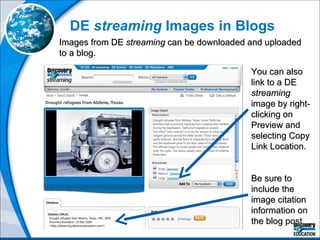
DE  streaming  Images in Blogs Images from DE  streaming  can be downloaded and uploaded to a blog.  You can also link to a DE  streaming  image by right-clicking on Preview and selecting Copy Link Location. Be sure to include the image citation information on the blog post.
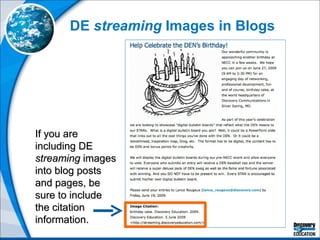
DE  streaming  Images in Blogs If you are including DE  streaming  images into blog posts and pages, be sure to include the citation information.
Managing Blogs Harnessing the Power of RSS
 
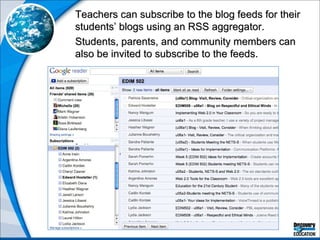
Teachers can subscribe to the blog feeds for their students’ blogs using an RSS aggregator.  Students, parents, and community members can also be invited to subscribe to the feeds.
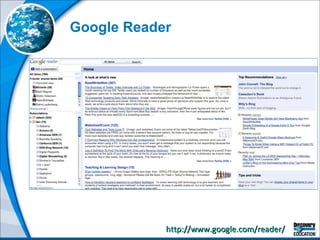
http://www.google.com/reader/   Google Reader
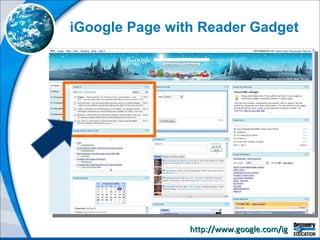
http://www.google.com/ig   iGoogle Page with Reader Gadget
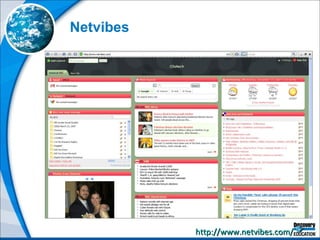
http://www.netvibes.com/   Netvibes
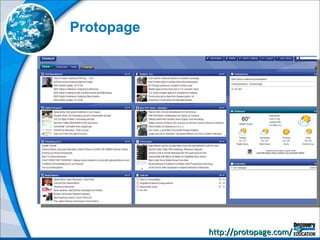
http://protopage.com/   Protopage
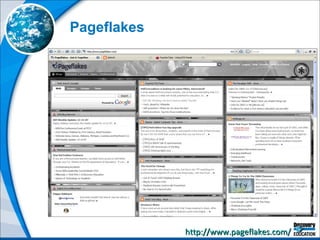
http://www.pageflakes.com/   Pageflakes
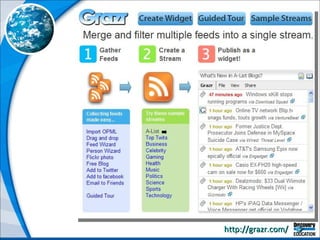
http://grazr.com/
Bringing Blogs into  DE  streaming Blogrolls + DE  streaming  Builders
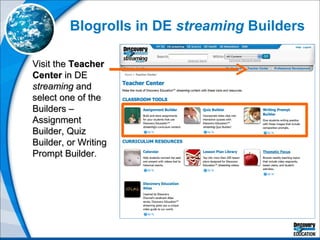
Blogrolls in DE  streaming  Builders Visit the  Teacher Center  in DE  streaming  and select one of the Builders – Assignment Builder, Quiz Builder, or Writing Prompt Builder.
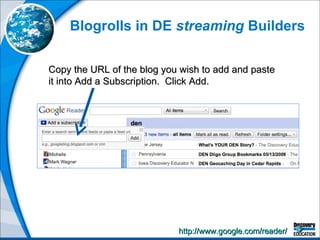
Blogrolls in DE  streaming  Builders Copy the URL of the blog you wish to add and paste it into Add a Subscription.  Click Add. http://www.google.com/reader/
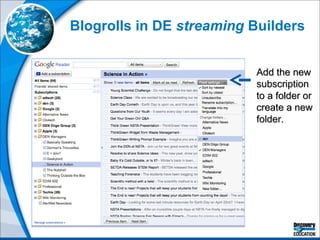
Blogrolls in DE  streaming  Builders Add the new subscription to a folder or create a new folder.
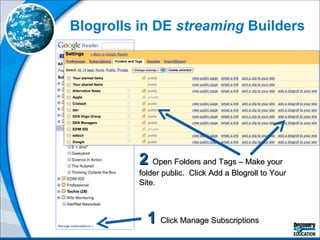
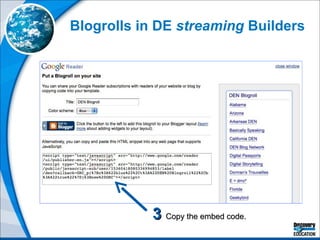
Blogrolls in DE  streaming  Builders 1   Click Manage Subscriptions 2   Open Folders and Tags – Make your folder public.  Click Add a Blogroll to Your Site.
Blogrolls in DE  streaming  Builders 3   Copy the embed code.
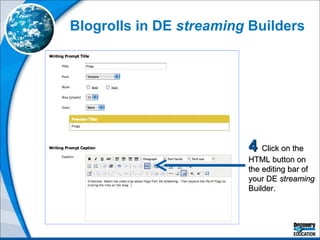
Blogrolls in DE  streaming  Builders 4  Click on the HTML button on the editing bar of your DE  streaming  Builder.
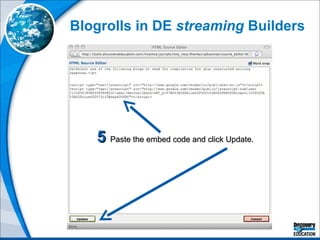
Blogrolls in DE  streaming  Builders 5  Paste the embed code and click Update.
Blogrolls in DE  streaming  Builders
Vlogs Taking blogging to a whole new level with video
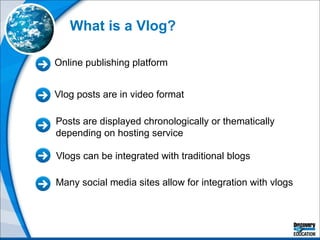
What is a Vlog? Posts are displayed chronologically or thematically depending on hosting service Online publishing platform Many social media sites allow for integration with vlogs Vlog posts are in video format Vlogs can be integrated with traditional blogs
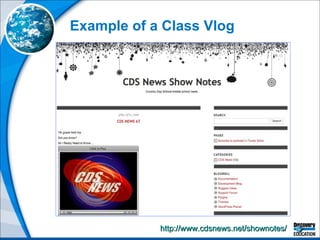
Example of a Class Vlog http://www.cdsnews.net/shownotes/
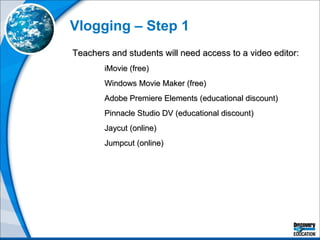
Vlogging – Step 1 Teachers and students will need access to a video editor: iMovie (free) Windows Movie Maker (free)  Adobe Premiere Elements (educational discount) Pinnacle Studio DV (educational discount) Jaycut (online)  Jumpcut (online)
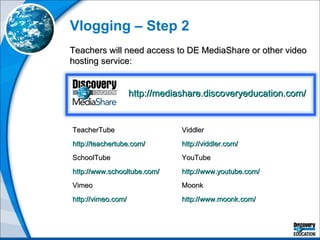
Vlogging – Step 2 Teachers will need access to DE MediaShare or other video hosting service: TeacherTube http://teachertube.com/   SchoolTube http://www.schooltube.com/   Vimeo http://vimeo.com/   Viddler http://viddler.com/   YouTube http://www.youtube.com/   Moonk http://www.moonk.com/   http://mediashare.discoveryeducation.com/
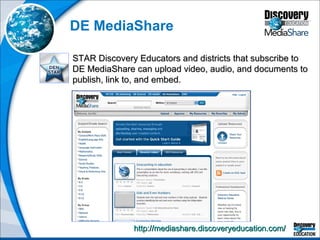
DE MediaShare http://mediashare.discoveryeducation.com/   STAR Discovery Educators and districts that subscribe to DE MediaShare can upload video, audio, and documents to publish, link to, and embed.
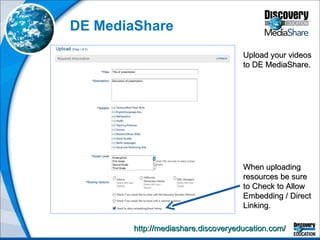
DE MediaShare http://mediashare.discoveryeducation.com/   When uploading resources be sure to Check to Allow Embedding / Direct Linking. Upload your videos to DE MediaShare.
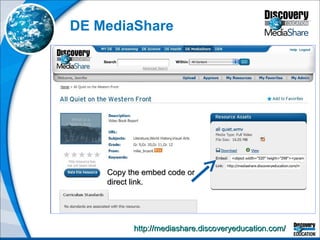
DE MediaShare http://mediashare.discoveryeducation.com/   Copy the embed code or direct link.
Vlogging – Step 3 Videos can be published and syndicated by embedding them onto or linking them to a blog, wiki, or website. They can also be syndicated through a video podcast service, such as: Podbean http://www.podbean.com/ Podomatic http://www.podomatic.com/   iTunes U http://www.apple.com/education/mobile-learning/
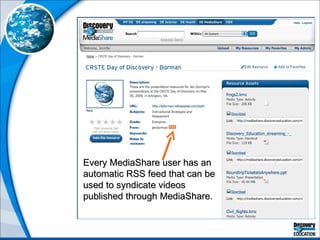
Every MediaShare user has an automatic RSS feed that can be used to syndicate videos published through MediaShare.
Vlogging with Apple If you are an Apple user, you can also use GarageBand to create vlogs that can be published to an iTunes account. Visit the iLife ‘09 GarageBand tutorials to learn more: http://www.apple.com/ilife/tutorials/garageband   You can also use iMovie to publish directly to YouTube or iWeb.  Visit the iLife ‘09 iMovie tutorials to learn more: http://www.apple.com/ilife/tutorials/imovie
Contact Me http://www.discoveryeducation.com/   Jennifer Dorman [email_address] http://denblogs.com/jendorman   Go to my  Presentations  page to download a copy of this  presentation

Blogs

  • 1.
    Students as AuthorsBlogging in the Classroom
  • 2.
    Contact Me http://www.discoveryeducation.com/ Jennifer Dorman [email_address] http://denblogs.com/jendorman Go to my Presentations page to download a copy of this presentation
  • 3.
    Blogs in PlainEnglish http://www.commoncraft.com/blogs Blogs IPE - Individual (.mov)
  • 4.
    What is aBlog? Posts are displayed chronologically Online publishing platform Many social media sites allow for integration with blogs Blog posts consist primarily of text with some embedded media and hyperlinks Many blogs allow for some static pages (e.g. About Me)
  • 5.
  • 6.
    Alternatives to EdublogsClass Blogmeister http://classblogmeister.com/ 21 Classes http://21classes.com/ Blogger http://www.blogger.com/ Ning http://www.ning.com/
  • 7.
    Static pages Chronologicalblog posts Sidebar
  • 8.
    When editing pagesor posts, use the Visual editor to create in a word processing style format.
  • 9.
    When editing pagesor posts, use the Code editor to author in HTML code and insert embeddable code for dynamic widgets.
  • 10.
    Upload documents andother files to your pages and posts.
  • 11.
    Use the Dashboardto manage comments.
  • 12.
    Use the blogrollto add web links to your sidebar organized by category.
  • 13.
    Integration Ideas forBlogs http://edublogs.org/10-ways-to-use-your-edublog-to-teach/ Post material and resources Host online discussions Create class publications Host eportfolios Transform students into publishers Share lesson resources with students, parents, and other educators Integrate multimedia Organize class materials and make them accessible anywhere, any time Receive and model feedback Create a fully functional class website
  • 14.
    For More IntegrationIdeas . . . http://jdorman.wikispaces.com/blogworkshop You can also access training guides for Edublogs, Blogger, Wordress, and Class Blogmeister as well as dozens of examples of class and teacher blogs.
  • 15.
    Blogs + DE streaming Blogs can be used instead of Writing Prompt Builder when you want to encourage students to respond to each other’s writing. You can link to any DE streaming media assets for blog prompts. Students will be required to sign into DE streaming in order to view them. You can insert DE streaming images into blog posts as long as you include the citation information. You can use a blog prompt as the student response element on a DE streaming Assignment. You can use a blog aggregator, such as Google Reader, to embed a blogroll widget into a DE streaming Builder.
  • 16.
    DE streaming Images in Blogs Images from DE streaming can be downloaded and uploaded to a blog. You can also link to a DE streaming image by right-clicking on Preview and selecting Copy Link Location. Be sure to include the image citation information on the blog post.
  • 17.
    DE streaming Images in Blogs If you are including DE streaming images into blog posts and pages, be sure to include the citation information.
  • 18.
    Managing Blogs Harnessingthe Power of RSS
  • 19.
  • 20.
    Teachers can subscribeto the blog feeds for their students’ blogs using an RSS aggregator. Students, parents, and community members can also be invited to subscribe to the feeds.
  • 21.
  • 22.
    http://www.google.com/ig iGoogle Page with Reader Gadget
  • 23.
  • 24.
  • 25.
  • 26.
  • 27.
    Bringing Blogs into DE streaming Blogrolls + DE streaming Builders
  • 28.
    Blogrolls in DE streaming Builders Visit the Teacher Center in DE streaming and select one of the Builders – Assignment Builder, Quiz Builder, or Writing Prompt Builder.
  • 29.
    Blogrolls in DE streaming Builders Copy the URL of the blog you wish to add and paste it into Add a Subscription. Click Add. http://www.google.com/reader/
  • 30.
    Blogrolls in DE streaming Builders Add the new subscription to a folder or create a new folder.
  • 31.
    Blogrolls in DE streaming Builders 1 Click Manage Subscriptions 2 Open Folders and Tags – Make your folder public. Click Add a Blogroll to Your Site.
  • 32.
    Blogrolls in DE streaming Builders 3 Copy the embed code.
  • 33.
    Blogrolls in DE streaming Builders 4 Click on the HTML button on the editing bar of your DE streaming Builder.
  • 34.
    Blogrolls in DE streaming Builders 5 Paste the embed code and click Update.
  • 35.
    Blogrolls in DE streaming Builders
  • 36.
    Vlogs Taking bloggingto a whole new level with video
  • 37.
    What is aVlog? Posts are displayed chronologically or thematically depending on hosting service Online publishing platform Many social media sites allow for integration with vlogs Vlog posts are in video format Vlogs can be integrated with traditional blogs
  • 38.
    Example of aClass Vlog http://www.cdsnews.net/shownotes/
  • 39.
    Vlogging – Step1 Teachers and students will need access to a video editor: iMovie (free) Windows Movie Maker (free) Adobe Premiere Elements (educational discount) Pinnacle Studio DV (educational discount) Jaycut (online) Jumpcut (online)
  • 40.
    Vlogging – Step2 Teachers will need access to DE MediaShare or other video hosting service: TeacherTube http://teachertube.com/ SchoolTube http://www.schooltube.com/ Vimeo http://vimeo.com/ Viddler http://viddler.com/ YouTube http://www.youtube.com/ Moonk http://www.moonk.com/ http://mediashare.discoveryeducation.com/
  • 41.
    DE MediaShare http://mediashare.discoveryeducation.com/ STAR Discovery Educators and districts that subscribe to DE MediaShare can upload video, audio, and documents to publish, link to, and embed.
  • 42.
    DE MediaShare http://mediashare.discoveryeducation.com/ When uploading resources be sure to Check to Allow Embedding / Direct Linking. Upload your videos to DE MediaShare.
  • 43.
    DE MediaShare http://mediashare.discoveryeducation.com/ Copy the embed code or direct link.
  • 44.
    Vlogging – Step3 Videos can be published and syndicated by embedding them onto or linking them to a blog, wiki, or website. They can also be syndicated through a video podcast service, such as: Podbean http://www.podbean.com/ Podomatic http://www.podomatic.com/ iTunes U http://www.apple.com/education/mobile-learning/
  • 45.
    Every MediaShare userhas an automatic RSS feed that can be used to syndicate videos published through MediaShare.
  • 46.
    Vlogging with AppleIf you are an Apple user, you can also use GarageBand to create vlogs that can be published to an iTunes account. Visit the iLife ‘09 GarageBand tutorials to learn more: http://www.apple.com/ilife/tutorials/garageband You can also use iMovie to publish directly to YouTube or iWeb. Visit the iLife ‘09 iMovie tutorials to learn more: http://www.apple.com/ilife/tutorials/imovie
  • 47.
    Contact Me http://www.discoveryeducation.com/ Jennifer Dorman [email_address] http://denblogs.com/jendorman Go to my Presentations page to download a copy of this presentation