Beginning WordPress
Jon Bishop
Kurt Eng
June 1st, 2013
LaborGuild: Weymouth, MA
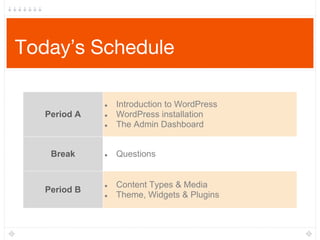
Today’s Schedule
Period A
● Introduction to WordPress
● WordPress installation
● The Admin Dashboard
Break ● Questions
Period B
● Content Types & Media
● Theme, Widgets & Plugins
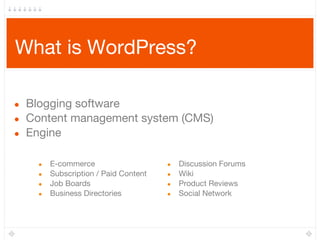
What is WordPress?
● Blogging software
● Content management system (CMS)
● Engine
● E-commerce
● Subscription / Paid Content
● Job Boards
● Business Directories
● Discussion Forums
● Wiki
● Product Reviews
● Social Network
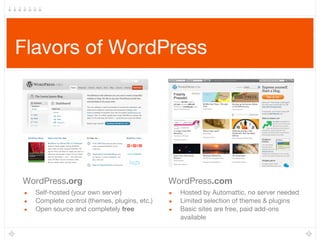
Flavors of WordPress
WordPress.com
● Hosted by Automattic, no server needed
● Limited selection of themes & plugins
● Basic sites are free, paid add-ons
available
● Self-hosted (your own server)
● Complete control (themes, plugins, etc.)
● Open source and completely free
WordPress.org
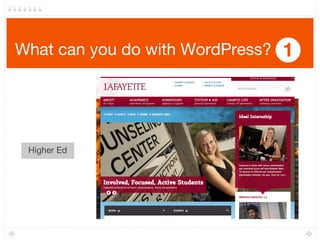
What can you do with WordPress? 1
Higher Ed
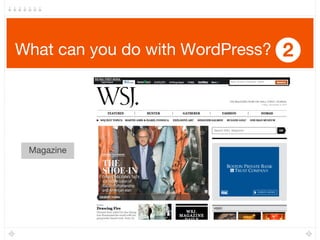
What can you do with WordPress? 2
Magazine
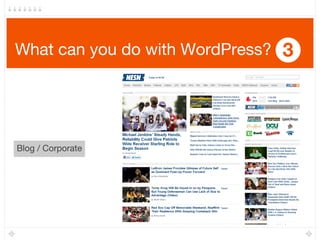
What can you do with WordPress? 3
Blog / Corporate
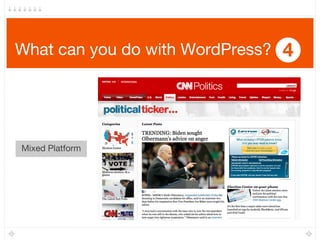
What can you do with WordPress? 4
Mixed Platform
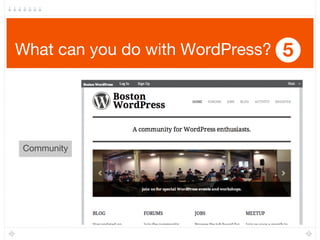
What can you do with WordPress? 5
Community
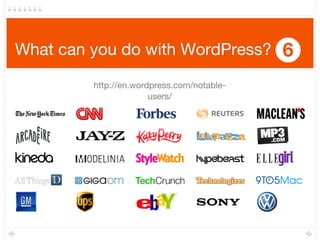
What can you do with WordPress? 6
http://en.wordpress.com/notable-
users/
Features of WordPress
● Control panel
(web-based & mobile)
● Users & profiles
(authentication & roles)
● Content types
● Taxonomy (content
organization)
● Media management
● Link & navigation management
● Built-in SEO*
● Comments
● Themes & widgets
● Plugins
● Feeds
● API
How does WordPress make my life/job easier?
Installation
Content Types
● Built-in content types in WordPress
● Posts: blogging/news, chronologic, appears in RSS feeds
● Pages: static content (e.g., “About”, “Contact”), hierarchical
● Comments: enable visitors to discuss your content
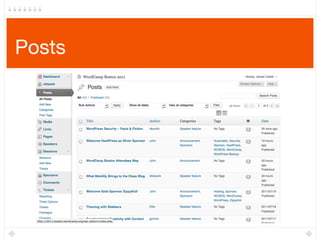
Posts
Posts
● Title 
● Arguably one of the most important aspects of content (include relevant/rich
keywords related to the content – SEO!)
● Responsible for building the content URL
● Content
● Actual post/page content (“body”), w/ text, images, videos, links, shortcodes, etc.
● WYSIWYG (similar to Microsoft Word) w/ Visual & HTML edit modes (and full-
screen!)
● Publishing
● Preview posts before publishing
● Set status (draft, pending, published) and visibility (private, password-protected)
● Set date (specific date in the past, scheduled date in the future)
Posts (cont.)
● Excerpt
● Write a custom post excerpt/teaser for category/archives pages or home page, as
opposed to auto-generated excerpts
● Taxonomy (Defaults: Categories & Tags) 
● Categories are hierarchical (parent/child) and useful for navigation menus
● Tags are “labels” assigned to
● Have separate pages in the Dashboard to manage
● Additional Meta Boxes
● Discussion settings, comments list
● Custom functionality from themes (featured image/thumbnail)
● Custom functionality from plugins (SEO plugins to edit title, meta description &
keywords…)
Posts (cont.)
● Permalinks
● Auto-generated from title
● SEO-friendly or “pretty” permalinks need to be enabled manually on default WordPress
installations!
● http://bostonwp.org/2011/07/bwpm-june-2011-creating-better-content-w-shortcodes/
● http://bostonwp.org/?p=505
● Can be customized per post/page on edit screen
● Trackbacks/Pingbacks
● Send automated notices to other websites & services when you change content
● Pingback: Include a link to 3rd
party article, save it, WP pings that article and adds a
pingback to the 3rd
party website article page
● Trackback: Outdated? Similar but not automatic. You find the trackback URL on 3rd
party website or article page (if enabled/advertised), paste into WordPress to send a
trackback
Posts (cont.)
● Revisions
● Autosaves and previously saved versions available for rollback or reference
● Author
● Change post/page author
● Custom Fields
● Stores all other metadata specific to your project
● Previously used to enable/disable certain theme-specific features
● Key/value pair format
Pages
● Pages
● Content that is “timeless” (About, Contact)
● Hierarchical (a parent page can have child pages)
● Page order (a number can be assigned for displaying pages in arbitrary
order)
● Can use custom page templates for completely different designs/layouts
per-page. Page templates can include other template files, WordPress
Template Tags, and PHP code
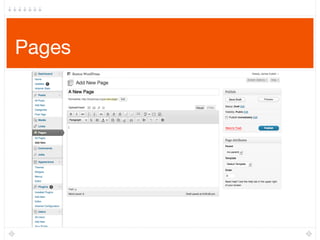
Pages
Pages (cont.)
● Pages are not Posts!
● Pages do not show up in the RSS feed
● Cannot be organized using category and tag taxonomies
● Typical page permalinks take the form of: http://mysite.com/the-page-
slug
● Can be added to Menus, or to sidebars using the Pages widget
Comments
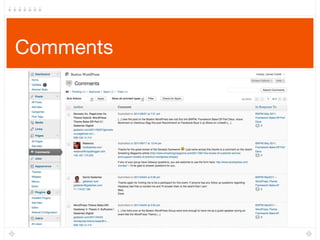
Comments
● Enabling/disabling
● Site-wide
● Per post or per page
● Moderating
● Always require administrator approval, or require the first to be approved per visitor
● Blacklist or hold in moderation queue by URLs, email address, IP addresses
● Nesting
● Replies are visible beneath the parent comment, and indented
● Gravatars
● Show commenter Gravatars next to comments (gravatar.com)
● Replacing built-in comments
● Disqus, IntenseDebate
Break
Themes
● A theme is a skin for your website
● Separation between the data layer and presentation layer
● Front-end: HTML, CSS, JavaScript, images, and some PHP
● Themes can also add functionality to WordPress
● Custom content types (a “Cake” for a bakery website)
● Custom taxonomies (flavors & occasions)
● Custom widgets (search box)
Theme Resources
● WordPress Theme Directory: http://wordpress.org/extend/themes/
● 3rd
party, free themes: Smashing Magazine, ThemeLab, WPSalon,
Mashable.com, Google search (of course)
● Premium Themes
● Support from developer & community
● Documentation
● Often higher quality, and feature-rich, and with child themes/variations
● Multiple licenses (individual, developer, etc.)
● Theme frameworks
Premium Theme Examples
● Press75
● WooThemes
● StudioPress
● Genesis
● Headway
● Pagelines Platform
● ElegantThemes
● ThemeForest
Child Themes
● Inherit the functionality of a parent theme
● Typically override:
● Styling (colors, fonts, margin/padding)
● Addition or removal of functionality (functions.php)
● Templates
● A good way to modify third party themes without hacking the original
code
● Provide several “flavors” of a parent theme
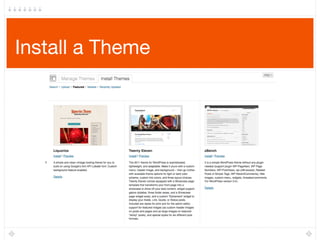
Install a Theme
Plugins
● Plugins extend the functionality of WordPress
● Add new menus & configuration options to the Admin Dashboard (post
types, spam filters, content importing)
● Add new features to the frontend of your website (social sharing tools)
● Change the way your site is displayed (mobile)
● Collect stats (analytics)
● Automate tasks (backup)
Plugin Resources
● WordPress Plugins Directory: http://wordpress.org/extend/plugins/
● Premium Plugins:
● WishList Membership Plugin
● Gravity Forms
● Scribe (copy-writing & SEO)
● WP e-Commerce, Shopp, PHPurchase
● WP Review Engine (reviews/star-ratings)
● WPtouch (mobile theme)
● Language translation
Plugin Recommendations
● Jetpack
● Disqus/Intense Debate
● WordPress SEO
● Akismet (already built in)
● Google Analytics for WordPress
● Gravity Forms
● VaultPress/Backup Buddy
● W3 Total Cache
http://wordpress.org/extend/plugins/ Many other plugins freely available!
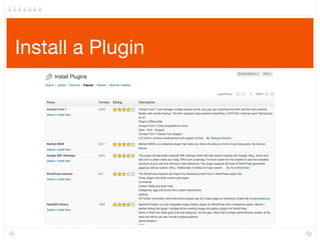
Install a Plugin
Widgets
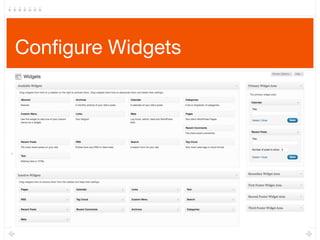
● Draggable & configurable modules that can be reused on WP sites
● Widgets are dragged into sidebars (widgetized regions), declared by
the theme
● WordPress contains many useful default widgets (the Text Widget is
powerful!)
● You don’t add new widgets directly: plugins & themes add new
widgets
● The more “widgetized” regions your theme contains, the more easily
configurable the page layout will be from the Dashboard, instead of
modifying code
Configure Widgets
Additional Resources
● WordPress-related blogs
WPRecipes.com, WPTavern.com, ...
● WordPress video tutorials from the source: http://wordpress.tv
● WordPress.org free theme & plugin directories - submit your work here!
● Commercial themes: custom admin panels & premium support
WooThemes, ThemeForest, StudioPress, ElegantThemes, Press75
● Theme frameworks: video tutorials and extensive documentation
Thesis, Genesis, Hybrid, Headway, Thematic
● WordPress Codex (Template Tags, loop query parameters, etc.)
● LiveWP.tv – WordPress news, tips, and banter…unscripted & live from Boston!
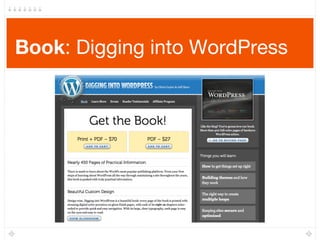
Book: Digging into WordPress
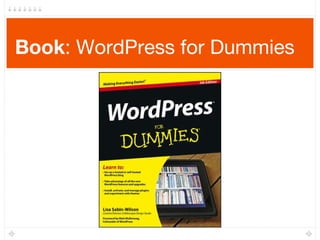
Book: WordPress for Dummies
Boston WordPress Meetup
● Monthly events at Microsoft NERD (last Monday of
every month)
● 1700+ members
● 2nd largest WordPress Meetup in the U.S.
● Support forums
● Past presentation slides & videos available online
● Free pizza!
● http://bostonwp.org
● @bostonwp on Twitter
HostGator
● Cheaper hosting with unlimited storage, bandwidth and domains
● Great if you plan on starting more than 1 WordPress site
● Plenty of support for the server and you don’t need to have WordPress
on it (self-install)
● Lots of software, room to experiment!
Use code TechDayCamp for 25% off hosting plan
WP-Engine
● WordPress only hosting
● Cheap, integrated, automatic backups, updates
● Set it and forget it!
● Secure, fast, reliable
Use code WPMeetupBoston2013at http://j.
mp/boswpshop for 1 free month
Questions
Open Q&A
Thank You
Jon Bishop
AMP Agency
Twitter: @JonDBishop
http://www.jonbishop.
com/
Kurt Eng
Twitter: @kurteng
http://www.kurteng.com/
Thanks for Viewing
Copyright 2013 Boston WordPress.
All rights reserved.
None of the material contained within this presentation may be used without authors’ written consent.

Beginning WordPress Workshop

  • 1.
    Beginning WordPress Jon Bishop KurtEng June 1st, 2013 LaborGuild: Weymouth, MA
  • 2.
    Today’s Schedule Period A ●Introduction to WordPress ● WordPress installation ● The Admin Dashboard Break ● Questions Period B ● Content Types & Media ● Theme, Widgets & Plugins
  • 3.
    What is WordPress? ●Blogging software ● Content management system (CMS) ● Engine ● E-commerce ● Subscription / Paid Content ● Job Boards ● Business Directories ● Discussion Forums ● Wiki ● Product Reviews ● Social Network
  • 4.
    Flavors of WordPress WordPress.com ●Hosted by Automattic, no server needed ● Limited selection of themes & plugins ● Basic sites are free, paid add-ons available ● Self-hosted (your own server) ● Complete control (themes, plugins, etc.) ● Open source and completely free WordPress.org
  • 5.
    What can youdo with WordPress? 1 Higher Ed
  • 6.
    What can youdo with WordPress? 2 Magazine
  • 7.
    What can youdo with WordPress? 3 Blog / Corporate
  • 8.
    What can youdo with WordPress? 4 Mixed Platform
  • 9.
    What can youdo with WordPress? 5 Community
  • 10.
    What can youdo with WordPress? 6 http://en.wordpress.com/notable- users/
  • 11.
    Features of WordPress ●Control panel (web-based & mobile) ● Users & profiles (authentication & roles) ● Content types ● Taxonomy (content organization) ● Media management ● Link & navigation management ● Built-in SEO* ● Comments ● Themes & widgets ● Plugins ● Feeds ● API How does WordPress make my life/job easier?
  • 12.
  • 13.
    Content Types ● Built-incontent types in WordPress ● Posts: blogging/news, chronologic, appears in RSS feeds ● Pages: static content (e.g., “About”, “Contact”), hierarchical ● Comments: enable visitors to discuss your content
  • 14.
  • 15.
    Posts ● Title  ● Arguablyone of the most important aspects of content (include relevant/rich keywords related to the content – SEO!) ● Responsible for building the content URL ● Content ● Actual post/page content (“body”), w/ text, images, videos, links, shortcodes, etc. ● WYSIWYG (similar to Microsoft Word) w/ Visual & HTML edit modes (and full- screen!) ● Publishing ● Preview posts before publishing ● Set status (draft, pending, published) and visibility (private, password-protected) ● Set date (specific date in the past, scheduled date in the future)
  • 16.
    Posts (cont.) ● Excerpt ●Write a custom post excerpt/teaser for category/archives pages or home page, as opposed to auto-generated excerpts ● Taxonomy (Defaults: Categories & Tags)  ● Categories are hierarchical (parent/child) and useful for navigation menus ● Tags are “labels” assigned to ● Have separate pages in the Dashboard to manage ● Additional Meta Boxes ● Discussion settings, comments list ● Custom functionality from themes (featured image/thumbnail) ● Custom functionality from plugins (SEO plugins to edit title, meta description & keywords…)
  • 17.
    Posts (cont.) ● Permalinks ●Auto-generated from title ● SEO-friendly or “pretty” permalinks need to be enabled manually on default WordPress installations! ● http://bostonwp.org/2011/07/bwpm-june-2011-creating-better-content-w-shortcodes/ ● http://bostonwp.org/?p=505 ● Can be customized per post/page on edit screen ● Trackbacks/Pingbacks ● Send automated notices to other websites & services when you change content ● Pingback: Include a link to 3rd party article, save it, WP pings that article and adds a pingback to the 3rd party website article page ● Trackback: Outdated? Similar but not automatic. You find the trackback URL on 3rd party website or article page (if enabled/advertised), paste into WordPress to send a trackback
  • 18.
    Posts (cont.) ● Revisions ●Autosaves and previously saved versions available for rollback or reference ● Author ● Change post/page author ● Custom Fields ● Stores all other metadata specific to your project ● Previously used to enable/disable certain theme-specific features ● Key/value pair format
  • 19.
    Pages ● Pages ● Contentthat is “timeless” (About, Contact) ● Hierarchical (a parent page can have child pages) ● Page order (a number can be assigned for displaying pages in arbitrary order) ● Can use custom page templates for completely different designs/layouts per-page. Page templates can include other template files, WordPress Template Tags, and PHP code
  • 20.
  • 21.
    Pages (cont.) ● Pagesare not Posts! ● Pages do not show up in the RSS feed ● Cannot be organized using category and tag taxonomies ● Typical page permalinks take the form of: http://mysite.com/the-page- slug ● Can be added to Menus, or to sidebars using the Pages widget
  • 22.
  • 23.
    Comments ● Enabling/disabling ● Site-wide ●Per post or per page ● Moderating ● Always require administrator approval, or require the first to be approved per visitor ● Blacklist or hold in moderation queue by URLs, email address, IP addresses ● Nesting ● Replies are visible beneath the parent comment, and indented ● Gravatars ● Show commenter Gravatars next to comments (gravatar.com) ● Replacing built-in comments ● Disqus, IntenseDebate
  • 24.
  • 25.
    Themes ● A themeis a skin for your website ● Separation between the data layer and presentation layer ● Front-end: HTML, CSS, JavaScript, images, and some PHP ● Themes can also add functionality to WordPress ● Custom content types (a “Cake” for a bakery website) ● Custom taxonomies (flavors & occasions) ● Custom widgets (search box)
  • 26.
    Theme Resources ● WordPressTheme Directory: http://wordpress.org/extend/themes/ ● 3rd party, free themes: Smashing Magazine, ThemeLab, WPSalon, Mashable.com, Google search (of course) ● Premium Themes ● Support from developer & community ● Documentation ● Often higher quality, and feature-rich, and with child themes/variations ● Multiple licenses (individual, developer, etc.) ● Theme frameworks
  • 27.
    Premium Theme Examples ●Press75 ● WooThemes ● StudioPress ● Genesis ● Headway ● Pagelines Platform ● ElegantThemes ● ThemeForest
  • 28.
    Child Themes ● Inheritthe functionality of a parent theme ● Typically override: ● Styling (colors, fonts, margin/padding) ● Addition or removal of functionality (functions.php) ● Templates ● A good way to modify third party themes without hacking the original code ● Provide several “flavors” of a parent theme
  • 29.
  • 30.
    Plugins ● Plugins extendthe functionality of WordPress ● Add new menus & configuration options to the Admin Dashboard (post types, spam filters, content importing) ● Add new features to the frontend of your website (social sharing tools) ● Change the way your site is displayed (mobile) ● Collect stats (analytics) ● Automate tasks (backup)
  • 31.
    Plugin Resources ● WordPressPlugins Directory: http://wordpress.org/extend/plugins/ ● Premium Plugins: ● WishList Membership Plugin ● Gravity Forms ● Scribe (copy-writing & SEO) ● WP e-Commerce, Shopp, PHPurchase ● WP Review Engine (reviews/star-ratings) ● WPtouch (mobile theme) ● Language translation
  • 32.
    Plugin Recommendations ● Jetpack ●Disqus/Intense Debate ● WordPress SEO ● Akismet (already built in) ● Google Analytics for WordPress ● Gravity Forms ● VaultPress/Backup Buddy ● W3 Total Cache http://wordpress.org/extend/plugins/ Many other plugins freely available!
  • 33.
  • 34.
    Widgets ● Draggable &configurable modules that can be reused on WP sites ● Widgets are dragged into sidebars (widgetized regions), declared by the theme ● WordPress contains many useful default widgets (the Text Widget is powerful!) ● You don’t add new widgets directly: plugins & themes add new widgets ● The more “widgetized” regions your theme contains, the more easily configurable the page layout will be from the Dashboard, instead of modifying code
  • 35.
  • 36.
    Additional Resources ● WordPress-relatedblogs WPRecipes.com, WPTavern.com, ... ● WordPress video tutorials from the source: http://wordpress.tv ● WordPress.org free theme & plugin directories - submit your work here! ● Commercial themes: custom admin panels & premium support WooThemes, ThemeForest, StudioPress, ElegantThemes, Press75 ● Theme frameworks: video tutorials and extensive documentation Thesis, Genesis, Hybrid, Headway, Thematic ● WordPress Codex (Template Tags, loop query parameters, etc.) ● LiveWP.tv – WordPress news, tips, and banter…unscripted & live from Boston!
  • 37.
  • 38.
  • 39.
    Boston WordPress Meetup ●Monthly events at Microsoft NERD (last Monday of every month) ● 1700+ members ● 2nd largest WordPress Meetup in the U.S. ● Support forums ● Past presentation slides & videos available online ● Free pizza! ● http://bostonwp.org ● @bostonwp on Twitter
  • 40.
    HostGator ● Cheaper hostingwith unlimited storage, bandwidth and domains ● Great if you plan on starting more than 1 WordPress site ● Plenty of support for the server and you don’t need to have WordPress on it (self-install) ● Lots of software, room to experiment! Use code TechDayCamp for 25% off hosting plan
  • 41.
    WP-Engine ● WordPress onlyhosting ● Cheap, integrated, automatic backups, updates ● Set it and forget it! ● Secure, fast, reliable Use code WPMeetupBoston2013at http://j. mp/boswpshop for 1 free month
  • 42.
  • 43.
    Thank You Jon Bishop AMPAgency Twitter: @JonDBishop http://www.jonbishop. com/ Kurt Eng Twitter: @kurteng http://www.kurteng.com/
  • 44.
    Thanks for Viewing Copyright2013 Boston WordPress. All rights reserved. None of the material contained within this presentation may be used without authors’ written consent.