You've Installed WordPress
                             Now What?


 March 20, 2012 | WPNYC Meetup | Rindy, Krista, Dana and Kevin | New York City
Settings
A Brief Overview
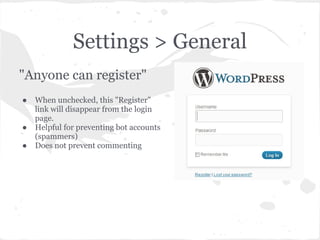
Settings > General
"Anyone can register"
●   When unchecked, this "Register"
    link will disappear from the login
    page.
●   Helpful for preventing bot accounts
    (spammers)
●   Does not prevent commenting
Settings > Writing
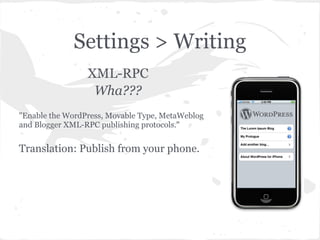
                 XML-RPC
                  Wha???
"Enable the WordPress, Movable Type, MetaWeblog
and Blogger XML-RPC publishing protocols."


Translation: Publish from your phone.
Settings > Reading
● Front page: Latest posts or static page?

● Number of posts per page (applies to archive
  pages as well as front page

● Full or summary RSS - this only affects your
  feed
Settings > Discussion
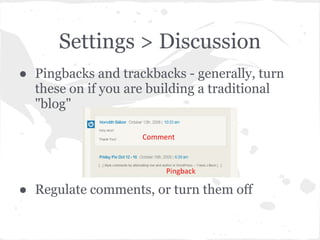
● Pingbacks and trackbacks - generally, turn
  these on if you are building a traditional
  "blog"


● Regulate comments, or turn them off
Settings > Privacy
● Turn off search engine indexing for test sites,
  not-ready-for-prime-time, etc

● This does not hide your site - it's still online!

● Not all search bots respect this
Settings > Permalinks
● Make your links readable and SEO-friendly

http://mysite.com/tags/parties/fourth-of-july
                     vs
         http://mysite.com/?p=241

● Customize, but beware! Best to use one of
  the options. Details at http://codex.wordpress.
   org/Settings_Permalinks_Screen
Pick a Theme
● Change themes without changing content

● Search from within the dashboard

● Change at will!
Themes
What is a theme?

A group of files that affect how your site looks.

Theme files are stored separate than WP core, plugins
and your content.
Free vs Premium
            Free                   Commercial/Premium

· Try as many as you like        · A good developer, will
for free!                        provide good support.

· Most are unsupported so        · If building a niche website,
you rely on community for        some are built with industry-
help.                            specific features.


                Is one better than the other?
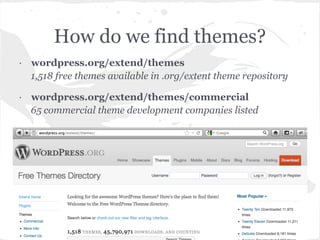
How do we find themes?
· wordpress.org/extend/themes
  1,518 free themes available in .org/extent theme repository

· wordpress.org/extend/themes/commercial
  65 commercial theme development companies listed
Where else?
· Developer websites - Elegant Themes, Themify, WPMU
· Lots of developers sell their work on other marketplace sites
such as themeforest.net (owned by Envato) and mojo-
themes, as well as many others
· Theme reviewers - WPCandy, WPTavern, Smashing
Magazine..


                         BEWARE!!
Do not use Google to do random non-specific theme searches,
BUT instead use it to find a specific theme or developer by name
that you may have heard about or read a review on.
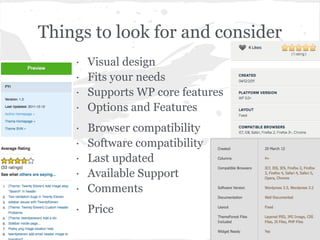
Things to look for and consider
    ·   Visual design
    ·   Fits your needs
    ·   Supports WP core features
    ·   Options and Features
    ·   Browser compatibility
    ·   Software compatibility
    ·   Last updated
    ·   Available Support
    ·   Comments
    · Price
How do you choose?

Know what you want, but be open to
      creativity and ideas.
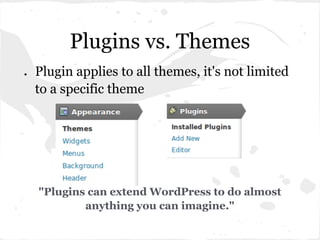
Plugins vs. Themes
●   Plugin applies to all themes, it's not limited
    to a specific theme


    "Plugins can extend WordPress to do almost
            anything you can imagine."
Plugins
How to search for Plugins
●   Free (WordPress.org)
●   Premium (links from WordPress.org)
●   WordPress Information Sites
    ○   WP Candy (http://wpcandy.com/)
    ○   WP Mail (http://wpmail.me/)
    ○   WP Beginner (http://www.wpbeginner.com/)
    ○   WPMU (http://wpmu.org)
    ○   WP Lift (http://wplift.com/)
    ○   Smashing Magazine (http://wp.smashingmagazine.com/)
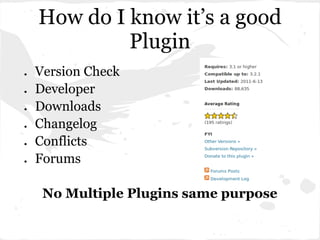
How do I know it’s a good
             Plugin
●   Version Check
●   Developer
●   Downloads
●   Changelog
●   Conflicts
●   Forums

     No Multiple Plugins same purpose
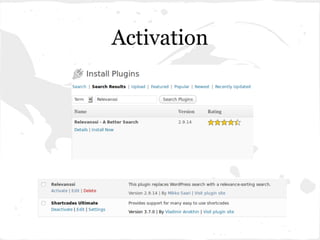
Activation
Must Have Plugins
●   Backups
    ○   Backup Buddy
    ○   WP-DB-Backup
●   Related Content
    ○   YARPP
    ○   nrelate
●   Spam Control
    ○   Akismet
    ○   Anti-Spam Bee
    ○   SI CAPTCHA Anti-Spam
Must Have Plugins
●   Widgets
     ○   Display Widgets
     ○   Widget Logic
●   Email
     ○   WP SMTP Mail
     ○   Better Emails
●   Sharing/follow
     ○   Social Sharing Toolkit
     ○   Sociable
●   Caching
     ○   Super Cache
     ○   W3 Total Cache
Widgets and Menus
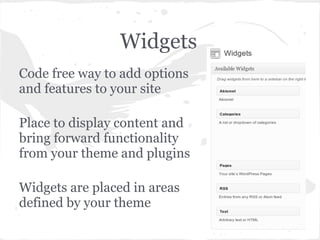
Widgets
Code free way to add options
and features to your site

Place to display content and
bring forward functionality
from your theme and plugins

Widgets are placed in areas
defined by your theme
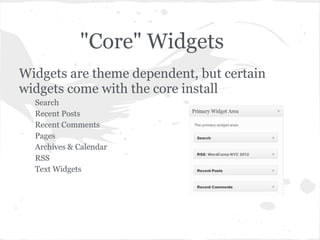
"Core" Widgets
Widgets are theme dependent, but certain
widgets come with the core install
  Search
  Recent Posts
  Recent Comments
  Pages
  Archives & Calendar
  RSS
  Text Widgets
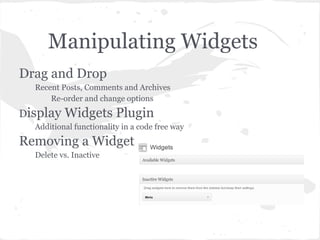
Manipulating Widgets
Drag and Drop
  Recent Posts, Comments and Archives
      Re-order and change options
Display   Widgets Plugin
  Additional functionality in a code free way
Removing a Widget
  Delete vs. Inactive
Menus
Main Navigation area of your site
  They tell your visitors where to find and access your content
Style
  Old Style of Menus was hard coded in theme :(
  New Style is User configurable in the admin panel
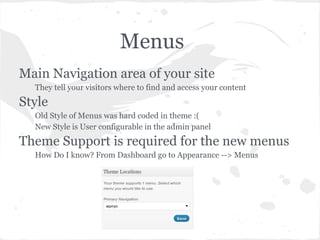
Theme Support is required for the new menus
  How Do I know? From Dashboard go to Appearance --> Menus
Building Menus
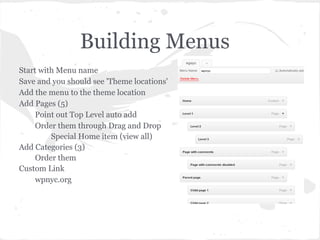
Start with Menu name
Save and you should see 'Theme locations'
Add the menu to the theme location
Add Pages (5)
     Point out Top Level auto add
     Order them through Drag and Drop
         Special Home item (view all)
Add Categories (3)
     Order them
Custom Link
     wpnyc.org
Useful Links
Widgets
    The Codex Article
        http://codex.wordpress.org/WordPress_Widgets
    Creating Widget Areas (Advanced Topic)
        http://justintadlock.com/archives/2009/05/26/the-complete-guide-
        to-creating-widgets-in-wordpress-28
Menus
    The Codex
        http://codex.wordpress.org/WordPress_Menu_User_Guide
Tips and Tricks
Tips and Tricks
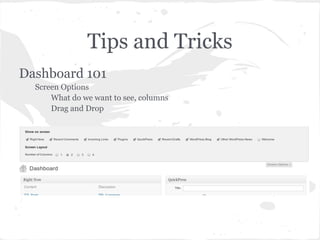
Dashboard 101
  Screen Options
      What do we want to see, columns
      Drag and Drop
Tips and Tricks
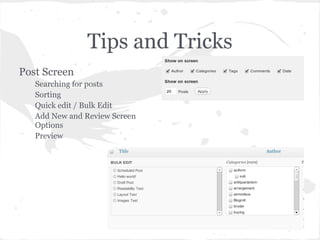
Post Screen
   Searching for posts
   Sorting
   Quick edit / Bulk Edit
   Add New and Review Screen
   Options
   Preview
Tips and Tricks
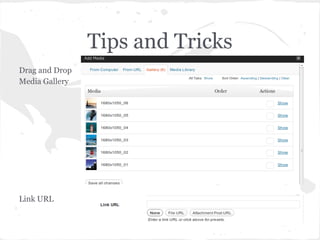
Drag and Drop
Media Gallery


Link URL
Presented by
Rindy Portfolio
@portfola / rindy@crosscutsoftware.com


Krista Gonzalez
www.720creations.com


Dana Skallman
dana@glocalwebtech.com


Kevin Cristiano
wpnyc.org/members/kcristiano

WordPress: After The Install

  • 1.
    You've Installed WordPress Now What? March 20, 2012 | WPNYC Meetup | Rindy, Krista, Dana and Kevin | New York City
  • 2.
  • 3.
    Settings > General "Anyonecan register" ● When unchecked, this "Register" link will disappear from the login page. ● Helpful for preventing bot accounts (spammers) ● Does not prevent commenting
  • 4.
    Settings > Writing XML-RPC Wha??? "Enable the WordPress, Movable Type, MetaWeblog and Blogger XML-RPC publishing protocols." Translation: Publish from your phone.
  • 5.
    Settings > Reading ●Front page: Latest posts or static page? ● Number of posts per page (applies to archive pages as well as front page ● Full or summary RSS - this only affects your feed
  • 6.
    Settings > Discussion ●Pingbacks and trackbacks - generally, turn these on if you are building a traditional "blog" ● Regulate comments, or turn them off
  • 7.
    Settings > Privacy ●Turn off search engine indexing for test sites, not-ready-for-prime-time, etc ● This does not hide your site - it's still online! ● Not all search bots respect this
  • 8.
    Settings > Permalinks ●Make your links readable and SEO-friendly http://mysite.com/tags/parties/fourth-of-july vs http://mysite.com/?p=241 ● Customize, but beware! Best to use one of the options. Details at http://codex.wordpress. org/Settings_Permalinks_Screen
  • 9.
    Pick a Theme ●Change themes without changing content ● Search from within the dashboard ● Change at will!
  • 10.
  • 11.
    What is atheme? A group of files that affect how your site looks. Theme files are stored separate than WP core, plugins and your content.
  • 12.
    Free vs Premium Free Commercial/Premium · Try as many as you like · A good developer, will for free! provide good support. · Most are unsupported so · If building a niche website, you rely on community for some are built with industry- help. specific features. Is one better than the other?
  • 13.
    How do wefind themes? · wordpress.org/extend/themes 1,518 free themes available in .org/extent theme repository · wordpress.org/extend/themes/commercial 65 commercial theme development companies listed
  • 14.
    Where else? · Developerwebsites - Elegant Themes, Themify, WPMU · Lots of developers sell their work on other marketplace sites such as themeforest.net (owned by Envato) and mojo- themes, as well as many others · Theme reviewers - WPCandy, WPTavern, Smashing Magazine.. BEWARE!! Do not use Google to do random non-specific theme searches, BUT instead use it to find a specific theme or developer by name that you may have heard about or read a review on.
  • 15.
    Things to lookfor and consider · Visual design · Fits your needs · Supports WP core features · Options and Features · Browser compatibility · Software compatibility · Last updated · Available Support · Comments · Price
  • 16.
    How do youchoose? Know what you want, but be open to creativity and ideas.
  • 17.
    Plugins vs. Themes ● Plugin applies to all themes, it's not limited to a specific theme "Plugins can extend WordPress to do almost anything you can imagine."
  • 18.
  • 19.
    How to searchfor Plugins ● Free (WordPress.org) ● Premium (links from WordPress.org) ● WordPress Information Sites ○ WP Candy (http://wpcandy.com/) ○ WP Mail (http://wpmail.me/) ○ WP Beginner (http://www.wpbeginner.com/) ○ WPMU (http://wpmu.org) ○ WP Lift (http://wplift.com/) ○ Smashing Magazine (http://wp.smashingmagazine.com/)
  • 20.
    How do Iknow it’s a good Plugin ● Version Check ● Developer ● Downloads ● Changelog ● Conflicts ● Forums No Multiple Plugins same purpose
  • 21.
  • 22.
    Must Have Plugins ● Backups ○ Backup Buddy ○ WP-DB-Backup ● Related Content ○ YARPP ○ nrelate ● Spam Control ○ Akismet ○ Anti-Spam Bee ○ SI CAPTCHA Anti-Spam
  • 23.
    Must Have Plugins ● Widgets ○ Display Widgets ○ Widget Logic ● Email ○ WP SMTP Mail ○ Better Emails ● Sharing/follow ○ Social Sharing Toolkit ○ Sociable ● Caching ○ Super Cache ○ W3 Total Cache
  • 24.
  • 25.
    Widgets Code free wayto add options and features to your site Place to display content and bring forward functionality from your theme and plugins Widgets are placed in areas defined by your theme
  • 26.
    "Core" Widgets Widgets aretheme dependent, but certain widgets come with the core install Search Recent Posts Recent Comments Pages Archives & Calendar RSS Text Widgets
  • 27.
    Manipulating Widgets Drag andDrop Recent Posts, Comments and Archives Re-order and change options Display Widgets Plugin Additional functionality in a code free way Removing a Widget Delete vs. Inactive
  • 28.
    Menus Main Navigation areaof your site They tell your visitors where to find and access your content Style Old Style of Menus was hard coded in theme :( New Style is User configurable in the admin panel Theme Support is required for the new menus How Do I know? From Dashboard go to Appearance --> Menus
  • 29.
    Building Menus Start withMenu name Save and you should see 'Theme locations' Add the menu to the theme location Add Pages (5) Point out Top Level auto add Order them through Drag and Drop Special Home item (view all) Add Categories (3) Order them Custom Link wpnyc.org
  • 30.
    Useful Links Widgets The Codex Article http://codex.wordpress.org/WordPress_Widgets Creating Widget Areas (Advanced Topic) http://justintadlock.com/archives/2009/05/26/the-complete-guide- to-creating-widgets-in-wordpress-28 Menus The Codex http://codex.wordpress.org/WordPress_Menu_User_Guide
  • 31.
  • 32.
    Tips and Tricks Dashboard101 Screen Options What do we want to see, columns Drag and Drop
  • 33.
    Tips and Tricks PostScreen Searching for posts Sorting Quick edit / Bulk Edit Add New and Review Screen Options Preview
  • 34.
    Tips and Tricks Dragand Drop Media Gallery Link URL
  • 35.
    Presented by Rindy Portfolio @portfola/ rindy@crosscutsoftware.com Krista Gonzalez www.720creations.com Dana Skallman dana@glocalwebtech.com Kevin Cristiano wpnyc.org/members/kcristiano