PASSWORD DOOR
LOCK SYSTEM
IOT MINI-PROJECT
CONTENTS
● Introduction
● Motivation
● Objectives
● Requirements
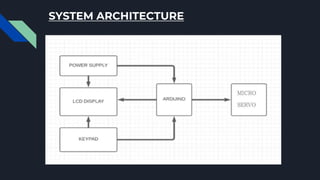
● System Architecture
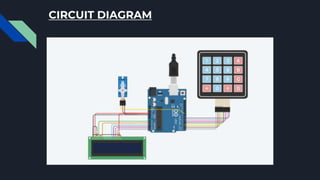
● Circuit Diagram
● Working
● Advantages and Applications
● Code and Implementation
● Conclusion
● Future scope
● References
INTRODUCTION
● This password-based door lock system allows access to
only authorized persons .
● It can be mounted to any of the existing doors .
● Less complicated components & embedded software are
used in this project.
● System is based on Arduino Uno along with a keypad , an
LCD and a Micro Servo.
MOTIVATION
● Today’s main concern is SECURITY.
● Conventional locks are not much safe.
● Rate of crime and intruders is increasing day by day.
● Access should be restricted to limited people.
OBJECTIVES
● To ensure better safety at residential places
● To give access of highly secured places in an organization
with only authorities
● To provide users more secure yet cost-efficient way of
door locking
REQUIREMENTS
Hardware:
● Arduino Uno
● LCD display
● Keypad
● Micro Servo Motor
● Resistors
● Connecting wires
● Battery
Software:
● Arduino Software (IDE)
ARDUINO UNO LCD DISPLAY
KEYPAD
MICRO SERVO RESISTORS
CONNECTING WIRES
SYSTEM ARCHITECTURE
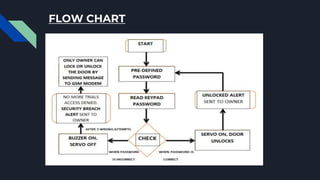
FLOW CHART
CIRCUIT DIAGRAM
WORKING
● Arduino compares the original set password and the passkey
which we enter.
● The operation code is dumped into the Arduino board using the
dumping cable.
● LCD displays “Enter Password”.
● We enter passkey using keypad and passkey is displayed on
LCD.
● For correct passkey, LCD displays “Door is Open” and for wrong
“Access Denied” so door remain locked.
ADVANTAGES
● Simple programmable code lock circuit.
● Major components are only LCD, Keypad, Arduino,Micro servo.
● User can set his password for ensured protection instantly.
● Power required to operate this circuit is very less.
APPLICATIONS
● Used in doors of houses.
● Used for vehicles.
● Used for jewellery or money boxes.
● Used in secured offices and wherever security is needed.
CODE
#include <Keypad.h>
#include <LiquidCrystal.h>
#include <Servo.h>
#define Password_Length 5
Servo myservo;
LiquidCrystal lcd(A0, A1, A2, A3, A4, A5);
int pos = 0;
char Data[Password_Length];
char Master[Password_Length] =
"1234";
byte data_count = 0, master_count = 0;
bool Pass_is_good;
bool door = false;
char customKey;
/*---preparing keypad---*/
const byte ROWS = 4;
const byte COLS = 4;
char keys[ROWS][COLS] = {
{'1', '2', '3', 'A'},
{'4', '5', '6', 'B'},
{'7', '8', '9', 'C'},
{'*', '0', '#', 'D'}};
byte rowPins[ROWS] = {0, 1, 2, 3};
byte colPins[COLS] = {4, 5, 6, 7};
Keypad customKeypad( makeKeymap(keys), rowPins,
colPins, ROWS, COLS);
/*--- Main Action ---*/
void setup()
{
myservo.attach(9, 2000, 2400);
ServoClose();
lcd.begin(16, 2);
lcd.print("Protected Door");
loading("Loading");
lcd.clear();
}
CODE
void loop()
{
if (door == true)
{
customKey = customKeypad.getKey();
if (customKey == '#')
{
lcd.clear();
ServoClose();
lcd.print("Door is closed");
delay(3000);
door = false;
}
}
else
Open();
}
void loading (char msg[]) {
lcd.setCursor(0, 1);
lcd.print(msg);
for (int i = 0; i < 9; i++) {
delay(1000);
lcd.print(".");
}
}
void clearData()
{
while (data_count != 0)
{
Data[data_count--] = 0;
}
return;
}
CODE
void ServoClose()
{
for (pos = 90; pos >= 0; pos -= 10) {
myservo.write(pos);
}
}
void ServoOpen()
{
for (pos = 0; pos <= 90; pos += 10) {
myservo.write(pos);
}
}
void Open()
{
lcd.setCursor(0, 0);
lcd.print("Enter Password");
customKey = customKeypad.getKey();
if (customKey)
{
Data[data_count] = customKey;
lcd.setCursor(data_count, 1);
lcd.print(Data[data_count]);
data_count++;
}
if (data_count == Password_Length - 1)
{
if (!strcmp(Data, Master))
{
lcd.clear(); ServoOpen(); lcd.print(" Door is Open
"); door = true; delay(5000);
loading("Waiting"); lcd.clear(); lcd.print(" Time is
up! "); delay(1000); ServoClose(); door = false;
}
else{
lcd.clear();
lcd.print(" Wrong Password ");
door = false;
}delay(1000);lcd.clear(); clearData();}
}
IMPLEMENTATION
Link to Tinkercad : https://www.tinkercad.com/things/idKgClcD9yw-mighty-bombul-
jaban/editel?sharecode=wXB5NROP9SFsuUKz6U3VDD9_fe83ra-zZdH3oDqZXC8
CONCLUSION
● This digital code lock is very marketable because it is easy
to use.
● Comparatively inexpensive due to low power
consumption and highly reliable.
● This is most prevalent form of digital lock as it uses
numerical code for authentication.
● The code lock is therefore particularly useful in door locks
and equipment locks.
FUTURE SCOPE
● This project can be further extended by adding GSM
module, so that owner will receive the message to his
mobile, whenever the lock is being authenticated.
● This helps the locking system to be more secure.
● Also, we can keep a count for wrong entries of passkey,
such that the lock will be permanently locked if the count
reaches and it can’t be opened until the owner resets it.
REFERENCES
● https://circuitdigest.com/microcontroller-projects/digital-keypad-security-door-lock-using-
arduino
● https://arduinogetstarted.com/tutorials/arduino-door-lock-system-using-password
● https://www.youtube.com/watch?v=PATSL8ck8Ns
● https://how2electronics.com/password-based-security-system-arduino-keypad/
● https://www.irjet.net/archives/V6/i2/IRJET-V6I2225.pdf
● https://youtu.be/58jFAammYcw
THANK YOU

PASSWORD DOOR LOCK SYSTEM.pptx

  • 1.
  • 2.
    CONTENTS ● Introduction ● Motivation ●Objectives ● Requirements ● System Architecture ● Circuit Diagram ● Working ● Advantages and Applications ● Code and Implementation ● Conclusion ● Future scope ● References
  • 3.
    INTRODUCTION ● This password-baseddoor lock system allows access to only authorized persons . ● It can be mounted to any of the existing doors . ● Less complicated components & embedded software are used in this project. ● System is based on Arduino Uno along with a keypad , an LCD and a Micro Servo.
  • 4.
    MOTIVATION ● Today’s mainconcern is SECURITY. ● Conventional locks are not much safe. ● Rate of crime and intruders is increasing day by day. ● Access should be restricted to limited people.
  • 5.
    OBJECTIVES ● To ensurebetter safety at residential places ● To give access of highly secured places in an organization with only authorities ● To provide users more secure yet cost-efficient way of door locking
  • 6.
    REQUIREMENTS Hardware: ● Arduino Uno ●LCD display ● Keypad ● Micro Servo Motor ● Resistors ● Connecting wires ● Battery Software: ● Arduino Software (IDE)
  • 7.
    ARDUINO UNO LCDDISPLAY KEYPAD
  • 8.
  • 9.
  • 10.
  • 11.
  • 12.
    WORKING ● Arduino comparesthe original set password and the passkey which we enter. ● The operation code is dumped into the Arduino board using the dumping cable. ● LCD displays “Enter Password”. ● We enter passkey using keypad and passkey is displayed on LCD. ● For correct passkey, LCD displays “Door is Open” and for wrong “Access Denied” so door remain locked.
  • 13.
    ADVANTAGES ● Simple programmablecode lock circuit. ● Major components are only LCD, Keypad, Arduino,Micro servo. ● User can set his password for ensured protection instantly. ● Power required to operate this circuit is very less.
  • 14.
    APPLICATIONS ● Used indoors of houses. ● Used for vehicles. ● Used for jewellery or money boxes. ● Used in secured offices and wherever security is needed.
  • 15.
    CODE #include <Keypad.h> #include <LiquidCrystal.h> #include<Servo.h> #define Password_Length 5 Servo myservo; LiquidCrystal lcd(A0, A1, A2, A3, A4, A5); int pos = 0; char Data[Password_Length]; char Master[Password_Length] = "1234"; byte data_count = 0, master_count = 0; bool Pass_is_good; bool door = false; char customKey; /*---preparing keypad---*/ const byte ROWS = 4; const byte COLS = 4; char keys[ROWS][COLS] = { {'1', '2', '3', 'A'}, {'4', '5', '6', 'B'}, {'7', '8', '9', 'C'}, {'*', '0', '#', 'D'}}; byte rowPins[ROWS] = {0, 1, 2, 3}; byte colPins[COLS] = {4, 5, 6, 7}; Keypad customKeypad( makeKeymap(keys), rowPins, colPins, ROWS, COLS); /*--- Main Action ---*/ void setup() { myservo.attach(9, 2000, 2400); ServoClose(); lcd.begin(16, 2); lcd.print("Protected Door"); loading("Loading"); lcd.clear(); }
  • 16.
    CODE void loop() { if (door== true) { customKey = customKeypad.getKey(); if (customKey == '#') { lcd.clear(); ServoClose(); lcd.print("Door is closed"); delay(3000); door = false; } } else Open(); } void loading (char msg[]) { lcd.setCursor(0, 1); lcd.print(msg); for (int i = 0; i < 9; i++) { delay(1000); lcd.print("."); } } void clearData() { while (data_count != 0) { Data[data_count--] = 0; } return; }
  • 17.
    CODE void ServoClose() { for (pos= 90; pos >= 0; pos -= 10) { myservo.write(pos); } } void ServoOpen() { for (pos = 0; pos <= 90; pos += 10) { myservo.write(pos); } } void Open() { lcd.setCursor(0, 0); lcd.print("Enter Password"); customKey = customKeypad.getKey(); if (customKey) { Data[data_count] = customKey; lcd.setCursor(data_count, 1); lcd.print(Data[data_count]); data_count++; } if (data_count == Password_Length - 1) { if (!strcmp(Data, Master)) { lcd.clear(); ServoOpen(); lcd.print(" Door is Open "); door = true; delay(5000); loading("Waiting"); lcd.clear(); lcd.print(" Time is up! "); delay(1000); ServoClose(); door = false; } else{ lcd.clear(); lcd.print(" Wrong Password "); door = false; }delay(1000);lcd.clear(); clearData();} }
  • 18.
    IMPLEMENTATION Link to Tinkercad: https://www.tinkercad.com/things/idKgClcD9yw-mighty-bombul- jaban/editel?sharecode=wXB5NROP9SFsuUKz6U3VDD9_fe83ra-zZdH3oDqZXC8
  • 19.
    CONCLUSION ● This digitalcode lock is very marketable because it is easy to use. ● Comparatively inexpensive due to low power consumption and highly reliable. ● This is most prevalent form of digital lock as it uses numerical code for authentication. ● The code lock is therefore particularly useful in door locks and equipment locks.
  • 20.
    FUTURE SCOPE ● Thisproject can be further extended by adding GSM module, so that owner will receive the message to his mobile, whenever the lock is being authenticated. ● This helps the locking system to be more secure. ● Also, we can keep a count for wrong entries of passkey, such that the lock will be permanently locked if the count reaches and it can’t be opened until the owner resets it.
  • 21.
    REFERENCES ● https://circuitdigest.com/microcontroller-projects/digital-keypad-security-door-lock-using- arduino ● https://arduinogetstarted.com/tutorials/arduino-door-lock-system-using-password ●https://www.youtube.com/watch?v=PATSL8ck8Ns ● https://how2electronics.com/password-based-security-system-arduino-keypad/ ● https://www.irjet.net/archives/V6/i2/IRJET-V6I2225.pdf ● https://youtu.be/58jFAammYcw
  • 22.