Blynk
Davide Meacci, La Sapienza
Pervasive Systems Individual Project:
Davide Meacci, La Sapienza
Blynk is a Platform with iOS and
Android apps to control Arduino,
Raspberry Pi and the likes over the
Internet.
What is Blynk?
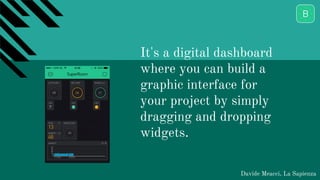
It's a digital dashboard
where you can build a
graphic interface for
your project by simply
dragging and dropping
widgets.
Davide Meacci, La Sapienza
But most importantly...
Davide Meacci, La Sapienza
It is really simple!
To set up all the required environment
(Server, Client and Board)
5 minutes are more than enough.
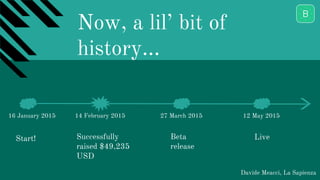
Now, a lil’ bit of
history...
Davide Meacci, La Sapienza
16 January 2015 14 February 2015 27 March 2015 12 May 2015
Start! Successfully
raised $49,235
USD
Beta
release
Live
What devices are
supported?
Davide Meacci, La Sapienza
- Arduino (and the likes)
- Energia
- Particle
- ARM mbed (soon)
Davide Meacci, La Sapienza
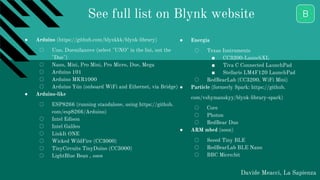
● Arduino (https://github.com/blynkkk/blynk-library)
○ Uno, Duemilanove (select "UNO" in the list, not the
"Due")
○ Nano, Mini, Pro Mini, Pro Micro, Due, Mega
○ Arduino 101
○ Arduino MKR1000
○ Arduino Yún (onboard WiFi and Ethernet, via Bridge)
● Arduino-like
○ ESP8266 (running standalone, using https://github.
com/esp8266/Arduino)
○ Intel Edison
○ Intel Galileo
○ LinkIt ONE
○ Wicked WildFire (CC3000)
○ TinyCircuits TinyDuino (CC3000)
○ LightBlue Bean , soon
● Energia
○ Texas Instruments
■ CC3200-LaunchXL
■ Tiva C Connected LaunchPad
■ Stellaris LM4F120 LaunchPad
○ RedBearLab (CC3200, WiFi Mini)
● Particle (formerly Spark: https://github.
com/vshymanskyy/blynk-library-spark)
○ Core
○ Photon
○ RedBear Duo
● ARM mbed (soon)
○ Seeed Tiny BLE
○ RedBearLab BLE Nano
○ BBC Micro:bit
See full list on Blynk website
How it connects?
Davide Meacci, La Sapienza
- Ethernet
- WiFi
- Bluetooth LE
- Serial USB
- 3G
What can i do with it?
Davide Meacci, La Sapienza
Everything
(regarding IoT)
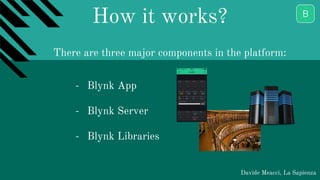
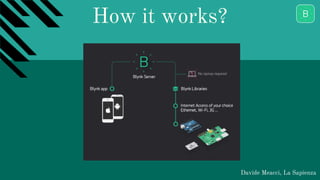
How it works?
Davide Meacci, La Sapienza
- Blynk App
- Blynk Server
- Blynk Libraries
There are three major components in the platform:
How it works?
Davide Meacci, La Sapienza
Main Operations
Davide Meacci, La Sapienza
- Interact with Pins (Digital and
Analog)
- Send and Receive data from
Hardware
How?
Blynk allows us to:
… with Widgets!
Davide Meacci, La Sapienza
- Controllers
- Displays
- Notifications
- Others
4 main types:
Common widget settings
Davide Meacci, La Sapienza
- Pin setup (Analog/digital)
- Data Mapping
- Split/Merge
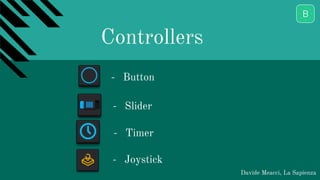
Controllers
Davide Meacci, La Sapienza
- Button
- Slider
- Timer
- Joystick
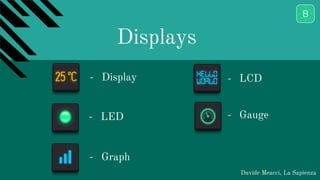
Displays
Davide Meacci, La Sapienza
- Display
- LED
- Graph
- LCD
- Gauge
Notifications and Other
Davide Meacci, La Sapienza
- Twitter
- Email
- Bridge
Is it possible to run a
local server?
Davide Meacci, La Sapienza
The answer, of course, is YES.
1. download the Web-server from the Website
2. start the server locally
3. set up Router to enable port-forwarding
4. Set the server from the Blynk App
Pros and Cons
Davide Meacci, La Sapienza
PROS: CONS:
- easy & simple
- many features
- no additional hardware
- cool GUI
- active community
- lack of documentation for some
devices
- not made to implement
complex proejcts
- can’t make own widgets
Questions?
Davide Meacci, La Sapienza
Thank You!
Davide Meacci, La Sapienza

Blynk presentation

  • 1.
    Blynk Davide Meacci, LaSapienza Pervasive Systems Individual Project:
  • 2.
    Davide Meacci, LaSapienza Blynk is a Platform with iOS and Android apps to control Arduino, Raspberry Pi and the likes over the Internet. What is Blynk?
  • 3.
    It's a digitaldashboard where you can build a graphic interface for your project by simply dragging and dropping widgets. Davide Meacci, La Sapienza
  • 4.
    But most importantly... DavideMeacci, La Sapienza It is really simple! To set up all the required environment (Server, Client and Board) 5 minutes are more than enough.
  • 5.
    Now, a lil’bit of history... Davide Meacci, La Sapienza 16 January 2015 14 February 2015 27 March 2015 12 May 2015 Start! Successfully raised $49,235 USD Beta release Live
  • 6.
    What devices are supported? DavideMeacci, La Sapienza - Arduino (and the likes) - Energia - Particle - ARM mbed (soon)
  • 7.
    Davide Meacci, LaSapienza ● Arduino (https://github.com/blynkkk/blynk-library) ○ Uno, Duemilanove (select "UNO" in the list, not the "Due") ○ Nano, Mini, Pro Mini, Pro Micro, Due, Mega ○ Arduino 101 ○ Arduino MKR1000 ○ Arduino Yún (onboard WiFi and Ethernet, via Bridge) ● Arduino-like ○ ESP8266 (running standalone, using https://github. com/esp8266/Arduino) ○ Intel Edison ○ Intel Galileo ○ LinkIt ONE ○ Wicked WildFire (CC3000) ○ TinyCircuits TinyDuino (CC3000) ○ LightBlue Bean , soon ● Energia ○ Texas Instruments ■ CC3200-LaunchXL ■ Tiva C Connected LaunchPad ■ Stellaris LM4F120 LaunchPad ○ RedBearLab (CC3200, WiFi Mini) ● Particle (formerly Spark: https://github. com/vshymanskyy/blynk-library-spark) ○ Core ○ Photon ○ RedBear Duo ● ARM mbed (soon) ○ Seeed Tiny BLE ○ RedBearLab BLE Nano ○ BBC Micro:bit See full list on Blynk website
  • 8.
    How it connects? DavideMeacci, La Sapienza - Ethernet - WiFi - Bluetooth LE - Serial USB - 3G
  • 9.
    What can ido with it? Davide Meacci, La Sapienza Everything (regarding IoT)
  • 10.
    How it works? DavideMeacci, La Sapienza - Blynk App - Blynk Server - Blynk Libraries There are three major components in the platform:
  • 11.
    How it works? DavideMeacci, La Sapienza
  • 12.
    Main Operations Davide Meacci,La Sapienza - Interact with Pins (Digital and Analog) - Send and Receive data from Hardware How? Blynk allows us to:
  • 13.
    … with Widgets! DavideMeacci, La Sapienza - Controllers - Displays - Notifications - Others 4 main types:
  • 14.
    Common widget settings DavideMeacci, La Sapienza - Pin setup (Analog/digital) - Data Mapping - Split/Merge
  • 15.
    Controllers Davide Meacci, LaSapienza - Button - Slider - Timer - Joystick
  • 16.
    Displays Davide Meacci, LaSapienza - Display - LED - Graph - LCD - Gauge
  • 17.
    Notifications and Other DavideMeacci, La Sapienza - Twitter - Email - Bridge
  • 18.
    Is it possibleto run a local server? Davide Meacci, La Sapienza The answer, of course, is YES. 1. download the Web-server from the Website 2. start the server locally 3. set up Router to enable port-forwarding 4. Set the server from the Blynk App
  • 19.
    Pros and Cons DavideMeacci, La Sapienza PROS: CONS: - easy & simple - many features - no additional hardware - cool GUI - active community - lack of documentation for some devices - not made to implement complex proejcts - can’t make own widgets
  • 20.
  • 21.