Basic Campus Network Design
Network Cabling System
Md. Abdul Awal
Network Engineer, BdREN
awal@bdren.net.bd
November 6, 2014
Workshop on Basic Campus Network Design, UGC, Dhaka BdREN © 2014. All rights reserved 1
Objectives
● Getting a basic idea about network cabling
● Understanding Standard Cabling Process
● Getting familiar with Network Cabling BCP
● Discussing specific issues
Workshop on Basic Campus Network Design, UGC, Dhaka BdREN © 2014. All rights reserved 2
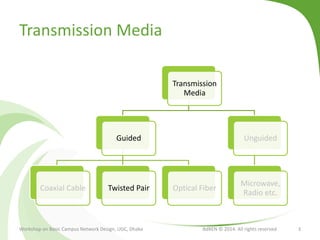
Transmission Media
Transmission
Media
Guided
Coaxial Cable Twisted Pair Optical Fiber
Unguided
Microwave,
Radio etc.
Workshop on Basic Campus Network Design, UGC, Dhaka BdREN © 2014. All rights reserved 3
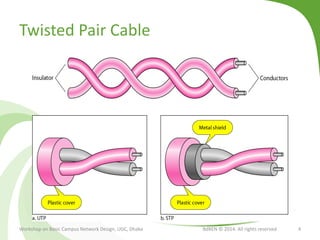
Twisted Pair Cable
Workshop on Basic Campus Network Design, UGC, Dhaka BdREN © 2014. All rights reserved 4
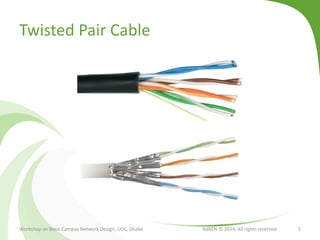
Twisted Pair Cable
Workshop on Basic Campus Network Design, UGC, Dhaka BdREN © 2014. All rights reserved 5
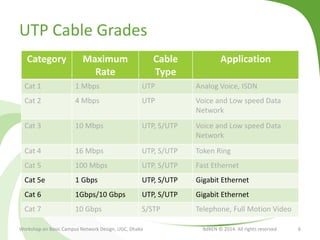
UTP Cable Grades
Category Maximum
Rate
Cable
Type
Application
Cat 1 1 Mbps UTP Analog Voice, ISDN
Cat 2 4 Mbps UTP Voice and Low speed Data
Network
Cat 3 10 Mbps UTP, S/UTP Voice and Low speed Data
Network
Cat 4 16 Mbps UTP, S/UTP Token Ring
Cat 5 100 Mbps UTP, S/UTP Fast Ethernet
Cat 5e 1 Gbps UTP, S/UTP Gigabit Ethernet
Cat 6 1Gbps/10 Gbps UTP, S/UTP Gigabit Ethernet
Cat 7 10 Gbps S/STP Telephone, Full Motion Video
Workshop on Basic Campus Network Design, UGC, Dhaka BdREN © 2014. All rights reserved 6
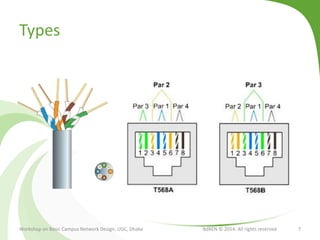
Types
Workshop on Basic Campus Network Design, UGC, Dhaka BdREN © 2014. All rights reserved 7
Other Elements
● RJ45 Connector
● Faceplate
● Patch panel
● Cable Manager
● Overhead Pathway
● Cable Tie
● Accessories
● Tools
Workshop on Basic Campus Network Design, UGC, Dhaka BdREN © 2014. All rights reserved 8
Structured Cabling
● a method for creating an organized cabling system
that can be easily understood by
● The installers
● The network administrators
● Any other technicians who deal with cables
● Golden Rules: Planning is the key
● Look for a complete connectivity solutions
● Plan for future growth
● Maintain freedom of choice in terms of vendors
Workshop on Basic Campus Network Design, UGC, Dhaka BdREN © 2014. All rights reserved 9
Subsystems
● Entrance Facilities
● Equipment Rooms
● Backbone Cabling
● Horizontal Cabling
● Telecommunications Rooms
● Work-Area Components
Workshop on Basic Campus Network Design, UGC, Dhaka BdREN © 2014. All rights reserved 10
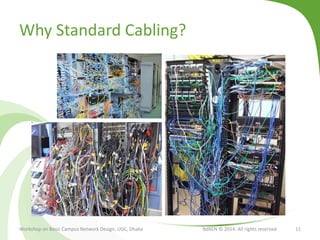
Why Standard Cabling?
Workshop on Basic Campus Network Design, UGC, Dhaka BdREN © 2014. All rights reserved 11
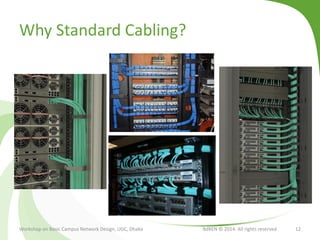
Why Standard Cabling?
Workshop on Basic Campus Network Design, UGC, Dhaka BdREN © 2014. All rights reserved 12
Design Goals
● Functionality: speed and reliability
● Scalability: ability to grow without major changes
● Adaptability: easily implements new technologies
● Manageability: facilitates monitoring and ease of
management
Workshop on Basic Campus Network Design, UGC, Dhaka BdREN © 2014. All rights reserved 13
Every Structured Cabling is Different
● The architectural structure of the Site/Building
● The manufacturer and products
● The function of the cabling installation
● The types of equipment the cabling installation will
support (present and future)
● The configuration of an already installed system
(upgrades and retermination)
● Customer requirements
Workshop on Basic Campus Network Design, UGC, Dhaka BdREN © 2014. All rights reserved 14
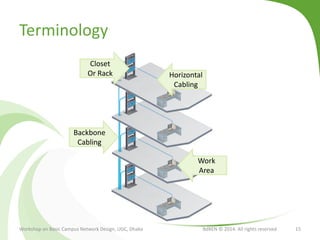
Terminology
Workshop on Basic Campus Network Design, UGC, Dhaka BdREN © 2014. All rights reserved 15
Backbone
Cabling
Closet
Or Rack Horizontal
Cabling
Work
Area
Considerations
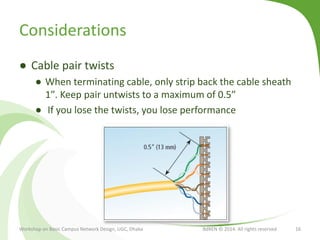
● Cable pair twists
● When terminating cable, only strip back the cable sheath
1″. Keep pair untwists to a maximum of 0.5″
● If you lose the twists, you lose performance
Workshop on Basic Campus Network Design, UGC, Dhaka BdREN © 2014. All rights reserved 16
Considerations
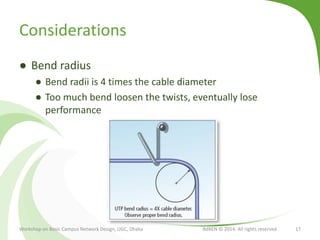
● Bend radius
● Bend radii is 4 times the cable diameter
● Too much bend loosen the twists, eventually lose
performance
Workshop on Basic Campus Network Design, UGC, Dhaka BdREN © 2014. All rights reserved 17
Considerations
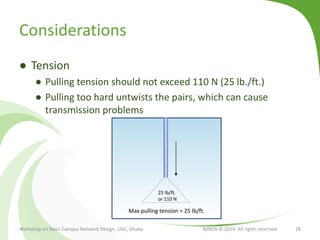
● Tension
● Pulling tension should not exceed 110 N (25 lb./ft.)
● Pulling too hard untwists the pairs, which can cause
transmission problems
Workshop on Basic Campus Network Design, UGC, Dhaka BdREN © 2014. All rights reserved 18
Max pulling tension = 25 lb/ft.
25 lb/ft.
or 110 N
Considerations
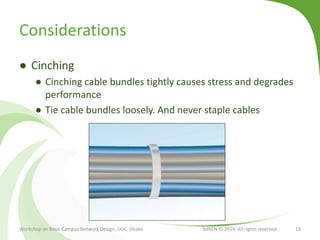
● Cinching
● Cinching cable bundles tightly causes stress and degrades
performance
● Tie cable bundles loosely. And never staple cables
Workshop on Basic Campus Network Design, UGC, Dhaka BdREN © 2014. All rights reserved 19
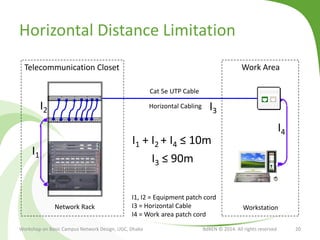
Horizontal Distance Limitation
Workshop on Basic Campus Network Design, UGC, Dhaka BdREN © 2014. All rights reserved 20
Cat 5e UTP Cable
Horizontal Cabling
Telecommunication Closet
Workstation
Work Area
Network Rack
I1
I2 I3
I4
I1 + I2 + I4 ≤ 10m
I3 ≤ 90m
I1, I2 = Equipment patch cord
I3 = Horizontal Cable
I4 = Work area patch cord
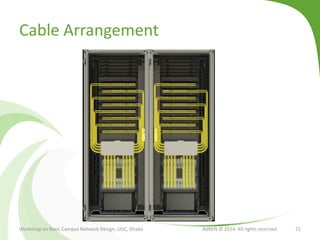
Cable Arrangement
Workshop on Basic Campus Network Design, UGC, Dhaka BdREN © 2014. All rights reserved 21
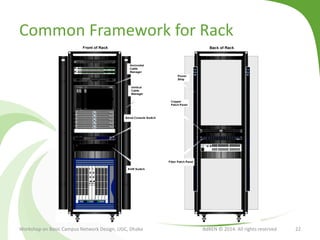
Common Framework for Rack
Workshop on Basic Campus Network Design, UGC, Dhaka BdREN © 2014. All rights reserved 22
Considerations
● Miscellaneous
● Use connecting hardware of the same category or higher.
So, if you’re using CAT6 cable, use CAT6 connectors
● Plan for 1-2 feet of slack cable behind wall outlets for
possible future reterminations
● Route your network cables away from power lines,
fluorescent lights, and industrial equipment
Workshop on Basic Campus Network Design, UGC, Dhaka BdREN © 2014. All rights reserved 23
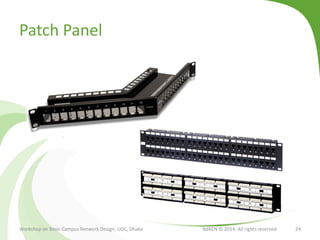
Patch Panel
Workshop on Basic Campus Network Design, UGC, Dhaka BdREN © 2014. All rights reserved 24
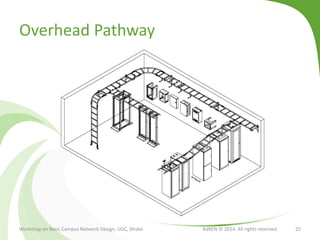
Overhead Pathway
Workshop on Basic Campus Network Design, UGC, Dhaka BdREN © 2014. All rights reserved 25
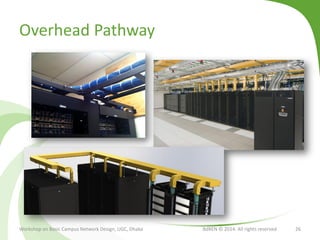
Overhead Pathway
Workshop on Basic Campus Network Design, UGC, Dhaka BdREN © 2014. All rights reserved 26
Documentation and Tagging
Workshop on Basic Campus Network Design, UGC, Dhaka BdREN © 2014. All rights reserved 27
Naming Scheme
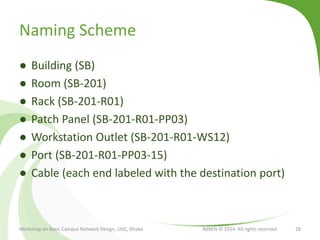
● Building (SB)
● Room (SB-201)
● Rack (SB-201-R01)
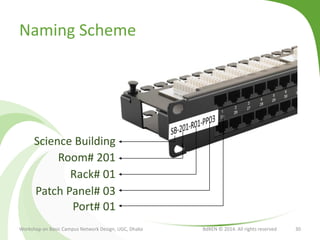
● Patch Panel (SB-201-R01-PP03)
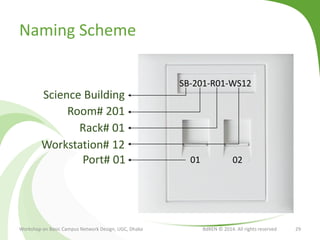
● Workstation Outlet (SB-201-R01-WS12)
● Port (SB-201-R01-PP03-15)
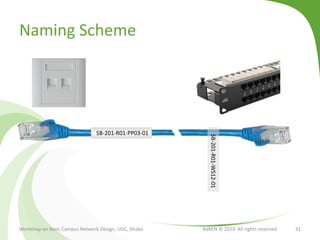
● Cable (each end labeled with the destination port)
Workshop on Basic Campus Network Design, UGC, Dhaka BdREN © 2014. All rights reserved 28
Naming Scheme
Workshop on Basic Campus Network Design, UGC, Dhaka BdREN © 2014. All rights reserved 29
SB-201-R01-WS12
Science Building
Room# 201
Rack# 01
Workstation# 12
01 02Port# 01
Naming Scheme
Workshop on Basic Campus Network Design, UGC, Dhaka BdREN © 2014. All rights reserved 30
Science Building
Room# 201
Rack# 01
Patch Panel# 03
Port# 01
Naming Scheme
Workshop on Basic Campus Network Design, UGC, Dhaka BdREN © 2014. All rights reserved 31
SB-201-R01-PP03-01
SB-201-R01-WS12-01
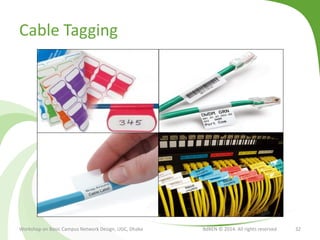
Cable Tagging
Workshop on Basic Campus Network Design, UGC, Dhaka BdREN © 2014. All rights reserved 32
Putting It All Together
Workshop on Basic Campus Network Design, UGC, Dhaka BdREN © 2014. All rights reserved 33
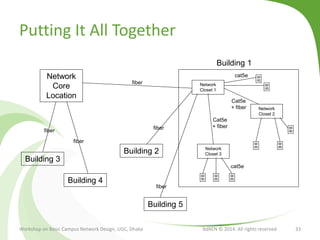
Network
Core
Location
Network
Closet 1
Building 3
Network
Closet 2
Building 1
Network
Closet 3
Building 5
Building 4
Building 2
cat5e
fiber
cat5e
Cat5e
+ fiber
Cat5e
+ fiber
fiber
fiber
fiber
fiber
Putting It All Together
Workshop on Basic Campus Network Design, UGC, Dhaka BdREN © 2014. All rights reserved 34
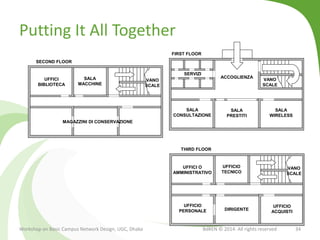
SERVIZI
VANO
SCALE
ACCOGLIENZA
SALA
CONSULTAZIONE
SALA
PRESTITI
SALA
WIRELESS
FIRST FLOOR
UFFICI
BIBLIOTECA
VANO
SCALE
SALA
MACCHINE
SECOND FLOOR
MAGAZZINI DI CONSERVAZIONE
UFFICI O
AMMINISTRATIVO
VANO
SCALE
UFFICIO
TECNICO
THIRD FLOOR
UFFICIO
PERSONALE
UFFICIO
ACQUISTI
DIRIGENTE
Putting It All Together
Workshop on Basic Campus Network Design, UGC, Dhaka BdREN © 2014. All rights reserved 35
SERVIZI
VANO
SCALE
ACCOGLIENZA
SALA
CONSULTAZIONE
SALA
PRESTITI
SALA
WIRELESS
PIANO TERRA
TC01
MC
TC02TC03
EF
MC
UFFICI
BIBLIOTECA
VANO
SCALE
SALA
MACCHINE
PRIMO PIANO
MAGAZZINI DI CONSERVAZIONE
UFFICI O
AMMINISTRATIVO
VANO
SCALE
UFFICIO
TECNICO
SECONDO PIANO
UFFICIO
PERSONALE
UFFICIO
ACQUISTI
DIRIGENTE
MCTC11
TC12
TC21
TC01EF
TC21
MC
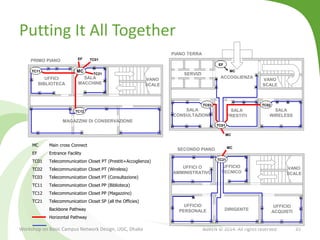
MC Main cross Connect
EF Entrance Facility
TC01 Telecommunication Closet PT (Prestiti+Accoglienza)
TC02 Telecommunication Closet PT (Wireless)
TC03 Telecommunication Closet PT (Consultazione)
TC11 Telecommunication Closet PP (Biblioteca)
TC12 Telecommunication Closet PP (Magazzino)
TC21 Telecommunication Closet SP (all the Officies)
Backbone Pathway
Horizontal Pathway
Putting It All Together
Workshop on Basic Campus Network Design, UGC, Dhaka BdREN © 2014. All rights reserved 36
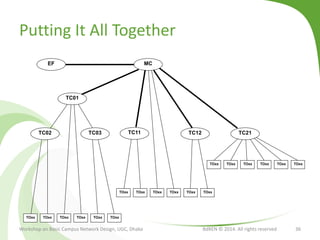
MCEF
TC01
TC02 TC03 TC11 TC12 TC21
TOxxTOxxTOxxTOxx TOxxTOxx
Putting It All Together
Workshop on Basic Campus Network Design, UGC, Dhaka BdREN © 2014. All rights reserved 37
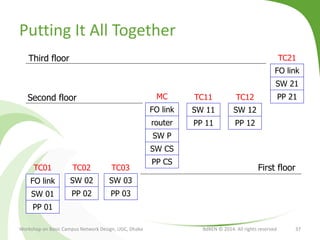
FO link
router
SW P
SW CS
PP CS
MC
FO link
SW 01
PP 01
TC01
SW 02
PP 02
TC02
FO link
SW 21
PP 21
TC21
SW 03
PP 03
TC03
SW 11
PP 11
TC11
SW 12
PP 12
TC12
Third floor
Second floor
First floor
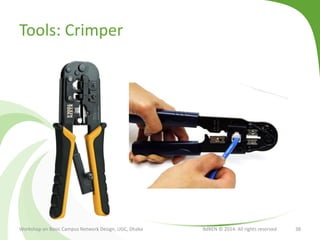
Tools: Crimper
Workshop on Basic Campus Network Design, UGC, Dhaka BdREN © 2014. All rights reserved 38
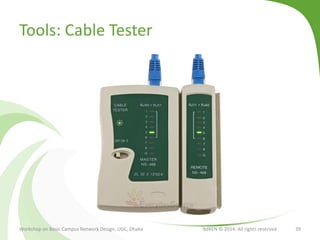
Tools: Cable Tester
Workshop on Basic Campus Network Design, UGC, Dhaka BdREN © 2014. All rights reserved 39
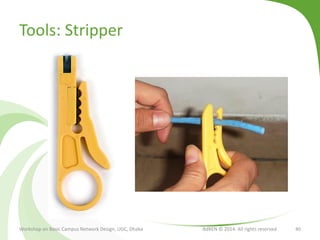
Tools: Stripper
Workshop on Basic Campus Network Design, UGC, Dhaka BdREN © 2014. All rights reserved 40
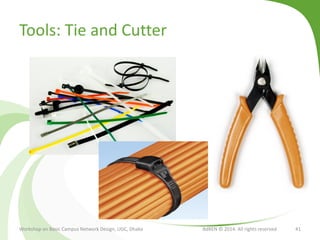
Tools: Tie and Cutter
Workshop on Basic Campus Network Design, UGC, Dhaka BdREN © 2014. All rights reserved 41
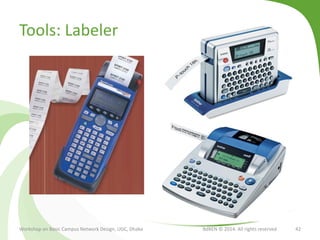
Tools: Labeler
Workshop on Basic Campus Network Design, UGC, Dhaka BdREN © 2014. All rights reserved 42
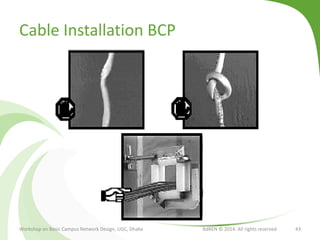
Cable Installation BCP
Workshop on Basic Campus Network Design, UGC, Dhaka BdREN © 2014. All rights reserved 43
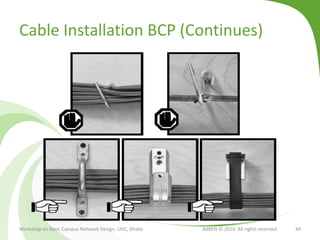
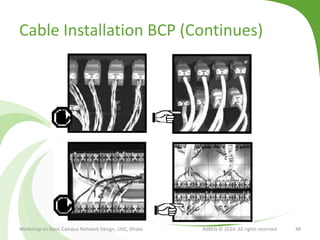
Cable Installation BCP (Continues)
Workshop on Basic Campus Network Design, UGC, Dhaka BdREN © 2014. All rights reserved 44
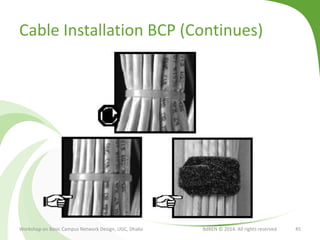
Cable Installation BCP (Continues)
Workshop on Basic Campus Network Design, UGC, Dhaka BdREN © 2014. All rights reserved 45
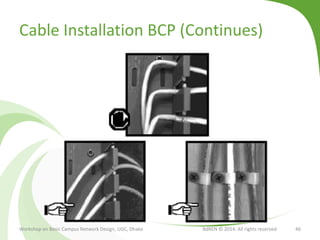
Cable Installation BCP (Continues)
Workshop on Basic Campus Network Design, UGC, Dhaka BdREN © 2014. All rights reserved 46
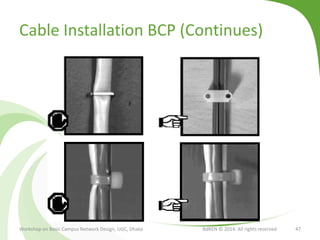
Cable Installation BCP (Continues)
Workshop on Basic Campus Network Design, UGC, Dhaka BdREN © 2014. All rights reserved 47
Cable Installation BCP (Continues)
Workshop on Basic Campus Network Design, UGC, Dhaka BdREN © 2014. All rights reserved 48
Wrapping UP
● Plan for stable physical layer: Optimizes cost
● Use Cat 5e (Or Cat 6) UTP cable
● Use Straight-Through Cable (TIA/EIA - T568B)
● Maintain HLD and LLD or other documentation and
diagram
● Tag, Tag, Tag…
● Total horizontal distance is less than 100m
● Consider port concentration
● Plan for future expansion
Workshop on Basic Campus Network Design, UGC, Dhaka BdREN © 2014. All rights reserved 49
Discussion
Workshop on Basic Campus Network Design, UGC, Dhaka BdREN © 2014. All rights reserved 50
awal@bdren.net.bd

Basic Campus Network Design - Network Cabling System

  • 1.
    Basic Campus NetworkDesign Network Cabling System Md. Abdul Awal Network Engineer, BdREN awal@bdren.net.bd November 6, 2014 Workshop on Basic Campus Network Design, UGC, Dhaka BdREN © 2014. All rights reserved 1
  • 2.
    Objectives ● Getting abasic idea about network cabling ● Understanding Standard Cabling Process ● Getting familiar with Network Cabling BCP ● Discussing specific issues Workshop on Basic Campus Network Design, UGC, Dhaka BdREN © 2014. All rights reserved 2
  • 3.
    Transmission Media Transmission Media Guided Coaxial CableTwisted Pair Optical Fiber Unguided Microwave, Radio etc. Workshop on Basic Campus Network Design, UGC, Dhaka BdREN © 2014. All rights reserved 3
  • 4.
    Twisted Pair Cable Workshopon Basic Campus Network Design, UGC, Dhaka BdREN © 2014. All rights reserved 4
  • 5.
    Twisted Pair Cable Workshopon Basic Campus Network Design, UGC, Dhaka BdREN © 2014. All rights reserved 5
  • 6.
    UTP Cable Grades CategoryMaximum Rate Cable Type Application Cat 1 1 Mbps UTP Analog Voice, ISDN Cat 2 4 Mbps UTP Voice and Low speed Data Network Cat 3 10 Mbps UTP, S/UTP Voice and Low speed Data Network Cat 4 16 Mbps UTP, S/UTP Token Ring Cat 5 100 Mbps UTP, S/UTP Fast Ethernet Cat 5e 1 Gbps UTP, S/UTP Gigabit Ethernet Cat 6 1Gbps/10 Gbps UTP, S/UTP Gigabit Ethernet Cat 7 10 Gbps S/STP Telephone, Full Motion Video Workshop on Basic Campus Network Design, UGC, Dhaka BdREN © 2014. All rights reserved 6
  • 7.
    Types Workshop on BasicCampus Network Design, UGC, Dhaka BdREN © 2014. All rights reserved 7
  • 8.
    Other Elements ● RJ45Connector ● Faceplate ● Patch panel ● Cable Manager ● Overhead Pathway ● Cable Tie ● Accessories ● Tools Workshop on Basic Campus Network Design, UGC, Dhaka BdREN © 2014. All rights reserved 8
  • 9.
    Structured Cabling ● amethod for creating an organized cabling system that can be easily understood by ● The installers ● The network administrators ● Any other technicians who deal with cables ● Golden Rules: Planning is the key ● Look for a complete connectivity solutions ● Plan for future growth ● Maintain freedom of choice in terms of vendors Workshop on Basic Campus Network Design, UGC, Dhaka BdREN © 2014. All rights reserved 9
  • 10.
    Subsystems ● Entrance Facilities ●Equipment Rooms ● Backbone Cabling ● Horizontal Cabling ● Telecommunications Rooms ● Work-Area Components Workshop on Basic Campus Network Design, UGC, Dhaka BdREN © 2014. All rights reserved 10
  • 11.
    Why Standard Cabling? Workshopon Basic Campus Network Design, UGC, Dhaka BdREN © 2014. All rights reserved 11
  • 12.
    Why Standard Cabling? Workshopon Basic Campus Network Design, UGC, Dhaka BdREN © 2014. All rights reserved 12
  • 13.
    Design Goals ● Functionality:speed and reliability ● Scalability: ability to grow without major changes ● Adaptability: easily implements new technologies ● Manageability: facilitates monitoring and ease of management Workshop on Basic Campus Network Design, UGC, Dhaka BdREN © 2014. All rights reserved 13
  • 14.
    Every Structured Cablingis Different ● The architectural structure of the Site/Building ● The manufacturer and products ● The function of the cabling installation ● The types of equipment the cabling installation will support (present and future) ● The configuration of an already installed system (upgrades and retermination) ● Customer requirements Workshop on Basic Campus Network Design, UGC, Dhaka BdREN © 2014. All rights reserved 14
  • 15.
    Terminology Workshop on BasicCampus Network Design, UGC, Dhaka BdREN © 2014. All rights reserved 15 Backbone Cabling Closet Or Rack Horizontal Cabling Work Area
  • 16.
    Considerations ● Cable pairtwists ● When terminating cable, only strip back the cable sheath 1″. Keep pair untwists to a maximum of 0.5″ ● If you lose the twists, you lose performance Workshop on Basic Campus Network Design, UGC, Dhaka BdREN © 2014. All rights reserved 16
  • 17.
    Considerations ● Bend radius ●Bend radii is 4 times the cable diameter ● Too much bend loosen the twists, eventually lose performance Workshop on Basic Campus Network Design, UGC, Dhaka BdREN © 2014. All rights reserved 17
  • 18.
    Considerations ● Tension ● Pullingtension should not exceed 110 N (25 lb./ft.) ● Pulling too hard untwists the pairs, which can cause transmission problems Workshop on Basic Campus Network Design, UGC, Dhaka BdREN © 2014. All rights reserved 18 Max pulling tension = 25 lb/ft. 25 lb/ft. or 110 N
  • 19.
    Considerations ● Cinching ● Cinchingcable bundles tightly causes stress and degrades performance ● Tie cable bundles loosely. And never staple cables Workshop on Basic Campus Network Design, UGC, Dhaka BdREN © 2014. All rights reserved 19
  • 20.
    Horizontal Distance Limitation Workshopon Basic Campus Network Design, UGC, Dhaka BdREN © 2014. All rights reserved 20 Cat 5e UTP Cable Horizontal Cabling Telecommunication Closet Workstation Work Area Network Rack I1 I2 I3 I4 I1 + I2 + I4 ≤ 10m I3 ≤ 90m I1, I2 = Equipment patch cord I3 = Horizontal Cable I4 = Work area patch cord
  • 21.
    Cable Arrangement Workshop onBasic Campus Network Design, UGC, Dhaka BdREN © 2014. All rights reserved 21
  • 22.
    Common Framework forRack Workshop on Basic Campus Network Design, UGC, Dhaka BdREN © 2014. All rights reserved 22
  • 23.
    Considerations ● Miscellaneous ● Useconnecting hardware of the same category or higher. So, if you’re using CAT6 cable, use CAT6 connectors ● Plan for 1-2 feet of slack cable behind wall outlets for possible future reterminations ● Route your network cables away from power lines, fluorescent lights, and industrial equipment Workshop on Basic Campus Network Design, UGC, Dhaka BdREN © 2014. All rights reserved 23
  • 24.
    Patch Panel Workshop onBasic Campus Network Design, UGC, Dhaka BdREN © 2014. All rights reserved 24
  • 25.
    Overhead Pathway Workshop onBasic Campus Network Design, UGC, Dhaka BdREN © 2014. All rights reserved 25
  • 26.
    Overhead Pathway Workshop onBasic Campus Network Design, UGC, Dhaka BdREN © 2014. All rights reserved 26
  • 27.
    Documentation and Tagging Workshopon Basic Campus Network Design, UGC, Dhaka BdREN © 2014. All rights reserved 27
  • 28.
    Naming Scheme ● Building(SB) ● Room (SB-201) ● Rack (SB-201-R01) ● Patch Panel (SB-201-R01-PP03) ● Workstation Outlet (SB-201-R01-WS12) ● Port (SB-201-R01-PP03-15) ● Cable (each end labeled with the destination port) Workshop on Basic Campus Network Design, UGC, Dhaka BdREN © 2014. All rights reserved 28
  • 29.
    Naming Scheme Workshop onBasic Campus Network Design, UGC, Dhaka BdREN © 2014. All rights reserved 29 SB-201-R01-WS12 Science Building Room# 201 Rack# 01 Workstation# 12 01 02Port# 01
  • 30.
    Naming Scheme Workshop onBasic Campus Network Design, UGC, Dhaka BdREN © 2014. All rights reserved 30 Science Building Room# 201 Rack# 01 Patch Panel# 03 Port# 01
  • 31.
    Naming Scheme Workshop onBasic Campus Network Design, UGC, Dhaka BdREN © 2014. All rights reserved 31 SB-201-R01-PP03-01 SB-201-R01-WS12-01
  • 32.
    Cable Tagging Workshop onBasic Campus Network Design, UGC, Dhaka BdREN © 2014. All rights reserved 32
  • 33.
    Putting It AllTogether Workshop on Basic Campus Network Design, UGC, Dhaka BdREN © 2014. All rights reserved 33 Network Core Location Network Closet 1 Building 3 Network Closet 2 Building 1 Network Closet 3 Building 5 Building 4 Building 2 cat5e fiber cat5e Cat5e + fiber Cat5e + fiber fiber fiber fiber fiber
  • 34.
    Putting It AllTogether Workshop on Basic Campus Network Design, UGC, Dhaka BdREN © 2014. All rights reserved 34 SERVIZI VANO SCALE ACCOGLIENZA SALA CONSULTAZIONE SALA PRESTITI SALA WIRELESS FIRST FLOOR UFFICI BIBLIOTECA VANO SCALE SALA MACCHINE SECOND FLOOR MAGAZZINI DI CONSERVAZIONE UFFICI O AMMINISTRATIVO VANO SCALE UFFICIO TECNICO THIRD FLOOR UFFICIO PERSONALE UFFICIO ACQUISTI DIRIGENTE
  • 35.
    Putting It AllTogether Workshop on Basic Campus Network Design, UGC, Dhaka BdREN © 2014. All rights reserved 35 SERVIZI VANO SCALE ACCOGLIENZA SALA CONSULTAZIONE SALA PRESTITI SALA WIRELESS PIANO TERRA TC01 MC TC02TC03 EF MC UFFICI BIBLIOTECA VANO SCALE SALA MACCHINE PRIMO PIANO MAGAZZINI DI CONSERVAZIONE UFFICI O AMMINISTRATIVO VANO SCALE UFFICIO TECNICO SECONDO PIANO UFFICIO PERSONALE UFFICIO ACQUISTI DIRIGENTE MCTC11 TC12 TC21 TC01EF TC21 MC MC Main cross Connect EF Entrance Facility TC01 Telecommunication Closet PT (Prestiti+Accoglienza) TC02 Telecommunication Closet PT (Wireless) TC03 Telecommunication Closet PT (Consultazione) TC11 Telecommunication Closet PP (Biblioteca) TC12 Telecommunication Closet PP (Magazzino) TC21 Telecommunication Closet SP (all the Officies) Backbone Pathway Horizontal Pathway
  • 36.
    Putting It AllTogether Workshop on Basic Campus Network Design, UGC, Dhaka BdREN © 2014. All rights reserved 36 MCEF TC01 TC02 TC03 TC11 TC12 TC21 TOxxTOxxTOxxTOxx TOxxTOxx TOxxTOxxTOxxTOxx TOxxTOxx TOxxTOxxTOxxTOxx TOxxTOxx
  • 37.
    Putting It AllTogether Workshop on Basic Campus Network Design, UGC, Dhaka BdREN © 2014. All rights reserved 37 FO link router SW P SW CS PP CS MC FO link SW 01 PP 01 TC01 SW 02 PP 02 TC02 FO link SW 21 PP 21 TC21 SW 03 PP 03 TC03 SW 11 PP 11 TC11 SW 12 PP 12 TC12 Third floor Second floor First floor
  • 38.
    Tools: Crimper Workshop onBasic Campus Network Design, UGC, Dhaka BdREN © 2014. All rights reserved 38
  • 39.
    Tools: Cable Tester Workshopon Basic Campus Network Design, UGC, Dhaka BdREN © 2014. All rights reserved 39
  • 40.
    Tools: Stripper Workshop onBasic Campus Network Design, UGC, Dhaka BdREN © 2014. All rights reserved 40
  • 41.
    Tools: Tie andCutter Workshop on Basic Campus Network Design, UGC, Dhaka BdREN © 2014. All rights reserved 41
  • 42.
    Tools: Labeler Workshop onBasic Campus Network Design, UGC, Dhaka BdREN © 2014. All rights reserved 42
  • 43.
    Cable Installation BCP Workshopon Basic Campus Network Design, UGC, Dhaka BdREN © 2014. All rights reserved 43
  • 44.
    Cable Installation BCP(Continues) Workshop on Basic Campus Network Design, UGC, Dhaka BdREN © 2014. All rights reserved 44
  • 45.
    Cable Installation BCP(Continues) Workshop on Basic Campus Network Design, UGC, Dhaka BdREN © 2014. All rights reserved 45
  • 46.
    Cable Installation BCP(Continues) Workshop on Basic Campus Network Design, UGC, Dhaka BdREN © 2014. All rights reserved 46
  • 47.
    Cable Installation BCP(Continues) Workshop on Basic Campus Network Design, UGC, Dhaka BdREN © 2014. All rights reserved 47
  • 48.
    Cable Installation BCP(Continues) Workshop on Basic Campus Network Design, UGC, Dhaka BdREN © 2014. All rights reserved 48
  • 49.
    Wrapping UP ● Planfor stable physical layer: Optimizes cost ● Use Cat 5e (Or Cat 6) UTP cable ● Use Straight-Through Cable (TIA/EIA - T568B) ● Maintain HLD and LLD or other documentation and diagram ● Tag, Tag, Tag… ● Total horizontal distance is less than 100m ● Consider port concentration ● Plan for future expansion Workshop on Basic Campus Network Design, UGC, Dhaka BdREN © 2014. All rights reserved 49
  • 50.
    Discussion Workshop on BasicCampus Network Design, UGC, Dhaka BdREN © 2014. All rights reserved 50 awal@bdren.net.bd