Campus Network Design
Submitted By:
Md. Mejanur Rahman- 183015125
Juliet Jahan- 183002122
Submitted To:
Md. Gulzar Hussain
Lecturer,
Dept. of CSE
Green University of Bangladesh.
Introduction
 Networking is refereed as connecting computers electronically for the purpose of
sharing information. Resources such as a file, applications, printers & software are
some common information shared in a networking. The advantages of networking
can be seen clearly in terms of security, efficiency, manageability & and cost
effectiveness as in allows collaboration between users in a wide range.
Objective
 Minimum Expense
 Reliability
 Performance
 Manageability
 Scalability
SYSTEM DEVELOPMENT :
In this growing network area, it has become necessary to protect our
network from unauthorized users and prevent it from hacking, so it is
necessary to maintain security in our network by using various security
option like port security, encryption using most secure routing protocol. To
implement this, we need best devices which can support these protocols
more efficiently. So, our discussion we decide to use layer 3 switches
which work as switch as well as router, and using this router it is possible
to implement EIGRP routing protocol. By using EIGRP it is possible for
load balancing on parallel links between sites and also manages load
balancing.
 SWITCHES:
The campus network uses Gigabit Ethernet switching network. Configure
a central switch and seven secondary switches. Each switch supports
beer expansion ports with expansion module slots. Campus network
backbone for the Gigabit network, Fast exchange to the desktop, to protect
all users at the same time call the service resources can be fast and
smooth, give full play to the role of multimedia classroom teaching; at the
same time to ensure that all users at the same time smooth Internet, the
campus network function most vividly
Server
Network center configurer 2 department-level
servers respectively, to process application server and Web
server.
Why do we need network design!
 Improved service levels
 Cost effective LAN design
 Security of the networks
 Strong network means scalability
 Consistency
Why Focus on Campus Networks
 The Campus Network is the foundation for all Research and Education activity
 Without a good campus network, the Research and Education Network can’t work
as well as it should
Campus Network Rules
 Separate layers of your network
 Minimize number of network devices in any path
 Use standard solutions for common situations
 Provision central services near the core
 Route near the core, switch at the edges
 Separate core router functions from border router functions
 Use DHCP centrally
 Separate DNS server duties
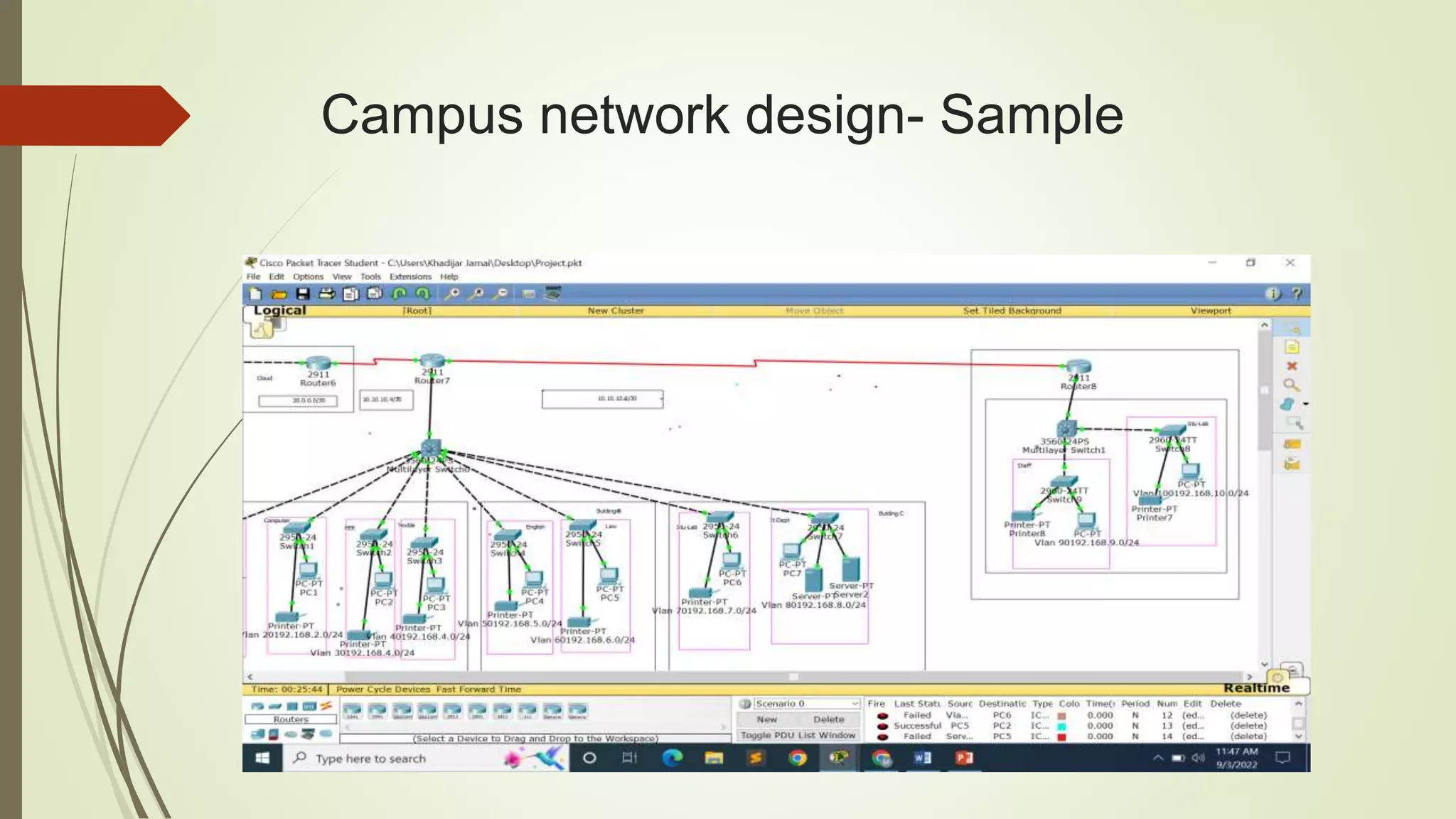
Campus network design- Sample
Server:
 A server is a computer program or device that provides a service to another
computer program and its user, also known as the client. In a data center, the
physical computer that a server program runs on is also frequently referred to as a
server.
 one that routes especially : a device that mediates the transmission routes of data
packets over an electronic communications network (such as the Internet) router.
Thank You

Campus Network Design Presentaion.pptx

  • 1.
    Campus Network Design SubmittedBy: Md. Mejanur Rahman- 183015125 Juliet Jahan- 183002122 Submitted To: Md. Gulzar Hussain Lecturer, Dept. of CSE Green University of Bangladesh.
  • 2.
    Introduction  Networking isrefereed as connecting computers electronically for the purpose of sharing information. Resources such as a file, applications, printers & software are some common information shared in a networking. The advantages of networking can be seen clearly in terms of security, efficiency, manageability & and cost effectiveness as in allows collaboration between users in a wide range.
  • 3.
    Objective  Minimum Expense Reliability  Performance  Manageability  Scalability
  • 4.
    SYSTEM DEVELOPMENT : Inthis growing network area, it has become necessary to protect our network from unauthorized users and prevent it from hacking, so it is necessary to maintain security in our network by using various security option like port security, encryption using most secure routing protocol. To implement this, we need best devices which can support these protocols more efficiently. So, our discussion we decide to use layer 3 switches which work as switch as well as router, and using this router it is possible to implement EIGRP routing protocol. By using EIGRP it is possible for load balancing on parallel links between sites and also manages load balancing.
  • 5.
     SWITCHES: The campusnetwork uses Gigabit Ethernet switching network. Configure a central switch and seven secondary switches. Each switch supports beer expansion ports with expansion module slots. Campus network backbone for the Gigabit network, Fast exchange to the desktop, to protect all users at the same time call the service resources can be fast and smooth, give full play to the role of multimedia classroom teaching; at the same time to ensure that all users at the same time smooth Internet, the campus network function most vividly
  • 6.
    Server Network center configurer2 department-level servers respectively, to process application server and Web server.
  • 7.
    Why do weneed network design!  Improved service levels  Cost effective LAN design  Security of the networks  Strong network means scalability  Consistency
  • 8.
    Why Focus onCampus Networks  The Campus Network is the foundation for all Research and Education activity  Without a good campus network, the Research and Education Network can’t work as well as it should
  • 9.
    Campus Network Rules Separate layers of your network  Minimize number of network devices in any path  Use standard solutions for common situations  Provision central services near the core  Route near the core, switch at the edges  Separate core router functions from border router functions  Use DHCP centrally  Separate DNS server duties
  • 10.
  • 11.
    Server:  A serveris a computer program or device that provides a service to another computer program and its user, also known as the client. In a data center, the physical computer that a server program runs on is also frequently referred to as a server.  one that routes especially : a device that mediates the transmission routes of data packets over an electronic communications network (such as the Internet) router.
  • 12.