Building Next-Gen Infrastructure with
Chef and Azure
Galen Emery – Solutions Architect | galen@chef.io | @galen_emery
Agenda
• What are the services that Azure offers
• Where we’ll focus the conversation today
• Benefits of using Chef to manage your Azure deployment
Lab: Deploy the Chef Server
• Go to portal.azure.com and log into your Azure account
• Select new and search ‘chef’
• Deploy the Chef Server, BYOL using the Resource Manager
Ensure that you configure a DNS name as per these instructions:
https://azure.microsoft.com/en-us/documentation/articles/virtual-machines-linux-portal-create-
fqdn/
Reference Documentation: https://docs.chef.io/azure_portal.html#azure-marketplace
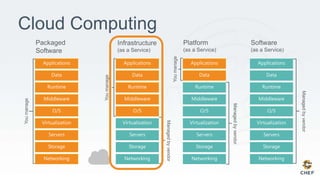
Cloud Computing
IaaS
• Manage machines both on-premise, in the cloud, or multi-
cloud
• Increased flexibility in deploying and maintaining your
application runtime and system security configuration
Go Fast Safely: Allow Teams to Build Code and Automate Systems
• Infrastructure as
Code
• Containers as Code
• Policy as Code
• Process as Code
• Applications
Reinforce the right
behaviors to collaborate
safely on code at
velocity
Culture
Automation
Governance
Build, deploy, and
manage infrastructure
and applications
anywhere
Operate safely and in
compliance with internal
controls and regulatory
requirements
version
collaborate
consistently
test
automatically
Deploy Anywhere
● On-premise
● Cloud
● Hybrid-Cloud
Configuration
Automation
Workflow
ApplicationInfrastructure
There’s a workflow for delivering changes
...
...
...
Targets/Workloads
Collaborative Dev
Chef Analytics
Production
Chef Server
Chef Server
Chef
Supermarket
Assessment
Chef Compliance
Search
Audit
Discover
Deploy
Chef Delivery
Local Dev
Model
Build
Test
Chef Development Kit
Chef Client & Cookbooks
Lab: Prerequisites
• ChefDK is installed – https://downloads.chef.io/chef-dk
• Active Azure subscription
• Git
• Recommended: Github Desktop
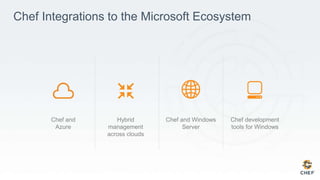
Chef Integrations to the Microsoft Ecosystem
Hybrid
management
across clouds
Chef and Windows
Server
Chef development
tools for Windows
Chef and
Azure
Chef and Microsoft integration points
Tap into cloud services quickly and easily
• Native Chef integration in Azure portal
• Azure SDK Tools PowerShell cmdlets
• Knife Azure plugin lets you:
• Create VM instances managed by Chef Server
• Deploy applications through the Azure API
• Enumerate instances and images
• Delete instances from Azure and Chef
• Chef provisioning supports Azure
• Allows dynamic management of Azure
workloads based on policy
• Can run on Windows Server
Chef and
Windows Server
Chef
and Azure
Hybrid
management
across clouds
Developer toolset
Chef development
tools for Windows
Migrate and automate workloads with Chef
Traditional Data center
Modern data center
• Upgrade to Windows 2012
• Virtualize with Hyper-V
• PowerShell DSC deployment
• Automate and control all Windows and Linux servers with Chef
Migrate workloads to Azure
• Automate and control Windows and Linux in Azure cloud
instances with Chef
Chef and
Windows Server
Chef
and Azure
Hybrid
management
across clouds
Developer toolset
Chef development
tools for Windows
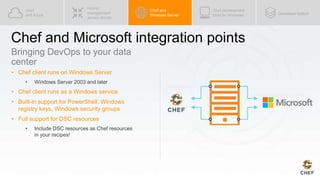
Chef and Microsoft integration points
Bringing DevOps to your data
center
• Chef client runs on Windows Server
• Windows Server 2003 and later
• Chef client runs as a Windows service
• Built-in support for PowerShell, Windows
registry keys, Windows security groups
• Full support for DSC resources
• Include DSC resources as Chef resources
in your recipes!
Chef and
Windows Server
Chef
and Azure
Hybrid
management
across clouds
Developer toolset
Chef development
tools for Windows
Chef and Microsoft integration points
Full support for Windows and Linux environments
Chef and
Windows Server
Chef
and Azure
Hybrid
management
across clouds
Developer toolset
Chef development
tools for Windows
Chef and Microsoft integration points
Knife Windows plugin
supports:
• Bootstrapping Windows servers
using winrm or ssh
• Remote command execution
using winrm or ssh
Chef Development Kit
available for Windows
Full Chef developer experience
available on Windows
Test kitchen drive
support for Windows
Guests and AzureRM
Run your Chef code
against
Windows/Linux
machines in Azure
Back to our Chef Server
2-
api_fqdn “chef-server-on-azure.cloudapp.net”
Lab: Configure your Chef Server
> echo ‘api_fqdn “<fqdn>”’ | sudo tee -a /etc/chef-marketplace/marketplace.rb
2-
analytics_fqdn “chef-server-on-azure.cloudapp.net”
Lab: Configure your Chef Server
> echo ‘analytics_fqdn “<fqdn>”’ | sudo tee -a /etc/opscode-
analytics/opscode-analytics.rb
2-
Lab: Configure your Chef Server
> sudo chef-marketplace-ctl hostname <fqdn>
2-
What is your first name?
What is your last name?
…
[wait ~20 minutes]
Lab: Configure your Chef Server
> sudo chef-marketplace-ctl setup
Just enough Chef
Objective:
2-
Group Lab: Hello, World?
 Create a recipe file writes out 'Hello, world!' to a text file
 Apply the recipe to the workstation
I heard Chef is written in Ruby. If that's the case it's
required that we write a quick "Hello, world!"
application.
©2016 Chef Software Inc. 20
2-
Resources
• A resource is a statement of configuration policy.
• It describes the desired state of an element of your
infrastructure and the steps needed to bring that item to
the desired state.
https://docs.chef.io/resources.html
©2016 Chef Software Inc. 21
2-
Example: powershell_script
powershell_script 'Install IIS' do
code 'Add-WindowsFeature Web-Server'
action :run
end
• The powershell_script named 'Install IIS' is run with the code
'Add-WindowsFeature Web-Server'.
©2016 Chef Software Inc.
https://docs.chef.io/resource_powershell_script.html
22
2-
Example: service
service 'w3svc' do
action [ :enable, :start ]
end
• The service named 'w3svc' is enabled (start on reboot) and started.
©2016 Chef Software Inc. 23
https://docs.chef.io/resource_service.html
2-
Example: file
file 'C:inetpubwwwrootDefault.htm' do
content 'Hello, world!'
rights :read, 'Everyone'
end
• The file 'C:inetpubwwwrootDefault.htm' with the content
'Hello, world!' and grants 'read' rights for 'Everyone'.
©2016 Chef Software Inc. 24
https://docs.chef.io/resource_file.html
2-
Example: file
file 'C:PHPphp.ini' do
action :delete
end
• The file name 'c:PHPphp.ini' is deleted.
©2016 Chef Software Inc. 25
https://docs.chef.io/resource_file.html
2-
GL: Create and Open a Recipe File
> atom hello.rb
©2016 Chef Software Inc. 26
2-
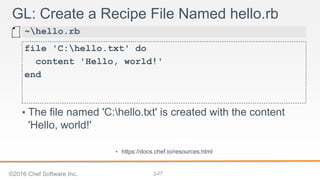
GL: Create a Recipe File Named hello.rb
file 'C:hello.txt' do
content 'Hello, world!'
end
~hello.rb
• The file named 'C:hello.txt' is created with the content
'Hello, world!'
• https://docs.chef.io/resources.html
©2016 Chef Software Inc. 27
Objective:
2-
Group Lab: Hello, World?
 Create a recipe file writes out 'Hello, world!' to a text file
 Apply the recipe to the workstation
I heard Chef is written in Ruby. If that's the case it's
required that we write a quick "Hello, world!"
application.
©2016 Chef Software Inc. 28
2-
chef-client
chef-client is an agent that runs locally on every
node that is under management by Chef.
When a chef-client is run, it will perform all of the
steps that are required to bring the node into the
expected state.
©2015 Chef Software Inc. 29
• https://docs.chef.io/chef_client.html
4-
--local-mode (or -z)
chef-client's default mode attempts to contact a
Chef Server and ask it for the recipes to run for the
given node.
We are overriding that behavior to have it work in a
local mode.
©2015 Chef Software Inc. 30
2-
Starting Chef Client, version 12.7.2
resolving cookbooks for run list: []
Synchronizing Cookbooks:
Compiling Cookbooks...
[2016-03-28T20:53:45+00:00] WARN: Node WIN-14DV1I4A82F.ec2.internal has an empty
run list.
Converging 1 resources
Recipe: @recipe_files::C:/Users/Administrator/hello.rb
* file[hello.txt] action create
- create new file hello.txt
- update content in file hello.txt from none to 315f5b
--- hello.txt 2016-03-28 20:53:45.000000000 +0000
+++ ./hello.txt20160328-392-edvhj4 2016-03-28 20:53:45.000000000 +0000
GL: Apply a Recipe File
> chef exec chef-client --local-mode hello.rb
©2016 Chef Software Inc. 31
2-
Hello, world!
GL: What Does hello.txt Say?
> gc C:hello.txt
©2016 Chef Software Inc. 32
Objective:
2-
Group Lab: Hello, World?
 Create a recipe file writes out 'Hello, world!' to a text file
 Apply the recipe to the workstation
I heard Chef is written in Ruby. If that's the case it's
required that we write a quick "Hello, world!"
application.
©2016 Chef Software Inc. 33
2-
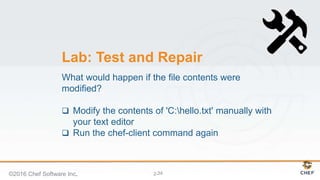
Lab: Test and Repair
What would happen if the file contents were
modified?
 Modify the contents of 'C:hello.txt' manually with
your text editor
 Run the chef-client command again
©2016 Chef Software Inc. 34
2-
Modify the Contents of the File
Goodbye, world!
C:hello.txt
©2016 Chef Software Inc. 35
2-
Converging 1 resources
Recipe: @recipe_files::C:/Users/Administrator/hello.rb
* file[hello.txt] action create
- update content in file hello.txt from 2ffd26 to 315f5b
--- hello.txt 2016-03-28 20:57:06.000000000 +0000
+++ ./hello.txt20160328-2708-sdgmv4 2016-03-28 20:57:22.000000000 +0000
@@ -1,2 +1,2 @@
-Goodbye, world!
+Hello, world!
Running handlers:
Running handlers complete
Re-apply the Policy Defined in the Recipe
> chef exec chef-client --local-mode hello.rb
©2016 Chef Software Inc. 36
Back to the Chef Server
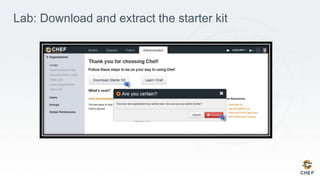
Lab: Download and extract the starter kit
2-
Lab: Go to our cookbooks folder
> cd <chef-repo-path>/chef-repo/cookbooks
2-
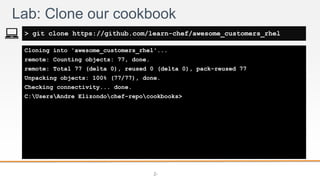
Cloning into 'awesome_customers_rhel'...
remote: Counting objects: 77, done.
remote: Total 77 (delta 0), reused 0 (delta 0), pack-reused 77
Unpacking objects: 100% (77/77), done.
Checking connectivity... done.
C:UsersAndre Elizondochef-repocookbooks>
Lab: Clone our cookbook
> git clone https://github.com/learn-chef/awesome_customers_rhel
2-
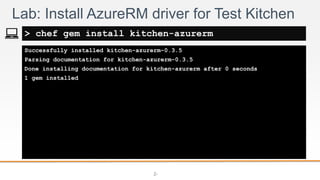
Successfully installed kitchen-azurerm-0.3.5
Parsing documentation for kitchen-azurerm-0.3.5
Done installing documentation for kitchen-azurerm after 0 seconds
1 gem installed
Lab: Install AzureRM driver for Test Kitchen
> chef gem install kitchen-azurerm
2-
Enter file in which to save the key (/c/Users/Andre Elizondo/.ssh/id_rsa):
Enter passphrase (empty for no passphrase):
Enter same passphrase again:
Your identification has been saved in /c/Users/Andre Elizondo/.ssh/my_key
[...]
Lab: Create an SSH Key
> ssh-keygen
2-
Lab: Edit your .kitchen.yml to use the AzureRM Driver
---
driver:
name: azurerm
provisioner:
name: chef_zero
driver_config:
subscription_id: "592e930e-fd8d-4298-a743-35a3a9a5f19d"
location: "West US"
machine_size: "Standard_D1"
transport:
ssh_key: ~/.ssh/<your-ssh-key>
platforms:
- name: lab-rhel-7.2
driver_config:
image_urn: RedHat:RHEL:7.2:latest
suites:
- name: default
run_list:
- recipe[awesome_customers_rhel::default]
attributes:
chef-repo/cookbooks/awesome_customers_rhel/.kitchen.yml
• The gist can be found at - http://tinyurl.com/kitchen-azurerm
2-
Lab: Create your Azure credentials file
[592e930e-fd8d-4298-a743-35a3a9a5f19d]
client_id = "4586a77e-f709-46dd-8ad1-d8662b9ec53a"
client_secret = "GLBcuGgNs_rG-c3scP2TRw=="
tenant_id = "a2b2d6bc-afe1-4696-9c37-f97a7ac416d7"
~/.azure/credentials
• Create your azure credentials file to be used when
creating test virtual machines
• http://tinyurl.com/hvdept2
• NOTE: this will be on Chef’s account, but you can create
your own using the azure-credentials gem
2-
-----> Starting Kitchen (v1.7.3)
-----> Creating <default-redhat-72>...
Creating Resource Group: kitchen-default-redhat-72-20160510T162609
Creating Deployment: deploy-e6b74bf74c214c52
Adding public key from C:/Users/Andre Elizondo/.ssh/id_rsa.pub to the deployment.
Resource Microsoft.Network/publicIPAddresses 'publicip' provisioning status is Running
Resource Microsoft.Network/virtualNetworks 'vnet' provisioning status is Running
Resource Microsoft.Storage/storageAccounts 'storagee6b74bf74c214c52' provisioning status is Running
Resource Microsoft.Compute/virtualMachines 'vm' provisioning status is Running
Resource Template deployment reached end state of 'Succeeded'.
IP Address is: 13.93.157.8 [kitchen-e6b74bf74c214c52.westus.cloudapp.azure.com]
[…]
Running handlers:
Running handlers complete
Chef Client finished, 0/0 resources updated in 03 seconds
Finished converging <default-redhat-72> (2m21.07s).
-----> Kitchen is finished. (7m52.64s)
Lab: Converge our cookbook on a VM
> chef exec kitchen converge
2-
-----> Starting Kitchen (v1.7.3)
-----> Destroying <default-redhat-72>...
Destroying Resource Group: kitchen-default-redhat-72-20160510T162609
Destroy operation accepted and will continue in the background.
Finished destroying <default-redhat-72> (0m1.88s).
-----> Kitchen is finished. (0m7.03s)
Lab: Destroy our sandbox
> chef exec kitchen destroy
2-
Resolving cookbook dependencies...
Fetching 'awesome_customers_rhel' from source at .
Fetching cookbook index from https://supermarket.chef.io...
[…]
Using rbac (1.0.3)
Using selinux (0.9.0)
Using seven_zip (2.0.0)
Using smf (2.2.8)
Using windows (1.40.0)
Using yum (3.10.0)
Using yum-epel (0.7.0)
Using yum-mysql-community (0.2.0)
Lab: Upload our cookbook to the Chef Server
> chef exec berks install
2-
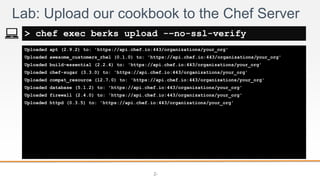
Uploaded apt (2.9.2) to: 'https://api.chef.io:443/organizations/your_org'
Uploaded awesome_customers_rhel (0.1.0) to: 'https://api.chef.io:443/organizations/your_org'
Uploaded build-essential (2.2.4) to: 'https://api.chef.io:443/organizations/your_org'
Uploaded chef-sugar (3.3.0) to: 'https://api.chef.io:443/organizations/your_org'
Uploaded compat_resource (12.7.0) to: 'https://api.chef.io:443/organizations/your_org'
Uploaded database (5.1.2) to: 'https://api.chef.io:443/organizations/your_org'
Uploaded firewall (2.4.0) to: 'https://api.chef.io:443/organizations/your_org'
Uploaded httpd (0.3.5) to: 'https://api.chef.io:443/organizations/your_org'
Lab: Upload our cookbook to the Chef Server
> chef exec berks upload -–no-ssl-verify
What can you do now?
• You have a fully configured Chef Server in Azure that can be used to manage
infrastructure anywhere.
• You’ve used test kitchen to test your Chef cookbook on Azure, ensuring this will
function when deployed to a live environment.
Further Resources
• Learn Chef: http://learn.chef.io
• Knife Azure: https://github.com/chef/knife-azure
• Chef and Azure: https://www.chef.io/solutions/azure/
Extra Content – creating a Chef
managed node in Azure
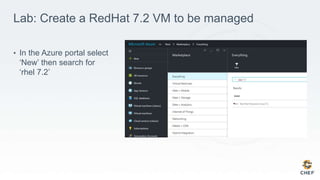
Lab: Create a RedHat 7.2 VM to be managed
• In the Azure portal select
‘New’ then search for
‘rhel 7.2’
Lab: Create a RedHat 7.2 VM to be managed
• Complete the basics
information and select the
VM size you’d like to
deploy
• Add the ‘Linux Chef
Extension’ to your VM
Lab: Create a RedHat 7.2 VM to be managed
• Add the ‘Linux Chef
Extension’ to your VM
Lab: Create a RedHat 7.2 VM to be managed
Azure handsonlab

Azure handsonlab

  • 1.
    Building Next-Gen Infrastructurewith Chef and Azure Galen Emery – Solutions Architect | galen@chef.io | @galen_emery
  • 2.
    Agenda • What arethe services that Azure offers • Where we’ll focus the conversation today • Benefits of using Chef to manage your Azure deployment
  • 3.
    Lab: Deploy theChef Server • Go to portal.azure.com and log into your Azure account • Select new and search ‘chef’ • Deploy the Chef Server, BYOL using the Resource Manager Ensure that you configure a DNS name as per these instructions: https://azure.microsoft.com/en-us/documentation/articles/virtual-machines-linux-portal-create- fqdn/ Reference Documentation: https://docs.chef.io/azure_portal.html#azure-marketplace
  • 4.
  • 5.
    IaaS • Manage machinesboth on-premise, in the cloud, or multi- cloud • Increased flexibility in deploying and maintaining your application runtime and system security configuration
  • 6.
    Go Fast Safely:Allow Teams to Build Code and Automate Systems • Infrastructure as Code • Containers as Code • Policy as Code • Process as Code • Applications Reinforce the right behaviors to collaborate safely on code at velocity Culture Automation Governance Build, deploy, and manage infrastructure and applications anywhere Operate safely and in compliance with internal controls and regulatory requirements version collaborate consistently test automatically Deploy Anywhere ● On-premise ● Cloud ● Hybrid-Cloud Configuration Automation Workflow ApplicationInfrastructure
  • 7.
    There’s a workflowfor delivering changes ... ... ... Targets/Workloads Collaborative Dev Chef Analytics Production Chef Server Chef Server Chef Supermarket Assessment Chef Compliance Search Audit Discover Deploy Chef Delivery Local Dev Model Build Test Chef Development Kit Chef Client & Cookbooks
  • 8.
    Lab: Prerequisites • ChefDKis installed – https://downloads.chef.io/chef-dk • Active Azure subscription • Git • Recommended: Github Desktop
  • 9.
    Chef Integrations tothe Microsoft Ecosystem Hybrid management across clouds Chef and Windows Server Chef development tools for Windows Chef and Azure
  • 10.
    Chef and Microsoftintegration points Tap into cloud services quickly and easily • Native Chef integration in Azure portal • Azure SDK Tools PowerShell cmdlets • Knife Azure plugin lets you: • Create VM instances managed by Chef Server • Deploy applications through the Azure API • Enumerate instances and images • Delete instances from Azure and Chef • Chef provisioning supports Azure • Allows dynamic management of Azure workloads based on policy • Can run on Windows Server Chef and Windows Server Chef and Azure Hybrid management across clouds Developer toolset Chef development tools for Windows
  • 11.
    Migrate and automateworkloads with Chef Traditional Data center Modern data center • Upgrade to Windows 2012 • Virtualize with Hyper-V • PowerShell DSC deployment • Automate and control all Windows and Linux servers with Chef Migrate workloads to Azure • Automate and control Windows and Linux in Azure cloud instances with Chef Chef and Windows Server Chef and Azure Hybrid management across clouds Developer toolset Chef development tools for Windows Chef and Microsoft integration points
  • 12.
    Bringing DevOps toyour data center • Chef client runs on Windows Server • Windows Server 2003 and later • Chef client runs as a Windows service • Built-in support for PowerShell, Windows registry keys, Windows security groups • Full support for DSC resources • Include DSC resources as Chef resources in your recipes! Chef and Windows Server Chef and Azure Hybrid management across clouds Developer toolset Chef development tools for Windows Chef and Microsoft integration points
  • 13.
    Full support forWindows and Linux environments Chef and Windows Server Chef and Azure Hybrid management across clouds Developer toolset Chef development tools for Windows Chef and Microsoft integration points Knife Windows plugin supports: • Bootstrapping Windows servers using winrm or ssh • Remote command execution using winrm or ssh Chef Development Kit available for Windows Full Chef developer experience available on Windows Test kitchen drive support for Windows Guests and AzureRM Run your Chef code against Windows/Linux machines in Azure
  • 14.
    Back to ourChef Server
  • 15.
    2- api_fqdn “chef-server-on-azure.cloudapp.net” Lab: Configureyour Chef Server > echo ‘api_fqdn “<fqdn>”’ | sudo tee -a /etc/chef-marketplace/marketplace.rb
  • 16.
    2- analytics_fqdn “chef-server-on-azure.cloudapp.net” Lab: Configureyour Chef Server > echo ‘analytics_fqdn “<fqdn>”’ | sudo tee -a /etc/opscode- analytics/opscode-analytics.rb
  • 17.
    2- Lab: Configure yourChef Server > sudo chef-marketplace-ctl hostname <fqdn>
  • 18.
    2- What is yourfirst name? What is your last name? … [wait ~20 minutes] Lab: Configure your Chef Server > sudo chef-marketplace-ctl setup
  • 19.
  • 20.
    Objective: 2- Group Lab: Hello,World?  Create a recipe file writes out 'Hello, world!' to a text file  Apply the recipe to the workstation I heard Chef is written in Ruby. If that's the case it's required that we write a quick "Hello, world!" application. ©2016 Chef Software Inc. 20
  • 21.
    2- Resources • A resourceis a statement of configuration policy. • It describes the desired state of an element of your infrastructure and the steps needed to bring that item to the desired state. https://docs.chef.io/resources.html ©2016 Chef Software Inc. 21
  • 22.
    2- Example: powershell_script powershell_script 'InstallIIS' do code 'Add-WindowsFeature Web-Server' action :run end • The powershell_script named 'Install IIS' is run with the code 'Add-WindowsFeature Web-Server'. ©2016 Chef Software Inc. https://docs.chef.io/resource_powershell_script.html 22
  • 23.
    2- Example: service service 'w3svc'do action [ :enable, :start ] end • The service named 'w3svc' is enabled (start on reboot) and started. ©2016 Chef Software Inc. 23 https://docs.chef.io/resource_service.html
  • 24.
    2- Example: file file 'C:inetpubwwwrootDefault.htm'do content 'Hello, world!' rights :read, 'Everyone' end • The file 'C:inetpubwwwrootDefault.htm' with the content 'Hello, world!' and grants 'read' rights for 'Everyone'. ©2016 Chef Software Inc. 24 https://docs.chef.io/resource_file.html
  • 25.
    2- Example: file file 'C:PHPphp.ini'do action :delete end • The file name 'c:PHPphp.ini' is deleted. ©2016 Chef Software Inc. 25 https://docs.chef.io/resource_file.html
  • 26.
    2- GL: Create andOpen a Recipe File > atom hello.rb ©2016 Chef Software Inc. 26
  • 27.
    2- GL: Create aRecipe File Named hello.rb file 'C:hello.txt' do content 'Hello, world!' end ~hello.rb • The file named 'C:hello.txt' is created with the content 'Hello, world!' • https://docs.chef.io/resources.html ©2016 Chef Software Inc. 27
  • 28.
    Objective: 2- Group Lab: Hello,World?  Create a recipe file writes out 'Hello, world!' to a text file  Apply the recipe to the workstation I heard Chef is written in Ruby. If that's the case it's required that we write a quick "Hello, world!" application. ©2016 Chef Software Inc. 28
  • 29.
    2- chef-client chef-client is anagent that runs locally on every node that is under management by Chef. When a chef-client is run, it will perform all of the steps that are required to bring the node into the expected state. ©2015 Chef Software Inc. 29 • https://docs.chef.io/chef_client.html
  • 30.
    4- --local-mode (or -z) chef-client'sdefault mode attempts to contact a Chef Server and ask it for the recipes to run for the given node. We are overriding that behavior to have it work in a local mode. ©2015 Chef Software Inc. 30
  • 31.
    2- Starting Chef Client,version 12.7.2 resolving cookbooks for run list: [] Synchronizing Cookbooks: Compiling Cookbooks... [2016-03-28T20:53:45+00:00] WARN: Node WIN-14DV1I4A82F.ec2.internal has an empty run list. Converging 1 resources Recipe: @recipe_files::C:/Users/Administrator/hello.rb * file[hello.txt] action create - create new file hello.txt - update content in file hello.txt from none to 315f5b --- hello.txt 2016-03-28 20:53:45.000000000 +0000 +++ ./hello.txt20160328-392-edvhj4 2016-03-28 20:53:45.000000000 +0000 GL: Apply a Recipe File > chef exec chef-client --local-mode hello.rb ©2016 Chef Software Inc. 31
  • 32.
    2- Hello, world! GL: WhatDoes hello.txt Say? > gc C:hello.txt ©2016 Chef Software Inc. 32
  • 33.
    Objective: 2- Group Lab: Hello,World?  Create a recipe file writes out 'Hello, world!' to a text file  Apply the recipe to the workstation I heard Chef is written in Ruby. If that's the case it's required that we write a quick "Hello, world!" application. ©2016 Chef Software Inc. 33
  • 34.
    2- Lab: Test andRepair What would happen if the file contents were modified?  Modify the contents of 'C:hello.txt' manually with your text editor  Run the chef-client command again ©2016 Chef Software Inc. 34
  • 35.
    2- Modify the Contentsof the File Goodbye, world! C:hello.txt ©2016 Chef Software Inc. 35
  • 36.
    2- Converging 1 resources Recipe:@recipe_files::C:/Users/Administrator/hello.rb * file[hello.txt] action create - update content in file hello.txt from 2ffd26 to 315f5b --- hello.txt 2016-03-28 20:57:06.000000000 +0000 +++ ./hello.txt20160328-2708-sdgmv4 2016-03-28 20:57:22.000000000 +0000 @@ -1,2 +1,2 @@ -Goodbye, world! +Hello, world! Running handlers: Running handlers complete Re-apply the Policy Defined in the Recipe > chef exec chef-client --local-mode hello.rb ©2016 Chef Software Inc. 36
  • 37.
    Back to theChef Server
  • 38.
    Lab: Download andextract the starter kit
  • 39.
    2- Lab: Go toour cookbooks folder > cd <chef-repo-path>/chef-repo/cookbooks
  • 40.
    2- Cloning into 'awesome_customers_rhel'... remote:Counting objects: 77, done. remote: Total 77 (delta 0), reused 0 (delta 0), pack-reused 77 Unpacking objects: 100% (77/77), done. Checking connectivity... done. C:UsersAndre Elizondochef-repocookbooks> Lab: Clone our cookbook > git clone https://github.com/learn-chef/awesome_customers_rhel
  • 41.
    2- Successfully installed kitchen-azurerm-0.3.5 Parsingdocumentation for kitchen-azurerm-0.3.5 Done installing documentation for kitchen-azurerm after 0 seconds 1 gem installed Lab: Install AzureRM driver for Test Kitchen > chef gem install kitchen-azurerm
  • 42.
    2- Enter file inwhich to save the key (/c/Users/Andre Elizondo/.ssh/id_rsa): Enter passphrase (empty for no passphrase): Enter same passphrase again: Your identification has been saved in /c/Users/Andre Elizondo/.ssh/my_key [...] Lab: Create an SSH Key > ssh-keygen
  • 43.
    2- Lab: Edit your.kitchen.yml to use the AzureRM Driver --- driver: name: azurerm provisioner: name: chef_zero driver_config: subscription_id: "592e930e-fd8d-4298-a743-35a3a9a5f19d" location: "West US" machine_size: "Standard_D1" transport: ssh_key: ~/.ssh/<your-ssh-key> platforms: - name: lab-rhel-7.2 driver_config: image_urn: RedHat:RHEL:7.2:latest suites: - name: default run_list: - recipe[awesome_customers_rhel::default] attributes: chef-repo/cookbooks/awesome_customers_rhel/.kitchen.yml • The gist can be found at - http://tinyurl.com/kitchen-azurerm
  • 44.
    2- Lab: Create yourAzure credentials file [592e930e-fd8d-4298-a743-35a3a9a5f19d] client_id = "4586a77e-f709-46dd-8ad1-d8662b9ec53a" client_secret = "GLBcuGgNs_rG-c3scP2TRw==" tenant_id = "a2b2d6bc-afe1-4696-9c37-f97a7ac416d7" ~/.azure/credentials • Create your azure credentials file to be used when creating test virtual machines • http://tinyurl.com/hvdept2 • NOTE: this will be on Chef’s account, but you can create your own using the azure-credentials gem
  • 45.
    2- -----> Starting Kitchen(v1.7.3) -----> Creating <default-redhat-72>... Creating Resource Group: kitchen-default-redhat-72-20160510T162609 Creating Deployment: deploy-e6b74bf74c214c52 Adding public key from C:/Users/Andre Elizondo/.ssh/id_rsa.pub to the deployment. Resource Microsoft.Network/publicIPAddresses 'publicip' provisioning status is Running Resource Microsoft.Network/virtualNetworks 'vnet' provisioning status is Running Resource Microsoft.Storage/storageAccounts 'storagee6b74bf74c214c52' provisioning status is Running Resource Microsoft.Compute/virtualMachines 'vm' provisioning status is Running Resource Template deployment reached end state of 'Succeeded'. IP Address is: 13.93.157.8 [kitchen-e6b74bf74c214c52.westus.cloudapp.azure.com] […] Running handlers: Running handlers complete Chef Client finished, 0/0 resources updated in 03 seconds Finished converging <default-redhat-72> (2m21.07s). -----> Kitchen is finished. (7m52.64s) Lab: Converge our cookbook on a VM > chef exec kitchen converge
  • 46.
    2- -----> Starting Kitchen(v1.7.3) -----> Destroying <default-redhat-72>... Destroying Resource Group: kitchen-default-redhat-72-20160510T162609 Destroy operation accepted and will continue in the background. Finished destroying <default-redhat-72> (0m1.88s). -----> Kitchen is finished. (0m7.03s) Lab: Destroy our sandbox > chef exec kitchen destroy
  • 47.
    2- Resolving cookbook dependencies... Fetching'awesome_customers_rhel' from source at . Fetching cookbook index from https://supermarket.chef.io... […] Using rbac (1.0.3) Using selinux (0.9.0) Using seven_zip (2.0.0) Using smf (2.2.8) Using windows (1.40.0) Using yum (3.10.0) Using yum-epel (0.7.0) Using yum-mysql-community (0.2.0) Lab: Upload our cookbook to the Chef Server > chef exec berks install
  • 48.
    2- Uploaded apt (2.9.2)to: 'https://api.chef.io:443/organizations/your_org' Uploaded awesome_customers_rhel (0.1.0) to: 'https://api.chef.io:443/organizations/your_org' Uploaded build-essential (2.2.4) to: 'https://api.chef.io:443/organizations/your_org' Uploaded chef-sugar (3.3.0) to: 'https://api.chef.io:443/organizations/your_org' Uploaded compat_resource (12.7.0) to: 'https://api.chef.io:443/organizations/your_org' Uploaded database (5.1.2) to: 'https://api.chef.io:443/organizations/your_org' Uploaded firewall (2.4.0) to: 'https://api.chef.io:443/organizations/your_org' Uploaded httpd (0.3.5) to: 'https://api.chef.io:443/organizations/your_org' Lab: Upload our cookbook to the Chef Server > chef exec berks upload -–no-ssl-verify
  • 49.
    What can youdo now? • You have a fully configured Chef Server in Azure that can be used to manage infrastructure anywhere. • You’ve used test kitchen to test your Chef cookbook on Azure, ensuring this will function when deployed to a live environment.
  • 50.
    Further Resources • LearnChef: http://learn.chef.io • Knife Azure: https://github.com/chef/knife-azure • Chef and Azure: https://www.chef.io/solutions/azure/
  • 51.
    Extra Content –creating a Chef managed node in Azure
  • 52.
    Lab: Create aRedHat 7.2 VM to be managed • In the Azure portal select ‘New’ then search for ‘rhel 7.2’
  • 53.
    Lab: Create aRedHat 7.2 VM to be managed • Complete the basics information and select the VM size you’d like to deploy
  • 54.
    • Add the‘Linux Chef Extension’ to your VM Lab: Create a RedHat 7.2 VM to be managed
  • 55.
    • Add the‘Linux Chef Extension’ to your VM Lab: Create a RedHat 7.2 VM to be managed

Editor's Notes

  • #5 Slide Objectives: Explain the differences and relationship between IaaS, PaaS, and SaaS in more detail. Speaking Points: Here’s another way to look at the cloud services taxonomy and how this taxonomy maps to the components in an IT infrastructure. Packaged Software With packaged software a customer would be responsible for managing the entire stack – ranging from the network connectivity to the applications. IaaS With Infrastructure as a Service, the lower levels of the stack are managed by a vendor. Some of these components can be provided by traditional hosters – in fact most of them have moved to having a virtualized offering. Very few actually provide an OS The customer is still responsible for managing the OS through the Applications. For the developer, an obvious benefit with IaaS is that it frees the developer from many concerns when provisioning physical or virtual machines. This was one of the earliest and primary use cases for Amazon Web Services Elastic Cloud Compute (EC2). Developers were able to readily provision virtual machines (AMIs) on EC2, develop and test solutions and, often, run the results ‘in production’. The only requirement was a credit card to pay for the services. PaaS With Platform as a Service, everything from the network connectivity through the runtime is provided and managed by the platform vendor. The Windows Azure best fits in this category today. In fact because we don’t provide access to the underlying virtualization or operating system today, we’re often referred to as not providing IaaS. PaaS offerings further reduce the developer burden by additionally supporting the platform runtime and related application services. With PaaS, the developer can, almost immediately, begin creating the business logic for an application. Potentially, the increases in productivity are considerable and, because the hardware and operational aspects of the cloud platform are also managed by the cloud platform provider, applications can quickly be taken from an idea to reality very quickly. SaaS Finally, with SaaS, a vendor provides the application and abstracts you from all of the underlying components.
  • #7 Additional: Describe infrastructure and workflow as code Provision and manage infrastructure and applications anywhere Test, package, and deploy applications anywhere Check for compliance with continuous audit
  • #8 (add flow elements) Stakeholders--dev, ops, and others– need a collaborative workflow Applications, runtimes and infrastructure must be deployed together
  • #11 Windows Server can be a provisioning node <click>>
  • #12 Automate all workloads the customer is running, including Linux workloads and VMware: Use Chef’s first class Microsoft integrations to automate and migrate to: The modern data center with Windows 2012 and Hyper-V AND Azure for LX and Windows support <<click>>
  • #13 Running as a service means system admins can see and manage from GUI. Support for 32 and 64 bit processes lets you configure current and legacy apps. DSC = Desired State Configuration. This is Microsoft’s native configuration interface. Chef exposes DSC resources in a way that makes them behave like any other Chef resource. There’s no need to write cookbooks for components whose configuration Microsoft already supports. <<click>>
  • #14 winrm is a remote execution feature of Windows Server. It’s similar to ssh. Note that ssh is not installed by default on Windows Servers. Chef DK is the Chef Development Kit. It includes the tools you need to create and test cookbooks. Test kitchen is a testing framework that is included as part of Chef DK. It runs on Windows and can instantiate Windows Servers. <<click>>
  • #21 Chef is written in Ruby. Ruby is a programming language and it is required that the first program you write in a programming language is 'Hello World'. So let's walk through creating a recipe file that creates a file named 'C:\hello.txt' with the contents 'Hello, world!'.
  • #22 First, let's look at Chef's documentation about resources. Visit the docs page on resources and read the first three paragraphs. Afterwards, let us look at a few examples of resources. Instructor Note: This may sound unusual to ask people to read the documentation site but it is important that they learn to refer to the documentation. This page in an important reference page.
  • #23 Here is an example of the powershell_script resource. The powershell_script named 'Install IIS' is run with the code 'Add-WindowsFeature Web-Server'
  • #24 In this example, the service named ‘w3svc' is enabled and started. Service resources are often defined with two actions. The action method can only take one parameter so to provide two actions you need to specify the two actions within an Array.
  • #25 In this example, the file named 'C\inetpub\wwwroot\Default.htm' with the content 'Hello, world!' and has allowed Everyone rights to read the file. The default action for the file resource is to create the file.
  • #26 In this example, the file named 'C:\PHP\php.ini' is deleted. Instructor Note: A resource's default action is based on the principle of least surprise. So they are often creative actions towards the system. This is why the file resource specified here has the action specified. It is not the default action.
  • #27 Using your editor open the file named 'hello.rb'. 'hello.rb' is a recipe file. It has the extension '.rb' because it is a ruby file.
  • #28 Add the resource definition displayed above. We are defining a resource with the type called 'file' and named 'C:\hello.txt'. We also are stating that the contents of that file should contain 'Hello, world!'. Save the file and return to the command prompt. Instructor Note: The default action is to create the file.
  • #29 Now the file is created with the resource that will create the file with the content we want to see. It is time to apply that recipe to the system.
  • #30 In the Chef Development Kit (ChefDK), we package a tool that is called 'chef-client'. 'chef-client' is a command-line application that can be used to apply a recipe file. It also has the ability to communicate with a Chef server – a concept we will talk about in another section. For now think of the Chef Server as a central, artifact repository where we will later store our cookbooks.
  • #31 'chef-client' has the default default behavior to communicate with a Chef server. So we use the '--local-mode' flag to ask 'chef-client' to look for the recipe file locally.
  • #32 Type the specified command to apply the recipe file. You should see that a file named 'hello.txt' was created and the contents updated to include your 'Hello, world!' text. The output that shows the contents of the file have been modified is being displayed in a format similar to a git diff (http://stackoverflow.com/questions/2529441/how-to-read-the-output-from-git-diff).
  • #33 Let's look at the contents of the 'C:\hello.txt' file to prove that it was created and the contents of file are what we wrote in the recipe. The result of the command should show you the contents 'Hello, world!'.
  • #34 The recipe has been applied and the file has been created. The contents of the file are what we hoped it would contain.
  • #35 Modify the contents of 'C:\hello.txt' manually with your text editor. Save the file with the new contents. Then think about what will happen if you applied this recipe file again. Then use `chef-client` to apply the recipe file again. Instructor Note: Allow 5 minutes to complete this exercise.
  • #39 Ssl_verify_mode :verify_none