Introduction to
Cooking with Chef
John Osborne
@johnsosborne
Senior Systems Engineer, LeadiD
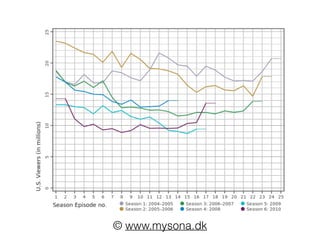
Let’s Start at the Beginning!
© www.mysona.dk
Goals
• Understand what Chef is and why its used
• Be able to define the core components and constructs
of Chef
• Understand methods to test Chef-driven infrastructure
• Understand how Chef can be enable creation sandbox
local development environments that mimic production
• Be thoroughly tired of culinary terminology and
metaphors
What is Chef?
• A tool for automating and managing the configuration of
infrastructure
• Types of infrastructure:
• Files, Users, Services, Packages, Mounts, and more…
• Facilitates infrastructure as code, giving the computing
environment attributes similar to any software project
• It is versionable
• It is repeatable
• It is testable
Why use Chef?
• Consistency
• Humans are bad at doing the same task repeatedly, irrespective to the quality or
completeness of documentation.
• Automation reduces opportunity for error.
• Efficiency
• Manage change at scale
• Increase change velocity
• Create an organization where change is embraced, not feared.
• Reproducibility
• Infrastructure configuration is kept in source configuration management tool
• Backup data + new servers + Chef cookbooks = New infrastructure
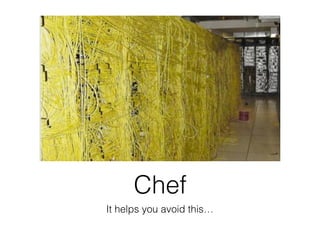
Chef
It helps you avoid this…
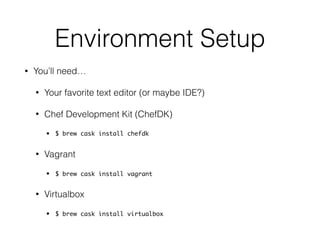
Environment Setup
• You’ll need…
• Your favorite text editor (or maybe IDE?)
• Chef Development Kit (ChefDK)
• $ brew cask install chefdk
• Vagrant
• $ brew cask install vagrant
• Virtualbox
• $ brew cask install virtualbox
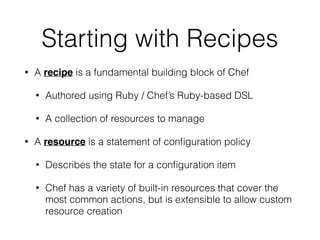
Starting with Recipes
• A recipe is a fundamental building block of Chef
• Authored using Ruby / Chef’s Ruby-based DSL
• A collection of resources to manage
• A resource is a statement of configuration policy
• Describes the state for a configuration item
• Chef has a variety of built-in resources that cover the
most common actions, but is extensible to allow custom
resource creation
Gotta start somewhere…
Hello World!
The Chef-O-Matic
It’s just… that… simple.
(CAUTION: This slide references obscure, dated pop culture.)
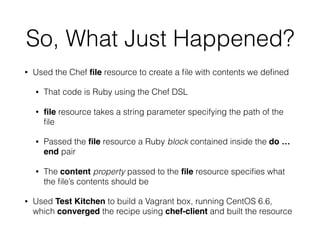
So, What Just Happened?
• Used the Chef file resource to create a file with contents we defined
• That code is Ruby using the Chef DSL
• file resource takes a string parameter specifying the path of the
file
• Passed the file resource a Ruby block contained inside the do …
end pair
• The content property passed to the file resource specifies what
the file’s contents should be
• Used Test Kitchen to build a Vagrant box, running CentOS 6.6,
which converged the recipe using chef-client and built the resource
Converge?
• Convergence refers to the process of Chef bringing the
system into compliance with a stated policy
• Policy is conveyed via the defined resources
• Policy = “What the state of the system should be”
• Chef handles “how” to place resources in convergence
and abstracts away platform or environment-specific
differences
• Resources have underlying providers which are called
dependent on platform
Common Resources
• File Management
• file, cookbook_file, remote_file, template, link, directory, remote_directory
• Package Management
• package: providers for common package management systems (yum, apt, Mac OS/X, Ruby Gems,
Python pips / easy_install)
• User Management
• user and group: define local users, SSH keys, shells, home directories, etc.
• Services
• service allows defining services to be enabled on boot, restarted, stopped, or notified upon change of
another resource (i.e. configuration file change).
• Running ad-hoc programs
• execute: run a command (***)
• script: run a pre-defined script (Bash, Perl, Python, Ruby) (***)
Idempotence
• Chef’s core resources are idempotent
• If the resource’s current state is equal to its desired
state, it is skipped
• Repeatedly re-running the chef-client on a
convergent node will do nothing
• By definition, arbitrary commands and scripts (execute
and script) are NOT idempotent
• They will run every time the chef-client runs, unless…
Conditional Execution with
Guards
• All resources support the following attributes:
• creates file: Specifies that the execution of the resource
creates file. The resource will not be run if file is present.
• not_if: The resource will not be executed if the condition
evaluates to true / truthy.
• only_if: The resource will only be executed if the
condition evaluates to true / truthy.
• not_if and only_if can be passed either a command to
execute to determine the condition, or, a Ruby block
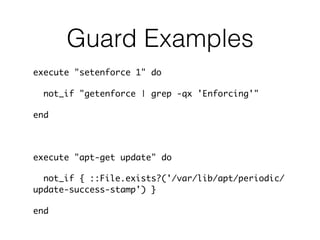
Guard Examples
execute "setenforce 1" do
not_if "getenforce | grep -qx 'Enforcing'"
end
execute "apt-get update" do
not_if { ::File.exists?('/var/lib/apt/periodic/
update-success-stamp') }
end
So…
• If you’re scoring at home, we’ve accomplished two
of our goals now…
✓ Understand what Chef is and why it used
✓ Configured your local development environment
to author and test Chef cookbooks
• We’ve also introduced some core concepts such
as recipes, resources, idempotency, convergence,
and Test Kitchen
Cookbooks
What is a Cookbook?
• Think of a cookbook as a package for recipes.
• One place where the cooking analogy sort of
makes sense.
• You might bundle all the recipes to cook Italian
food into a single cookbook.
• Similarly, you might bundle the recipes to install,
configure, or deploy a web server, database, or
application each into their own cookbooks.
Cookbook Components
• Recipes
• Attributes
• Templates
• Files
Attributes
• attributes contain your own custom variables which can be used and
referenced within your recipes.
• Commonly used to configure a cookbook.
• Can be overridden (there’s a precedence scheme; we’ll get there…)
• Examples: the user and group a file should be owned by, the version
of an application to install, the path where an application should be
installed.
• The attributes directory may contain multiple .rb files each containing
attribute definitions. Files are read alphabetically.
• Convention is, in most cases, to store all attributes in attributes/default.rb
Node Attributes
• Chef compliments the attributes you defined with automatic attributes
• Collected by a tool called ohai at the start of each chef-client run
• Examples:
• Platform details
• Network usage
• Memory usage
• CPU data
• Kernel data
• Host names
• Fully qualified domain names
• Other configuration details
• These attributes are also reported back to the Chef Server can be used as search criteria
Let’s Start a Cookbook!
• Cookbook goals:
• Install Apache (httpd)
• Start the Apache service
• Make it run when the server boots
• Write out a static home page
Chef Community
• Chef Supermarket (http://supermarket.chef.io) is the community site for
cookbooks
• Open-source cookbooks anyone can use
• Most common infrastructure has very good, well documented, well tested,
throughly used community cookbooks
• There is no namespacing of cookbooks
• Always a good idea to preface your internal cookbook names to avoid
namespace collisions with community cookbooks
• Example: Use leadid_apache instead of apache
• Berkshelf, a dependency resolver for Chef, can automate downloading
community cookbooks for your use
Managing Nodes with
Chef Server
Chef Server
• Centralized store for configuration data about
infrastructure
• Cookbooks
• Nodes
• Roles
• Environments
• knife provides a command line interface to interact with the
Chef Server from your workstation
Bootstrapping Nodes
• Bootstrapping refers to the process by which a remote system is prepared to be
managed by Chef
• knife bootstrap
• Uses a validator private key
• knife accesses the node via SSH using credentials you supply, transfers
the validator, installs and configures chef-client
• chef-client reaches back to the Chef Server, authenticating with the
validator
• From this point forward, node uses its own client key and the validator can
(and should) be removed from the node
• There’s other ways to do this, but this is the most common and straightforward
Roles
• Roles are a way of classifying the different types of services in your infrastructure
• Web Servers
• Database Servers
• Caches
• Contain a run_list
• An ordered list of recipes and other roles that are run that exact order by chef-clients
• During a chef-client, references to the role will be expanded to the recipes specified
in the role’s run_list
• Contain role-level attribute overrides
• Conveyed in JSON files
Example Role
{
“name”:"webserver",
“description":"Web Server”,
“json_class":"Chef::Role",
“chef_type”:"role",
“run_list":[
“recipe[motd]",
“recipe[users]",
“recipe[apache]”
]
}
Important Safety Tip!
Role Cookbooks
• Changes made to a role are immediately reflected across the entire infrastructure
• No versioning of roles
• Roles are organization-wide, across all environments
• Say someone changes the run_list contained in a role file erroneously
• The next chef-client run on all nodes having that role will put the bad run_list in place
• Across all environments that have nodes using that role
• A common pattern is to build a role cookbook
• Cookbooks are versioned
• Role run list is set using include_recipe
• http://realityforge.org/code/2012/11/19/role-cookbooks-and-wrapper-cookbooks.html
Environments
• Environments are a way of grouping infrastructure
to model the phases of your software development
lifecycle
• Environments contain:
• Environment-level attribute overrides
• Version constraints (“pins”)
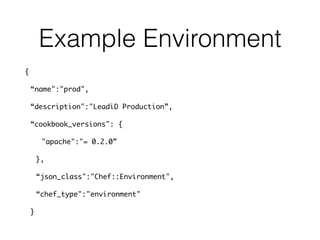
Example Environment
{
“name":"prod",
“description":"LeadiD Production”,
“cookbook_versions": {
"apache":"= 0.2.0”
},
“json_class":"Chef::Environment",
“chef_type":"environment"
}
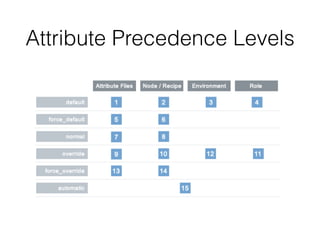
Attributes
• Now that we’ve talked about all the pieces, let’s talk about the
attributes, precedence, and overrides
• You’ve seen multiple ways attributes can be set / generated
• Ohai / Automatic
• Cookbooks
• Roles
• Environments
• If multiple levels set the same attribute, who wins?
Attribute Precedence Levels
And with that…
✓ Goal #3: Be able to define the core components
of Chef
Testing Your Chef
You Test Your Code, Right?
• Chef is no different than any software project
• Automation makes infrastructure configuration
more repeatable and reliable, and therefore, more
testable
• You saw the utility of Test Kitchen to manually verify
what did happen was what you expected to
happen
• Now, let’s automate that verification!
Linting / Style
• Foodcritic is a Chef linting tool to check cookbooks for common
problems
• Style, Correctness, Syntax, Best Practices, Common Mistakes,
and Deprecations
• Rubocop is a general Ruby linting tool
• Enforce Ruby style conventions and best practices
• Help every member of the team author similarly structured code;
set expectations
• Rubocop can automatically fix most common, non-complex
offenses
Unit Testing
• Chefspec (http://www.github.com/sethvargo/
chefspec) is used to simulate the convergence of
resources on a node
• Runs the chef-client in memory on the local
machine
• An extension of RSpec, a BDD framework for
Ruby
• Is the fastest way to test resources and recipes
Chefspec
• Chefspec is valuable
• It is very fast
• Quickly lets us test logical execution paths in our cookbooks
• Uses fauxhai to generate fake node attributes so you can test how your
cookbook behaves on different platforms
• Test your cookbook and make assertions about its behavior
• Stub things outside your cookbook and control their actions (Ruby
modules, classes, node attributes, etc)
• So, Chefspec is an appropriate unit level tool because it tests in isolation
of external factors… what about integration level?
Serverspec
• Serverspec allows us to make assertions on the
state of a fully configured machine
• Test whether services are running, ports are
open, commands return correct output, etc
• Run on the converged infrastructure, as laid out
in Test Kitchen configuration
Test Kitchen and Serverspec
• Look again at .kitchen.yml
• There are platforms and there are suites
• Suites are test suites
• Tests that should be run to verify them are under
test/integration/<suite_name>
• These tests use Serverspec to allow you to make
assertions about the converged platform
Let’s Add Tests to the
Apache Example
And…
✓ Goal #4: Understand methods to test Chef-driven
infrastructure
Pivoting to Immutable
Infrastructure with Chef
Configuration Drift
• What if we comment out the service resource in our
Apache example?
• What happens when we run our tests?
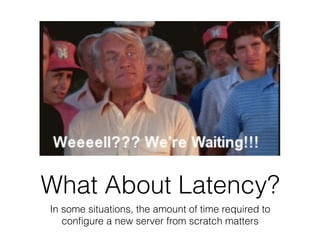
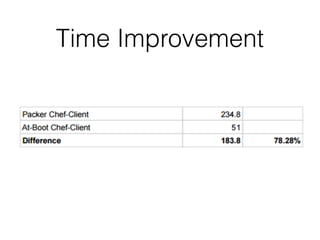
What About Latency?
In some situations, the amount of time required to
configure a new server from scratch matters
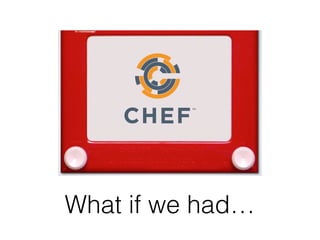
What if we had…
Building a Server
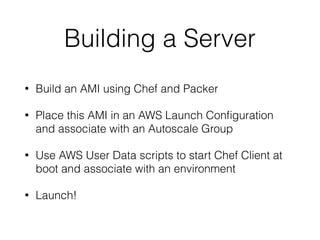
• Build an AMI using Chef and Packer
• Place this AMI in an AWS Launch Configuration
and associate with an Autoscale Group
• Use AWS User Data scripts to start Chef Client at
boot and associate with an environment
• Launch!
Time Improvement
Infrastructure Change?
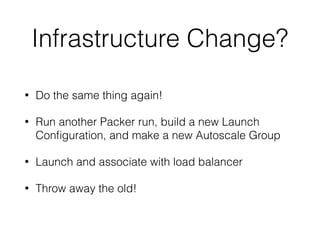
• Do the same thing again!
• Run another Packer run, build a new Launch
Configuration, and make a new Autoscale Group
• Launch and associate with load balancer
• Throw away the old!
Further Thoughts
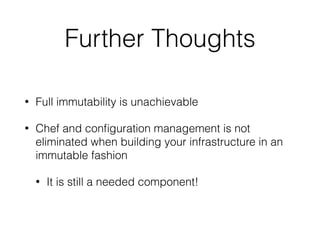
• Full immutability is unachievable
• Chef and configuration management is not
eliminated when building your infrastructure in an
immutable fashion
• It is still a needed component!
For More Learning
Chef References
• http://docs.chef.io - Chef Documentation
• Chef Bob Ross - New Youtube Series by Franklin Webber
• https://www.youtube.com/watch?v=FOYc_SGWE-0
• Chef Fundamentals Webinar Series
• https://learn.chef.io/skills/fundamentals-series-week-1/
• Little dated now, but largely effective at introducing the core concepts
• “Learning Chef: A Guide to Configuration Management and Automation”
• http://shop.oreilly.com/product/0636920032397.do
• By Mischa Taylor and Seth Vargo
• “Test-Driven Infrastructure with Chef, 2nd Edition”
• http://shop.oreilly.com/product/0636920030973.do
• Good book, but examples don’t work
• “Customizing Chef: Getting the Most Out of Your Infrastructure Automation”
• http://shop.oreilly.com/product/0636920032984.do
Thanks!
Backup
Back to Test Kitchen
• Test Kitchen is a tool to create sandbox environments
to develop and test Chef stuffs
• Supports drivers allowing Kitchen to create
infrastructure for this purpose in a number of manners
• Vagrant (most common), Docker, Amazon EC2,
OpenStack, RackSpace, and so on…
• Test Kitchen itself is merely a framework for managing
the state of the systems built via the drivers and running
tests
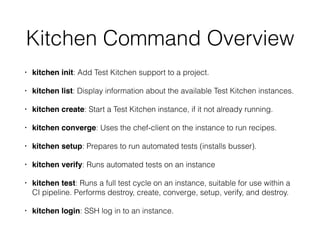
Kitchen Command Overview
• kitchen init: Add Test Kitchen support to a project.
• kitchen list: Display information about the available Test Kitchen instances.
• kitchen create: Start a Test Kitchen instance, if it not already running.
• kitchen converge: Uses the chef-client on the instance to run recipes.
• kitchen setup: Prepares to run automated tests (installs busser).
• kitchen verify: Runs automated tests on an instance
• kitchen test: Runs a full test cycle on an instance, suitable for use within a
CI pipeline. Performs destroy, create, converge, setup, verify, and destroy.
• kitchen login: SSH log in to an instance.
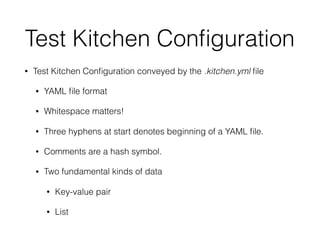
Test Kitchen Configuration
• Test Kitchen Configuration conveyed by the .kitchen.yml file
• YAML file format
• Whitespace matters!
• Three hyphens at start denotes beginning of a YAML file.
• Comments are a hash symbol.
• Two fundamental kinds of data
• Key-value pair
• List
Look at .kitchen.yml
from our overview
Run cgc, do a tree
• What is all this crap?
README.md
• Good software requires documentation!
• Markdown format
• Generators put together a skeleton with major section headings present
• Overview
• Dependencies
• Usage
• Examples
• Attributes
• Testing
chefignore
• Stuff that should be ignored when the cookbook is
uploaded to the Chef Server
• Editor swapfiles
• Source control related files
• Helps reduce unnecessary clutter when nodes download
cookbooks
• Globbing supported
• Comment lines begin with #
metadata.rb
• Every cookbook must have a metadata.rb
• Conveys information about the cookbook to the Chef
Server
• Version
• Dependencies
• Supported Platforms
• Cookbook Name
templates
• Holds Chef templates used within the cookbook
• Uses Embedded Ruby
• Ruby code is evaluated when the template is
rendered on the node
Attributes
• attributes contain your own custom attributes which can be used and
referenced within your recipes.
• Commonly used to configure a cookbook.
• Can be overridden (there’s a precedence scheme; we’ll get there…)
• Examples: the user and group a file should be owned by, the version
of an application to install, the path where an application should be
installed.
• The attributes directory may contain multiple .rb files each containing
attribute definitions. Files are read alphabetically.
• Convention is, in most cases, to store all attributes in attributes/default.rb
Node Attributes
• Chef compliments the attributes you defined with automatic attributes
• Collected by a tool called ohai at the start of each chef-client run
• Examples:
• Platform details
• Network usage
• Memory usage
• CPU data
• Kernel data
• Host names
• Fully qualified domain names
• Other configuration details
• These attributes are also reported back to the Chef Server can be used as search criteria
• More later…
Additional Stuffs
• Berksfile
• test/
• spec/
• Rakefile
• LICENSE, CONTRIBUTING.md, CHANGELOG.md
Installing
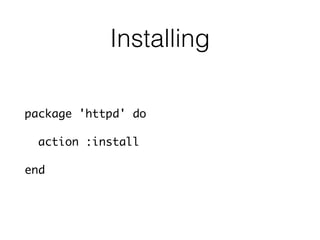
package 'httpd' do
action :install
end
Starting and Enabling
service 'httpd' do
action [:enable, :start]
end
Static Webpage
• In default.rb
template '/var/www/html/index.html' do
source 'index.html.erb'
mode '644'
end
• In templates/default/index.html.erb
Welcome to LeadiD!
Hostname: <%= node['hostname'] %>
Verify Success
• In .kitchen.yml
---
driver:
name: vagrant
network:
- ["forwarded_port", {guest: 80, host: 8095}]
• Open http://localhost:8095 in your web browser. Success?

Introduction to Cooking with Chef

  • 1.
  • 2.
  • 5.
    Let’s Start atthe Beginning!
  • 6.
  • 7.
    Goals • Understand whatChef is and why its used • Be able to define the core components and constructs of Chef • Understand methods to test Chef-driven infrastructure • Understand how Chef can be enable creation sandbox local development environments that mimic production • Be thoroughly tired of culinary terminology and metaphors
  • 8.
    What is Chef? •A tool for automating and managing the configuration of infrastructure • Types of infrastructure: • Files, Users, Services, Packages, Mounts, and more… • Facilitates infrastructure as code, giving the computing environment attributes similar to any software project • It is versionable • It is repeatable • It is testable
  • 9.
    Why use Chef? •Consistency • Humans are bad at doing the same task repeatedly, irrespective to the quality or completeness of documentation. • Automation reduces opportunity for error. • Efficiency • Manage change at scale • Increase change velocity • Create an organization where change is embraced, not feared. • Reproducibility • Infrastructure configuration is kept in source configuration management tool • Backup data + new servers + Chef cookbooks = New infrastructure
  • 10.
    Chef It helps youavoid this…
  • 11.
    Environment Setup • You’llneed… • Your favorite text editor (or maybe IDE?) • Chef Development Kit (ChefDK) • $ brew cask install chefdk • Vagrant • $ brew cask install vagrant • Virtualbox • $ brew cask install virtualbox
  • 12.
    Starting with Recipes •A recipe is a fundamental building block of Chef • Authored using Ruby / Chef’s Ruby-based DSL • A collection of resources to manage • A resource is a statement of configuration policy • Describes the state for a configuration item • Chef has a variety of built-in resources that cover the most common actions, but is extensible to allow custom resource creation
  • 13.
  • 14.
  • 15.
    The Chef-O-Matic It’s just…that… simple. (CAUTION: This slide references obscure, dated pop culture.)
  • 16.
    So, What JustHappened? • Used the Chef file resource to create a file with contents we defined • That code is Ruby using the Chef DSL • file resource takes a string parameter specifying the path of the file • Passed the file resource a Ruby block contained inside the do … end pair • The content property passed to the file resource specifies what the file’s contents should be • Used Test Kitchen to build a Vagrant box, running CentOS 6.6, which converged the recipe using chef-client and built the resource
  • 17.
    Converge? • Convergence refersto the process of Chef bringing the system into compliance with a stated policy • Policy is conveyed via the defined resources • Policy = “What the state of the system should be” • Chef handles “how” to place resources in convergence and abstracts away platform or environment-specific differences • Resources have underlying providers which are called dependent on platform
  • 18.
    Common Resources • FileManagement • file, cookbook_file, remote_file, template, link, directory, remote_directory • Package Management • package: providers for common package management systems (yum, apt, Mac OS/X, Ruby Gems, Python pips / easy_install) • User Management • user and group: define local users, SSH keys, shells, home directories, etc. • Services • service allows defining services to be enabled on boot, restarted, stopped, or notified upon change of another resource (i.e. configuration file change). • Running ad-hoc programs • execute: run a command (***) • script: run a pre-defined script (Bash, Perl, Python, Ruby) (***)
  • 19.
    Idempotence • Chef’s coreresources are idempotent • If the resource’s current state is equal to its desired state, it is skipped • Repeatedly re-running the chef-client on a convergent node will do nothing • By definition, arbitrary commands and scripts (execute and script) are NOT idempotent • They will run every time the chef-client runs, unless…
  • 20.
    Conditional Execution with Guards •All resources support the following attributes: • creates file: Specifies that the execution of the resource creates file. The resource will not be run if file is present. • not_if: The resource will not be executed if the condition evaluates to true / truthy. • only_if: The resource will only be executed if the condition evaluates to true / truthy. • not_if and only_if can be passed either a command to execute to determine the condition, or, a Ruby block
  • 21.
    Guard Examples execute "setenforce1" do not_if "getenforce | grep -qx 'Enforcing'" end execute "apt-get update" do not_if { ::File.exists?('/var/lib/apt/periodic/ update-success-stamp') } end
  • 22.
    So… • If you’rescoring at home, we’ve accomplished two of our goals now… ✓ Understand what Chef is and why it used ✓ Configured your local development environment to author and test Chef cookbooks • We’ve also introduced some core concepts such as recipes, resources, idempotency, convergence, and Test Kitchen
  • 23.
  • 24.
    What is aCookbook? • Think of a cookbook as a package for recipes. • One place where the cooking analogy sort of makes sense. • You might bundle all the recipes to cook Italian food into a single cookbook. • Similarly, you might bundle the recipes to install, configure, or deploy a web server, database, or application each into their own cookbooks.
  • 25.
    Cookbook Components • Recipes •Attributes • Templates • Files
  • 26.
    Attributes • attributes containyour own custom variables which can be used and referenced within your recipes. • Commonly used to configure a cookbook. • Can be overridden (there’s a precedence scheme; we’ll get there…) • Examples: the user and group a file should be owned by, the version of an application to install, the path where an application should be installed. • The attributes directory may contain multiple .rb files each containing attribute definitions. Files are read alphabetically. • Convention is, in most cases, to store all attributes in attributes/default.rb
  • 27.
    Node Attributes • Chefcompliments the attributes you defined with automatic attributes • Collected by a tool called ohai at the start of each chef-client run • Examples: • Platform details • Network usage • Memory usage • CPU data • Kernel data • Host names • Fully qualified domain names • Other configuration details • These attributes are also reported back to the Chef Server can be used as search criteria
  • 28.
    Let’s Start aCookbook! • Cookbook goals: • Install Apache (httpd) • Start the Apache service • Make it run when the server boots • Write out a static home page
  • 29.
    Chef Community • ChefSupermarket (http://supermarket.chef.io) is the community site for cookbooks • Open-source cookbooks anyone can use • Most common infrastructure has very good, well documented, well tested, throughly used community cookbooks • There is no namespacing of cookbooks • Always a good idea to preface your internal cookbook names to avoid namespace collisions with community cookbooks • Example: Use leadid_apache instead of apache • Berkshelf, a dependency resolver for Chef, can automate downloading community cookbooks for your use
  • 30.
  • 31.
    Chef Server • Centralizedstore for configuration data about infrastructure • Cookbooks • Nodes • Roles • Environments • knife provides a command line interface to interact with the Chef Server from your workstation
  • 32.
    Bootstrapping Nodes • Bootstrappingrefers to the process by which a remote system is prepared to be managed by Chef • knife bootstrap • Uses a validator private key • knife accesses the node via SSH using credentials you supply, transfers the validator, installs and configures chef-client • chef-client reaches back to the Chef Server, authenticating with the validator • From this point forward, node uses its own client key and the validator can (and should) be removed from the node • There’s other ways to do this, but this is the most common and straightforward
  • 33.
    Roles • Roles area way of classifying the different types of services in your infrastructure • Web Servers • Database Servers • Caches • Contain a run_list • An ordered list of recipes and other roles that are run that exact order by chef-clients • During a chef-client, references to the role will be expanded to the recipes specified in the role’s run_list • Contain role-level attribute overrides • Conveyed in JSON files
  • 34.
  • 35.
  • 36.
    Role Cookbooks • Changesmade to a role are immediately reflected across the entire infrastructure • No versioning of roles • Roles are organization-wide, across all environments • Say someone changes the run_list contained in a role file erroneously • The next chef-client run on all nodes having that role will put the bad run_list in place • Across all environments that have nodes using that role • A common pattern is to build a role cookbook • Cookbooks are versioned • Role run list is set using include_recipe • http://realityforge.org/code/2012/11/19/role-cookbooks-and-wrapper-cookbooks.html
  • 37.
    Environments • Environments area way of grouping infrastructure to model the phases of your software development lifecycle • Environments contain: • Environment-level attribute overrides • Version constraints (“pins”)
  • 38.
    Example Environment { “name":"prod", “description":"LeadiD Production”, “cookbook_versions":{ "apache":"= 0.2.0” }, “json_class":"Chef::Environment", “chef_type":"environment" }
  • 39.
    Attributes • Now thatwe’ve talked about all the pieces, let’s talk about the attributes, precedence, and overrides • You’ve seen multiple ways attributes can be set / generated • Ohai / Automatic • Cookbooks • Roles • Environments • If multiple levels set the same attribute, who wins?
  • 40.
  • 41.
    And with that… ✓Goal #3: Be able to define the core components of Chef
  • 42.
  • 44.
    You Test YourCode, Right? • Chef is no different than any software project • Automation makes infrastructure configuration more repeatable and reliable, and therefore, more testable • You saw the utility of Test Kitchen to manually verify what did happen was what you expected to happen • Now, let’s automate that verification!
  • 45.
    Linting / Style •Foodcritic is a Chef linting tool to check cookbooks for common problems • Style, Correctness, Syntax, Best Practices, Common Mistakes, and Deprecations • Rubocop is a general Ruby linting tool • Enforce Ruby style conventions and best practices • Help every member of the team author similarly structured code; set expectations • Rubocop can automatically fix most common, non-complex offenses
  • 46.
    Unit Testing • Chefspec(http://www.github.com/sethvargo/ chefspec) is used to simulate the convergence of resources on a node • Runs the chef-client in memory on the local machine • An extension of RSpec, a BDD framework for Ruby • Is the fastest way to test resources and recipes
  • 47.
    Chefspec • Chefspec isvaluable • It is very fast • Quickly lets us test logical execution paths in our cookbooks • Uses fauxhai to generate fake node attributes so you can test how your cookbook behaves on different platforms • Test your cookbook and make assertions about its behavior • Stub things outside your cookbook and control their actions (Ruby modules, classes, node attributes, etc) • So, Chefspec is an appropriate unit level tool because it tests in isolation of external factors… what about integration level?
  • 48.
    Serverspec • Serverspec allowsus to make assertions on the state of a fully configured machine • Test whether services are running, ports are open, commands return correct output, etc • Run on the converged infrastructure, as laid out in Test Kitchen configuration
  • 49.
    Test Kitchen andServerspec • Look again at .kitchen.yml • There are platforms and there are suites • Suites are test suites • Tests that should be run to verify them are under test/integration/<suite_name> • These tests use Serverspec to allow you to make assertions about the converged platform
  • 50.
    Let’s Add Teststo the Apache Example
  • 51.
    And… ✓ Goal #4:Understand methods to test Chef-driven infrastructure
  • 52.
  • 53.
    Configuration Drift • Whatif we comment out the service resource in our Apache example? • What happens when we run our tests?
  • 54.
    What About Latency? Insome situations, the amount of time required to configure a new server from scratch matters
  • 55.
    What if wehad…
  • 56.
    Building a Server •Build an AMI using Chef and Packer • Place this AMI in an AWS Launch Configuration and associate with an Autoscale Group • Use AWS User Data scripts to start Chef Client at boot and associate with an environment • Launch!
  • 57.
  • 58.
    Infrastructure Change? • Dothe same thing again! • Run another Packer run, build a new Launch Configuration, and make a new Autoscale Group • Launch and associate with load balancer • Throw away the old!
  • 59.
    Further Thoughts • Fullimmutability is unachievable • Chef and configuration management is not eliminated when building your infrastructure in an immutable fashion • It is still a needed component!
  • 60.
  • 61.
    Chef References • http://docs.chef.io- Chef Documentation • Chef Bob Ross - New Youtube Series by Franklin Webber • https://www.youtube.com/watch?v=FOYc_SGWE-0 • Chef Fundamentals Webinar Series • https://learn.chef.io/skills/fundamentals-series-week-1/ • Little dated now, but largely effective at introducing the core concepts • “Learning Chef: A Guide to Configuration Management and Automation” • http://shop.oreilly.com/product/0636920032397.do • By Mischa Taylor and Seth Vargo • “Test-Driven Infrastructure with Chef, 2nd Edition” • http://shop.oreilly.com/product/0636920030973.do • Good book, but examples don’t work • “Customizing Chef: Getting the Most Out of Your Infrastructure Automation” • http://shop.oreilly.com/product/0636920032984.do
  • 62.
  • 63.
  • 64.
    Back to TestKitchen • Test Kitchen is a tool to create sandbox environments to develop and test Chef stuffs • Supports drivers allowing Kitchen to create infrastructure for this purpose in a number of manners • Vagrant (most common), Docker, Amazon EC2, OpenStack, RackSpace, and so on… • Test Kitchen itself is merely a framework for managing the state of the systems built via the drivers and running tests
  • 65.
    Kitchen Command Overview •kitchen init: Add Test Kitchen support to a project. • kitchen list: Display information about the available Test Kitchen instances. • kitchen create: Start a Test Kitchen instance, if it not already running. • kitchen converge: Uses the chef-client on the instance to run recipes. • kitchen setup: Prepares to run automated tests (installs busser). • kitchen verify: Runs automated tests on an instance • kitchen test: Runs a full test cycle on an instance, suitable for use within a CI pipeline. Performs destroy, create, converge, setup, verify, and destroy. • kitchen login: SSH log in to an instance.
  • 66.
    Test Kitchen Configuration •Test Kitchen Configuration conveyed by the .kitchen.yml file • YAML file format • Whitespace matters! • Three hyphens at start denotes beginning of a YAML file. • Comments are a hash symbol. • Two fundamental kinds of data • Key-value pair • List
  • 67.
  • 68.
    Run cgc, doa tree • What is all this crap?
  • 69.
    README.md • Good softwarerequires documentation! • Markdown format • Generators put together a skeleton with major section headings present • Overview • Dependencies • Usage • Examples • Attributes • Testing
  • 70.
    chefignore • Stuff thatshould be ignored when the cookbook is uploaded to the Chef Server • Editor swapfiles • Source control related files • Helps reduce unnecessary clutter when nodes download cookbooks • Globbing supported • Comment lines begin with #
  • 71.
    metadata.rb • Every cookbookmust have a metadata.rb • Conveys information about the cookbook to the Chef Server • Version • Dependencies • Supported Platforms • Cookbook Name
  • 72.
    templates • Holds Cheftemplates used within the cookbook • Uses Embedded Ruby • Ruby code is evaluated when the template is rendered on the node
  • 73.
    Attributes • attributes containyour own custom attributes which can be used and referenced within your recipes. • Commonly used to configure a cookbook. • Can be overridden (there’s a precedence scheme; we’ll get there…) • Examples: the user and group a file should be owned by, the version of an application to install, the path where an application should be installed. • The attributes directory may contain multiple .rb files each containing attribute definitions. Files are read alphabetically. • Convention is, in most cases, to store all attributes in attributes/default.rb
  • 74.
    Node Attributes • Chefcompliments the attributes you defined with automatic attributes • Collected by a tool called ohai at the start of each chef-client run • Examples: • Platform details • Network usage • Memory usage • CPU data • Kernel data • Host names • Fully qualified domain names • Other configuration details • These attributes are also reported back to the Chef Server can be used as search criteria • More later…
  • 75.
    Additional Stuffs • Berksfile •test/ • spec/ • Rakefile • LICENSE, CONTRIBUTING.md, CHANGELOG.md
  • 76.
  • 77.
    Starting and Enabling service'httpd' do action [:enable, :start] end
  • 78.
    Static Webpage • Indefault.rb template '/var/www/html/index.html' do source 'index.html.erb' mode '644' end • In templates/default/index.html.erb Welcome to LeadiD! Hostname: <%= node['hostname'] %>
  • 79.
    Verify Success • In.kitchen.yml --- driver: name: vagrant network: - ["forwarded_port", {guest: 80, host: 8095}] • Open http://localhost:8095 in your web browser. Success?